Visual Memory (Miscellaneous)

This is a game «Visual Memory». Remember squares and then open them.
High score and sound level automatically saved in cookies of browser.

Number of squares for levels:

  • 1-3 levels – 16 squares. Must guess 4 squares.
  • 4-8 levels – 25 squares. Must guess 5 squares.
  • 9-18 levels – 36 squares. Must guess 6 squares.
  • 19-all next levels – 64 squares. Must guess 8 squares.

Here is this game on Flash – http://activeden.net/item/visual-memory/6486364

Download Visual Memory (Miscellaneous)

Facebook Forum (Social Networking)

Faceforo is a discussion board for Facebook pages (fan pages, company pages etc). Works like normal forum scripts but for sure it does not has the features of vBulletin, IPB, xenForo etc etc. But as you can read below, the most important features are including

PS: My 8 years experiance on developing AddOns for vBulletin™ (my portfolio has 35+ such addons), guarantees that if not now, some day in the near future, faceforo will becomes the most powerful forum for facebook™.

Features

  • Unlimited Forum Categories, with unlimited depth (subforums)
  • Unlimited Usergroups with ability to specify different permissions for each usergroup
  • Uses Smarty template engine for easy modifications.
  • Post, Edit, Delete, Reply, Quote based on Usergroup permissions
  • Sticky threads
  • Icon identifier for threads
  • Visual Editor for text formatting
  • Ability to attach Images and Files
  • Powerful Search form
  • Sharing in Facebook wall
  • Subscribe/Unsubscribe to threads (notifications are posting to user’s timeline
  • Powerful Admin control panel
  • Latest threads, Sticky Threads, Popular threads in Homepage
  • User Info block in Homepage
  • Top posters, Just join us in Homepage
  • Statistics and Users Online in Homepage
  • ToDo List

    Follow features are not including in the current version but they’re in my ToDo list to include them in the upcoming versions (depending on the amount of sales).

    Important Notification

    Here are some important information regarding Faceforo to avoid possible misunderstandings:

    • Faceforo is a Forum script which works only in Facebook as Page Tab Application. Even if the data are on your own webspace, the forum is not accessible by your domain name.
    • Does not works in Facebook groups. Works only in Facebook Pages.
    • Only Facebook users can access and use your Forum.
    • Unlike some other companies who are offering Forum services for your fan page without giving you the ability to access your data, with Faceforo you own the data and thus you have full access to them.

    About Support

    Codecanyon is a great place to find cheap high quality scripts but the Comments section is far away to be count as support section.

    So for support issues, bug reports, suggestions for new features, you must register at: https://www.christeris.com.

    You can use the Comments section only for pre-sales questions.

    Requirements

    • Facebook Account
    • Web Hosting depending on the traffic that you expect to have.
    • Server with PHP 5.3+, MySQL 5, able to run Cronjobs.
    • SSL certificate. Since Oct 2012, FB applications work only in secure layer (https).

    Download Facebook Forum (Social Networking)

    MiniGO – Uber Minimal Flat Coming Soon WP Plugin (Utilities)

    Hello everyone and welcome to the WordPress version of MiniGO, a distinguished minimal coming soon page with a fair bit of sophistication. MiniGO is all about being neutral and letting your under construction page shine through the background you choose. It’s very easy to set up and customize, you can be online in less than 5 minutes after purchasing. You just add the included plugin zip file to WP, change the admin options to suit you and you’re done.

    Would you like to buy the HTML version of minigo for just $6? You can check it out here : MiniGO – Uber Minimal Flat Coming Soon Page

    With this WP Plugin you will be able to work on your site/theme while your visitors see the under construction page. When you’re done just disable it in the MiniGO admin and your new site will be live. You can then keep using it whenever you need to take your site into maintenance mode.

    While it’s deceptively simple (as it should be) a significant amount of work has been put into it and we hope it shows in the details. You will be able to customize a ton of options from the plugin admin panel without any need to code but also have the ability to do in-depth customisations with the help of the included SASS source files for advanced users.

    Key Features:

    – Slick 3D perspective page transitions.
    – 5 Full Screen Background Types : Video (hosted or youtube), Ken Burns Image Slideshow, Fade Image Slideshow, Continuous Fade and Solid Color background.
    – Several customisation options for each background type.
    – 2 Styles of count down timer, 3D Square and 3D Rounded (Piechart).
    – Fully Responsive, looks awesome on anything from phones and tables to large computer screens.
    – Optional content background window for increased contrast on brighter main backgrounds.
    – Font Awesome icon fonts (360 icons to choose from).
    – Google Web Fonts were used for good browser compatibility.
    – MailChimp support for e-mail subscribers as well as hosted e-mail address saving support (custom script).
    – Working contact form via customizable php script.
    – 41 Overlay Pixel Patterns for the Fullscreen Background with customizable transparency.
    – Extensive help file.
    – HTML5 and CSS3 have been used.
    – SASS sources included for advanced users.
    – PSD Photoshop design included.
    – HTML version included ($6 value).
    – Powerful admin panel to help change the numerous available options (70+).
    – 5 Custom Shortcodes to help set up your pages easier.

    Preview Theme on Mobile or Tablet

    In the Admin Panel you will be able to:

    – set the plugin in Coming Soon, Maintenance or Off modes.
    – choose the site title, upload your logo, set it’s size, upload favicon.
    – turn the translucent content background On or Off.
    – add custom css code to change the styling and add extra html code like google analytics.
    – edit the content of all three pages independently (splash page, left and right pages) with the help of 5 shortcodes, enable or disable the left and right pages.
    – change the button labels, icons and titles for the left and right pages.
    – enable or disable the countdown, choose it’s style (3D Square or Pie Chart), choose the start and end dates and times and customize the countdown text labels (easier for translation)
    – select the background type (solid color, image slideshow – ken burns, fade, continuous fade -, video or youtube video)
    – change specific background options for each of the background types : Solid Color – color selection and transparent toggle; Ken Burns Slideshow – time between slides, minimum and maximum scales, minimum and maximum movement, choose and edit the images used; fade and continuous fade – time between slides and image gallery; Video – fallback image (for mobiles w/o video support), video volume (0 for mute), upload MP4/WebM/OGG file formats for best browser compatibility; Youtube Video – fallback image, video volume, youtube video or playlist url, start at time and end at time.
    – add your own pattern overlay or choose from 41 included presets, set the pattern overlay opacity.
    – add/remove/reorder/edit contact info shortcode elements through slides (ex. phone, e-mail, address). Each slide has a label (text), optional link, icon chooser and force new row option.
    – edit all the contact form settings (field and button labels, success message, target mail address, e-mail subject prefix).
    – edit all the subscribe form settings (use mailchimp on/off, mailchimp api key and list id, see, edit and save the subscriber list if you don’t want to use mailchimp).
    – edit the global form settings (field validation message, e-mail validation message)
    – add/remove/reorder/edit the footer menu items (social icons in the demo) as slides, each slide has a text label (that will show on mouseover), link url and icon chooser.
    – import and export admin panel settings, useful for backups or different configurations.

    Note : The cool images used in the preview have been purchased from Fotolia and are not included.
    All other assets have been outlined in the help file : http://www.premiothemes.com/help/minigo-wp/

    Now, if you managed to get this far I’d like to thank you for checking out our product and also remind you to let us know what you think about it. Your feedback would be much appreciated and would help us bring you much more value in this product and future ones.

    Have an awesomely creative day!

    PS: Don’t forget to vote 5 stars after purchasing if you like MiniGO and it’s been useful.

    Download MiniGO – Uber Minimal Flat Coming Soon WP Plugin (Utilities)
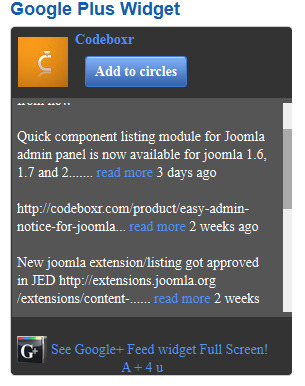
    Google+ Activity Widget Module For Joomla (Joomla)

    A Super Way to Show Your Google Plus Profile & Pages Updates Inside Module Position, Smart and Fast

    Google Plus Activity Widget Module show your Google+ Profile and Page’s latest public posts/activity stream on any Joomla! site in module position. People use it to establish trust, to stay in touch with visitors and to get feed at a very low cost. Saves precious time for developers

    Key Features:

    • Displays latest updates from Google Plus profile or page
    • Dynamic Animation
    • Custom Background Color
    • Custom Text Color
    • Custom Feed Background Color
    • Custom Link Color
    • Full control to style-match with your Joomla site

    Easy to Setup:

    1. Put your Google Plus ID
    2. Select Style and Module position
    3. Save and Enjoy

    Customer Review:

    This is a fantastic extension for Joomla. It works very well and it is just overwehlming in its features. The Google-Plus-Activity-widget is easy to install and has a many different options available. The Widget offers you great flexibility and makes it easy to stay in touch with your visitors … has superb support! Thanks to the great developers – I am 100 % convinced by this excellent GooglePlus Widget!

    – Joolin

    This would be the best google plus widget so far. Its allows easy communication between you and your visitors on your site. Easy to install and configure

    – Dee Okeyo

    Joomla Compatibility:

    This Plugin works for Joomla (1.5, 1.6, 1.7 and 2.5) versions.

    Download Google+ Activity Widget Module For Joomla (Joomla)

    Native Simple Tab and Slider for Joomla (Joomla)

    Display Simple Tab and Slider for Joomla in Module Position

    Joomla Native Simple Tab Slider is a light but effective module to make tab or slider using other modules. It’s simple but powerful. It for those who love simplicity and elegance.

    Key Features:

    • It’s Simple, no Unnecessary Styles or Effects
    • Tabbed or Slider (Accordian) Interface
    • Show tabs at position Top, Bottom, Right and Left
    • Alow close all slides (Slider Only)
    • Choose modules by module position
    • Choose Modules by Module Id
    • Custom Slider Specific Setting
    • Full Control to Style-match with your Joomla Site
    • Flexible and Easy to Use

    Easy to Setup:

    1. Put your Site URL
    2. Select Your Social Button
    3. Save and Enjoy

    Joomla Compatibility:

    This Plugin works for all Joomla (1.5 and 2.5) versions

    Download Native Simple Tab and Slider for Joomla (Joomla)

    Pinterest Pins Display Fixed Vertical Button (Joomla)

    Bring the Beauty and Interaction of Pinterest within your Joomla Site. Easy & Stylish

    Do you want to display your favorite pins as a slider which will be vertically fixed on your Joomla site? Pinterest Pins Display Fixed Vertical Button is a great system plugin for Joomla with which you can elegantly show your Pins. This is a very light plugin which utilizes advanced caching feature of Joomla so that your pins are shown very fast and efficiently.

    Key Features:

    • Displays all Popular Social Network Icons in Fixed Vertical Box
    • Pixel Perfect Positioning of Button
    • Grab Pins Automatically from Any User
    • Can Even Grab Pins from a Particular Board of an User
    • Cacheable for Faster Performance

    Styling Options:

    • Number of Pins You Want to Show
    • Show/Hide Follow on Pinterest Button
    • Collection of Preset Buttons in Different Sizes and Colors
    • Custom Height and Width for Custom Image
    • Preview of Large Pin Image on Mouse Hover Using Custom Tooltip

    Styling Options:

    • Custom Background Color for The Main Display Box
    • Custom Background & Border Color for the Tooltip (image previewer)
    • Available to Set Size of Pinboxes in the Showcase
    • Slide In-Out Effect Can be Set on Click on Mouse Hover

    Easy to Setup:

    1. Put Pinterest User Name
    2. Select Your Social Button
    3. Save and Enjoy

    Joomla Compatibility:

    This Plugin works for Joomla (1.5,1.6, 1.7 and 2.5) versions.

    Download Pinterest Pins Display Fixed Vertical Button (Joomla)

    Shortcode based Related Article Embedder (Joomla)

    A Smart Way to Show Related Items at Anywhere in the Content of a Page. Simple & Easy

    Ever wondered how the great news websites suggest related articles, great e-commerce sites show other related products as their visitors browse any particular page and read a story? With this Plugin you can achieve just that with style.

    Key Features:

    • Displays Related Items with easy to use Shortcode
    • Great Flexibility and Option to Customize
    • Ascending or Descending Related Articles Picked Up from Meta-tags
    • Custom Title for Related Article
    • Skip Words option by title matching (like adverb etc.) or exclude categories for perfect control
    • For specific Categories Plugin Enable/Disable Options
    • Shortcode Syntax is Pretty Simple: {cbrelatedarticle /}
    • Supported Components: Com_Content and K2
    • Custom Title for related article
    • Setting Round Corner Radius of embed box
    • Show on left, right or center
    • For more details please check details shortcode usages guide: http://codeboxr.com/product/shortcode-based-related-article-embedder#detailsusagesguide (only for content plugin)

    Related Article Options:

    • Related Articles Box Heading
    • Show Directions Words
    • Custom Background Color
    • Use Gradient

    Easy to Setup:

    1. Put your Site URL
    2. Select Your Social Button
    3. Save and Enjoy

    Customer Review:

    I just started using this extension and am so far very pleased with the functionality and support. I like being able to embedd related articles into individual stories of my choosing, and having the option to have them generated based on Meta data, titles or individual article IDs. I was also very happy with the support I received when I asked a question about the functionality. The developer added the functionality I asked about and released a new version that included this. This extension appears to have great support!
    -klmartin

    Joomla Compatibility:

    This Plugin works for all Joomla (1.5, 2.5 and 3.x) versions

    Download Shortcode based Related Article Embedder (Joomla)

    Premium HTML 5 Game #4 (Games)

    This fun, vibrant HTML 5 game is a great addition to any HTML5 gaming website.

    • Insane parallax effects
    • Persistent high score
    • Perfect for tablets or large screens
    • Touch or mouse
    • Premium sound effects and music included
    • Premium graphics included (not for redistribution)
    • Touch or mouse controls
    • Construct 2 source file included

    If you like it, please rate 5 stars. Thanks.

    Background Music: Call to Adventure” Kevin MacLeod (incompetech.com) Licensed under Creative Commons: By Attribution 3.0 http://creativecommons.org/licenses/by/3.0/

    Download Premium HTML 5 Game #4 (Games)

    MC Ultimate Games Bundle – HTML5 & Stencyl Source (Games)


    MC ultimate games bundle contain HTML5 and Stencyl source code for 5 games.

    By Stencyl Software you can edit the games and re-published it as Flash, HTML5 and iOS games

    1- Super Medo 2 Game

    Super medo 2 , Kill the enemies and reach to castle.

    Video Demo : http://www.youtube.com/watch?v=vHmyQGRR5sQ

    2- Learn Math Game

    Cool learn math game for kids.

    Video Demo : http://www.youtube.com/watch?v=6aO3RJa3Joc

    3- Air Worriors Game

    Air Warriors is An exciting flying fighting game, shoot the airplanes and defeat the enemies!

    Video Demo : http://www.youtube.com/watch?v=bV5yPyk1XHo

    4- Wings Hunter Game

    Hunt Airplanes, destroy enemies and test your shooting speed.

    Video Demo : http://www.youtube.com/watch?v=Cpq_lSpQcOI

    5- Anti Parachute Game

    Shoot the parachutes before they touch the land.

    Video Demo : http://www.youtube.com/watch?v=HBdml5xV5Fc

    Download MC Ultimate Games Bundle – HTML5 & Stencyl Source (Games)

    Standalone Like System for Joomla (Joomla)

    Have an Independent Like Button with Counter to Measure Popularity of Content

    Standalone Like System is an excellent 3-in-one (Component, Plugin and Module) bundle extension that is very simple to implement and easy to use. This will allow you to place a custom Like or Vote button to receive vote, complements, like from both guest and logged in visitors. Saves you coding time without any tweaking of template and gives you freedom from third party social network.

    Key Features:

    • A Standalone, fully Customizable Like System for Joomla
    • Bundle contains a Component to keep counts, Content Plug-in to render the Like button and a Module to show Most Liked Articles
    • Comes with Preset Buttons with Option for Custom HTML or Image Button
    • Full control to style-match with your Joomla site
    • Button Display for guest : No buttons or Button with log-in message
    • Supports for Com_Content, K2, Virtuemart and Hikashop
    • <liControl for Who Can Give Like (Guest or only Logged in Users)

    • Filter for Com_Content and K2
    • Option for jQuery loading
    • Setting Round Corner Radius of embed box

    Styling Option:

    • Turn On/Off Detail Count
    • HTML Button View has 2 modes: Normal and Compact
    • 7 Choosable Colors: Light Gray, Blue, Sky, Green, Red, Orange and Dark
    • 6 Type of Prebuilt Image Buttons such as Smile, Thumb in Circle, Heart etc plus free to Use any Custom Image as Button.

    Easy to Setup:

    1. Unzip the Bundle and install the Plugin, Module and Component
    2. Select your preferred Button Style
    3. Save and Enjoy

    Joomla Compatibility:

    This Plugin works for all Joomla (1.5 and 2.5) versions

    Download Standalone Like System for Joomla (Joomla)

    Vertical Floating Video Showcase for Joomla (Joomla)

    Freedom to Display any Number of Youtube Videos with Flexibility

    You have great product reviews in video format that you wish to showcase within your site? You want your visitors not to leave your website while visiting? Your company has tons of official videos on youtube that you wish to share? Video testimonials to add to a page with high visibility? With this product you will be able to do all of that. Moreover the plugin has great transition effect, utilizes caching and does not affect your site’s performance since we only show static image thumbnail on site loading.

    Key Features:

    • Display video with Youtube Video ID, Video Playlist ID or Channel Name
    • Take Input of Multiple Video ID in Comma Separated Format
    • Set the Number of Video You Want to Show
    • Custom Design Related Features

    Styling Options:

    • Define the Vertical Position for the Floating Button
    • Option for Setting Custom Height and Width for Custom Image
    • A Nice Collection of Preset Buttons in Different Sizes and Colors
    • Adding Custom Image for the Button is Necessary
    • Custom Background Color for the Video Display Box

    Social Features:

    • Facebook Share
    • Twitter Share
    • Pinterest Share

    Easy to Setup:

    1. Put Your Video ID
    2. Select Your Style and Position
    3. Save and Enjoy

    Joomla Compatibility:

    This Plugin works for all Joomla (1.5, 2.5 and 3.x) versions.

    Download Vertical Floating Video Showcase for Joomla (Joomla)

    Music For Me (Miscellaneous)

    ‘Music for me’ is a huge online music catalogue, powered by Last.fm and youtube API, it brings full ajax experience for users to quickly browse and listen to music. ‘Music for me’ is pixel perfect designed for desktop and mobile devices.

    Requirements
    • Apache or Nginx Webserver
    • PHP 5.3 +
    • PHP CURL
    • Last FM API key an secret

    Features
    • Full ajax Interface
    • Easy Installation
    • Advanced Last FM integration
    • Youtube Integration
    • Caching system
    • Object oriented design
    • HTML 5 and CSS 3
    • Bootstrap 3
    • Fully Responsive

    Download Music For Me (Miscellaneous)

    Multiplayer Tic-Tac-Toe (xox) (Native Web)

    Multiplayer Tic-Tac-Toe (xox)

    User should register/login game before play. The script creates a profile for every user and their game statistics are shown their profile.

    Two people can play xox with this script.

    User matches with randomly.

    When game finished they can play with each other again if two user wants to play.

    This script uses Html5, Css3, Php, Mysql, Jquery Mobile, Jquery, Javascript and Client – Server Architecture technologies.

    User can play on Windows,Mac,iOS,Android platforms. Playable in all platforms.

    Download Multiplayer Tic-Tac-Toe (xox) (Native Web)

    Fun Captcha jQuery Plugin (Forms)

    Support at codstack.com

    Fun Captcha jQuery Plugin

    This is a jQuery plugin by which you can easily implement some captcha codes in four different fun and game like captcha models

    Features:

    • Well documented
    • Easy to use
    • All browser support
    • Four different models
    • In 3 sizes ( small, medium, large )
    • Callback functions
    • Bootstrap supported
    • Click, drag & drop events

    Demo link

    Download Fun Captcha jQuery Plugin (Forms)