WooCommerce Quick Related Products (WooCommerce)

WooCommerce Quick Related Products

“WooCommerce Quick Related Products” is the best plugin to show the Related WooCommerce Products in a Quick Popup View. This plugin is very essential for WooCommerce sites. It will Show Related Products based on same Tags or same Category. Fully Customizable Popup and Request Button from Admin. “WooCommerce Quick Related Products” is compatible upto wordpres version 3.8.1 and woocommerce version 2.0.20

Online Documentation

Check The Demo

Shop Page

shop-page

Related Products Button

related-products-button

Related Products Popup

related-products

Admin Settings

settings

Features:

  • Category, and Tag-wise Related
  • Quick Popup View
  • Admin can Enable/Disable Related Button.
  • Admin can set “Alignment, Text, Text Color, Text Size, Background Color, Border, Border Opacity and Border Radius” of Button.
  • Admin can set “Background Color, Border Radius, Button Text, Button Text Color, Button Text Size, Button Background Color, Button Border Radius” for Popup design.
  • Fully Customizable Popup and Request Button
  • Simple but Effective
  • Very Easy Installation
  • Quick Support

Download WooCommerce Quick Related Products (WooCommerce)

SimpleCam – iOS Camera (Audio/Video)

SimpleCam

A Memory Efficient Drop In Replacement for UIImagePicker

What Is SimpleCam?

Do you have a project that you want to include photo taking capabilities, but it’s not the prime focus of your app and you don’t want to spend a lot of time developing it, then SimpleCam is perfect for you.

If you’ve tried the native UIImagePicker, then you have probably already found out that it can be slow to load, it uses a lot of memory, and it often returns image files that are either unnecessarily large or very poor resolution. This is where SimpleCam is best. It loads quickly, it uses minimal memory, and it returns an image that is significantly reduced in file size while still maintaining crystal clear photo capabilities.

Save yourself the development time dealing with AVFoundation and take advantage of SimpleCam today. With its clean and elegant design, this camera is ready to be dropped into any project with just a few lines of code.

Why Do I Need It?

SimpleCam was created out of the necessity to have high quality photographs while providing a lightweight memory footprint. Apple’s UIImagePicker is a wonderful application, but because it has a lot of features and a lot of options, . . . it uses a lot of MEMORY. This can cause crashes, lag, and an overall poor user experience when all you wanted was to give the user an opportunity to take a quick picture.

If you’re capturing photographs with UIImagePicker, or via AVFoundation on the highest possible capture resolution, it will return giant image files exceeding thousands of pixels in size. SimpleCam avoids this while still using the highest possible capture resolution by resizing the photo to 2x the size of the phone’s screen. This allows the photo to maintain a significantly reduced file size while still looking clean and brilliant on mobile displays.

In addition to this resizing, we also handle a bit of cropping that you and the user shouldn’t even notice! If you look at the iOS native Camera, you’ll notice the black portions on the top and bottom of the screen. This is because the camera actually captures at a 4:3 resolution. This means that to display a fullscreen view for the user, the camera will have a bit of extra space around the edges that needs to be removed. When designing simpleCam, we felt that if a user sees a fullscreen imageCapture on their phone, that’s what they’re expecting their image to be. This is exactly what we deliver.

We hope you find the project as useful as we did, and we’ll continue to add more features including more customization options.

Features

  • iOS 7 Inspired Design
  • 3.5” & 4” Screen Compatibility
  • Low Memory Usage
  • Drag & Drop Installation
  • Portrait/Landscape Views
  • Front/Rear Camera
  • Touch to Focus
  • Controllable Flash

YOUTUBE VIDEO DEMO

You can check out a demo video captured through an airplay mirror here

DOCS

You can check out our docs here , or you can follow along below.

Adding SimpleCam to Your Project

1. Add SimpleCamSDK to Xcode

  • Unzip SimpleCamSDK
  • Drag SimpleCamSDK into your Xcode project
  • Make sure “Copy items into destination group’s folder (if needed)” is selected

2. Your ViewController.h File

  • Import SimpleCam
  • Set up your view controller as a simpleCam delegate
#import <UIKit/UIKit.h>
#import "SimpleCam.h" 

@interface ViewController : UIViewController <SimpleCamDelegate>

@end

3. Set Up Delegate

– Add SimpleCam’s Delegate method to your ViewController.m file

#pragma mark SIMPLE CAM DELEGATE

- (void) closeSimpleCamWithImage:(UIImage *)image {
    if (image) {
        // closed with image
    }
    else {
        // user backed out w/o image
    }
}

This is how SimpleCam will notify your ViewController that the user is finished with it. If there is an image, then the user took a picture. If there is not, then the user backed out of the camera without taking a photograph.

4. Launch SimpleCam

– Add this code wherever you’d like SimpleCam to launch

SimpleCam * simpleCam = [[SimpleCam alloc]init];
simpleCam.delegate = self;    
[self presentViewController:simpleCam animated:YES completion:nil];

If you’d like to launch simple cam when the user presses a button, you could add the above code to the IBAction method, like so:

-(IBAction)buttonPress:(id)sender
{        
  SimpleCam * simpleCam = [[SimpleCam alloc]init];
  simpleCam.delegate = self;    
  [self presentViewController:simpleCam animated:YES completion:nil];
}

That’s it, it’s as simple as that. SimpleCam will take care of everything else!

Try It Yourself!

See It In Action!

Download SimpleCam – iOS Camera (Audio/Video)

Fun Captcha WP Plugin (Forms)

Support at codstack.com

Fun Captcha WordPress Plugin

This is a WordPress Plugin by which you can easily and visually implement and manage some captcha codes in four different fun and game like captcha models for your wordpress websites

Features:

  • Well documented
  • Easy to use and manage
  • All screen devices
  • All browsers support
  • Four different models
  • In 3 sizes ( small, medium, large )
  • Touch, drag & drop events
  • Specially compatible for Login, Register, Lost Password or Comments of your wordpress forms

Please see the screenshots

Download Fun Captcha WP Plugin (Forms)

jQuery – Easy Horizontal Select (Forms)


Missing Flash Style Forms ?

Good Ol’ Horizontal Select, in less than a minute.

Why ?

State of The Art OOP Code – See Preview
Special Math formulas to handle positioning
Handles everything automatically, with zero effort on your side
Component Based Arhitecture ( One Controller + 7 Handlers, unplug any as you wish)
Minimalistic CSS, easily modified.
Selection List is displayed fully handled by code, based on the select properties ( from position to height, padding, border, margin)
Modify Everything using the HTML 5 attributes ( Optional )

Benefits

Content Relax

jQuery Easy Horizontal Select isn’t enabled on mobile devices, not even if you want it.

jQuery Easy Horizontal Select works out of the box with little effort on your end. Minimal coding for you, we promise.

Easy Integration

The installation process is simply copy – paste and a 3 step integration. The last one is of course enjoying the script

Everything is plain simply, we’ve taken care of everything, the code is OOP for the curious ones.

12-24H Support

We guarantee support 7/24. Our fastest answer was 15 minutes after receiving an email.

We take the time to answer you as detailed as possible, our goal is making sure every client is happy

ThemeForest Usage

If you want to use the jQuery Easy Horizontal Select in your Theme / Template here on ThemeForest too please purchase
1 extended license for each theme (as long as there is no Developer License available) you put on the marketplace! If you have questions about this agreement please contact us.

You Might Also Like


Download jQuery – Easy Horizontal Select (Forms)

UserMgr: User Registration and Management (iOS)

iOS User Management Made Easy

User management on iOS has never been easier. With UserMgr, we’ve built a simple to use system that allows users to register and login. With advanced features like user memory, UserMgr provides a simple and clean interface that anyone can use. Simply redirect the user to your own storyboards upon a successful login, and you’ve got a secure app that’s up and running in minutes!

In addition to the app itself, also included is a simple admin panel. In this panel, you can view registered users, as well as edit user details, and even delete users! Not only is this system easy to use, it’s secure! We use PDO and binding to handle all database communication, which reduces intrusion risks!


App Features

  • User registration
  • User login
  • Remember user
  • Duplicate account check
  • Form validation

Admin Panel Features

  • Edit user details
  • Delete users
  • Secure login
  • Permissions system (9 = admin, 0 = default)
  • Count total users

General Features

  • Well commented code
  • Simple installation guide
  • Password hashing
  • UUID storage/registration

Note: This project was developed using JailCoder. If you are a registered iOS developer and want to use this system on a registered device, you will need to unpatch the .xcodeproj using JailCoder. The next update will be unpatched by default.

Download UserMgr: User Registration and Management (iOS)

Aani Bootstrap Skin (Bootstrap)

AANI is a skin for Bootstrap, which means that can be used with any site built with the Bootstrap framework. With easy installation and customization thanks to the LESS files included and the custom themes colors ready to use.
It’s a very simple and colorful Bootstrap skin
This skin is based on a flat desing and also extends the styles directly applied to Bootstrap files. There’s no overwritten rules or bloating CSS, making a lightweight skin as Boostrap is itself. Because you can easily update the new version of Bootstrap.

  1. Buttons Styles
  2. Form Controls
  3. Form Controls With Validation
  4. Tables With Alerts
  5. Added new bordered tab
  6. progress-sm
  7. progress-xs
  8. added gradient Panel
  9. Modal
  10. Headings
  11. Google Font
  12. Typography

Download Aani Bootstrap Skin (Bootstrap)

Eli – Accordion Freamwork (Tabs and Sliders)

Eli – Accordion Framework

  • Based in Pure CSS3
  • JQuery fallback for IE browsers
  • If you like Eli, please dont forget to rate…

Features

  • FIVE COLOR SCHEME
  • FLUID GRID SYSTEM
  • FOUR FIXED WIDTH SIZE
  • THREE FLUID WIDTH SIZE
  • FOUR SIZES OF LABEL
  • DARK AND LIGHT VERSION
  • BORDER RADIUS AND BOX SHADOW CLASSES
  • THREE SIZES OF BUTTONS
  • 60+ ANIMATION EFFECTS
  • ICON SUPPORT (360+)
  • CROSS BROWSER
  • EASY USE
  • EASY CHANGE COLOR
  • EASY CHANGE ANIMATION EFFECTS
  • WELL DOCUMENTED

Support

Please send me an email to : [email protected]

Change Log

  • Version 1.0
    • Initial Release

See also

Rad – Package Menu


Download Eli – Accordion Freamwork (Tabs and Sliders)

Eli – Accordion Framework (Tabs and Sliders)

Eli – Accordion Framework

  • Based in Pure CSS3
  • JQuery fallback for IE browsers
  • If you like Eli, please dont forget to rate…

Features

  • FIVE COLOR SCHEME
  • FLUID GRID SYSTEM
  • FOUR FIXED WIDTH SIZE
  • THREE FLUID WIDTH SIZE
  • FOUR SIZES OF LABEL
  • DARK AND LIGHT VERSION
  • BORDER RADIUS AND BOX SHADOW CLASSES
  • THREE SIZES OF BUTTONS
  • 60+ ANIMATION EFFECTS
  • ICON SUPPORT (360+)
  • CROSS BROWSER
  • EASY USE
  • EASY CHANGE COLOR
  • EASY CHANGE ANIMATION EFFECTS
  • WELL DOCUMENTED

Support

Please send me an email to : [email protected]

Change Log

  • Version 1.0
    • Initial Release

See also

Rad – Package Menu


Download Eli – Accordion Framework (Tabs and Sliders)

Security Commander Advanced (Miscellaneous)

Security|Commander is a brutally powerful website security app that allows you to monitor and protect any PHP/MySQL website in real time. It uses intelligent algorithms (same ones used by major industry players) to detect all known hacker attacks as well as new unknown threats using code recognition and user-action patterns, and automatically takes action. What’s better, you get to watch all this action in an innovative 3-pane widescreen design in real-time! And finally, it comes with a bonus malware scanner, analytics program, and a mobile-ready responsive design.

This app is an industrial-grade security powerhouse packed full of features! Do NOT launch your website WITHOUT THIS!

FEATURES:

+ Real-Time Traffic Monitoring (Built-In Live Analytics)
+ Real-Time Attack Monitoring (Watch all the action as hackers “try” to attack your website!)
+ Real-Time Scanning of all user input (GET and POST data)
+ Innovative 3-Panel Live Monitor Interface
+ Industrial-Strength Algorithms to Detect Known Hacker Attacks
+ Intelligent Pattern Recognition to Detect Unknown Attacks at 80-95% Accuracy
+ Advanced SQL Injection, CSRF, XSS protection and more
+ Advanced Session Hijacking Prevention
+ Basic DoS Flood Protection at the PHP Application layer
+ Proxy IP Detection
+ Browser / User Agent Detection
+ Convenient Database Cleanup Tool
+ Advanced Malware Scanner for Your Server [BONUS!]
+ Responsive Desktop / Mobile Design [BONUS!]
+ Auto-Installer Included [BONUS!]
+ Sample Data and Sample Malware (for testing) Included [BONUS!]
+ Clean Minimalist Design to Help You Focus On What’s Important
+ 10-Page Documentation
+ Easy To Install (10 minute setup process)
+ Easy to Use (No programming knowledge required.)

MINIMUM REQUIREMENTS:

Server Technologies: PHP 5 / MySQL 5
PHP.Ini Settings: short_open_tag = ON
Shared Hosting (should work even on the cheapest web host!)

TESTED ON:

Google Chrome v.32
Internet Explorer 8+
Firefox 5.0
Safari 5.1
Opera 11.60

RESPONSIVENESS:

Large Desktop / Laptop Browsers
Small Mobile Browsers

SETTINGS:

Google Chrome with minimum browser window size of 980×500.
The app is responsive and will adjust itself to mobile but since security is VERY important, a larger screen will allow you more flexibility and see more data.

CUSTOM INTEGRATION:

This script was created to be able to fit into any PHP/MySQL application. However, there might be times when you wish to modify its source code. We don’t recommend you modify the source code! This is because with something as important as security, one wrong move could damage your website or create a vulnerability for hackers. Do not modify the source code unless you are a security expert! You modify anything at your own risk. This is your website security we’re talking about here :-)

WORDPRESS INTEGRATION: This app has been tested to work 100% on WordPress. However, it will not work inside of WordPress’ admin panel; It will work in its own admin panel. Remember, it is not a plugin for WordPress. To integrate into WordPress, you will need custom modification to WordPress’s source code and we would be happy to do it for you for a small fee.
REMEMBER: This app secures your website at the application layer only. In order to secure your website at the root server layer, you will need to install special software (and sometimes, hardware) into your actual server, and most shared hosts will not allow you to do that.
Photo Credits: Thanks to Placeit.net for Some Image Generation


Download Security Commander Advanced (Miscellaneous)

UberPanel – Sliding Panel Plugin for WordPress (Miscellaneous)

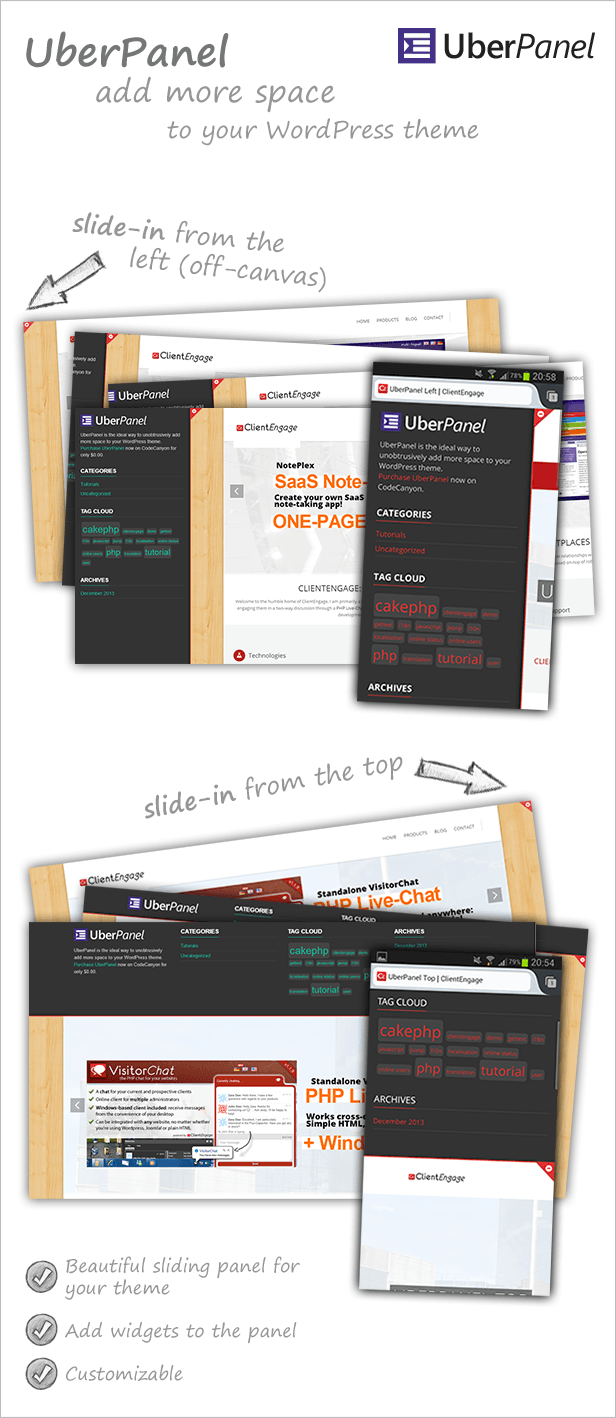
UberPanel is a plugin which adds a widgetised sliding panel to any WordPress theme. It provides you with an unobtrusive way to add additional space to your theme.

Try the left panel | Try the top panel

Unobtrusive Sliding-Panel for your WordPress Theme

  • Unobtrusively adds more space to your WordPress theme
  • Supports WordPress widgets (four horizontal columns and one vertical)
  • Choose from the left (off-canvas) panel or the top position
  • Choose colours for the button & border, or the optional pre-defined style
  • Works beautifully on all modern devices

Try Before You Buy

Would you like to try how UberPanel integrates with your website? Simply copy (temporarily) the code below into your website’s footer.php. However, please note that jQuery is required and that the demo does not support SSL.

Instead of copying the code into your footer.php, you can also hit F12 (in Chrome), look for the “Console”-tab, click into the last row next to the ”>”, paste the code (without the “script”-tag) and hit ENTER.

UberPanel Left:

<script type="text/javascript">
var vcjs = document.createElement('script'); vcjs.type = 'text/javascript';           vcjs.src = ('https:' == document.location.protocol ? 'http://' : 'http://') + 'clientengage.com/wp-admin/admin-ajax.php?action=ceup_inject_left';           var s = document.getElementsByTagName('script')[0]; s.parentNode.insertBefore(vcjs, s);
</script>

UberPanel Top:

<script type="text/javascript">
var vcjs = document.createElement('script'); vcjs.type = 'text/javascript';           vcjs.src = ('https:' == document.location.protocol ? 'http://' : 'http://') + 'clientengage.com/wp-admin/admin-ajax.php?action=ceup_inject_top';           var s = document.getElementsByTagName('script')[0]; s.parentNode.insertBefore(vcjs, s);
</script>

A Note on Styles

Depending on the theme you use, it may be possible that some of the UberPanel styles are affected. In that case, you can use the CustomCSS within UberPanel to override these styles and to make it look exactly like you want. However, please note that support will not provided for styling and custom modifications.

ClientEngage VisitorChat – a PHP-based Chat With Windows Client

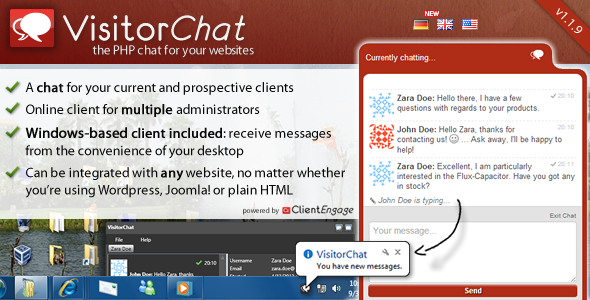
If you are looking for an advanced PHP live chat script to supercharge your client-interactions, then come right this way to have a look at the ClientEngage VisitorChat- an advanced PHP support chat script.

The ClientEngage Visitor Chat is a fully-featured real-time chat for your websites. A clear and simple web-based administration allows you to conveniently chat with your visitors. And best of all: Visitor Chat comes with a Windows-based client out-of-the-box. Without having to visit the Visitor Chat’s admin-interface you will be notified from your Windows tray and can start chatting straight away!

ClientEngage VisitorChat - The PHP Online Chat With Windows Client

Download UberPanel – Sliding Panel Plugin for WordPress (Miscellaneous)

Dry Preview (Interface Elements)

Dry Preview is a simple plugin which boost up your productivity with just one click by enabling you to preview all of your changes in editor immediately.

Subscribe to our Newsletter by Email

You want to receive our newsletters, updates info, sneak peeks, promotions and freebies notifications?
Than, all you need to do is to Sign up for the Newsletter.

And remember – we do not spam!

Download Dry Preview (Interface Elements)

Fullscreen Parallax WordPress Plugin (Accordions)

This plugin help you to add a fullscreen parallax to your WordPress, which support other shortcode in the text block.

followrss

Features

  • Live preview in the backend.
  • Optional dot button navigation, the dot buttons can be in left or right.
  • Optional tooltip for the dot buttons.
  • Optional item height.
  • Optional repeat background.
  • Optional text block, optional width and padding for the text block, optional position: can be in left or right.
  • Text block support shortcode and HTML, which means you can put any kind of content in it.
  • Optional color with built-in color picker.
  • Optional offset for the smooth scroll.
  • Optional to display the parallax on a certain post/page only.
  • Optional cookie, will not show the parallax again if user close the parallax.
  • Optional to put the parallax alive in your WordPress frontend.
  • Compatible with latest jQuery and latest WordPress.
  • Enqueue the js and css only when needed. Keep WordPress page size smaller.
  • FAQ and source code are included in the package. Free update in the future.

Recommendation for you

Image Map HotSpot WordPress Plugin:

hotspot

Credit

jQuery http://jquery.com
jQuery Parallax http://www.ianlunn.co.uk/plugins/jquery-parallax/
jQuery Cookie https://github.com/carhartl/jquery-cookie
Smooth Scroll https://github.com/kswedberg/jquery-smooth-scroll
Tooltipster https://github.com/iamceege/tooltipster
Great images http://www.flickr.com/photos/markjsebastian/

Download Fullscreen Parallax WordPress Plugin (Accordions)