DYSANIA – Responsive WordPress Grid Gallery Plugin (Galleries)

Features

  • Fully Responsive Layout
  • Valid HTML5 – CSS3 – Jquery
  • Unlimited Galleries and Filters: Unlimited gallery and filter menu can be added to any post or page
  • Easy to use, user friendly admin panel
  • Highly customizable! All colors, fonts, alignments, icons, hover animations can be changed from plugin settings
  • Photo,video and link gallery item types are available
  • 6 different colorbox style
  • 1,2,3,4,5 column layout options
  • Fits all themes
  • Grid combination
  • 4 different thumbnail resolution option
  • Gallery shortcode generator
  • Custom widget
  • And much more…

Credits

JavaScript

  1. jQuery
  2. Colorbox

Demo Images

  1. Flickr

DEMO IMAGES ARE NOT INCLUDED IN THE DOWNLOAD

Download DYSANIA – Responsive WordPress Grid Gallery Plugin (Galleries)

WordPress Font Writting Animation (Miscellaneous)

Create animated font from any SVG and insert into wordpress post, page or widget.

– Possibility to use your own font file

– SVG Icons supported

– Gradient mode or unlimited multiple color mode

– Define size, stroke, background, speed, transition …

– Create unlimited styling animation and publish him in 30 sec.

USAGE : Create your animation directly with control panel and simply publish the code.

LIVE PREVIEW : Manage parameters and click “Preview” button to preview the font animation.

Frequently updated.

Download WordPress Font Writting Animation (Miscellaneous)

Mapplic – Custom Interactive Map WordPress Plugin (Utilities)

If you would like to turn your photo/vector graphic map into a fancy interactive map application that is supported by every major browser and it’s working even on mobile or other touch devices, you can stop searching, you’ve come to the right place. In fact, you came to the only place, since it is the only utility available with this unique feature set.

The supported map file formats are: JPG, PNG and SVG.

Main features:

  • Unlimited landmarks: Any number of locations with unique pins and various actions
  • Unlimited floors: Multiple floors are supported without any limitation
  • Admin interface: user friendly backend
  • Deeplinking: Every location can be referenced by it’s own URL
  • Browser support: Works great in every major browser, even Internet Explorer 8
  • Responsive design: Provides optimal experience across a wide range of devices
  • Touch optimized: Touchscreen devices, like tablets and smartphones are also supported
  • Well documented: A detailed user guide is included

Why to use

There are dozens of web mapping applications available, like Google Maps, however in some cases other approaches may be needed in order to provide proper results. The following are just a few of the possible applications that can be achieved exclusively with this utility:

  • Buildings: Shopping malls, hospitals, airports, public buildings, blueprints or any building that is too small to be detailed on the world map, however it has importance. Displaying multi-storey structures is highly effective.
  • Illustrated maps: Ski maps, isometric maps or any kind of illustrations.
  • Fictional maps: Fantasy maps, RPG and other video game maps, anything that cannot be found on the world map.
  • Temporary maps: Camps, festivals or anything that is not permanent. Moving objects, like cruise ships can also have maps.

Please don’t forget to rate after purchase!

Download Mapplic – Custom Interactive Map WordPress Plugin (Utilities)

OpenCart Canonical URLs SEO extension (OpenCart)

OpenCart is a great free, open source PHP cart software. Unfortunately it’s quite behind in terms of SEO. A default installation will end up flooding Google’s index with many duplicate category, index, and information pages which will dilute your search result positioning, hide your links in the duplicate content search, and possibly cause a “thin” pages penalty for having many duplicate low-content pages on your site.

Not to fear, this simple add-on will correct these shortcomings by addding canonical links to your category pages, your site’s main page, and all information pages. In addition, it will correct the “duplicate” index problem where multiple URLs point to the site’s home (an SEO no-no).

Installation is easy and the script comes with full instructions.

Download OpenCart Canonical URLs SEO extension (OpenCart)

News SEO (SEO)

Overview

Plugin Create Xml news sitemap for you news articles,twitter news summerycard meta tags , opengraph metatags for your news articles. Automatically or manually generate news xml sitemap whenever new article is updated. Automatically or manually Ping sitemap whenever news article is created.Multiple sitemap feature for sites with more then 1000 articles.

Other features

* Supports custom post types.

  • News SEO metabox to change sitemap , opengraph and twitter summery card values.
  • Custom sitemap filename.
  • Allows you to create sitemap into folder.
  • Set Default values for sitemap.
  • Option to choose post thumbnail as Opengraph , Twitter summary card metatags.

Plugin features

Twitter Summery Card Metatags

With this plugin you can create twitter summery card metatags so that your news article looks like this
whenever someone shares its link on twitter.Off course you can change image and description of this. Please remember
you will require approval from twitter once before you get started.

Opengraph metatags for Facebook

Plugin creates Opengraph news article metatags for facebook. Once you have this metatags your links will appear like this
whenever someone shares it. You will not require any approval from facebook to use it.

Xml news sitemap for google News

Plugin creates xml news sitemap for you news site like this.

Multiple Sitemap with sitemap Index for big News site

If your total news articles are more then 1000 then you can create multiple sitemap with sitemap index file like this.


Download News SEO (SEO)

Auto Send Virtual KeyCard Products / Image Codes (WooCommerce)

With this PHP script it’s possible to send virtual products to your customers automatically. For instance if you are selling Xbox Live, World of Warcraft, iTunes, Playstation (PSN) cards or any other image based products you can easily send them to your customers using this script.

As soon as your customer checks out in your Woocommerce based e-commerce store, the hook in this PHP script will check if the product the customer ordered is available for direct delivery. If it is, it will not only show the product image immediately after the checkout process, but this script will also e-mail the product to the customer.

Your stock is automatically updated and all the sold cards are moved automatically to a “used” folder on your server so it’s easy for you to keep track of which cards are used and sold, and which cards are not.

Key Features:

  • Shows products directly after the customer makes the payment
  • Sends a copy to your customer by e-mail
  • Contents of the e-mail is fully configurable
  • Works even when a customer orders a virtual and physical product
  • Script saves all the used codes in a separate clear folder
  • Updating your stock is as easy as uploading new images and updating the number of available items in WooCommerce
  • Supports 1 or more products during checkout

FAQ

  • Does this script only work for WordPress/WooCommerce or also any other e-commerce software?
  • This script is developed for WooCommerce. If you need it for any other e-commerce store, please see my portfolio. If your preferred store is not listed, please contact me.
    http://codecanyon.net/user/Fidelity5789/portfolio

  • Are my product codes/images save?
  • Yes! They are saved in a secured folder which is only readable by this script

  • I also sell physical products, would that be a problem?
  • Not at all! This script ignores all the other products and will only process the products you have setup using the installation instructions

  • Can my customer order multiple virtual products?
  • Yes that is possible, this script reads the whole order and processes all the found products

  • Is this a Woocommerce component?
  • No this is a PHP script that uses a hook to read the order information on checkout. This is an advantage since you can easily modify the script or use it for any other e-commerce solutions

  • How does the hook with Woocommerce work?
  • You need to add a few lines of code to your existing Woocommerce theme in order for this script to read the customer- and order data on checkout. The installation instructions will help you add the correct code in the correct file. If you have any questions about this, please let me know.

  • Do my products need to be of type ‘simple’ in Woocommerce?
  • I advise you to add your products into Woocommerce as ‘simple’ products. But actually all the Woocommerce product types are supported:
    Simple, Grouped, Variable

  • I have another question that’s not been answered here yet!
  • Please let me know in the comments section or contact me using my e-mail address

Download Auto Send Virtual KeyCard Products / Image Codes (WooCommerce)

Ninja Kick Sidebar for WordPress (Interface Elements)

Ninja Kick Sidebar is a WordPress plugin that adds hidden sidebar with content push animation effect on every page of your site. Any content you put in the sidebar will wait for its time to reveal! You can utilize this plugin in so many ways: show visitors menu or your social feeds, offer an subscription, kick in registration form or shop’s basket etc etc etc. Popups are so 2009, guys!

Plugin uses modern CSS3 transitions with fallback to older JS animations if browser lacks support. Sidebar layout is responsive to screen size changes, looks well on mobile devices and reacts on swipe gestures. You can look at some examples how to use Ninja Kick Sidebar on its demo page. Kick your site!

This plugin was inspired by customers of first plugin from Ninja Kick series — Ninja Kick Sidebar: Contact Form. And yes, they are compatible.

Other features:

  • You have option to hide label and you can trigger sidebar opening from any element on page (button, link, image). Just add special class to element in your theme HTML editor.
  • User-friendly Settings page
  • Choose side for sidebar to fly out. Adjust sidebar’s width also
  • Font Awesome icon font included

Try out Ninja Kick Sidebar now!

Before purchase please check compatibility with your WP theme using bookmarklet from demo page to inject sidebar on your site. There are some conflicts possible with non-standard CSS like heavy usage of fixed and absolute positioned elements or incompatibility with some scripts sensitive to layout changes. Current solution fades out all fixed elements when sidebar kicks in. If you found any problem please submit it via message or comment so I can inspect, fix if possible and add to current build.

Grab bookmarlet on demo page in block TRY OUT NINJA KICK.

Check Ninja Kick ready solution for contact form!

Check out existing solution for contact form — Ninja Kick Sidebar: Contact form. If you look for stylish form with same push contect animation that’s definitely your choice! Three completely different themes with clean design, a lot of customization and frequent updates.

Changelog

Please request features in comments section to schedule them higher. Requests from users with ‘Purchased’ badge will have highest priority :)

Version 1.0.1 (2014-02-08)

- Option to disable onhover label animation 
- Performance tweak

Version 1.0 (2014-02-08)

- Plugin is approved on CodeCanyon


Download Ninja Kick Sidebar for WordPress (Interface Elements)

Multi Product Express Order Form Content Plugin (VirtueMart)

Virtuemart Multi Product Express Order Form Content Plugin

The Express Form enables Virtuemart Multiple items adding to your shopping cart only by one click “add to cart” button.

Main features:
– allows you to embed Virtuemart product information directly into a Joomla article
and to make it multi product adding form;

– it can calculate the total price of the products in same page;

– adds virtuemart multiple products to shopping cart in just one form;

– it shows product images, the prices and quantity in table form;

– the css style of the table can be changed;

– the quantity of the products can increased pr decreased on the fly;

– simple usage of the plugin;

– it is now updated to work for Joomla 2.5 and Virtuemart 2 and

It now has very useful and popular functionality developed by request of the clients.

The usage of the plugin:

This plugin is used in article as content plugin.

please download unzipfi.zip archived plugin files. it has several zipped plugin archives for diferent version of virtuemart.
and install desired plugin for your site.

you can install it by using joomla extensions manager in Joomla administrator backend and enable it.

please go to the plugin manager and find plugin with name “plg_content_vmproductmultisnapshots”

and go to the admin backend setting see the image for change the setting of the plugin
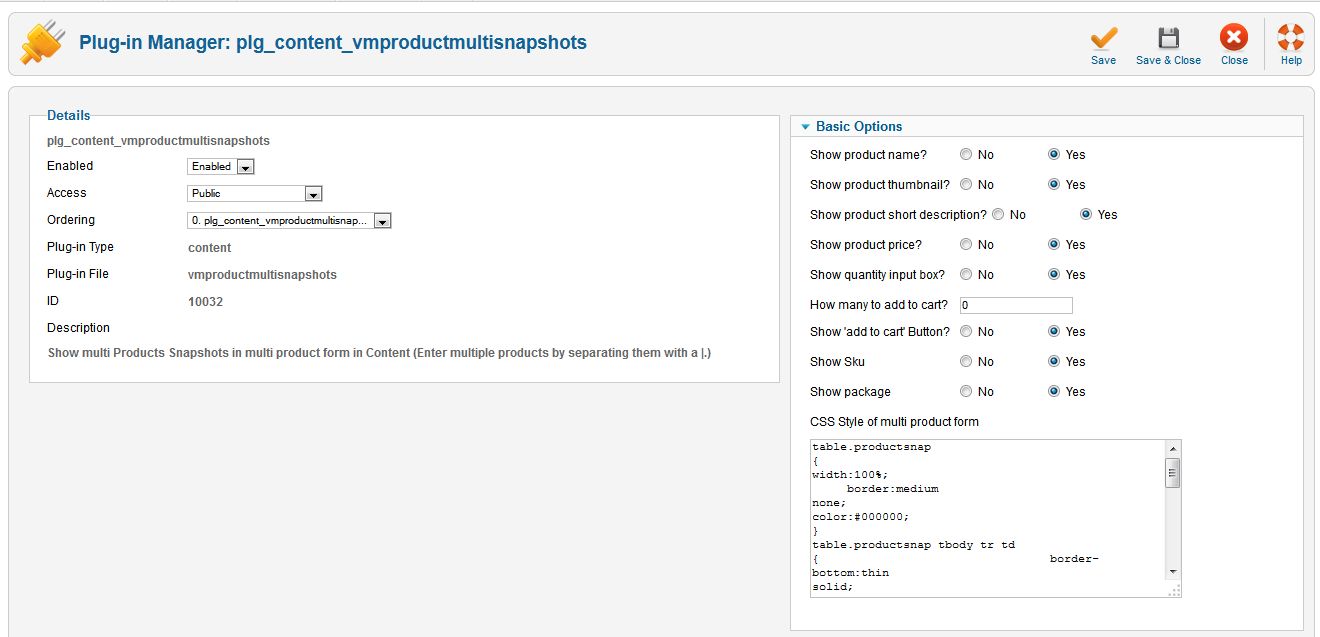
there you find the Basic Options settings for the plguin work:

– Show product name? No/Yes – Defines whether or not to show the name of the product

– Show product thumbnail? No/Yes – Defines whether or not to show the thumbnail of the product

– Show product short description? No/Yes – Defines whether or not to show the short description of the product

– Show product price? No/Yes – Defines whether or not to show the price of the product

– Show quantity input box? No/Yes – Defines whether or not to show the quantity inputbox of the product

– How many to add to cart? – Used when showaddtocart equals y

– Show ‘add to cart’ Button? No/Yes – Defines whether or not to show add to cart button

– Show Sku No/Yes – Defines whether or not to show SKU

– Show package No/Yes – Defines whether or not to show package

and textarea input field of CSS Style of multi product form


table.productsnap {width:100%;

border:medium none;
color:#000000;}
table.productsnap tbody tr td { 
border-bottom:thin solid;  }

table.productsnap tbody tr th {

background-color:#E4F1FB;
border-bottom:3px solid green;
border-top:3px solid green;

}

.addtocart_button {

-moz-background-clip:border;
-moz-background-inline-policy:continuous;
-moz-background-origin:padding;
background:transparent url(../images/addtocart.jpg) no-repeat scroll 0 0;
height:25px;  width:160px; 
}"

to use the plugin functionality in joomla article component

please put in the article content as example the following code {product_multi_snapshot:id=1|2|3}

id is product id.

please see image for article content adding code

and you will get virtuemart multi product price calculator and multi product shopping cart adding form

please see following image and visit demo page and visit detailed video instruction the

Download Multi Product Express Order Form Content Plugin (VirtueMart)

Mega Slider Filter (OpenCart)

Filter by price and Weight vqmod module (responsitive)
1. No additional javascripts.
2. Esay to integrate in your design (responsitive).
3. No ajax requests.
4. Fast filter.

demo Version1: http://opencart-extension.tk/index.php?route=product/category&path=20

demo Version2: http://opencart-extension.tk/v2/index.php?route=product/category&path=20

If you need some assistance with the install process or if you have any questions, please email us, we’ll be glad to help you!!!

email: [email protected]
or : [email protected]

Download Mega Slider Filter (OpenCart)

mySurvey (Forms)

mySurvey is a php and ajax system that allows you to run and create your own surveys faster and easier
with ability to customize the questions, answers, the theme and the surveys. There are 3 easy steps to
publish a survey: create a survey, add questions and answers and publish the survey.
mySurvey supports creation of: multiple choice questions, rank order questions, rating scale questions,
open ended questions, close ended questions with the questions types.

Features:

  • Unlimited Questions
  • Unlimited Answers
  • Unlimited Surveys
  • Admin Panel
  • Realtime Statistics
  • View Statistics by survey and questions and export to csv
  • 8 Questions types with template that allows variety of answers
  • Custom question types + custom template (Developers)
  • Survey Themes (1 Responsive theme Included)
  • Fully Customizable theme
  • Ability to create a survey in your language
  • One click install

Download mySurvey (Forms)

Invite all Friends to Facebook Event (Social Networking)

Invite all Friends to Facebook Event with one Click.
A Viral Facebook App with Admin Area and easy 3 Step Installation. Users are able to generate a own Inviter Link and give it to Friends, so they can also Invite their Friends.

Stores all Users Data to Database.
– Easy 3 Step Installation.
– Flat UI Design
– Admin Area

Frontend Demo:
http://bit.ly/1fJOYqX

Backend Demo (USer&Pass: admin):
http://bit.ly/1b4e04S

Download Invite all Friends to Facebook Event (Social Networking)