Yalda jQuery – Package Menu (Navigation)

Yalda jQuery – Package Menu

  • Animated Dropdown Menu (jQuery + CSS3)
  • Animated Horizontal SubMenu (CSS3)
  • Animated Vertical Menu (jQuery + CSS3)
  • Footer Menu (CSS3)
  • If you like Yalda, please dont forget to rate…

Features

  • All Menu
    • 03 COLOR SCHEME
    • 60+ ANIMATION EFFECTS
    • jQuery + CSS3
    • ICON SUPPORT (360+)
    • CROSS BROWSER
    • FREE FONT
    • EASY CHANGE COLOR
    • EASY CHANGE ANIMATION EFFECTS
    • FREE UPDATE
    • DOCUMENTED
  • Animated Vertical Menu
    • LEFT AND RIGHT POSITION

Inside Pack (Folder)

  • Animated Dropdown Menu
  • Animated Horizontal SubMenu
  • Animated Vertical Menu
  • Footer Menu

Support

Please send me an email to : [email protected]

Change Log

  • Version 1.0
    • Initial Release

See Also

His – Animated Mega Menu


Download Yalda jQuery – Package Menu (Navigation)

Ekselen – School Management System (Project Management Tools)


Ekselen – School Management System

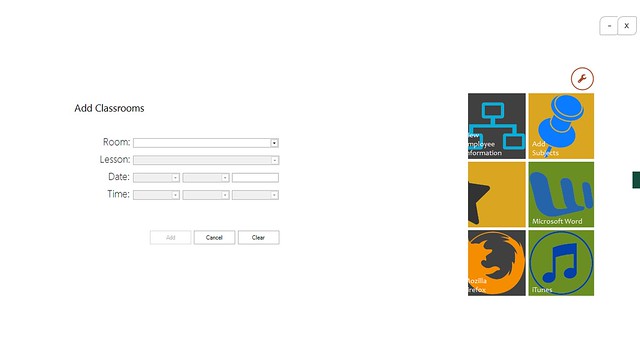
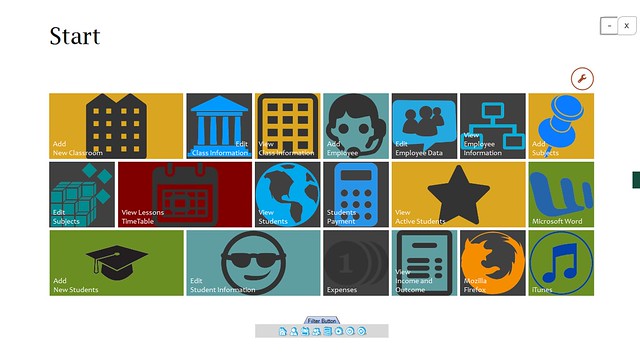
Ekselen is a desktop school management system, Ekselen offer great features for all type of educational institutions such as management for students, classrooms, subjects, timetable schedule, fee payments, expenses, employees, teachers and much more. With an outstanding GUI, support for Touch Events and Voice Commands, Ekselen is the only desktop school management you need in your school.

Features

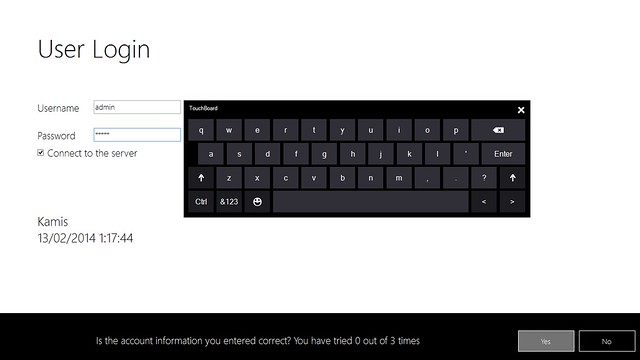
  1. Touch Event Support
    Ekselen taking advantages of technology, make it possible for you to manage information in your institution anyway you like, using any components of your devices, no limitation.


    Touch here, touch there, no limitation for accessing Ekselen. Ekselen even embedded with sliding panel, to make you feel Ekselen is really interacting with you all the time.

  2. Voice Command Support
    Who say only smartphones that can respond to your command? So do Ekselen! even integrated with your system. But make sure your microphone is on, don’t let Ekselen unable to hear what you say. Ekselen always have feedback for every command you say. Fun right. One day, a shiny day, Ekselen white background was so bright.

    So I said to Ekselen, “Too shiny, can you change to orange?”, “Sure do, sir” It replied. Voila! It changes to orange.

    What else Ekselen can recognize? Helping you processing your data, just say “add new student” the new student screen will appear and you can choose either you use your keyboard or the touch keyboard on your screen, hold on a sec. Just say it and it will typed itself into the corresponding field. No way, yes. Feel free to explore, word such as “open touch keyboard”, “back to menu”, everything you wanna do with Ekselen can be done this way.

  3. Responsive?
    Of course it is responsive, any screen size you used there won’t be any changes happen to Ekselen. It stays the way it stands.
  4. Update History

    Version 1.0 – February 13, 2014

     - Initial release
    

    Entities

    Administrator

  • Manage Students Class/Group wise
  • Add / Edit / Delete Student
  • View Profile of Student
  • Manage teacher profile
  • Add / edit / delete teacher information
  • Create / edit / delete class / group for students.
  • Create / edit / delete subjects here from subject menu
  • Subjects can be defined seperately according to each classes
  • Manage class routine
  • Create / edit / delete class routine schedule on 7days a week
  • Manage payment for student
  • Create / edit / delete invoice listing
  • View invoice and print them
  • Edit system settings
  • Manage language of the software
  • Create your own language and convert the language phrases easily
  • Create backup and restore anytime
  • Generate reports

Principal

  • View students report
  • View financial report
  • View class schedule
  • View Teacher Information

Teacher

  • View students information
  • View class schedule

Support

Please contact me via email from my Profile regarding support or pre-sale questions for any purchase of my items.

Download Ekselen – School Management System (Project Management Tools)

Web Studio – Domain & Hosting Manager (Project Management Tools)

WebStudio – Domain & Hosting Manager is designed for web agencies and freelancers, to manage and maintain it quick and simple on Domains, Hosting and Server. In WebStudio – Domain & Hosting Manager, you can manage (add, edit, delete) your domain with its relevant accounts.

WebStudio – Domain & Hosting Manager allows you to save and manage all your data server, domains and social network accounts. Easy, 100% Customizable, Multi language, Security.

http://webstudio.webreattivo.com/

User Demo: Demo (not all the features work in the demo)
Link: http://demo-webstudio.webreattivo.com/
User: admin
Password: pass

Features

  1. Add all the data of your domains.
  2. Add all the data of your server.
  3. Add the customers of your domains.
  4. Add to your provider and save your passwords.
  5. Add all types of hosting.
  6. You can use WebStudio from any device: smartphone, tablet, PC.
  7. You upload any file and connect to your domain. For example, attach th
    e invoice or a backup mysql.
  8. WebStudio uses SQLite, then without Mysql.
  9. WebStudio uses the most advanced encryption algorithms. All passwords are encrypted using.
  10. Add a new type account. Default: Bitbucket, Cpanel, Database MySQL, Email, Twitter, Facebook, GitHub, Google, Linkedin, PhpMyAdmin, Pinterest.
  11. Choose your client and information, and send email.
  12. WebStudio is programmed in Zend Framework 2, the best PHP framework..

Download Web Studio – Domain & Hosting Manager (Project Management Tools)

BooksDaddy – The Ultimate Books Search Engine (Search)

What is BooksDaddy

BooksDaddy is a PHP script which will help you to create your own books service website. You don’t need to add any books or keep the site up to date with books, because we are using google books API to fetch books from google’s database. One more awesome feature in our script is you don’t need to create any database or any other headache. You just need to edit the site name and other details and yea you are done with installation. It’s just a 2 mins process. Also we have added Amazon referral feature whcih means you can earn from this script. You just need to enter the referral id and when ever anyone will click on Buy Now button then they’ll redirected on Amazon website and once they complete the purchase then you’ll earn commission. You can also earn a lot by adding Ads. Their are many other features which you’ll know while browsing the LIVE DEMO!

Features List

  • Fetching books from Google Books API (You don’t require to apply for any Developers key etc)
  • Books are categorized in category
  • 2 Ad Units in the sidebar
  • Facebook Like Box Already Integrated
  • Search Books by ISBN by title and many others
  • Amazon Referral option so that you can earn.
  • Displays Books information: Name, Description, Author, Publisher, Publish Date, ISBN, Category etc.
  • Integrated Google Books Preview
  • Pagination for search results
  • Pagination for category results
  • Facebook, Twitter, Google Sharing Ready.
  • Responsive in mobile and other devices
  • Built in Bootstrap 3.0
  • Lightweight and easy to install as well as configure
  • Easy to customize and edit
  • AND MUCH MORE!!! CHECK THE LIVE DEMO.

Live Demo

Check the live demo here: CLICK HERE

Recommendations

ImgZoom:
ImgZoom is a Jquery Plugin, which helps you to allow your user to view the thumbnail image in a bigger view on mouse hover. This is very useful for websites which is related to Media and Applications. You can simply customize the Plugin as well as the image container according to your page design. It’s very easy to install and use a beginner can also use this and enrich his/her website.
Buy Now: CLICK HERE

Download BooksDaddy – The Ultimate Books Search Engine (Search)

WooCommerce Catalog Mode (WooCommerce)

About This Plugin

“WooCommerce Catalog Mode” can be used to turn your WooCommerce shop to a Catalog View Mode.

In catalog mode “Add to Cart” button will be removed from full shop, so shopping functionality will be disabled from site. Visitors can then just can view your products and its details and make any query to you if they have.

You can choose to diplay price tag or not. Also you can append an extra button with each product, through which you can show a message to visitors (Like Call For Price, or Product Enquiry). If you wish you can add a custom URL link to this button, also can decide to open URL in same window or a separate window.

Button customization options are available to adjust button with your site theme.

Plugin Features –

  • You can turn Shop mode to Catalog mode easily
  • Can decide to keep Price Tag or not
  • Custom button support
  • Custom link lupport
  • Button customization options
  • Mode switcher option

Credits

  1. Admin Page Class

Download WooCommerce Catalog Mode (WooCommerce)

Jumper – An Arcade Bouncing Game (Templates)

This is a native Android Arcade Jumping Game, written in Java with Eclipse. The aim of the player is to tilt his device and keep jumping up as high as he could. The game features coins, powerups, bombs, trampolines, top 10 high scores, calibrate feature and more.

This game can be edited to your likings. Feel free to add more bars, more special items, more coins or give it reskin.

Comes ready with AdMob interstitial Ads and Facebook Share Feature.

Check out the Demo on Google Play

Features

  1. Includes interstitial AdMob Ads – Make money from Ads easily.
  2. 26 Different Sprites Included – All sprites are also in .ai format.
  3. Pause Feature – Player can pause game during gameplay.
  4. Video Tutorial Included – A 3:24 minutes narrated video tutorial is included for a quick start.
  5. Top 10 High Scores – The game saves the top 10 High Scores on the user’s Device.
  6. Uses Accelerometer – The device inbuilt accelerometer is used to detect tilting and move the Ninja Blob.
  7. Calibrate feature – This allows your users to calibrate the flat position according to their device.
  8. Music and sound – Game comes with music and Audio features. Player can choose to turn off all sound fx or music.
  9. Facebook Share – Uses Facebook SDK for your players to share their score on facebook and promote your App for free and efficiently.
  10. 3 PowerUps – Rocket, twin rocket, Balloon
  11. Different Bars/Platforms – Moving Platforms, Breakable Platforms and Normal Green Platforms.

Music used in game

The music is not included with the game. You can buy it from here: http://audiojungle.net/item/happy-game/409203

Other games you might like


Download Jumper – An Arcade Bouncing Game (Templates)

Joomla Paypal Donation Module (Joomla)

Paypal Donation Module

Paypal Donation Module helps to integrate paypal donation button to joomla sites

main features:
Easy to Setup
-Secure
-Integrates with Paypal
-Customizable intro text (Optional)
-Donation Success return page
-Paypal account id
-Donation Organization title -Donation Cancel return page
-Customizable Paypal description within Paypal’s Donation Form
-Standard or adjustable donation amount
-Currency selector

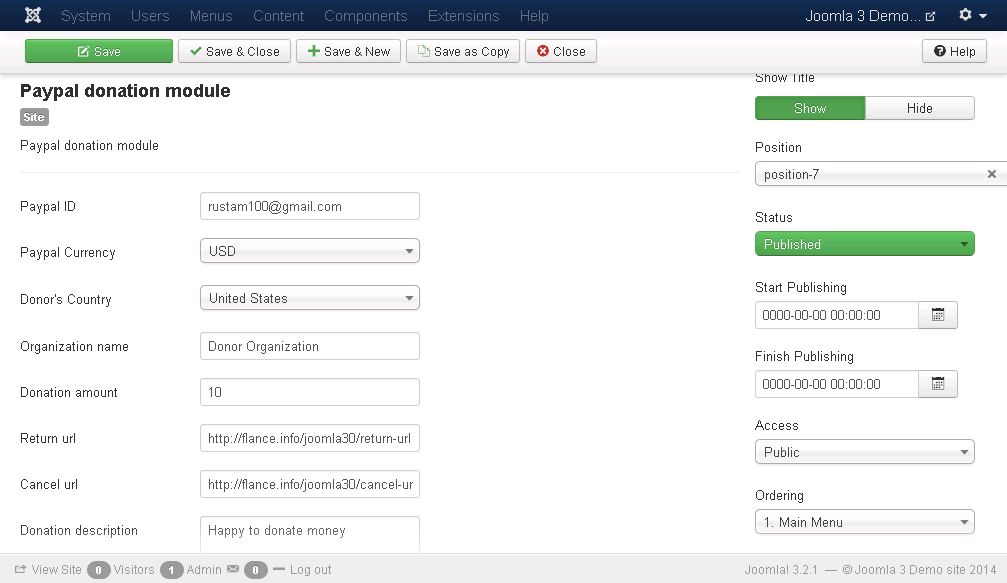
please see the image for change the setting of the module

Download Joomla Paypal Donation Module (Joomla)

Category Slider / Carousel module for OpenCart (OpenCart)

Category Slider / Carousel module

is display products from category with carouFredSel effect with many parameters to configure…

Carousel Settings: (easy change in admin)

  • Set Carousel Circular – on/off
  • Set Carousel Infinite – on/off
  • Set Carousel Responsive – on/off
  • Set Carousel Direction – left/right/up/down
  • Set Products to Scroll
  • Scrolling Effect scroll – scroll/directscroll/fade/crossfade/cover/cover-fade/uncover/uncover-fade/none
  • Scrolling Easing Animation – swing/linear/quadratic/cubic/elastic
  • Set Scrolling Duration
  • Pause Carousel on Hover
  • Auto Play the Carousel
  • Carousel Direction Nav for previous/next navigation
  • Carousel Control Nav for paging control of each product
  • Carousel Swipe Nav – navigating via swiping for touchscreen devices

Features:

  • Set categories when module will be display
  • number of products is selectable from the admin
  • image dimensions is selectable from the admin
  • change front language in admin (box name, add to cart name)
  • change front css for any module in admin
  • Show in box and show without box
  • Multi Language Support
  • Multi Store Support
  • easy Enable/Disable
  • works with all Themes
  • easy install and Setup
  • Easy admin interface
  • Plug and play Module

Demo
Admin demo | login: demo | pass: demo

http://demo.btechunit.eu/admin/index.php?route=module/category_carousel_bt
Demo for Content Top and Content Bottom
Demo for Column Left and Column Right
http://demo.btechunit.eu/


Please use the comment section for general questions, feedbacks etc… only. For error related and for more complex problems, please use [email protected]

Download Category Slider / Carousel module for OpenCart (OpenCart)

Battery Checker (Full Applications)

Battery Checker indicates the battery charge level of your device.
Battery Checker is a app that will help you follow the current battery percentage on your Android device.

It displays:

• Temperature
• Voltage
• Health status
• Technology

It also monitors the device battery drainage in fixed time stamp and notifies whether power saving is option or mandatory.

Full Source Code
We provide full source code with video help file

Live Demo / Download APK:
https://play.google.com/store/apps/details?id=com.mobilemerit.batterychecker

Support:
http://mobilemerit.com/contact-us/

For any custom coding in Android, pl. contact – http://www.mobilemerit.com

Download Battery Checker (Full Applications)

LightPro (Full Applications)

This is iPhone application for building flash light and morse code application.

It contains XCode project file with sample “LightPro” app (complete working application with all graphics).

This project for XCode 3.x – 5.x and app works well on iOS 3 – iOS 7 on iPhone 4/4S/5/5C/5S and iPod Touch with flash light.

Note: this app works only on real device with flash light (iPhone 4/4S/5/5C/5S, iPod Touch with flash light). You can’t use this app in XCode Simulator.

If you are new with XCode and iOS development and want to use my Project source as base for your own application this Documentation will help you know the basics how to do it, but you need to know how to use XCode and Objective-C programming language basics (but second is not neccesarry).

Include Document to help.

How to Setup:

A) Overview

This is iPhone application for building flash light and morse code application.

It contains XCode project file with sample “Morse Code PRO” app (complete working application with all graphics).

This project for XCode 3.x – 5.x and app works well on iOS 3 – iOS 7 on iPhone 4/4S/5/5C/5S and iPod Touch with flash light.

Note: this app works only on real device with flash light (iPhone 4/4S/5/5C/5S, iPod Touch with flash light). You can’t use this app in XCode Simulator.

If you are new with XCode and iOS development and want to use my Project source as base for your own application this Documentation will help you know the basics how to do it, but you need to know how to use XCode and Objective-C programming language basics (but second is not neccesarry).

There is several helpful links to learn XCode and Objective C:

Official Apple XCode 4 User Guide
Objective-C Language Introduction
iOS Developer Library help sections
StackOverflow – web service when you can ask or find answer to any question about XCode and Objective-C
If your are already working in XCode and know Objective-C you can dont read explanation how to use my Project below, I think you can change everything in my project without my help.

B ) Change project name, icons, default screens

  • Open file “XCode Project/LightPro.xcodeproj” in XCode.
  • Click “LightPro” on the top-left project tree. You will see project properties.
  • To change Load images and Icons you can drag and drop your own graphics for it to this window in corresponding places.
  • To change your project name double click “LightPro” that you clicked once on 2 step and enter new name.
  • To change project bundle_id scroll this window to top and change Bundle Id to your company, for example to com.mycompany.projectname:
  • To change app name, that displays on Device, you need to open file Support files/LightPro-Info.plist and change value for “Bundle display name” key.

C ) Publish your app in AppStore

To publish your application in Apple AppStore your will need to create developer account and create application in iTunes Connect.

You can read how to do all of this and submit your application to review here:

Great instruction how to register developer account, create and submit your app for review by Gustavo Ambrozio
iOS Developer Center

D ) Project structure

fbrowser – project file

  • Classes

    • AppDelegate – app delegate class
    • MainViewController – first view controller in app
    • Images – all project images, icons, default screens and backgrounds
  • XIBs

    • SettingsViewController.xib – setting view controller
    • MainViewController.xib – system view controller
  • Supporting files – app system files

    • LightPro-Info.plist – application settings file
    • Frameworks – app frameworks and libraries

E ) Contacts and support

Once again, thank you so much for purchasing this item. As I said at the beginning, I’d be glad to help you if you have any questions relating to this item. No guarantees, but I’ll do my best to assist. If you have a more general question relating to the items on CodeCanyon, you might consider visiting the forums and asking your question in the “Item Discussion” section.

Please, dont forget to leave stars rating for my app on CodeCanyon. You can do this in Downloads section in your profile.

Download LightPro (Full Applications)

Flappy Fish – iOS Game (Cocos2D) iAd Enabled (Games)

A clone of the popular game ‘Flappy Bird” which I’m sure you’ve all heard of.

This is complete source code written in Cocos2D and is simple to edit. A straight graphics swap can be done with no 3rd party software needed. Simply drop in your own .png image files and you’re all set.

Features similar gameplay mechanics to Flappy Bird. Touching the screen will move the Fish up against gravity. Avoid the pipes, ground and ceiling to get a high score. The high score is remembered as long as the app is installed on the device.

Parallax scrolling is available and there are basic mp3 sound effects when moving the fish through the level (which is infinite with random spawning obstacles).

The fish leaves a trail using particles which gives you a useful introduction to cocos2D’s particle engine.

All gameplay mechanics (speed, gravity, score) can be changed via altering a few simple variables.

This code is a great example of how Flappy Bird works and is fun to play in its own way.

Feel free to use this code in anyway you see fit, but please do not redistribute it as is directly to the App Store.

Supports iPhone 3.5” and 4” displays.

Download Flappy Fish – iOS Game (Cocos2D) iAd Enabled (Games)

ZPager – PHP Pagination with Bootstrap (Navigation)


This class can generate listing pagination links. Easy to customize. Support Bootstrap, MySQL and Smarty Template Engine. You can configure it in seconds

If you like this script, please dont forget to rate it Large-star-onLarge-star-onLarge-star-onLarge-star-onLarge-star-on

Change Log / Updates

Version 1.0 – 7 February 2014

  • Initial Version
  • Download ZPager – PHP Pagination with Bootstrap (Navigation)