A html5 basketball game that works on both desktop and mobile devices.
Category: code
download PHP, ASP.NET, Java and Javascript from CodeCanyon – the marketplace for code scripts and snippets.Javascript, Java, Program, Code, Snippet, Script, Dev, Development, Codebase, MySQL, Class, Widget, System, CMS
Woocommerce Bulk Edit Product Variations (WooCommerce)
Chalis | Sidebar Menu for Mobiles & Tablets (Mobile)


An awesome sidebar navigation jQuery template that allows you to build your own template from the ground up!
Requires iOS 5.0 or higher, Android 4.3 or higher, Latest RIM, Windows Mobile 8!
Download Chalis | Sidebar Menu for Mobiles & Tablets (Mobile)
WooCommerce Show Sales Numbers (SSN) (WooCommerce)


The Plugin Show Sales Numbers (SSN) for WooCommerce
displays the number of sales and the number of comments for the current product on the single product page.
Just like you can see here on Codecanyon (or the other Envato Marketplaces).
You can easily change the Text, Style and Icons via Admin Settings
Be proud of your sales and show the number to your customers to animate them
to buy!
The Message is shown after the Product Tags Listing and before the ShareThis Icons.
You can change the Text and Style of the message individually. Choose between
5 predefined CSS-Styles or use your own CSS-Class.
You can choose the Icon you like. 10 different Icons royalty free to use by you are included. They are
Icon Fonts so they scale wonderful sharp and diplay well on Retina Displays, too.
All this done easily from the Admin-Backend!
Easy Customization
Message Text, Style and Icons. Everything can be
comfortable changed via
Settings Page in the Backend!

CSS File Driven
The Style of the Message is completely driven by a CSS-File. So you can simply change it on the settings page to your needs. The Plugin comes with 5 different, predefined Styles ready to use. Or use your own CSS-Class.

Icons included
You can use the included free Retina Ready Web Font Icons to make the Message more visible. You can simply Change the Icon on the settings page. Simply choose the one you like with one click! 5 Icons for Sales Message and 5 Icons for Commetns Message are included!

Support & Documentation
Detailed Quick Start Guide included in Documentation. All steps are explained with
screenshots!

We will give you free support on this Plugin.
We will be happy to help!
We recommend to use our Helpdesk for Support: www.hupe-graphics.de/helpdesk
Theme Developers Welcome
With buying an extended License I give you hereby the permission to included
this Plugin within your Theme to sell on Themeforest. Every Theme needs a
single extended License.
Changelog
V 1.0 (09.02.2014)
* First stable release

Download WooCommerce Show Sales Numbers (SSN) (WooCommerce)
Video Portal – WordPress Video Gallery AddOn (WordPress)
DZS Video Portal lets you convert your WordPress site to a video portal site like YouTube, Vimeo or 9gag.tv by offering Likes, Playlists, Upload and even an optional SignIn functionality.
- easy install – purchase, download the zip, access your WordPress Admin Menu > Plugins > Add New > Upload zip and that’s all!
- synergy with the powerful DZS Video Gallery – this is a addon to the already powerful DZS Video Gallery, works in synergy with it
- fully BuddyPress integrated – works in BuddyPress sites, even has features directly integrated in BuddyPress – like Playlists and Likes functionality
- inherits theme’s style – this plugin has custom styling only for custom components, for input text fields, headings, paragraphs, it will inherit the theme styling so it should look good on any theme
- five skins + skin generator – we provided more then five skins to match any branding on your site, and more – you can generate your own skins with your own colors in the Design Center
- iOS, Android, mobile ready – mobile ready
- retina ready – only retina components used
- facebook login – this plugin offers a optional login component with Facebook Login ( for ease of access to your users ). This is optional and can be integrated in your theme very easily
Credits
- second theme used in the preview – Royale
- third theme used in the preview – Mingle
Download Video Portal – WordPress Video Gallery AddOn (WordPress)
LatestNews – Animated News Ticker (News Tickers)
LatestNews – Responsive News Ticker
LatestNews is a new responsive plugin that allows you to show news feed with amazing text effects.
It already comes with a Theme Configurator (360 css files included!) and 200 ready-to-use text animations.
Features
- 200 ready-to-use animations
- theme configurator
- responsive
- SEO friendly
- it can get news items from facebook (php files included)
- it can get news items from twitter (php files included)
- it can get news items from standard RSS
- it can animate both letters and words
- full compatibility with all the latest browsers
- fallback for older browsers
200 ready-to-use animations
LatestNews already comes with 200 ready-to-use awesome text effects and with a tool that let you create your animation packs.
Feeds
LatestNews can get news from standard RSS (using Google Feed API), Facebook and Twitter (it requires you to know how to use facebook and twitter API).
Flexiblility
LatestNews lets you animate letters or words, control speed and stagger and so on.
Compatibility
LatestNews works in all the latest browsers, with fallbacks for the old ones (some features, like 3D transforms in IE9, may be disabled).
Responsive
LatestNews is responsive
SEO friendly
You can use standard html list tags
Dependencies
CoolText takes advantage of the TweenMax and jQuery. See their licences.
Download LatestNews – Animated News Ticker (News Tickers)
Tab Modern CSS3 Menu (Navigation and Menus)
TiTemplate – Flat, FB Style Menu with PHP API Sync (Full Applications)
This is a sample Appcelerator Titanium application that will keep a local
database of content and also sync with a remote data source via an API. A
PHP script that uses PDO to connect to your server database and output JSON
that the app can then process locally and keep a cached version.
There is also support to add new entries on the device and edit existing
entries on the device.
The app features a Facebook style drawer menu thanks to a wonderfully
included open source menu. This is personally one of the best menus I’ve seen
for Titanium.
Both the app source and remote PHP source is commented heavily and I’d be
happy to help you along with the installation and any issues you may have.
This is a great template to quickly base a data collection app upon and you
can be up and running in around five minutes.
Download TiTemplate – Flat, FB Style Menu with PHP API Sync (Full Applications)
Flatic – Full Flat Blog Reader App (Full Applications)


Flatic is a full iOS blog application, with a great user interface and backend. Flatic is build on the latest trend, with a flat modern look.
Flatic features a very advance web backend service, that controls the content of the app without requiring to create a new update just for making some content based changes. It does not require any programming experience to customize for your own needs.
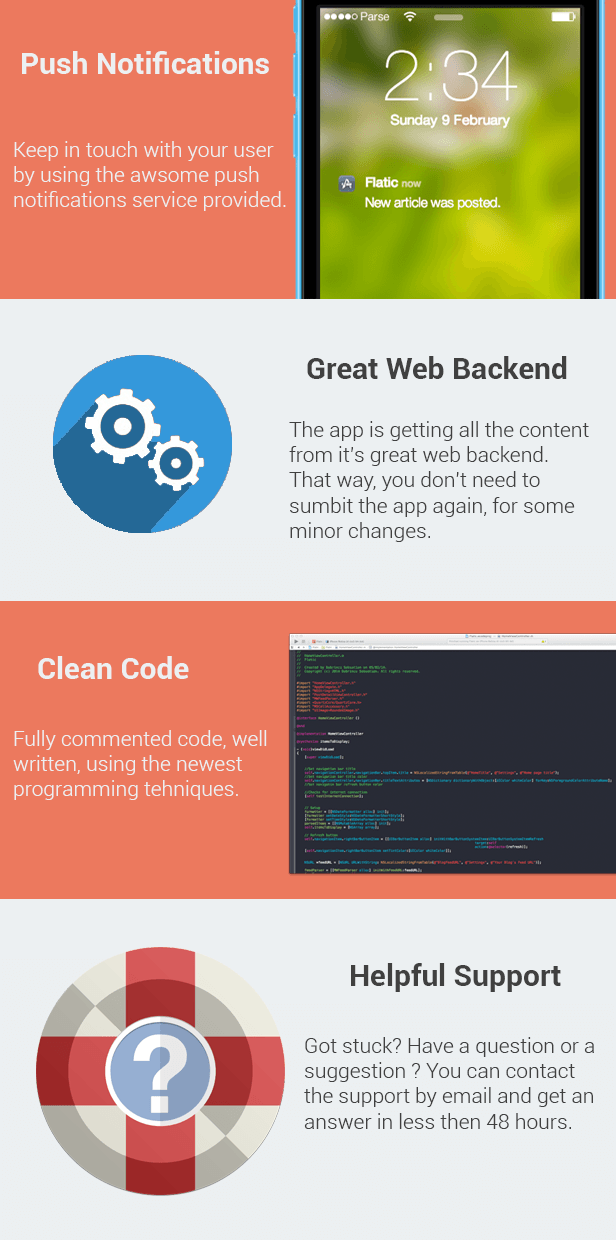
Features
- All settings are stored in one single text file
- 1 Line rebranding
- No programming experience required
- Modern Flat User Interface
- Push Notification System based on Parse
- Great web backend
- Very clean code, easy to understand
- Advance photo gallery system
- Web or Local images
- Easy customization
- Beautiful social links bubble with animation
- Fully integrated maps
- 1 Line Blog parser
- Post thumbnail support
- Great sharing features
- Compatible from iPhone 4 to 5S
- Enjoyable user experience
- Helpful support
Thanks for purchasing this app, i will try my best to assist you. 
Download Flatic – Full Flat Blog Reader App (Full Applications)
Snippeter – Code Snippets Manager (Help and Support Tools)
Snippeter is code snippets manager which make your coding much easier. It uses Google Prettify to highlight code. This script is made to boost your coding by saving your code snippets online and enabling you to find them easily using integrated search bar.
Features
– Add / remove snippets
– Snippets are categorized by tags
– Search bar
– Keyboard shortcuts
– Export as JSON file
– Export as plain text
– Export as Sublime Text snippet (with tabTrigger support)
– Import snippets
– Edit snippets
– Public / Private snippets
– Snippets sharing
– Code highlighting
– Raw code display
– One-click copy to clipboard
– Enable / Disable line numbers
– 3 Fonts
– 3 Font sizes
– Settings dialog
– Admin panel
– User managment
– Simple login and registration form
If you find any problems with Snippeter contact me using Support button and I will help you to solve it.
You can see it in action as user and admin (All admin functions are disabled in preview mode)
Admin panel credentials
Username: admin
Password: admin
Download Snippeter – Code Snippets Manager (Help and Support Tools)
Instagram Downloader (Images and Media)
Instagram Downloader Script allows you to offer a Image Downloading Service for your Users. This Script is based to download all Photos from Users.
After Searching for Users you can preview or download all photos of a Instagram User.
Demo:
http://backlinkexpert.biz/instagram-downloader/
Download Instagram Downloader (Images and Media)
iOS Joke App Template (iOS)
iOS Joke App Template Features:
- The jokes are loaded via XML
- Splash Screen;
- Home, New Stuff, Favourites and All Jokes screens;
- Share options: eMail, Facebook, Twitter;
- Search within the whole content;
- Joke Slider with Latest Jokes;
- Rate My App;
- Easy customization(colors; pics; texts);
- Font Size control for changing the size of the joke’s content;
- Compatible with iOS 6 and iOS 7.
Description:
The product can be used by everyone who wants to share jokes; thoughts; funny posts.
iOS Joke App Template has user-friendly interface with easy to manage content – to use the app you just have to create single xml file, with all your jokes and upload it on a webserver.
When the app is started on user’s iPhone, it will pull all jokes from that xml file.
You can update the content (the xml file) whenever you want, your users will instantly get the newly added jokes when they start the application.
Video Tutorial and Demonstration: Watch Here!
Latest versions:
Version 1.0 (13/02/2014):
- The jokes are loaded via XML
- Splash Screen;
- Home, New Stuff, Favourites and All Jokes screens;
- Share options: eMail, Facebook, Twitter;
- Search within the whole content;
- Joke Slider with Latest Jokes;
- Rate My App;
- Font Size control for changing the size of the joke’s content;
Download iOS Joke App Template (iOS)
Gravity Forms Styler (Forms)
Gravity Forms Styler is a very unique and powerful plugin for gravity forms.
You can create and apply beautiful styles to your gravity forms standard fields, advanced fields, titles and descriptions, buttons, form borders, form labels, form backgrounds and you can even customize the form confirmation and error messages.
You can change each elements background color, border size, border color, border radius, font size, font type, font color and anything else that is possible using css.
We made it really easy for you to customize everything by simply moving the slider to change values, use color picker to choose any color you like and simply choose options from the drop down list.
The best part is you can create unlimited styles and apply to any gravity forms simply by changing the form id, so you can have one style for all the forms or you can have different style for each form.
On top of that we gave you an option to add custom css code for each form style you create.
The possibilities are endless and you don’t have to set gravity forms css output to NO and it will not change your existing form styles, because each of your form styled with Gravity Forms Styler will have independent css code generated dynamically, how cool is that? so what are you waiting for ?
A shortcode builder and a widget is included for your convenience.
If you have any questions or problems please email us at [email protected] and we will get back to you as soon as possible.
We can add new features and fix bugs for you very fast.
If you like the product please don’t forget to give 5 stars
Download Gravity Forms Styler (Forms)
Share Button WordPress Plugin (Add-ons)
Help you to add Twitter, Facebook, and Google Plus share button to your WordPress post/page.


Features
- You can apply it globally in the setting, or add each share button in the tiny-mce built-in WordPress editor.
- Facebook share with image support, it will fetch your featured image automatically (note: need Facebook App ID).
- Optional button text, icon, background, color, position, popup layout etc.
- Retina ready.
- CSS3 transition.
- Support touch gesture, works fine in small device like iPhone too.
- Compatible with latest jQuery and latest WordPress.
- Enqueue the js and css only when needed. Keep WordPress page size smaller.
- FAQ and source code are included in the package. Free update in the future.
Recommendation for you
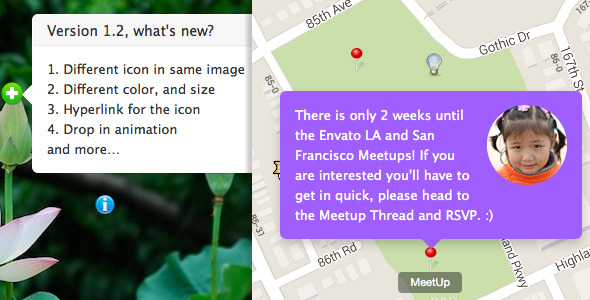
Image Map HotSpot WordPress Plugin:
Credit
jQuery http://jquery.com
share button http://carrot.github.io/share-button/
icon font http://weloveiconfonts.com
Download Share Button WordPress Plugin (Add-ons)
ExNet Tooltip Plugin (WordPress)
Description:
A versatile WordPress hover & click tooltip plugin for displaying custom HTML contents with CSS3 effects and jQuery animation. This tooltip plugin enables your website to display related information on keywords, links, Images, labels,… simply.
Usage is unlimited, Such as:
- Dynamic tooltip contents using WordPress shortcodes and remote URL data.
- Price table in WordPress ToolTips
- Hover on image to see bigger preview tooltip
Features:
- Future Publish and Expiration Date/Time: Best for using advertisements, time limited offers.
- Unlimited ToolTips: Add items as much as much as you like.
- Auto Embed Videos and Other Social Media with inline preview: blip.tv, DailyMotion, Flickr (both videos and images), FunnyOrDie.com, Hulu, Instagram, Qik, Photobucket, PollDaddy, Revision3, Scribd, SlideShare, SoundCloud, SmugMug, Twitter, Viddler, Vimeo, YouTube, WordPress.tv
- Fully Customizable Via Options: Use your imagination to make use of this plugin.
- Full Control Over HTML via WYSIWYG Editor: Build your custom HTML in WordPress Native editor.
- Supports WordPress ShortCodes inside HTML contents.
- Over 30+ CSS3 Animation plus jQuery effect and old browsers fallback.
- Ability to Use as Snippet/AD Manager Tool: The idea of this feature is like signature at the end of emails.
- Auto Generate ShortCodes: Each tooltip has its own settings and a shortcode to be used everywhere.
- Supports Shortcodes as Content: Insert WordPress shortcodes in tooltip content and the results come out.
- Supports Remote Data With Caching Option.
- Cross Browser Compatibility: IE7-9, Chrome, Safari 4+, Opera and Firefox 4+
- Pure css: No images but fallbacks for older browsers.
- Free positioning: The popup code will be added to the document root so the position won’t be affected by your layout.
- Custom options for each tooltip: You can have different popups with different options on one page if you like.
- Single popup element: For best browsers compatibility and resource usage.
- Auto position with preferred position option.
- Export and Import tooltips.
- And more…