Automatic Set Order Status (Magento Extensions)

Magento Extension: Automatic Set Order Status

This extension provide advance function to manage and automate default order status. In certain condition you can set order status for example cancel the order if customer not paid the order for certain time and relase the product stock

Download Automatic Set Order Status (Magento Extensions)

SLICK Licensing Component (.NET)

SLICK Licensing Component – the easiest advanced licensing component

SLICK as it’s name suggest is easy to use advanced licensing components. The project is divided into 3 parts the 1st part includes a licensing component that will help you to create application registration system with the help of windows registry by just entering a few lines of code, the second includes a licensing component that will help you add software registration feature by encrypted files – this means it can use in portable apps. and the last one includes a licensing component that will add software registration by windows registry with online activation.

Let me tell you more about these…
Both these three component includes a keygen, a example demo, a compiled demo and key generator class and it’s documention. The third project also includes php files and a webpanel demo which will used for activation.

Please view the video preview to know how it works.

It’s pretty simple and easy to use. For e.g if you want to check if the current user has registered or not :
dim boo as Boolean = Slic.licensing.check()
if (boo = true)
Msgbox(“Registered user!”)

and to register a new license :
*Diffrent parts have different parameters but for now i am showing you the first one :

dm isreg as boolean = slic.licensing.register(“Name”,”Email”,”Serial key”)
if ( isreg = true )
msgbox(“License is valid and stored!”)

and to retrieve license info :

dim ar as array = slic.licensing.showinfo()
dim name as string = ar0

a bit about the online activation ….

When your invoke that slic.licensing.register(<parameters here>) it will open a dialog where it will show users to wait till it verifies the serial key and when it verifies it registers the software. You can see it in the video preview.
Yes it’s simple as that so why are waiting add licensing feature to your project now!

Download SLICK Licensing Component (.NET)

Dry ShortCode Rainbow (Miscellaneous)

Dry ShortCode Rainbow is a really simple plugin which helps you to easily spot all of your shortcodes by highlighting them in any color you want.

Subscribe to our Newsletter by Email

You want to receive our newsletters, updates info, sneak peeks, promotions and freebies notifications?
Than, all you need to do is to Sign up for the Newsletter.

And remember – we do not spam!

Download Dry ShortCode Rainbow (Miscellaneous)

Authentica – Responsive Two-Factor Register/Login (Forms)

Authentica is a very powerful user login/registration/authentication system. It’s coded very securely in PHP, the frond-end is done in Bootstrap which provides a great responsive experience. It’s very easy to implement and or to expand the current code. This product is very well documented and the code is extensively commented.

Authentica provides a very simple and secure way to protect pages/scripts. In demo you can see that there are two options; Register and Login. Go to Registration, here you will be able to create an account. Enter an username, email address and a password twice. When you press Register the current system saves the user data in sessions (this is just for demo, you should save the information to a database). Now you will see a message appearing about a successfull user registration. You will see a small summary of the data you entered, you will also see a QR code. This code must be scanned using Google Authenticator (free app available in Google Play, App Store and App World). Authenticator will now save this secret key, using this data it will generate unique Authcodes for you.

After registration we are going to demonstrate the Login page. Proceed to Login, here you must fill in your username and password; including an Authcode. The Authcode can be generated from the Google Authenticator app. Authcodes are visable for an amount of seconds and valid for minute. You should now be able to login.

To test the demo, please register first then you are able to login. Registrations are saved on session basis as demonstration.

• Developed with security in mind.
• Based on Bootstrap. Easy to code even for non-developers!
• Very responsive, works on any mobile device.
• Two-Factor Authentication using Google Authenticator.
• Authenticator app available freely on Android, iOS, BlackBerry.
• Very well documented and code extensively commented.
• Easy to customize, integrate or expand.
• Highest level of security with security features.
• QR code after registration to simply add it to Google Authenticator app.
• Build-in logger to log user information from hacking attempts.
• Supports all major browsers: Chrome, Firefox, Internet Explorer 9+, Safari, Opera.

Download Authentica – Responsive Two-Factor Register/Login (Forms)

SilverPop Custom Popup Subscription for WordPress (Newsletters)


If this plugin is useful, could you please help us to rate it? it will be a big encouragement to improve for us.

SilverPop Custom Popup Subscription

“SilverPop Custom Popup Subscription” plugin is an amazing email subscriber plugin which allows the site Admin to create Custom Popup, place YouTube/Vimeo embed videos, image or any sort of HTML/custom content in the subscription popup and the Visitors can Subscribe their email to the SilverPop subscription list. It is flexible, best and simple way to subscribe email for newsletter. Admin can set “SilverPop Custom Popup Subscription” plugin through a Popup style which has various display options or Admin can add this into a widget area.

If you want convert the visitors to your member /subscribers then the Custom Popup is the best solution to tell the users why they should subscribe or to show them a new advertisement or Banner on the popup to allure them get subscribed.

If you want your website to reach every reader, you have to use email and “SilverPop Custom Popup Subscription” plugin will be useful to promote your company to the general people.
“SilverPop Custom Popup Subscription” plugin is very useful for those people who need to send Newsletters to users. This powerful plugin allows users to collect and manage emails & newsletters with an easy way.

“SilverPop Custom Popup Subscription” plugin has some excellent features and very easy to install or setup. “SilverPop Custom Popup Subscription” plugin is more flexible and compatible with many existing plugins in the WP repository. This Plugin is fully customizable. Users can easily configure the plugin into the new or existing WP websites. This plugin is compatible up to WordPress Version: 3.8.1.

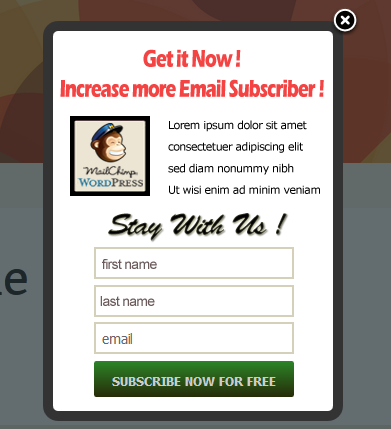
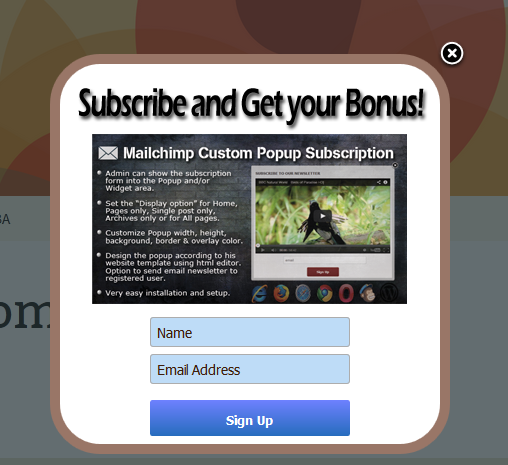
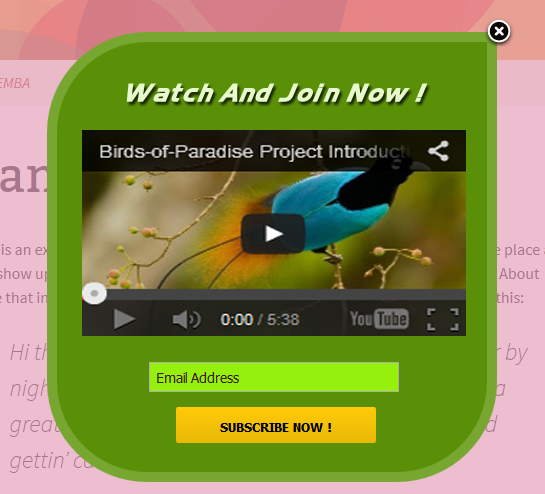
Front View of this Plugin:

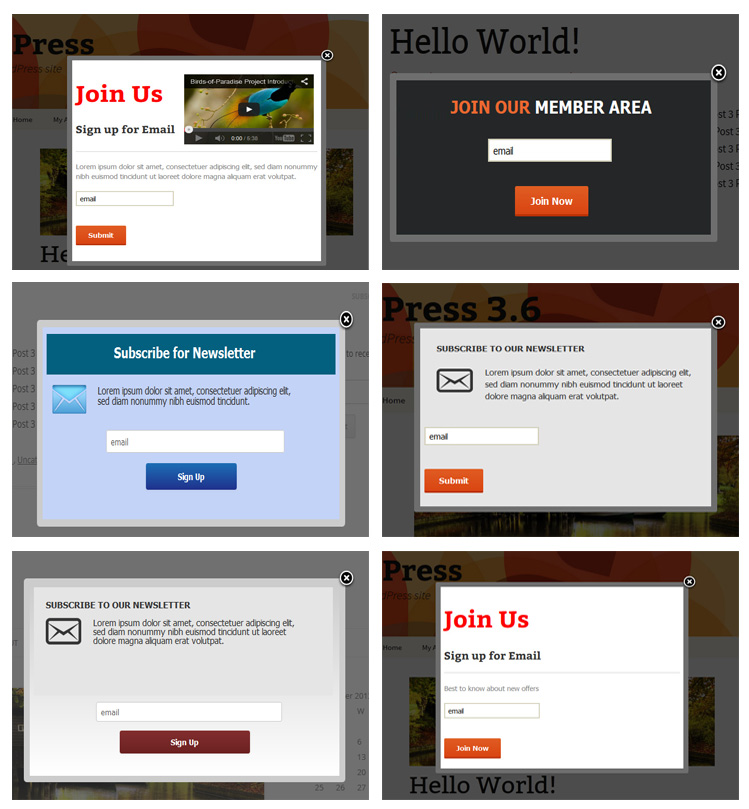
Some Popup Samples

Features of SilverPop Custom Popup Subscription

  • Admin can show the subscription form into the Popup and/or Widget area.
  • Fully customizable and many advance features for the Popup design like
    • Admin can design the custom popup according to his website template using html editor.
    • Admin can place YouTube/Vimeo embed videos, image or any sort of HTML/custom content in the subscription popup.
    • Popup display time can be set like after 1minute, 1day, 1 week, 1 month, 3 month, 6 month and 1 year.
    • Admin can set the “Display option” for Home, Pages only, Single post only, Archives only or for All pages.
    • Admin can customize Popup width, height, background color, border color, overlay color.
    • Admin can active/deactivate the popup.
    • Admin can set the subscription mandatory or not.
    • Admin can set the “Popup Delay Time” from admin panel.
    • Admin can set the “Subscription form type” from admin panel.
    • Button text, button color and button hover color can be customizing from admin.
    • “Subscription Success Message”, “Subscription Text Box” and “Subscription Button Designs” are customizable.
    • Admin can set the “Container Border Radius” and “Bottom Content position”.
    • Two color boxes are for to set the Gradient color and if you want to make Gradient color, it will be better to use light and deep combination. If you not use Gradient then put one field blank.
  • It has option to send email newsletter to registered user.
  • Very easy installation and setup.

Features of the Widget section of admin

  • Admin can customize the Title and title color of the Plugin.
  • Admin can set the Title in three positions.
  • Admin can put the custom text above the email text box.
  • Admin can set Button text.

Download SilverPop Custom Popup Subscription for WordPress (Newsletters)

Tweet from WordPress (Social Networking)

The Tweet from WordPress plugin allows you to send tweets directly from your WordPress website. You can choose to automatically send tweets after each post, page or any other custom post type available on your website. Or you can manually write tweets and send them to your connected Twitter account.

Tweet from WordPress

Automatic tweets for new posts

You have the option to enable automatic tweets for all new posts, pages or any other custom post type on your website.

Tweet directly from your website

Save time by sending your tweets directly from your WordPress website!

Download Tweet from WordPress (Social Networking)

Fufu – Viral media/gag script (Social Networking)

ABOUT

Fufu provide you a quick and easy way to create an viral media site (with brief-popular named “gag site”). It was built with lots of features that you need for a premium viral media website and lots more are waiting for upgrade. Your website’s visitor are allow to post gag as video type (more than 20 sites available for embed), image type, gif or vine.

Features:

  • Quick installation (input then done, no file-modified need).
  • Build with PHPNinja, easy to integrate other applications, easy to customize.
  • Powerful admin dashboard: edit, delete, approved, listing fu. All in AJAX
  • User submission
    • Fu types: Vine, Video (20+ site embeddable), Image, Gif
    • Admin can choose which type of Fu are available for posting, image size and thumbnail size.
    • Word censorship: No more worry about bad words, censorship affect fu’s description and title
    • Fu title with min & max ajax validation
    • Fu description with min & max ajax validation + character length flying
    • #Hashtag ready for description, all hashtag will automatically generate keyword tags for displaying single fu.
    • Post + validator with AJAX
    • Admin can set how many fu each user can post within ‘X’ minutes
    • Admin can set if the fu need to be approval or not.
    • Fu’s source: User can input a link or a some text, if they input a link it will automatically show as a link.
    • Strong spam filtering. User cannot spam with this system, we even donot need stupid captcha here.
  • Nice UI: 70% action from front-end and back-end is ajax. Base on user-experience researched. Bootstrap based, theme changable which mixed php and html.
  • Mobile ready! People sometime misidentify that built with bootstrap is always reponsive but lots of script lookin damn bad on mobile. Fufu is pixel-perfect on mobile and tablet (default theme).
  • AJAX Rating
    • User cannot spam rating for sure.
    • If you previous downvote, he can upvote and the rating will plus 2 (not 1)
  • Built-in theme editor:
    • Layouts and widgets are editable from the front-end
    • Variety adspots ready to change
    • Nice layout simulation (see screenshot)
  • Built-in language editor
    • Multi-language supported
    • Language are editable from front-end with input field and SUBMIT
    • You can change the option that allow user change language or set for them default one
  • Public moderator:
    • Community is the best moderator for your website
    • Reduce your workload
    • You can turn this feature on/off and set how much positive rate/ negative rate so the fu will be accepted or not.
  • Hashtag: Hashtags in content provide more SEO value than simple tagging system. User are able to search for tag, too
  • Category: More than hashtag, category help you to management content easier and help your user suff fu with better filter. (You can turn this on/off)
  • Powerful paginator and filter
    • Paginator with number of pages, not simply next page & previous page
    • You are able to list fu by rating, views, date added in ASC or DESC
    • And you are able to search for fu, too. Sorting and search can mix with each other. (Search, then order)
  • Rss ready
    • You can turn this on/off, set the number of rss feed
    • RSS are able for the whole site or can specific for the single category, type of Fu
    • XML 2.0 Ready!
  • Theme/Language choosable:
    • Visitor are able to choose language and theme (You can turn this on/off)
  • Ultimate SEO Optimized:
    • Title tag, description tag, keyword tags in all pages are customizable!
    • Fully SEO tag customization with shorttags such as fu’sTitle, fu’sTags, etc. Auto list all tag belong to the fu for keywords meta tag.
  • Custom page:
    • Create custom page simplier than ever, just write and publish!
    • 100% customizable slug
    • Title tag, description tag, keywords tags are all customizable
    • WYSIWYG editor build in
  • Rich options: Almost all features are “togglable”!.
  • Facebook comment + Addthis sharing: Easy to attract more visits via Facebook community and other social network.
  • Responsive design. Cross-browser supported.
  • And more


Download Fufu – Viral media/gag script (Social Networking)

Bricklayer – Content Builder WP Plugin (Utilities)

For Everyone

When you install this plugin you’ll get a drag & drop widget based interface inside your page editor. You’ll have 20+ widgets to be your building blocks for any type of design. Bricklayer helps you build your content fast and easy. On top of that Bricklayer plugin is a layout building tool. You can create endless number of layouts: fullwidth, boxed, right-sidebar, left-sidebar, narrow, anything you can thing of. Also, every configuration can be saved as template and reused anywhere.

For Frontend Developers

Bricklayer offers an easy way of making your custom classes be entered or selected directly from the widgets. This means that you can have endless variations on each of default widgets. Also, this plugin lets you enter any custom CSS rules.

For Backend Developers

Bricklayer is easily extendable. You can register your own widgets with no restrictions on how you display them on the frontend. Creating and registering widgets resembles WordPress widget system that you are familiar with.

Download Bricklayer – Content Builder WP Plugin (Utilities)

Animated banners with flying heart (Banner Ads)

Animated banners with flying heart

This banners can be used for Valentine’s Day, for Gift shops or with a little text modification for Dating sites.

Banner sizes:

leaderboard (728×90)
medium rectangle (300×250)
rectangle (180×150)
wide skyscraper (160×600)
smartphone static wide banner (320×50)
smartphone static banner (300×50)

Included Files:

  • Adobe Edge Source File (.an)
  • Adobe Edge Template File (.antmpl)
  • Help video

Files are well organized and named,easy to customize

Browser Support:

  • IE9+
  • Chrome
  • Firefox
  • Safari

Font Georgia & Arial was used

Please Rate)))

PS:If You have questions or need help, feel free to contact me!

Download Animated banners with flying heart (Banner Ads)

HTML5 Vinyl Music Player – WP Plugin (Media)

Vinyl-styled Music Player is the perfect candidate for HTML5 music player on your website. Just imagine Music Player which really easy to use with wonderful mix of classic and modern taste.

Audio Player Features

  • HTML5 technology – uses the latest html5
  • Fully responsive – looks great from mobile to HD
  • Touch optimized – touch devices are not forgotten (try to jerk the disc)
  • CSS3 technology – this player uses cutting-edge css3 definitions
  • easy install – purchase, download the zip, add easy input code in html
  • compatible with all major browsers, including IE, Chrome, Safari and Firefox
  • Non-fixed Playlist
  • Volume controller
  • Very easy to add/change songs

Rate us with 5 stars when you enjoy! :)

How it works?

You just need to insert the hortcode:
[vinylplayer id=1]
player into the any side of site.

Notes

  • The cover is getted from the music file but it also can be defined as a tag
  • Supporting music formats mp3, wave, ogg …
  • …and just try to drag and drop the vinyl:)

Support

If you want something more like this, send me e-mail from my profile or Skype: kuzenko_net

Are you ready to get great Player in your site?

Download HTML5 Vinyl Music Player – WP Plugin (Media)

Groups Gravity Forms (Forms)

This extension integrates Groups with Gravity Forms. It allows to add users to groups automatically, based on form submissions.

Requirements

You must have Gravity Forms 1.8.x or higher and the Groups plugin installed and activated on your WordPress site. Some of the integration features require Gravity Forms Add-Ons which are only available to those who have a Gravity Forms Developer license.

Support

You are welcome to post questions and suggestions on the plugin page.

Please rate it!

Please rate this item once you have tried it. Please let us know if you have problems before you give a low rating. Many problems have usually an easy solution and we’re glad to help you. Your feedback is important so that improvements based on your needs can be made, and suggestions are always welcome!

Features

A new Groups settings section is provided for each form, where automatic group membership assignments can be determined.
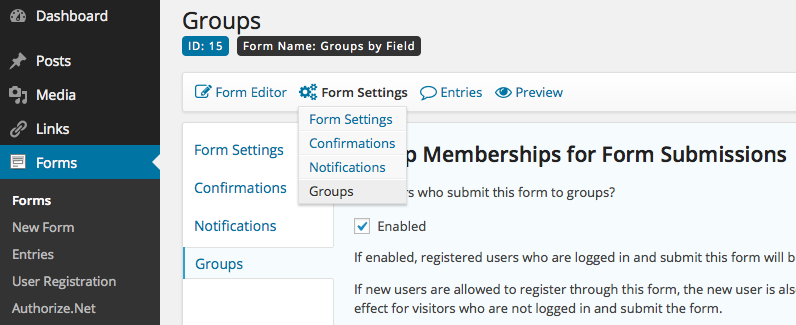
Groups Gravity Forms Form Settings

Group Memberships based on Form Submissions

  • Add users who submit a form to one or more groups
  • Add users to groups based on a form field

For each form, one or more groups can be chosen that a user who submit the form will be added to.

A form field can be used to determine which groups the user will be added to.
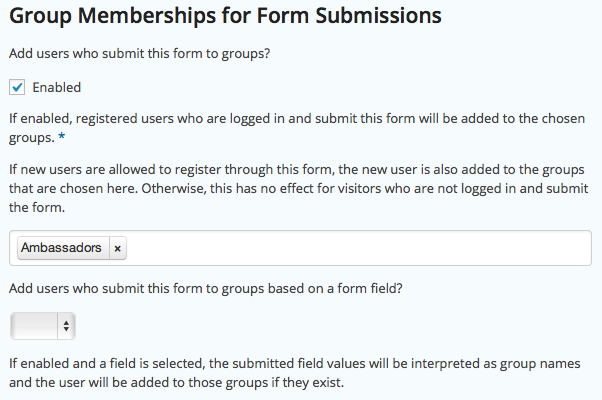
Group Memberships for Form Submissions

Group Memberships for User Registrations

This feature requires the Gravity Forms User Registration Add-On. Please note that this Add-On requires a Gravity Forms Developer license.

When a visitor registers through a form, the user can automatically be added to one ore more groups.
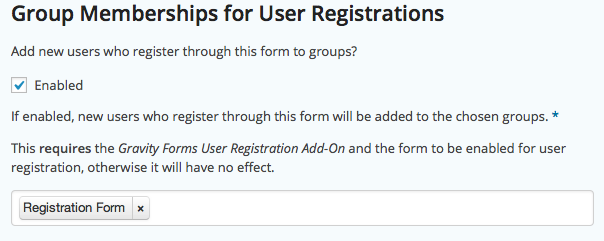
Group Memberships for User Registrations

Group Memberships for Payments

This feature requires a Gravity Forms Payment Add-On. Please note that these Add-Ons usually require a Gravity Forms Developer license.

When a payment has been made, the user is added to one or more groups. If the payment is reverted/refunded, the user is removed from those groups.

User registrations with related payments can also be handled (this requires the Gravity Forms User Registration Add-On).
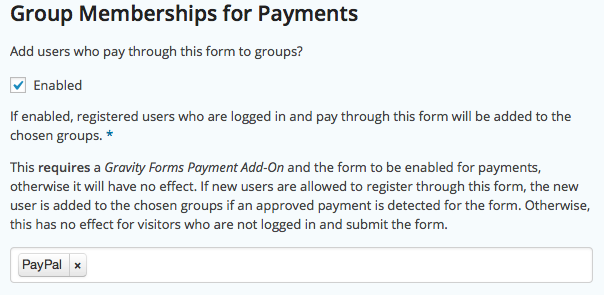
Group Memberships for Payments

Limitations

  • Support for Subscriptions is to be considered in beta/experimental stage. This is mainly due to the fact that subscription expirations are based on incoming IPNs and that these do not necessarily correspond to the actual end of term of a subscription.
  • PayPal Pro subscriptions are not recognized as expired.
  • The PayPal Payments Pro gateway is not ‘officially’ supported as exhaustive testing has yet to be performed with this extension using the gateway.

Documentation

See the Documentation pages for Groups Gravity Forms.

Demo

Please visit the Demo site.

Download Groups Gravity Forms (Forms)

Photo Confession (Social Networking)

Photo Confession allows your users to confess their darkest secrets without exposing their anonymity. Every uploaded picture is converted into a great looking polaroid style picture.

The powerful admin allows you to:
– change the front-end texts
– create static pages with over 160 menu items
– use a wysiwyg editor to style your static pages
– modify many settings
– delete every confession that you find unfitting
– add custom css without editing any files

Download Photo Confession (Social Networking)

The Ultimate Fun Pack (Miscellaneous)

Presenting you the ultimate fun pack. Have you ever imagined 33,335 quotes, 38,729 jokes, 8301 riddles & 6357 facts in one single script?. If that’s not going to fulfill your boredom appetite we have animated GIFs and Images support as well. We bet this is a “must have” boredom killer app for your visitors.

The script is fully responsive from PCs to Mobile phones. Comes with an easy installer, which helps you getting started in just one click. Read on for more info.

Admin Panel Demo:

admin panel: http://demo.killmyboredom.com/admin
user: admin
password: 123456

Features:

  • Animated GIFs
  • Static Images
  • Upload from device or URL
  • User submissions
  • User ratings
  • User follow/unfollow
  • Facebook/Google login
  • Facebook comments
  • User Profile
  • User registration
  • Advertisement support
  • 100% responsive
  • Import from CSV
  • Easily translatable to other languages
  • SEO friendly urls

Admin Features

  • Manage users
  • Manage Images/Quotes/Riddles/Jokes/Facts
  • Manage Pages

Technical Features

  • Made on Yii Framework which is the best PHP MVC framework
  • Frontend made on Twitter Bootsrap 3 which is the best CSS framework
  • Totally written in Object Oriented Programming and best practices
  • Clean and manageable code
  • Scalable
  • Easy to customize and extend
  • Secure
  • Application written by Zend PHP 5.3 certified engineer

Download The Ultimate Fun Pack (Miscellaneous)