DH Slidebar Menu – Slide and Push Menu (Joomla)

Introduction

You want create slidebar menu or off-canvas navigation in your site ? With this plugin will help do it, It allows you to build up a powerful menu system and you are full control. !

Features

  • Support Joomla 2.5 and Joomla 3.x
  • Easily Installation
  • Easily configure
  • 6 Transitions effects
  • Support Left or Right Slidebar
  • Support Search form in Slidebar
  • Support Slide or Push Menu
  • Support multiple levels sub menu
  • Fully mobile responsive

Download DH Slidebar Menu – Slide and Push Menu (Joomla)

WP Collab (WordPress)

WP Collab — WordPress plugin that makes project management easier.

  • Build nice and friendly client area
  • Keep projects information right in your WordPress website
  • Discuss projects with your colleagues and keep your clients informed about current project status
  • No headaches for your clients with registration — just share project link with access key
  • Customize templates as you want, include your own styles, extend plugin functionality using custom fields
  • Premium Support! Ask for qualified help on our support forums. See guidelines and documentation

Good choice for freelancers, developers, designers, small teams and everyone who looking for simple project management tool.


Download WP Collab (WordPress)

Fresh LESS / SCSS Compiler (Utilities)


About

Automatically compile and cache your .LESS and .SCSS files on both frontend and backend

Main Features

  • Automatically watches and compiles .LESS and .SCSS files (.SASS syntax is not supported) that you have added directly via wp_enqueue_style
  • Works in themes, plugins, on both frontend and wp-admin
  • Integrated cache, compiles only after a change is detected
  • Create new LESS/SCSS variables on the fly with WordPress hooks – great for generating CSS from backend options
  • Does not have any GUI (Graphical User Interface)

Including .LESS and .SCSS files

In order to automatically watch and compile your .LESS and .SCSS files, you need to add them directly via wp_enqueue_style

Example LESS:

wp_enqueue_style('design', get_template_directory_uri().'/assets/css/design.less');

Example SCSS:

wp_enqueue_style('design', get_template_directory_uri().'/assets/css/design.scss');

Create LESS/SCSS variables with WordPress hooks

add_action('ff_css_variables', 'my_css_variables');

function my_css_variables( $variables) {
    $variables->addVariable('design', 'backgroundcolor', '#000000'); //'wp_enqueue_style handle', 'variable name', 'variable value'
}

Recommended Plugins (sold separately)

      Fresh Performance Cache
You can minify, combine and compress your .LESS/.SCSS files on the fly using our Fresh Performance Cache plugin for WordPress.
Purchase Here

Attributions & Credits

Our Latest WordPress Theme – NEW!

Download Fresh LESS / SCSS Compiler (Utilities)

Ultimate Helper Class (Help and Support Tools)


A very helpful class for people that just start in PHP and want some head start with some helpful functions or you have already some PHP knowledge and you want to make your life more easy by using these great and helpful functions.

  1. Truncate
  2. Word Truncate
  3. Generate Random Color Code
  4. Generate Distinct Random Numbers
  5. Block IP’s list
  6. <Convert Temperature (C, K, F)
  7. Lorem Ipsum Generator
  8. Get domain from url
  9. Get current file name
  10. Get file Extension
  11. Generate Slug
  12. Generate Readable String
  13. Shorten Url
  14. Convert URLs to video
  15. Convert YouTube url to embed video
  16. Get data from a youtube video
  17. Convert Vimeo url to embed video
  18. Get data from a vimeo video
  19. <Get gravatar
  20. Complex Password Generator
  21. Get alexa rank
  22. Generate QR
  23. Read QR Images
  24. Get weather for location
  25. Get facebook stats
  26. Get Tweet Count
  27. Get LinkedIn Count
  28. Get Pinterest Count
  29. Keygenerator
  30. Encrypt Password
  31. Bbcode
  32. IP to Country
  33. Check stats
  34. Censor words
  35. Validate IP

Download Ultimate Helper Class (Help and Support Tools)

Referral System – Simple invitesystem in bootstrap (Social Networking)

Referral System is a simple, user friendly and small referral system.

You can invite your friends and collect points for inviting them. You can also see the profiles from other members and also write entries to the guestbooks in the profile, instantly!

You’ll get your own invite link which you can share, so what are you waiting for?

It is also very simple to create a bigger social network from this, because the code is very easy to understand! So, let’s make a bigger social network out of this! :P

Download Referral System – Simple invitesystem in bootstrap (Social Networking)

Noty Manager (Miscellaneous)

Highly customizable notification manager.
It also supports open source Noty plugin.

Noty Manager Documentation

NotyManager

A – Installation

Include the latest release of jQuery before your NotyManager files.
The Google AJAX Libraries API can be used for this but you could also host the library yourself.

Include jquery.noty.manager.js and its dependancies below jQuery.

NotyManager is compatible with jQuery 1.6+ for now.

Your code should then be similar to this:


<script type="text/javascript" src="http://ajax.googleapis.com/ajax/libs/jquery/1.7/jquery.min.js"></script>
<script type="text/javascript" src="js/noty-manager/jquery.noty.manager.js"></script>

If you want to use this manager with open source Noty plugin. Include jquery.noty.packaged.min.js too.


<script type="text/javascript" src="js/noty/packaged/jquery.noty.packaged.min.js"></script>

B – Initializing

Initializing an instance is simple actually, as can be seen in the below;


// NotyManager initialization
window.NotyManager = new $.NotyManager($('#notifications'), {
    bubble   : {
        top : 10,
        left: -2,
        showZero: true
    },
    max: 30,
    container: $('#notification-list'),
    wrapper: '<div/>',
    emptyHTML: '<div class="no-notification">There is no notification in here</div>',
    callback: {
        onOpen: function() {},
        onClose: function() {}
    },
    useNoty: true,
    noty: {
        layout: 'bottomLeft',
        timeout: false,
        closeWith: ['button']
    }
});

C – Creating Notifications

When you create a notification with below functions, it returns a NotyManager instance. So it’s chainable.

You can give any html as a notification content.


// notification body's can be any html string or just string
var notification_1 = '<div class="activity-item"> <i class="fa fa-tasks text-warning"></i> <div class="activity"> There are <a href="#">6 new tasks</a> waiting for you. Don\'t forget! <span>About 3 hours ago</span> </div> </div>',
notification_2 = '<div class="activity-item"> <i class="fa fa-check text-success"></i> <div class="activity"> Mail server was updated. See <a href="#">changelog</a> <span>About 2 hours ago</span> </div> </div>',
notification_3 = '<div class="activity-item"> <i class="fa fa-heart text-danger"></i> <div class="activity"> Your <a href="#">latest post</a> was liked by <a href="#">Audrey Mall</a> <span>35 minutes ago</span> </div> </div>',
notification_4 = '<div class="activity-item"> <i class="fa fa-shopping-cart text-success"></i> <div class="activity"> <a href="#">Eugene</a> ordered 2 copies of <a href="#">OEM license</a> <span>14 minutes ago</span> </div> </div>';

NotyManager.alert(notification_1);
NotyManager.alert('Some other string or <strong>html</strong>');
NotyManager.info(notification_2);
NotyManager.warning(notification_3);
NotyManager.error(notification_4, { useNoty: false, increase: false });

D – Options & Defaults

Options and default values are listed below;


// NotyManager initialization
window.NotyManager = new $.NotyManager($('#notifications') /* this is the bubble attach element */, {

    // bubble options
    bubble   : {
        top : 10, // default: 10
        left: -2, // default: -2
        showZero: true // default: false
    },

    // max bubble count, if the count is bigger than 30 it will show 30+
    max: 30, // default: 20

    // this this the notification container
    container: $('#notification-list'), // default: <div/>

    // this is the wrapper of the a single notification
    wrapper: '<div/>',

    emptyHTML: '<div class="no-notification">There is no notification in here</div>', // default: as is

    callback: {

        // This callback is fired each time a notification list is opened
        onOpen: function() { // default: function(){}
            // NotyManager instance accessible with this variable in this scope
            console.log('opened', this);
        },

        // This callback is fired each time a notification list is closed
        onClose: function() { // default: function(){}
            // NotyManager instance accessible with this variable in this scope
            console.log('closed', this);
        }
    },

    // Below settings for the using open source Noty plugin

    // if true notifications also appears on the screen
    useNoty: true, // default: false

    // this settings used when if useNoty is `true`
    noty: {
        layout: 'bottomLeft', // default: 'bottomLeft'
        timeout: false, // default: false
        closeWith: ['button'] // default: ['button']
    }
});

Option Default Description
bubble.top 10 Bubble top position from element
bubble.left -2 Bubble left position from element
bubble.showZero false If false and there is no notification, bubble will not be displayed. Otherwise bubble will display zero (0).
max 20 Max limit for bubble count, if count greater than max limit bubble will display {maxlimit}+ In this case 20+
container $(’<div/>’) This is the container of notification messages. Each notification will be prepend in this container.
wrapper $(’<div/>’) This is the wrapper of each notification html’s. You can use this wrapper for css styling and etc.
emptyHtml There is no notification in here If there is no notification in the ‘container’ this html will be shown in the container.
callback.onOpen function(){} This callback fired when notification container opened
callback.onClose function(){} This callback fired when notification container closed
useNoty false If true and noty plugin is loaded, notifications will be display on the screen.
noty Object This option will be used by noty plugin. Option details are here.

E – Per Notification Options

As you can see above; NotyManager.error function has 2 parameters.

First parameter is the notification html content.
Second parameter can be useable for the per notification option overriding.
For now per notification options includes useNoty and increase options.


{
    useNoty: false, // notification will not be displayed with noty. default: true
    increase: false // notification will not increase the bubble count. default: true
}
            

F – API

Function Param Description
NotyManager.alert(param1, param2); String, Object For creating a standart type notification
NotyManager.info(param1, param2); String, Object For creating a information type notification
NotyManager.warning(param1, param2); String, Object For creating a warning type notification
NotyManager.error(param1, param2); String, Object For creating a error type notification
NotyManager.increase(param); Number Increase the count of bubble
NotyManager.decrease(param); Number Decrease the count of bubble
NotyManager.setCount(param); 0 Bubble count setter
NotyManager.getNotificationCount(); None Returns notification element’s count
NotyManager.getBubbleCount(); None Returns bubble’s count
NotyManager.clearNotifications(); None Clears the notification elements

Download Noty Manager (Miscellaneous)

HD Wallpaper (Full Applications)

Our Support
Gmail
Facebook
Twitter

“HD Wallpaper” is a cool new app that brings all the best HD wallpapers and backgrounds to your Android device.

Each high resolution image has been perfectly formatted fit to the phone display and comes with a host of user friendly features.
The stunning UI allows you easily tap and swipe your way through the multipal image galleries.

Admin Add the category and its items and Viewer View thats.

\

Android Side:

  1. All Device Combability(Responsive Design).
  2. Brand New Look.
  3. Easily Navigate With Tab.
  4. Image Display With Category Wise.
  5. Recently Added Image Display.
  6. Image Display With Full Screen Mode.
  7. Image Change with Swiping finger.
  8. Image Change with next and previous button.
  9. Even Image Change in Device Shake.
  10. Auto Play and Stop Mode.
  11. Add to Favorite Mode.
  12. Favorite Image Display Seperate.
  13. Image Share with your friends and on social networks.
  14. Image Save in Sdcard.
  15. Image SetAsWallpaper.
  16. Image zoom with Pinch gesture.
  17. Grid Item Size Responsive Based on Screen Display Size.
  18. Check Network Availability

Admin Side:

  1. Simple and Attractive Admin Panel.
  2. Display Total Category and Image Uploaded.
  3. Easily Add Category.
  4. Easily Add Category Item.
  5. Edit and Delete Category.
  6. Edit and Delete Category Item.
  7. Multiple Image Uploaded at Time.
  8. Upload Unlimited Category and its Item.
  9. Json Service

What U Get:

  1. Full Android Source Code.
  2. Full Php Code of Server Side.
  3. Android Package hierarchy (that tells which class is used for what).
  4. Video Tutorial(5 videos).

\

Demo Admin URL :

http://viaviweb.in/Apps/wallpaper_demo/

Username : admin
Password: 123456

Category api

http://viaviweb.in/Apps/wallpaper_demo/api.php

Images api

http://viaviweb.in/Apps/wallpaper_demo/api.php?cat_id=3

Latest images api

http://viaviweb.in/Apps/wallpaper_demo/api.php?latest=3

\

\

\

\

\

\

\

Dependency Library

ActionBarSherlock From Github

ActionBarSherlock Website

Note:All Images are Stored in Server,Not in Device

Download HD Wallpaper (Full Applications)

WooCommerce Back In Stock Notifier (WooCommerce)

Back In Stock Notifier Plugin is an extension of WooCommerce Plugin used to notify by email the users who subscribed for Back In Stock Notification, when the product comes Back In Stock.

Features

  • Automatically notify by email when product comes Back In Stock.
  • Turn the interested visitors into customers using the Back In Stock Notifier.
  • Lists the number of subscribers to be notified for each Product using which you can understand the Product Priority for Restocking.
  • Option to clear Back In Stock Notify List after successful notification.
  • Error Message customization options.
  • Back In Stock lists subscribers in each Single Product page.
  • Mail subject and message are customizable in Admin Settings.
  • Simple and Easy to use.

Support

If you have any problems or need help for this Plugin, contact us by Comments or Register and open a support ticket on our site.

Updates

Version1.0 - Initial Release 

Download WooCommerce Back In Stock Notifier (WooCommerce)

Generate Video From Links PRO ( WordPress Plugin ) (Media)

Generate Video From Links PRO is a wordpress plugin which generate video players from links. (video website: youtube.com, vimeo.com, dailymotion.com and metacafe.com.You can create your own video player style for every video and you also can configurate settings.You will be able to insert it in any page or post.( select directly from short code generator menu ).

Features

  • You can generate video players from links:
    • Video Websites:
      • youtube.com
      • vimeo.com
      • dailymotion.com
      • metacafe.com
  • with a customizable video player:
    • you can change width, height, mask color and opacity, play button and border color;
  • you can configurate video player settings

Very easy to create your own video player style

This plugin was build with EDFP and make our plugin very easy to customize.

Online FREE Support

If you have any problem or you don’t know how to do something please just go to: http://support.wdh.im and tell your problem.

Changelog

1.0 (2014-15-02)

        * Initial release.

Contact us

If you did not find the answer you were looking for in the given documentation, please Contact us

Please rate it if you liked it !

If you like this script, feel free to rate it five stars \\\\\  at your CodeCanyon account in Downloads section. If you encounter any problems, before rating the item, contact us so we can help you fix them.

Flag Counter

Download Generate Video From Links PRO ( WordPress Plugin ) (Media)

Video Intro for HTML (Presentations)

WordPress Version Available!

Video Intro for HTML allows you to add video presentation before your visitors get into the main content of your website.

Online Documentation Here

It comes with a lot of features to make your website shine:

  • Auto redirect after video ends. Don’t let your visitors thinking if they really want to get into your website when the introduction ends: redirect them directly to the page you want.
  • Skip Intro button. Don’t let your anxious visitors waiting to see what comes next: give them the opportunity to skip your advertising or favorite video and get into the content.
  • Responsive. And mobile compatible.
  • Bottom text areas. Use this space to write a copyright, show your social networks or anything you want. It’s up to your creativity.

Credits

Videos by LOCUS

Changelog

/**
 * CHANGELOG
 * Video Intro for HTML
 * v1.0
 */

v1.0 / March 5, 2014
- First release.

Download Video Intro for HTML (Presentations)

Parallax Background Image For Visual Composer Rows (Add-ons)

Easily Transform Your Boring Background Images into Awesome Parallax Background Images in Visual Composer

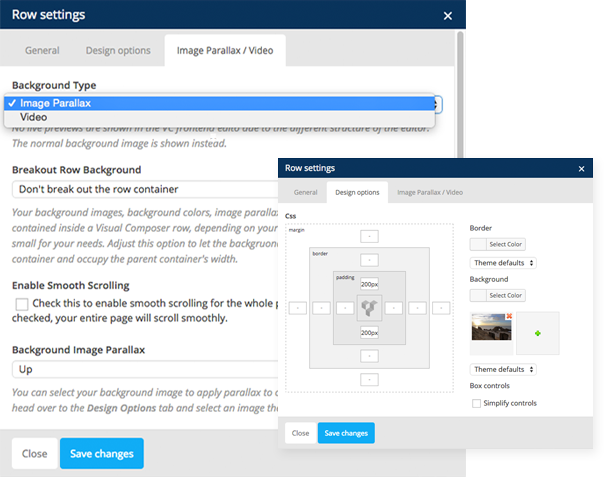
Just activate the Parallax Background plugin or embed the code into your WordPress theme and parallax background images will become available for Visual Composer rows.

Works in any theme as long as it is integrated with Visual Composer.

When you click on the edit button on your rows, you will see these new parameters added (the last two: Enable Background Image Parallax and Parallax Speed):

Just add a large background image to your row using the normal method, then check the Enable Background Image Parallax and you’re good to go.

Features:

  • Plug and play, just activate the plugin along with Visual Composer,
  • Can be embedded in your theme code, just add the files, plus 1 line of code to enable it,
  • Translation files included: English .mo and .po files,
  • Integrates well in the Visual Composer interface

Want to Include Parallax Background Images in Your ThemeForest Theme?

The code can also be embedded into your project. All you have to do is copy the files, then include the script in your code and it’ll work without any hassle. Instructions are included in the download package.

Download Parallax Background Image For Visual Composer Rows (Add-ons)

Radio Online App (Android)

Just a native android live streaming app, easy to costumize, Just add your station name, stream url and station image; then build with Eclipse & submit to Google Play store.

Features:

  • Pull Dj Name
  • Pull Artist and Song Name
  • Shows the number of people connected to your station
  • AdMob Advertisement
  • Full Native(Java)Application and SourceCode included
  • Works on wifi or 3G
  • Background Playback
  • Notification (display dj name and listeners number)
  • Supports Android 2.2 and Up
  • Step by step instruction includes

Download Radio Online App (Android)

Arwell – Viral media, vine and gag script. (Images and Media)

Description

Arwell is a 9gag like, viral media, gag and vine sharing application. It contains an extremely powerful and functional admin panel, where you can manage gags, categories, pages, users, comments and whole application.

Arwell is greatly documented and built on Laravel 4 framework and Bootstrap 3. It has facebook, twitter, pinterest and google plus share widgets, mostly ajax based and has a realtime notifications system.


Application Features

– Over 10 different color options, many more to come!
– Uses ajax for login, register, share gags and uploads.
– Realtime notifications system.
– Upvote/downvote posts.
– Multilingual ready.
– English and Turkish translations are already done.

User & Admin Features

Admin

– Admin can delete, feature, approve, disapprove gags posted.
– Admin can create, edit, delete, feature categories.
– Admin can create unlimited amount of HTML pages, where you can write HTML or use the WYSIWYG editor.
– Admin can manage, create, delete, ban or unban users.
– Admin can approve, disapprove, massapprove or delete user comments.
– Admin can change website settings on settings management. It supports features like: auto approve comments, auto approve gags, change facebook like url, add custom css, add analytics code, update logo, and more.

Users

– Users can register and login to the system.
– Users can share, comment and vote gags.
– Users can use their own control panel, which supports features like: change password, manage my comments.
– Users can get notifications realtime. (e.g Someone upvotes your sharings)

Want to take Arwell for a test ride?

Click here for the demo

Need documentation?

Like it?

If you have a bug report or an improvement idea, feel free to make a comment about it. I plan on releasing minor and major content updates every month!

Changelog

Version 1.0 – 06.03.2014 (update: e31d60f)

- Initial release.

Download Arwell – Viral media, vine and gag script. (Images and Media)

UCM Plugin: Advanced Todo (Add-ons)

UCM Advanced Todo Plugin Features

The Advanced Todo is an easy handy plugin, for the popular Ultimate Client Manager, which can make your daily todo’s set up easy. Forget the little tags and booklets, wherein write the significant todos with your partners!

With the help of Advanced Todo plugin you can see clear easy and fast your next todo. With drag&drop mode you can set easy the priority order, the inline edit mode give an option for change the wanted todo without loading a new page. It’s very easy: just double click on a todo to edit it and hit enter to save the changes. For shift a todo in finished status enough to click on the green tick icon on the line of todos. (Undo: click on the grey tick).

The Ultimate Client Manager can be found here.

v1.0.5     03/03/2014     Show info line on todos page and hide it on dashboard
Add todo owner to the info line if user has All todo permission
v1.0.4     03/02/2014     Done / Undone function
WhiteLabel bug fix is deleted, no more necessity, due to repair of theme code. Thanks, dtbaker! :-)
v1.0.3     02/23/2014     Todos menu | Filtering by users
Todos handling by user authorities (view, create, edit, delete)
Dashboard alert message if the plugin installation isn’t complete
v1.0.2     02/20/2014     Todos menu | Own todos only
v1.0.1     02/19/2014     Mobile view | Todo sort, edit and delete disabled in mobile view
v1.0 02/13/2014 First release | Dashboard todos | WhiteLabel bug fix


Installation Instructions

  • Download and install the Ultimate Client Manager on your website
  • Once UCM is working, come back and purchase this plugin
  • Unzip the downloaded files, and upload the plugin_webnpro_advanced_todo folder into your websites includes folder
  • To finishing the installation choose the Settings > Upgrade menu point, and click on the Manual Upgrade button. If you see All Good title on the end of webNpro Advenced Todo plugin’s line the plugin installation is successful.
  • Step on the Dashboard
  • If everything went well, the Todos menu point is appear, or rather the Todos widget (WhiteLabel theme only)
  • You can find the general setting at Settings > Advanced Todo menu point
  • That’s all, have fun!

Features

  • drag&drop sort
  • inline todo editor
  • dashboard widget for the own todos (WhiteLabel theme only)
  • todos filtering by users
  • own or other users todos handling by users authorities (view, create, edit, delete)

Planed features

  • todos coloring (coming in the next release…)
  • icons assign on several todos
  • longer description affixing with todos
  • time-limit assign on todos
  • alarms/reminds set up on todos (popup, email, dashboard)
  • daily todos sending in email in every morning
  • the full value mobile view
  • Google Todo synchronization
  • Any.do synchronization
  • todos printing
  • todos assign to customer, contact, job, or invoice
  • advanced filter
  • built in the system’s inner searcher
  • bulk delete
  • automatically upgrade function
  • and much more useful trifles…


Note: This is a plugin for the Ultimate Client Manager. Please ensure the latest version of Ultimate Client Manager (Lite or Pro) has been purchased and installed before using this plugin.

Please, refrain from downloading codes from unreliable sources, because by doing this you ignore the hard work of the developers!

I live and work in Hungary, so you can communicate with me in Hungarian or English, but my knowledge of the latter is far from perfect. :)

Please, visit my website at http://webnpro.com, follow me on Twitter (@webnprocom) or Facebook (http://facebook.com/webnpro)!

Donations

If you feel that I have not asked for sufficient payment for one of my works, I will gladly accept your extra offerings.

If you want to support one of my works, you can order it more than once. You can also send your individual donations to my PayPal account via [email protected], it will be greatly appreciated.

Support

You can email me if you need help regarding any of my products ([email protected]) or via the „Support” page on the product’s profile page. I’d be glad to help you if you have any questions in relation to my items. No guarantees, but I’ll do my best to assist.

I am looking forward to count you among my customers soon!

Kind regards

Zoltan Korosi (webNpro)


Download UCM Plugin: Advanced Todo (Add-ons)