Advanced Orders List (Prestashop)

This module improves Prestashop orders list allowing
individual and massive edit of orders quickly and easily.

Features
– Show and edit orders.
– Show and edit products on an order.
– Bulk edit of orders and products.
– Filter orders by date.
– Search orders by id, reference, client and more.
– Sort orders by id, reference, client and more.

To see how this module works, please, check the video preview or check the demo:

Live Demo: http://www.demo.prestanitro.com/admin5482/
User: [email protected]
Pass: demodemo

Download Advanced Orders List (Prestashop)

WordPress Responsive Crossword Puzzle Game (Miscellaneous)

Features

Memory Enhancement Game, attract more visitors to your website with “Crossword Puzzle Game”

  • Responsive Layout
  • jQuery Validation
  • Game Categories
  • Simple Installer
  • Simple Admin Settings
  • Text , image and audio clue

If you download it, and you liked it, please, don’t forget to rate this item!


This helps us a lot.

Installation

Read this installation documentation before install our product. This is a few step install process.

After reading this ,anyone can install this product easily. Unzip the package and following setps.

Step 1

Step 2

Step 3

Step 4

Step 5

Step 6

Step 7

Frontend

Backend


Support

We have a great supporting team, our 24×7 supporting team will answer to your all enquiries about the product, visit http://caduthuz.com

Download WordPress Responsive Crossword Puzzle Game (Miscellaneous)

UZY – Secure PHP User Management System (Project Management Tools)

UZY – Secure PHP User Management System is a powerful PHP CodeIgniter application that allows you to create a website and have users register on it. The system boasts plenty of features that allow you to provide content to your users, including a news system, mail system, page/content system and a feedback form. The system is translation ready so you can easily convert it into any language you like. It also comes with an advanced Admin Panel that allows you to take control of your system! We provide great support to all buyers so feel free to ask us any pre-sale questions in the comments or by email!

Create an account on the live preview and you will automatically be given Admin Status. Admin functionality is disabled for the demo.

UZY – Why is it secure?

  • Uses prepared statements so no SQL Injection!
  • Protects against CSRF attacks!
  • HTML Filter to protect against XSS attacks!
  • Built on powerful CodeIgniter Framework that has been tried and tested by millions of developers
  • Passwords are encrypted using PHPass Library
  • Captcha enabled on pages to prevent spam!
  • IP Blocking enabled which allows you to blacklist IPs from logging into your system

Social Login Included!
You can enable users to login with their Twitter, Facebook or Google accounts for the UZY System. You can also turn off Social Login in the Admin Panel if you would rather users register directly on your system.
Note: In order to enable Social Login, you will need a PHP Version 5.3+ in order to interact with the Social Network API libraries. Everything else should work on PHP 5.0+

Feature List

  • User System
    • Disable/Enable Registration
    • Users sign up providing their email, date of birth, name and a password.
    • Passwords are encrypted with PHPass Library
    • Sign in using your Twitter, Facebook or Google accounts
    • Forgot Your Password feature
    • User Groups which have different access levels (Member, Banned, Moderator, User Admin and Admin).
    • Remember Me feature
    • User’s have avatars
    • Includes User Panel that allows user to update their information
    • User can upload their own avatar (can be disabled in admin panel)
    • User can change their password in User Panel
  • News System
    • Can create news posts that provide information to your users on site updates.
    • Can view news posts in categories
    • News Posts can have comments (can be disabled per news post or globally)
    • News Comments Captcha protected
    • Moderator functions to delete comments
    • Share News Posts on Twitter and Facebook (buttons auto-generated)
    • News Posts use a WYSIWYG Editor and can add images and video (TinyMCE)
  • Mailbox System
    • Mailbox System allows users on your system to send messages to each other.
    • Get notifications when you receive new mail
    • View replies for each mail created (paginated)
    • Users can delete mail
    • Block list allows users to block other users from contacting them
  • Page System
    • The Page System acts as your Content Management System allowing you to add any number of pages to your site.
    • Displays newest page on the Page Index
    • Pages can be categorized
    • Pages can be restricted to logged in users only
    • Pages can be restricted to certain User Groups only (admin can view all)
    • Page voting to show how useful a page is (can be disabled)
    • Users a WYSIWYG editor and pages can have videos and images added
  • Contact Page
    • Your own contact page allows you to receive feedback from your users. You can view the feedback in the Admin Panel.
    • Captcha Protected to guard from bots
    • Can force users to be logged in in order to view Contact Page
  • Site Widgets
    • Comes with 3 Widgets that can be edited in the Admin Panel.
    • Twitter Widget to display your most recent tweets using the Twitter API (direct feed)
    • News Widget which displays the latest news posts and links to them
    • Advert Widget which allows you to add your own advert code
    • Widget options allow you to disable each one, as well as make them display on every page or only the frontpage.
  • Social Icons
    • Social Icons used to link to your other sites and sections.
    • Each can be disabled in the admin panel if you do not need them to be displayed.
  • Admin Panel
    • The Admin Panel can be accessed only by Moderators, User Admin and Admin User Groups. A link is displayed under the Home tab.
    • Can change site name, site email and site logo.
    • Can change the site theme by selecting one of the 7 we have created for you; you can easily add your own too!
    • Option to disable Social Login
    • Option to disable Page Voting
    • Option to disable Avatar Uploading
    • Option to disable Registration
    • Option to disable News Comments
    • Option to allow guests to use the Contact Page
    • Option to disable the entire Mailbox System
    • Social Media Settings which allow you to enter your Twitter Account to display tweets in the Twitter Widget, as well as setup your Social Login Keys to enable Social Logins to the UZY System.
    • Widget Settings allow you to edit the behavior of widgets in the sidebar. Options include to fully disable a widget, to show it on every page or to only show it on the frontpage. You can also enter your own advert code for Google Adsense or any other type of advert you wish to display.
    • Add News allows you to add a news post to the site; includes WYSIWYG editor. Upload the thumbnail and main news image, option to disable comments and select your news category.
    • Edit News
    • Add News Category
    • Edit News Category (Delete too)
    • Add Page allows you to add a new page to the Page System; includes a WYSIWYG editor and you can also restrict pages to logged in users or particular user groups.
    • Edit Page (Delete too)
    • Add Page Category
    • Edit Page Category
    • Add Theme – allows you to add your own theme to the site.
    • Edit Theme
    • Add User to the system directly in the Admin Panel
    • Edit User (Delete too)
    • Search User – search by email or IP address
    • IP Blocking allows you to block users IP address from logging into your site.
    • Add User Group- add your own custom User Groups that have privileges
    • Edit User Group (Delete too)

Update Log

None

Download UZY – Secure PHP User Management System (Project Management Tools)

Whitelabel WordPress Theme Options Panel (Miscellaneous)

Whitelabel is a state of the art script that allows developers to add quick and easy powerful options to their WordPress Theme or Plugin. Whitelabel is so easy to use and so fast that is suitable for both experienced developers and beginners.

With Whitelabel your themes or plugins will look gorgeous and users will feel comfortable. The user interface was designed so that users will rapidly operate it without programming skills needed. Friendly user options types such as number sliders, button groups, image groups, select boxes with search, multi-select boxes, all of them and many other designed only for user comfort.

Features:

  • 26 Option Field Types
  • Seamless integration in WordPress (3.8+)
  • Integrated with WordPress Color Schemes
  • Unlimited Pages and Options
  • Unlimited Backups & Restore
  • Less than a minute activation
  • Fantastic Customer Support
  • Incredible User Experience
  • Flat & Modern User Interface
  • Extremely lightweight
  • WordPress proprietary functionality (Media Upload, Color Picker)
  • 100% White Label

Extended License is required when purchasing this for integration with future Theme Forest or Code Canyon Products.

For demo preview, please login here: http://demo.curlythemes.com/whitelabel-plugin/wp-admin

Username: demo
Password: demo

Option Fields:

  • Sections
  • Titles
  • Info Boxes
  • Dividers
  • HTML Fields
  • Text Fields
  • Textarea Fields
  • Editor Fields (WordPress Editor)
  • Single Checkbox Field
  • Checkbox List Field
  • Radio Buttons
  • Classic Select Boxes
  • Select Boxes with Search
  • Multi-Select Boxes
  • Switches
  • Upload Fields (WordPress Media)
  • Mini-Upload Fields (WordPress Media)
  • Number Fields (Slider)
  • Button Groups
  • Image Groups
  • Classic Typography Fields
  • Google Fonts Typography Fields
  • Color Picker (WordPress Color Picker)
  • iFrames
  • Back-up & Restore Field
  • Reset Field

Download Whitelabel WordPress Theme Options Panel (Miscellaneous)

DooJobs – Job search Affiliate Website (PHP Scripts)

The DooJobs – Indeed Affiliate Website is for anybody wanting to run their very own job search website to create traffic using Indeed as the source job provider.

EARN A PASSIVE INCOME

As a bonus join the Indeed Publisher Programme ( Click here to create an account ) to earn money every time a visitor clicks on a sponsored pay-per-click link on the job-site, all url’s on the DooJobs – Indeed Affiliate Website points to the job-site ( where all jobs are advertised ) or employers site ( this can be set in the admin area ). Add any type of affiliate banners or Google ad-sense at the top and side of your new DooJobs – Indeed Affiliate Website.

INSTALLATION

The DooJobs – Indeed Affiliate Website is very easy to install using the one page installer, just enter you database details, Indeed API Key, the web site url the script will be installed on and a few clicks, and you are good to go! Just a few more tweaks in the admin area and you can rock and roll! I offer FREE INSTALATION if needed.


REQUIREMENTS

  • mod_rewrite (come as standard with most web host)
  • 1 Mysql database
  • PHP 5.4 or higher
  • curl
  • Indeed API Key

Important: If you do not have the above requirements this script will not work.

Note: Before buying this script sign up to the indeed publisher programme to get your api key Visit Indeed here

DOOJOBS – UNIQUE FEATURES

  • Easy one page installer
  • FREE INSTALLATION – Just send me an email through my profile page with details..
  • Script automatically update jobs through indeed api, no need for cron jobs!
  • Manually add a job category to be shown on home and category page!
  • Basic and advance job search
  • Set Default Country for job search
  • Allow or disallow visitors to set country for job search
  • AJAX Powered admin
  • Select a country for jobs
  • Add a category for featured jobs on home page
  • Jobs listing ordered by days/time ago
  • Pagination
  • Easy Admin area (view screen shots, no admin demo at present)
  • Admin forget password reset
  • Advertising sections/space on website- Top and side: place Google adsense or any affiliate banner in the spaces provided
  • Friendly URL’s
  • Add meta details in admin area – keywords, description and site title
  • Add your api key in admin area
  • Easiliy change admin details
  • Responsive Design – mobile and tablet friendly
  • Add/Edit/Delete pages: About Us etc..

CREDIT

  • Foundation 5
  • Indeed API

CONTACT ME

If you have a question or want FREE INSTALLATION on this product, you can email me here!

Regards, Freddie

Download DooJobs – Job search Affiliate Website (PHP Scripts)

Web Font Revolution (Add-ons)

Use Web Fonts Anywhere on your Website

Web Font Revolution puts all of the Google Web Fonts (650+ and counting) at your fingertips, with a smart realtime font browser for your editor, the WordPress customizer, or as a public toolbox for individual display on any post or page.

The plugin will support a new font provider with each plugin update, including TypeKit, Font.com, and more, making thousands of new font families accessible across browsers. Effortlessly.

From the Mobile Up

Web Font Revolution is also built with mobile devices in mind. It is both responsive, and retina-ready. Font browsing and download are optimized to the last byte, making for a fast and seamless experience regardless of your connection speed and form factor.

Extensible

Last but not least, Web Font Revolution is designed in accordance with coding best practices and is extensible, with clean and well-documented code, and a full API browser. Create your own stylesheets, or embed advanced font support into your brand new WordPress theme in a snap. It is simple as that.

Features

  • Live Preview
  • Retina-ready
  • Responsive
  • Optimized for extreme speed and performance
  • Compatible with WooCommerce, Jigoshop, and countless other plugins
  • Translation-ready
  • Supports WPML
  • Clean code
  • Full API documentation
  • More to come

Download Web Font Revolution (Add-ons)

FAQPlus – WordPress FAQ Plugin (Utilities)

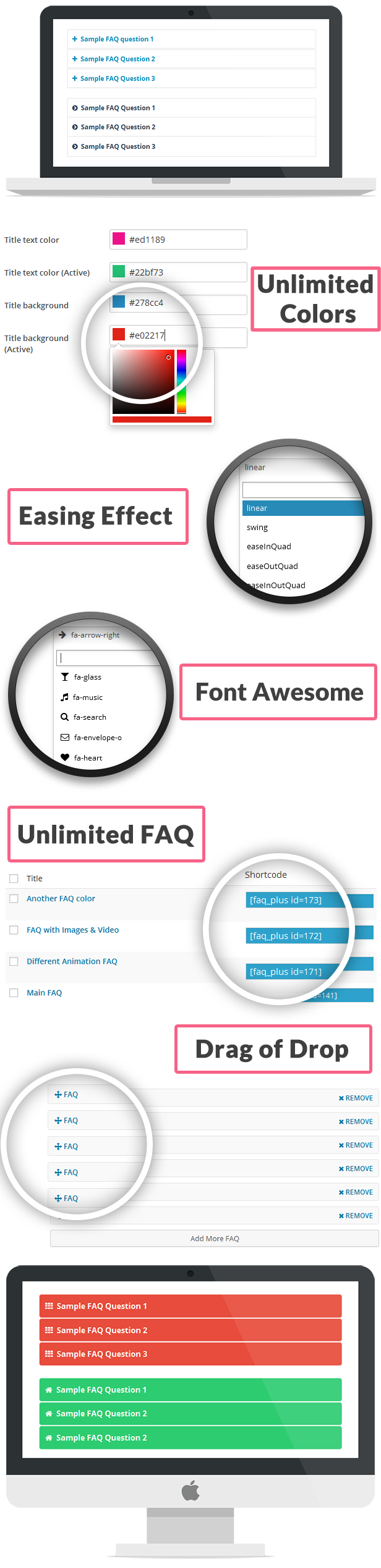
FAQPlus is a complete Frequently Asked Question plugin for WordPress which has customizable CSS for every FAQ group with 25+ easing animation effect. FAQplus can be displayed anywhere in Post, Page, Widget or Theme by Shortcode.

It has unlimited color variation and Font Awesome to display the FAQ more clean and standard. FAQPlus support text,image,videos with Drag & Drop to re-order the FAQ Items.

WordPress Backend Login

URL: Login URL
User: demo
Password: demo

Features of the plugin:

  • Multiple FAQ creation
  • Unlimited colors
  • jQuery Easing effect
  • Font Awesome
  • Custom CSS
  • Support Images & Videos
  • Animation Speed
  • Shortcode Powered
  • Responsive Layout
  • Place Anywhere with Shortcode(Post,Page,Widget,Theme)
  • Drag and drop to re-order FAQ Items
  • Cross Browser Compatible

Full Options Backend Panel


Download FAQPlus – WordPress FAQ Plugin (Utilities)

iProtect – Display content after authentification (Miscellaneous)

iProtect – Display content after a successful authentification

You’ve got a very private content which only a few people should see? No problem! With this cool script you’ll be able to protect it from others!

Import only one line into your .php file and it will do the magic! This is the line:
<?php require_once(“iprotect/class.core.php”); ?>

From now on iProtect will protect the displayed content in the .php file and will always require a password to display the content!

The unique features are:

• Only ONE line is required! (<?php require_once(“iprotect/class.core.php”); ?>)
• Add unlimited account combinations to the existing array which will be able to authentificate at the authentification-page!
• Session-management is included: This means, you can setup a interval how long peoples will stay logged in after an successful authentification! Currently it’s set to 5 seconds, but in our VERY EASY DOCUMENTATION you’ll understand in a second how to change it to another time, very simple, i promise! :)
• Redirect after authentification to any favour URL or just refresh the site with the string “self” :P (Also very simple to use in our VERY EASY DOCUMENTATION)
• Using AJAX to authentificate people, it doesn’t require any reload: Saves bandwidth!
• Using Bootstrap as authentification template! (See our screenshots for a preview, looks awesome for an authentification!)

So why are you still waiting? This script will always protect content from you!

Download iProtect – Display content after authentification (Miscellaneous)

Portfolio Wall | html – css (Animations and Effects)

Portfolio Wall | Joomla module 2.x 3.x is a module which make you can create wall of your works or clients or team or any thing other as you want, with an awesome 3d hover effect …

Some Examples

Feateures

  • Choose from
    ( 2 – 3 – 4 )
    columns.
  • Responsive layout
  • 3D
    hover effect
  • PrettyPhoto
    lightbox

Sources & Credits

Special thanks to :

Images:
http://unsplash.com/

&

prettyphoto

The images not included in the download package.

Note..!! PrettyPhoto not included it is just to know some of what you can do by this Code.

Download Portfolio Wall | html – css (Animations and Effects)

Bulk PDFand XPS Converter (Windows)

It’s a PDF and XPS converter. Its will convert your any kind of Docx file to pdf or xps file.
There are some main functionality are below.
1. Single file convert docx to PDF
2. Single File Convert docx to XPS
3. Folder conversion docx to PDF or XPS format
4. You can convert a directory where a lot of DOCX and you want to convert at a time.
5. Convert large Amount of PDF or XPS at a Time from DOCX just select a folder where contain large amount of docx file

Download Bulk PDFand XPS Converter (Windows)

JoPolaroid joomla gallery (Galleries)

JoPolaroid is a joomla module can be used as gallery and it have options to add external link and content at the module interface,

I will wait for your rating at this
If you interested in joomla modules check my other works for joomla at my portfolio link.
My Portfolio

Features

  • Responsive layout
  • Support Joomla 3.x
  • Support Joomla 2.x
  • HTML5 + CSS
  • Custom content optionally
  • and moOoOore …

Credits :

    ll

  • UnSplash (images)

Note: Images are not included in the download file

Thanks for reading this.

Download JoPolaroid joomla gallery (Galleries)

Word Slider iOS Game for iPad and iPhone (Games)

Word Slider is iOS game for iPhone and iPad. Supports iOS 7. It has 8 different languages (English, Spanish, Bulgarian, Danish, Italian, French, Russian and German). It has built in Game Center and Banners for your ads. Social Networks are also available. The game is all about finding a words by sliding your finger across the screen.

Question: So how many words can you incorporate in the game so the user doesn’t quickly get bored?
Answer: There are 300 different levels for each language. The words in the grids are pre-generated randomly with the help of official dictionaries. The levels are played in the following order 1,2,3,4,5….300 and after all of them are played, they are reseted, so the levels can be played again from beginning. It is almost impossible for the user to notice the similarities after 300 games. The levels are loaded from pre-generated xml files. There is a possibility to give you brand new set of levels on your request on a certain language

Built In 8 Languages

The Game is completely translated in 8 languges with option to easy add more.

English, Spanish, Italian, French, German, Danish, Bulgarian, Russian

2 Game Modes

Normal Mode: You have 2 minutes to find as much words as you can.

Extreme Mode: 2 Minutes to find as much words as you can while distractions are trying to slow you down. They can be changing the color of the letters, shaking letters and falling stars from the top of the screen.

Free & Full Versions

Free Version: In free version the player has 60 seconds to play, there will be banners at the top of the screen, after finishing a round he will be not able to see all words in the grid only the biggest one and there will be no Combo words (What is combo words please see below).

Full Version: Every feature that Free version does not support the is available here in full version.

Combo Words

There are combos which give extra seconds in order to help you out. If you find 3 words in a row and these words have the same length you get bonus seconds. Depending on how long are the words more seconds will receive the player.

In-App Purchases

There are in-app purchases implemented. If you want to upload the free version you can activate the in-app purchase to enable players to buy the full version of the app, or you can upload both separetly.

Game Center

Leaderboards and Achievments are implemented in the game.

Social Networks

Facebook, Twitter and Share score by email are supported in the game.

Download Word Slider iOS Game for iPad and iPhone (Games)

inTime – Domain Sale & Coming Soon WordPressPlugin (Miscellaneous)

inTime is a responsive, modern and clean domain sale/coming soon WordPress plugin. This minimal design is being packed with a countdown timer, social icons and about page where you can write a little bit about yourself and add other information.

Features

  • WordPress 3.8+
  • Allow access filter by IP, roles
  • Enable/Disable coming soon on some specific pages.
  • Responsive layout
  • Retina display ready
  • Full screen image or image slider background
  • Full screen YouTube video background
  • JavaScript Countdown Timer
  • Social Links
  • Compatible with most modern browsers
  • Auto update via WordPress admin

Download inTime – Domain Sale & Coming Soon WordPressPlugin (Miscellaneous)

Weather Widget One (Widgets)

Weather Widget One is a simple plugin for displaying weather conditions and forecast for places across the world.

Highlight Features

– Can be displayed as widget or directly through shortcode
– Change any font by using Google Fonts (Over 600 Fonts)
– Color Customizable (Including the Weather Icons and Buttons)
– Auto Detect user location through HTML5 Geolocation, IP Address or mixed mode
– Search location weather by US Zipcode, UK Postcode, Canada Postalcode, IP address, Latitude/Longitude (decimal degree) and city name
– jQuery, AJAX, cURL, JSON, Cache
– Responsive Wrapper (minimum recommended width ~200 pixels)
– Comes with en_US .po file for translation

Installation

From your Admin Panel go to Plugins -> Add New -> Upload -> Browse and pick the Weather Widget One archive file.

Click “Install Now” button.

Click “Activate Now” after the plugin has been installed.

A new menu should now appear in your Admin Menu called “Weather Widget One”.

Setup

From Dashboard go to Weather Widget One -> General Settings.

Enter you API Key in the “API Key” field.
If you don’t have API Key you can obtain one from http://developer.worldweatheronline.com/member/register

Displaying the plugin on the front-end

The plugin uses the shortcode [weatherwidgetone].

From Dashboard go to Weather Widget One -> Shortcode.

Adjust the settings there to your liking and click “Save and Refresh Shortcode”.

The page will refresh and your shortcode will be re-generated in the “Generated Shortcode” field at the bottom.

Copy the content from “Generated Shortcode” field.

Paste the shortcode in the post or page where you want the plugin to be displayed.

If you want to display the plugin as widget – go to Dashboard -> Appearance -> Widgets -> Weather Widget One and place the shortcode in the “Paste shortcode here” field.

Credits

Forecast Icons by: http://forecastfont.iconvau.lt/
General Icons by: http://fortawesome.github.io/Font-Awesome/
Forecast by: http://www.worldweatheronline.com/

Download Weather Widget One (Widgets)