This plugin is to enable Payza and EBS payment gateway on Easy Digital Downloads plugin.
Features:
- Test mode for the EBS.
- You just have to specify secret key & account number for EBS.
- For payza enter email id and scruirty code.
Blancer.com Tutorials and projects
Freelance Projects, Design and Programming Tutorials
download PHP, ASP.NET, Java and Javascript from CodeCanyon – the marketplace for code scripts and snippets.Javascript, Java, Program, Code, Snippet, Script, Dev, Development, Codebase, MySQL, Class, Widget, System, CMS
Slot Machine – The Fruits is a HTML5 casino game. Enjoy this coloroued slot machine with classic fruit symbols!
The ZIP package contains the game with 1024×768 resolution that automatically scales to fit current screen device and all the assets to grant complete game customization.
The game is fully compatible with all most common mobile devices.
Sounds are DISABLED ON MOBILE DEVICES to avoid compatibility issues but can be easily enabled (read Enable Sound section in readme file). Anyway we can’t grant full compatibility on all mobile devices if this feature is enabled.
More info into help file (see documentation).
Meme Generator can be used to create funny and viral Meme Images.
Meme – Add caption to your images.
Browse the most popular memes, create your own meme and caption your favorite character.
You can add caption to any photo in your mobile and make custom memes.
Have Fun!
Features
Add Caption in Photos
Add Meme in any photo in your mobile
Add Caption to existing popular Meme’s
Add Caption in Top and Bottom of Image
Share photos via Email, Facebook, Twitter
Users can share photos with friends using social networking sites, email and can even save photos
Supports Popular image formats
Admin can add photos, images and pictures in HD, png and jpeg format
Add banners or Admob code
Monetize your Android App by adding banners or Admob code
Full Source Code
We provide full source code with video help file
Help File
https://www.youtube.com/watch?v=OQA2g5Y-Joc&feature=youtu.be
Live Demo / Download APK:
http://mobilemerit.com/meme-generator/
Support:
http://mobilemerit.com/contact-us/
For custom Android App Development – http://www.mobilemerit.com
WooCommerce styler is a very powerful and easy to use plugin to style your WooCommerce site.
You can easily style Shop, Product, Cart & Checkout pages individually.
For example you can completely customize the look of shop pages by changing the fonts, colors, sizes, borders of buttons, badges, images, prices, texts, star rating colors and more.
Changing the values of each element is very easy as our plugin provides you with very powerful and simple to use sliders, toggles, colorpickers, tabs and more.
Everything is so easy to use that even an individual with no knowledge of CSS can easily style it.
For Advanced users we gave you the option to use CUSTOM CSS Element to add your own css code.
If you have any questions about the plugin or you need additional functionality in the plugin, please leave a comment or send us an email at [email protected].
iDemo, is a Joomla! 3.x component. This extension makes you able to have a full functional demo frame on your website. There are various information which can be presented by iDemo in your website’s front-end such as demo name, image, description, demo link, purchase link, version and creation date. Using iDemo is too easy and does not need any coding knowledge.
Some of iDemo features:
Fully responsive
BootStrap Compatible
FontAwesome Support
Easy to Use and Costomization
Dedicated Joomla! Template+
Ongoing Support
Need to know more about iDemo? Study its online documentation at:
https://shahrokhi.me/documentations/idemo
Etsy360 is a smart and easy to install WordPress plugin that allows you to display your Etsy Shop Listings on your WordPress website. This is a great alliterative to Esty Mini. As you make changes to your Etsy Shop all newly added or updated items are updated in realtime on your website or blog.
Etsy360 is intended to be an extension to your shop. It’s designed to give your users more of an e-commerce experience when visiting your website or blog.
It’s important to have more than one place to promote your products. If you don’t have a website, than you could be missing sales. Having a website or blog is another medium for you to drive traffic and build sales. It’s been proven that having more areas that promote your products leads to more sales.
Easy, Simple & Fast
This tool which will help you pick any color you want from any page or image.
You decide whether you want the HEX or RGB color code, the tool will get it for you!
Do you hesitate about a color about fitting with another color?
Then don’t wait longer, just test it with the Gradient Tester.
This tool contains the following features:
Suggestions & Bug Report
Do you miss something in this application or did you find a bug?
Then please don’t hesitate and contact me, i would love to help you out.
Runtime: .NET
This plugin allows you to create links to your website, and then track hits (clicks) and WooCommerce orders (sales) made by each link.
You can use it every time you want to share your website on social media, newsletters or any other places, just to see which way is making more sales, more profit.
When user comes to your website via entry link you shared, this plugin saves a cookie to a browser so when user is making an order later on, we can track where from and when customer came to your website.
Basically it works the same way as simple affiliate system.
Usage workflow looks like this:
Features:
Call Message Blocker Template Features
Description
Call Message Blocker Template can be used by Android Developers for providing the design and good implementation on Call Message Blocker app for creating own Call Message Blocker app or to the employers.
This template will provide you the design and screens flow ready for Android app only need to write logic/code to block calls from blacklisted numbers and messages.
Developer only need to write the code for block calls and add entry in app to show in history in Call/Messages tab.
Right now the template will provide all the hardcoded call numbers, messages and contents from content manager class that have written in code.
Admob banner ads added in most of the screen only you need to put Admob id to see ads on your Call Message Blocker app you ready.
Search feature provided to search the blocked records on basis of Call, Messages, Month-Year and Date.
Settings provided for ON/OFF the different settings preferences to act the app accordingly.
Template having Theme support and 5 default/free themes enabled and can use.
Easy to change the colors/graphics, by simple replacing the color code and images, app logo and name of app.
This template needs one third party library and that is of Google itself, named as : Support App Compatibility Library “android-support-v7-appcompat”
Slider with Quick Menu Options:
If you have question, please first visit the Support Tab for more information and FAQs or contact me via contact form provided in this site.
Before purchase this item please read item features and details what item is providing like is App Template or full app.
If you have any questions/doubts in mind about the item features and working, please contact and ask. I will be more happy to clear your doubts.
Thanks.


The Restocking Alerts for WooCommerce plugin gives your customers the ability to subscribe to products that are out of stock. Then, once the item is replenished, they will receive an email notification letting them know it is back in stock! This feature can be used to help encourage additional sales and repeat visits to your shop.
This plugin works alongside your WooCommerce store and encorporates the settings directly into your WooCommerce settings. The familiar layout and easy to use options will make it simple to setup and use in your store. (Requires PHP4+)
Triggers When EditingWorks on all three methods of editing products: full edit, quick edit, and bulk editing. |
Variation SupportWorks with all types of products including the specific variation the customer is looking for. |
|
Simple FormDoes not require much work on customer’s behalf, only needs a valid email address. |
Email TemplatesUses built in WooCommerce email templates that can also be overwritten by a file in your theme. |
|
Statistics PageSimple bar graphs let you easily see what your most desired products are and how often customers signup. |
Registration ListView all of the current resgistrations directly on the dashboard including whether or not they’ve been notified |
For a complete list of changes, view the full version log.
Please post all questions or requests for support either here in the comments for this file or visit the support forums to find more answers or seek support. Messages and emails may be missed.
WooCommerce Extended External Productsis a plugin for WooCommerce which allows you to create an extra buy now button on your external products’ pages. The extra button can be
created using your own artwork, such as a logo to the site where the product is located. This helps communicate to the customer that the product is located on another website.

Connect to your server’s FTP
Copy the “optart-woocommerce-extended-external-products” folder from the zip into the “wp-content/plugins” directory
Login to your WordPress administrator panel
Click the “Plugins” tab and you’ll see your newly installed plugin – activate it.
Navigate to your website’s WordPress Admin panel.

Make sure WooCommerce and the Extended External Products plug-in are installed and activated.

In the left panel of the admin page, hover over the “products” button, and then select “External Sources”.

Here is the page where you add your custom “buy now” buttons. To create one, enter a name, slug, description, and the image/logo you want to be displayed as your button. Then select the “Add New Tag” button.

You should see that a new tag was generated. Now, navigate to “products” and select the external product you would like to add the button to.

Once on the “Edit Product” page, on the right sidebar, you should see a box labeled “External Sources”. Type in the name of the source you created and select “Add”.

Update the product page, and you will now see the button artwork you uploaded on the page. When selected by a customer, it will link to the product URL.


…is included in the package.
Here you find a ready to use Game User Interface built with construct 2 (you need construct 2 to open and edit the file!). You can start building your game immediately and export it to every platform, like Android, IOS, Windows 8 Phone, Facebook etc.
) Just need to be set up in the cloud compilier CocoonJS
) Values will be saved on local device, no webserver needed!
You’ll find in the package the link to download the GUI PSD file & font. Both files are free to use! Moreover the construct project file, the HTML5 files and the used elements as sprites are included.
V1.1
V1.0
Just write a comment and i try to include it!


With this attention-grabber jQuery Plugin, you can collect your visitor’s email address on your website. It has a lot of optional customization options, but you can setup simply in minutes. Using the latest CSS3 animations with AJAX validation the Signup Form will build your email list effectively in no time.
You can use it with MailChimp, but if you have any other email database manager, you can use it with that as well. In that case, the plugin will send you a message about every subscription with the user’s email address, therefore you can easily add it to your own email list manager. You can also use this function as a signup notification.
If you have any question or feedback, please feel free to email via my user page contact form.


Check out the demo pages:
I owe a big thank you for the following websites:




Demo User: demo
Demo Password: demo

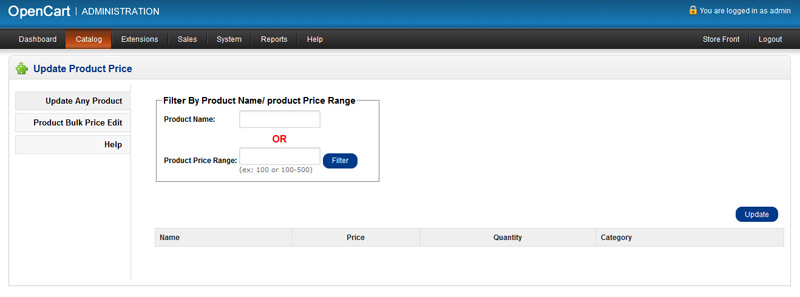
“OpenCart Bulk Price Update” plugin allows OpenCart Store Admins to Filter Products by Product Name or Product Price Range and Update Products as Bulk “Price”, “Quantity” and “Category”. Store Admin can Update all Products Quantity and/or Update all Products Price at a time and Update All Product Price by Percentage with Percent condition to Increase or Decrease
If you are tired of updating prices and quantity one by one, “OpenCart Bulk Price Update” plugin will help you lot. You can put flat price amount or can set a percentage to increase the selling price amount for all of the products selected.
It is simple but effective extension for OpenCart which allows you to easily bulk update your entire products prices within few seconds.