Accordion Slider – Responsive WordPress Plugin (Sliders)

Accordion Slider is a fully responsive and touch-enabled WordPress plugin that combines the functionality of an accordion with that of a slider.

Some of the features:

  • Fully Responsive – automatic or custom responsiveness.
  • Touch-enabled – touch-swipe and tap on mobile screens, mouse drag on desktops.
  • Dynamic Content – load images and content from posts, galleries and Flickr.
  • Automatic Updates -update the accordion directly from the Dashboard.
  • Pagination -add as many panels as you want without worrying about screen space.
  • Animated layers – set layers to display when the panel is opened, or when it’s closed, or all the time.
  • Caching – accordions are automatically cached for improving the load time.
  • Inline help – instructions directly from the admin area.
  • Load anywhere – in posts/pages, template PHP code, or widgets.
  • Smooth animations – uses CSS3 transitions and RequestAnimationFrame.
  • Retina-ready – specify a retina version for each image.
  • Swap image – change background image when panel is opened.
  • Keyboard and mouse navigation – navigate using the keyboard keys or mouse wheel.
  • Lazy Loading – load images only when they are viewed.
  • Lightbox – FancyBox is included and integrated with the Accordion Slider plugin.
  • SEO-Friendly – all content is visible to search engines.
  • Deep linking – link directly to panels inside the accordion.
  • Breakpoints – change the accordion slider settings at different screen sizes.
  • Powerful JavaScript API – control the accordion slider programmatically or add/remove content at runtime.
  • Modular architecture – easily strip out code to reduce the JavaScript file size.
  • Multisite – compatible with MultiSite environments.
  • Import and export – move accordion sliders from an installation to another one
  • Action and filter hooks -highly extendable by developers.

If you have any questions or need assistance with integrating the Accordion Slider plugin in your site, please feel free to ask; I will gladly help you. Also, if you like this script, please take a moment to rate it. Thank you! :)


Changelog

v 1.0.1 ( 5 April 14 )
* fix: disable lightbox when the accordion is swiped

v 1.0.0 ( 3 April 14 )
* first release

Download Accordion Slider – Responsive WordPress Plugin (Sliders)

Improved Dashboard (Utilities)

About Improved Dashboard

Improved Dashboard job is improving the admin control panel, It gives you some features that makes dealing with WordPress control panel much easier, faster and more comfortable, Like having drag & drop installations, Remove all menu items / widget items at once … And many other features, You can turn them on/off from a simple options page.

Supported features

General

  • Scroll up icon
  • Select all / Deselect all in screen options

Posts

  • Double click for quick-edit
  • Floating publish panel
  • Drag & drop uplaod for featured image
  • Edit in new tab (popup) batch action
  • Post status color indicator
  • Change permalink settings in popup

Media

  • Ratio locker
  • Drag & drop upload

Widgets

  • Remove all widgets button
  • Close / Open all sidebar areas
  • Floating sidebar areas

Menus

  • Remove menu with children button
  • Remove all menu items
  • Collapse / Expand all menu children / parents

Themes / Plugins

  • Themes / Plugins drag & drop upload and installation
  • Rich code editor
  • Themes / Plugins fixed files column
  • Drag & drop upload for theme’s background / header

Users

  • Random strong password generator

Try It Yourself!

You can access the Demo with these credentials

Username: admin
Password: admin

Languages

  • English
  • Arabic (With RTL Support)

WordPress Versions Support

The plugin has been tested on:

  • WordPress MU 3.8
  • WordPress 3.7
  • WordPress 3.6
  • WordPress 3.5
  • WordPress 3.4
  • WordPress 3.3

Support

Please visit our support website

Change Log

Version 1.0.0
- Improved Dashboard has been released

Download Improved Dashboard (Utilities)

t2search (Add-ons)

Searching should be easy. Period.

With t2search you don’t need to trigger search by clicking on search box, typing keyword and confirming search, all you need to do is just type on your keyboard (hardware keyboard, touch keys are not supported), and you will get search result in a moment (and it looks beautiful)

Here you can find more details about t2search plugin
http://jewelleries.co/microsite/t2search/

Download t2search (Add-ons)

Social Business Directory v1.0 (Social Networking)

With our script Social Business Directory will make an excellent social environment for the customers of the companies so they can express their opinion by comment accordingly choose the comment is positive, neutral or negative and can appreciate how much the company was useful for them.

Features

  • Bootstrap 3 ready
  • jQuery sortable plugin ready
  • SEO and Friendly urls
  • Search engine (find easy company by name or some keyword)
  • Template engine (included: SBD_default theme)
  • Multi language engine (included: English, Bulgarian)
  • Full admin panel
  • jQuery infinity scrolling (when user scroll bottom load more companies)
  • Home page ajax sorting (top, popular or newest companies)
  • Categories for easy sorting what user search
  • Accounts management (for most security, admin can get user location, browser and os info)
  • Social media profiles (for companies)
  • Google show in image company address
  • Unuqie short key validation (Eg: http://demos.eliteworks.info/sbd/company/EliteWorks)
  • User can manage his/her companies
  • Rating system (from 1 to 10)
  • Comments system (whit 3 types: positive, neutral and negative)
  • and much more…

Demos:

System administrator can do anything.
Administrator can`t delete anything.

Download Social Business Directory v1.0 (Social Networking)

Pingoholic – Website ping tool (Social Networking)

Pingoholic is a website pinging service similar to pingfarm and pingomatic, it allows you to ping your website or pages to inform search engines that your content has updated.

Features include

  • RPC pinging
  • Stores ping count in a json file
  • Easy installation
  • Easily add new services
  • Language file for easy translation
  • Bootstrap 3 based design

Changelog

– none yet.

Download Pingoholic – Website ping tool (Social Networking)

Simple 3D Coverflow WordPress Plugin (Galleries)

What is Simple 3D Coverflow WordPress Plugin?

Simple 3D Coverflow WordPress Plugin is a fully responsive media 3D coverflow wordpress plugin that allows you to display media content with an unique original layout from a 3D perspective. It’s perfect for any kind of presentation, for anyone that wants to deliver a great impact on their visitors. It runs on all major browsers and mobile devices like iPhone, iPad, IOS, Android and Windows 8. Also supports unlimited categories and each category can have any number of thumbnails.

Simple 3D Coverflow WordPress Plugin main features:

Responsive / Fluid layout with autoscale function.

Mobile and desktop optimized (iPad/IOS demo).

Scroll and swipe functions for the desktop and mobile devices.

Mouse Wheel support – navigation with mouse wheel scrolling.

Keyboard support – the left and right arrows can be used for navigation through the thumbnails.

Optional Categories Menu.

Support for unlimited categories and each category can have any number of thumbnails.

The option to start at a specific category.

Customizable thumbnails size and topology geometry.

Customizable hover effect for the side thumbnails.

Customizable description text for the center thumbnail.

Dynamic or static tooltip for the center thumbnail.

Customizable controls – each button and scrollbar component can be changed.

Customizable reflection for the thumbnails.

Optional and customizable Shadow Box Gradient for the thumbnails.

Custom action for the thumbnail click.

Powerful API included.

You can include multiple instances on the same page.

Slideshow autoplay.

Responsive / Fluid layout for the coverflow Lightbox.

Image, youtube, vimeo, iframe lightbox support.

Zoom and panning support for lightbox images.

Optional lightbox slideshow button, time and autoplay.

Customizable border and background for the lightbox.

Lightbox keyboard support – the left and right arrows can be used for navigation.

Three skins included along with the psd files.

Three skins included along with the preset configurations.

Admin panel video tutorial demo:


Click here to see the admin panel video tutorial demo.

Special notes:

When viewing the coverflow on a mobile browser the scrollbar is automatically disabled, the swipe functionality taking its place.

On IE the coverflowXRotation and coverflowYRotation do not work. This affects only preset 9.

The coverflow also has a setting to limit the maximum number of thumbnails only on mobile devices, separately from the pc, for performance reasons. This is an optional feature it can be disabled but we advice to leave it active because it will increase the performance on mobile devices.

The skin is constructed from png files.

JavaScript version:

IF YOU NEED ONLY THE JAVASCRIPT VERSION FOR THIS PRODUCT, YOU CAN DOWNLOAD IT FROM HERE : http://codecanyon.net/item/simple-3d-coverflow/6562058

Download Simple 3D Coverflow WordPress Plugin (Galleries)

Firebase Live Notifications for WordPress (WordPress)

Firebase Live Notifications for WordPress is a cool real-time plugin powered by Firebase to add live notice to your WordPress every time you publish a new post and/or for every approved comment.

Very useful to keep your visitor’s interest and had more interactivity to your website.

Notice are elegantly displayed in the bottom of every visitors screen and can be easily modified with the built-in theming system to fit your colors and styles.

Plenty of hooks can help developer to achieve very smooth integrations.

The plugin is already translated in english and french and comes with editable .po / .mo files.

Please note that the plugin requires a firebase account which is totally free of charge. Visit firebase.com for more information.

Download Firebase Live Notifications for WordPress (WordPress)

360 Degree View Of Product (Magento Extensions)


Follow me on Facebook

Follow me on Twitter


Follow me on CodeCanyon

Follow me on Google+

360 Degree View Of Product extension is the most effective technical change to your web-store to motivate customers to buy more products. Customers generally want to see the product from 360 degree as if they are seeing it by holding it and examine the product from all the sides, that’s where the e-commerce store lacks, so we tried to create a solution in form of the 360 Degree View Of Product extension, This extension extension is the best way to reach a beneficial trade between you and your customers.

Major Key Features

  • Allow customers to view images of the product in 360 degree.
  • Allow Admin to add the 360 degree images of any product.
  • Easy to install and configure.
  • User-friendly interface.
  • Follow me on Google+

    Follow me on Google+

    Download 360 Degree View Of Product (Magento Extensions)

    Shortcode Magic for WordPress (WordPress)

    Shortcode Magic is a very unique and powerful “Shortcode Builder”.
    You can easily create shortcodes from any HTML/CSS/JS code.
    You can also style and configure existing shortocdes.
    All Shortcodes are dynamically generated and you can easily add them to post and pages and there is also a widget available for you to easily add them to widget area.

    If you have any questions please email us at [email protected]

    If you like the plugin, please don’t forget to rate 5 stars :-)

    Download Shortcode Magic for WordPress (WordPress)

    March Classified CMS (Project Management Tools)


    Classified CMS with management system

    Demo Login: (email,password)

    Features

      Frontend

    • Easy advertise posting
    • Product search, with voice search
    • Six color theme in front end
    • 20+ language support
    • Layer slider included ($12 save)
    • Responsive design
    • Six color variation for all UI items
    • All the products are smartly categorised
    • Easy sign in and sign up facility for users
    • Users can post their advertise with full description and multiple pictures
    • Smart user profile including their information and posted advertises
      Admin panel

    • Manage teacher profile
    • Log in with e-mail adress and password
    • Admin has authorisation to check all the information of users
    • Admin can edit or delete any user profile in case of unexpected situations
    • Only after the approval of admin the posted advertise will be published
    • Admin has all authorisation over all the products
    • Easily edit the slider for changing the fontend views
    • Select the home page view between the two categories
    • Select the color theme for frontend view
    • Edit the contact page , terms & conditions , header text and footer text for frontend view
    • Edit categories and sub-categories for frontend view
    • Add the social media links and select the language for total CMS
    • Admin hold a profile and can edit the profile for changing his/her e-mail and password
    • Admin can edit the CMS names and other informations

    Users

    • User can easily sign up with e-mail adress & password
    • After sign in user can post his/her advertise with full description
    • After approval of admin the advertise will be post on the frontend
    • User can edit/delete his/her advertise from his profile
    • Every users hold profile page with his/her information and posted advertise

    Product

    • After approval of admin the advertise will be posted on the frontend
    • All products are sorted by different categories
    • Categorised product are elaborated with sub-categories
    • Featured products are shown top of the all advertise in a different view
    • Latest products are shown in the home page
    • Easy pagination to check all the products
    • User can upload multiple image of the product with full description
    • User can manage his/her advertise from his/her profile

    Admin

    • Log in with e-mail adress and password
    • Admin has authorisation to check all the information of users
    • Admin can edit or delete any user profile in case of unexpected situations
    • Only after the approval of admin the posted advertise will be published
    • Admin has all authorisation over all the products
    • Easily edit the slider for changing the fontend views
    • Select the color theme for frontend view
    • Edit the contact page , terms & conditions , header text and footer text for frontend view
    • Edit categories and sub-categories for frontend view
    • Add the social media links and select the language for total CMS
    • Admin hold a profile and can edit the profile for changing his/her e-mail and password
    • Admin can edit the CMS names and other informations

    Requirement

    • Apache server for running php
    • Database access,purchase code during installation
    • Php curl should be enabled
    • One purchase code is legal for using one domain only

    Support

    Please send me a private message regarding support and pre-sale question for any purchase of my items. I will reply in email as soon as possible.

    Flag Counter

    Download March Classified CMS (Project Management Tools)

    Puerto – Responsive Mega Menu (Navigation and Menus)

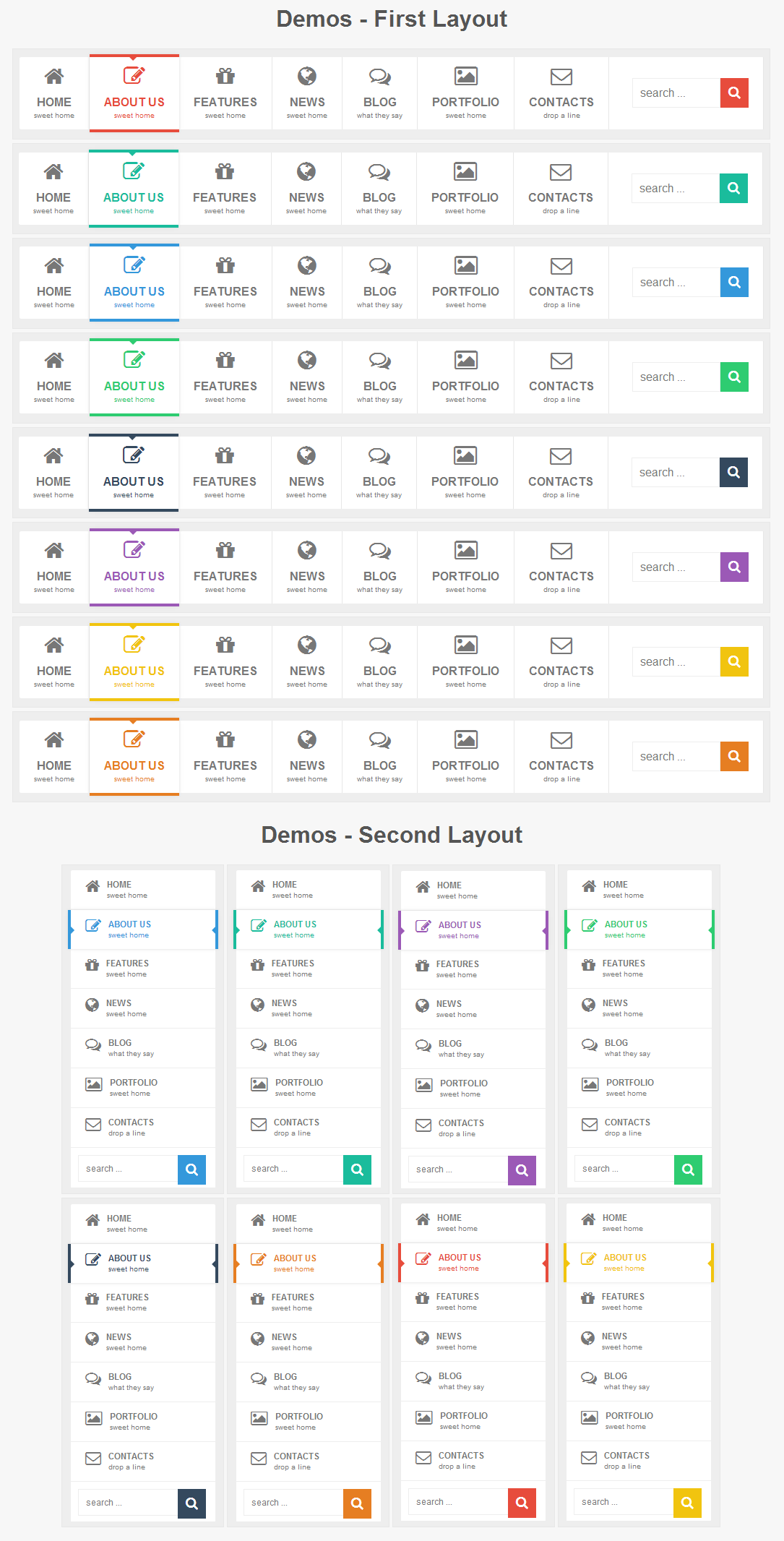
    Puerto – Responsive Mega menu: is pure HTML5/CSS3 menu. Menu has HTML5 structure and works on all major browsers. Menu is easy to edit and integrate into any website. CSS is separate from HTML and is well commented. Menu has two similar layout and eight colors, each theme can be used separately without any connection with the others. Menu is responsible and adapts to the screen of the device(computer monitor, tablet, mobile phone…). Menu also has five different animation.

    Menu works (the main structure is 100% same) on Internet Explorer 9, 8, 7… and a lot of old browsers but animation and some other CSS3 features do not work

    Beautiful CSS3 Animations

    There are a animation effects based on pure CSS3.

    8 Color Schemes

    Each color scheme has it’s own css file, that can be easily modified for creation your own colors.

    Responsive Design

    A fully responsive layout that adapts perfectly for all device resolutions like mobiles, tablets and desktops.

    16 Useful Examples

    You can use these examples as a base for creation your own navigations simple and fast.

    HTML5 and CSS3

    Take full advantage of modern web technologies. Semantic HTML markup and standards compliant CSS.

    Cross-Browser

    Tested on Windows (Chrome, Firefox, Opera, IE8, IE9, IE10), Mac (Safari, Chrome, Firefox, Opera), iOS (iPhone, iPad) and Android.

    Unlimited Number of Levels

    Menu has no limit for nested levels and all of them will be displayed correctly.

    Commonly Used Forms

    Includes search.

    Documentation

    Extensive step-by-step guide to help you with usage and customization.

    Lifetime Support

    To get support please send me an email through the contact form on my profile page.

    Download Puerto – Responsive Mega Menu (Navigation and Menus)