Product Options for WooCommerce – WP Plugin (WooCommerce)

Product Options for WooCommerce – WC Plugin

Add image, text, numeric, dropdown and options to WooCommerce Products.

Features

  • Add options to products
  • Add prices to options
  • Easy to Use
  • Drag & Drop
  • Use without prices
  • Show/hide priices
  • Lots of Option Types:
    • Image Options
    • Radio Options
    • Text
    • Text Area
    • Number Slider
    • Number with Buttons
    • Number as Text
    • Dropdowns

Description

Product Options for WooCommerce is an easy-to-use plugin for adding options to products.

Product Options for WooCommercce uses drag-and-drop to create checkbox, numeric, dropdowns, radio buttons and image options to your products.

You can use the options with or without option prices. If you add prices to your options, then you can choose whether or not to display the prices.

Download Product Options for WooCommerce – WP Plugin (WooCommerce)

3 State Animated Button – Edge Animate – Bionic (Edge Animate Templates)

3 state animated web button, Edge Animate animated button template. A slick and modern eye-catching animated button. Easy to use, perfect for Adobe Muse. Editable edge animate project, simply enter your text and desired URL to open and you can drag-and-drop the button in Adobe Muse.

The button includes three button states, and animates in ‘Mouseover’ and ‘Mouseout’ states with cool bionic techy type style with amazing glow CSS effects. It’s additiona feature is double text, you have the option to have the text changed in the ‘mouseover’ state or to keep it the same. This is a perfect attention grabber, it can be used as an animated CTA, animated banner button, it can be used to create an animated navigation bar or animated menu bar. Perfect for modern, new website designs. You’ll win a lot of attention with this one.

This button is you answer on how to create a cool button animation in edge animate, with this button you’ll have the modern, cool appearance and you can draw attention to important part of your website. As a part of Skilltech.co fresh new 2014 modern animated responsive web buttons compilation, this 3 state animated button includes css, html and javascript and it can be used outside of edge animate when you export it for web though it’s main purpose here is to use it with Adobe Muse.

You can edit color of some elements in Edge Animate and create different color styles. Easy to use button. This is the second design from Skilltech.co new web buttons and new animate web buttons collection.

Download 3 State Animated Button – Edge Animate – Bionic (Edge Animate Templates)

Socialine – Social Counter For OpenCart (OpenCart)

This module comes with a ton of visual options and easy to customize, uses the powerful social sites API for the counter.
Every module is pulled via Ajax call and will not prevent another web element to load.
Built your own counter template(s) with just simple steps, customize the stylesheet, create template animations with jQuery,
share the template to other peoples. Place this module anywhere wherever you like, top, bottom, right or left
or even custom layout.

View the demo here.

Key Features & Options

Easy installation, no hardcoding needed!
Supports Facebook, Dribbble, Google+, Forrst, Github, Twitter, Youtube, and Vimeo.
Front-end and back-end AJAX
Easy template system.
Interactive dialog interface.
Optional automatic update schedule.
Optional kilo K, million M and thousand separator.
Unlimited modules.
Can be used in template.
13+ predefined flat style templates.
Template tags for creating your new template.
Documentation included
Easy to drop into your project
Developer friendly.
And more…

Credits

Bootstrap Framework
Fontello
Font Awesome
Typicons
Zocial
Stack Overflow

Change Logs

1.0 Initial Release

Support and Features Request

This module does not match to your site style? Is this script not quite working as it should?
Having trouble installing? Or need some custom modifications that aren’t already included?
Or you want more features on next release? Feel free to get in touch about any of your queries via
profile page.

Download Socialine – Social Counter For OpenCart (OpenCart)

WooCommerce Documentation (WooCommerce)

This plugin requires WooCommerce and Documentation.

WooCommerce Documentation is an extension for WooCommerce based on the Documentation plugin for WordPress. It allows to link documentation pages to products and display them automatically on the product pages.

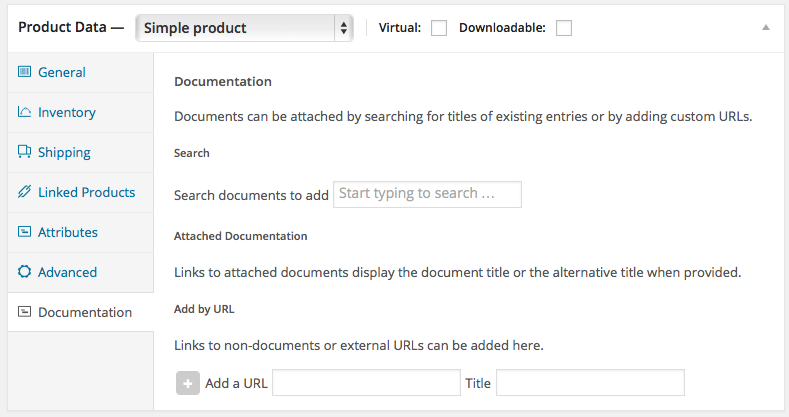
A new Documentation section in the Product Data area allows to link to documents and URLs.

Product - Documentation

A dynamic document search facility makes it easy to locate documents from large documentation pools.

Document Search

Documentation links can be displayed for products automatically, using a widget, shortcodes and API functions for use in templates.

Product Documentation Display

Documentation

Please refer to this extension’s Documentation page for details.

Demo

Front End demo showing product links on product pages using the included widget : http://woocommerce-documentation.itthinx.org

Download WooCommerce Documentation (WooCommerce)

WordPress Gallery Module For Android (Android)

Download demo app!

This app was made in purpose that if you have your WordPress site, you can have the Android app too. This app is gallery with all original size images from WordPress site. As you know, WordPress automatically resize images, but this app are filtering those images and show only original ones. Also, if you have broken image, it will be hidden.

This app is not meant to be used only with WordPress and it can be used with any other folder structure on your server. It is written in documentation how to manage folders and images on your server.

Features

  • Gallery with all original size images from WordPress site
  • Redirect to your site (WebView)
  • Working without WordPress site too – Standard Gallery
  • No database required
  • Bulk upload
  • Easy customized
  • No programming skill
  • Recently added images
  • JSON service for server side
  • Image title
  • Set wallpaper
  • Share image
  • Save image
  • PhotoPager slider for gallery (Depth page transformer)
  • AdMob integrated
  • Google Analytics integrated
  • Splash screen

Support and FAQ

Contact us at [email protected]

Credits

The images used in demos are not included in the downloaded ZIP file. All images and fonts belong to their rightful owners:

Fonts:

Roboto

Images:

AnimalsEnrico
AnimalsKeith Kissel

Download WordPress Gallery Module For Android (Android)

BWL Knowledge Base Manager (Utilities)

This plugin comes with lots of unique and flexible features to create unlimited number of Knowledge Base question and answers for your website content. Sticky and shortcode base Ajax search options gives your user best search experiences to find there required answers. It has an awesome Shortcode editor that provide you all kinds of options to insert shortcode in tinymce editor. Built-in widgets display latest/top up voted/top down voted/popular knowledge base in sidebar area.

Plugin Features:

– Zero configuration required, Just Plug & Play.

– Unlimited Knowledge Base questions and answers.

– Display Featured, Popular and Recent Knowledge Base items in a Responsive Tab.

– Up and down voting system with each Knowledge Base single Page.

– Down voting feedback option to improve Knowledge Base content.

– Enable/Disable Dislike Button.

– Knowledge Base Post View Counter.

– Display related Knowledge Base questions with each single Page.

– Ajax search feature for searching Knowledge Base content quickly.

– External question submit form with each Knowledge Base each single Page.

– CAPTCHA security with question submit form to protect spam Bot submission.

– Sticky Ajax Search & External Knowledge Base Question Submission Option.

– Email Notification feature for Both New Question and Feedback submission.

– New Question Review option.

– Feedback Review option.

– TinyMce Integrated Visual Shortcode Editor Facility.

– Quick and Bulk Edit Options.

– Quick Up/Down/Feedback Reset Options.

– Sort your items by top like vote/ top down vote/ categories/ topics.

– Display Top Up Voted/Top Down Voted/Recent/ Popular/Featured
Knowledge Base in Widget Area.

– Extensive & Details Option panel for customize colors and settings.

– Custom column to display no of like/dislike/feedback for each
Knowledge Base Question.

– Custom Permalink Setup For SEO.

– Responsive Grid System For Layout.

– 2 Unique and animated CSS3 List Type.

– Fit With any Theme(Free customization).

– Integrate Custom CSS Code from option panel.

– Ready for localization & WPML Supported.

– Support WP Latest Version.

– Well Documented.

– 24/7 Free & Life Time support.

Change log:

2014, June, 10 - v 1.0.0 - Initial release

Flag Counter

Download BWL Knowledge Base Manager (Utilities)
Live LESS Theme Customizer (Miscellaneous)

Features

  • Live edit the visuals of a web page in a browser with the help of Less.js (colors, padding and any other CSS properties)
  • Edit the Less variables and see the results immediately on the preview page.
  • Generates the customized CSS file (and the minified version).
  • Provides a way to the user to freely overwrite any style by hand.
  • Can use any web fonts (by adding the @import’s into the custom Less code).
  • Related variables – filter the variables that affects the appropriate element
  • Can import any customized Less file with comment hinting – it is very easy to set up the customizer.
  • Can save any color in the color picker and reuse them later.
  • The preview is in an iframe so any multi-paged theme can be edited without reloading the editor (the same Less variables can be used on every page, with the actual customizations applied to every page).
  • Javascript interface – load any pre-defined theme programmatically (see the theme selector in the advanced demo).
  • Very easy to set up the customizable variables (they are getting parsed from a Less file)

Target audience

  • For everyone who like to edit their own themes in the browser with instant visual feedback
  • For theme developers who wants to provide a way for their users to customize their purchased theme (they can customize on the demo page and can download the compiled CSS)

Download Live LESS Theme Customizer (Miscellaneous)

Content After Posts WordPress Plugin (Miscellaneous)

We all know that users do not always land on your home page directly. Most of the users come from search engines or other sources. They find their way to a certain page and read the content. What if you want to have the same content on every single page? For example Newsletter-Codes or advertisements? Adding the code to every page is not only time consuming but also very inefficient. This is why I wrote the Content After Posts WordPress Plugin. It allows to add multiple contents before and after posts, pages, custom post types or even single pages. You can also select certain pages or exclude some of them. Super easy!

Content After Posts WordPress Plugin

  • WordPress Plugin
  • Super Easy to use
  • Language ready (.po files included)
  • Already translated into: English and German
  • Automatic Updates
  • Uninstall feature

Support & Testimonials

  • Our products are made in Germany by a German engineer.
  • All technical requests regarding the plugin will end up in the engineers email account not in asia or anywhere else.
  • You will get support from the guy who wrote the plugin.
  • Maybe this are the reasons why our customers are so satisfied.

Some quotes of our customers (this and other products):

  • “Dear WP-Buddy, WOW, thanks so much for super service and great product.”
  • “Thanks WP-Buddy for listening to your buyers. Great support thanks again.”
  • “Thank you so much for the briefing. Awesome services.”
  • “I just found your plugin on Code Canyon, I love the quality of it and it shows you have great talent.”
  • “Thanks a lot for the help and support mate. It seems good after testing… please let me know u have anymore products for sale or in pipline lol”
  • “Thanks SO MUCH for taking time and writing to me the valuable information about snippets.”

Plugin Requirements

  • This plugin requires: PHP5.3 running on your webserver (if you don’t know how to update to the latest version, read this)

Version History

The current version is 1.0 (June 10, 2014). Click here for a full version history.

Want to see new buttons functions in one of the next version?

Request a function now

Check out my WordPress Plugins!

Content After Post WordPress Plugin
Paragraph Spacing and Line Breaking WordPress Plugin
Fixed WordPress Social Share Buttons Plugin
WordPress Comment Rating Plugin
Google Analytics Opt Out WordPress Plugin
Google Custom Search WodPress Plugin
Purple Heart Rating WordPress Plugin
Rich Snippets WordPress Plugin
Google Plus Author Information in Search Results
Product Countdown WordPress Plugin for WooCommerce
Google Drive as WordPress CDN Plugin
Login With Amazon for WooCommerce WordPress Plugin

Download Content After Posts WordPress Plugin (Miscellaneous)

Woocommerce Free Shipping Plugin (WooCommerce)

You can specify country and minimum cart amount per product!

Woocommerce Free Shipping. Optionally specify only certain countries per product before free shipping is allowed for that specific product. And optionally specify minimum cart amount per product before free shipping is allowed for that specific product. Free shipping is applied per product and not per cart.

Editing a product’s free shipping options are done in the same editing streen of the actual product, not in a separate admin screen.

Plus customers can specify shipping address!

In woocommerce, specifying a product as a virutal product does allow it to have free shipping. However with a virtual product you cannot limit which countries get the free shipping or a minimum cart total. Most of all, with only virtual products in the cart a customer cannot specify a shipping address – the billing address is the only place they can ship to.

Woocommerce Free Shipping by Blankkit. Buy it today!

CHANGE LOG
  • 1.0.0 – 6/14

    Intial Release

Download Woocommerce Free Shipping Plugin (WooCommerce)

Game of Tones Universal Game (Games)

Game of Tones

  • Universal Game -> Runs on iPhone, iPad and iPod
  • Colourful Design
  • Amazing Sounds -> Each mode has his own sounds which you can easily change
  • How to change the graphics ? -> Storyboards
  • Does the game support Game Center -> YES
  • Does the game support iAD -> YES
  • Can I add admob, chartboost or any other advertisement company -> YES
  • How easy is to change the graphics -> Copy -> Paste -> Done
  • Can I change the sounds from my Windows PC -> YES
  • Can I change the some graphics from my Windows PC -> YES
  • Can I run it on Windows PC -> NO
  • What about android -> Sorry NO
  • But it runs on all iOS 7 devices -> YES
  • What about App store -> Already passed the review
  • This is cool let my buy it :) -> Sweet


Download Game of Tones Universal Game (Games)

WP Tag Manager (WordPress)

The WP Tag Manager Pro plugin for WordPress makes it easy to manage tags that can be used on your website.

Tag Universe

This plugin allows you to create your own Tag Universe. Once that’s created, users are only allowed to choose from the tags defined in the Tag Universe. This is POWERFUL plugin that is perfect for any website with multiple authors and/or contributors. It’s a time-saver which greatly expedites the editorial process and keeps your database clean from poor tagging.

Limit Tags

Want to ensure a user doesn’t add too many tags to a post? This plugin lets you do exactly that!

Limit Tags to Display on Post

A user may enter X number of tags but you can define how many will actually display on the post front-end.

Control the WP Tag Cloud

You can configure how many tags are allowed as well as the largest and smallest font size in the Tag Cloud.

We plan on adding more features to make Tag Management easy so don’t hesitate to purchase this premium plugin.

If you want to see what else we’re up to, check out http://www.wpsite.net – And don’t forget to rate this item.

Download WP Tag Manager (WordPress)

WooCommerce Pin Payments Gateway (WooCommerce)

This extension allows you to accept payments in WooCommerce via Pin Payments.

Features

Set Shop Hour(s) Day(s) and Timezone

– Secure, Fast and Reliable Checkout Process.
– Accept credit card payments with Australia’s first all-in-one online payment system.

Sources Checkout

– Option to set Private Key.
– Option to set Publishable Key.

Easy Extension Settings

– Enabled – this setting will enable the gateway which will be used by customers to checkout.
– Title – this setting will appear for the payments during checkout. this will be shown on the page- Order Received.
– Description – this will appear under the setting – Title, during customer’s checkout.Please note that once environment is not “Production” a “Sandbox” notice will be shown.
– Return Url – used to choose Return Page or Thank you page.
– Environment – this setting is used to post transactions to.
You can either set this to:
a) Production – if you are using Payment Gateway Production / Live Account
b) Sandbox – if you are using Payment Gateway Sandbox / Test Account

Download WooCommerce Pin Payments Gateway (WooCommerce)