UniFilter – Multipurpose jQuery Plugin for Filtering, Sorting & Searching (Navigation)

Multipurpose jQuery Plugin for Filtering, Sorting & Searching

UniFilter plugin was created with the idea to make filtering, searching and sorting in a list of items as simple as possible. In its basis plugin takes all data from “data-” attributes assigned to list items and then it manipulates DOM tree by changing items position and appearance depending on active filters, search queries and selected sorting option.

UniFilter allows to use filters, sorting and search together or you can use them separately. For instance, you may want to add a single search field for a small photo gallery or five filters for your online shop. Also you can place UniFilter anywhere on your website, either it’s a sidebar or on top of the grid.

KEY FEATURES

  • Multiple filters and search boxes
  • Searching by one or few words
  • Multilevel filtering
  • Arranging list items by their best match with active filters & search queries
  • “BestMatch” filtering mode
  • Two predefined templates
  • No markup required
  • Support for any grid type
  • Compatible with Masonry Plugin
  • Arbitrary UniFilter placement – in sidebar or on top of the grid
  • Automatic pulling filters tags from list items

CHANGELOG

# version 1.0 (Apr 21, 2018)
- plugin released!

CREDITS & SOURCES

Photos & Images – https://picjumbo.com, https://pxhere.com,
Icons – https://www.iconfinder.com,
Masonry Plugin – https://masonry.desandro.com

Download UniFilter – Multipurpose jQuery Plugin for Filtering, Sorting & Searching (Navigation)

Ajax Layer Navigation – Magento 2 (Magento Extensions)


Features full list

  • Easy to install
  • No need to configure
  • Full Ajax support in the filter product sidebar and tool-bar, search result page
  • Includes Price Slider, for customers to filter products in the catalog by price range, this Magento price slider uses an implementation of the jQuery UI slider component
  • The price slider plugin supports touchscreen.
  • Scrolls to top after Ajax reload
  • With bookmarks/history support, using URL hashes.
  • Display product quickly and smoothly

Ajax Layer Navigation will allow the customers to search the products using the product attributes. It will also optimize the filtering of products based on the product attributes. Using this module you can filter multiple attributes and attributes values at a time. This module also provides an impressive price bar as well. Both are Ajax based that means customers don’t need to wait for the page reload.


Ajax Based Extension

The extension uses Ajax web technology which allows web pages to update and transfer data without reloading. Ajax technology helps in providing a faster way to filter down the catalog and find the right products that the customers are looking for. Ajax Layer Navigation Magento 2 eliminates the delays in the searching process and prevents the page reloads.

  • Send and receive web page data asynchronously.
  • Saves search preferences of the customers.
  • Update filter results without page reload.
  • Maintains the previous state of the browser.

Filter By Range

Ajax Layer Navigation extension allows customers to filter down the products by numeric product attributes. It provides price slider which is an ideal numeric filter tool.

  • Slider control Price selection.
  • Search the product in the most efficient way.
  • User defined price range search.

Change Log

------------ VERSION - 1.0.0: Release on 04-20-2018 ------------
[+] Initial Release

Download Ajax Layer Navigation – Magento 2 (Magento Extensions)

CryptoKing – Live Feed Crypto Currency Script with Subscriptions (Social Networking)

CryptoKing is a Live Feed Cryptocurrency script built on Laravel and Vue Js. The Buyer can easily make money by Google Adsense and In-built subscriptions managed by Stripe and RazorPay.

Cryptocurrency script

CryptoKing – Top10 Features List

  • Google Adsense integrated – earn money immediately
  • Real time trade feed
  • 2000+ crypto currencies
  • Recurring Payments (Stripe and Razorpay)

  • Multi theme support (6 themes + upcoming themes)
  • Dynamic multi lingual system – Launch your site in your favourite language
  • Crypto Quotes, Videos & News with RSS feed
  • Voyager Admin Panel

  • Social logins & Social Activity
  • SEO with rich snippet support

Cryptocurrency script

CryptoKing – Front End Modules

1.Multiple Themes Module:CryptoKing comes with 6 varieties for themes and a future ready setup for upcoming themes. You can select your favourite theme and go live in seconds.

2.Multi Currency Module:Cryptoking supports more than 2000+ Currencies. Right from Bitcoin to Ripple.

3.Multi Language Module:Users can switch the site into any language, Admin has a privilege to add any language. Ex: English,French, German…etc,.

4.Live Trade Feeds Module:CryptoKing will fetch the live data of coins from over 90 cryptocurrency exchanges.

5.Detailed Charts Module:Sparkline, line,bar and many other charts are available to pull the coins data hourly, daily and weekly.

6.Coin Information Module:CryptoKing provides detailed information for each coin like Summary, website, key numbers, historical quotes.

7. Trending Coins Module:The site will pull the trending coins based on the market cap.

8. Currency Calculator Module:Convert any currency into any currency at live rate.

9.Google Adsense Module:CryptoKing fully integrated to with Google Adsense. Admin can add ad code and can start earning in seconds.

10.Crypto Currency Calculator Module:CryptoKing has the ability to see the crypto coin value in any currency like USD to AUD…etc.,

11. Affiliate Links MOdule:Earn extra money besides Google Adsense with Changelly :) You can add links at admin end.

12. SEO Module:CryptoKing is SEO optimized and compatible for RICH SNIPPETS.Your URLs looks pretty on Social Networks.

13. Installation ModuleInstall the script in less than 5 min. Thanks to easy installation setup of CryptoKing. We provide FREE INSTALLATION too :)

CryptoKing – Admin End Modules

1. Site Settings Module:You can easily change the Site Logo, Favicon, SEO Details and many other settings.

2. Payment Gateway Settings Module:Add your Stripe and RazorPay Settings easily in admin. No need to touch the code.

3. Language Settings Module:Add your language strings and make the site live in any language.

4. Ad Settings Module:Get Google Adsense code and paste into the Ad Settings,Ads will display on the site.

5. Social Settings Module:Add your Facebook, Google secrete keys for social logins into the system.

6. Theme Settings Module:Admin can set the desired theme from 6 pre-build themes.

7. Users Module:List all your users registered in the site.

All coins data and prices are based on CryptoCompare API

Download CryptoKing – Live Feed Crypto Currency Script with Subscriptions (Social Networking)

WordPress Infinite Related Post Manager (Utilities)

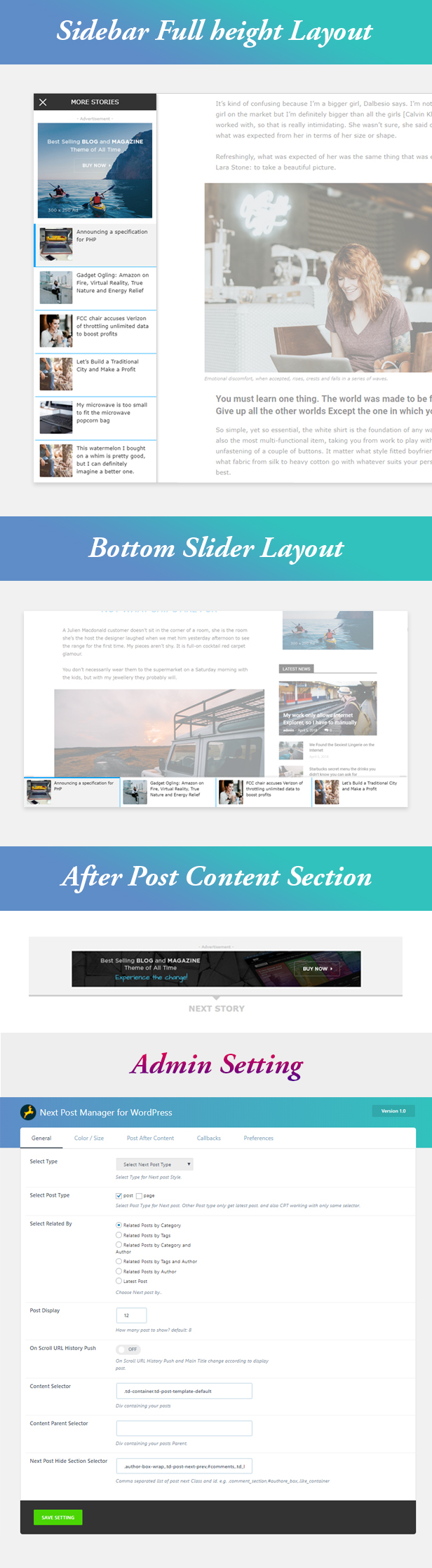
WordPress Next Post Manager

WordPress Next Post Manager

  • 3 Style Available
  • Infinite loading, Top/Bottom slider and Sidebar
  • Custom Post Type Support
  • Before After Content Management
  • Custom backgrond Color and hover background color
  • Override Option in every post
  • History URL On Scroll
  • Override Option in every post
  • Manually Next Post add option.
  • Callbacks Option
  • Related Post

Download WordPress Infinite Related Post Manager (Utilities)

Directories Pro for WordPress (Miscellaneous)

Directories Pro for WordPress

Directories Pro is a WordPress plugin that lets you build any kind of directory such as a community driven local business directory like Yelp.com, Google+ Places, or Yahoo! Local, a user directory, a website directory, a property directory, etc. It’s the most feature rich and versatile directory plugin you can find for WordPress.

Directories Pro demo Directories Pro documentation

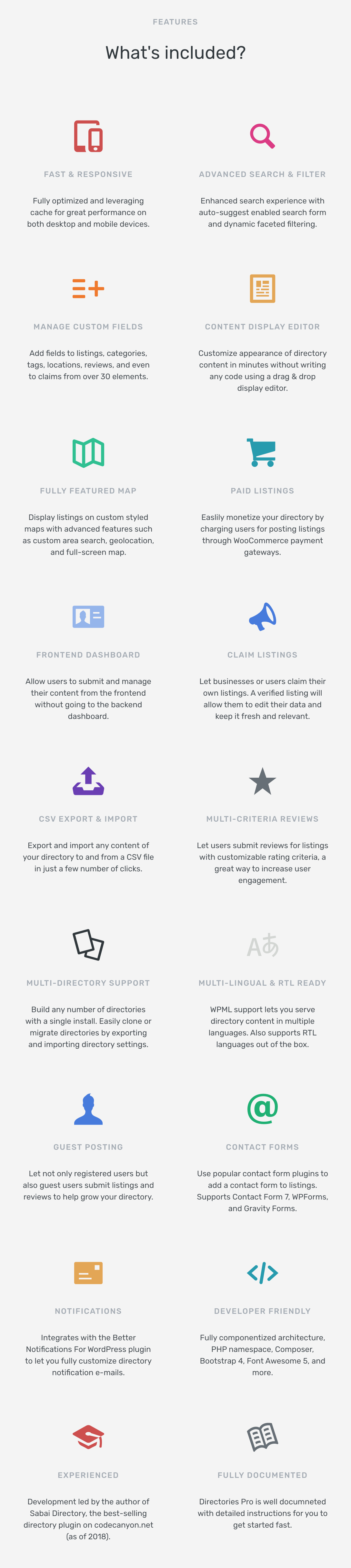
Directories Pro features

Feature list

Directory Management

  • Unlimited number of directories
  • Disable or enable categories/tags/locations/reviews/claims/payments per directory
  • Export and import directory settings
  • Export and import any directory content
  • Directory permission (capability) manager

Fully Customizable

  • Add custom fields to listings/reviews/claims (custom post types)
  • Add custom fields to categories/tags/locations (custom taxonomies)
  • Use content display editor to customize appearance of content without any coding
  • Create full or partial template files for more control over display
  • Hide/show content by user roles

Search & Filter

  • Advanced search form with auto-suggestion
  • Fully customizable filter form with live updating facet count
  • Search and filter by custom fields
  • Search and filter by current location (geolocation)
  • Search form shortcode

Monetization

  • WooCommerce support – charge users for submitting listings
  • Charge switch plan / re-activation fee
  • Prorated discount
  • Guest checkout
  • Create add-on plans for additional revenue

Frontend Submit and Dashboard

  • Submit listings/reviews from frontend
  • Manage listings/reviews/claims/votes through frontend directory dashboard
  • reCAPTCHA support
  • Guest posting without user registration
  • WooCommerce my-account page integration

Create Views

  • Display listings/reviews/categories/tags/locations in list/grid/masonry view
  • Show listings in photo slider
  • Configure custom query
  • Sort by custom fields
  • Display views anywhere with shortcode

Reviews

  • Customizable multi-criteria 5-star rating reviews
  • Filter and/or sort listings by review rating
  • Filter reviews
  • Search listings by review content
  • Show review rating statistics by stars or criteria

SEO Ready

  • Fully compatible with popular SEO plugins
  • Configure custom permalink URLs for listings/categories/tags/locations
  • Generate custom shema.org JSON-LD
  • Custom OpenGraph meta tags
  • Compatible with Yoast SEO and Breadcrumb NavXT breadcrumbs

Other Features

  • Claim listings
  • WPML support
  • Admin and user notification e-mails
  • Contact us form (supports Contact From 7, WPForm, Gravity Forms)
  • Online plugin update (no FTP required)

Change log

v1.0.2 – May 1, 2018

  • Bug fixed – Not able to access admin listing index page when directories-pro plugin not installed.

v1.0.1 – April 30, 2018

  • Bug fixed – Claims admin menu not showing in the backend.
  • Bug fixed – Required option for Location field not working properly.
  • Bug fixed – Removed redundant success message after edit/delete posts on frontend dashboard page.

v1.0.0 – April 29, 2018

  • Initial release

Download Directories Pro for WordPress (Miscellaneous)

PVR – Instagram Feeds (Social Networks)

PVR – Instagram Feeds is made with javascript that provides a nice looking Instagram Feeds with many Options.

Features of Instagram Feeds

  • Add Via Data Attributes
  • Layout Via Data Attributs
  • Instagram Feed Captions
  • Taged Users
  • No of Likes and Comments
  • User Information
  • Redirect to Instagram Post
  • Lightbox via Data Attributes
  • Instagram Feed Carousel
  • Instagram Feed Badges
  • Responsive
  • Bootstrap Compatibility
  • No conflict with Bootstrap
  • Simple and clean interface

Download PVR – Instagram Feeds (Social Networks)

WordPress Lucky Wheel (Miscellaneous)

WordPress Lucky Wheel gives you the best solution to get emails address from visitors of your WordPress website. WordPress Lucky Wheel offers visitors to fill in their email addresses to spins for prizes. This is the best way to collect email from visitors on your site, they will be pleased to fill in their email address. The prize will be sent to visitors email automatically. Email addresses will be saved in back-end and can be automatically synced with MailChimp.

FEATURES:

SPIN THE WHEEL: The main feature of the WordPress Lucky Wheel plugin, allow visitors to spin for prizes by fill in their email address.

  • Subscribe to spin: Visitors must fill in their email to spin the wheel. If they win, the prize will be sent to the email that they have just typed in so that can protect your site from spammers.
  • Spin to win coupon: After type in his/her email, the visitor will be able to spin the wheel.
  • Times Spinning Per Email: Decide how many time can customer spin the lucky wheel with an email address.
  • Delay Between Each Spin Of An Email: Select a time between a spin turn of an email address.

THE WHEEL POP-UP: The wheel pop-up is a small pop-up appears in a corner of your site, by clicking on it visitor will open the WordPress Lucky Wheel

  • Position: Select the position of the lucky wheel pop-up on the screen Top left, Top right, Middle left, Middle right, Bottom left, Bottom right.
  • Initial Time: Select the time for the pop-up to appear after the page is fully loaded.
  • Hide after a successful spin: Select a time for the pop-up to reappear after a successful spin.
  • Page to display: Choose to hide the pop-up on Frontpage/Homepage, Cart Page, Checkout Page, Single Product Page.
  • Conditional Tags: Use WordPress conditional tags to configure which pages where the pop-up will appear.

CUSTOMIZE THE LUCKY WHEEL: Configure the Wheel to works as you want with a lot of features.

  • Spinning Duration: Select the spinning time on front-end. The wheel will stop after this time.
  • Pieces Label: Enter the label for each wheel piece.
  • Remove/Clone Wheel pieces: Clone a piece with the same settings, this option will save you tons of time.
  • Drag and Drop pieces: Easily select the wheel piece position in the wheel by drag and drop it in the back-end.
  • Pieces Probability: The pieces size will be same but you can select the winning probability of each piece. The total of probabilities must be 100%.
  • Piece color: Pick up a color for each wheel piece, or let the plugin helps you with the auto-color feature.
  • Auto-color: Select the main color then WordPress Lucky Wheel will automatically pick similar colors for every wheel pieces.
  • Automatically Hide: The wheel will be hidden after successful spin.
  • Congratulation message: The wheel will display a congratulation message if the visitor wins some prize by spinning the wheel. You can customize this message with shortcodes.
  • Shortcodes:  Using these shortcodes to design the front-end message {prize_label}, {customer_name}, {customer_email}, {prize_value}.
  • Sorry message: If the visit hit the non-prize piece after spinning the wheel, WordPress Lucky Wheel will also display a sorry, better luck next time to them.
  • Lucky Wheel design: Custom the lucky wheel with wheel description (HTML supported), background color or image, center color, border color, border bot color.
  • SPIN NOW button: Custom the spin now button with text, background color, and text color.
  • Pointer design: Custom the pointer position (center, top, bottom, right) and color.

EMAILS: If a visitor wins a prize, there will be an automatical email sent to his/her email address that he/she has just typed in. The email includes the prize that they have just won or how to claim it. Visitor email address will be saved in the back-end and can be synced with MailChimp using MailChimp API key.

  • Sync with MailChimp: By fill in your MailChimp API key in the back-end, visitor email addresses can be synced to one of your MailChimp lists.
  • Design the winning emails: Customize the congratulation email with shortcodes.
  • Email shortcodes: Using these shortcodes to design the emails {prize_label}, {customer_name}, {customer_email}, {prize_value}.

AUTO-UPDATE: Fill in your Envato Purchase code in WordPress Lucky Wheel backend to enable the automatically update features.

Download WordPress Lucky Wheel (Miscellaneous)

WP Job Manager Bundle (Add-ons)

We know that you are always looking for a better solution for your business. We value your time and money.

To be more effective and get maximum results we decided to create a bundle where we gathered our WP job managers plugins for you. They can be integrated to your website easily. Every month we make updates of each plugin and it gets new functionality to work better for you.

The bundle allows:
to create an easy resume posting site, built upon WP Job Manager
to display an application form on your job listings instead of the standard email/website links
to apply to jobs using both Indeed and LinkedIn accounts

Bundels benefits:
quick access to the best WP Job Managers
easy integration
best price

Download WP Job Manager Bundle (Add-ons)

Corporate HTML5 Banners – 7 Sizes (Ad Templates)

BEE-CC-124-Corporate HTML5 Banners

Very easy to edit and detailed help file is included. Google fonts used. This banner set can be customized with Free Google web designer software.

All the files are included with the download file. ( Icons, Shapes)

This set includes the following 7 sizes

-160×600 -180×150 -300×250 -300×600 -320×50 -336×280 -728×90

VALUE PACK
280 HTML5 Banners

Download Corporate HTML5 Banners – 7 Sizes (Ad Templates)

Fashio HTML5 Banners – 7 Sizes (Ad Templates)

DOTO-CC-102-Fashion Sale_HTML5_Banners.

Very easy to edit and detailed help file is included. Google fonts used. This banner set can be customized with Free Google web designer software.

All the files are included with the download file. ( Icons, Shapes)

This set includes the following 7 sizes

-160×600 -180×150 -300×250 -300×600 -320×50 -336×280 -728×90

VALUE PACK
280 HTML5 Banners

Download Fashio HTML5 Banners – 7 Sizes (Ad Templates)

Business HTML5 Banners – 7 Sizes (Ad Templates)

DOTO-CC-105-Business_HTML5_Banners.

Very easy to edit and detailed help file is included. Google fonts used. This banner set can be customized with Free Google web designer software.

All the files are included with the download file. ( Icons, Shapes)

This set includes the following 7 sizes

-160×600 -180×150 -300×250 -300×600 -320×50 -336×280 -728×90

VALUE PACK
280 HTML5 Banners

Download Business HTML5 Banners – 7 Sizes (Ad Templates)

Easy Payment | Student Payment System (PHP Scripts)

Student Payment Management System – Easy Payment

Login

  • Username : admin
  • Password : admin

It’s suitable for :

  • School / College
  • Students batch
  • Coaching Center / Academy
  • Education Center etc.

Main Features :

  • Add Student / Admission Student
  • Manage Student
  • Create Branch
  • Manage Branch
  • Take Fees
  • Manage Fees
  • Fees Details
  • Reports

It’s user friendly online software

….Thank You…..

Download Easy Payment | Student Payment System (PHP Scripts)

Recent Sales Notification for Magento 2 (Magento Extensions)

\ \ \

Customers support :- http://softprodigy.com/store/support

Email :- [email protected]

Recent Sales Notification for Magento 2

Recent Sales Notifications are fun and useful, not only for the sellers but also for the buyers. With recent sales notifications, retailers can promote their trending products to the visitors as the visitors enjoy knowing what others are buying. Recent sales notifications come with engaging information regarding product and the buyer along with product images with clickable feed, allowing the visitors to know detailed information about the particular product. Recent Sales Notification for Magento 2 is an easy-to-use extension, designed for the modern retail stores to dials real-time notifications on the eCommerce websites.

With this extension installed on your Magento 2 store, pop-up notification will be displayed for each product sold with all details. Store admin can also create custom sales notification for visitors. The notification would fade out automatically after the set time, which can be modified from the admin panel

Key Features:

Customizable

Store admin can easily customize notifications with option to change text according to the setting. Admin can set number of orders show on recent notification.

Create custom notifications

Store owner can create custom notifications for store to engage more buyers online. Option available to set customer name and product of custom notification.

Pop-up customization

Store admin can easily change the extension settings to select pop-up notifications and display it at the best place.

Set pop-up notification time

Store admin can easily set the interval and display time to keep them engaged on store.

Product details

Each pop-up notification displays product related information along with the customer’s name and other required details such as location and address of purchase. Product image is also displayed on the recent sales notification.

Enable or Disable

Store admin can easily enable or disable the extension from backend.

Download Recent Sales Notification for Magento 2 (Magento Extensions)

WP Age Verifier (Utilities)

Overview

Wp Age Verifier is a responsive and touch-ready plugin for WordPress. Websites from different industries such as alcohol, pharmacy, tattoo, adult content and many more require a mandatory age verification to ensure that the user is above a certain age. Our SEO friendly age verification plugin makes it simple for you to create the age-gate between a website visitor and your content.

What Makes us Stand Out?

Our plugin automatically detects the user location and sets the age restriction limit as per defined age gate in that particular country/region.

Install the Wp Age verifier, simply activate the plugin and easily customize every aspect by setting age, make a selection of the page or entire website, add heading, description, logo, define layout, perform essential settings and you are good to go!

Wp Age Verifier Plugin is Perfect for:

  • Alcohol Stores (Wineries, Breweries, Distilleries)
  • Tobacco, E-Cig & Cigarette Stores, Vape Shops
  • Pharmacists
  • Adult Content
  • Gaming
  • Age Restricted Media
  • Tattoo Parlors
  • Marijuana Dispensaries
  • Social Media

Key Features:

  • Easy to Activate
  • Fully Responsive & Optimized for All Devices – Desktop, Mobile, Tablet
  • Automatic Location Detection & Manual Country/Province Age Restriction
  • Customized Restrictions at Page Level or Full Site
  • Multiple Verification Methods
  • Choose Not to Verify Site Members
  • Facility to Redirect Invalid Users to Desired URL
  • Highly Customizable – Add/Change Logo, Background Color, Text
  • Color Rich Presets
  • Supports Multi-site
  • Set Minimum Age Limit
  • Disable/Enable Date of Birth
  • Reset to Default Design
  • No Additional Coding Required
  • SEO Friendly

Quick Guide to Set Up & Get the Plugin Running

  1. Install WP Age Verifier plugin
  2. Go to Age Verifier
  3. Add the “Age” that need to verify
  4. Perform selection – verify for the whole website or specific pages in the websites
  5. Select the option to verify for all visitors or don’t verify for registered users
  6. Set the option to verify age by “Yes/No” button, feed the date of birth, select the date of birth
  7. Modify heading, description, error message content as per requirement
  8. Modify button text as per requirement.
  9. Add your website logo
  10. Set the best layout with the help of different style setting options
  11. Go to “Setting” screen where you can select the Country/Province to verify age for those locations only
  12. That’s it plugin is set up and rolling!

FAQ:

Qs: Can I add my logo?
Ans: Yes, we have this functionality in our Wp Age Verifier Plugin.

Qs: Can I edit the text?
Ans: Yes! You can fully edit any of the text.

Qs: Will Wp Age Verifier work on all or specific website pages?
Ans: Yes, by installing the plugin, visitors will be greeted with age verification message regardless of their entry page.

Qs: Is this an ad-free version?
Ans: Yes, our Wp Age Verifier is totally ad-free.

Qs: Is this plugin responsive? Will it work on a mobile device?
Ans: Yes! Wp Age Verifier is responsive and works great on all devices.

Qs: Which third party tool is used to detect the user location?
Ans: GeoPlugin is a free tool that has the ability to easily geo-localize the visitor down to the city.

Qs: How many requests will be handled by the third party tool used?
Ans: Maximum 120 lookups per minute can be done, if required for more request then kindly check here.

Download WP Age Verifier (Utilities)

FedaaPricingTables (Pricing Tables)

Fedaa Pricing is a Full Responsive CSS3 Pricing Table built on HTML5, CSS3. jQuery has used only for month/year price toggle. Its wonderful features can be used to list your website Service Pricing. Pricing is clean modern creative Responsive Pricing Table CSS script. You will be able to showcase your website Service Pricing on mobile devices such as smart phones and tablets. It has included month/year price switch styles. All the codes are clean and well organized. Also have proper help documentation. It looks great with all types of devices. Try out the demo

Download FedaaPricingTables (Pricing Tables)