Responsive Flat Design Web Pricing Tables
Features:
Credit:
Font: http://www.google.com/fonts/specimen/Titillium+Web
Blancer.com Tutorials and projects
Freelance Projects, Design and Programming Tutorials
download PHP, ASP.NET, Java and Javascript from CodeCanyon – the marketplace for code scripts and snippets.Javascript, Java, Program, Code, Snippet, Script, Dev, Development, Codebase, MySQL, Class, Widget, System, CMS
Responsive Flat Design Web Pricing Tables
Font: http://www.google.com/fonts/specimen/Titillium+Web


PrettyLoader for WordPress is the page preloader and spinner solution that will make you and your visitors proud of your website. PrettyLoader page preloader features over 15 image-based content preloader spinners, as well as 8 CSS-based spinners (completely image-free). But that’s not all! There are 5 predefined full-sized smooth page transitions, supporting all major browsers and mobile devices (tested on iOS and Android). There is no programming knowledge required.
PrettyLoader was built with modern design techniques in mind. You can choose between “normal” and flat spinners, choose a background color or apply some fancy background image of your choice (background images are not included). We’ve even built a completely unique type of backgrounds – tricolor backgrounds! You simply specify 3 colors of your choice and PrettyLoader does all the magic for you. Check out the demo site number 2 to view tricolor backgrounds in action.
Page PreloaderThe all-in-one solution for WordPress. Let your visitors expirience fancy loading animations and nice full-page transition effects. |
Full-Page TransitionsWe’ve built 5 full-page transition inside PrettyLoader for WordPress. From gentle fade effect to more complex “geenie’s”. |
|
Spinner GraphicsOver 15 graphical spinners are included in PrettyLoader. And these are not GIF animations, but transparent PNG’s. This means you are not bound to use the simple white background. |
Pure CSS SpinnersWant to keep the loading speed even faster and use latest technology? There are 8 CSS-based spinners waiting for you to choose from. Set their size, set their color and they are ready for action. |
|
Unique Tricolor BackgroundsFind single-colored or image backgrounds boring? We are exciting to present you our unique tricolor background technology! |
Background Colors and ImagesChoose a background color of your choice, or upload a background image (full-sized or tiled). You can even add a border to fine-tune your design. |
|
Easy InstallationThe installation process doesn’t require more than 3 clicks within your WordPress dashboard, though we’ve included an extra documentation |
CustomizableThere are lots of customisation options waiting for you after the plugin has been installed. It’s very easy to understand. No programming knowledge required. |
|
Responsive DesignWe’ve spent lots of hours testing PrettyLoader on several devices (Windows, Mac, iOS and Android) to make sure everything runs smooth. |
Object-Oriented ProgrammingIt is pretty easy to extend this plugin if you’d like to. The code is easy-to-read and fully commented. |
|
Free UpdatesWe offer plugin updates free of charge. Stay up to date with our PrettyLoader and receive latest releases and enhancements. |
Professional SupportWe are always there to help you out whenever you require any assistance or faced difficulties. If you’ve got a cool idea – let us know and it may see the light in the upcoming updates! |
|
24.06.2014 - ver 1.0
   - PrettyLoader release
MC Code Snippet Manager script lets programmers and designers store all of their commonly used pieces of code.
Admin Area : http://microcode.ws/demo/snippets/
User : admin , Password : admin
This Facebook Download Responsive Application is designed for brands those want to get more fans on their pages and users engagement.
Give fans a free download in exchange for their email and other contact info.
Offer your fans an exclusive eBook, Audio, document or image that they can save and load onto all of their devices. Promote awareness of your brand, increase fan appreciation and collect contact information as they claim.
The Sorcerer is a HTML5 clone of the famous Zuma puzzle game. The game contains 3 different progressive levels.
Please beware that sounds are DISABLED ON MOBILE DEVICES to avoid compatibility issues.
More info into help file (see documentation).
MAIN FEATURES:
MORE GAMES







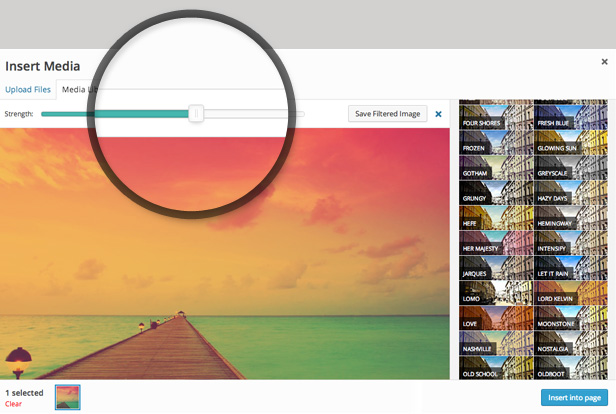
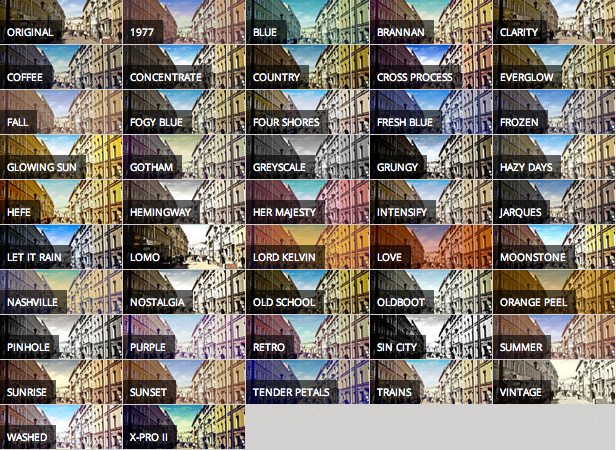
Ultimate Image Filters is a WordPress Plugin that integrates directly into your WordPress admin’s Media Manager and adds filters that you can use to enhance your photos for your site.
With Ultimate Image Filters, you can compose the perfect photos for any slider, page header or blog featured image. Say goodbye to Photoshop!
We like simplifying things, so we added filters in straight into the WordPress interface. Just select your image, and choose a filter, and a preview will be displayed immediately. Save your new photo, and use it right away in your content.
The best thing is that Ultimate Image Filters does NOT bloat your website, since the filtered images are saved as new image attachments. So there are no front-end performance impacts. It also works with any theme.

You can just include this item as a plugin which your customer can install and active along with your theme.
If you want to include this item in your ThemeForest WordPress theme, please purchase an extended license and send me a message through my profile page.
Head over to the support tab and check out the FAQs, or post a comment!
Be sure to leave a rating and review and show us some love.




Version 1.0
* Initial release

|
 |

|
With this jQuery plugin you can easily create cool looking headings for your pages!
Azexo Composer is JavaScript library for user friendly front-end content editing of HTML pages. It is based on jQuery, jQuery UI, Underscore and Bootstrap. The main difference from other solutions – Azexo Composer uses client JS for render of HTML to work faster and save server resources. It can be used for such tasks:
– Azexo Composer is ready for making static landing pages by end users with default Bootstrap CSS (or you can use Bootswatch CSS or any custom Bootstrap theme). In this case Azexo Composer saves results of editing into server file system via PHP AJAX interface in shortcodes format (like WordPress).
– Developers of HTML site templates can integrate Azexo Composer very easily, so their template will be ready for simple editing by the end users.
– Azexo Composer is ready for creating static content AJAX sites. Content can be loaded (via AJAX) when it will appear in user viewport.
– In same cases Azexo Composer can be used by graphic designers, who do not have CSS skills, for creating HTML site templates or sites for end users.
– Azexo Composer can be used for making offline HTML documents.
EdgeParallax takes parallax scrolling to the next level!
Fully customisable and responsive it delivers maximum performance on tablets as well as desktop and offers full support for touch devices, conventional menus and mouse wheel input types.
EdgeParallax is not just a widget or component but a complete site in itself – its super smooth performance and physics means it’s not only functional but fun too.
Features
EdgeParallax combines the visual power of the latest release of Edge Animate CC 2014 and the awesome performance and flexibility of Greensock.
This is a source code of Asteroids game (Graphics included). The app has minimum setup and ready to Appstore upload.
Free Game Download
https://itunes.apple.com/us/app/space-rider-galaxy-flight/id873959846?ls=1&mt=8
Quick Setup
The There is no setup. Just open the Asteroids.xcodeproj and you will be on your way. One prerequisite is that you have XCode min version 5.1 installed one you mac.
1) Open Asteroids-Info.plist file and change CFBundleIdentifier com.alexstart.asteroids to your app Bundle Identifier (example: com.site.YouGame.)
2) Open Asteroids-Prefix.pch and changes your identifiers for every ad you want to use
For PlayHaven #define PLAYHAVAN_TOKEN ”5638118c59d84411b5ccc0091932dc5a” #define PLAYHAVAN_SECRET ”303424d45d4f4fb08e65350c0856270e” #define PLAYHAVAN_PLACE @”game_launch”
For Chartboost #define ChartsBoostsAppID ”523f3a2717ba474e39000008” #define ChartBoostsAppSignature ”81a2d6e128228d66a4409fdde8befc0659b37f52”
For RevMob #define REVMOB_ID @”5211c347aee3909ff5000003”
3) Ready submit to Appstore
HTML 5 Geolocation provides you a more robust solution for getting the User location. In addition to providing the coordinates of the user, this library also helps you with their Address & mapping their location with just a single line of code. This works by extending the HTML 5 supported browser’s Geolocation APIs so it even works in your existing HTML4 websites.
Geolocation library handles the fallback gracefully if the browser doesn’t support geolocation or the user denies to provide access so you rest assured that your webpage is not going to fail in any case.
Geolocation library is a Stand alone, light weight library which is 1 KB when gzipped and can be used without any supporting libraries like jQuery or Moo Tools.
Works on IE9+, Chrome, Firefox & Safari, Android, Windows Phone, iPhone, iPad
Note: Safari geolocation work’s on WiFi


The JSE Dropdown Menu is a smooth Joomla!® menu module. It allows you to display your Joomla!® menu in a horizontal drop down style.

With JSE Dropdown Menu module, it is very easy to use. Just install the module and select a menu from Joomla menu system then publish it to a position which you want. Now just sit back and see menu’s effect.
To change background image or some fonts, please edit in CSS file. It is possible to change anything at CSS file, but remember to keep right names of div and class.
This is a horizontal version, but you can change or restyle CSS file to make it vertical.


About Easy Editor for WordPress
Easy Editor is a premium editor for comfortable, smart, fast, modern page editing.
Do you find it difficult to edit texts in standard editor? New editor will resolve these problems, increase speeds and comfort of the process.
Reach possibilities of view and working mode customizing settings make editor powerfull and functional tool for everyday activity.
Main features
Visual Composer Support
AutoComplete with shortcodes.
30 color themes
Auto Beautifier
50+ keyboard shortcuts
Free updates


