


Curl Hover Effects (Animations)

Description

Edge Animate projects with subtle curl effect hover animations. Perfectly suitable for website UI elements such as call-to-action buttons, cards, image gallery thumbnail list, social share elements, price badges, profile photos, ‘our team’ photos list, pricing plans, appstore buttons or other content.

  • 20 Edge Animate projects
  • Resolution independent scalable vector graphics (SVG) or pure CSS3
  • Easy to customize colors, opacity of elements (with or without Edge Animate software), add new ones or just remove them
  • Included:
    • Edge Animate files (.an, JS, HTML, SVG)
    • Edge Animate templates (.antmpl)
    • Documentation

Watch demo

Notes

  • Images are taken from Unsplash and pixabay.com websites. Public Domain CC0 license
  • Icons used made by <!—
    ->Adam Whitcroft, <!
    ->Elegant Themes, <!
    ->SimpleIcon, <!
    ->Freepik, <!
    ->Picol, <!
    ->Yannick <!
    —>from Flaticon.com. Public Domain CC3 license
  • The projects were produced using Adobe Edge Animate CC version 3.0.
  • Customer support

    • Documentation included (HTML)
    • Additional support by e-mail or this site.
    • I’m available to customise these files (at an additional cost). Mail me if you have any tasks.
    • Contact e-mail: [email protected]

    Preview of Documentation

    Ratings

    If you like it, please rate it - thank you in advance! :)

    Download Curl Hover Effects (Animations)

    Magento Banner Slider Extension (Magento Extensions)

    Magento Banner Slider Extension
    Banner Slider Magento Extension is a banner management tool, which empowers the online store owners to display banners as a slider of images at the top of their online store.
    Overview:
    To make your website more eye-catching and appealing to the customers, Banner Slider Extensions are an effective solution to display a Slider Banner at the top of the page on your online store. With the help of this Magento image slider extension, the site owners can place banners of different advertisers or may run some banners of promotional campaigns at the top of their web page to seek more customers’ attention.
    Outstanding Features:
    1. With Banner Manager images can be added or removed from the admin panel with information like title, URL and description.
    2. Allows creating banners with slider for CMS and category pages.
    3. Allows adding of unlimited banners and images.
    4. Banners can also be put to specific positions of pages (CMS & category).
    5. Multi browser support – IE, Chrome, Firefox, Safari, Opera.
    6. Multi-Store support – banners can be filtered by stores.
    7. The images can be sorted and displayed in order or randomly.
    8. Support Magento 1.3.x, 1.4.x, 1.5.x, 1.6.x, 1.7.x, 1.8.x, 1.9.x and Magento Enterprise Edition(*).
    9. Ecomextension now supports Magento CE 1.9 that includes striking features for going responsive, easy checkout with PayPal, Cross Border Consistency and more.

    To enhance the credibility of your online store, our Banner Slider Magento Extension is the perfect choice to opt for. It will not only enhance the credibility of your store but will make it more functional, eye-catchy and attractive to the users.

    Download Magento Banner Slider Extension (Magento Extensions)

    Multiscreen Slideshow (Sliders)

    Showcase your responsive designs in a great way using this slider, enable and disable the devices you want to show and position them in the way you like!

    Key features

    • Multiple screens slideshow
    • Enable/disable the devices you want
    • Position them the way you like
    • Lots of different animations that can be set per device
    • Lots of different easings that can be set per device
    • Set the animation speed and delay per device to create unique animations
    • Pagination, previous/next navigation and play/stop controls
    • Responsive
    • Works on all modern devices and in all modern browsers

    Screenshots provided by

    Download Multiscreen Slideshow (Sliders)

    TinyLink – small and powerful URL shortener script (Miscellaneous)


    TinyLink – is a simple and powerful url shortener script, with it you can set up your own url shorting service just in 5 minutes.

    Admin Demo

    You can access admin demo at http://tinylink.nazarkin.su/admin.

    Coordinates:

    • Login: admin
    • Password: 123

    NOTE! In demo admin page some functions like changing settings and work with static pages is disabled.

    \

    Basic features:

    It’s very easy to install and contains many cool features, such as:

    • Admin Panel
    • Work without MySQL database
    • Advanced Template System
    • Domain black-list
    • Static pages system
    • Link lifetime setting
    • Responsive template with WebApp support for iPhone
    • API System
    • Extensive documentation

    Requirements:

    • Apache (with mod_rewrite)
    • PHP 5.3+

    Download TinyLink – small and powerful URL shortener script (Miscellaneous)

    Alphabet (Full Applications)

    Our Support
    Gmail
    Facebook
    Twitter
    Follow us on Envato

    Our Alphabet Application that teach kids letters.
    Our Apps make learning ABC s fun and easy.Children who can identify letters and know letter sounds when entering
    kindergarten will be prepared to learn how to sound out words and read. you can make your own application.

    Features

    Android Side

    1. Two Types Of Category-* Capital Alphabet * Small Alphabet
    2. You can Flip Pages by Swiping Next or Previous Button
    3. Auto Play Option
    4. Sound Play and Mute Option
    5. You can Flip Pages by Swipe Gesture
    6. A to Z Alphabets with Sounds and Images
    7. Alphabets Learn the sounds of Letters A-Z
    8. Small Alphabet Learn the sounds of letters a-z
    9. Alphabet Images Share and Save
    10. Beautiful UI and Easy to Customize
    11. Admob Integrated
    12. Start App Integrated

    What You Get:

    1. Full Android Source Code
    2. Android Package hierarchy (that tells which class is used for what)
    3. Full Document with Screen Shot

    \

    Download Alphabet (Full Applications)

    Super Platformer (Games)

    This game is a plarformer style similar to Super Mario. Written in Java on top of LibGDX framework with Admob banner

    Download the APK

    You’ll get the completed source code and all graphic source in SVG format. Levels were designed using free tool Tiled Map Editor (www.mapeditor.org)

    You can easily alter the graphics, sounds, and the level.
    Also you can insert your own new level, the instructions are completed and the it well commented source code.

    Download Super Platformer (Games)

    CodeTabs – Touch Responsive Tabs (Navigation)


    Codetabs is a great plug-in tabs when integrated gestrue swipe, move between slides really easy on desktop and mobile. No need to switch troublesome dropdown menu as the other plugin on the mobile. Same time create thousands of beautiful effects with built-in over 250 ‘out-in’ effects and ‘one’. Also, codetabs built-in responsive features, vertical tabs, flat and clean theme, powerfull API, 40+ templates html, 14+ positions, 100+ options, more and more.


    • Swipe gestures – switch between slides easy and flexibility with support swipe gestures, especially with tabs have many slides or on the mobile devices. No need to worry, no need to trouble to switch dropdown menu on mobile devices.
    • Huge effects – Easily create thousands of beautiful effects with pre-build over 250+ out-in effects and one effects. Same time can create favorite, unique effects their own through code.effect.css file. There’s also support powerline and fade effect for those who love the speed and simplicity. Codetabs have the most effect in the tabs plugin.
    • Fully responsive every browser and every devices : desktop – tablet – mobile.
    • True tabs – it is trully tabs on mobile devices. One design throughout on desktop and mobile devices.
    • Flat design – flat, clean and minimalist design throughout codetabs, respond most of the modern template. Same time easily create new style in css file.
    • Directions – full support horizontal tabs and vertical tabs.
    • 14 positions – maximun support position of title tabs (pagination).
    • 5 sizes – built-in 5 sizes title tabs. Same time easily create new size in css file.
    • Slideshow – full support slideshow, timer, button ‘Play/Pause’, hoverpause functions. Automatic stop slideshow before the next slide not loaded and play back automatically when the next slide has loaded.
    • Timer – support to 3 type timer with flat style, special support more options in ‘arc’ object.
    • 40+ templates – easily start using codetabs with multiple templates.
    • SEO friendly with html5 markup.
    • HTML5 data – easy setup options in JavaScript object like other jQuery plugins, same time support setup options via HTML5 data attributes.
    • Nested & multi tabs on the page with different skins.
    • Cross browser – full support main browser on desktop and mobile devices. Same time support old browser IE7, 8, 9.
    • Fallback effects – ‘one’ effects, ‘out-in’ effects fallback to ‘fade’ effect on old browser.
    • Powerful API – codetabs easier control with more public methods and callback events.
    • Live update – easily update most options directly through ‘opt()’ api.
    • Keyboard & MouseWheel navigation support.
    • Random effects – including ‘one’ effects and ‘out-in’ effects.
    • Outside markup – the components: navigation, title tabs, timer… can set up markup in any location on site. Makes it easy to create flexible layout, design is not tied.
    • Well documentation – step by step instructions to create codetabs, described features short, concise, and illustrated more easily begin using.
    • Free support & update – codetabs always developing new features, regular updates as well as improve existing features.


    Version 1.0 – 27/06/2014

    - Initial release

    Download CodeTabs – Touch Responsive Tabs (Navigation)

    Flappy Control : AdMob, iAd (Games)

    Frog Jump


    Game play introducing

    control the character between two blades, also you can eat x3 coin to get more score!

    Features

    • iPhone 4 / iPhone 5 Supported ( It means 3.5 inches and 4 inches iOS Devices , iPod,iPhone )
    • Game Center Supported
    • Local scores
    • UIKit Technology
    • PSD files included / Layer Mode
    • Music/sounds Included
    • Sound OFF / Sound ON button
    • share score on Facebook,Twitter
    • Full game and ready to upload and sell
    • Full support through the comments with screenshots and videos If It needs!

    Projects

    1 – AdMob Project
    2 – iAD Project
    3 – Clean project – it means there is no ADS

    EASY TO EDIT

    As you know, I have coded this game with UIKit, ANY OPENGL CODES!!!

    Setup the Game

    • 1) Find the “-Info.plist” in the project,then click on it!
    • 2) Find “Bundle identifier” row,then double-Click on the value
    • 3) change the “com..”’s value to your own domain

    Setup the GameCenter

    • 1) Find defined.h file then open it
    • 2) change the “k_game_center_domain”’s value

    Setup the AdMob

    When you decided to upload the game on the Appstore, follow the steps! because the app can has access to the Real ADS, not Test ADS! by doing this, you will active real ADS.

    • Find defined.h file then open it
    • change the “k_adMob_ID”’s value
    • goto the “GameViewController.m” and find ”- (GADRequest *)request” function,then comment this line.
     request.testDevices = @[ GAD_SIMULATOR_ID ];
    

    Download Flappy Control : AdMob, iAd (Games)

    Power Image Hotspot Galleries (Media)

    Now the image mapping tool has become more powerful and offers unlimited possibilities. First time ever image mapping with galleries.

    Embedded Features

    Boost your sales with link redirection on single image, intuitive Drag and Drop Interface, lazy load for Quicker Slider Start, a powerful administration with live preview & easy management. The sleek look, clean code and flat design sets it stand out and guarantee to capture anyone’s attention

    Bitsgeo Power Hotspot Gallery

    How does it work ?

    Upload an image, and place a spot by using a drag & drop features hotspot pins and add information,link, videos for each single spots, now just place a short-code either by direct copy paste and insertion with easy sleek layout for each single image or gallery by tags.

    Download Power Image Hotspot Galleries (Media)

    Project Box – Team Management Tool (Project Management Tools)

    ProjectBox is a powerful PHP CodeIgniter application that allows you to setup and manage projects whilst collaborating with other users. The system features tasks, forums, time logger, invoice and accounting systems and much more! We are also updating our products so if you’ve got any suggestions, feel free to email us!

    You can use the Demo by simply registering an account on the Demo Page. All the accounts are automatically turned into Admins so you will be able to see all the options available.

    Demo Link: http://pb.patchesoft.com/

    Or you can use the Demo Login Details:
    Email: [email protected]
    Password: test123

    ProjectBox is also very secure!

    • Uses prepared statements so no SQL Injection!
    • Protects against CSRF attacks!
    • HTML Filter to protect against XSS attacks!
    • Built on powerful CodeIgniter Framework that has been tried and tested by millions of developers
    • Passwords are encrypted using PHPass Library
    • Captcha enabled pages to prevent spam!

    Feature List

    • Create Projects
      • Create unlimited projects and invite unlimited members to join your team!
      • Each project is unique from all other projects
      • Allow members to register and create their own projects (or disable)
      • Admins can access all Projects and modify them
      • Easily switch between Projects using the frontpage or folder icon in the navigation bar
    • Tasks
      • Create unlimited amount of tasks for your Projects!
      • Tasks can be sorted by tags which allow you to organize your tasks in an efficient way.
      • Activity Stream for each Task to let you know the most recent actions
      • Set start and due dates and progress completion to let team members know how far the task is completed.
      • Add team members to each Task so that they receive notifications on new updates.
      • Add mini objectives to each task to help keep the task organized and know what needs to still be completed.
      • Objectives can be marked as completed and used to sync the Progress bar
      • Each task has it’s own message area where team members can discuss the task.
      • Use the @username ping feature to alert a user in the Task.
      • Assign Files and Tags to Tasks to let your Team know what to use.
      • Tasks can have their status and details changed on the fly.
    • File Manager
      • Upload files to your Project that your Team can view and use.
      • Set which File Types can be uploaded in the Admin Panel
      • Organize your files by creating File Categories.
      • Files can be assigned to Tasks
      • Delete and Modify uploaded files.
    • Team Management
      • Add unlimited registered users to your Project
      • Each Project has it’s own set of unique groups which you can assign to your Users.
      • Each group can have different powers set for it, so you can easily allow different users to have different access to each part of the project.
      • A user can be a member of many projects as well as create multiple projects (which can be disabled or enabled)
    • Time Logger
      • Log time that you spend on completing tasks and work.
      • Set an hourly rate for time spent to help work out how much you are owed.
      • View time per day of the week or in useful recently logged time lists.
      • Once you start logging time, you can stop it as soon as you have finished working to get accurate minutes. You can also start the timer again if you continue working.
      • Time can be marked as paid to help work out how much you are owed.
      • The Time Logger works for each user.
      • Easy to look at time logged for all users too.
    • Chat
      • Each project comes with it’s own chat board where topics can be created.
      • Topics can be stickied and locked.
      • You can notify a user by using the @username ping feature and they will be notified of being mentioned in a chat topic.
      • View newest posts so you can easily keep up to date with what’s going on.
    • Ticket System
      • Create tickets that can be answered by Ticket Admins.
      • Tickets can be categorized and have a priority set for them.
      • Tickets can also be closed when solved.
      • The all Tickets area is only available to Ticket Admins so you can easily add your clients to the system.
      • Set Ticket Admins option in the Team management section.
      • Create categories for the Ticket System.
    • Accounting
      • Log accounts of your expenditure and profits.
      • Each account may have a currency set for it as well as a conversion to help keep consistency.
      • Accounts can be organized by categories
      • Add note to each logged account.
      • Export the accounts to CSV file by selecting a start date and end date.
      • Add and modify different currencies to work with
      • Create Invoices that can automatically be paid via PayPal and updated using the PayPal IPN system.
      • Send Invoices to clients and setup Merchant accounts used to be paid with.
      • Easily specify the cost of items and services for each invoice, as well as any Tax.
      • Invoice can be paid in any currencies you add.
      • Option to email the client the Invoice.
      • Once an Invoice is paid via PayPal, the Invoice is automatically marked as paid by using the PayPal’s IPN system.
      • Create Merchant accounts that are used to be paid with.
    • Mail System
      • Send messages to users of the ProjectBox system.
      • Get a notification each time you get a mail
      • Block users from sending you messages on the system.
      • All you need to know is the user’s username to be able to send them a message.
    • Notifications
      • Get notifications when you are pinged using the @username feature on the chat boards, file system and tasks area.
      • Get notifications from tasks whenever they are updated.
      • Get notifications when you are invited to a project.
      • Ability to get an email each time you get a notification (can enable/disable)
    • ProjectBox
      • The System is Translation Ready that allows you to easily translate the system into any language by modifying the language files (just 4).
      • Built on CodeIgniter PHP MVC Framework.
      • Uses Twitter Bootstrap 3.0
      • Friend URLS for SEO
      • HTML validated
      • Contains the normal features such as Forgot Password, Login, Registration, User Panel, Change Password and more!

    Download Project Box – Team Management Tool (Project Management Tools)

    Formate description – clean duplicate whitespace (Prestashop)

    The module is designed to clean and complete a short description of the double spaces. Thus formats the text in the correct form.The module works through Ajax technology and therefore does not hang under heavy loads or large amounts of goods.

    Allows you to optimize your description, reduce the amount of text and improve SEO.

    You can see demo in back office when product description have two or more whitespace.

    Demo BO acsses:
    url: http://prestademo.ru/formatdescription/admin123
    login: [email protected]
    pass: $O%%S$M1KZ

    Module base on Ajax technology.

    If you like this module please live rait him.

    Download Formate description – clean duplicate whitespace (Prestashop)

    Jumbo: A 3-in-1 full-screen menu for WordPress (Menus)

    Jumbo: A super-customizable menu plugin for WordPress

    Thank you for becoming acquainted with Jumbo!

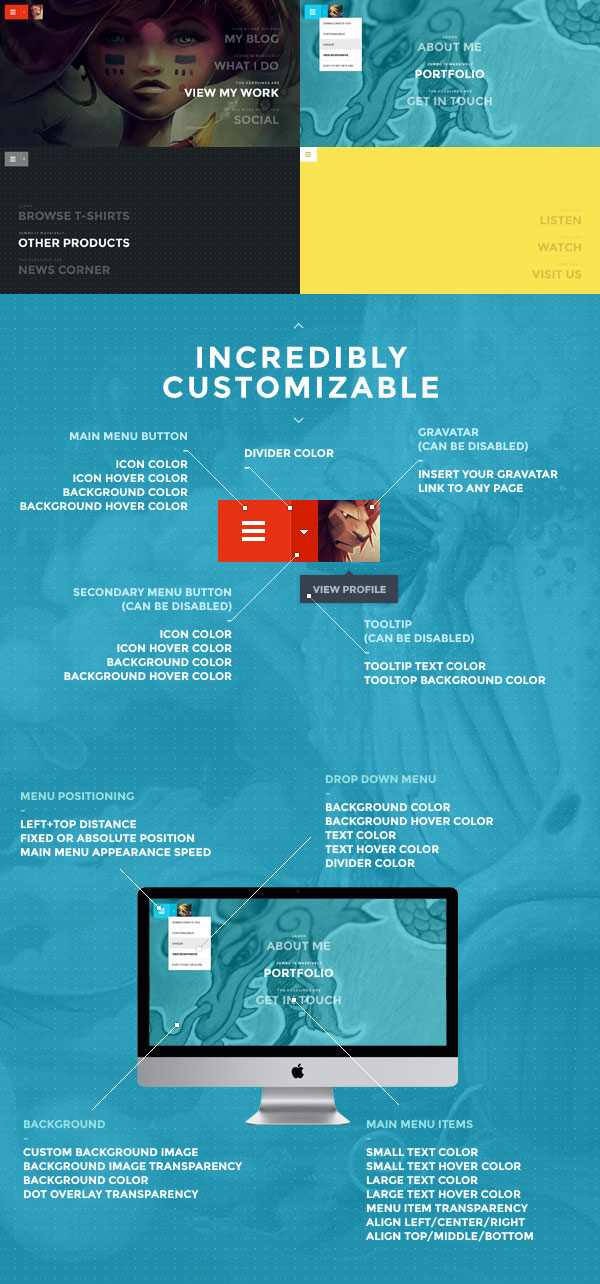
    Jumbo is a WordPress menu plugin that you can add to any theme, and it comes with a bit of a unique twist. Next to allowing you to build a bold, memorable and fully responsive full-screen menu, you can also create an optional, secondary drop-down menu.

    Furthermore, you can set up a Gravatar image that will appear right next to the highly-visible menu buttons, linking to any page you wish. For example, you can direct it to a custom profile or an ‘about me’ page that you’ve created (great for owners of personal blogs) but ultimately its use is up to you.

    Thanks to its extensive customization possibilities, Jumbo is also suitable for essentially any site. You can make substantial customizations like change all colors, add a background image, re-position different elements, change the menu appearance speed and much more. As can be seen from the few examples and details below, you can end up with results that look and feel vastly different.
    Our customers love us!

    As always, you can rely on our support should you need it. If you’re an existing customer and have spoken to us previously, then you already know what that means. If you’re new, then here is just a taster of what our customers have to say about Bonfire Themes:

    • “Great products, matched by great customer support.”
    • “A customer service like that, I haven’t seen for a long time!”
    • “I am one happy customer indeed! Thank you guys! Keep up the good work!”
    • “This is by far the best support..”
    • “… extreme fast response!!!”
    • “Thanks for your speedy service! :)”
    • “Best support I’ve ever seen! .. Five stars is not enough!”
    • “Wow, thanks for the prompt response.”
    • “… customer service provided goes above and beyond … An excellent experience from start to finish.”
    • “Thanks for such a speedy response! You rock man!”

    Finally, huge thanks go out to Robert Grafstrom and Amin Faramarzian for allowing their lovely artworks to be used to show off Jumbo.

    Download Jumbo: A 3-in-1 full-screen menu for WordPress (Menus)

    Animated Sliding Menu System (Navigation)

    A simple, flat menu system that you can embed within your own website, web apps, or even your own WordPress blog! This template also comes with all the information you need to customise the colour of your menu, add, remove and edit the menu items, and even include an icon font of your own choice to make your menu stand out from the rest!

    Download Animated Sliding Menu System (Navigation)