MadMimi Social WordPress (Newsletters)

How it works?

This plugin let your public subscribe your newsletter via Facebook, Hotmail, Google and by just typing
the email. What’s the bonus? Users do not have to confirm the email because the email is already
“confirmed”. It’s really simple to configure the plugin, I made a awesome tutorial you can found it in
the tab “Help”!

Plugin Compatibility

You can use this plugin with others by just put the special shortcode: [madmimi_social_wp_popovers]
The others plugins must support WordPress Shortcodes!
For example, you can use this with Pop Overs, Opt-in plugins etc!

What do you get when you purchase this item?

Plugin Settings

Screenshots

Other versions

MailChimp Social WordPress

MailChimp Normal version

Mad Mimi Normal version

Users feedback!

Changelog

Version 1.0.0, 3 July 14
------------------------------------------------------------------------------------
[+] Initial release

Server Requirements

Please use at least PHP5.2.17!

Download MadMimi Social WordPress (Newsletters)

Shipping Details Pro Plugin for WooCommerce (WooCommerce)

Shipping Details Pro Plugin is a WordPress Plugin which allows the WooCommerce Plugin Users to enter Shipment Tracking Number and Display them on Track you Order and View Order Pages and also send them via Email when Order is marked Complete.

A Complete list of supported couriers is available here.

This plugin helps users to track there shipments on the sellers site without being redirected or having to visit courier site.

Features :

  1. Supports up to 5 Tracking Number Per Order.
  2. Support 190 couriers worldwide
  3. Displays Latest delivery status on your site.
  4. Send Delivery update notifications.
  5. Supports notifications via Email and SMS.

You need to have a account with Aftership to use this plugin. You can get AfterShip account (Sign up free)

Download Shipping Details Pro Plugin for WooCommerce (WooCommerce)

Z-Docu Online Documentation Script (PHP Scripts)

Z-Docu is a multi products online documentation script for your products or services based on categories and subcategries for each product or services. Z-Docu is build on pure php and smarty framework, full responsive design template.

Easy to integrate and customize the template design and source code. You can create unlimited templates that can be changed any time you want from General Settings.

The script come with a lot of features for admin and editors. Other people can join your website as editors and they can edit your documentation articles based on user level. You can opt for auto approve or mark the articles as hidden until administrator review. Admin can any time edit/delete or approve/unapprove articles and editors accounts, and of course the editors will be notified by email about any changes made on them account.

We also have a forum community where you can ask more information about this script, or if you have any issues using our product, just post there, we will be glad to help you.

Server Requirements

Most current web servers with PHP & MySQL installed will be capable of running our script.

The minimum requirements are:

  • Linux or Windows OS
  • PHP Version 5.2.x – 5.4.x
  • JSON Enabled
  • PHP Memory Limit: 64M (minimum)
  • MySQL Version 4.1.x and above (Strict Mode Disabled)
  • Curl Support (with SSL)
  • GD2 Image Library

Features

  • Unlimited products and services
  • Based on category and subcategory for each product or services
  • Editors can register/login and write articles
  • Search engine
  • Multi template
  • Easy to customize and integrate into any website
  • Display articles based on user level
  • Restrict editors to edit articles based on level
  • Auto notify when new article is added
  • Auto approve new articles (you can turn off from admin panel and set for mannual approval)
  • Auto approve new registered editors (you can turn off from admin panel and set form mannual activation)
  • SEO friendly urls
  • 100% Open Source
  • And much more! please visit our demo

Download Z-Docu Online Documentation Script (PHP Scripts)

Radio Player With Playlist – Shoutcast and Icecast (Media)

\

\
\


FEATURES:

\ Only Radio Stream Needed

Just add the radio stream and the player will get radio name, radio categories, current playing song and artist photo.

\ Shoutcast & Icecast Support

It supports Shoutcast and Icecast radio streaming. Radio Stream should be MP3 type, no support for AAC/AAC+ stream

\ Responsive Design

The radio player can be used in websites which are responsive. Optional parameter to disable responsive behavior in order to integrate it in non-responsive websites.

\ Mobile Compatible

It is compatible with IOS and Android operating systems.

\ Last.FM API

The player uses Last.FM API to display the photo of the current playing singer.

\ Highly Customizable

You can choose from the 2 available skins: back & white. Also, from parameters you can create any color scheme, having the possibility to integrate it in any design.

\ Categories

The playlist items are structured in categories. A radio file can belong to multiple categories. The categories are automatically generated from the radio stream data.

\ Playlist Search

You have the option to search the playlist. The results will be displayed as you type the search term.

\ Show/Hide Playlist

Button to show or hide the playlist. Also option to start the player with the playlist hidden.

\ Share

You can share the radio player on Facebook and Twitter. Parameters to customize the share title and description.

\ Continuous Playback

When you’ll change the page, the player will not start from the beginning. This will ensure a continuous playback across your entire website.

\ Multiple Instances

You can insert multiple radio players on your website or on the same page.

\ Show/Hide Buttons

You can set as visible or set as hidden: playlist, volume, share buttons

\ Multiple Parameters

Over 70 js options from where you can customize your player, including: width, autoplay, initial volume, playlist, categories & color parameters.

\ Free Updates

Once you’ve bought the product, you can download for free, from your account, all the updated versions.


Notes for IOS (restrictions imposed by Apple):
1. The autoplay will not work because IOS disables autoplay feature and it can’t be controlled from JS
2. Volume controllers will not work on IOS. You’ll have to adjust the volume with physical buttons of the mobile device.


\

\

\

\

\

Keywords: html5, php, radio, audio, mp3, music, player, playlist, ios, song, mobile, streaming, playlist, search, Shoutcast, Icecast, audioplayer

If you need additional information don’t hesitate to contact us at [email protected]. We’ll try to answer you as quickly as possible.

Enjoy!

Download Radio Player With Playlist – Shoutcast and Icecast (Media)

MVC 5 – MCust Management (Project Management Tools)

MCust Management is a .net based web app to manage your stock and customers.User Interface is very easy and simple. There are 2 users levels, admin, user. using SHA256 class for encrypt passwords in login users,
support relation database ON UPDATE CASCADE ON DELETE CASCADE

MCust management web application for small teams yet simple. Suitable for software development.

MVC5
C#
.Net 4.5.1
Entity Framework 6
MSSQL database
Source code – for future adjustments & new features
Bootstrap
maskMoney.js

Download MVC 5 – MCust Management (Project Management Tools)

Woo Slider | Ultimate Woo Commerce Product Slider (WooCommerce)

What is Woo Slider?

Woo Slider is and ultimate plugin for creating woo commerce product carousel list. It adds extra field for the products where you can put URL to the video presentation of the product. Plugin has the ability to display gallery, video or the single image. You can choose which part you want to show ( rating, price, description,… ) and which one to hide. You can save your sliders like the posts and use them where ever you want by including the slider shortcode.

You can add slider via WP Editor, widget or visual composer which allows you to add it everywhere. Every option in the plugin has its own default value o you can use the plugin like plug and play and be ready in seconds.

Features

  • 3 different layouts
  • Display video, gallery or image
  • Select image size to be used
  • WPML Ready
  • Fully customizable with unlimited colors
  • Chose what section to show
    • media
    • sale
    • featured
    • cart
    • description
    • price
    • ratings
  • Select how many items to show on which window width. With this you can control the width of each box on different screen width
  • Autoplay or not
  • Slide speed
  • Lazy load
  • Pagination and navigation
  • Video, gallery or single image media
  • Select image size for displaying
  • Change default colors with color pickers
  • Add it to the widget
  • Add multiple per page
  • Add it via visual composer
  • Select which products to show using powerful product filter
  • Filter by category
  • Filter by tags
  • Filter by sale
  • Filter by featured
  • Filter by in stock
  • Filter by out of stock
  • Order ascending or descending
  • Order by:
    • date
    • title
    • price
    • rate
    • sales
    • SKU
    • stock
  • And other cool stuff…

Download Woo Slider | Ultimate Woo Commerce Product Slider (WooCommerce)

HTML5 Greeting Card Universal (Canvas)

Greeting Card for Any Needs

Whether you want to congratulate a friend on his birthday or wish your business partner Merry Christmas, there is a solution that is right for all cases.
Let me introduce you to a card template with a cheerful and colorful design. You will be able to customize the text, font, colors, dimensions, and even animation!
The card was made with HTML5 Canvas technology. This means that it will be displayed on any modern device that has Internet access.

Features

  • HTML5
  • All platforms
  • All modern browsers
  • Compatible with retina displays
  • Google fonts
  • Resizable
  • Exclusive art
  • Customizable text and font
  • Customizable colors
  • Customizable dimensions
  • Customizable animation
  • Advanced users can add custom graphics and animation
  • All graphic sources are included
  • Detailed documentation in pdf format

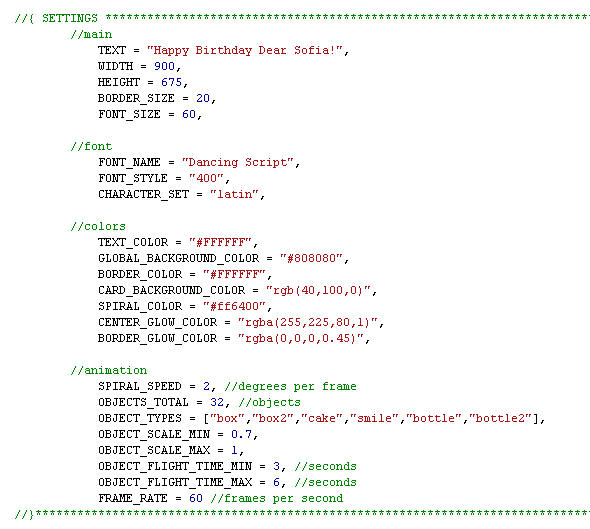
Settings

The settings are in the main html-file:

The documentation includes a detailed description of each property.
If you have any questions concerning these settings, feel free to ask me in the item discussion.

Images


Download HTML5 Greeting Card Universal (Canvas)

Magento Easy Blocks (Magento Extensions)

Are you finding the way of adding special block in any pages of your website simply? if “yes” Easy Blocks Magento is the right choice. With the extended position blocks, you can display promotional image, advertising banner, price discount, upcoming events, or any special information wherever you want

Moreover, you are provided numerous predefined positions. Especially, you can place your image and content on cart pages and checkout pages. If you want to create your favored position, Cmsideas allows you to customize them easily. It’s also easy for you to schedule time and date, Hours, Minutes, Seconds to display your block.

Product details:http://cmsideas.net/magento-easy-blocks.html

Document: http://cmsideas.net/documentation/magentoextension/magentoeasyblocks/index.html

Main Features and user’s benefits

– Cmsideas provides 8 main positions for 3 main visible level of the whole website including: general (all pages), catalog, product
– Especially, add new block on cart page, my account page, checkout page or any pages you want
– It’s also easy for you to manage time and date, Hours, Minutes, Seconds to display your block. Even, you can schedule blocks operation on any specific dates (odd days, even days, 1st day, 2nd day, etc.)
– This multi position block allows you to set rotation mode for each block. There are 3 choices for you
Show all: show all items in the block
Rotate one by one: show each items one by one
Show random: show item randomly
– You can enable/disable to show in subcategories.
– Block items can contain content including HTML, Images, JavaScript and Code
– Admin can add an unlimited quantity of content items in each block
– Our Easy Blocks Magento allows you to place block under prerefined place or customized place
– You are allowed to enable/disable any block status as needed
– With module , you are able to manage item order through the “sort order” attribute.

  • Predefined Block Places for Your Choice

– General ( Can be displayed on all pages)
Sidebar Left Top (block displayed at top of left sidebar)
Sidebar Left Bottom (block displayed at bottom of left sidebar)
Sidebar Right Top (block displayed at top of right sidebar)
Sidebar Right Bottom (block displayed at bottom of right sidebar)
MenuTop (block displayed above the main menu)
Menu Bottom (block displayed under the main menu)
Page Bottom (block displayed at end of page)

– Catalog & Product

Catalog Sidebar Left Top
Catalog Sidebar Left Bottom
Catalog Content Top
Catalog Sidebar Right Top
Catalog Sidebar Right Bottom
Catalog Page Bottom
Catalog Menu Top
Catalog Menu Bottom

– Product only

Product Sidebar Left Top
Product Sidebar Left Bottom
Product Content Top
Product Sidebar Right Top
Product Sidebar Right Bottom
Product Page Bottom
Product Menu Top
Product Menu Bottom

– Customer content top

In this position, you can add content items based on your intention (upcoming event, price discount, promotional program, etc).

– Cart & checkout Content Top

This special block is on the cart’s and check-out’s pages instead of the main block.

Download Magento Easy Blocks (Magento Extensions)

Loupe Image Magnifying Glass for Visual Composer (Media)

Try out Loupe Magnifying Glass in a live environment first before you buy

Add an Interactive Loupe to Zoom on Your Images

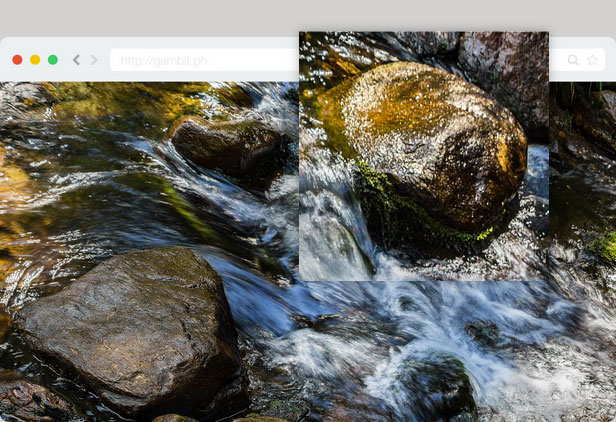
What is a loupe? It’s that circular magnifying glass-like thingamajig placed on top of images that zooms in a part of it. Normally, this cool web design element is done manually by graphic artists. But we’ve brought it to the next level, and now you can create your own with ease.

Loupe Magnifying Glass WordPress plugin is a Visual Composer addon that enables you to add a magnifying glass on top of your images. This is not just a normal loupe magnifying glass, it’s interactive and you can drag it around to zoom in the different parts of images.

The loupe is also very customizeable, you can use circular or square loupes, add a shine to the glass, have shadows, and change the size, colors and thickness of the loupe.

We don’t like complicated things, so we made things simple. Just select your zoomed in image, then the plugin does the rest. You can also try the plugin out in your own private sandbox, click on the live preview link above to test it out.

A preview of Loupe Magnifying Glass WordPress with a white border

You can change the size, colors and thickness of the loupe.

A preview of Loupe Magnifying Glass WordPress with a smaller size and a black border

You can use circular or square loupes, add a shine to the glass, and have shadows

A preview of Loupe Magnifying Glass WordPress a borderless square loupe

Full Feature Set

  • Interactive Loupe, drag it around your image,
  • Customizable size, color, opacity and thickness,
  • Use circular or square loupes,
  • Add shadows or a shine on your loupe,
  • Works with any theme,
  • Very easy to use,
  • Properly coded in WordPress standards,

Try out Loupe Magnifying Glass in a live environment first before you buy

To ThemeForest WP Theme Developers

You can just include this item as a plugin which your customer can install and active along with your theme.

If you want to include this item in your ThemeForest WordPress theme, please purchase an extended license and send me a message through my profile page.

Live WordPress sandboxes are provided by the awesome WP Demo

Having Trouble with the Plugin?

Head over to the support tab and check out the FAQs, or post a comment!

Enjoying the Plugin?

Be sure to leave a rating and review and show us some love.

Check out Our Other WordPress Plugins

Video & Parallax Backgrounds For Visual Composer

CSS Animator add-on for Visual Composer

4k Icons add-on for Visual Composer

Updates

Version 1.0

* Initial release

Download Loupe Image Magnifying Glass for Visual Composer (Media)

WordPress ScrollTo Menu (Menus)

Touch Enabled – Built for IOS and Android.

Create a ScrollTo Menu to allow the user to scroll to any part of your page easily. Over 750 icons to choose from or use your own images as menu item icons. Now with ad space or custom html content space.
Simple and easy to implement on page. Basic html required. Simply add a class to any element to add a link to the menu.

Example of code on page:
<div id=”ebook” class=”stm-item” data-stm-name=”eBooks” data-stm-icon=”icon-books” ></div>

This will add a menu item of “eBooks” that when clicked will scroll the page to that #ebook element.

This is not a WordPress sitewide navigation menu it is a page scrolling menu that scrolls to certain points on the page.

Download WordPress ScrollTo Menu (Menus)

Promo Planner – Schedule Ads to Facebook & Twitter (Windows)

ABOUT PROMO PLANNER

Schedule your Facebook and Twitter promotions to get unlimited flow of traffic, increase your customers and boost sales!

WHY USE PROMO PLANNER

The most important thing to drive sales from your social media profiles is to post regular promotions by following the 80/20 rule (80% content, 20% promotions). So use this app to post deals and offers from your website and get more traffic and sales even when you are not beside the computer.

WHAT IT DOES

This app let you post and schedule Facebook (with statuses, links, videos, photos) and Twitter promotions (tweets, links, photos, videos) in advance, and specify the time at which the promotion should be posted to your Pages and Profile.

FEATURES

  • Post to one or multiple fan pages at a time.
  • Upload promotional images or videos
  • Target fans by Country and Gender, the posted statuses will be visible to selected target fans.
  • Hide the promotion from fanpage wall and only show in fans newsfeed.
  • Auto-repeat option for repeat promotions – you can repeat the deal or offer for any number of days, weeks or months.
  • Auto-delete option for time-limited promotions – the posted deal or offer will be auto deleted from the wall after the time you set.

Download Promo Planner – Schedule Ads to Facebook & Twitter (Windows)

MC Freelancer Page (Miscellaneous)

MC Freelancer Page is an impressive and professional personal website script, featuring an awesome portfolio and a working contact form.

It’s simple! Just download and install in a few minutes, you can show your personal website to your friend, customer or employer in an interview by phone or tablet.

Features :

  1. Responsive layout.
  2. Admin dashboard.
  3. Easy to install and use.
  4. Awesome portfolio .
  5. Contact form.

Live Demo

Front End : http://microcode.ws/demo/freelancer-page/

Admin Area : http://microcode.ws/demo/freelancer-page/admin/

User : admin , Password : admin

Download MC Freelancer Page (Miscellaneous)

WHMCS Tweet Planner (PHP Scripts)

tweet planner allow you to schedule your twitter statues for future!it is standard addon and you can translate it to your language by editing lang file.you can use this great addon to announce :

  1. special offer
  2. coupon code for special events like new year
  3. send news to your follower
  4. send back traffic to your web site!
  5. ….

features:

  • multi language support
  • multi accounts support
  • fully automation
  • step-by-step help via interactive view in admin panel(powered by intro.js)
  • no need any additional API
  • life time update
  • great support via email,help center and IM

system requirement

  • WHMCS 5.x
  • Twitter Account with register new app

also free installation after purchase available!Contact Me if need after purchase.

Download WHMCS Tweet Planner (PHP Scripts)