Prestashop Recommended Products by ID module (Prestashop)

Prestashop Recommended Products by ID Module will allow you to display the desired products by IDs in a carousel on homepage and product page also you can display this module on left or right column.Is included a color editor to change very easy style of the module.

PrestaShop compatibility

  • PrestaShop 1.6.0.4
  • PrestaShop 1.6.0.5
  • PrestaShop 1.6.0.6
  • PrestaShop 1.6.0.8

Compatible with all major browsers:

  • IE 9 +
  • Firefox
  • Chrome
  • Opera
  • Safari

Prestashop Recommended Products Carousel

Download Prestashop Recommended Products by ID module (Prestashop)

Prestashop iContact Subscription (Prestashop)

“iContact Subscription with Custom Popup for Prestashop” is an amazing email subscriber module which allows the site Admin to create Custom Popup, place YouTube/Vimeo embed videos, image or any sort of HTML/custom content in the subscription popup and the Visitors can Subscribe their email to the iContact subscription list. It is flexible, best and simple way to subscribe email for newsletter. Admin can set “iContact Subscription with Custom Popup for Prestashop” module through a Popup style which has various display options.

If you want convert the visitors to your member /subscribers then the Custom Popup is the best solution to tell the users why they should subscribe or to show them a new advertisement or Banner on the popup to allure them get subscribed.

If you want your website to reach every reader, you have to use email and “iContact Subscription with Custom Popup for Prestashop” module will be useful to promote your company to the general people.

“iContact Subscription with Custom Popup for Prestashop” module is very useful for those people who need to send Newsletters to users. This powerful module allows users to collect and manage emails & newsletters with an easy way.

“iContact Subscription with Custom Popup for Prestashop” module has some excellent features and very easy to setup. “iContact Subscription with Custom Popup for Prestashop” module is more flexible and compatible with many existing modules in the Prestashop repository. This Module is fully customizable. Users can easily configure the module into the new or existing Prestashop websites.

Download Prestashop iContact Subscription (Prestashop)

Prestashop Mailchimp Subscription (Prestashop)

“MailChimp Subscription with Custom Popup for Prestashop” is an amazing email subscriber module which allows the site Admin to create Custom Popup, place YouTube/Vimeo embed videos, image or any sort of HTML/custom content in the subscription popup and the Visitors can Subscribe their email to the MailChimp subscription list. It is flexible, best and simple way to subscribe email for newsletter. Admin can set “MailChimp Subscription with Custom Popup for Prestashop” module through a Popup style which has various display options.
If you want convert the visitors to your member /subscribers then the Custom Popup is the best solution to tell the users why they should subscribe or to show them a new advertisement or Banner on the popup to allure them get subscribed.

If you want your website to reach every reader, you have to use email and “MailChimp Subscription with Custom Popup for Prestashop” module will be useful to promote your company to the general people.

“MailChimp Subscription with Custom Popup for Prestashop” module is very useful for those people who need to send Newsletters to users. This powerful module allows users to collect and manage emails & newsletters with an easy way.

“MailChimp Subscription with Custom Popup for Prestashop” module has some excellent features and very easy to setup. “MailChimp Subscription with Custom Popup for Prestashop” module is more flexible and compatible with many existing modules in the Prestashop repository. This Module is fully customizable. Users can easily configure the module into the new or existing Prestashop websites.

Download Prestashop Mailchimp Subscription (Prestashop)

Visual Composer Popup Notifications (Add-ons)

Visual Composer Popup Notifications lets you add the popup notifications to your pages/posts.

.

Features

  • 439 font awesome icons
  • 5 different themes for notifications
  • 9 different colors for each notification theme
  • Lot of Animation option to chose for Popups.
  • Make it sticky or auto hide it after some time
    and many more …..

Changelog


Version 0.1
------------------------------------------------------------------------------------
[+] Added option to restrict the number of times popup can be shown

Version 0.1
------------------------------------------------------------------------------------
 Initial Release

Note : You need Visual Composer installed before you can use this addon.

Download Visual Composer Popup Notifications (Add-ons)

Multi-Level Push Menu for WordPress (Menus)

Are you tired of the same old WordPress Administration Menu? With the latest version of WordPress you can choose between multiple new modern color schemes, but you are still stuck with the same menu and icons.

Give your WordPress admin a sophisticated look with this nested multi-level push menu, and easily customize colors, fonts and icons with our Visual CSS Editor.

We hope you will like it!

Multi-Level Push Menu for WordPress Admin

Login using the information below and take a look at the menu.

Username: DemoUser
Password: TryMeNow

List of features

  • Replace the default WP-Admin menu with the Multi-Level Push Menu
  • Rearrange the menu items in the WP-Admin menu
  • Change names of menu items in the WP-Admin menu
  • Change the Icons for each top-level menu item in the WP-Admin menu
  • Change the CSS including Colors and Fonts with the Visual CSS Editor (go to Settings > Google Web Fonts to enable the fonts you want to use in the Visual CSS Editor)

Screenshots

When you have installed the Multi-Level Push Menu for WordPress plugin you can turn it ON by going to the Appearance > Push Menu Options in the Push Menu tab.

Multi-Level Push Menu - Options

Click on the Menu icon in the WordPress toolbar and the Multi-Level Push Menu will appear.

Multi-Level Push Menu for WordPress - Install Plugin

Click on a menu item with a sub-menu and the sub-menu will slide in from the left on top of the first level. Click on the top level again (dark bar below with globe) and the sub-menu will slide out to the left, and the top level will appear again.

Multi-Level Push Menu for WordPress - Appearance - Push Menu Options

In the Appearance > Push Menu Options > Menu Layout tab you can rearrange the top level menu items, and you can rename the menus as well as change the icons.

Multi-Level Push Menu - Options Menu Layout

Should you experience issues with the Multi-Level Push Menu for WordPress we have added a Troubleshooting menu under Appearance > Push Menu Options > Troubleshooting, which allow us to enable debugging. This provides technical information that helps us when troubleshooting problems.

Multi-Level Push Menu - Options - Troubleshooting

Enter your License Key and you can easily update the plugin from inside wp-admin when new updates are released. Entering the License Key will also give you access to the Appearance > Push Menu Downloads, where you can download free add-ons.

Multi-Level Push Menu - Options - License

In the Settings > Google Web Fonts menu you can access more than 600 Google Web Fonts. You can easily turn ON or OFF the fonts you want to use in the CSS Editor.

Multi-Level Push Menu - Settings - Google Web Fonts

In the Appearance Menu > Push Menu CSS you can enable or disable the CSS Editor. When you enable the CSS Editor it will show in the wp-admin toolbar.

Multi-Level Push Menu - Push Menu CSS Editor

If you experience issues with the CSS Editor we have a Troubleshooting tab, which provides some solutions for the most known possible issues.

Multi-Level Push Menu - Push Menu CSS Editor - Troubleshooting

Access the Visual CSS Editor in the WordPress toolbar. If you have any of our other plugins that also utilizes the Visual CSS Editor they will all be located in the same menu.

Multi-Level Push Menu - Push Menu CSS Editor

Easily edit all CSS settings without any knowledge of CSS. You can easily save different color schemes.

Multi-Level Push Menu - CSS Editor WP Admin Menu

Changelog

Version 1.0.0 rev52069 – July 8, 2014

  • First release

Click to visit RightHere Help Center

Sources, Credits and Licenses

We have used the following open source projects, graphics, fonts, API’s or other files as listed. Thanks to the author for the creative work they made.

  1. Codrops (http://tympanus.net/codrops/). Muti-Level Push Menu an experimental push menu with multi-level functionality. We have used this great menu experiment as the basis for our Multi-Level Push Menu for WordPress Admin. Please notice it has been adapted for WordPress and we have added an extensive options panel for setup and administration, as well as added features that are not available in the original source.
  2. Steamline Icons, (100 icons), Standard License. http://www.streamlineicons.com/
  3. Linecons by Sergey Shmidt (48 icons) , http://designmodo.com/linecons-free/
  4. Font Awesome by Dave Gandy (360 icons), http://fortawesome.github.io/Font-Awesome/
  5. Metrize by Alessio Atzeni (300 icons), http://www.alessioatzeni.com/metrize-icons/
  6. Google Web Fonts, https://www.google.com/fonts (http://creativecommons.org/licenses/by/3.0/)

Download Multi-Level Push Menu for WordPress (Menus)

WooCommerce Custom Taxonomy Reports (WooCommerce)

The plugin will provide charts for products and orders using custom taxonomies. Just like the Sales by Product Category report, you can now have the sales by product tags, any custom product attribute, any custom products taxonomies, and any custom orders taxonomies as well (like custom order statuses ..etc.).

Features

  • Add custom taxonomy reports by products taxonomies
  • Add custom taxonomy reports by products attributes
  • Add custom taxonomy reports by orders taxonomies
  • Set time range for reports and export to CSV like any other report

Download WooCommerce Custom Taxonomy Reports (WooCommerce)

OpenCart Super Search: Autocomplete & more (OpenCart)

OpenCart’s search is costing you sales! Fix it with OpenCart Super Search.

OpenCart Super Search is three extensions in one:

  • Autosuggestions – completes visitors’ typing and helps them quickly find your products, categories, and search terms
  • Smarter, more relevant, more search-engine-like results – shows visitor’s relevant, expected results for their searches
  • Search terms logging & stats – shows you what your visitors are searching for and helps you improve your site and product lines

OpenCart site’s default search functionality is costing you sales;

  • OpenCart’s search doesn’t handle plurals. If you have 200 listings with “Monitor” in the title, a search for “Monitors” (plural) won’t bring them up! Really. Try it on your own site.
  • OpenCart’s search by default only searches product titles and models. The rest of the product page is completely ignored.
  • OpenCart’s search has no autocompletion/autosuggestion, making it hard to use and vulnerable to user error
  • OpenCart’s search has no spelling/typo correction, misspelled words just return zero results
  • OpenCart’s search has no useful prioritization. If you have many products, relevant search results get buried in the noise.
  • OpenCart’s search doesn’t track what’s being searched, who knows what your visitors wanted or whether or not they found it?

Your customers can’t buy your products if they can’t find them. Super Search allows your products to be found.

Features

  • Very configurable. Almost every aspect of Super Search can be configured to your liking in the friendly admin interface.
  • “Did you mean?” spelling suggestion feature helps to correct typos and spelling errors. Word list is based on your products so will include your brand names and proprietary words!
  • Smarter language processing allows word variations to be found for more relevant results
  • Keywords are searched in titles, descriptions, tags, meta description, meta keywords, category titles and more.
  • Smart search ordering determines which search results are more relevant to your user’s query, placing them at the top of the list.
  • Logs every search your visitors make! Wondering what products you can add to your store? Your customers are the best source for this. Find the products your customers want to buy.
  • See the most recent searches, the all-time most popular search terms, and the most common terms not producing results
  • Full graphical search statistics to help you determine if your users are finding what they’re looking for
  • Highlights matching search terms in titles and descriptions
  • Compatible with multicurrency and multilanguage

Autocomplete

Search logging and statistics

“Did You Mean” suggestions

Demo Site

You can try OpenCart Super Search out for yourself:

Front end:
http://www.forlent.com/ssdemo

Back end:

http://www.forlent.com/ssdemo/admin
u: demo / p: demo

Super Search stats are in Report -> Super Search Report
Configuration is in Catalog -> Super Search (saving is disabled)

Requirements

  • OpenCart 1.5.4 or later
  • PHP 5.2 or later
  • Autocomplete works with most templates out of the box, some may require minor customization, instructions included.
  • Recommended: PSpell PHP library (required for “Did you mean?” functionality; most hosts have this installed)

Download OpenCart Super Search: Autocomplete & more (OpenCart)

Easy and Responsive Image Uploader (Loaders and Uploaders)

Easy and Responsive Image Uploader is an easy way to upload your images and share.

– Direct links ready to copy;
– HTML code ready to copy;
– Upload jpg, gif and png images;
– Different links for each image page;
– Responsive;
– Ready for retina devices.

Download Easy and Responsive Image Uploader (Loaders and Uploaders)

Facebook Like, Share and Download Pro (Social Networking)

Introduction

Facebook Like, Share and Download Pro is a MUST HAVE application for business who have
fan page(s). This application will help you increase your Fan Base and spread your post
on Facebook utilizing Facebook Share feature. The idea of this application is to
give away free eBook to people and before they can get to eBook they first have to like and
then Share your post.

Features – Standard License

Here are some cool features of this application:-

  • Fan gate content ie Not to allow users to see your share / download page until they like
    your fan page.
  • Lock your eBook until users share (what you want them to share).
  • Customize the post which you want users to share on their wall.
  • Customize content which shows to Non-Fans.
  • Customize content which shows to your fans.
  • No database required.

Features – Extended License

If you have bought extended license then you qualify for following free services:-

  • Free hosting of files (life time – note that FTP access to files will not be provided).
  • Free set up of Facebook App.
  • Free content customization ie share post and text which shows up to fans and non fans. Just fill a document
    (click here to download) and send us, we will customize
    your share post and content based on the file you send.
  • We will send you free back up of your customized copy.

Live Demo

  • Live Preview
    Click Here
  • Admin / Setup Preview

    Click Here
    (Please note that in demo version settings do not show up on Facebook Fan Page)

Documentation

Documentation covers instructions for you to install and use the application.

Click Here
to read the documentation

Application Flow

Please

Click here
to see complete application flow

System Requirements

If you have bought standard license then your server should have following:-

  • PHP 5.x
  • SSL Installed

FAQs

I do not have server where i can host the code. What should i do ?
Do not worry, we can host your code free of cost if you purchase extended license.

I do not have Facebook Application. What should i do ?
Setting up Facebook Application for your fan pages is very easy. We have explained it in our documentation
Click Here
to read. However, if you do not have time to set up, we offer you free application set up if you purchase extended license.

I don’t have SSL installed on my server. What should i do ?
Unfortunately SSL is required, However, this does not stop you from buying this application. Here are available options for you

  • Buy and install SSL certificate on your server
  • Purchase extended license and we can host the code on own server, In this way you do not have to worry about server or SSL

Live Support

App Screen Shots

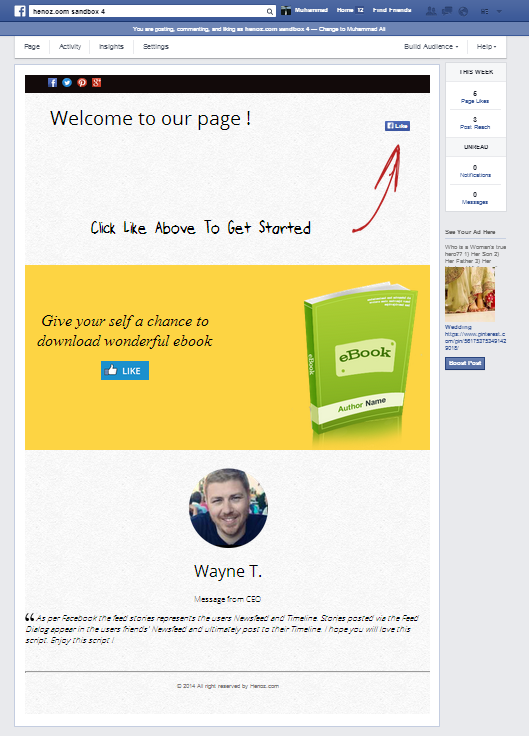
Non Fans Content View

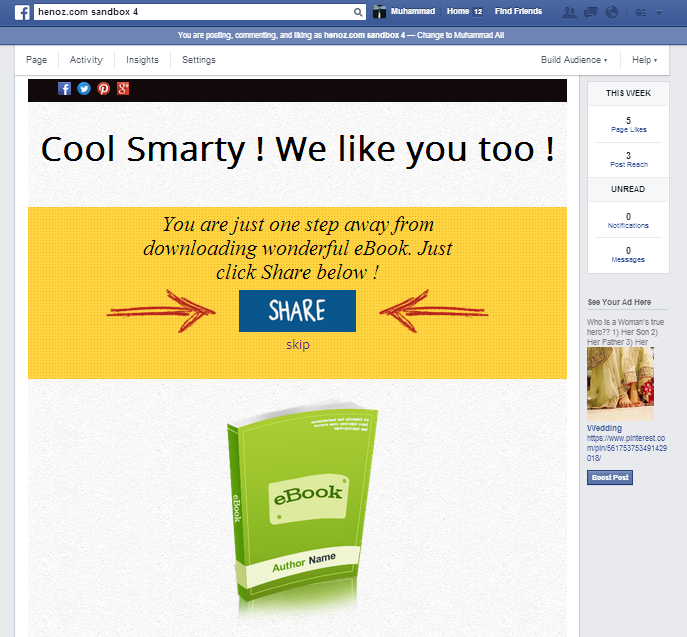
Fans Content View

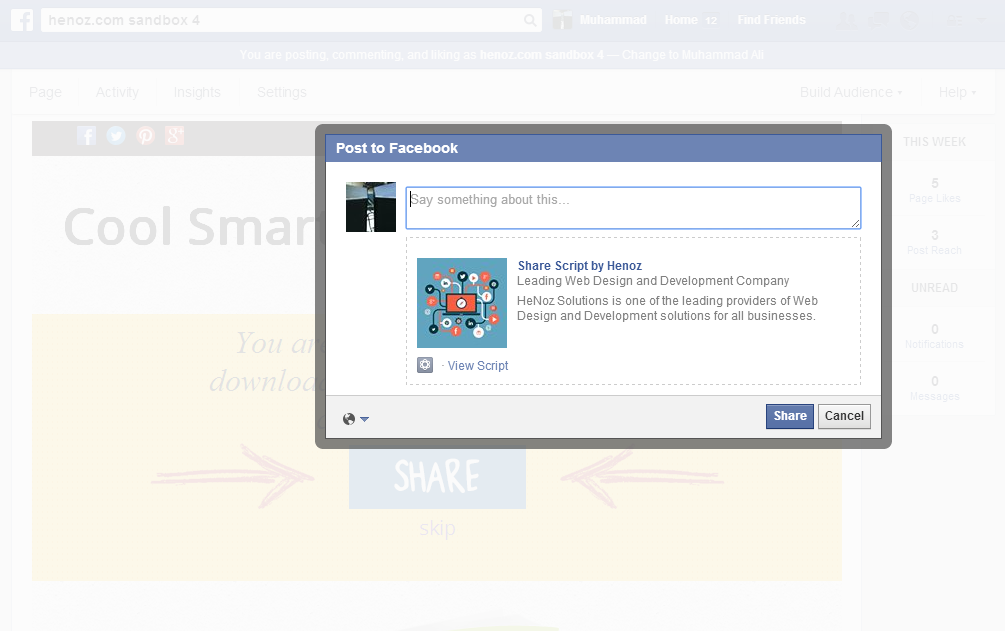
Share on Facebook View

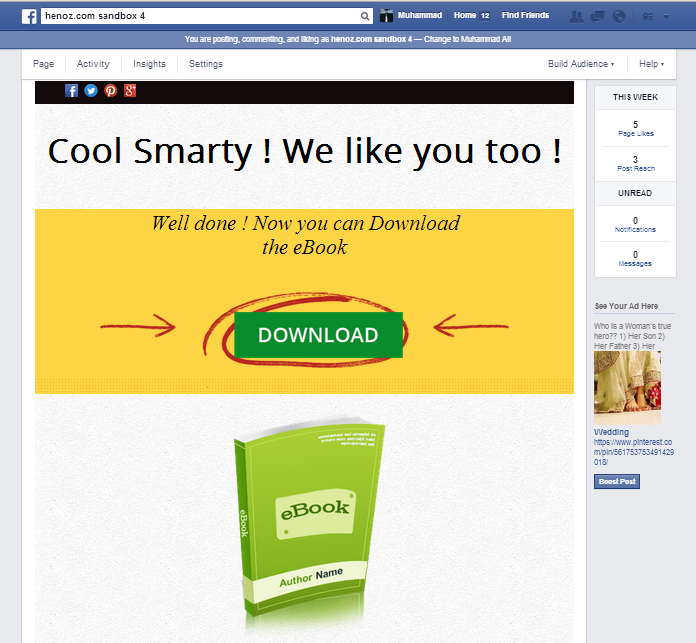
Download Page View

Feed Preview – As share post will look on Facebook

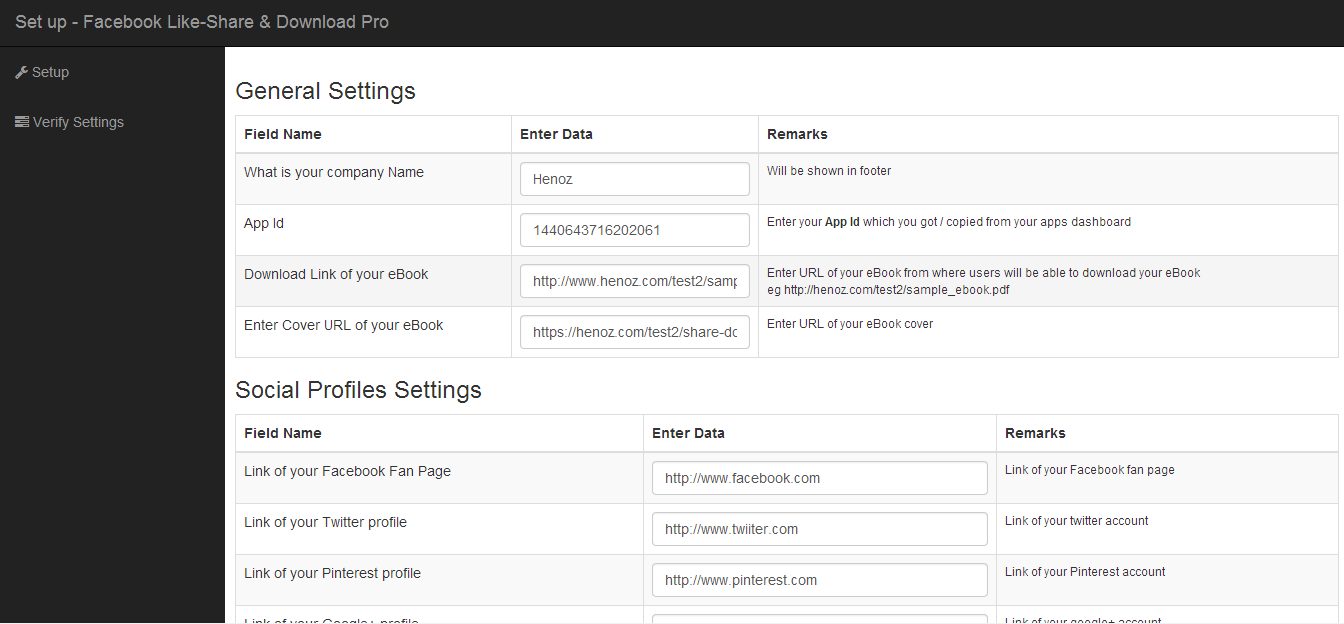
Setup / Admin Settings View


Download Facebook Like, Share and Download Pro (Social Networking)

ALNavigationScroll Controller (UI Elements)

What is it?
ALNavigationViewController is a view controller that handles scroll-based navigation. You can change views by scrolling or by tapping the view’s title on navigation bar. ALNavigationViewController will animate following changes.
Package contains ALNavigatorViewController file (.h and .m), and sample Xcode project.

Installation:
1. Choose navigation type (Navigation bar or Toolbar)
2. Set views
3. Done

Features:
• Two types of navigation bars
• Animated changes
• Well documented code
• Easy installation
• Sample project included

Updates:
(1.0) XX July
? Two types of navigation bars – UINavigationBar and UIToolbar (top and bottom respectively)
? Animated changes

Contact.
Please write me an email (via the message box on the right side) if you have any questions or suggestions.

Download ALNavigationScroll Controller (UI Elements)

Creative Laboratory (Games)

Creative Laboratory
This is a game is for Android OS. The project was compiled for Adobe Air and was published to *.apk file. Adobe Air Runtime was also integrated into *.apk file, so you don’t need to install Adobe Air on your device.

Admob support

Download Demo

Here is APK file: http://appdemo.wavesnows.com/apks/CreativeLaboratory.apk
Flash Version: http://activeden.net/item/creative-laboratory/4835884

FEATURES:

1.Easy to change skin.
2.All vector images.
3.AS 3.0 version.
4.The first in the board horizontal, vertical, oblique shape with color in a row to win five in a line game .
5.Easy to change it to any project.
6.Puzzle and interesting Game.
7.You can drag the block to make the big block color change and get the expected result.
8. Easy to change it to any platform.
9.Use Flash cc edit.
10.Eeay to change it for ios,then upload App Store.
11.Admob supported.
12.Include Document to help.

HELP:

If you have other question ,please contact me.Good Luck using the file in your projects!

Other Games


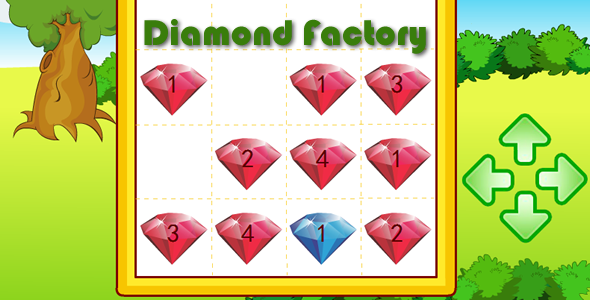
Diamond Factory- CodeCanyon Item for Sale
Find Food - CodeCanyon Item for Sale

Download Creative Laboratory (Games)

WooCommerce Coupons by Location (WooCommerce)

Offer coupons valid for locations of your choice.

WooCommerce Coupons by Location restricts coupons by customer’s billing country, state or city.

According to research, customers convert more when offered a discount. Additionally, offering location aware, contextual offers significantly boosts conversion rates.

In short, you can get double increase in conversion rates with this unique plugin – WooCommerce Coupons by Location.

Features

  • Restrict Coupons by Billing Country, State or City
  • Great for Local Marketing
  • Delight Customers With Offers They’d Love
  • Allows Entering Custom Locations
  • Compatible With Other Coupon Rules & Plugins

Example Uses

  • Offer an “independence day special” coupon to customers from United States on 4th July.
  • Offer a “best football players” discount to customers from FIFA 2014 semi-finalist countries.
  • Cut a deal with “local love” discounts for customers in the same city as you.

How to Use

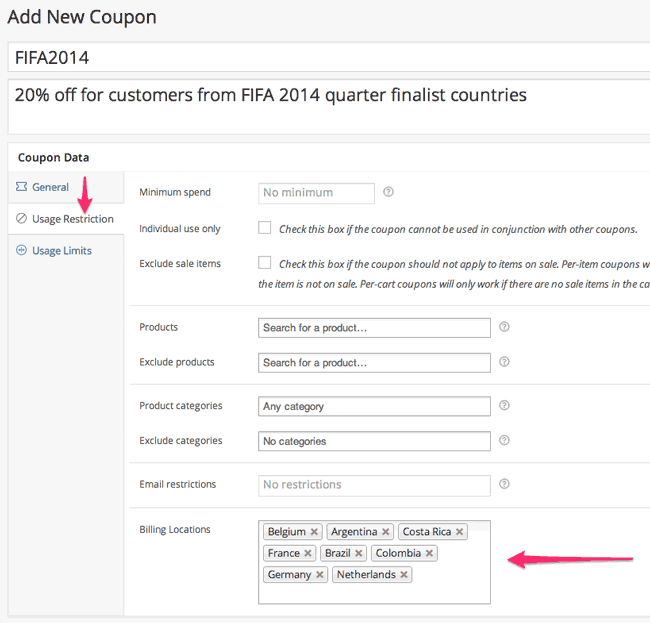
Here’s how you can create a new coupon and restrict it to be used by customers from locations of your choice.

  1. Go WordPress Admin – WooCommerce – Coupons
  2. Click on Add Coupon (or edit an existing coupon)
  3. Go to the Usage Restrictions tab in this coupon’s settings.
  4. Locate the Billing Locations option.
  5. You can start typing a country name in the text box. Coupons by Location will auto complete country names. Press enter to select that country.
  6. You can type in state or city names in this box too. Press enter after typing to add that location. This will work even if the name is not auto completed. As long as customers location exactly matches the location you enter, coupon will be applied.
  7. Custom locations you enter (e.g. city, state etc) will be saved for later usage. So you will get them in auto complete next time.
  8. Complete adding all locations you want to restrict this coupon too.
  9. Also setup discount parameters and other conditions you want on this coupon.
  10. Save the coupon.

Here’s a screenshot that explains this process.

What happens when customers use this coupon?

  1. When someone uses this coupon, the coupon will be applied only if all the rules match.
  2. Coupons by Location will check customer’s billing country, city and state values for a match. If any of the locations you’ve entered in coupon setup match customer’s billing country, city or state, the coupon will be applied.
  3. If customer is logged in, their registered billing location is used to check fo the coupon.
  4. On checkout page, whatever billing address customer has entered, is used to check location restrictions.
  5. This means non-logged-in users can not use a location restricted coupon on “Cart” page. But can use it on “Checkout” page.

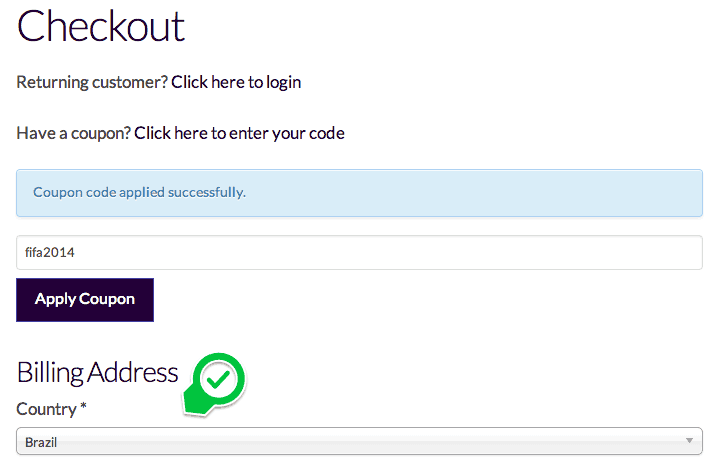
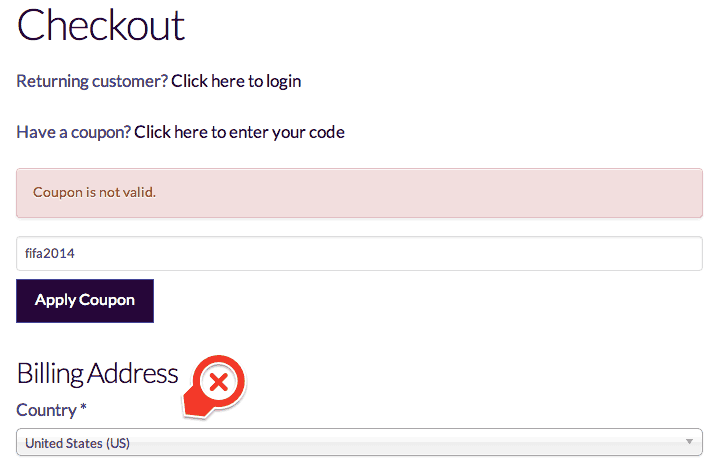
Here are two screenshots explaining cases when a coupon is applied and when it’s not.

Coupon applied because location matches…


Coupon does not applied because location dot not match

Need Help?

If you need any help or have a question, feel free to contact us.

Download WooCommerce Coupons by Location (WooCommerce)

Magento User Interaction (Magento Extensions)

Magento User Interaction extension provides the user friendly communication between Administrator and customers. It allows users to send messages to administrator and receive his answers.

With our MUI Extension administrator can send single and Bulk messages to users.

MUI also provides the order Tracking Ticket system, with this ticket system customer and administrator can easily track the orders and manage the tickets.

Features

  1. Admin – User Messaging system.
  2. Bulk messaging options.
  3. Inbox and Outbox for users.
  4. Order Tacking/Tickets system.
  5. Users profile Listings on frontend.
  6. Profile image option for users and administrator.
  7. Message notifications Email to users.
  8. Extended User Profile.
  9. More than 15 admin options…

Download Magento User Interaction (Magento Extensions)

Lets-Box | Box plugin for WordPress (Utilities)

Lets-Box | WordPress Plugin

This plugin will help you to easily integrate Box into your WordPress website or blog. Lets-Box allows you to view, download, delete, rename files & folders directly from a WordPress page. You can use Lets-Box as a filebrowser, gallery, audio- or video-player!

NOTE: Lets-Box uses the Offical Box API.

Google Drive: We have also a Google Drive variant of this plugin with even more powerful features!. If you only want to use the Gallery function you really should consider Use-your-Drive as it is much faster.

Use your Drive - Google Drive plugin for WordPress

Features

File browser

  • View Box folders & files directly on your site
  • Upload form so users can upload (multiple) files to Box
  • Add, delete and rename files & folders
  • Search your Google for files & folders and even in contents
  • If needed you can restrict users so they are only able to use their ‘own’ Box folder

Gallery

  • Great looking grid with lightbox
  • Folder thumbnails shows whats inside the folder
  • Customize image row height
  • Shuffle images
  • Add, delete and rename images

Audio & Video

  • Streams audio files directly from your Box with a HTML 5 audioplayer with flash-fallback
    • .m4a (AAC/H.264)
    • .oga (Vorbis/Theora)
    • .mp3
  • Streams video files directly from your Box with a HTML 5 audioplayer with flash-fallback. (Do always supply a mp4 or m4v file for cross-browser support)
    • .webmv (Vorbis/VP8)
    • .ogv (Vorbis/Theora)
    • .mp4 (Limited support)
    • .m4v (AAC/H.264)
  • Multiple awesome skins

General

  • Sort files by name, size or modified date
  • Restrict viewing by file extension and file or folder name
  • Restrict uploading files by file extension
  • Restrict which user can see, download, rename or delete your files or upload new ones. You can set the required roles by yourself
  • Secure OAuth 2 authentication
  • Powerful but intuitive shortcode generator
  • Multi Sites supported
  • Multi language supported
  • Auto-updater
  • And finally… All elements are responsive!

Do you miss a feature? Let us know!

Requirements

  • At least PHP 5.3 with cURL extension and ‘allow_url_fopen’ enabled

Not compatible with

Screenshots

Use your Drive - Google Drive plugin for WordPress


Changelog

= 1.0 (8 July 14) =

  • Initial release version

Download Lets-Box | Box plugin for WordPress (Utilities)

Woo Product Viewer with Hotspot (WooCommerce)

Key features

  • -Admin editor with drag and drop
  • -Unlimited frames and hotspots
  • -Auto rotates frames
  • -Auto slides and opens hotspot content
  • -Hotspot thumbnail
  • -Any kind of hotspot content
  • -8 positions of hotspot content
  • -9 positions of hotspot anchor
  • -Responsive
  • -Works on mobile
  • -And more…

Download Woo Product Viewer with Hotspot (WooCommerce)