Woocommerce email order to supplier (OTS) (WooCommerce)

WooCommerce Email OTS

WooCommerce Email OTS lets you create an customised email with any order in Woocommerce. This is perfect if you want you send completed orders to a supplier ( drop shipping ).

Quick guide

  1. Create your email under the “Email OTS settings”. Be creative and use the default WordPress WYSIWYG editor.
  2. Find your order inside the Woocommerce orders and hit the “send so supplier button”.
  3. Done.

Version 1.0

  • Initial release

Download Woocommerce email order to supplier (OTS) (WooCommerce)

RadioBundle – summer sale (Full Applications)

Introducing the complete assembly of the radio applications for all tastes with a variety of functions!

<

Only this this summer!


Support notes

Right now we receive many emails and requests for support than we can manage quickly. Many times we can answer the same day but others take much longer. Before you send a request for support please read the entries below:

  • Support from Envato authors is optional but we will do our best to help.
  • Support doesn’t mean customization.
  • Read the full documentation file.
  • Check if your question is not already in the Item Discussion section.
  • We do not give support for third party code in this case you need contact the authors.
  • We do not support errors caused by strong modification to the original files.
  • We do customizations but this is not included in the package price. To get a quote for a modification you can send an email using the form in the right sidebar.
  • We can’t teach how to code in Objective-C, C++, Java or any other language.
  • We can’t give refunds, if you want a refund please contact Envato directly.
  • If you have a general question you can use and asking your question in the Item Discussion section.
  • Our time zone is (currently) GMT+4, so please keep in mind our timezone might be different from yours.

You can read more about item support on the Envato wiki Thanks for reading.
Support group http://support.studio76.pro

License

All additional libraries that we use when writing code in our programs meet the MIT license and Creative Commons CC0 1.0 Universal, correspond to the free dissemination, modification and commercial sale

Download RadioBundle – summer sale (Full Applications)

WooCommerce Order SMS Notification (WooCommerce)

This is a WooCommerce add-on. By Using this plugin admin and buyer can get notification about their order via sms using different SMS gateways.

The WooCommerce Order SMS Notification plugin for WordPress is very useful, when you want to get notified via SMS after placing an order. Buyer and seller both can get SMS notification after an order is placed. SMS notification options can be customized in the admin panel very easily

Key features of this plugin

  • Very easy to install
  • Very easy to customize
  • Five major SMS Gateway Supported
  • Extended Settings Option
  • Works with WooCommerce 2.0+
  • All version of WordPress 3.0+ supported

There are five types of SMS gateway. Such as:

Using any one of these service Admin can get SMS notification of orders. Admin can also enable SMS notification service for buyers as well

Note : If your PHP version is below 5.4 please update your PHP version because our plugin require PHP version 5.4 or higher.

Download WooCommerce Order SMS Notification (WooCommerce)

Kids Learn Book With ADMOB/MobileCore (Android)

Demo apk file : https://www.dropbox.com/s/z5ftqp97hl7p7ed/Codecanyone%20kids%20learn%20book.apk

Features:

Learn ABC
Learn Numbers(with sound pronunciation)
Learn Animals(with sound pronunciation)
Learn Fruits (with sound pronunciation)
Practice Alphabets.
Admob (Google play service libs) / Mobile code

What you will get is :

Full source code.
Well formed documentation.
Screenshots.
.apk file.

Buy it now. I am here to support you any time.

Thanks,

Download Kids Learn Book With ADMOB/MobileCore (Android)

Post/Schedule to Multiple Facebook Pages (Social Networking)

Schedule your website posts to your Facebook Pages/Profile and get unlimited flow of traffic.

The most important thing to drive traffic from your Facebook Pages is to update it regularly. Add more links from your website and get more traffic even when you are not beside the computer.

This app let you post and schedule Facebook updates (statuses, links, videos, photos) in advance, and specify the time at which the updates should be posted to your Facebook Pages and Profile.

Post to one or multiple fan pages at a time.

Target fans by Country and Gender, the posted statuses will be visible to selected target fans.

Hide the posted status from fan page wall, will hide from wall but will show in fans newsfeed.

Repeat option, now can repeat the scheduled posts for any number of days, weeks or months.

Auto delete option, the posted statuses will be auto deleted from the wall after the time you set.

It keeps latest selected Pages and time so no need to select all again.

No need of ssl certificate.

Download Post/Schedule to Multiple Facebook Pages (Social Networking)

Windows Phone Apps – Web view Project (.NET)

This is a Windows Phone Apps – Web view Project 2.1

Using this apps you can build windows Phone apps for particular
responsive website.

Social network site Pinterest  brings all the features of
Pinterest you love to your Windows Phone.

Feature

  1. You Can Build any websites windows Phone Apps.
  2. All Device Combability(Responsive Design).
  3. Easily Add Category.
  4. Edit and Delete Category.

What You Get:

  • Full Windows Phone Apps Source Code.
  • Full XAML and CS Code of Server Side.
  • User manual Document with Screen Shot.

Works with:

  • Windows Phone 8.1
  • Windows Phone 8
  • Windows Phone 7.5


Support

Download Windows Phone Apps – Web view Project (.NET)

Multifeatured Product Module (OpenCart)

Multifeatured products module is a excellent extension that helps you to create unlimited featured modules at home page or anywhere on your opencart website. You are able to display products by each module with your customization.

FEATURES

  • Create unlimited featured modules.
  • No core file changes.
  • Almost Themes are compatible.
  • Multi-Language.
  • Multi-Store.
  • Clean code and design with browser compatibility.
  • Quick Installation.
  • Detailed Installation Guide.
  • Easy to Customize.

DEMO

Feel free to check out our demo site :


SUPPORT

If you have any questions about this extension, please feel free to contact with me via email : [email protected]. Thanks so much!

CHANGELOG
+20 July 14 – First Release.

Download Multifeatured Product Module (OpenCart)

Apollo – Bootstrap Skin (Bootstrap)

Apollo

Apollo is a modern template built with Bootstrap 3, giving it the ability to be used with any website. If you know Bootstrap, you know it is very easy to install and customize the template to your own needs, especially because this skin is built with LESS (included file). This modern and flat design is the best pick for your next web development adventure.

Features

  • Retina Ready Design
  • 300+ Font Awesome 4.0 Icons
  • Numerous JavaScript / jQuery Plugins
  • Crossbrowser
  • Mobile and Tablet compatible
  • Demo Page Included as Documentation
  • Always here to answer your questions!

Download Apollo – Bootstrap Skin (Bootstrap)

TONIK – Navigation Menu (Navigation and Menus)

Features :

  • Pure CSS
  • Works On All Major Browsers
  • Flat Design
  • Animated ( CSS3 )
  • 7 Colors ( dark & light )

    • blue & light blue
    • green & light green
    • orange & light orange
    • pink & light pink
    • red & light red
    • violet & light violet
    • yellow & light yellow
  • 2 Postions ( top left and top right )
  • 2 Direction ( horizontal and vertical )
  • Font Awesome Icons
  • Less File Included

Tonik

Tonik

Credits :

Download TONIK – Navigation Menu (Navigation and Menus)

iDesign – The ultimate in WP web design software (Utilities)


Introducing iDesign:

The Ultimate in WP Web Design Software

iDesign was built ground up on new principles to bring an enhanced experience to the design builder genre with a single aim – make creative web design fun, intuitive and efficient like never before. Here is a canvas that fits in anywhere and brings to life amazing designs with splendid ease that blends work into play.

You can use this plugin for developing specific sections that you require, for filling out gaps in your website with creative web designs. Or simply make it your new page builder to create awesome pages. Just browse iDesign’s vast array of presets here to get an idea of how refreshingly capable the plugin is at creating unique and requirement specific web design elements.


Truly Endless Possibilities:

The plugin was created to give users immense designing power. With zero lines of code, and an intuitive user interface experience you’ll be able to create and visually integrate a wide variety of web elements such as:

  • Tile Grids
  • Product Showcase
  • Portfolios
  • Metro
  • Testimonials
  • Feature Sections
  • Text Bubbles
  • Banners
  • Team View
  • Buttons
  • Post Teasers
  • Sliders
  • Filters
  • And More…

Most importantly, you’ll be getting the means to conveniently create highly custom sections and pages that would simply not be possible otherwise without a cumbersome amount of coding. For the first time, you’ll do this without struggling with the tyranny of rows and columns and receive a vast amount of customization options and presets to jump start your projects!

Freedom of an amazing DIY (Do-it-Yourself) tool!


For non-programmers, and those keen on quick productivity, iDesign brings the amazing opportunity to conveniently build your web visions into reality without code and via an easy to use platform that facilitates creatively experimentation. It’s interface was created to remain newbie friendly and offers more and more power to advanced skills. Another great facility relevant here is iDesign’s vast array of presets that can be found here. These can be used to quickly jump start your projects, saving you time and energy by laying down the foundation, and to better understand the design capabilities of the plugin. iDesign offers easy and vast creative control over your web designs, and can be counted on time and again while you build various sections of your website. Mastering this tool means gaining incredible and easy creative control over your website and it can be counted on time and again while you build design elements for various sections of your website – be it the main content area, sidebar, widgets, footer – basically wherever your theme permits shortcodes without restrictions. In this way, iDesign helps you truly customize your website to your specific needs amd bring your web visions to reality.

Capabilities & Chief Features

  • Ajax Pagination: For native posts as well as WooCommerce! Add elegance and smarter your designs with this nifty feature, awesome for hooking your traffic.
  • LightBox: Lightbox can have different image than the tile, background color, pattern image and opacity can also be controlled individually for each tile.
  • FreeFlow Blueprint: Step up to the amazing feel of a liquid like blueprint where you create designs with amazing ease without struggling against rows within columns within columns…
  • Native Slider: Very convenient to use, size it as per convenience and it will blended anywhere within the layout. Great for purposes where a simple slider or carousel is needed such as reviews, teasers, products.
  • Filtering: Attractively display portfolios with filters. The filter tabs themselves are also highly customization friendly in terms of their visual styling.
  • Font Awesome Integrated: Choose from over 400 beautiful icons for your tiles and enjoy detailed customization for them including shadow and hover colors.
  • 24 Tile Types: Each tile type comes with a unique markup structure, most with custom animation, covering a wide range of purposes. Different tile types can be used within the same set.
  • WooComm. Integrated: But ofcourse! Attractively display your woo products, style mini shop sections, add to sliders, paginate, use presets and generally pump up the value of your wares with iDesign.
  • Custom Classes: Give different custom class to each set or even each tile within a set in order to target them individually for targeting via JS or CSS.
  • Separate Hover Image: Provide a different image on hover if needed. Hovered font awesome icons can have different style properties to create smart hover effects.
  • Appear Animations: Detects when set is within screen view and applies appear animation decided by the user. There are two different animation styles, swing and glide and 6 different animation directions to style your sets!
  • Mulitiple Links / Tile: Add multiple links per tile, and for weight, choose different dimensions / animations per link, per tile.
  • Import/Export Supported: Import/Export all designs via ‘Resources’ page or do it for individual designs, sets and even tiles for great convenience and efficient re-use of past material.
  • Google Fonts Integrated: The ‘Resources’ page offers a panel for conveniently managing your Google Fonts. The process is super simple and over 600 fonts wait to spoil you for choice!
  • In-Depth Customization: You’ll have no complaints going hands on with a boat load of styling options made available for each element of the tile, the tile itself and even the set and design.


Sweet, Massive Selection of Presets

A solid presets system is at the heart of iDesign’s ability to provide you with great efficiency and ease of use. iDesign is already backed by a vast selection of presets, including sets and full page templates, covering a variety of purposes, and this selection will only continue to grow. Access the presets by heading over to the presets page here. These presets can be easily imported into your current projects and are a great way to jump start your designs. The “General Use” presets section offers a variety of handy presets you could often rely on to build typically required elements. But do not forget to check out the selection of “Custom Concepts” that showcase how unique your own designs could end up looking with the power offered by this plugin.


Author’s Note:

iDesign has been developed with a lot of care and deliberation as a high calibre WordPress tool to assist with the creation of beautiful and smart designs, and its success would be measured in terms of the output it helps its users create. If you would like to share your work developed with iDesign, please send a mail to [email protected]. A five star rating from satisfied users would be much appreciated for the effort behind put into its development. However, if you face any issues with the plugin, or would like to provide suggestions to enhance it (most welcome), please write in to the same email address for prompt support.

Download iDesign – The ultimate in WP web design software (Utilities)

Bubble Shooter template for Corona SDK (Games)

About
This is a core of a bubble-shooter game. It is developed with Corona SDK version 2014.2189.  It supports all editions of Corona SDK (starter, basic, pro, and enterprise).  

To build a complete game, you just need to add code on top of this template (such as level selection screen, saving score, playing sound).

The levels are configured with simple JSON file. The format of the level configuration is explained in the document in the package. There are 4 sample levels so you don’t have to create a new level from scratch.

Try it out
See Slide 15 demo clip at http://www.youtube.com/watch?v=TcTTH2PngT0

If you have Android device, you can download the apk from http://lightanddepth.com/apps/BubbleShooter.apk

Note that it is currently designed for devices with screens that is at least 800×480 in resolutions.

Download Bubble Shooter template for Corona SDK (Games)

WP Flat Visual Chat (Utilities)
PRESENTATION

Offer quality support to your customers !

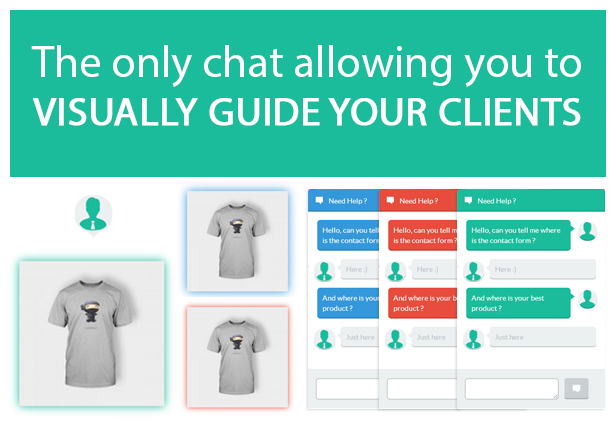
This unique chat not only allows you to communicate with your customers, but also to guide them through the pages of the site showing them visually any element.

Click here to see a video of the backend

FEATURES

  • Real time AJAX chat
  • Beautiful, flat & responsive design
  • View the page where your customer is.
  • Operators can visually show any website element to the customer (through the different pages)
  • New “Chat Operator” user role
  • You can assign the operator role to any another role
  • Chat logs management
  • Operator can transfer discussion to another online operator
  • Frontend chat texts are customizable : you can translate in your language
  • If there is no operator online, a contact form appears
  • Colors are customizable
  • Reactive support !

Frontend

Backend

GETTING STARTED

  • Upload and activate the plugin
  • Click on the “Visual Chat” menu link to lauch the chat console

** If you like this plugin, please leave a note ! **

SUPPORT

If you need help, contact me from my envato profile

Follow me


Google+


Google+

Plugins


\


\


\


\

Plugins


Google+


Google+


Google+


Google+


Google+


Google+

Download WP Flat Visual Chat (Utilities)
User Signup for Arforms (Forms)

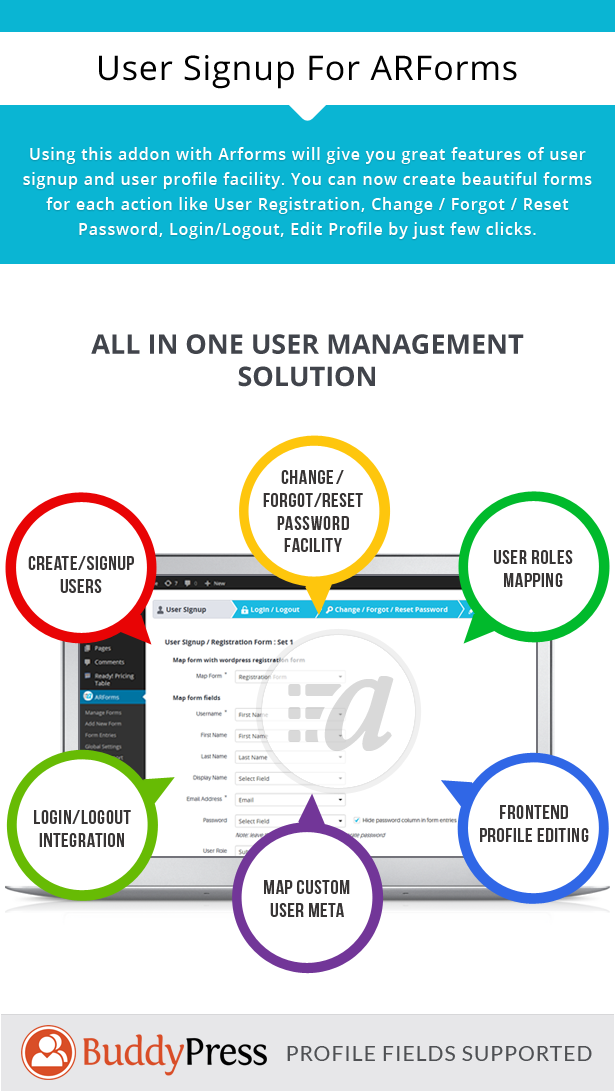
  • Advanced user signup integration

  • With ARForms User signup Add-on you can set custom user meta with registration form. That means you can set additional fields other than wordpress standard registration fields. You can select existing user meta as well as set new meta(s).
  • You can manage user default role while user registration.

  • You can send notification to users after successful signup with your site.

  • Auto-login facility after user signup.

  • Ability for User Login / Logout.

  • ARForms User Signup Add-On allows you to login user within your site only. For that you need to map existing ARforms’ form with this add-on. User will be loggedin to your site after submitting form with corret credentials. You can also manage redirection URL after successful logged-in to your site.
    You can put a link or Button for user logout. just place a shortcode from this add-on for logout. You do not need to manage anything else
  • Ability to Change Password and Retrieve Forgotton Password

  • ARForms User Signup Add-On allows your site users to change their password from front-end. This add-on has facility to validate user’s old password before change new password.
    With this add-on your site users also can retrieve their fogotton password by entering their email or username.
  • Ability to update User Profile from front-end

  • ARForms User Signup Add-On allows your site users to edit their profile from front-end. This add-on will auto populate all the user’s data which he has
    entered while signup. User can modify his profile data and update their profile immediately after submit the form.

Download User Signup for Arforms (Forms)