Plus Gallery – Joomla version (Galleries)

Plus Gallery is a simple lightweight photo gallery module for Joomla driven by your existing online photo gallery.

Please note! This is Joomla version! If you are WordPress lover WORDPRESS version is here!

Plus Gallery grabs all your albums and images from an online source or feed and display them on your site or within individual blog posts.
It allows you to browse albums and galleries, or display just one Gallery at a time.
Take a photo with your iphone, post to Facebook, Instagram, Flickr or Google Plus and it is automatically added to your site as well.

Now people have an easy way to update and maintain their photos via, Facebook, Instagram, Flickr, Google+, etc and their old photo galleries on their website quickly become outdated. Plus Gallery takes your albums and photos from your online gallery and streams them directly to your website or individual blog/news posts.

Features:

  • Fully Responsive: Display the same on any devices.
  • Dynamically load images from Facebook, Instagram, Google + or Flickr to your site’s gallery.
  • Manage gallery by including/excluding albums, limit the number of pictures to be display in each album.
  • Compatible with Tablet, Smart phone
  • Inline help: instructions directly from the admin area.
  • Flexible Configuration
  • Very Detailed Documentation

Change Log:

V1.0.0 (9 August 14)

» Initial Release


Thank you for your interest in Plus Gallery
If you have any questions or need assistance, please feel free to ask; I will gladly help you. Also, if you like it, please take a moment to rate it. Thank you! :)

Download Plus Gallery – Joomla version (Galleries)

Overlays Over Images WordPress Plugin (Utilities)

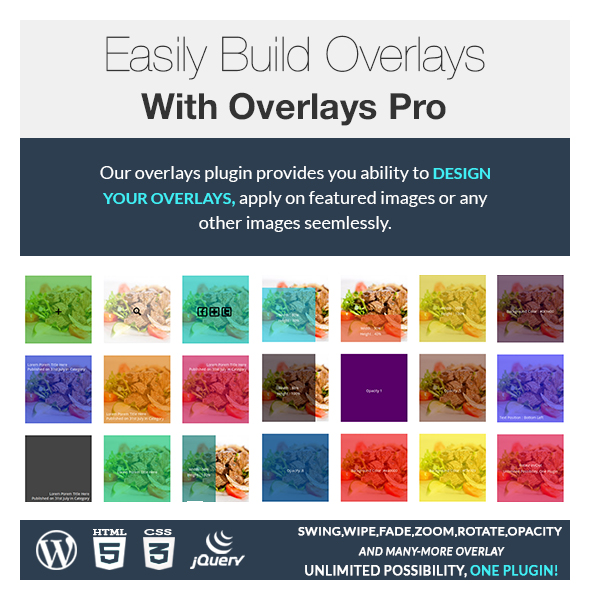
Overlays over images is best way for viewer engagement with images and display useful information on mouse-over. Visual Designer and Shortcode made it super easy to create, preview and apply in minutes. This plugins gives you ability to display overlays on Featured Images, Product Images (Woo Commerce) and custom images. ‘Easy to Use’ and ‘Apply Anywhere’ approach made it awesome overlays wordpress plugin ever.

Features

  • Design overlays with help of visual designer and get preview instantly.
  • Apply beautiful effects for in and out appearance of overlays.
  • Control over the speed with help of slider.
  • Choose Overlays background color using color picker.
  • Control over the contents of overlays using content place holder.
  • Show/Hide settings for post listing, single page or achieves pages.
  • Minified Javascript and CSS for excellent Performance.
  • Multilingual Supported. .po included for English.
  • Apply ready-made Overlays on a click.
  • Display Post Title, Post Excerpt, Post Category, Post Tags or Custom Fields over the overlays.
  • Display Product Price, Product Sell Price, Product Title over the overlays
  • Shortcode Supported to take control over every settings.
  • Apply on custom images with help of shortcode.
  • Facebook, Twitter and Google Plus integrated to share contents over the overlay.
  • Shortcode documented with every parameter and uses.
  • Fully Responsive.
  • Woo-commerce Supported to apply overlays over product images on products listing or single product page.
  • Hooks Supported to extend functionality of the overlays or modify contents on fly.
  • Multi-Site Supported
  • Create dynamic Overlays using do_shortcode
  • +40 Examples created to show awesomeness.

Live Examples

Hooks Supported

if you’re a developer and wants to achieve your own customized functionality on the overlays, you can do this easily with help of hooks. Below are the available hooks to extend features of this plugin.

  • overlays_image
  • overlays_content
  • overlays_html
  • overlays_product_price
  • overlays_product_rating
  • overlays_product_category
  • overlays_product_tags :
  • overlays_product_title
  • overlays_post_category
  • overlays_post_tags
  • overlays_post_title
  • overlays_post_link
  • overlays_post_excerpt
  • overlays_post_readmore

Support

We’re here to help you achieve your goals with this plugin. Just mail us and we’ll get back to in shortest possible time.

For any help, feature request or to report a bug, you may contact me anytime And please rate this item as per your experience with it.

Suggestions

We’re requesting all visitors who purchased or not to send us features they want to see in next version. We’re very passionate about this product and willing to make it worth for everyone.

Download Overlays Over Images WordPress Plugin (Utilities)

CanvasArt – print FramePhoto and Poster (Full Applications)

Features

  • take photo
  • choose photo from album
  • search photo from web (instagram, 500px, flickr, bing, google)
  • edit photo (aviary photo editor)
  • print Canvas, Frame photo, Poster
  • make money 30% per sale
  • storyboard support
  • full documentation
  • easy customization
  • Provider CanvasPop library
  • iPhone 3,5 – 4 screen support
  • Ship Print, Photo frame and etc. to the United States, the European Union and Canada.

Support notes

Right now we receive many emails and requests for support than we can manage quickly. Many times we can answer the same day but others take much longer. Before you send a request for support please read the entries below:

  • Support from Envato authors is optional but we will do our best to help.
  • Support doesn’t mean customization.
  • Read the full documentation file.
  • Check if your question is not already in the Item Discussion section.
  • We do not give support for third party code in this case you need contact the authors.
  • We do not support errors caused by strong modification to the original files.
  • We do customizations but this is not included in the package price. To get a quote for a modification you can send an email using the form in the right sidebar.
  • We can’t teach how to code in Objective-C, C++, Java or any other language.
  • We can’t give refunds, if you want a refund please contact Envato directly.

If you have a general question you can use and asking your question in the Item Discussion section.
Our time zone is (currently) GMT+4, so please keep in mind our timezone might be different from yours.
You can read more about item support on the Envato wiki Thanks for reading.

License

All additional libraries that we use when writing code in our programs meet the MIT license and Creative Commons CC0 1.0 Universal, correspond to the free dissemination, modification and commercial sale

Support

Site: http://support.studio76.pro

Download CanvasArt – print FramePhoto and Poster (Full Applications)

Multisite Widget Mimic (Widgets)

This widget replicates other widget areas from any site in a WordPress Multisite!

This plugin is meant ONLY for WordPress Multisite installations!

Simply place the widget in the area you want it to appear and specify the blog you want to pull from by its Multisite ID (1 is typically the main site) and the widget area by its internal name (i.e. page-sidebar).

This widget automagically pulls the content from the other site and displays it as desired.

Download Multisite Widget Mimic (Widgets)

Lightning Cache + Redis (Utilities)

Automatically create a cache for each page on the frontend site and automatically clear the caches for any page that has content changed.

This is one of the only WordPress plugins for Redis that works out of the box on a server that has Redis installed!

*IMPORTANT: Redis must be installed on your server or this plugin WILL NOT WORK.

For any page that you do not want to be cached simply put the shortcode [nocache] in its content area and it will never cache. Note: if [nocache] is put in a post, every page where that post is used in will not be cached.

To create automatic cache clearing on a time interval set the Time to Expire field on the settings page to be greater than 0 (0 means no scheduled cache clearing) and all caches will be cleared in the specified time intervals from the time you save the setting.

WARNING: This plugin may not detect content changes created by changes in themes or plugins (except those named below). If making changes to either of these and changes are not displayed on the site, please clear the entire cache by using the button at Settings -> Redis Cache.

Plugins that are known to automatically detect changes using WordPress hooks:

  • Gravity Forms
  • Contact Form 7
  • New RoyalSlider -> Clears on admin page visit
  • Plugins that use custom posts, widgets, short codes, etc.

Download Lightning Cache + Redis (Utilities)

Category Bundler (Utilities)

Automatic WordPress Category Bundler and Affiliations

This plugin automatically categorizes a post into its parent or other custom categories. For example, if you have a category ‘news’ with child categories ‘local news’, ‘national news’, and ‘global news’; if a post is categorized ‘local news’ it will automatically be categorized as ‘news’ as well.

This plugin also adds “Affiliations” under the posts menu item. An
affiliation consists of a title, a primary category (except for the Network
Model), and secondary categories. There are three types of affiliations:
Subscription, Broadcast, and Network.

= The Subscription Model =

If a post is categorized in one of the secondary categories it will automatically categorize in the primary category. This works exactly the same way the standard auto-categorization according to category hierarchy works, as described earlier.
But, does this without affecting your actual hierarchy.

= The Broadcast Model =

If a post is categorized in the primary category it will automatically categorize in all the secondary categories. This auto-categorizes in the opposite direction that the Subscription Model uses.

= The Network Model =

If a post is categorized in one of the secondary categories it will automatically categorize in all the other categories.

And don’t worry, if this functionality is bothering you it can be turned off on a post by post basis.

Forget about manually managing the “Homepage Slides” category ever again!

Download Category Bundler (Utilities)

Wp Popup Survey (Forms)

This is a WordPress plugin that enables you to collect information from visitors using popup surveys when any page is accessed.

POPUP SURVEY FEATURES

  • Easy to setup and manage
  • Customizable look to match your site.
  • Responses and statistics can be exported.
  • 5 Types of survey questions to meet your need.

GETTING STARTED

  1. After purchase, download and unzip the package
  2. Install and activate the plugin like any other WordPress plugin
  3. A sidebar menu named “Popup Survey” will appear
  4. Click on the “Getting Started” sub menu

Download Wp Popup Survey (Forms)

Magento Slideshow Extension (Magento Extensions)

Magento Slideshow Extension

Give your site or theme a easy to use slideshow extension. This Magento Slideshow extension makes it possible to upload and manage slides inside of Magento admin. Supporting two popular frameworks, Bootstrap and Foundation makes it easy to implement in a lot of already existing themes. For the sites that does not use bootstrap or foundation Nivo Slider has been included so that the slideshow easily can be used on any homepage.

The following features can be found in the file.

  • Great for non-coders & developers
  • User friendly admin area
  • Support popular frameworks, Bootstrap & Foundation
  • Nivo Slider support
  • Unique settings for all the supported slideshows.
  • All slideshows are responsive.
  • Slide settings are: Title, Store, Image, Url, Target, Content, Sort Order, Status
  • ScriptManager to help users with many extensions/scripts that can cause conflicts or load javascripts twice.

Support

Do not hesitate to contact me for any kind of support or feature request regarding this Magento Slideshow extension and also do not forget to
Follow us for more updates at Envato, Twitter & Facebook

Download Magento Slideshow Extension (Magento Extensions)

Frontend Publishing Pro (Forms)

If you want to give your users the ability to create posts from the front-end area then Frontend Publishing Pro is the perfect solution for you. It works well with custom post types/taxonomies and comes with a simple drag and drop interface for easy form building. Thanks to the included shortcodes you can deploy this plugin on your WordPress website in just a few minutes.

Download Frontend Publishing Pro (Forms)

Edge Multipurpose Banner Ads (Banner Ads)

Edge Multipurpose Banner Ads

This banner template has a cool look with a universal design to accommodate almost any type of business, products or services. This banner brings a modern unique look and feel for your business marketing.

Features:

  • The file is well organized, layers named appropriately
  • All easy to customize
  • 4 standard sizes
  • Instructional video included
  • Editable with notepad or Adobe Edge animate

Download Edge Multipurpose Banner Ads (Banner Ads)

Le Chef – Recipes Manager for WordPress (Utilities)


Le Chef – Recipes Manager for WordPress is our modern & stylish recipes plugin available on Codecanyon that will give you the opportunity to present your users recipes in a way that will definitely help you stand out of the crowd.

This plugin easily allows you to transform your wordpress website into a recipes related website.

You will easily impress your visitors using our recipes plugin, giving the users a new appetizing way of discovering recipes on your website.

With the use of this plugin you can easily enter and format recipes. This plugin is perfect if you wish to showcase your own family recipes, or if you wish to create a recipes only website.

Recipe gallery, ingredients, custom measurements units, steps, difficulty level, cooking time, nutritional facts and ratings are all included in this plugin.

The plugin fits any custom wordpress theme, looks great on all devices and it’s easy to manage and customize.

Features :

  • Works with any wordpress theme
  • Fully responsive
  • Easily add unlimited number of recipes
  • Customizable layout ( font colors, setup how many columns to display )
  • Custom recipe widgets
  • Add custom measurements units
  • Add custom recipe types
  • Add and manage recipe details with difficulty level and preparation time
  • Add and manage ingredients
  • Add and manage nutritional facts
  • Add and manage cooking steps
  • Add and manage recipe images gallery
  • Custom “like” button for each recipe, with display counter
  • Custom calories counter
  • Related recipes on recipe details
  • Compatible with wordpress 3.9+

Download Le Chef – Recipes Manager for WordPress (Utilities)

Stripe Payment Gateway for Reseller Club (Miscellaneous)

This extends Reseller Club to accepts money/payments through Stripe Payment gateway on your supersite. Stripe is a developer-friendly way to accept payments online and in mobile apps, integrate it with your supersite or reseller panel provided by Reseller Club.

Plugin is a set of files, with step by step documentation.

Open the documentation, make slight changes, enter API/key values from Stripe & Reseller Club account to the files as shown in documentation. Start accepting payment on your store front within 5 to 10 minutes.

Step by step video guide to be uploaded soon.

Download Stripe Payment Gateway for Reseller Club (Miscellaneous)

MegaNavbar. Advanced Navbar for Bootstrap 3.0+ (Navigation and Menus)

Lightweight and pure CSS MegaNavbar component, that uses the standard navbar markup, and the fluid grid system classes from Bootstrap 3. Work for fixed and responsive layout, and has the facility to include any Bootstrap component except dropdown. MegaNavbar is compatible with mobile devices and modern web browsers.

Download MegaNavbar. Advanced Navbar for Bootstrap 3.0+ (Navigation and Menus)

ALCalendar App (Full Applications)

What is it?
ALCalendarApp is a ready-to-go iOS application. Code is based on MVC pattern. Package contains custom calendar View, working Model for fetching and updating events and two Controllers for managing vertical and horizontal calendars.
Calendar View has a fixed number of month panels. As you scroll to the end, next panel will be loaded.

Features:

  • Calendar Orientation – Vertical and Horizontal
  • Infinite scrolling
  • Event indicators
  • Events list for selected date
  • Event Management:
    • View
    • Add
    • Edit
    • Delete
  • Calendars Management (Show/hide EKCalendars that will be processed)
  • Jump To Date function
  • MVC-based code

Features to add:

  • Google calendar integration
  • Long tap to add event on date
  • Landscape mode
  • Adding EKCalendar
  • Week panel (maybe)

Updates:
(1.0) XX August

  • Released (see functions list in Features tab)

Contact

Please write me an email (via the message box on the right side) if you have any questions or suggestions.

Download ALCalendar App (Full Applications)