Woocommerce Table Rate Shippoing Options (WooCommerce)

Advanced Shipping Options

The table rate shipping module extends WooCommerce’ default shipping options giving you highly customisable shipping options.

Define multiple shipping rates based on location, price, weight, or item count. Wildcards may be used to match multiple regions too.

Create zones for target shipping destinations
Add multiple tables of rates per zone
Several types of table rate calculation: Per order, Calculated per item, Calculated per line, Calculated per class
Add rules based on Weight, Number of items, Number of items by class and Price
Add costs per row, per item cost, a percentage and per weight unit

Create zones for target shipping destinations

Adding data as complex as table rate shipping can be an arduous process. That’s why the user interface has been designed to make the process of adding, duplicating and removing rates as intuitive as possible.

Download Woocommerce Table Rate Shippoing Options (WooCommerce)

Fortin Kids Application – Learn – Guess – Paint (Android)

Fortin Kids App is specially designed for your kids to explore there creative ends along with learning routines like Alphabets, scribbling, identifying objects with so much of fun!!

image
image
image
image

Please download demo apk from here,

https://play.google.com/store/apps/details?id=fortin.kids.app.abc

The Whole Package Includes:

Complete Android Source Code

Well Guided Documentation

Layered PSDs

All the Graphics used in the App

Smiling Customer Support :)

Download Fortin Kids Application – Learn – Guess – Paint (Android)

Proveryator – Form Validation script (Forms)

Proveryator is a set of validation rules which lets you add server-side
validation to your forms quickly and with as little effort as possible. The
script checks the values that a user has entered into your form, and if it
doesn’t meet the criteria specified (e.g. they failed to enter a value, or
they entered a fake email address), they are returned to the original form
with a list of all the offending fields.

Download Proveryator – Form Validation script (Forms)

Installer – Multipurpose Industry Installation (Project Management Tools)

Installer is an application extension that allows you to inject database connection into your web application. Installer includes Bootstrap Framework that will allow you to have responsive capability. Use PDO connection for security purposes, very easy to integrate with your application header, Google hosted jQuery API, cross platform, HTML5 & CSS3. Installer also captures all server settings to appear and compare them with your application requirements. iCheck is also available for more User-friendly input options.


Preview
Please view each page in following links, for security purposes we could not provide Database Connection Information.
Step 1 | Step 2 | Step 3 | Step 4 |

Download Installer – Multipurpose Industry Installation (Project Management Tools)

WooFAQs: WooCommerce Product FAQs (WooCommerce)

woocommerce-product-contact-form-tab”>WooCommerce Product FAQs

WooFAQs is an extension for WooCommerce that allows you to add Frequently Asked Questions to your store’s products. FAQs are great additions to your store for several reasons. They make it easier and faster for your visitors to get the information they need about your products that allow them to make purchases faster and with less customer service support than ever before. Additionally, FAQs on your product pages are great for SEO because they give you more targeted content relating to each product which Google can use to determine that your store is an authority site.

After uploading and activating the WooFAQs extension, you just have to add any number of FAQs to your WooCommerce products. Once they are entered, your FAQs will appear in a new tab on your product page called “FAQs” automatically. You will also have access to add more and remove any FAQs from any product as you see fit (without ever writing a single line of code).

features”>Features

  • Install and setup in under 5 minutes without any hassles
  • Add as many FAQs to your products as you need / want
  • Easily remove any FAQs from any products at any time
  • Great for SEO by providing additional targeted and helpful content to product pages
  • Increases sales conversions by providing visitors with the information they need to make their purchase

changelog”>Changelog

            v1.0.0
            - First Stable Release
        

faqs”>FAQs

  • What shopping carts will this plugin work for?
    The WooContact plugin is an extension for WooCommerce. This version will not work with other shopping carts such as JigoShop, WP-Ecommerce or Magento.
  • Will I need to modify my theme files in any way to get the contact form on my product pages?
    No, this plugin will hook the “FAQs” tab right into your existing product tabs without you modifying a single line of code.
  • Is support available for this plugin after purchase?
    Yes, you can use the “Support” link listed below to visit my support center and get the assistance that you need.

Support

http://www.usingwordpressforbusiness.com/support/

Download WooFAQs: WooCommerce Product FAQs (WooCommerce)

PDF Stamper (Images and Media)

PDF Stamper is a PHP script that stamps automatically PDF files with a custom image or text. The demo allows you to change the image of the stamp, add a custom text, select the font family, style and color. You can also decide the position of the stamp.

This script can help you to modify a massive number of PDF files (Tested with more then 200 files at the same time, also big files 5 MB), adding your company logo, mark as ‘Paid’ the invoices, put the Director sign on a lot of pages or put a very cool ‘Top Secret’ red stamp on all the pages of your really secret PDF!

This script uses different resources in order to work:
– jQuery 1.11.1
– jQuery File Upload
– jQuery ColorPicker
– Bootstrap 3.2.0
– fpdf

You can easily adjust the settings or create new ones, add more functionalities and features to the script.

Download PDF Stamper (Images and Media)

Feral – Social Communication Platform (PHP Scripts)

Description

Feral is a social communication platform that brings coworkers / friends / family / etc. together in a closed online environment. With Feral you can share news, events, files and messages. Member get their own profile with all their contact information, which is available to all other members.
Feral is build on the framework CakePHP. This makes it easy to customize and extend Feral to your own needs.

Live Demo

http://feral.inrainbo.ws/users/login

Admin
Email address: [email protected]
Password: johnferal

User
Email address: [email protected]
Password: janeferal

Documentation

http://www.inrainbo.ws/documentation/feral/

Download Feral – Social Communication Platform (PHP Scripts)

jQuery Slide Gallery (Images and Media)

New browser to Your Media Items

Welcome in the modern browser your pictures and videos. I worked on this two weeks for create it. This is a complex jQuery Gallery script for Images and VideosThe script is easy to use.

  • Possibility to browse gallery Images.
  • Possibility to b rowse YouTube and Vimeo videos.
  • Sort Media Items by categories.
  • Possibility to add descriptions for Media Items.
  • Fully Responsive.
  • Keyboard support.
  • The ability to set custom keys to control.
  • easy to change the appearance via CSS.

Follow Me on CodeCanyon
Contact Me

Download jQuery Slide Gallery (Images and Media)

documentSide PHP Document & Guide Manager (Help and Support Tools)

documentSide is a PHP based document generator. Its provides all the tools necessary to write complete guides, manuals, documentations and eBooks in a user-friendly and very easy to use environment.

documentSide can generate, Web / Local HTML files, printable PDF documents and downloadable ZIPs for e-mail attachments or software documentations.

documentSide offers to you advanced tools for document sharing. Registered user controls, Author-specific contents, Password or Licence Key requirement, shorten document links supported bit.ly etc..

There too many features available for document creation!

General Features

  • Multiple User & Language Support
  • PDF / ZIP / HTML Documents
  • Document Expiration Support
  • Special Contents for Author
  • Unlimited Color & Theme Support
  • Guest / Registered User Control
  • XML / JSON Lists
  • Autosave Support
  • Advanced Listing Class
  • Dowloads With Password or License Key
  • Syntax Highlighting
  • Fully Ajax Controlled
  • Responsive Design
  • bit.ly Short URL Creation
  • Trackable Links Views / Downloads
  • Live Document Statistics via Google Analytics
  • Draft System
  • Section Controls / Easy Sortable
  • Customizable PDF Layout

Demos & Class Usage

Admin Panel: http://dside.artlantis.net/dside/admin/

Username: [email protected]
Password: dside

Class Documentation: http://dside.artlantis.net/

Demo Documents:

Live Document: http://bit.ly/1syrwS0
PDF Document: http://bit.ly/1ktkH4D
Key Required: http://bit.ly/1lKKIYK (123456)
For Registered Users: http://bit.ly/1uA00oq

Layout & Design
\

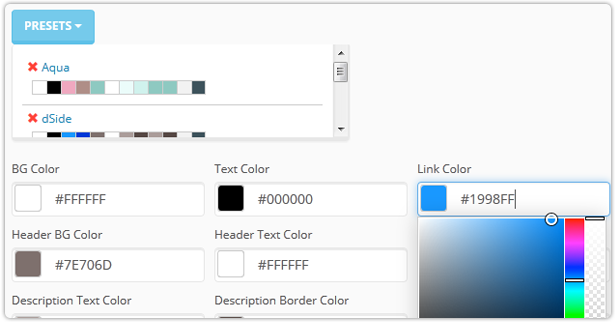
documentSide offers you the option of customizable colors and layouts!

You can easily design your new/existing documents with Layout options. Pre-defined area colours easily can modify with color picker also you can save as a preset your color sets for other documents! Also you can use your own CSS file!
\

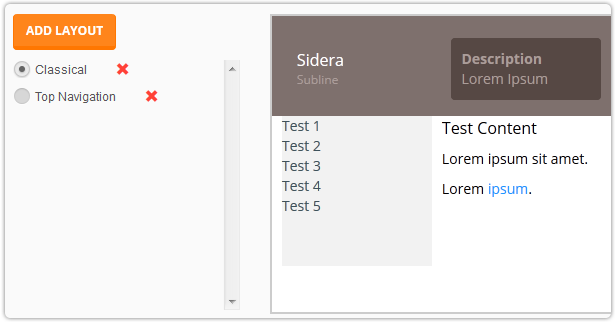
Yes! Your Documents Must Be Creative as Your Projects!

documentSide will come with two layout option, but that is not mean it is has limited layouts! You can easily create your own Layouts, it’s little a bit HTML experience required it’s not that hard with Bootstrap 3.2 support. Bootstrap core files automatically included to your documents.
\

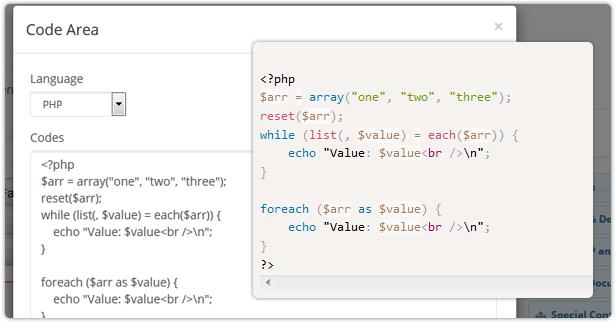
Who Say The Programmers Doesn’t Understand the Intricacies of the Art!

Syntax Highlighting is a “Flame of Anor” for programmers! In fact, we’re using it. documentSide provides stylish programming code view ability!
\

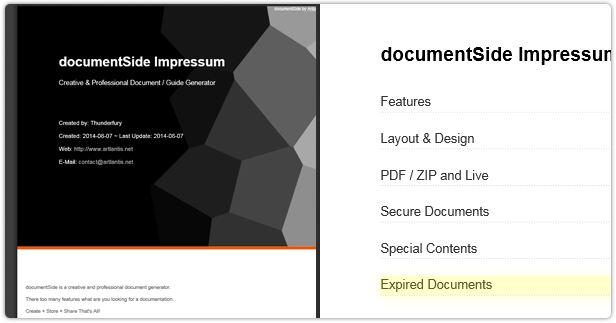
PDF Customization

documentSide uses customizable PDF layout as a template located documentSide folder. You can easily modify current PDF layout or create new ones. Yes, PDF documents supported HTML and CSS, all the rest is your imagination!

PDF / ZIP and Live
\

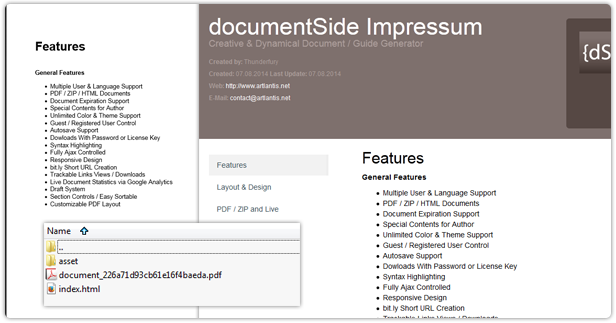
documentSide will store your datas on different file types. Also there a few share options available!

Basically all documents saved on documentSide database until you publish your documents. Its will create/update documents PDF, HTML and downloadable ZIP file. You can easily share your documents as Live view, PDF view or downloadable links.

Also if you have a bit.ly account, documentSide will create your shorten links by bit.ly API.

In addition, if you have special contents for your project and you don’t want to share on your document you no need to create new document for that. documentSide will do it for you!

Secure Documents

\

Documents for registered users? Documents for key / password required?

If you have a membership system you can easily give an access to your users for view/download your documents. Also if you write a program and its has a document for usage, you can define a password or license key for who enter key to allow see your documents.

Special Contents for Author

\

Same Document Hidden Contents

If you have special contents for your project and you don’t want to share on your document you no need to create new document for that. documentSide will do it for you!

For example; If you are a programmer and you have a few programs, we know you are best! You already created installation, usage, customization documents/guides etc. But all of them for your end users and this documents will do their own job.

But after a few years.. You’ll want to remember some things, small intricacies of the software you write.

Document Expiration
\

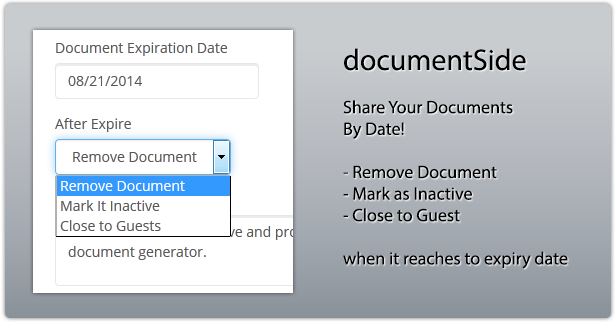
documentSide has a expiration date controller for special documents.

If you would like to share a document with specific dates, documentSide can check dates for you and when date come to your defined expiration date it can run an action as you selected.

There 3 action available for this option.

Download documentSide PHP Document & Guide Manager (Help and Support Tools)

Imagestack – public gallery site (Images and Media)

About

Imagestack script helps you to create your own image gallery for yourself and others. Users can simply register on the site and start uploading images. Uploading images is very easy, it uses Javascript features to visualize uploading process. Other features include: creating albums, commenting, rating, sending messages & favourites.

Features

  • Adding, deleting & editing images.
  • Adding, deleting & editing albums.
  • Adding & deleting categories.
  • Ban & mute users.
  • Bootstrap 3 responsive design.
  • Edit preferences like “allowed file size” etc.
  • Contact page.
  • About page.
  • Editing site information.
  • Rating & commenting images.
  • Sending messages.
  • Javascript / AJAX features – rating, commenting & uploading images.

Requirements

  • PHP 5.3 or higher.
  • BC math module.
  • Database with PHP PDO extension.

Installation

  1. Upload the files to your server.
  2. Give permissions to /db/config.php file (chmod 777).
  3. Give permissions to folder /upload and it’s subfolders (chmod 777).
  4. Open your browser and visit the location you just uploaded the files.
  5. An installation screen should appear.

Download Imagestack – public gallery site (Images and Media)

Builder – Drag ‘n Drop Site Builder (Project Management Tools)

Builder is a drag ‘n drop site builder created with PHP.. It uses Bootstrap 3 framework for the layout, Mysql for saving components and layout information, jQuery UI and Gridster for interface management.

Builder creates a full web site, not stand-alone pages like other builders, those pages are manageable from the password-protected admin area.

Builder users will have no need to edit any code to get a professional web site, and can have their web site up and running in minutes.

Components

With Builder, site owner will have 20+ highly customizable components to use as the building blocks of their pages, those components are:

  1. navigation bars
  2. jumbotrons
  3. thumbnails
  4. alerts
  5. dismissable alerts
  6. panels
  7. wells
  8. embedded items
  9. modals
  10. togglable tabs
  11. collapsible items
  12. image carousel
  13. image lightbox
  14. google maps
  15. contact forms
  16. text blocks
  17. social buttons
  18. audio player
  19. footer
  20. heading

Screenshots

php site builder components

php site builder pages

php site builder layout

php site builder settings

php site builder styles

SEO

Each page will have its own customized information for Search Engine Optimization, including:

  • Custom Title
  • Custom Meta Description
  • Custom Meta Keywords
  • Custom Name in URL

Additional Options

  • CSS file upload
  • CSS file editor
  • Custom 404 Page
  • Custom “Site Offline” Page
  • Home Page Determination
  • Upload page background
  • Upload favicon
  • Upload site logo

Demo

Click here for demo login
username:admin
password:123

click here to view a full website created with Builder
php site builder demo

Download Builder – Drag ‘n Drop Site Builder (Project Management Tools)

J!Admin Hider (Add-ons)

J!Admin Hider It’s a plugin that allows a Super Admin to assign different menu links in administration area, for all groups.
It’s up to you.

Steps
– Create a new group under Super Users group. (Example: Customer)
– Add a new user in this group
– Then go and edit for this second group, what are the menu links in administrator that you want the users from Customer group to see.

This is nice, if you dont want them to see the extensions menu, or the help menu..but if the user knows the full address of the hidden menu, he will be able to access it directly.

Example:
Super Admin link:
>> SITE
>> My profile
*/administrator/index.php?option=com_admin&view=profile&layout=edit&id=200

Customer link is hidden, but if they access:
*/administrator/index.php?option=com_admin&view=profile&layout=edit&id=200
They are able to access it – because he has THE SAME right as Super Administrator (or the group that he is in)

The concept was started when I realise a customer that I give him Publisher permissions, but in some components (like VirtueMart) his access is somehow limited.

I want to give full access to a customer for entire site, but I want him to see only relevant links.
(His profile, menus, articles, some components and only to modules)

That’s it :)
I hope you like it.

Download J!Admin Hider (Add-ons)

Red Bird – Admob, GameCenter (Games)

Now the Red Bird game for iOS is gaining popularity and you don’t want to be late to earn some $$$.
So don’t wait for another opportunity and come ride the wave with us.

Support Admob ads

Include Document to help.

The code:
It has no Cocos2D or any graphics API

Simpe native SpriteKit elements

Admob for banner ads

iPhone 5 wide screen support

iOS support on iOS 7+.

Runs on iPhones, iPads.

Support:
We provide support within the comments section. So when you have questions, we’re here to answer. So let’s get the new top list app code!

Update is FREE!

Get this code and start making money!

How to Setup:

A. Quick Setup

There is no setup.
Just open the Crazy Bird Escape.xcodeproj and you will be on your way.
1 prerequisite is that you have XCode min version 5.1.1 installed one you mac.

B. Basic Configuration

1. Open Crazy Bird Escape.xcodeproj

  • Change CFBundleIdentifier “com.iMadeLab.” to your app name ID (example: com.YouGame.)

2. Open Prefix.pch file

  • Change admob id to show Ads: #define PUBLIC_ID to your admob ID for iphone

3. Open Info.plist file

  • Change CFBundleName: to your app name
  • Change CFBundleIdentifier com.iMadeLab. to your app Bundle Identifier

4. Open Prefix.pch file

  • Change Leader Board to your leader board id
  • Change #define BEST_SCORE @”BEST_SCORE” to your define for save best score for user.
  • Change DEVICE_TEST GAD_SIMULATOR_ID addtion id device for test ads admob
  • Change #define SCORE_OVER @”SCORE_OVER” to your define for save score game over

5. Open MyScene.m file

  • Change background color:

    _skyColor = [SKColor colorWithRed:113.0/255.0 green:197.0/255.0 blue:207.0/255.0 alpha:1.0];

  • Change runner background

    SKTexture* groundTexture1 = [SKTexture textureWithImageNamed:@”background”];

    groundTexture1.filteringMode = SKTextureFilteringNearest;.

  • Change Number block win show on -(void)showBlock .
    See int numBlock = (arc4random() % 3) + 3;
    Change 3 to your number
  • Change image block

    see blockTexture = [SKTexture textureWithImageNamed:@”block”];

    and change by name block name in imageasset

6. Open CrazyBird.m file

  • Change or add more image bird for action fly

    SKTexture* birdTexture1 = [SKTexture textureWithImageNamed:@”bird_0”];

    birdTexture1.filteringMode = SKTextureFilteringNearest;

    SKTexture* birdTexture2 = [SKTexture textureWithImageNamed:@”bird_1”];

    birdTexture2.filteringMode = SKTextureFilteringNearest;

    SKAction* flap = [SKAction repeatActionForever:[SKAction animateWithTextures:@[birdTexture1, birdTexture2] timePerFrame:0.2]];

    timePerFrame:0.2: time delay foreach image bird

7. Open GameOverScene.m file

  • Change or add image to share text, image to social network by line below

    NSString *caption = @” Some thing text will share here”;

    NSArray *activityItems = @;

8. That’s All And Done

C. Ready Submit to Appstore

Download Red Bird – Admob, GameCenter (Games)

Course Start Event for Moodle (Plugins)

A Moodle* plugin that automatically adds the course start date to the calendar as a site event.

– Add a course start event to the calendar automatically for every new course you create.
– Customize the event description.
– Optionally add a link to view the course in the event description.
– Automatically create or update a course start event for all existing courses.
– Automatically delete all course start events from the calendar.

*Supported Moodle version: Moodle 2.6 and Moodle 2.7

Download Course Start Event for Moodle (Plugins)

WooCommerce FollowUp Email Marketing Autoresponder (WooCommerce)

Turbocharge your email marketing strategy with a single purchase
Email marketing outperforms social media 8 to 1! The Follow-up Emails extension is a powerful auto-responder and customer relationship tool. First, it can replace the built-in WooCommerce email communications to give you, the store owner, an indispensable customer relationship management tool. Second, it gives Sensei users the ability to build automated marketing campaigns for your Sensei quizzes, tests, and more! Follow-up Emails works with either plugin installed (Sensei only or WooCommerce only) or with both. It is your choice. Use this automated email follow up extension for WooCommerce and Sensei, and you will be able to consistently drive increased value for your customers, stay in touch, and build your relationships.

Key Features
1) One-time cost. No monthly or per-email costs. Unlimited sends.
2) Unlimited contacts.
3) Targeted emails to your customers and prospects
4) Automate emails, on your defined schedule
5) Fully supported, maintained, and updated
6) Easy to setup – no complicated integrations, APIs, or additional accounts
7) Easily create emails to manage your business communications with individuals directly from WooCommerce interface versus your email client
8) Offer discounts in your emails with integrated coupons
9) Full-featured reporting on email sends, opens, clicks, and communication by customer
10) Google Analytics integration
11) Numerous variables to allow you to integrate customer and order data into your emails

Turbocharge your communication strategy:
The Follow-up Emails extension is a powerful email marketing auto-responder and customer relationship tool. Our solution automates your post purchase email campaigns enabling you to easily, and automatically, reach out to customers with a goal of keeping these customers active, and aware, of your brand.

With this plugin, you can define automated emails that will be delivered to your customer’s email inbox at defined intervals after they make purchases. Promote other products, promote special sales, or request reviews and offer discounts for those reviews by using Follow-up Emails in conjunction with the Review for Discount extension.

Product, Category, and Storewide Email Automation Settings
Do all these things without any manual intervention. Simply define the emails once and they will continue to drive customers back to your site for weeks, months, and years to come.

Easy to create emails, but powerful options to guarantee success
Get started with email marketing automation today, and learn for your business why research shows that email was the leader in conversions to sales in the second quarter of this year, with 4.25 percent, ahead of search at 2.49 percent and social at 0.59 percent.

Download WooCommerce FollowUp Email Marketing Autoresponder (WooCommerce)