DB Reader – Database Management (Database Abstractions)

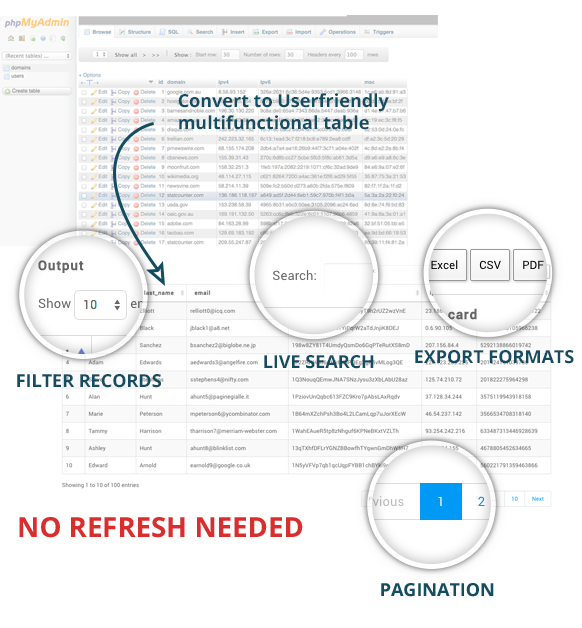
DB Reader is an online database/table viewer you can use to quickly show your data for you or your client with only 2 lines of code. You can search and export database data to excel, pdf, print, csv.

Include of class libary (clean code, lightweight)

The class has the following functions:

  • Lightweight class libary (clean, easy to understand code)
  • Return data in 2 lines of code
  • Easy Integration
  • Return Array & HTML
  • Export (PDF, Excel & CSV)
  • Print from browser
  • Ajax Search
  • Show databases on host (access required)
  • Show tables on database
  • Show table records
  • Reset table records (wipe/auto increment 0)
  • Pagination
  • No refresh needed

Demo’s
Full demo
Multi-Table records demo
Only HTML Table demo
Database & Table demo

Easy explanation

Easy install

include_once('dbreader.class.php');
$obj = new DBReader('db_username', 'db_pass', 'host');

Class functions:

$obj->showDatabases() // show the databases on the host 
$obj->showTables('database') // shows the tables in the given database 
$obj->showData('database','table') // returns the columns & records in the given table
$obj->resetTable('database','table') // wipes the table & reset the auto increment.
$obj->showHtmlTable('database','table') // returns columns & records as HTML table

Download DB Reader – Database Management (Database Abstractions)

Magento Gift Card Extension (Magento Extensions)

Gift Cards Extension

The Magento Gift Card Extension is a great way for you customers to buy gift cards to present to their friends and family. Friends and Family who receive these cards can use them to pay for the products they purchase at your store.

The Gift Cards Magento Extension is one way to give your customers a personalized experience at your online store. Customers can create gift cards of certain value at your store and give them to their friends and family. They can later on use these Gift Cards to pay for the purchases they made at your store.

Traditionally, gifting your loved one’s something meant endless wandering about stores and malls to find something perfect. The online gifts trend is rapidly catching on. The Gift Cards Extension allows users to create cards in three forms – either Physical, Virtual or a Combination of the two. A customer ordering a virtual gift card gets a code in their email that can be used at the time of payment for purchased products. A Physical Gift Card can be exported for printing. Whenever a gift card is created, the unique code that is generated can only be redeemed by one customer.

Store Admins must create a Gift Card Code Pool which can be used by customers. These codes are unique with a specific format. One code is permanently assigned to a gift card as soon as the card is created.
The Gift card Extension is extremely lightweight fulfills the task with minimum obstruction.

It is in line with the Magento Standard Workflow.

Features

For Customers:
• Gift cards of different values can be created either from a dropdown or by entering a preferred amount from a range.
• Gift cards that are purchased can be used by customers to make payments or can be gifted to others.
• Gift Cards can be scheduled for a certain date.
• Gift codes can be redeemed to a credit balance and can be used as a payment method during checkout.
• Tracking of gift codes is made easy.
• Easy to check and manage gift codes quickly.
• After purchase, Magento automatically adds the gift code to a customer’s card list.
• Gift cards can also be used as a discount during checkout.
• Gift cards can be sent either via email or via Post.

For Admins:

• Admins can create gift cards for selling products.
• Admins can also generate gift codes for customers or they can import gift codes that can be used offline.
• The gift Codes are either a specific pattern or could be random.
• The quantity for the gift cards and the unique code can be configured by admins.
• Auto email is generated and sent to card recipients and to customers.
• Admins can also configure the content that will be displayed on the gift cards product page.
• Admisn can set values for the gift card products – they can show either a dropdown, a fixed amount or a price range for the customers to select from.
• The status for the vouchers is automatically updated so that admins can easily keep track.
• Requires no manual configuration.
• Easy installation.
• Meets Magento programming guidelines.
• 100% open source. Show according to catalog or shipping price rule.

Download Magento Gift Card Extension (Magento Extensions)

Magento Customer Attribute Extension (Magento Extensions)

Collect data from customers effortlessly by adding attributes using the Customer Attribute Extension from Magento. Unlimited attributes can be created by adding fields to the registration page, and all this information can be easily viewed on the grid view for a Magento Admin. As a store owner, you can use this information for segmentation of customers according to certain attributes in order to provide your customers with better services.

By installing this extension, store owners will experience the joy of better customer management.

This powerful tool can be used to gather customer attributes such as age, preferences and interests, receive documents etc.

Download Magento Customer Attribute Extension (Magento Extensions)

Prestashop Presta Speed (Prestashop)

PrestaSpeed ??optimizes database and Prestashop to increase speed of your shop and the admin panel.

The module aims to erase all data statistics are useless for the administration of the store and overload the database (such as user connections, abandoned cars). We recommend using Google Analytics for advanced statistics and avoid overloading your database (with normal traffic, the database may become larger and larger and slower store).

The module also optimizes all tables in database and eliminates discount vouchers expired or abandoned cars, to improve the size of the database

The module is not limited to working with the database, the module can clear the cache and optimize the CSS and JS files on your site and set up your shop for the best performance.

And is not only related to database, the module can clear the cache and optimize the CSS and JS files in your site configuring your store for the best performance.

  • Multilingual
  • Multistore


Download Prestashop Presta Speed (Prestashop)

Maths Practice (Android)

Create your Custom Maths App. it’s Too simple just Change User Interface it and publish that’s it.

Great game for great mind !! Math Practice app is basically designed keeping in mind the target audience and provide the easiest to play this game and enhance user maths skills. Aims of this game is to improve your maths mental exercise and make your calculation fast in a funny way.

In this game you have to just match the make equally number that display on the top corner. For example if it displays 18 then you have to chose a number from square box and complete 18 even you can do the addition and multiplication to find the no. like (9+9) or (6*3).

    Android Side:

  • Provide tow option Addition and Multiplication
  • Easy and Hard Mode Easy for no time and Hard that have complete one sum on 10 sec.
  • Implement Google Game Service with Leaderboard and Achievement.
  • Save All Score Data on Google Cloud if user uninstall app or change device score will automatically sync on new device.
  • All PSD provide you for change any screen or design anything you can do.
  • All parameter are set customise for change.
  • Play Over unlimited level
  • Next level unlock when user get up to 70%
  • Set time 15 sec for completed 1 maths problem.
  • Success and failure message after completed level
    You Will Get:

  • Full android source code.
  • All PSD Design that will help you to re-screen app
  • Full Document of project that explain step by step process.

We will provide basic project setup process service free but if you need help set up game service and cloud setup, and other stuff etc then that service will be chargeable.

Live Demo App,

Play Store Link: https://play.google.com/store/apps/details?id=com.arkay.mathspractice

Live Video Demo: https://www.youtube.com/watch?v=t3cGjgSW7o8

Support: [email protected]

Video Help: https://www.youtube.com/watch?v=a0uXP_Fvdgk

Download Maths Practice (Android)

The Four – A Game about Concentration (iOS)

Ultimate quick maths game for all age.
• This game is build with Cocos2d 3.2.1, ARC enabled.
• Game centre leaderboard and Achievements
• Few graphics, easy for reskin
• Endless game levels

Video Demo : http://vimeo.com/107234593

Live Game – https://itunes.apple.com/us/app/four-amazing-maths-game-by/id922827915

Features and Requirements
? No need to spend much for new graphics. (Only few images used )
? Easy monetization – Chartboost, Applovin Full Screen ads, ADMob & iAd banner ads Used.
? Easy to add nextpeer multiplayer mode as its Cocos2d code.
? Taken advantage of Cocos2d 3.2.1 sprites effects – Ex. Glass Effects

How to Setup and Reskin
Easy to reskin. (Documents included in source)
? Change App Icon
? Change Splash screens
? Change Chartboost id
? Change Applovin SDK Key
? Change Admob banner id
? Change Pushwhoosh id
? Change Gamecnter leaderboard id
? Change Game Center Achievement id
? Options to change buttons image

Download The Four – A Game about Concentration (iOS)

WOOPS – WooCommerce Product Slider and Carousel (WooCommerce)

WOOPS – WooCommerce Product Slider and Carousel provides an easy way to display WooCommerce products in a super flexible responsive product slider or a responsive product carousel.

This plugin comes with 6 easy shortcode, 4 ready widgets, 7 hover animation type and unlimited customization. The shortcodes are easy and highly configurable to control the look and function of the slider/carousel.

Comes with built-in shortcode generator to easily control the look and function of the slideshow

[woops_latest title=”Latest Product Slider” items=”9” order=”ASC” category=”hoodies” hover_style=”3”]

With this plugin you can make your WooCommerce products slider as latest or featured or custom product list or single product item or category wise smart grid, carousel, slider anywhere within Post or Pages.

With it’s 6 ready widgets and you can make product slider/carousel into the widget area or sidebar.

This plugin provides an easy wordpress admin option panel, where you can change the slider parameters or styles.

This plugin supports 7 different hover animation styles for ease in matching your theme. Optionally you can customize every aspect of the design with our robust documentation.

Features:

  • Modern, Effective, Flat and Responsive Slider/Carousel
  • Shortcode System to Control Look and Function
  • Works with any WordPress Theme
  • 6 Useful Shortcodes
  • 2 Main Product Slider
  • Display Latest Products or Featured Products or Custom Listed Products or Single Product or Categories Products and limit & order them.
  • Advance Setting/Option Panel
  • 4 Ready Widget
  • 7 Different Hover Animation Style
  • Touch enabled
  • Drag enabled
  • Cross Browser Support
  • Very Lightweight and Simple
  • Shortcode Buttons in Editor
  • Well Documented and Unparalleled Support

Download WOOPS – WooCommerce Product Slider and Carousel (WooCommerce)

Advance Route Planner API Ver 1.0 (Miscellaneous)

A) Details – top

Advance Route Planner is a A to B RoutePlanner tool written in Pure Javascript with Google Map Ver. 3 API. it have very advance features like Responsiveness, Google Adsense, Dragable Route, Shareable Link Genrator, Print button, Change Google Map Language, Fix your starting / ending point with ease and get proper Route Directions in details via Google API. This tool can be easily attached to any existing Projects. if you have any query you can contact us any time at my profile page or raise ticket.

B) How to Use – top

Extract all the files form the zip. The file you need to include Google API Javascript along with routeplannerapi.js.

If you wanted to install the plugin in your website please follow below after setting up above settings

include below libraries

<script src="https://maps.googleapis.com/maps/api/js?v=3.exp"></script>
<script type="text/javascript" src="https://maps.googleapis.com/maps/api/js?libraries=adsense"></script>
<script src="js/routeplannerapi.min.js"></script>

Set up Form, to get Starting and Ending Location and call calcRoute(); function on button submit as below :

<form class="form-inline" role="form">

<div class="form-group">
<label class="sr-only" for="start">Starting Location :</label>
<input type="text" class="form-control" id="start" placeholder="Enter Starting Location">
</div>

<div class="form-group">
<label class="sr-only" for="end">Destination Location :</label>
<input type="text" class="form-control" id="end" placeholder="Enter Destination Location">
</div>

<div class="form-group">
<select class="form-control" id="mode" name="mode">
<option value="DRIVING">Driving</option>
<option value="WALKING">Walking</option>
<option value="BICYCLING">Bicycling</option>
<option value="TRANSIT">Transit</option>
</select>
</div>

<button type="button" class="btn btn-success" onClick="calcRoute();">Get Route</button>
</form>
   

Add Google Map Div and Google Direction Div in the Page as below

<div id="map-canvas" />
<div id="directionsPanel" />

Thats it ! you are good to go if you want to do any changes please follow below instructions :

var _ZNRPL = {
latitude : 41.850033,
longitude : -87.6500523,
start:"",
end:"",
adsense:true,
publisherid:"ca-google-maps_apidocs",
adformat : "BANNER",
adposition : "RIGHT_BOTTOM",
adbackgroundColor: '#c4d4f3',
adborderColor: '#e5ecf9',
adtitleColor: '#0000cc',
adtextColor: '#000000',
adurlColor: '#009900'
};

You can set the variables, as per your requirement like below :

You can set your center location when page load by providing latitude and longitude of your location.

latitude : 41.850033,
longitude : -87.6500523,

You can setup your starting or ending location as below

start:"Chicago",
end : "New York",

You can enable or disable Google Adsense as below

adsense:true,

If adsense is enable you have to set your publisher id as below

publisherid:"ca-google-maps_apidocs",

If adsense is enable you have to set Type of Banner Format as below

adformat : "BANNER",

As per Google Adsense, Banner Format can be :

  • LEADERBOARD creates a fully horizontal display area.
  • BANNER creates a horizontal “banner” ad.
  • HALF_BANNER creates a smaller horizontal “banner” ad.
  • SKYSCRAPER creates a large vertical ad.
  • WIDE_SKYSCRAPER creates a wide vertical ad using larger
    type.
  • VERTICAL_BANNER creates a medium-sized vertical ad.
  • BUTTON creates a small ad.
  • SMALL_SQUARE creates a slightly larger square ad.
  • SQUARE creates a large square ad with large type.
  • SMALL_RECTANGLE creates a small rectangular ad.
  • MEDIUM_RECTANGLE creates a medium rectangular ad.
  • LARGE_RECTANGLE creates a large rectangular ad.
  • SMALL_VERTICAL_LINK_UNIT creates a small vertical link
    unit.
  • MEDIUM_VERTICAL_LINK_UNIT creates a medium vertical link
    unit.
  • LARGE_VERTICAL_LINK_UNIT creates a large vertical link
    unit.
  • X_LARGE_VERTICAL_LINK_UNIT creates an extra large vertical
    link unit.
  • SMALL_HORIZONTAL_LINK_UNIT creates a small horizontal link
    unit.
  • LARGE_HORIZONTAL_LINK_UNIT creates a large horizontal link
    unit.

If adsense is enable you have to set Position of Banner as below

adposition : "RIGHT_BOTTOM",

As per Google Adsense, Banner Position can be :

  • TOP_CENTER indicates that the adunit should be placed
    along the top center of the map.
  • TOP_LEFT indicates that the adunit should be placed along
    the top left of the map, with any sub-elements of the control “flowing”
    towards the top center.
  • TOP_RIGHT indicates that the adunit should be placed along
    the top right of the map, with any sub-elements of the control “flowing”
    towards the top center.
  • LEFT_TOP indicates that the adunit should be placed along
    the top left of the map, but below any TOP_LEFT elements.
  • RIGHT_TOP indicates that the adunit should be placed along
    the top right of the map, but below any TOP_RIGHT
    elements.
  • LEFT_CENTER indicates that the adunit should be placed
    along the left side of the map, centered between the TOP_LEFT
    and BOTTOM_LEFT positions.
  • RIGHT_CENTER indicates that the adunit should be placed
    along the right side of the map, centered between the
    TOP_RIGHT and BOTTOM_RIGHT positions.
  • LEFT_BOTTOM indicates that the adunit should be placed
    along the bottom left of the map, but above any BOTTOM_LEFT
    elements.
  • RIGHT_BOTTOM indicates that the adunit should be placed
    along the bottom right of the map, but above any BOTTOM_RIGHT
    elements.
  • BOTTOM_CENTER indicates that the adunit should be placed
    along the bottom center of the map.
  • BOTTOM_LEFT indicates that the adunit should be placed
    along the bottom left of the map, with any sub-elements of the control
    “flowing” towards the bottom center.
  • BOTTOM_RIGHT indicates that the adunit should be placed
    along the bottom right of the map, with any sub-elements of the control
    “flowing” towards the bottom center.

If adsense is enable you have to set Colors Scheme of Banner as below in hex format

adbackgroundColor: '#c4d4f3',
adborderColor: '#e5ecf9',
adtitleColor: '#0000cc',
adtextColor: '#000000',
adurlColor: '#009900'

Download Advance Route Planner API Ver 1.0 (Miscellaneous)
Easy View Shortcode in Visual Composer (Add-ons)

You have difficulty when you want to see shortcode of each element in Visual Composer or when you trying copy shortcode of each element in Visual Composer ? No problem, this is a simple plugin which purpose is to help you do it. With this plugin, you can copy shortcode in Visual Composer used for different purposes: in WP Widget Text, with do_shortcode function….

Download Easy View Shortcode in Visual Composer (Add-ons)

Social Audience. Twitter analytics. Standalone (Social Networking)

MULTIFUNCTIONAL TWITTER FEED SYSTEM

Standalone Version / PHP Script

A pioneering system for the measurement and analysis of social impact through social networks (via Twitter). Display multiple data and compare results in visual graphic charts or simply display a timeline from a user or hashtag. Monitorize in real time the activity from multiple users or hashtags: new tweets, followers, retweets, mentions… Compare data in a certain period of time. View the last most relevants tweets. The Standalone version is fully autonomous, connection with any CMS (WordPress, Drupal, Joomla, etc.) is not necessary. From your control panel you can create analytical views and exported via iframe to embed in any web page. FULLY AUTONOMOUS! ONLY NEED THE CONNECTION TO A DATABASE (CREATED SPECIFICALLY FOR SA PLUGIN).

Spanish description

Social Audience Standalone system es un script avanzado para la medición de audiencia social a través de Twitter. Un sistema pionero y fácil de usar capaz de ofrecer visualización y análisis de datos efectiva del impacto social de usuarios y hashtags usando la API de Twitter. Medir, analizar y visualizar este impacto es su objetivo. Esta versión Standalone es totalmente autónoma, no necesita vinculación con ningún CMS tipo WordPress, Drupal, Joomla, etc. Desde su panel de control es posible crear vistas y analíticas que se exportan vía iframe para incrustar en cualquier página web. TOTALMENTE AUTÓNOMO! SÓLO NECESITA LA CONEXIÓN A UNA BASE DE DATOS CREADA EXPRESAMENTE PARA SA PLUGIN STANDALONE.

SA Plugin by Pumpun

SA Plugin by Pumpun

MEASURES, ANALYZES AND CREATES VISUALIZATIONS

Social Audience Standalone version is a multi-functional Twitter feed system (a standalone PHP Script with control panel and iframe generator). A pioneering system for the measurement and analysis of social impact through social networks (via Twitter).

Measure, analyze and visualize this impact. SA Plugin provide social media engagement, publishing and analytic tools for WordPress users. A powerful standalone system (PHP) for social measurement.

Monitor Hashtags and Topics on Twitter and analyzes incoming messages for all of your connected Twitter profiles to give you hassle free insights. Configure your trending topics, hashtags and influencers across your profiles.

See the Tweets behind what’s trending, dig into day-by-day stats and chart relationships between hashtags & topics.

You don’t need any HTML/CSS/PHP knowledge to install and use this standalone version. Connect the system with a MySQL database and start working with data from Twitter.

STANDALONE SA PLUGIN FEATURES

SA Plugin by Pumpun

Built on HTML5
Future proof design with latest technologies. Improved plugin performance.

Twitter Boostrap v3 Framework
Amazing CSS framework for solid design.

Fully responsive
Looks great on laptops, tablets and mobiles (don’t forget to view demo in a mobile device or just resize your browser).

Predefined skins
Choose of the predefined skins to start or edited.

Elegant and clean design
Enhanced by some pretty jQuery effects.

Clean HTML / CSS
If you want to digg in the code, you will find it easy and well organized.

Built with LESS
Use the LESS Luke!!!

Cross browser compatible
It works fine on any modern, major browser(IE8+, Google Chrome, Mozilla Firefox, Apple Safari and Opera).

Google fonts
You can select your preferred one in the backend.

Custom elegant social icons
Elegant and efficient to link to your social profiles.

DEMO SITE

http://www.saplugin.com/standalone-version/. This demo shows the capabilities of the Standalone system showing results on a iframe generated by the PHP script.

EASY INSTALLATION

You only need to run the “install.php” file and follow the instructions: connection to a MySQL database, creating a username and password and that’s it!

SUPPORT AND DOCUMENTATION SITE

Full documentation (Both standalone and WordPress plugin versions)

Knowledge base & support center

DESIGN

SA Plugin by Pumpun
SA Plugin by Pumpun
SA Plugin by Pumpun

REVIEWS

SA Plugin by Pumpun

CREDITS

Designed and developed by: Pumpún

The Standalone version has been possible thanks to the following resources:

  • Composer a Dependency Manager for PHP
  • Guzzle PHP HTTP client and webservice framework
  • Idiorm & Paris Light object-relational mapper and fluent query builder with an Active Record implementation
  • TWIG Template engine for PHP
  • Chart.js Simple HTML5 Charts using canvas
  • jQuery javascript framework
  • Bootstrap CSS framework
  • Font Awesome The iconic font and CSS toolkit
  • Slick Light and reponsive carousel
  • LESS CSS pre-processor
  • And of course thanks to TWITTER

div style=”clear:both”>

CHANGELOG

Ver. 1.0.0

Release: 14/10/2014

  • Initial release

Download Social Audience. Twitter analytics. Standalone (Social Networking)

Smooth MouseWheel for Javascript (Miscellaneous)

This is the Javascript version. Are you looking for the WordPress Plugin version?

MouseWheel Movements Do Not Need to Be Jumpy

We want all our websites to be amazing, that’s why we just love adding nifty effects in our sites like:

  • large images,
  • parallax backgrounds,
  • fancy entrance animations,
  • and many more.

However, these effects can sometimes be made less awesome because when your visitors scroll down using their mouse wheel, the screen just jumps down. This is especially harmful to parallax effects, since a jumpy scroll would make the parallax unnoticeable.

This script will make your site cool again by making the scroll movement of the mouse wheel smooth. Even scrolling by pressing the up and down keys are made smooth.

Just include the script, and smooth scrolling will be applied right away.

Why Use This Script?

Let me tell you a very short story. We wanted to make our website’s scrolling smooth, so we browsed the net for solutions. Unfortunately, we couldn’t find an all-in-one solution that worked the way wanted it to work.

Some were complicated and required us to read a ton of documentation, some only did smooth scrolling for same-page links, some only worked sort of okay (scrolling up and down fast made the page stutter), and some interfered with multi-touch enabled touchpads.

In the end, we created our own solution. It’s simple, easy to use, and it just works – the Smooth MouseWheel script.

Full Feature Set

  • Minimal setup, just include the script;
  • Optimized, we use a polyfilled requestAnimationFrame to perform the scrolling;
  • Lightweight, only 4kb minified
  • Smart, smooth scrolling will disable itself automatically for touch mobile devices since those already scroll smoothly using Modernizr;
  • A pure Javascript solution, doesn’t require jQuery;
  • Also smoothens up & down key scrolling;
  • Fires the scroll event correctly; and
  • Works in all modern browsers

Having Trouble with the Script?

Head over to the support tab and check out the FAQs, or submit a support ticket!

Enjoying the Script?

Be sure to leave a rating and review and show us some love.

Check out Our Other Stuff

Video & Parallax Backgrounds For Visual Composer

CSS Animator add-on for Visual Composer

4k Icons add-on for Visual Composer

Updates

Version 1.0

* Initial release

Download Smooth MouseWheel for Javascript (Miscellaneous)

01Smile Football Games Collection 1 (Games)

About the Pack:

This pack includes 3 different football games:
1- Angry Soccer – Cup 2014 – HTML5 Game
2- Sky Soccer – Toward Cup 2014
3- Hold Up the Ball World Cup Edition

These games are separate from each other and you can edit each one individually.

Angry Soccer – World Cup 2014

Angry Soccer – World Cup 2014 is a physics based game and we tried to add a major advantage to it in comparison with similar games. In this game you can choose! It means that you can choose your desired balls according to their unique abilities and your needs and complete each level in your own way and by using your creativity.

In this game you play as an angry player who is mad at some referees for not being fair and so he decides to hit them with balls and take his revenge!!! But remember this is just a game and we strongly disagree with his behavior! So you should never do what he is doing in real life!

This Game includes 16 levels. There are 4 different kinds of balls in this game with their own unique abilities and features.

Sky Soccer – Toward Cup 2014

We have tried to make Sky Soccer different from similar games and somehow you can consider its gameplay as new and different. This game has six levels and at the end of each one, you will reach the Sky Cup!
You can easily change the game’s appearance and change its resolution to use it on both web and mobiles and tablets.

Hold up the Ball – World Cup Edition

In this Hold up game, you have to kick the ball and hold it in the air as much as possible. This game has a level mechanism, which means that you have to kick the ball a certain number of times (without letting it touch the ground) to be able to proceed to next level. The number of required kicks will increase in each level and so the game will become harder as you progress.

Features:

» Supports touch
» Works on all HTML5 browsers
» Auto-resize feature (responsive)
» Ability to personalize the game’s appearance, logo and etc.
» Ability to personalize the game’s music and SFX

590x300-Cross-RPG-(Code-Canyon)

We will be happy to hear your ideas and opinions about the game, so if you like write a comment or send it to our e-mail:
[email protected]
And if you liked it, don’t forget to rate it!

Come & see our website: www.01Smile.com

Download 01Smile Football Games Collection 1 (Games)

Fortin Charts Template With Admin Panel (Templates)

Fortin Charts Template With Admin Panel Is a Native Android Application Template with PHP Admin Panel.

This Template Allows to Easily create dynamic dashboards to your Android Applications using the following Charts,

Pie Chart
Bar Chart
Line Chart
Area Chart

It works As Follows,

At the Server Side, Through PHP Admin Panel, You can add the Data to MySQL Database, This Data could Any of your Data whose Dashboards you wish to see on Android Side, for example Sales Data, (We have populated the demo sales data for ease of understanding)

Retrieve Server Side Data To Android Side through JSON Webservices.

Creates The Charts At Android Side, based on the Data Retrived. If the data at Server Side is changed It will automatically get reflected on charts at Android Side.

Export Chart to PDF – Saves chart to SD Card.

Apply Date Filters on the data.

Download Fortin Charts Template With Admin Panel (Templates)

easy mp3 streaming (Audio/Video)

Easy mp3 streaming playlist ( Titanium Widget )

Tested on Iphone and Android

Features :

  • Full Player Functionality (play,stop,reward,backward,shuffle,repeat,slider,estimate time,elapsed time)
  • Easy Customisation
  • Easy for using
  • If mp3 file completed automatically play next mp3 file
  • Slider component for backward and forward mp3 file
  • Automatic reconnect to play if connection lost
  • Full project included for widget demo
  • Full documented
  • Save a lot of hours of work

Recommended 3x titanium sdk

Tips

Please see Frequently Asked Questions http://codecanyon.net/item/easy-mp3-streaming/9192627/support

Download easy mp3 streaming (Audio/Video)