Selfie iOS App (iOS)

Description:

A Selfie is a Photo of you, taken by yourself.

The App works in any iOS Device or Phone with front facing camera.

Take self portrait photos of you and your friends and share them instantly with the Selfie app.

Features

• Take self portrait photos

• In app customized camera

• Both landscape and portrait orientation supported

• Live camera filters like grayscale, negative, vignette, false colour etc.

• Ability to switch to back/front camera

• Share and save image

• Admob with Banner and interstitial ad enable

• Optimized for iOS 8

Full Source Code
We provide full source code with video help file

Documentation:
http://www.mobilemerit.com/ios-selfie-app/

Installation Video:
https://www.youtube.com/watch?v=-HqaLNjwMZo

Support:
http://mobilemerit.com/contact-us/

Download Selfie iOS App (iOS)

Social Microblogging PRO (Social Networking)

Social Microblogging PRO Twitter is a script style, designed to share news, events, or simply what you want, through publications of 140 characters, and may refer to other users, create Hashtag and share with other site users. a part of it can upload images, videos from Youtube, DailyMotion, Screenr, DotSub, Hulu (Permitted users only united states ) or Vimeo. Follow other users, send direct messages. and other features that will be described below.

Demo user: Just create an account or accessed from Twitter

  • (Features are disabled)
  • Admin Demo: Demo
  • User Pass 12345
  • link Admin Demo
  • Features:

    Users/General:

  • Authentication with Twitter
  • Built with Bootstrap 3.2
  • Font Awesome
  • IcoMoon
  • Flat UI
  • PHPMAILER
  • Over 100 emoticons accessible from the post box
  • Ability to create Post with line breaks
  • Preview URL
  • URL is detected dynamically (The user places the URL in the text box
    directly)
  • Map with Google Maps link to the original map
  • Send message direct/private
  • Customizable profile page.
  • Follow/Unfollow users
  • System favorites
  • Trending worldwide
  • #Hashtag
  • Design like twitter
  • Real-time updates on Page index
  • Real-time updates on Discover Page
  • Real-time updates on Search Page
  • Find people
  • Comments on posts
  • Page Status like twitter
  • List of Trends worldwide
  • Suggestions for who to follow
  • Block/Unblock users
  • Private profile
  • Option Delete Account
  • Users can change your user name as often as you wish
  • Upload cover (You can edit position)
  • Upload Background
  • Upload avatar (You can edit position)
  • Set the Color Link
  • Set the Color/Position Background
  • Upload Video from Youtube (API)
  • Upload Video from Vimeo(API)
  • Upload Video from DailyMotion(API)
  • Upload Video from Screenr(API)
  • Upload Video from DotSub(API)
  • Upload from Hulu (Permitted users only united states)
  • Can Embed slides from SlideShare
  • Reply comments page Status
  • User validation by email
  • Recovery password
  • An email, by account
  • Users verified twitter style
  • Only you can send private messages to your followers, twitter style
  • You can tell if a user is following you “FOLLOWS YOU”
  • Report users/publications
  • Change password
  • Discover page: where is the publication of the users who are not following
  • Delete Posts
  • You can login with your username or email
  • Optimized performance
  • API for developers
  • SiteMaps
  • Admin Features:

  • Set Site Name
  • Set Keywords(SEO)
  • Set Description(SEO)
  • Set Message/Post length
  • Edit pages static e.g: Privacy, Help
  • Manage Users
  • Delete/Suspended Users
  • Change type account of users
  • Manage Users reported
  • Manage Posts reported
  • Manage Ads
  • Change password
  • Allow new registrations
  • Check users
  • Admin can enable or des enable the user records, and to verify whether or
    not users all from the admin panel.
  • Edit the color of the header icons, and edit the color of the icon Verified
  • Requirements:

  • cURL
  • PDO Driver
  • GD Library
  • Enabled function mbstring
  • allow_url_fopen (PHP.INI) is ON
  • This script was developed with PHP OOP and MVC

    Important: All images used in this demo are solely and exclusively from their owners, not be included in the script.

    Download Social Microblogging PRO (Social Networking)

    PHP Configurator (Help and Support Tools)

    Hi there!

    My name is PHP Configurator and I can help you to manage your configuration files into your PHP projects.

    All your projects have some configurations settings which you can save on database or save under files in format PHP, ini, yaml, xml, etc.

    You know, the most fast way is using PHP array, but give your customers a PHP array file can be hard to edit.

    They need FTP program, an editor and know what to change. Without considering that they can wrong edit that files.

    No worries!

    Thanks to me, you can just create your PHP array organized into files, and I will create a nice user interface where your customers can easy edit your settings.

    I work with any PHP array, but I have two basic modes: simple PHP associative array like array(‘key1’ => ‘value1’, ‘key2’ => ‘value2’) and an advanced mode, where you can define attributes like field type, validation, etc.

    How does it work?

    It’s pretty simple. Find below example of usage, then you can also check example demos here, here and here.

    // 1. Include main class
    include '../classes/Configurator.php';
    
    // 2. Prepare Settings
    $settings = [
      'base_dir' => '/path/to/www/envato/configurator' // base path to your project
      ,'config_dir' => '/config/' // config directory where you put your config files
      ,'form_field_prefix' => '<div class="form-group">' // Each form field will have this prefix
      ,'form_field_suffix' => '</div>' // Each form field will have this suffix
      ,'form_field_class' => 'form-control' // Form field class name
    ];
    
    // 3. Create new instance passing $settings array
    $configurator = new Configurator($settings);
    // 4. Set configuration file (optional, if omitted, config.php will be used)
    // The path of file is build using $settings['base_dir'] + $settings['config_dir'] + 'config' + '.php'
    // 'config' is below paramter which you go to set
    $configurator->setFile('my_config_filename');
    // 5. Set language file (optional if you want translate label and description)
    // The language file should be an associative array
    $configurator->setLanguage(include '../config/language_en.php');
    // 6. Load data from file
    $configData = $configurator->loadFile();
    // 7. Set current config so we can add/edit config
    $configurator->setConfig($configData);
    // 8. Check if post is submitted
    if($_POST)
    {
      // 9. Save
      $configurator->saveData($_POST);
    }
    

    Support forum:

    http://macagoraga.com/forum/forum/37-php-scripts/

    NOTE:
    I have use this product in different PHP projects in last years, so it can consider stable version. However all software has bugs, and if you discover one, please let me know. I will do my best to fix them in later releases.

    Download PHP Configurator (Help and Support Tools)

    Visual Composer Add-on – Metro Carousel and Tile (Add-ons)

    Extend Visual Composer, give user the flexibility to display images in Metro style Carousel or Tile mode. Carousel mode support button and arrow navigation, with 3 type of button options, 6 button position options, 12 active color options, 4 animation options. Tile mode support 6 slide animation options. Both mode support auto play slideshow and the image support lightbox or custom link.

    Note: you can get this extension from Visual Composer Extensions All In One. You do not have to purchase again if you purchased the All In One package before. And it’s recommended to purchase the All In One package which will contain other extension in the future update:

    package

    Features

    • You can choose to display the image in Carousel or Tile mode.
    • Navigation button in Carousel support these position: bottom-left, bottom-center, bottom-right, top-left, top-center, and top-right.
    • Navigation button in Carousel can be one of these 3 type: default(short line), cycle, and square.
    • Navigation button in Carousel with 12 active color options available.
    • Slide animation support: slide, fade, switch, or slowdown in the Carousel mode.
    • Slide effect support: slideLeft, slideRight, slideLeftRight, slideUp, slideDown, and slideUpDown in the Tile mode.
    • Thumbnails support lightbox or custom link in both mode.
    • Auto play slideshow in both mode, you can customize the delay time in the editor.
    • Retina ready and responsive.
    • Metro UI CSS driven, include the necessary component only, keep the files lightweight.
    • Extend the Visual Composer, work fine with the VC in a theme or VC installed as a plugin.
    • Compatible with latest jQuery and latest WordPress.
    • Enqueue the js and css only when needed. Keep WordPress page size smaller.
    • FAQ and source code are included in the package. Free update in the future.

    Recommendation for you

    Image Map HotSpot WordPress Plugin:

    hotspot

    Credit

    http://metroui.org.ua
    http://formstone.it/components/boxer

    Download Visual Composer Add-on – Metro Carousel and Tile (Add-ons)

    WC Daily Update (WooCommerce)

    Schedule Daily Updates for your WooCommerce Stock or Price Data

    WC Daily Update is an updater, not an importer. By optimizing queries for a single attribute it can achieve speeds 100x faster than traditional importer plugins.

    • Schedule Daily Automated Updates from Local or Remote Sources (HTTP or FTP!)
    • Easily add HTTP or FTP sources even with login informaiton!
    • Includes a powerful scraping framework that lets you transform XML feeds or scrape entire distributor websites!
    • Fast Update Stock or Prices from the WP tools menu
    • Intuitive step-by-step ajax interface
    • Customize import and CSV settings to match your input
    • Test the update beforehand to check how many products will be affected
    • Can update a product catalog of 100K records in seconds!

    Download WC Daily Update (WooCommerce)

    Ecommerce App with Magento Rest API (Mobile)

    This application is responsive shopping cart. User can purchase the products from any of the device and importantly it is integrated with magento so it has powerful magento backend support and in the front end this app will have power to increase the user experiences. You can generate the mobile application just by few commands. You can create your own store app using phonegap and with the help of responsive ajax based cart. This application will help the user to generate the phonegap app, user can generate the their own shopping cart application with android, iphone, windows platforms.

    Features

    Registration
    Login
    Change Password
    Home Page Category Listing
    Product Listing based on category selection
    Header/Footer
    Left side Swipe Navigation
    Ajax based more product loading
    Product Detail page
    Add to Cart Feature
    Cart Page
    Checkout Pages
    Order Review Page
    My Orders
    My Dashboard
    My Addresses
    My Wishlist
    Easy to setup
    Nice UI

    Enjoy the shopping with Web as well as on the mobile , tablet devices.

    Download Ecommerce App with Magento Rest API (Mobile)

    Qaidi DDoS Protection – WordPress plugin (Miscellaneous)

    Qaidi DDoS Protection plugin programmed to protection your website that powered by wordpress from some kind of DDos attack such as http flood , proxy attack .. and more feature that you need it to save your website traffic and let real traffic let throw . this plugin with many feature you will find out when you installed.

    this plugin attach protection class to wp-load to better scan and save more traffic

    Download Qaidi DDoS Protection – WordPress plugin (Miscellaneous)

    Magnetometer (Metal & Magnet detector) (Utilities)

    Works with any mobile, no special sensor needed.
    How to use (similar app): https://www.youtube.com/watch?v=q2HxK0YNJgY
    The similar app: https://play.google.com/store/apps/details?id=kr.sira.metal

    Description

    Magnet Detector is a powerful tool to detect ferrous metals and magnets.
    Demo APK

    This application detects and measures magnetic field values using the in-built sensor of your phone.
    This application can also detect electrical flux.
    Hidden live electrical wires weather underground or inside the walls.
    This application is very simple to use:
    Just open and the app and start exploring magnetic or electromagnetic fields around you.
    Accuracy of this application is dependent on the sensors installed in your device.
    Failure of this application is indicative of the lack of functionality in your device.
    For best results, remove external casing of your phone.
    Enjoy exploration!

    Demo APK

    Features

    • Costum UI
    • AdMob integration
    • Android Studio project (If you want eclipse version I can send after purchasing.)
    • No programming skills needed (my similar project’s video tutorial link in the zip file)

    Demo APK

    What you get

  • Full Android Source Code
  • Step-By-Step Video instructions (my similar project’s video tutorial link in the zip file)
  • Step-By-Step documentation
  • Demo .apk file
  • Download Magnetometer (Metal & Magnet detector) (Utilities)

    Perspective Mockups PHP Plugin (Images and Media)

    Turn ordinary images into eye catching compositions with the power of perspective mockups. An efficient marketing tool perfect for enhancing your portfolio and showcasing your work, it requires minimum effort and yields maximum results. With all the content in one place you will find yourself saving loads of time, and with the interface this easy, you shall see first results with just a few clicks.

    perspective-mockups-features

    Video presentations:

    For a more detailed picture of what the plugin does for the curious:

    Features

    • 200+ Free Perspective Mockups (and counting!) ready for use right away. (~100 photos, 100+ abstract/digital compositions)
    • Perspective mockups come in diverse flavours consisting of photos, digital artwork, abstract shots, compositions, vast array of devices including but not limited to iphones, ipads, imacs and other tablets and smartphones from major manufacturers.
    • All mockups are licensed under the Creative Commons license meaning you can use them free of charge in both personal and commercial projects requiring only an attribution in exchange. All source details are included within the application and easily accessible.
    • Perspective generator is based on popular LibGD PHP library so that it ensures seamless performance on most server configurations
    • Application layout is built according to responsive design principles.
    • Easy filtering tool for efortless and quick selection of the stuff you like
    • Crop assistent useful for precise aligning raw images within mockups
    • Customizable background image/color for most (120+) mockups
    • Mockup base will get gradually expanded!
    • Have a perspective mockup of your own you’d like to use and have available in your application? Contact us for custom mockups implementation.
    • Works in all modern browsers See list of supported browsers
    • Resolution of generated images keeps around 1280×720.

    Want custom mockup made?

    Contact us for the details!

    Server requirements

    Minimum

    • PHP 5.2.3+
    • MySQL 4.1.2+
    • GD library – used for image manipulation

    Supported browsers (assume recent version if not specified explicitly); Notes

    • Chrome
    • Firefox
    • IE 10+
    • Opera (No WebGL support; no live preview available)
    • IE 9/10 (No WebGL support; no live preview available)

    Mockups Licensing

    Unless specified otherwise, all mockups available in the application are licensed under the Creative Commons license enabling the use of generated images in both personal and commercial projects requiring only an attribution in exchange.

    Source info about a particular mockup is available while editing mockup sticking to the bottom right side of it. If you’re using any of the work done publicly, please do mention the source on behalf of the autors! Thanks!

    We’d like to thank all the following sources and authors for making all the beautifull content available to the public. If we missed anybody in this list and you happen to notice it, please contact us!

    You can review the full list of the sources in the mockups licensing section.

    Problems / Need help?

    DON’T USE CodeCanyon Comments for support requests as that’s not what they’re designed for. This will make our lifes easier. Thank you in advance! ;-)

    Follow Support Guidelines to get in touch with us for faster turnaround.

    Latest Update

    2014-10-15, version 1.0.5

    Added: Initial release
    

    Support

    In case of any troubles use and abuse sources below as much as you need.

    • Email: [email protected] (please include your item purchase code along with the problem description)

    Note: We usually respond within 1-7 days from reporting the issue.

    Outroduction

    In case of any troubles you talk to us directly so let’s get to know each other better. We’re WordPress enthusiasts. We live in Poland. We develop for web independently full-time. This should do for starters. Want to know more – message us. Cheers!

    Update Log

    2014-10-15, version 1.0.5

    Added: Initial release
    

    Download Perspective Mockups PHP Plugin (Images and Media)

    Easy Contact Form Magento Extension (Magento Extensions)

    Description

    The Easy Contact Form Extension enables the e-commerce store owner to incorporate an contact/inquiry or website feedback form in their website easily. This form enables the visitor to submit the details of inquiry/feedback in the provided form in the website. Once the form is submitted the data is sent to the store owner in HTML format.

    This Extension enables you to embed the quick contact form anywhere in your site easily. CAPTCHA enabled Easy Contact form to protect your website from spammers. You can configure Contact form to send email to your or save messages to database admin panel or in both.

    General Features

    • Easy installation
    • 100% open source
    • Meets Magento programming practices
    • Life time free updates

    Installation

    You can install extension by using Magento Connect, It allows you to install free as well paid Magento extensions. You can download extension zip from your order email, and follow the below instructions to install in to your Magento Store. First you need to log into the Magento administrator area, and then go to System > Magento Connect > Magento Connect Manager. Here, login using the same login as for your Magento administrator area. Once logged in you will see two tabs: Extensions and Settings. In Extension Tab you can see a browse button, by which you can upload the extension zip you downloaded from your order email.

    NOTE:

    Please logout and login back after installation of Extension, sometime Magento Cache having some issue.

    Magento Versions Compatibility

    Our Magento Testimonial Extension is compatible with Magento CE:
    1.9.0.1, 1.9.0.0, 1.8.1.0, 1.8.0.0, 1.7.0.2, 1.7.0.1, 1.7.0.0, 1.6.2.0, 1.6.1.0, 1.6.0.0, 1.5.1.0, 1.5.0.1
    DEMO: http://demo5.vivacityinfotech.net/magento/index.php/contactusform

    You can use below code to add contact form to a cms page or static block {{block type=”contactform/getdata” name=”contactform_getdata” template=”contactus/contactform.phtml”}} .

    Download Easy Contact Form Magento Extension (Magento Extensions)

    CSS3 Loader and Preloader (Loaders and Uploaders)

    Description

    Css Loader is developed to load on screen a waiting spinner plugin for your customers.
    You have 17 different spinners to suit your designs.

    In just 2 minutes you can configure this plugin, with a few steps you will have transitions from page to page on your website.
    You also have the option of launching the loader if you are performing an action, to send data by Ajax, wait while a process is running, etc.

    A simple, lightweight but very useful plugin, developed in CSS3, compatible with mobile devices and taking advantage of hardware acceleration.
    When we are in a higher than screen web, wherever you’re Css Loader always placed in the center of the screen.

    Feature list

    • 17 differenf spinners where you can set color
    • Ready to mobile
    • Css3 hardware accelerated
    • Ready for use between processis
    • Create your own theme
    • Set your custom callback to each element
    • Documentation in English and Spanish

    Changelog

    Version 1.0 (15/10/2014)

    - Initial version
        

    Download CSS3 Loader and Preloader (Loaders and Uploaders)

    Pro Writer (Utilities)

    Pro Writer streamlines the process of creating content inside of WordPress with simple intuitive tools for editing blog posts and pages.

    Edit copy, style type and add images and media without needing to access the WordPress admin.

    Our plugin adds a ‘Edit Page Content’ button o the admin bar, which will allow you to go into edit mode and edit and style your pages by typing directly on the screen.

    Download Pro Writer (Utilities)

    Pricing Tables Creator (Miscellaneous)

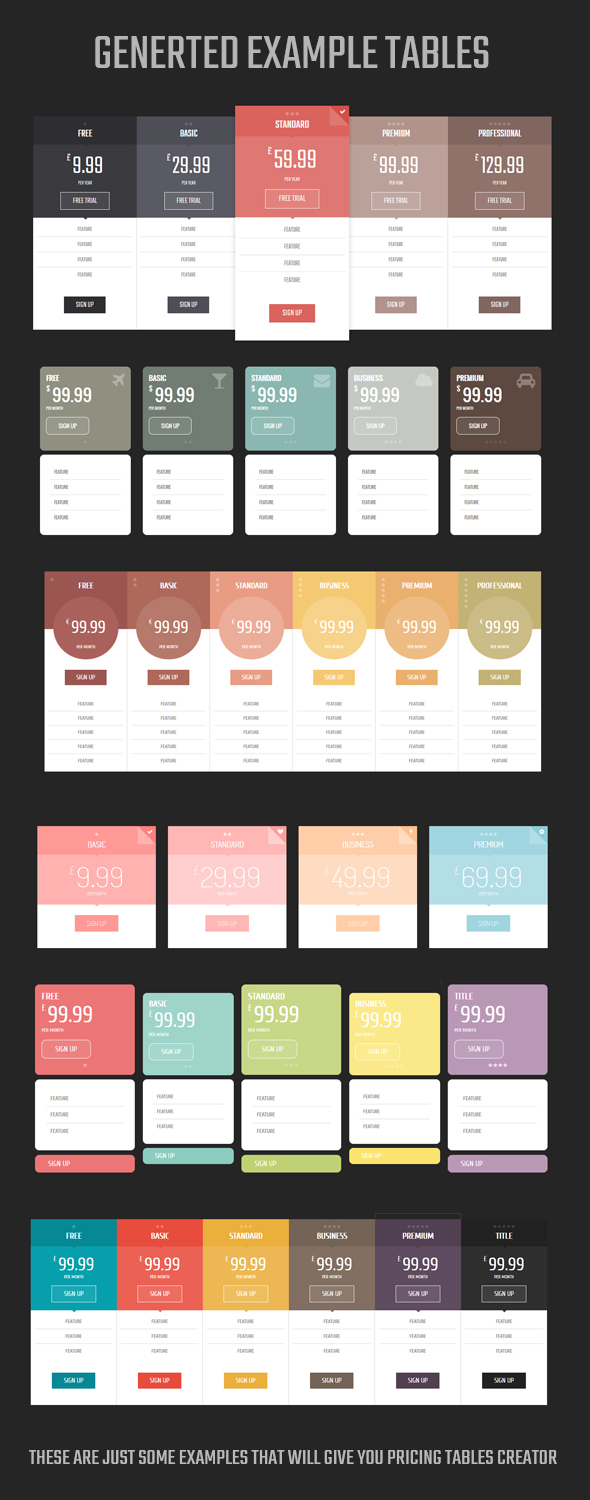
    Pricing Tables Creator is the only such tool for creating unique price tables. With a few mouse clicks you can completely change the look of your tables.

    \

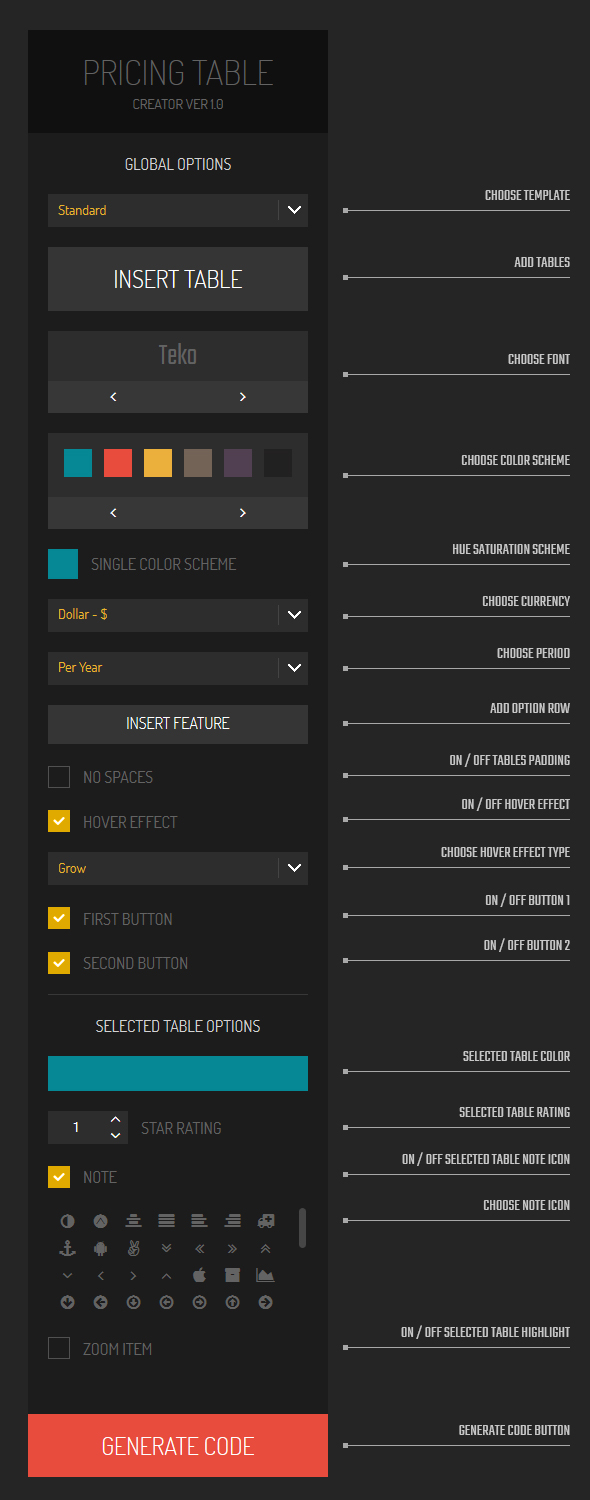
    Here is a list of opportunities that will give you this tool, You will be able to:
    1. Change template
    2. Adding / deleting / moving tables
    3. Change the font
    4. Change the color scheme
    5. Giving one color on the different shades of all tables
    6. Quick change currency
    7. Quick change period
    8. Add / Remove table options
    9. Enable / disable the spacing between tables
    10. Enable / disable / change effect when you hover on table
    11. Enable / disable buttons.
    12. Edit buttons and links
    13. Change the color of the selected single table
    14. Change in number of stars quality for the selected table
    15. Enable / disable icon in table
    16. Enable / disable highlight table
    17. Edit all text table as title, price, currency, options
    18. Preview of tables
    19. Change the background color of preview
    20. Generating code html and css designed tables

    Creating pricing tables has never been easier.

    \
     

    FEATURES:

    • Creator included
    • Up to 6 tables
    • 3 different templates
    • 15 trendy fonts
    • 8 ready-made color schemes
    • 11 CSS3 hover effects
    • 6 global options (currency, period, spacing, the effect hover, button 1, button 2)
    • 4 options for each table (color, rating, icon, highlight)
    • Unlimited color variants
    • Pure CSS3
    • Fully Responsive
    • Tested on the main browsers
    • Documentation included

    CREDITS:

    Creator:

    Output:

    Please don´t forget to rate it!

    VERSION HISTORY:

        Version 1.0 (2014-10-15)
             
    • First release.

    Download Pricing Tables Creator (Miscellaneous)

    Google Translate Style Customizer (Miscellaneous)

    Do you use the Google Website Translator on your website, but hate the way it looks? Do you wish you had complete control over the style and formatting of the dropdown? Well now you can! Unlike other language managers, this plugin AUTOMATICALLY translates your webpage using Google Translate.

    The actual Google Website Translator gets embedded on your site using an iFrame which makes it difficult to style items. Using a small jQuery script, we generate that same list of languages using only HTML to give you complete control over how they are displayed on your website!

    A “select language” button is positioned in the top right hand side of the screen. When clicked, the button reveals a menu on the left side that lists all 80 languages Google Translate currently supports!

    Download Google Translate Style Customizer (Miscellaneous)

    SocialApp – Send and Share Location and More (Full Applications)

    A handy application providing the interface for asking for help by sending the current GPS location along with a google maps link to configurable recipients via SMS or e-mail.
    Also allows to post it on facebook or tweet it!

    In the "Settings" you can set/unset the recipients.
    In the "Map", the current location can be shown in a map view.

    Enhanced with the ability to send morse signals with sound, to use a flashlight and a strobelight.

    Download SocialApp – Send and Share Location and More (Full Applications)