Pure CSS3 Loader Animations (Animations and Effects)

This is a kit of Pure CSS3 Loader Animations. These 15+ CSS3 animation effects are compatible with all major browsers:
IE10+, Firefox, Chrome, Safari, Opera…

The kit is very easy to use, you only need to add the style sheet to your page and add a simple html code to display your preferred CSS3 Loading animation!

You have choice between various Loader Effects. You can also change the CSS3 file to customize the effects, like the colors, animation speed…

Download Pure CSS3 Loader Animations (Animations and Effects)

curaeto – Enterprise-Level Curated Video (Images and Media)

About

curaeto facilitates the creation of your curated video site. This is similar in functionality to sites like VEVO. Video Encoding & embedding videos from third party services is supported.

Demo

Features

UI / UX

  • Modern Web-based UI
  • Mobile UI
  • Permission System
  • User Login
  • User Registration
  • Delete Videos (Admin & User)
  • Featured Content Carousel
  • Social Media Sharing (Facebook, Google+, Twitter, Pinterest, LinkedIn, Reddit, StumbleUpon, Tumblr)
  • Video Upload & Conversion (FFmpeg required)
  • Attach metadata to uploaded content, such as Artist, Featured Artist(s), Record Label, Release Date, et al
  • Regenerate Thumbnails from uploaded videos
  • Multi-lingual User Interface
  • Point-&-Click Installer
  • Point-&-Click Upgrade System
  • Federated / Social Login (15 options to choose from)
  • RSS Feed
  • 19 Themes

Admin

  • Admin UI
  • Modern Web-based UI
  • Add Featured Content, including custom HTML
  • Usergroups
  • Granular Usergroup Permissions
  • Granular Site Permissions
  • Moderate Uploaded Content (Optional; Admin option)
  • Delete Videos (Admin & User)
  • OEmbed Provider
  • OpenGraph Tags
  • Twitter Cards
  • Featured Videos
  • Promoted Videos
  • Multiple Video Players—9 Open Source Video Players to choose from

Server Requirements

  • PHP 5.x
  • MySQL 5.x
  • A web server (Apache is recommended)
  • FFmpeg (optional; required if video conversion is desired)
  • MP4Box (optional; required if video conversion is desired)

Download curaeto – Enterprise-Level Curated Video (Images and Media)

The Layouter – Post Teaser / Layout Galleries (WordPress)

WordPress ZoomTabs Intro – top

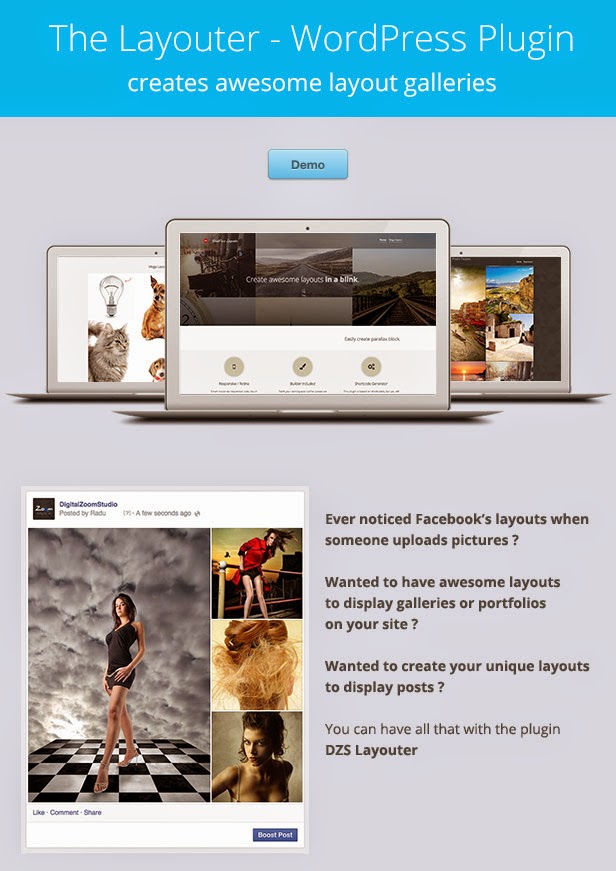
Want an awesome layout for your posts, or your portfolio items or your vacation pictures ? This is the plugin for you. Insert images like you do in the native Add Media WordPress form, but with more options and layouts!

WordPress Layouter Features

  • HTML5 technology – layouter uses the latest css3 and html5 techniques to deliver a never seen before experience to your clients
  • fully responsive – looks great from mobile to HD
  • 17 included sample layouts – full layouts for every number of items and more..
  • included builder – if that is not enough, a builder is included to create more layouts
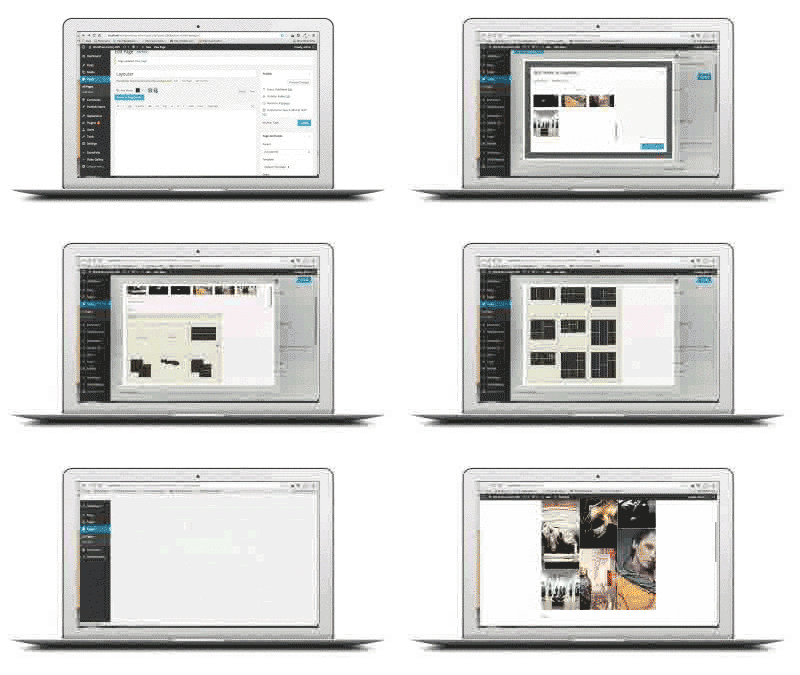
  • shortcode generator – do not remember any shortcodes, the plugin writes the code for you!
  • Retina-ready – graphics have double resolution for smooth retina viewing
  • easy install – purchase, download the zip, read the docs
  • iPhone / iPad optimized – this gallery has been optimized for Apple touch devices
  • Android optimized – this component has been tested on Android 4.0 and works awesome
  • developer / SASS powered – this component’s CSS has been built on top of SASS which means SASS users will have an easy time modifying the skins. For non-SASS users it’s no problem either because CSS files ( generated by SASS ) are provided
  • 100% css skinnable – want to make slight modifications to the skins ? The skins are 100% built from the css and it is very easy to edit with css knowledge
  • SEO friendly – built with search engine optimization on mind from the ground up, the Testimonial Rotator uses non hidden valid html markup to build the widget
  • compatible with all major browsers, including IE – compatible from IE9 to IE11, Chrome, Safari and Firefox

FAQ

Will this work on any page?

Yes. It’s based on shortcode so it will work in any page and even in theme pages.

Can you choose different background for each section?

Yes, going to the WP Text Editor inputing something like

<div style="position:relative;">
<div style="position:absolute; left:0;top:0;width:100%;height:100%; background-image: url(http://pathtobg.jpg); ">
[dzs_layouter] ...
</div>
</div>

will give a each layouter section with a different background

Other Great Plugins


Credits

Download The Layouter – Post Teaser / Layout Galleries (WordPress)

Premier – Responsive Slider + Slider Builder (Sliders)

FEATURES:

  • Layouts: Responsive, FullWidth, Fixed
  • Slider Builder
  • Unlimited Slides
  • Unlimited Layers
  • Vimeo&YouTube support
  • Code generation/Clean code
  • Parallax effect
  • Transparent Effect
  • Navigation: Hidden/Arrows/Thumbs/Big Thumbs
  • Different Arrows styles
  • Bullets: Hidden/Rings/Circles/Dots
  • Different Bullets Effects
  • Frame Shadow easy customizable
  • Timeline
  • Lots of effects & unlimited variations
  • Google Webfonts Support
  • Text Animations
  • Add animations by Drag&Drop
  • Scaling images in layers
  • Mobile devices support (swipe gestures)
  • And much more!

Download Premier – Responsive Slider + Slider Builder (Sliders)

DTMS – Demo Templates Management System (PHP Scripts)

DTMS – Demo Template Management System

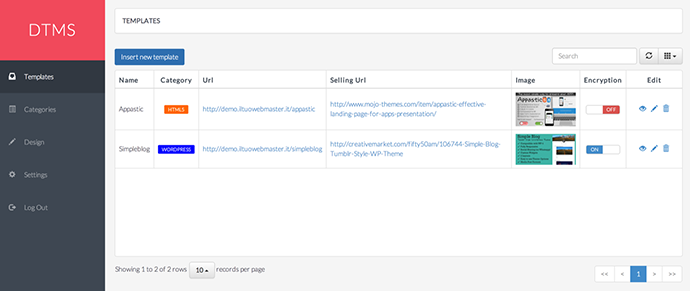
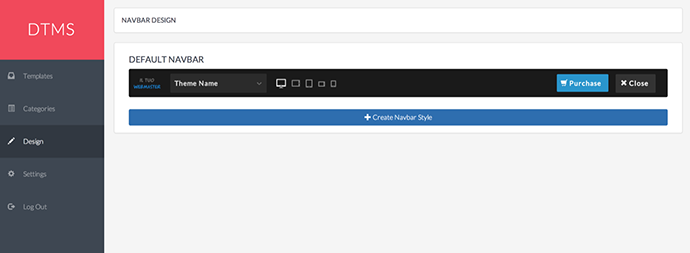
DTMS is a PHP script written on Codeigniter to allow you to show your demo template or your theme in a simple and secure way. In fact you have full control of everything without writing a single line of code. You can design unlimited navbar styles to adapt your theme style and can also choose to protect the source code of your theme obfuscating it!
The script include also a responsive test tool to provide to your customer a full overview of your theme!
Please feel free to give it a try!

http://dtms.iltuowebmaster.it/login

User: admin
Password : password

Features

  • Built on solid framework
  • Highly customizable
  • Bootstrap 3.2
  • Responsive Tool Test
  • HTML/JS Obfuscator
  • Logo Support
  • Image Preview Support
  • Fluid and responsive layout
  • Compatible with most modern browsers
  • Well documented

Intuitive UI

Unlimited Navbar Styles

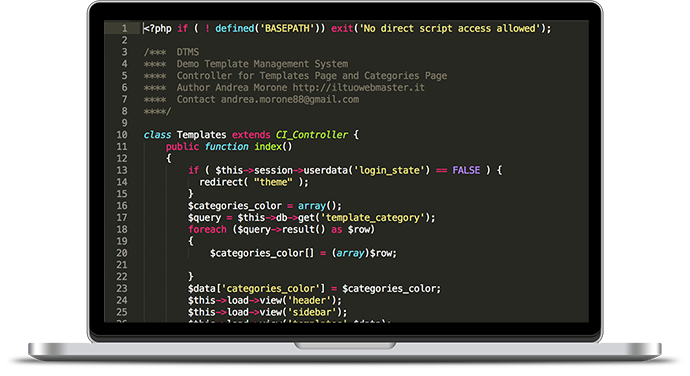
Clean code

Support

If you need any help to install or configure the script please feel free to contact me. I am also available to customize the script to suit your needs.

Download DTMS – Demo Templates Management System (PHP Scripts)

MotoPress Content Editor – Visual Builder for WordPress (WordPress)

MotoPress Content Editor is a visual drag and drop builder for WordPress. The main word to characterize the plugin is – simplicity! It helps you to create layouts you want without using a single line of code. Add built-in content elements and create stylish responsive webpages for any WordPress theme. The plugin is easily extendable and enables to work with custom post types. It gives an opportunity to add video and parallax backgrounds and there is no need to buy add-ons for this, the feature is included to the plugin price.
Use MotoPress and change the way you WordPress!

Download MotoPress Content Editor – Visual Builder for WordPress (WordPress)

TracPress (Utilities)

TracPress is an enhanced issue tracking system for software development projects. TracPress uses a minimalistic approach to web-based software project management.

TracPress is a WordPress-powered ticket manager and issue tracker featuring multiple projects, multiple users, milestones, attachments and much more.

Use tracpress-show to display a sortable table of all submitted tickets. The container table can be sorted by all columns and has a pagination dropdown. The sorting is persistent on all pages. A recommended tickets-per-page value has been preset to 100.

Use tracpress-show category="83" to display tickets from a single component. If you have several projects you are working on, each project can be a component. My plugins, for example, are set up as components. This way you can display them on separate pages.

Note: you can show multiple components on the same page.

Use tracpress-timeline milestone="83" to display the tickets timeline for a certain milestone. The list will show all tickets, their current status and resolution, the last modified date/time and the most recent comment.

Tickets need a custom post template, named single-ticket.php by default. Creating a custom template is as simple as duplicating the single.php file and adding one line of code below the the_content() line:

<?php tp_main(get_the_ID()); ?>

Use tracpress-milestone category="83" to display a progress meter for a certain milestone (based on category ID). Number of active/open/closed tickets is calculated automatically.

Use tracpress-add to display a ticket submission form. Based on your settings, it will also allow/disallow file uploads. As with any issue tracker, users might want to upload screenshots, files, patches, documents and so on. Tickets are subject to moderation, but if you require users to log in, then you can disable moderation. Tickets can be marked as wontfix or postpone.

Here’s a list of all possible ticket variables:

  • Workflows: has-patch, commit, fixed-major, dev-feedback, needs-testing, early, needs-refresh, close, accessibility, needs-ui, tested
  • Statuses: assigned, reopened, new, reviewing, accepted, closed
  • Types: defect (bug), enhancement, feature request
  • Priorities: low, normal, high, critical
  • Severities: blocker, major, minor, normal
  • Resolutions: fixed, invalid, wontfix, done, wontdo, postpone

Download TracPress (Utilities)

Video Blogster Pro (Media)

Video Blogster Pro is a powerful autoblogging plugin for WordPress that can put your site on auto-pilot, automatically creating new content from various video sites and giving you unlimited amounts of fresh search engine food for your niche blog all day, every day.It’s super easy to use, extremely flexible and works with any theme!

Supports YouTube, DailyMotion, Hulu, and Vimeo.

Download Video Blogster Pro (Media)

Satisfaction Survey for Prestashop (Prestashop)


Module rating

Precautions
Before installing this module please check that your PHP version is greater than or equal to 5.4 without this precaution the module does not work.

Demonstration

Demo Front Office

Satisfaction Survey – Prestashop

Walking a website must have a vision as accurately as possible to the satisfaction of its clients in relation to their requirements.

Simply create your customer satisfaction surveys through this module, you will be able to define a series of questions to prompt reply.

This module allows you to send via a cron job an email to your customers x days after a change of status control configurable for each survey.

The email configurable and translatable offers the customer to respond to a questionnaire up to 10 questions (as you wish), to do a link in the email can reach the page of the survey questionnaire, the customer simply answer yes or no questions or giving a rating via a rating from 1 to 10 OS.

You have the option to encourage your customers to respond to the survey, offer them a good parameterized reduction for each survey, an email will be sent to their their issue the voucher amount by percentage or shipping available in all cases a mail is sent to the client to thank you for taking the time to respond.

You can find all the answers to surveys in the back office part of your shop Prestashop, you can create as many as you want inquiry for any type of order status, a preview button is available surveys for each survey to see the questionnaire appear to the client.

For each survey the customer the possibility to specify a free commentary which the merchant can answer.

You can export each survey result as a Javascript widget installable on any site.

The ”+” for your customers

A satisfied customer is a customer who returns to your shop, give the possibility of their being able to speak and tell you their ressentient compared to your benefit.

  • Creating customer satisfaction survey unlimited 
  • Edit, delete investigations 
  • Validation of customer responses 
  • Reply 1 customer survey 
  • Yes / no answer, Star 
  • Order Status configurable for each consignment investigation 
  • Configurable number of days before sending 
  • Ability to send a voucher for a survey answered 
  • Maximum 10 questions per survey 
  • Results exportable survey widget to an external display 
  • Preview formilaire surveys before sending 
  • Possibility of response by the merchant to customer reviews 
  • Page display of survey responses 
  • Rich Snippet / extract enriched in the display page surveys 
  • Block summary of a survey available on adjustable column Right / Left 
  • Automatic sending of investigation according to the parameters associated via cron job

Flag Counter

Download Satisfaction Survey for Prestashop (Prestashop)

Article Transformer (Utilities)

Article Transformer is a plugin for everyone who wants to change the face of their blog or is working on a new WordPress Theme.

What does it do?

Article Transformer transforms your normal posts loop into a grid style layout placing the posts in optimal position based on the available space.

Highlight Features

– Customizable: Dimensions, colors, fonts and fonts size
– 3 Animations: Swipe Down, Swipe Right, Rotate. The color of the animation is automatically determined based on the dominant color of the featured post image (if any).
– 4 Layouts
– Responsive
– Integrated post views counter
– Ajax posts loader: On Button click and On Scroll
– Social buttons (Facebook, Google+, Twitter)

Installation

From your Admin Panel go to Plugins -> Add New -> Upload -> Browse and pick the Article Transformer archive file.

Click “Install Now” button.

Click “Activate Now” after the plugin has been installed.

A new menu should now appear in your Admin Dashboard called “Article Transformer”.

Displaying the plugin on the front-end

There are two ways to display the plugin.

1) Through shortcode
2) Integrating inside your theme loop

1) Shortcode examples:

    [article_transformer]
    [article_transformer categories=1,2,3]

where categories=1,2,3 are your categories term_ID
term_IDs are visible in the General Settings categories list in brackets

2) Integrating inside your theme loop

Add following code:

    if (function_exists("article_transformer_the_loop")) {
        article_transformer_the_loop();
    }

right above your theme posts loop code:

    if (have_posts()) { 

    -> PLACE THE CODE HERE <-

        while (have_posts()) {
            the_post();
            ...
            ... 
            ...
        }
    }

Go to the Article Transformer General Settings and set “Enable theme loop override” to “Enable”.

Download Article Transformer (Utilities)
CSS Live Editor WordPress Plugin (Add-ons)

CSS Live Editor helps you to fix up the styles of your website straight from your frontend, with a live preview!

Have you ever wanted to adjust some CSS in your website, and you find yourself going BACK into the backend just to edit your page or add some customized CSS? Then after previewing your site, you find that you still need more adjustment? If you have, then this plugin is for you.

Features: CSS Live Editor window preview

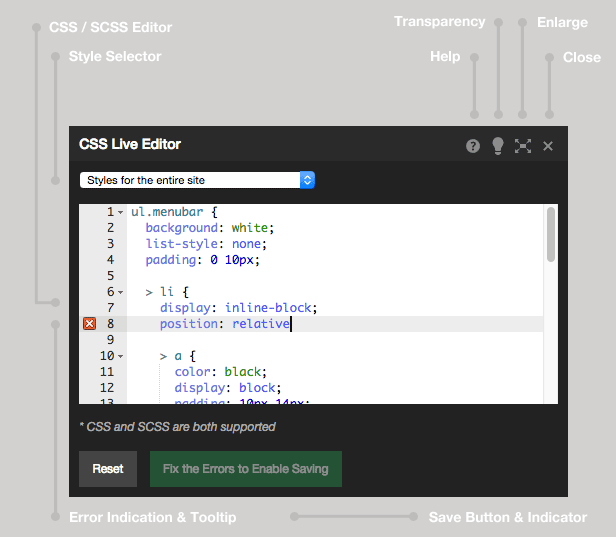
Put in your CSS in the editor window, and your styles will be applied directly to your website as you type. This live preview is so helpful and will save you time when finding out the perfect style. When you’re done, then just click the save button and your styles would be saved.

CSS Live Editor is for both expert and novice web developers and designers.

You can use plain CSS or SCSS syntax in the editor. And because of this, you can use variables, functions and nesting. This makes the CSS Live Editor really powerful. For example, you can add your variables for your ‘entire site’ styles, then use them in the different parts, such as the styles ‘specific for this page’.

Error checking is also built-in, so when you have an error, an indicator will be displayed near where the error occurred. Hover your mouse over the indicator and the error message will show up to help you figure things out. CSS Live Editor has 2 levels of error checking. Saving your CSS can sometimes show you error messages.

Why and Where to Use This

You can use it for tweaking and even while developing your website.

We ourselves use this for creating styling websites for our clients. We found that editing your styles along with a live preview of how the entire site would look like is a powerful time-saving tool. SCSS and nesting rules also ensure that your code is small and tidy.

Here’s a good tip for you: Use CSS Live Editor with your browser’s inspector or developer console, so that you can quickly get the id and/or class names that you need.

Features

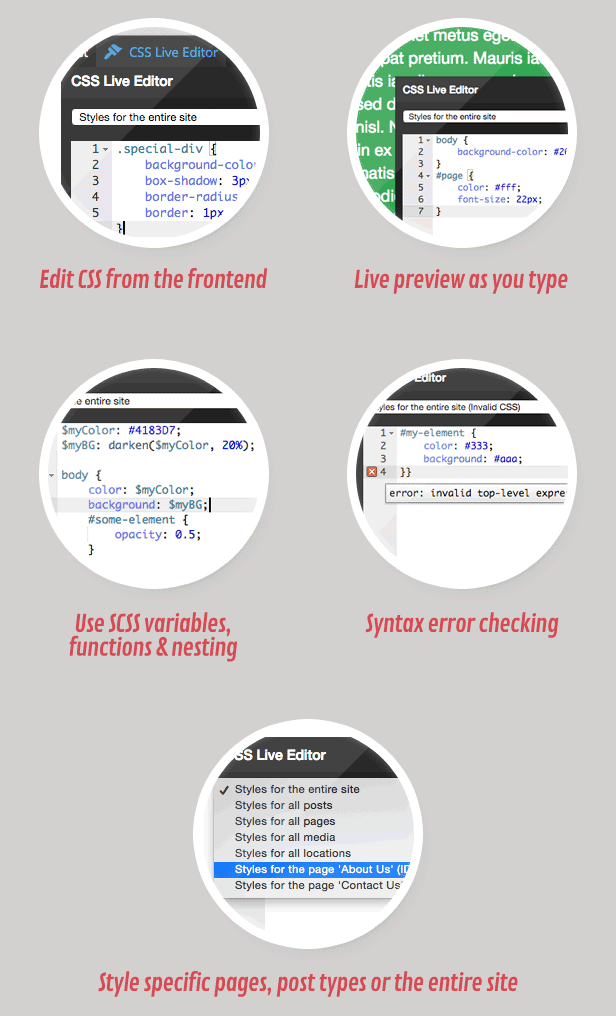
Features: Edit CSS from the frontend, View a live preview of your CSS as you type, Use plain CSS or SCSS syntax: use variables, functions and nesting, Syntax error checking with error annotations, Apply styles to your entire site, all pages or post types or even specific pages,

  • Edit CSS from the frontend,
  • View a live preview of your CSS as you type,
  • Use plain CSS or SCSS syntax: use variables, functions and nesting,
  • Syntax error checking with error annotations,
  • Apply styles to your entire site, all pages or post types or even specific pages,
  • Little overhead since SCSS is compiled when it’s going to be used,
  • The Editor is only available if you have privileges to edit your theme,
  • Only the CSS needed for your site is loaded in the frontend,
  • Lightweight,
  • Cleanly coded in WordPress standards

Having Trouble with the Plugin?

Head over to the support tab and check out the FAQs, or submit a support ticket!

Enjoying the Plugin?

Be sure to leave a rating and review and show us some love.

Check out Our Other Stuff

Video & Parallax Backgrounds For Visual Composer

CSS Animator add-on for Visual Composer

4k Icons add-on for Visual Composer

Updates

Version 1.0

* Initial release

Download CSS Live Editor WordPress Plugin (Add-ons)

Web Site Tour Builder For WordPress (Miscellaneous)

## Description ##

Web Site Tour Builder for WordPress
is a powerfull Tour Plugin, which can be used as a site tour, helpers, guides or tooltips.
Use the Web Site Tour plugin for your website, products, applications, landing pages or something else.

The plugin is very easy to use and allow you to create a very cool tour in simple dinamics steps.
Web Site Tour Builder gives you the ability to create amazing frontend tour which easily arouse visitor interest, with a User Friendly Backend, highly customizable solution to build your tour into your site.

Note:
You can create different Tour in different page by duplicating shortcode with different ids and publishing in page where you want tour and create unlimited steps with jump page.

After popular demand and 5 stars reviews of our customers now plugin is also avaiable for WordPress than that for Joomla!

## Features ##

– Support Continued Tour in Multiple Pages
– 3 Types of Display ad ( Autostart on Load, LightBox on Load, Manual )
– 3 Types of Popup Box ( Modal, Tooltip, Nohighlight )
– 3 Selectors Type ( id, class, name) – You can append tour to all html class
– 4 Positions (Top, Bottom, Left, Right )
– Draggable Box
– Keywords Controls to change step
– Rotation Control
– Steps Title
– Steps Text with Editor WYSIWYG
– (JumpPage) Redirect to Control – Usefult to continue tour in multiple pages
– 2 Popup Tour Themes (new)
– 2 LightBox Themes (new)

## Compatible With All recents Popular Browsers ##

– Google Chrome
– Firefox
– Safari
– Opera
– Internet Explorer(IE7+)

Download Web Site Tour Builder For WordPress (Miscellaneous)

Magento Social Login (Magento Extensions)

Magento Social Login extension developed by MCM extensions helps your store customers log in with an easier and faster process with their Social Media accounts. They don’t have to remember the password for your website and can login into your website with one click. This login process improves the customer experience very much that customers will love to purchase things from your store without remembering another new password for your website.

Magento Social Login offers One Click Login for the 6 popular services: Facebook, Google, Twitter, Yahoo, WordPress, Live

Download Magento Social Login (Magento Extensions)