Justified Gallery – Image Grid for Visual Composer (Add-ons)

Justified Gallery is a modern and elegant gallery which automatically sizes any image to the beautiful grid.

Comes with premium The Zoom Lightbox for more comfortable viewing.

Main Features

  • Row Height
  • Justify mode
  • Randomize mode
  • The Zoom Premium Lightbox
  • Lightbox Gallery mode
  • Images Ordering
  • IE8 support

Requirements & Compatibility

Plugin requires Visual Composer 4.x. You must buy item separately.

Plugin is compatible with the WordPress versions 3.9 and later (PHP v.5.2 or greater; MySQL v.5.0.15 or greater). Most JavaScript enabled Browsers will make them work with no issues.


1.0.0 - December 2, 2014
* Initial

Download Justified Gallery – Image Grid for Visual Composer (Add-ons)

Woocomerce product label (WooCommerce)

Woocommerce product label

Woocommerce product label plugin allows you to make visually-appealing labels to product images and display in both product and catalog views..Merchant can increase sales with label such as “Free shipping”, “new Arrival”.
These label will appear on product page and on category page.
Each product may has many labels.For example, product Berlin Tshirt have both “Hot”
and “Free shipping”.

Admin create product label rule, upload image for product label, define text of product label.

A product label rule can apply for whole category and/or each product.
In product edit page, admin can choose the product label rule for product in similiar way choosing category for product.

Features

The Woocommerce product label plugin includes a number of features
and benefits, perfect for your online store. Using this WordPress plugin,
you can efficiently:

  1. Create an unlimited number of product label rules
  2. Easily upload image for product label
  3. Assign product label rule for all products belong to a category.
  4. Assign product label for product on product edit page
  5. Easily add arbitrary text or HTML in Label
  6. Work with any theme
  7. Prioritize label rules
  8. Choose label positions: top-left, top-center, top-right, middle-left, middle-center, middle-right, bottom-left, bottom-center, and bottom-right

You can access product label setting by click Product > Product label
woocommerce product label menu

Main page of product label rule
woocommerce product label panel

Admin can assign product label on product edit page
Woocommerce product label assign for product
Product label on category page

Product label on category page

Download Woocomerce product label (WooCommerce)

Wilylab Invoice (Miscellaneous)

Wilylab Invoice is a web-based flexible invoicing system executed using CodeIgniter and Bootstrap.

Details Features:

  • Create invoice (Bill) from multiple company
  • Multiple Tax System
  • Multiple Currency System
  • Create invoice with or without signature option
  • 10 Invoice colors
  • 10 admin panel colors
  • Set invoice reference format
  • Shipping option
  • Discount option (support both fixed or percentage)
  • View invoice history and pay due from Invoice History page.
  • Set invoice payment mode
  • HTML invoice layout
  • PDF invoice layout
  • Invoice print option
  • Send invoice as attachment through email system
  • View overall status in dashboard
  • View current month status in dashboard
  • Responsive design

Download Wilylab Invoice (Miscellaneous)

CF7 Google Maps (Forms)

CF7 Google maps is useful to display Google Maps as a field for Contact Form 7. Visitor can mark any number of markers, circle, polygon, poly line or rectangle on google maps and can submit them with contact form 7 so it’s very useful to ask location or area information from visitor.

How it Works

When you submit your form, this plugin generate a KML file automatically based on user’s input on the google maps and attach it with the email send by contact form 7. You need not to modify your email body for this because it’s totally automatic process which makes this plugin unique. Each generated KML file will be copied in cf7-google-maps/kml folder as well.

How to Use

Click on “google maps” element tag generated by this plugin and specify map’s centre location, zoom level, width and height of the map according to your need. Insert short code in to your form. You can specify fill colours, stroke colours and stroke width from dashboard > Settings > CF7 Google Maps. You can setup these settings individually for each shape as well. though we have setup default values also so if you don’t do any setting, that’s also fine.

Then put contact form short code on your page and you’re done!

Example Map

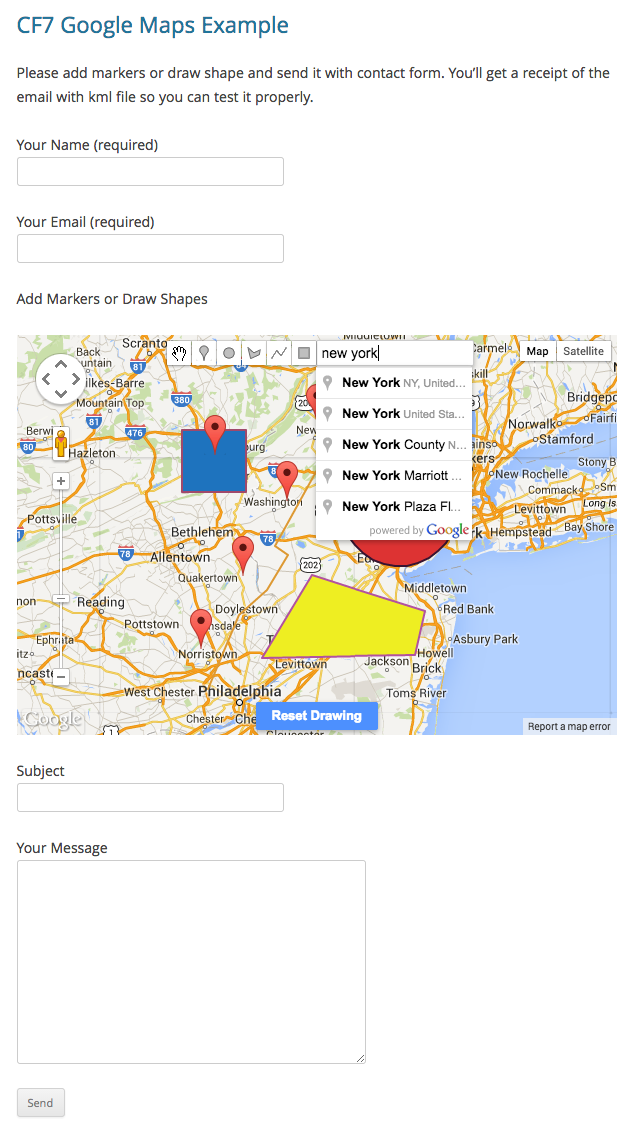
Below is example which shapes and markers visitor can add on the map and send it via contact form 7.

Example Google Maps with Contact Form 7

Setting

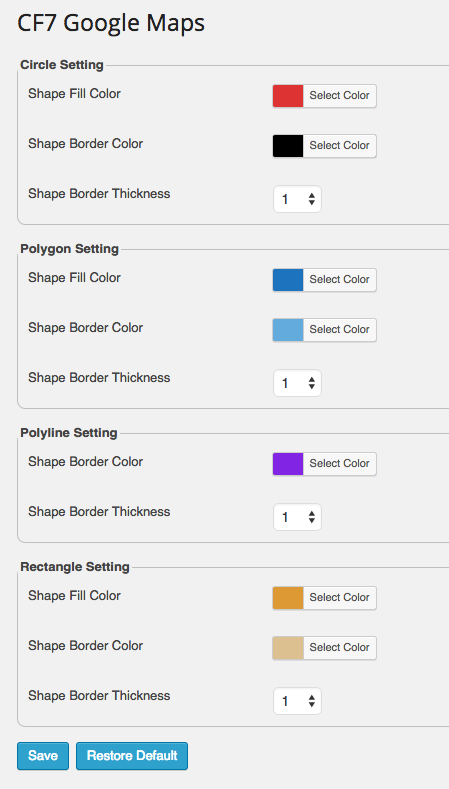
You can setup different colors of the shapes to specify them better way.

CF7 Google Maps Setting

Support

We’re here to help you achieve your goals with this plugin. Just mail us and we’ll get back to in shortest possible time.

For any help, feature request or to report a bug, you may contact me anytime And please rate this item as per your experience with it.

Suggestions

We’re requesting all visitors who purchased or not to send us features they want to see in next version. We’re very passionate about this product and willing to make it worth for everyone.

Download CF7 Google Maps (Forms)

Device Frame Generator (Android)

Demo : https://play.google.com/store/apps/details?id=com.waycreon.device_frame_generator

Features :

1. 21 frames to generate device art
2. Easy to customize.
3. integrated with start app
4. Easy to use.
5. rate app.
6. Match the device
7. enable or disable shadow.
8. set as default device
9. Notifications while generate the device.
10. attractive UI

What you will get is:

1. Full source code
2. Step by step documentation
3. 24×7 hours support
4. screenshots.
5. .apk file

Thank You.

Buy it now !!

Mail me at [email protected] for support if i am not available here

Download Device Frame Generator (Android)

Photo Text App [10 Filters, Social Sharing, AD,db] (Full Applications)

Add fantastic custom Text, select Photo Effects and share via Social (Whatsapp, Instagram, Facebook, Twitter…)!
Free Download from App Store

The iOS app “Photo_Text” allows you to customize your photos using the following functions:

  1. Add text to photos, a name, a motto, what you want!
  2. Edit photos from ten different filters
  3. Change the color of the frame
  4. Add date to photos
  5. Add your location to photos

Share your photos directly on the following social channels:
Facebook, Twitter, Instagram, Flickr

And also via:
Mail, Whatsapp, Message

Setup and Reskin
The first view is a TableView, you can Select a Text to add into a Photo, from this view you can add custom text (saved into DB sqlite).
From Settings view you can add Date and/or your Location to Photo, and select different type of Frame Color.

Filters Type
Ten different type of Filters, managed by FiltersViewController class:

filtersName = [[NSArray alloc]initWithObjects: 
@"Normal",
@"Sepia",
@"Crazy Mask",
@"Chrome",
@"lamroN",
@"Noir",
@"Posterize",
@"Vintage",
@"Ink",
@"Afternoon",
nil];

App Made with Xcode 5.1
iOS Version >= 7.0 (iOS 8 ready)
For iPhone 4, 4S, 5, 5S, 5C, 6, 6Plus

Download Photo Text App [10 Filters, Social Sharing, AD,db] (Full Applications)

Native Email- User-Defined Category Email Alerts (WordPress)

Welcome to the Native Email plugin for WordPress. Give your site users personalised, flexible, automated email alerts. Essential for your directory site, eCommerce site, news section or blog.

Email marketing is by far the best way to promote your site and its content- still outperforming social media several times over.

Whether you run a one-person blog, a business site or an eCommerce store, configure Native Email for WordPress in just a few minutes. Ensure each user receives their own personalised email content digest based on user-selected category preferences and more.

Wave goodbye to mass newsletters in your third-party mailer service and form more successful relationships with your site users- just like Amazon, eBay and most other major sites do.

Set up in just a few minutes and allow Native Email to automatically collect subscribers, promote your posts, listings, products or page content.

Sit back in the knowledge that you have improved your brand, increased site visitors, optimized sales and boosted site registrations.

NativeEmail Ecommerce-590px

Set-up is easy too. Once you have configured your email and preferences, the Native Email auto sign-up widget can be placed multiple times on different parts of your site. Simply set which post-type you wish to display on it, choose which categories to include on the widget and it adapts seamlessly to your site CSS. You might enable individual subscriptions to post categories on your blog sidebar, different product categories on your shop pages, or listings on your directory listings pages. All you have to do is select which post type your site users will subscribe to each different time you use the widget.

 Use Native Email It To Alert Site Users About

  • Newly added products in a customer’s preferred category
  • Latest blog posts of interest to each user
  • New listings on your directory, classified ads site or real estate site
  • Most popular posts or products this week

NativeEmail Ecommerce-590px

Full Features

  • User-Based Notifications By Post Type,
    Category Type, Taxonomy, Page and More
  • Customisable Email Templates
  • Auto-Subscribe Widget
  • Multi-Use Widget
  • Custom Widget Styling
  • 5 Email Content Layouts
  • Text Only Version
  • Email Scheduler
  • Send Most Recent + Most Popular Posts
  • Set Number Of Posts In Emails
  • Send Log
  • Include/ Exclude Widget Categories
  • Widget Shortcodes
  • New User Notification Email
  • Re-Brand Email From “Your Site”
  • Email Data/ Preferences
  • Live Email Preview
  • Send Test Email
  • Add/Remove Users
  • Assign Users Subscriber Categories Manually
  • Import/ Export User Emails by CSV
  • Premium Support
  • 12 Months Of Auto Updates


NativeEmail Ecommerce-590px

Support

Swift premium support is available for all.

Main site:
NativePlugins.com

Demo
http://demo.nativeemail.com/

Username: NativeUser
Password: NativeDemo

Benefits

Massively increase exposure of your site posts, products, news or listings on your site. Improve:

tick2  Site Visitor Numbers

tick2    Customer Retention

tick2    Site Usage Times

tick2    User Registrations

tick2    Sales

tick2    Brand Image

tick2    Social Interaction

+ MORE EXCITING FEATURES COMING

Download Native Email- User-Defined Category Email Alerts (WordPress)

Sudoku – HTML5 (Games)

Description

On launch user is presented with a difficulty picker. Once difficulty is picked the game starts. In Game mode player clicks on a empty spot which selects the spot (indicated by blinking tile). Then player selects a number at the bottom to populate into the spot (Only the correct number can be placed). Player can click on placed number to highlight them as a helper tool.

Features

– HTML5

– Responsive

– Multiples Levels

– jQuery

– Javascript

– Simple to initialize

Download Sudoku – HTML5 (Games)

Find Couples (Games)

Find Couples is an Android game made in Java using Eclipse IDE.

The aim of the game is to find every couple before the time has finished. The game includes 12 different levels, each harder than previous. Also, the best time for each level is stored.

DOWNLOAD THE GAME

GAME FEATURE

– Random couples generated in each level
– 12 Levels, each harder than previous
– Admob Ads (Banner and Interstitials)
– Splash screen with your logo

THE GAME INCLUDES A README.doc EXPLAINING:

– How to import the game (video included)
– How to change Admob ids (Banner and Interstitial)
– How to change the % of times that appears the Interstitial
– How to change the current levels and how to add more levels.


MORE GAMES

Download Find Couples (Games)

Light Tone (Games)

Light Tone is a nice colorful game on Eclipse. One of the screen sides is brighter than the second. For getting scores a player needs to choose the side which is brighter. Everything you need to succeed is to be quick and attentive.
Light Tone game helps you to improve your reaction time and recognize colors better.
Note! There is abrupt change of colors.

screen

Features

You can turn on and off sound and/or vibration.
The Light Tone game contains banner admob option.
The game has 4 modes:

  • Classic – a player needs to score points for limited amount of time.
  • Crazy – similar to Classic, but to collect points is a bit more difficult because of constant changes of colors.
  • Reaction – a player can estimate how fast he/she is.
  • Practice – a player can train his/her reaction without a time limit.

You can download live demo here.

Lite Tone

Download Light Tone (Games)

Wunderadmin (Magento Extensions)

premium magento extensions - nwdthemes.comfacebooktwitterenvato

live preview

color schemes

description

Change the look of your admin panel by selecting one of three themes, that will modify design of admin panel. You can get improved and cleaner design of interface to get better usability and user experience, switch to modern theme to have fresh looking sidebar navigation.

All of the interface elements are totally under your control. You can change colors of any elements to match your corporate colors and keep admin skin solid with your frontend taste. All customizable elements are grouped by logical sections to let you easier access them.

Full features list

  • Change look and feel of your admin panel
  • Customize color scheme of theme
  • Upload your own logo
  • Customize admin theme fonts with 500+ Google Fonts
  • Import / Export and download color schemes
  • Hide extension controls to include in your whitelabel theme
  • No programming skills required
  • Easy to install and configure

Changelog

version 1.0.1

  • fixed: Fix align issue on massactions in Modern theme.
  • fixed: Adjust footer position in Modern theme.
  • fixed: Fix for big logo problem.
  • fixed: Fix for import incorrect format redirect.
  • fixed: Checkboxes in tree fix.
  • fixed: Export button aligment issue.
  • fixed: Fix for tables and forms alignment.
  • fixed: Fix for permissions role issue.
  • fixed: Fix for message on login screen in Modern theme.

version 1.0.0

  • Initial Release

Download Wunderadmin (Magento Extensions)

Universal Video Player – WordPress Plugin (Media)

\

\
\


\
IF YOU NEED ONLY THE JQUERY PLUGIN FOR THIS PRODUCT , YOU CAN DOWNLOAD IT FROM HERE : http://codecanyon.net/item/universal-video-player-youtubevimeoselfhosted/8949390


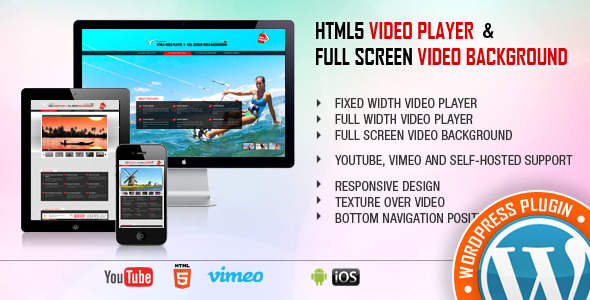
Universal Video Player supports YouTube, Vimeo and Self-Hosted videos and is a top-notch responsive HTML5 plugin compatible with all major browsers and mobile devices.

 

video tutorial

Step 1: Installation – https://www.youtube.com/watch?v=rAFJMLyKvvs
Step 2: Create a new player and manage the player settings – https://www.youtube.com/watch?v=XwNqOK0UCFE
Step 3: Manage the playlist and categories – https://www.youtube.com/watch?v=49Uo9JGm1wk


FEATURES:

\ YouTube, Vimeo and Self-Hosted support

It plays YouTube, Vimeo and Self-Hosted video files. For YouTube and Vimeo, all you need to use is the video ID

\ Responsive Design

The plugin can be used in websites which are responsive. Optional parameter to disable responsive behavior in order to integrate it in non-responsive websites.

\ Mobile Compatible

It is compatible with IOS and Android operating systems.

\ Google Analytics

Option to activate Google Analytics tracking. You’ll be able to see how many times each video was played.

\ Customizable Color Scheme

Any color scheme possible, customizable from parameters, so you can integrate this audio player in any design.

\ Playlist With 3 Versions

You can show the playlist thumb, title & description or hide one of them. Also parameters for playlist size and color.

\ Playlist Search

You have the option to search the playlist. The results will be displayed as you type the search term.

\ Categories

The playlist items can be structured in categories. A video can belong to multiple categories.

\ Two Skins

You can choose from the 2 skins available: back & white. Also, from parameters you can create any color scheme, having the possibility to integrate it in any design.

\ Download Option

Available button to download the current playing file (only for self-hosted videos). You have the option to hide the download button.

\ Share

You can share your video player on Facebook and Twitter. Parameters to customize the share title and description.

\ Show/Hide Playlist

Button to show or hide the playlist. Also option to load the player with the playlist hidden.

\ Shuffle

Option to shuffle the playlist.

\ Logo/Watermark

You can define a logo in the top & left corner. Also, option to set the link and target_self or _blank.

\ Multiple Parameters

Autoplay, loop, colors, dimensions etc. Over 85 parameters from where you can customize the player.

\Lightweight

The JS file has around 55KB

\ Free Updates

Once you’ve bought the product, you can download for free, from your account, all the updated versions.
 

\

\

Keywords: self hosted, vimeo, search, wordpress, media, html5, plugin, mobile, player, playlist, responsive, video, video player, youtube, categories

If you need additional information don’t hesitate to contact us at [email protected]. We’ll try to answer you as quickly as possible.

Enjoy!

UPDATES / RELEASE LOG

***Version 1.3 Release Date: December 02, 2014

Download Universal Video Player – WordPress Plugin (Media)