A responsive interface which allows users to create amazing menus, presentations, portfolios, and slideshows using a fancy circular pattern. It is totally customizable, as you can create multiple children elements equally arranged from the center, with different classes, and style them with css.
Category: code
download PHP, ASP.NET, Java and Javascript from CodeCanyon – the marketplace for code scripts and snippets.Javascript, Java, Program, Code, Snippet, Script, Dev, Development, Codebase, MySQL, Class, Widget, System, CMS
Turtle Slidepuzzle (Games)
About Turtle Slide puzzle Game– HTML5 Game
This is a Slide puzzle game that works with HTML5 and is developed to run in web pages.
At the beginning of the game, puzzle will automatically and randomly move the pieces and player should solve the puzzle by clicking and moving pieces. When he/she succeeds, the puzzle will dissemble again, but this time in a more difficult way.
This process will continue endlessly and each time player faces a more difficult puzzle to solve. This gradual increase in difficulty will keep the game challenging and interesting.
Slide Puzzle games are popular among different ages and people and so are a good choice for improving the experience of the visitors of your site.
And at the end,
We will be happy to hear your ideas and opinions about the game, so if you like write a comment or send it to our e-mail:
[email protected]
And if you liked it, don’t forget to rate it!
Come & See Our Website: www.01Smile.com
Download Turtle Slidepuzzle (Games)
AccessPress Social Icons Pro (Social Networking)
Link-up your social profiles right from your website, in an easy and fun way!
AccessPress Social Icons PRO – allows you to create various social icons and link your social profiles from your website. Its fun because – you can create, customize and build the beautiful icons for your social media profiles on your own.
You can select icons from our 12 different beautifully designed sets, or upload our own icons set, customize them, define sizes, add several effects, add tooltip, set margins etc. Also you can define to appear the icons horizontally/vertically and no. of rows/columns!
Checkout main features below:


Features
- Beautifully designed 12 icon sets
- Select from pre available icons themes or upload your own
- Strong customization options
- Define size, set height, width of the icons
- Set margin / spacing between icons
- Link up your social media profiles, set link targets
- Enable and disable the tooltips
- Choose display type (vertical or horizontal), define no. of rows/columns
- Multiple icon sets multiple places
- Create multiple-instance of the icon sets and use them in multiple places
- Font Awesome icons
- Choose from 105+ font awesome icons, color/style them as you need!
- SVG icon sets
- High quality SVG icon sets, make your icons retina ready!
- The social sidebar
- Configure and setup social sidebar with lots of options for your site.
- Easy integration
- Get short code or use widgets for each instance you design
- Use the short code anywhere you like: header, footer,in the content area
- Get some styles!
- Define styles like shadow, borders for icons
- Define tooltips and style it with your own color, BG color.
- Tooltips
- Add some feel on your icons – add and customize the tooltip
- Enable or disable tooltips
- Interactive Icons
- Make it interactive, define hover animation on icons.
- Make your own layout
- Vertical and horizontal display option
- Select rows and columns
- Real time live preview
- Real time live preview – check how it looks on your website before using it.
- Order the icons
- Order the icons – they way you like by using easy drag and drop feature.
- Fully Responsive
- Fully Responsive – compatible with mobile devices
- User friendly and very interactive user interface
- Anyone can use it, its as easy as drag and rop.
- SEO friendly
- Use your own image alt/title tags for hover-over text
- Google will love it!
- Paid customization available
- Do you want to extend the plugin or add more features? Ask us for premium support
- Support
- Forum support, Online chat support and dedicated email support
- Free updates
- Get free updates for lifetime.
Support
- Support right from here – Contact us using the contact form on our profile page
- Dedicated support forum on our website: http://accesspressthemes.com/support/
- Email support: [email protected]
- Online chat at our website: accesspressthemes.com
Documentation:
We’ve detailed documentation which leaves you with no question. Find the plugin documentation here:
https://accesspressthemes.com/documentation/plugin-instruction-accesspress-social-icons-pro/
Video tutorials:
We’ve prepared detailed video tutorials to setup and use the plugin. Find video tutorials here:
https://www.youtube.com/user/accesspressthemes/playlists
View plugin change logs here:
https://accesspressthemes.com/updatelogs/accesspress-social-icons-pro-update-logs/
Get latest updates
Like our Facebook page and get latest updates:
https://www.facebook.com/AccessPressThemes
Feature request:
Click here to submit feature request. It can also be used to notify bug .
https://accesspressthemes.com/contact/
Download AccessPress Social Icons Pro (Social Networking)
App Sharer (Android)
App Sharer – Share any of your installed android applications with one click!
Demo apk file : https://www.dropbox.com/s/3jihohsf7se7okn/Apk_share.apk?dl=0
Reference apps that is on playstore :
https://play.google.com/store/apps/details?id=com.yschi.MyAppSharer&hl=en
https://play.google.com/store/apps/details?id=com.mobilepearls.appsharer&hl=en
Features :
1. Integrated with admob banner/intersitials
2. Share apk file with mail
3. Share playstore url of app with whats app, messaging etc.
4. Easy to customize
5. attractive UI
6. Search bar to search your app
7. Multiple selection with check box
What you will get is :
1. Full source code
2. .apk file
3. Step by step documentation
4. screenshots
You may like Photo Collage App

You may like Mood scanner

You may like Meme creators

Thanks.
Download App Sharer (Android)
zGabi Forms (Forms)



Quantum Fader – Powerful Javascript Gallery (Sliders)
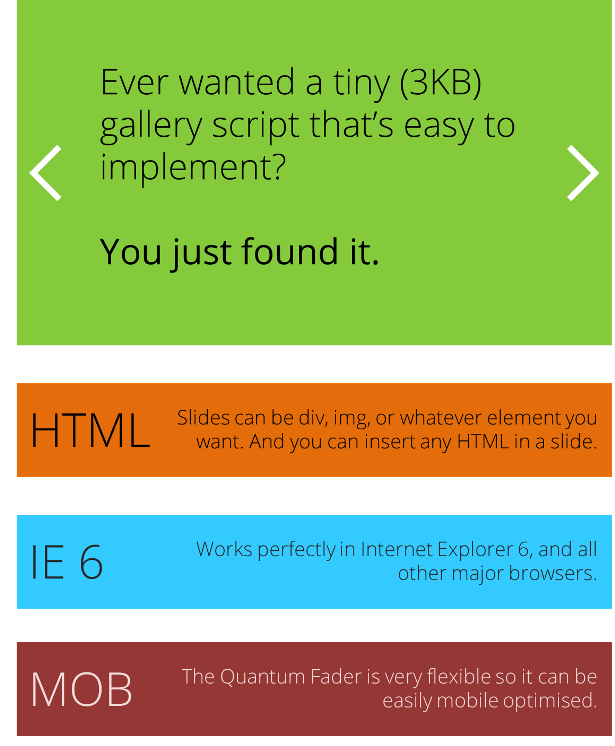
Quantum Fader is a powerful but quantum small (3KB) JS gallery. It transitions from one slide to another by fading. You can add pretty much anything you want in a slide: images, html, video, twitter feed, and more. Best of all, it works perfectly in Internet Explorer 6 (!) and all major browsers. It is also very flexible and can be mobile optimised extremely easily.
You can add as many galleries to one page as you want. The script gives them all a unique ID and each one fades in slightly after the previous Quantum Fader. That’s so every gallery on the page doesn’t transition at the exact same time.
The Quantum Fader runs in autoplay with pause/start buttons, and also previous/next buttons. Navigation buttons can be automatically added to the Quantum Fader by the script.
Implementing
To implement the Quantum Fader on a page, you obviously need to link the CSS and JS files and then add this code:
<div class="QuantumFader">
    <div class="QuantumSlides">
        <div class="QuantumSlide">This is my slide.</div>
        <div class="QuantumSlide">This is my second slide.</div>
        <img src="imagepath/image.jpg" alt="My third slide" />
    </div>
</div>
Then, all you do is call the QuantumFader on the page:
<script>
    $("body").QuantumFader();
</script>
Simple!
Navigation Buttons
The Quantum Fader runs in autoplay and can be paused with a Pause/Start button. There are also Previous/Next buttons (when these are clicked, autoplay is automatically paused). If you choose, the script can automatically add all the navigation buttons for you.
To see the complete list of features, please go to the Live Preview.
Known Bugs
The last thing you want when you purchase a product is ugly surprises. So I have listed the bugs that I know of below:
Due to the way in which the Quantum Fader works, some elements need to be reloaded when the slide fades out. For example, a YouTube video or a Facebook like button may have to be reloaded when the slide finishes fading out. If there is a way to fade slides without resetting the css “display” property, let me know (jQuery .animate(“opacity”) and .fadeTo() don’t work for me).
Prev and Next navigation buttons may not appear transparent in IE 6. This is an issue with all websites regarding IE6, and is not confined to this product only.
Download Quantum Fader – Powerful Javascript Gallery (Sliders)
Wet Kitten iOS Universal (Games)
Wet Kitten iOS Universal!
Wet Kitten is an application fully developed in iOS with Objective-C, has been built with all the characteristics required to contain an universal application
Features :
- Universal Project (iPhone / iPhone 5 / iPad compatible)
Free AND Pro Versions - Viral Features: Sharing to Twitter, Facebook, Email.
- Ratings Prompt (AskingPoint).
- Using Multiple Ad Networks :
- Admob.
- Flurry.
- Chartboost.
Wet Kitten is developed to make it easy to use when performing a reskin and update of the parameters used. In Wet Kitten documentation explains each of the technical details that should be considered for changing the images. This development is intended for publication on iOS Universal .
Deliverables :
- Project iOS with all its images, sound and source codes used in this development to be compiled on iOS.
Resources
- xCode 6, iOS 5.0, iOS 5.1, iOS 6.0, iOS 6.1.x, iOS 7.0.x, iOS 8.0.x
Demo:
- xCode 6, iOS 5.0, iOS 5.1, iOS 6.0, iOS 6.1.x, iOS 7.0.x, iOS 8.0.x
Demo:
Download Wet Kitten iOS Universal (Games)
3D Business Card Flipper (Images and Media)
Whether you’re showing your designs to a client or just want an online business card, this 3D flipper is a creative and fun way to show off your work. You can include designs of any size, so it doesn’t even need to be a business card. It could be a poster, flyer, announcement, or anything else that’s flat and has two sides. You can show multiple cards at once, or one at a time with buttons to cycle through additional cards.
Easy to Edit
This item works perfectly right out of the box – no special customizations needed. Just include the .jpg’s or .png’s in the images folder (one for high-res retina and one for normal size), list the card names in the .js file, and you’re ready to go! You can change the sizes and backgrounds right in the CSS. If you want to dig deeper, all the code is included and well commented to make it easy for any developer to modify.
Compatible With All Major Browsers


This business card flipper works flawlessly with all major browsers, even on iOS and Internet Explorer. Always be wary when buying 3D effects as they usually won’t work properly on IE – luckily this one does.
Smooth Javascript Animations
There are no Flash or animated GIF elements here. All of the animations you see are 100% Javascript and don’t require any browser plugins.
This item uses Greensock’s TweenMax for the animations, rather than jQuery. Why? Because GSAP is SOOOO much faster and smoother. See for yourself: jQuery vs GSAP speed test.
The Cards in the Preview:
If you like the business cards used in this preview (not included), check them out here:
Related Items


Download 3D Business Card Flipper (Images and Media)
PT – Pricing Tables Bootstrap 3.2.0 (Pricing Tables)
WooCommerce Estimated Delivery and Shipping Estimates (WooCommerce)


Demo


Now your buyers can get shipping estimates for their area by simply entering area code/ zip code.
Shipping Estimates Include
- Shipping Availability Information.
- Estimated Delivery Date Information.
- Cash On Delivery Availability Information.
- Extra Shipping Cost Information.
- Courier Information .
- Custom Text for Entered Area Code .

You can Easily show/hide any of this estimate features.Each zone will have its own configuration.

Front-End Output and form input texts can ve changed easily from admin panel without creating po files.

Changelog
Version 1.0.0 -02 December 2014
- Initial Release
Download WooCommerce Estimated Delivery and Shipping Estimates (WooCommerce)
Exchange – Subscribe and Get Coupon (Exchange)
Exchange – Subscribe and Get Coupon allow you offer Exchange coupon by subscription
Exchange – Subscribe and Get Coupon easy you to gain mailinglist by offer coupon with subscription
Key Feature
- Easy to use and setup
- Working with iThemes Exchange 1.14
- Auto forwarded to Mailchimp, Getresponse, Sandy, iContact and more
- Including with social share
- Including with mailinglist manager
- Work for multiple cart
Download Exchange – Subscribe and Get Coupon (Exchange)
Woocommerce Multi Vendor (WooCommerce)
Make Multi Vendor Marketplace and Don’t Leave WordPress.
Woocommerce Multi Vendors plugin allows you to turn your store into a multi-vendor marketplace, such as Etsy or Creative Market. You can assign existing products to vendors, or they can add and edit their own ones – they will have a dedicated page on the site where they will be able to list all of their products, but they will also show up in your normal shop pages so you can sell your own products alongside those of your vendors.
To make things even more useful, you have complete control over how much commission each vendor receives for a sale and you can even manually add new commissions and edit existing ones.

Features:
A few important things to remember:
Video Guide
Download Woocommerce Multi Vendor (WooCommerce)
Shape Blitz (Mobile)
Shape Blitz was built using the latest version of Corona SDK 2014.2511 and takes full advantage of composer and graphics 2.0. This game template utilizes AdMob and RevMob for banner and full screen ads.
This game is a twist on the current and very popular game brain rush. The object of the game is to match the oncoming shape with the shape below. Over time, the game gets increasingly faster until the player incorrectly matches a shape.
Shape Blitz is different from Brain Rush because it shows each oncoming object in random colors and makes the player manage three objects. Starting out, the player has a circle and he or she can tap on the left side to turn the object into a rectangle and tap the right side for the triangle.
Ads
Shape Blitz uses AdMob and RevMob for monetization. Banner ads are shown at all times during game play and fullscreen ads are shown a third of the time once it’s game over for the player.
Features
– This is universal game and is ready for Android, iPhone, iPad, and any other device using Corona’s ultimate config file.
– Leaderboards for both Game Center and Google Play Services
– Ads using Admob and RevMob
– Uses the latest Corona SDK public build 2014.2511
– Available for any pricing plan, Starter and Up
– This is a full game ready for the store.
– Easy to reskin with few assets.
– Clean and very well commented code.
– Beautiful interface using flat colors.
Game Store Description
In this reflex inspired game, you’ll need to survive the onslaught of shapes by tapping the screen (or not tapping) to match the oncoming shapes.
Tap left for the rectangle.
Tap right for the triangle.
Don’t tap at all of for the circle.
Colors don’t matter.
How many points can you earn before Shape Blitz say’s it’s game over?
Download Shape Blitz (Mobile)
Sale Banner Ad Template (Ad Templates)
EdgeSnowFlakes: Personalized Animated Holiday Card (Animations)
The best time of year is here again!
EdgeSnowFlakes is a beautiful yet subtle 3D animated holiday card that allows you to customize each card with a simple JSON file – your clients and loved ones will appreciate that personal touch!
It’s optimized to run beautifully on desktop and tablet – IE11 is also supported.
No greeting card is complete without music – the music used here is called Snowflake Serenade by Hughmitchel and it’s available on AudioJungle here http://audiojungle.net/item/snowflake-serenade-/3596678?ref=chrisgannon
Features:
- Personalize your greeting with a simple JSON file
- Configurable number of flakes to get best performance on all platforms
- Configurable length of time before the message appears
- Music is supported
- Parallax snow effect
- Personal message supports HTML formatting
- Optimized for both desktop and tablet
EdgeSnowFlakes is designed for Edge Animate and powered by Greensock.