Planet Spin – HTML5 Game (Games)

Planet Spin is a HTML5 game where you can rotate the three colours planet and making sure that the flying coloured objects land in the matching part of the planet to earn points.

The ZIP package contains the game with 1024×768 resolution that scales proportionally to fit current screen device.

How To Play:
1. Use finger or mouse to rotate the planet
2. Match the correct colours will score point and expand the part of the planet
3. Match the wrong colours will cause damage and decrease the part of the planet, continually match the wrong colours after 3 times will game over.

Features:

  • High Definition (1024×768)
  • Auto-Resize (Responsive)
  • Mouse and Touch controls
  • Playable in all platforms (Mobile, PC, etc.)
  • Browser not support page
  • Mobile rotate instruction (For Landscape Only)
  • Complete game customization (Score, Speed, Text)
  • Make with CreateJS

Download Planet Spin – HTML5 Game (Games)

BestSale – HTML5 Promotional Banner Template (Ad Templates)

About BestSale

BestSale it’s an animated html5 ad banner, perfect to promote your amazing special offers, (products or services) in a quick and easy way. The Ads were built with Google Web Designer and they’re fully prepared to be used in DoubleClick or Google Adwords display network.

With different colors, design elements and ad sizes available, you get a lot of ready to use and easy to customize options. All files needed to edit the ad in Google Web Designer are included, as well as the PSD files (layered and well organized). In addition, with BestSale HTML5 Ad Template you get 8 thematic patterns and 4 different Price Tags, offering you a wider range of options so you can completely customize your ads according to your business and promotion needs.

What’s Included with BestSale:

  • 4 different colors options
  • 4 standard ad sizes: 300×250, 160×600, 728×90 and 468×60
  • 1 expandable Ad Banner with youtube video integration: from 300×250 to 300×450 (not compatible with Adwords)
  • All files needed to edit your ads in Google Web Designer
  • Google Web Font integration
  • Layered and well organized PSD files included
  • 8 Thematic Patterns and 4 different price tags PNG files
  • Help Documentation file

If banners in live preview not showing up after a few seconds, please, turn off your AdBlock plugin and refresh the page.

Download BestSale – HTML5 Promotional Banner Template (Ad Templates)

Social listing-based – Donate Charity Center (PHP Scripts)

Social listing-based – Donate Solution – To Make Dreams Come True.

It’s A standalone, self hosted, PayPal powered, fully automated, Realtime and social donate center, A brand new donate method it sell social listings To Fuel Your Dream Projects.

This Donate listing Center. It utilizes PayPal’s APIs to bring you a fully fledged donate solution.

When Your visitor donate With PayPal they can post a Comment of 140 characters along with a Website URL, Twitter URL, Facebook URL, Linkedin URL, Youtube Video URL, and a Image or Flyer URL to promote them self and this make a big difference compared to the standard Paypal donation button, Because now you give something in return (Recognition) and Promotion.

This is a great way to say thanks to your Generous Donators
Who helpt You, To Get your Goals for your Dream project.

How it works

Afther donation your visitor wil be redirected to a page where they can add the listing
A Name or Brand and the Comment are Required but all the rest is optional to use.

1. Website URL, here you can add a link to your Website or Blog.
2. Twitter URL, here you can add a link to your Twitter account.
3. Facebook URL, here you can add a link to your Facebook page or account.
4. Linkedin URL, here you can add a link to your Linkedin account.
5. Youtube Video URL, here you can add the link from your YouTube Video.
6. Image or Flyer URL here you can add a link to your online Photo or Flyer.

All URLs must be the full url, no files, images or videos are uploaded,
The social buttons, image and video embed will be generated automatically when given.

You also Get a notification from paypal so you can check the listing in your admin panel

When a listing is violating your terms of use (TOS) you can remove the listing.

Features

Build on bootstrap 3
Font awsome icons
All Demo pages included
Easy to install
Admin pannel
Great for personal and non-profit projects

Admin

Site settings
Demo mode to test script or to add demo donators
Paypal settings
Edit donate prices country code etc.
Global site settings
Easy translate
View and remove listings
View and remove payment
2 adspots top and footer (or for extra info)
Add your project youtube video
edit info box
edit modal info
edit info box collor
edit donator box collor

You can also enable or disable display settings like the progress bar, goal demo menu and more!

You can simply replace the logo, your project image and background in the img/ folder

Visitors

open all images in lichtbox
open and view all video in modal and full screen
visit like or follow donators social links
share like g+ listing page
visit donator website
donate to get a listing themself
See Your Logo on Paypal page

Requirements

php5+
MySQL database
Paypal business account

Note: There is No demo for the admin please see the screenshots

Download Social listing-based – Donate Charity Center (PHP Scripts)

Power SEO plugin for King Media Script (Add-ons)

POWER SEO is a Powerful plugin that allow King Media Script owners to improve their website’s SEO. It is an all in one plugin which offers all SEO customizations that you need to bring your site’s search rank to the next level.

With this Plugin you can:

– Change page title on all important pages using static text or variables available on page.

– Cleanup your media’s URLS by removing common words and making URLs shorter and with richer keywords.

– Upper Case first letter, all first letters of words or whole URL of a media page.

– Change all relations in internal links in post content “DoFollow” to improve internal linking and improve your SEO rank for links from inside your content. Also you can change Relation attribute of any other site to give them SEO benefits of getting links from your site.

– Restrict search engines from indexing or following certain pages.

– Stop search engines indexing pages with short content length.

– Set link title, and page description for Categories.

– AND many many more….

This is the most powerful and necessary plugin for your website.

DOWNLOAD IT NOW if you really want to bring your site’s search rank to the TOP RESULTS!

*Attention this is a plugin for King Media Php Script. You must have first installed the King Media Script to run this plugin!

Download Power SEO plugin for King Media Script (Add-ons)

Taxonomy Sidebars (Utilities)

About the Extension

Taxonomy Sidebars is a plugin for WordPress that extends its functionality by allowing to add custom sidebars and widgets on different WordPress taxonomy pages. This versatile extension works with any WordPress plugin that creates custom taxonomies! The plugin is absolutely useful when you want to add widgets to certain WordPress taxonomies only. Not only does it make your site clearer, but it also gives more opportunities when using advanced WordPress plugins, including e-commerce systems like Jigoshop or WooCommerce.

Installation

  1. Connect to your server’s FTP

  2. Copy the “taxonomy-sidebars” folder from the zip into the “wp-content/plugins” directory

  3. Login to your WordPress administrator panel

  4. Click the “Plugins” tab and you will see your newly installed plugin – activate it.

How it works & configuration

Let’s test how the plugin works with basic WordPress taxonomies – post categories and tags.

First of all, you’ll have to add some categories and tags to your site. This is a header of a basic WordPress site:

a

There are three post categories, and we would like to add a widget for the Events category only.

To achieve it, you have to go to the administrator panel, and then move to Apperance -> Taxonomy Sidebars.

b

Here you can add sidebars for any taxonomies you like. The sidebar options are:

  • the sidebar’s name (it is recommended to name it just like the taxonomy you want to assign it to)
  • taxonomy type (basic WordPress taxonomies are post category and tag)
  • two options defining the HTML structure (whether the sidebar should be a list element or a separate box)


c

This is an exemplary sidebar for one of the categories. Note that when you select the taxonomy type, a select box for choosing specific taxonomy will appear. When you’re ready, click “Add”, and then save the changes with a button below.

d

After adding the sidebar in the panel, we will also have to add it to the template file in order to make it visible.

Please login to your FTP server. As we’re adding a sidebar for a category taxonomy, we will have to edit the category.php file in the “wp-content/themes/your_theme_name/” directory.

Add this piece of code:

<?php taxonomy_sidebar(‘the_sidebar_id’); ?>

where the_sidebar_id is the ID of the sidebar you have added in the panel. So in our example, the code will be:

<?php taxonomy_sidebar(‘taxonomy_sidebars-events’); ?>

Add this code above or below the

<?php get_sidebar(); ?>

line.

The last step is to add a widget to our new sidebar. To do it, click Appearance and move to the Widgets section.

On the right, you will see the list of all sidebars with our new Events sidebar:

c

To add a widget to the Events sidebar, click the sidebar to unwind it and drag&drop a widget to it:

d

After configuring the widget settings remember to save the widget.

Taxonomy Sidebars In Action

This is the homepage of our WordPress blog:

a

A standard WordPress text widget can be seen here. It appears at any page of the blog, including the homepage.

Let’s move to the Events category:

b

Here we can see two widgets: the standard one and the taxonomy widget we added before.

You can use this extension in the exact same way with another WordPress taxonomies – tags. Just make sure to select the “Tag” taxonomy type when adding a sidebar and to add this line:

<?php taxonomy_sidebar(‘your_sidebar_id’); ?>

to the

wp-content/themes/your_theme_name/tag.php

file instead of category.php.

There are many other ways of using this extension and the only limit is your imagination.

Changelog

  • v1.0.1 – 2013-09-18
    * Added: Activation and deactivation hooks
    * Fixed: Plugin now works properly for post categories and post tags
    * Fixed: Warnings after first installation
  • v1.0 – the first ready and stable version.

Download Taxonomy Sidebars (Utilities)

MonoList – List Grouping & Navigation (Navigation)

MonoList – Plugin for creating navigation by list and by pretty much everything else.

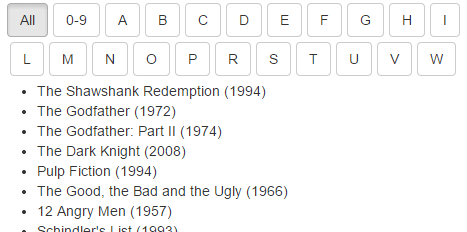
Do you have a long list of HTML elements? Would you like to group it by item’s first letter and allow users to easily navigate by it? With MonoList you can do it.

Features

Lightweight
Only 2KB minified.

Responsive design support
Plugin creates navigation buttons which work great with responsive design.
Responsive design support

Easy integration with CSS frameworks
Easily assign button template with your styles and classes.

Set initial letter selection
Assign any button preselected.

Dealing with prefixes
Navigate by the fist letter of the prefix, as by the first letter of the word after it. It can be very useful when dealing with articles in English language.

Multilingual support

Whatever markup
Use plugin with whatever markup you want. It is not necessarily should be a list. It could be any set of HTML elements.

Data navigation
Navigate not only by text in items but also by any data.

AJAX support
Fetch data by AJAX.

Download MonoList – List Grouping & Navigation (Navigation)

Ad HTML5 Template | Pizza Delivery Service (Ad Templates)

Description

HTML5 Ad Banner template is created and customizable with Google Web Designer.
It provides 3 most frequently used banners sizes in the market. Check the live preview.
Tip: If the Ad is not showing, please make sure to disable any Adblock plugins installed in the browser.

Features

• Easy to edit
• 3 Different HTML5 Ad banner sizes ( 300×250, 160×600, 728×90 )
• Fast to load
• CSS3 / HTML5
Google web font

Download Ad HTML5 Template | Pizza Delivery Service (Ad Templates)

Ad HTML5 Template | Car Service Shop (Ad Templates)

HTML5 Ad Banner template is created and customizable with Google Web Designer.
It provides 3 most frequently used banners sizes in the market. Check the live preview.
Tip: If the Ad is not showing, please make sure to disable any Adblock plugins installed in the browser.

Features

• Easy to edit
• 3 Different HTML5 Ad banner sizes ( 300×250, 160×600, 728×90 )
• Fast to load
• CSS3 / HTML5
Google web font

Download Ad HTML5 Template | Car Service Shop (Ad Templates)

CCAvenue For Magento (Magento Extensions)

Description

Save time and money with the CCAvenue payment processing module! Payment processors can be expensive and complicated, but CCAvenue is both affordable and easy to use. As the most popular payment gateway solution in South Asia, CCAvenue services over 5,000 websites and has achieved the “Data Security Standard Version 1.1” for the second year in a row, making it one of the most secure gateways out there. Check out all of the cool features that the module has to offer!

Features

CC Avenue allows you to offer your products in rupees and U.S. dollars, no matter where you are selling from. The United States dominates the global ecommerce market, and offering products that are advertised in a currency that is conducive to the consumer can determine your store’s success in this huge demographic. The currency rate is updated four times a day, so you can be sure you are getting the most up-to-date rate possible.

Don’t miss out on gaining interest in your account! With CCAvenue’s convenient direct deposit option, you can have money deposited in your account immediately, thus allowing you to accrue more days of interest. Alternative, you can request your funds by INR check, which is delivered every week. Both options are catered to save you the most money.

CCAvenue enables you to accept a wide variety of payment types to meet every customer’s needs:

Credit cards:
MasterCard
Visa
American Express
JCB Cards
Diners Club International

Visa Debit cards from prominent Indian banks (VBV):
Abhyudaya Co-operative Bank Ltd
Allahabad Bank
Andhra Bank
Axis Bank Limited
Bank Of Baroda
Bank Of India
Bank Of Maharashtra
Barclays Bank Plc
Central Bank Of India
City Union Bank Ltd
Corporation Bank
Dena Bank
Deutsche Bank Ag
Development Credit Bank Ltd.
Dhanlaxmi Bank Limited
HDFC Bank Limited
ICICI Bank Ltd
IDBI Bank Ltd.
IndusInd Bank Limited
Karnataka Bank Limited
Kotak Mahindra Bank Ltd
Oriental Bank Of Commerce
Standard Chartered Bank
Syndicate Bank
Tamilnad Mercantile Bank Limited
The Cosmos Co-Op Bank Limited
The Federal Bank Ltd
The Karur Vysya Bank Ltd
The Lakshmi Vilas Bank Ltd
The Saraswat Co-Operative Bank Ltd
The Shamrao Vithal Co-Operative Bank Ltd
The South Indian Bank Ltd
TJSB Sahakari Bank Ltd.
UCO Bank
United Bank Of India
Vijaya Bank
Yes Bank Ltd

MasterCard / Maestro Debit Card issued in India (MSC):
Axis Bank
Bank Of India
Central Bank Of India
Citi Bank
Corporation Bank
Federal Bank
HDFC Bank
ICICI Bank
IDBI Bank
Indian Bank
Royal Bank Of Scotland
Standard Chartered Bank
Yes Bank

Net Banking Solutions:
Andhra Bank
Axis Bank
Bank of Bahrain and Kuwait
Bank of Baroda
Bank of India
Bank of Maharashtra
Canara Bank
Catholic Syrian Bank
Central Bank of India
Citibank
City Union Bank Ltd.
Corporation Bank
Development Credit Bank
Deutsche Bank
Dhanlaxmi Bank
The Federal Bank
HDFC Bank
ICICI Bank
IDBI Bank
Indian Overseas Bank
IndusInd Bank
ING Vysya Bank
Jammu & Kashmir Bank
Karnataka Bank
The Karur Vysya Bank Ltd.
Kotak Mahindra Bank
Lakshmi Vilas Bank
Oriental Bank Of Commerce
Punjab National Bank
Royal Bank of Scotland
Standard Chartered Bank
South Indian Bank
State Bank Of Bikaner and Jaipur
State Bank Of India
State Bank of Indore
State Bank of Hyderabad
State Bank of Mysore
State Bank of Patiala
State Bank of Travancore
Syndicate Bank
Tamilnad Mercantile Bank Ltd.
Union Bank Of India
United Bank Of India
Vijaya Bank
Yes Bank

ATM-cum – Debit Cards:
Andhra Bank
Canara Bank
Citibank
Indian Overseas Bank
Punjab National Bank
State Bank of India
Union Bank of India

Cash Cards:
Done Card
ICashCard
ItzCash
noQ24×7
OxiCash

Mobile Payments:
PayMate
SBI Freedom

Download the CCAvenue module to reap the benefits of a global payment solution that is made with the e-merchant in mind!

By PrestaShop

The module CCAvenue for PrestaShop has been developed by the PrestaShop team, guaranteeing full compatibility with PrestaShop’s e-commerce software.

Installation

Not sure what you’re doing? Choose the installation by PrestaShop!
Upload and installation of the module to your shop
Configuration of the module in your back office
Configuration of your bank administration panel (if needed)
Communication with your bank (if needed)
Tests and payments
Instantaneous analysis of any problem encountered

Download CCAvenue For Magento (Magento Extensions)

Sale – Ad Banner Template – Google Web Designer (Ad Templates)

Sale – Ad Banner Template is designed in Google Web Designer. It provides 3 most frequently used banners’ sizes in the market:

  • 728×90 px
  • 300×250 px
  • 160×600 px

The HTML5 Ad Banner Template offers smooth and clean animation for you Advertising campaign.

It was created with GWD (Google Web Designer).

You can easily edit it and publish to Google Adwords and DoubleClick Studio.

Watch our Video Tutorial

Download Sale – Ad Banner Template – Google Web Designer (Ad Templates)

CCAvenue Module For PrestaShop (Prestashop)

Features

CC Avenue allows you to offer your products in rupees and U.S. dollars, no matter where you are selling from. The United States dominates the global ecommerce market, and offering products that are advertised in a currency that is conducive to the consumer can determine your store’s success in this huge demographic. The currency rate is updated four times a day, so you can be sure you are getting the most up-to-date rate possible.

Don’t miss out on gaining interest in your account! With CCAvenue’s convenient direct deposit option, you can have money deposited in your account immediately, thus allowing you to accrue more days of interest. Alternative, you can request your funds by INR check, which is delivered every week. Both options are catered to save you the most money.

CCAvenue enables you to accept a wide variety of payment types to meet every customer’s needs:

Credit cards:
MasterCard
Visa
American Express
JCB Cards
Diners Club International

Visa Debit cards from prominent Indian banks (VBV):
Abhyudaya Co-operative Bank Ltd
Allahabad Bank
Andhra Bank
Axis Bank Limited
Bank Of Baroda
Bank Of India
Bank Of Maharashtra
Barclays Bank Plc
Central Bank Of India
City Union Bank Ltd
Corporation Bank
Dena Bank
Deutsche Bank Ag
Development Credit Bank Ltd.
Dhanlaxmi Bank Limited
HDFC Bank Limited
ICICI Bank Ltd
IDBI Bank Ltd.
IndusInd Bank Limited
Karnataka Bank Limited
Kotak Mahindra Bank Ltd
Oriental Bank Of Commerce
Standard Chartered Bank
Syndicate Bank
Tamilnad Mercantile Bank Limited
The Cosmos Co-Op Bank Limited
The Federal Bank Ltd
The Karur Vysya Bank Ltd
The Lakshmi Vilas Bank Ltd
The Saraswat Co-Operative Bank Ltd
The Shamrao Vithal Co-Operative Bank Ltd
The South Indian Bank Ltd
TJSB Sahakari Bank Ltd.
UCO Bank
United Bank Of India
Vijaya Bank
Yes Bank Ltd

MasterCard / Maestro Debit Card issued in India (MSC):
Axis Bank
Bank Of India
Central Bank Of India
Citi Bank
Corporation Bank
Federal Bank
HDFC Bank
ICICI Bank
IDBI Bank
Indian Bank
Royal Bank Of Scotland
Standard Chartered Bank
Yes Bank

Net Banking Solutions:
Andhra Bank
Axis Bank
Bank of Bahrain and Kuwait
Bank of Baroda
Bank of India
Bank of Maharashtra
Canara Bank
Catholic Syrian Bank
Central Bank of India
Citibank
City Union Bank Ltd.
Corporation Bank
Development Credit Bank
Deutsche Bank
Dhanlaxmi Bank
The Federal Bank
HDFC Bank
ICICI Bank
IDBI Bank
Indian Overseas Bank
IndusInd Bank
ING Vysya Bank
Jammu & Kashmir Bank
Karnataka Bank
The Karur Vysya Bank Ltd.
Kotak Mahindra Bank
Lakshmi Vilas Bank
Oriental Bank Of Commerce
Punjab National Bank
Royal Bank of Scotland
Standard Chartered Bank
South Indian Bank
State Bank Of Bikaner and Jaipur
State Bank Of India
State Bank of Indore
State Bank of Hyderabad
State Bank of Mysore
State Bank of Patiala
State Bank of Travancore
Syndicate Bank
Tamilnad Mercantile Bank Ltd.
Union Bank Of India
United Bank Of India
Vijaya Bank
Yes Bank

ATM-cum – Debit Cards:
Andhra Bank
Canara Bank
Citibank
Indian Overseas Bank
Punjab National Bank
State Bank of India
Union Bank of India

Cash Cards:
Done Card
ICashCard
ItzCash
noQ24×7
OxiCash

Mobile Payments:
PayMate
SBI Freedom

Download the CCAvenue module to reap the benefits of a global payment solution that is made with the e-merchant in mind!

By PrestaShop

The module CCAvenue for PrestaShop has been developed by the PrestaShop team, guaranteeing full compatibility with PrestaShop’s e-commerce software.

Installation

Not sure what you’re doing? Choose the installation by PrestaShop!
Upload and installation of the module to your shop
Configuration of the module in your back office
Configuration of your bank administration panel (if needed)
Communication with your bank (if needed)
Tests and payments
Instantaneous analysis of any problem encountered

Download CCAvenue Module For PrestaShop (Prestashop)

Advanced Reward Points Pro (OpenCart)

FREE TRIAL 30 DAYS.
100% MONEY BACK.

RESOURCES

HOW TO INSTALLATION

USER GUIDE

LIVE DEMO

PLAY ON SANDBOX (demo/demo123)

WHY REWARD POINTS?

“90% of all customers exchange their reward points during the checkout. This is the proof that the investment in this extension was not waste of money. A++” – Anton, Rechemco.com

hello to everyone to all who want buy this extension i think i was the first. i bought this extension, the setup was really easy its work perfect on default theme but i need it to customize to my custom theme, there brilliant support helped me and solve all the customize problem.

i really enjoyed to buy from them. A+++++ – [email protected]

Great support from the developer. Working good. 5 Star from me :)Muhammad Nizar Jamaludin – www.muslimahclothing.com

Amazing tech support helped me get up and running immediately! – jordbrett – opencart.com market


MAIN FEATURES

Reward Customer Behavior:

  • Reward Customers for Registering on your web site
  • Reward Customers for Signing up for your Newsletter
  • Reward Customers for Posting a new Product Review (Approved by Admin Required)
  • Reward for Customer Birthdays
Reward Customer Purchases
  • Reward points based on specific products, brands and categories (Catalog Rule)
  • Reward points based on customer’s total purchase with flexible conditions (Shopping Cart Rule)
  • Reward fixed points or by percentage based on product price (Configured in Rule)

Use Reward Points:

  • Use reward points to purchase products.
  • Redeem points with convenience slider in the shopping cart page .
  • Allow to redeem points at the checkout page as well.

Track Reward Points:

  • Customers can see reward points on many places (category / product page, registration page, sign up newsletter block…)
  • Review detail awarded points in shopping cart page, check total awarded points in mini cart / order reviews
  • Customers can check their reward points balance and expiry
  • Check Point-Currency exchange rate
  • Track their detailed transactions history

Manage Earning Rules:

  • Create flexible catalogue rules (Reward points for specific products, brands, categories or any other product attribute. Reward points can be fixed or a percentage of product price)
  • Create flexible shopping cart rules (Reward points basing on total order, quantity, SKU or any other item attribute. Reward points can be fixed or a percentage of money spent)

Manage Spending Rules:

  • Create flexible spending rules basing on cart conditions
  • Create flexible spending rules basing on product conditions
  • Allow customers to use points on all or certain products
  • Disable using points on all or certain products
  • Allow to use unlimited, fixed reward points or a percentage of money spent
Opencart Compatibility:
  • Version 1.5.4.x to 1.5.6.x, 2.x.x.
  • 99% themes.


Download Advanced Reward Points Pro (OpenCart)

SEO plugin for SocialKit (Add-ons)

Features include (key benefits):

1. Automatic XML Sitemap generation (generation module).

\
This plugin will put the record of the visited pages to the database and will list them in the sitemap.xml file.
The URLs are automatically cleaned up from the sitemap file once a post or a user are deleted.
Slow crawling, as well as junk pages indexing, by the web search engines was a common problem for SocialKit.
Web crawlers were taking /welcome, /terms, /welcome?lang= pages into account, usually missing all the others.
The reason is simple – there were no links to the internal content pages.
Provide a web crawler with an intelligent URLs list to index!
Increase your indexed pages amount. Increase the signups!

2. Robots.txt file including the sitemap link.
The junk pages indexing is disabled by default.

3. The “Read more…” button redirecting to the internal website pages (posts).

\

Following the “read more…” link will:
– put the url record to the sitemap.xml;
– inprove your social network usability;
– increase the number of your website pages’ views;
– increase the banners’ impressions. Boost your income by installing the ads plugin “Automatic selling advertising for SocialKit”!
Double or even triple the number of page views which leads to more banners’ impressions.
Google, Yandex, Yahoo web crawlers understand the “read more…” button as a sign of engaging content.
+ “Back” button: efficient way to return quickly to the last visited page.

4. “See More” button for SocialKit. Bingo!

\

Huge posts can be compressed now!
Fit more content in less space and avoid stretched pages.
Customize the amount of characters to be shown in a preview.
Press “See More” to expand the full content.
! The “Read more…” button will redirect users to the post page with already expanded content ! Easy-to-use :)

5. “Message” button on top of each post (snippet).

\

Feel free to contact the post author.
Just press “Message” and that’s it!

Download SEO plugin for SocialKit (Add-ons)

One Page – Premium theme for Confession Script (Miscellaneous)

You will need latest version of confession script to make this theme work, check it out here:

About One page

One Page is an premium theme for confession script which cost many hours of work. I bet you will love it. Well done better than well said, let’s check the demo instead of reading dummy text:

Home demo: One Page

Admin demo: Dashboard
Admin account: admin/admin
Let’s check the customizator at Settings -> Theme customization :)

What make Onepage special?


How to install and customize?

There is a documentation inside the package, install will only cost one minute (3 steps).

Download One Page – Premium theme for Confession Script (Miscellaneous)