PHP Website and Domains Marketplace (Miscellaneous)

Description

Start your own Website & Domains Marketplace

Earn top notch dollar by running your own website and domains marketplace (like Flippa, Sedo, etc.).
Sit comfortable at your desk and watch the earnings coming your way by charging for Regular & Featured listings.

All on auto-pilot
as we took care and setup PayPal IPN

for you – just enter your payment email and you’re ready to run.

Front-end features overview

Membership
AJAX Modal Signup & Login

Sell Websites&Domains
the source of marketplace income

Listing Filters
revenue, income source,
visitors & age

Bidding System
members only auction system

Website Thumbnails
automatically generates
website thumbnails

PR & Alexa
automatically fetches google
PR & alexa rank

User messages
members can message
each other

Profile System
members have
a public profile

Commenting system
to allow comments
on marketplace listings

Contact form
directly into
admin inbox

Codeigniter
for clean, secure code.

Twitter Bootstrap
easy to customize

Starting a Listing on the Marketplace

Starting a listing is like completing your own social network profile.

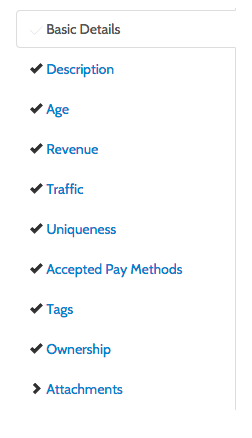
The form contains a total of 10 tabs each one requesting crucial information to attract attention & sales.

  • Basic details: fill in listing type (website/domain), listing title and auction pricing (starting, reserver and BIN price)
  • Description: a long textarea to enter the listing description.
  • Age: set estabilished website/domain date.
  • Revenue: monetization methods, last three months earnings average and revenue description textarea
  • Traffic: last three months visits/views average and traffic description textarea
  • Uniqueness: is content/design unique or not.
  • Payment Methods: which payment methods are accepted by the seller for closing the deal.
  • Tags: niche, type (forum, blog, etc.), implementation (custom, php, wp, etc.)
  • Ownership: verification via file upload of website/domain ownership
  • Attachments: add image (png/jpg) proofs of income, traffic, etc)

Admin Features

Admin panel allows you to control listings, users, comments, listing fees, website title, logo and seo aspects.

Live Admin Demo URL: http://marketplace.crivion.com/admin/
Admin Login Username: admin
Admin Login Password: adminpass

Listings Management
edit, delete, manually approve

Users Management
overview of markeplace
users and removal.

Comments Management
overview of listing
comments and removal.

TOS
update terms of
service page.

Payment Settings
set listing fee,
featured fee and paypal email

Configuration
website title, analytics code,
social urls and logo

SEO Module
add seo title
keywords and description
   

Requirements

Apache with mod_rewrite enabled, php 5.3+ and mysql.

Download PHP Website and Domains Marketplace (Miscellaneous)

AlnoJS – Javascript Alerts & Notifications (Miscellaneous)

This is a JavaScript library that can be used to generate custom JavaScript alerts and notifications. Instead of the default Alerts this provides you more stylish and customized alert boxes with various features. Also lets you create popup notifications with modern styling and many other features.

Download AlnoJS – Javascript Alerts & Notifications (Miscellaneous)

Ebay Importer WooCommerce Plugin (WooCommerce)

Ebay2woocommerce Extension allows to import products,pricing,description,categories, images etc from “eBay” to your wordpress woocommerce Store. The extension reads out eBay store automatically and import the products in your woocommerce Store

E)Live Demo – top


Front-end: http://ebay2woocommerce.mkreddy.com/
Back-end: http://ebay2woocommerce.mkreddy.com/wp-admin
UserName:woocommerce
Password:woocommerce123

also check the video of the extesion on how to import by clickining here

<iframe src=”https://www.youtube.com/embed/Mw5n0DgxafQ” height=”380” width=”550”></iframe>

Download Ebay Importer WooCommerce Plugin (WooCommerce)

Drink Green – iOS8 Swift Project – Universal Build (Full Applications)

Drink Green is a Vegan Alcohol Directory powered by Barnivore API.

It is basically a database with over 20.000 Alcoholic drinks from aprox. 4.000 well known brands world wide.

This app shows all this companies – the company details are available, the current vegan status in green, yellow or red, depending on it´s vegan friendliness, and on the company details it shows another little table view with all registered products.

iAd Banner implemented, but you can easily remove it if you wish.

The design is entirely made with Interface Builder and most values can be modified in the code.

I customized the table views, so it´s a bit more pleasant

A info screen explains the meaning of each icon.

The Code is well structured and full of comments so customization will be very easy.

Photoshop files of app icon, status icons and main logo are included.

Except for a valid Apple Developer Account and a bundle id for your app, you won´t need anything at all. Just place your bundle ID, change the colors as you wish, make some App Icons with the PSD Template provided and that´s it.

– Entirely developed in SWIFT
– iOS8 ready
– runs and fits on ALL iOS Devices
– Localization ready (english, spanish and german already in)
– Features iAd
– Clean and structured Code
– Lots of Code comments
– easy to customize
– Support in several languages

Nearly everything is adjustable from within the Storyboard File/Interface builder. NO Graphic files need to be designed (Only your App Icon) .

All colors, sizes, styles can be changed very easy.

No Coding or development experience needed.

Download Drink Green – iOS8 Swift Project – Universal Build (Full Applications)

WordPress Link Builder (Advertising)

WordPress Link Builder creates text link ads for advertisers and referral links to make money with affiliate programs.

Beneffits:

  • Statistic: view who click in your links
  • Increase your website’s brand awareness
  • Make money by adding referral link for any text
  • Give opportunity to sell text links directly through
  • Monetize: adds your own web-site link to all words that you need

Support

Dear Customers, if you have some issues – please email to our great and quickly support. Dont give a low rate without trying to resolve it with support. We are happy to help you – just ask us via profile page

Changelog

1.0 (February 04 2015)
* First release

Download WordPress Link Builder (Advertising)

SpeedoMap – iOS8 Swift Project – Universal Build (Full Applications)

SpeedoMap is an GPS Speedometer, a GPS tracker and a weather app in one. The user just by swiping it can change from one screen to another enjoying several custom transitions.

It shows the user’s current speed in miles, kilometers or knots, but also his current GPS Coordinates, location and even the street where he is at any given moment.

It features also a map that keeps track of the journey. It “prints” or renders a line of the trip.

The user can zoom in and out of the map or change the units of the speedo.

The Weather Section gives all relevant weather data for the current location such as temperature (ºC or ºF), air pressure, humidity, precipitation, ozone and a resume description with an weather icon depend on the conditions.

The App is build to fit all available iOS device sizes and can be easily reskinned and customized.

It´s entirely build with the new Interface Builder of Xcode 6 and the Layout is realized with constraints. Apart from the launch screen, weather icons and the App Icons are no graphic files involved.

Everything is easily customizable from within the Code Files.

Plenty of Code Comments help to find your way through the project and change everything you want.

The App has been localized in English, Spanish and German. More languages can be added easy.

The App comes with iAds build in in all Screens and in App Purchase to remove those Ad Banner.

Just replace your bundle identifier and you`re good to go.

Download SpeedoMap – iOS8 Swift Project – Universal Build (Full Applications)

Equilibrium (Games)

– Auto save/load
– 12 levels
– Mouse or touch control
HTM5 includes files and construct2
This game can be exported to the following systems:

Android, iOS, Windows Phone, Facebook, Windows Store, Amazon Appstore, Chrome Web Store, Firefox Marketplace, OUYA, CocoonJS, PhoneGap, Intel XDK, Tizen, Open Web App, Kongregate, Ejects, HTML5 website.

– Optimized for all mobile devices and Web. – Ads support – – Touch controls for mobile devices. – Splash Screen, – Sound – Easy edite code. – Well commented event sheets.

minimum requirements to edit the game:

– Construct 2 r173 Download: https://www.scirra.com/construct2

Download Equilibrium (Games)

s2member Swiss Post (PostFinance) Integration (Add-ons)

About the Extension

s2member Swiss Post Integration is Swiss Post payment gateway solution for s2member membership WordPress plugin. It allows users to pay for membership ivia Swiss Post instead of standard methods available in s2member.

Note: This plugin requires s2member Pro to operate properly. This plugin doesn’t allow recurring payments as PostFinance doesn’t have such option yet. If you need other s2member integration – feel free to contact us.

Please rate our items

Installation

  1. Connect to your server’s FTP

  2. Copy the plugin folder from the zip into the “wp-content/plugins” directory

  3. Login to your WordPress administrator panel

  4. Click the “Plugins” tab where you will see your newly installed plugin. Activate it.

Usage

Go to s2member / Post Finance Options to set up your PostFinance details

Go to s2member / Post Finance Forms to generate payment form in similiar way you do for standard paypal payments.

Download s2member Swiss Post (PostFinance) Integration (Add-ons)

iPlaceholder – Dummy Image Generator (Images and Media)

iPlaceholder is a complete dummy image generation service solution. And it is need of time, we are most often required to replace the original image with the dummy image before we ship digital product to the buyer due to copyrights limits. By keeping in mind, we develop this script with flexible options. User can generator placeholder image of any size any color with custom text and multiple available format option. It has a color picker that allow the user to select color scheme required. It has placeholder preview, auto link and embed code generation system. It has quick download button user can instantly download generated image.
If you are looking for staring own image generation service and wanted to monetize it. iPlaceholder is the best choice. It can be install and ready in the matter of seconds.

Download iPlaceholder – Dummy Image Generator (Images and Media)

College Frames Pro (Full Applications)

Best application for photo editing with college frames !!

Download APK

This application has specially designed unique college frames in built into the application. This application can work without internet connectivity also. This app is very fast because of in-built photo frames.

We have designed multitype of frames (eg 1 pic, 2 pic). There are multiple categories based on frame type. We also have created unique shaped frames with love text, miss text, friendship text on it.

Features:

  • Multiple categories for frame type and beautiful college frames
  • Specially designed 100% unique frames with love text, miss text, friendship text etc.
  • 360° rotation, zoom in, zoom out, move photo with drag as well as buttons, pinch in/pinch out resize
  • Dual photo selection option
  • Share photo on social medias and messengers
  • Save photo on SD card or mobile phone
  • Set photo as wallpaper
  • Very easy and attractive UI
  • Supports all screen resolutions of mobiles and tablets
  • Works without internet
  • Admob and Startapp ad compatibility

Please don’t forget to rate this app if you like it!

Download College Frames Pro (Full Applications)

Talent/Model HR Manager (Social Networking)

Talent/Model HR Manager is an app for manage free/paid listings of Artist/Model/Talent Human Resource Profiles along with their gallery. This application supports Facebook, Google Logins. You can use this app in many ways.

  1. Model Agency Website
  2. Talent HR Agency
  3. Artist HR Agency
  4. Artist/Model Social Networking Website
  5. Updates And Change Log

    02/03/2015 – Version 1.0

  • First release of Model Management System

Download Talent/Model HR Manager (Social Networking)

Pofi 2 – Responsive Animated Menu (Navigation)

Pofi 2 – Responsive Animated Menu

  • Based in Pure CSS3
  • Fully Responsive
  • If you like Pofi 2, please dont forget to rate…

Features

  • 06 COLOR SCHEME
  • 60+ ANIMATION EFFECTS
  • ICON SUPPORT (400+)
  • CROSS BROWSER
  • FREE FONT
  • EASY CHANGE COLOR
  • EASY CHANGE ANIMATION EFFECTS
  • FREE UPDATE
  • DOCUMENTED

Support

Please send me an email to : [email protected]

Change Log

  • Version 1.0
    • Initial Release

Of this family

Pofi – Animated Tabs And Accordion Menu


Download Pofi 2 – Responsive Animated Menu (Navigation)

JUGNOON Gamify for ASP.NET MVC (Social Networking)

JUGNOON Gamify MVC is a complete solution (badges, rewards, levels, credits, points, packages, events and more) that can help you implement advance social gamify solution in your existing asp.net mvc application easily which normally takes lots of efforts and complexity.

Features

Core feature include

  • Badges management
  • Rewards management
  • Level management
  • Credits management
  • Points management
  • Packages management

I: Badges:

Jugnoon Gamify allow site administrator to manage (add, update, delete) unlimited badges. Badges to be awarded when user achieve certain goal in website. Badges can be grouped into one or more categories.

Main attributes of badges include

  • Title: Badge Title
  • Description: Detail about badge.
  • Notification: Message to be sent or saved in user achivement table when user award this badge.
  • Category: Assign category for selected badge
  • Priority: For listing badges top to bottom based on priority
  • Is Hide: Whether to display this badge in main badge listings or will be hidden.
  • Is Multiple: Whether this badge to be awarded multiple times.
  • Icon: Badge thumb or use badge css with littlbe bit customization.

How to create badge?

  • Go to badge section
  • Click on add button
  • Fill form and submit add button.
  • In Next step choose icon for badge
  • Thats it, badge will appear in main badge listing.

How to award badge?

Badge can be awarded when user complete certain action in website. e.g completing public profile 100% will award ABC badge.

Steps to follow to write code for awarding ABC badge. lets support when you create ABC Badge, it’s generated with id e.g “45”

  • Go to badge section
  • Select badge ABC from listing
  • On right side click on “show code” link
  • Form will appear with instruction to copy, paste and usage.

Sample badge usage can be seen here

You can either award badge using auto generated code by example shown above or using direct core bll. Both examples shown below.

ga_badge_item_events.Trigger_Item_45(userid);

or via by using core bll

$ga_core_bll.trigger_item(userid, 45);

where 45 is id of badge.

II: Rewards:

Rewards are almost similar as badge but with additional attributes. Rewards can be used to unlock website features and services to selected user when unlocked. Rewards can be unlocked either by calling on certain function e.g user purchased premium membership or can be unlocked automatically by some other events e.g increase discount 1% when user reach to level 4.

Main attributes of rewards include

  • Title: Reward Title
  • Description: Detail about reward.
  • Notification: Message to be sent or saved in user achivement table when user award this reward.
  • Category: Assign category for selected reward
  • Priority: For listing reward top to bottom based on priority
  • Credits: Credits required to unlock reward. e.g buy reward by utilizing account credits.
  • Is Hide: Whether to display this reward in main badge listings or will be hidden.
  • Is Multiple: Whether this reward to be awarded multiple times.
  • Icon: Reward thumb or use reward css with littlbe bit customization.

How to create reward?

  • Go to reward section
  • Click on add button
  • Fill form and submit add button.
  • In Next step choose icon for badge
  • Thats it, reward will appear in main reward listing.

How to award reward?

Reward can be awarded when user complete certain action in website. e.g upgrade premium account will unlock ABC reward or reward can be awarded automatically e.g completing level 5 will award XYZ reward that can increase 4% discount for selected users .

Steps to follow to write code for awarding ABC badge. lets support when you create ABC Badge, it’s generated with id e.g “45”

  • Go to reward section
  • Select reward ABC from listing
  • On right side click on “show code” link
  • Form will appear with instruction to copy, paste and usage.

Sample badge usage can be seen here

You can either award badge using auto generated code by example shown above or using direct core bll. Both examples shown below.

ga_reward_item_events.Trigger_Item_45(userid);

or via by using core bll

ga_core_bll.trigger_item(userid, 45);

where 45 is id of reward.

How to unlock website features by awarding reward?

When script award reward to specific user, it will call a custom function process(rewardid,userid).. located in /Areas/api/events/process_reward_features.cs

This function include cases for all rewards you generated.

Go to rewards section and on right side of Add button you will notice “Generate” button, click on it. You can see sample page here which is responsible for generating all cases for process function.

Sample code will look like this

switch(reward_id, userid) 
{
      /*********************************
      -> Unlock -> Level 5 Reward 3
      -> +2 Skills for your profile
      **********************************/
      case 32:
      /* Put your custom code here associated with Level 5 Reward 3 reward. */
      break;
     /*********************************
     -> Unlock -> Level 5 Reward 2
     -> +2.5% Faster bid refresh rate
     **********************************/
     case 31:
     /* Put your custom code here associated with Level 5 Reward 2 reward. */
     break;
     /*********************************
     -> Unlock -> Level 5 Reward 1
     -> +1 Extra bids per month
    **********************************/
     case 30:
     /* Put your custom code here associated with Level 5 Reward 1 reward. */
     break;
     /*********************************
     -> Unlock -> Skills
     -> Increase the total number of skills allowed for your profile
     **********************************/
     case 19:
     /* Put your custom code here associated with Skills reward. */
     break;
     /*********************************
     -> Unlock -> Bids
     -> Increase the number of bids you received per month.
     **********************************/
     case 18:
      /* Put your custom code here associated with Bids reward. */
     break;
     /*********************************
      -> Unlock -> The Network Slot
      -> Increase the number of network slots in your contact list.
      **********************************/
      case 17:
      /* Put your custom code here associated with The Network Slot reward. */
      break;
 }

Now you have to write custom code for each reward you want to execute when reward is awarded to user. in case case. Before adding, make sure its 100% working code and test process(rewardid, userid) to make sure its working fine.

Levels:

Site administrator can create unlimited levels and associate unlimited rewards with each level using manage gamify application level section.

Levels can be completed when user reach to maximum points from initial points (reset after completion of level). Levels can be upgraded manually or automatically when user points exceeds maximum points required to unlock another level.

Main attributes of level include

  • Level: Current number of level e.g 1, 2, 3,… n (can’t be edited by site admin, its automatic)
  • Title: Level Title
  • Description: Detail about level.
  • Notification: Message to be sent or saved in user achivement table when user complete this level.
  • Category: Assign category for selected level
  • Priority: For listing rewards top to bottom based on priority
  • XP: Maximum points required to complete this level and unlock next level.
  • Is Hide: Whether to display this level in main level listings or will be hidden.
  • Icon: Level thumb or use css with littlbe bit customization.

How to create reward?

  • Go to level section
  • Click on add button
  • Fill form and submit add button.
  • In Next step choose icon for level
  • Thats it, reward will appear in main reward listing.

How to associate rewards with this level?

You can associate unlimited no of rewards with each level. when level upgrade, script will automatically look for all association and unlock it by executing reward script.

How to complete level?

Level can be awarded manually by site administrator or automatically when user complete points.

Steps to follow to write code for completing level manually. lets suppose you want to complete level 5 with id “45”. Note when you complete user level, all level 4, 3, 2, etc will be automatically completed.

  • Go to level section
  • Select Level 5 from listing
  • On right side click on “show code” link
  • Form will appear with instruction to copy, paste and usage.

Sample level usage can be seen here

You can either complete level using auto generated code by example shown above or using direct core bll. Both examples shown below.

ga_level_item_events.Trigger_Item_45(userid);

or via by using core bll

ga_core_bll.trigger_item(userid, 45);

where 45 is the id of level.

Points:

Site administrator can create unlimited no of points event that can be trigger or call on certain events. e.g award 15 xp points when user upload video or deduct 5 xp points when user delete video.

Main attributes of points include

  • Title: Point Title
  • Description: Detail about points.
  • Notification: Message to be sent or saved in user achievement table when user award or deduct points associate with this event.
  • Category: Assign category for selected point
  • Priority: For listing point event top to bottom based on priority
  • Is Hide: Whether to display this point event in main point listings or will be hidden.
  • XP: XP points to be awarded to user when this point event trigger.
  • Is Deduct: When this point event will deduct or increment user points
  • Icon: Assign thumb or not required for such items

How to create point event?

  • Go to point section
  • Click on add button
  • Fill form and submit add button.
  • In Next step choose icon for badge, leave blank as its not required in points
  • That’s it, point event will appear in main badge listing.

How to trigger point event?

Point event can be trigger or call multiple times when certain event occurs in site. e.g you can call ABC point event to award 15 points when user upload video.

Steps to follow to write code for awarding ABC point event. lets suppose when you create ABC point event, it’s generated with id e.g “45”

  • Go to points section
  • Select points event ABC from listing
  • On right side click on “show code” link
  • Form will appear with instruction to copy, paste and usage.

Sample badge usage can be seen here

You can trigger point event using code generated by example link shown above or using direct core bll. Both examples shown below.

ga_points_item_events.Trigger_Item_45(userid);

or via by using core bll

ga_core_bll.trigger_item(userid, 45);

where 45 is id of point event.

Credits:

Credits is almost similar to xp points but instead of points in this case, user credits will be incremented or decrements on certain credit event calls. Points can be used to unlock levels whiles credits can be used to unlock rewards.

Rest is almost same

Packages:

Its optional feature which will allow site administrato to create unlimited no of packages for purhasing credits on real payment. Credits will be added to user account when user purchase specific package. Click here to check more about package information.

Events:

Its optional feature that allow site administrator to group multiple events (badge, reward, level, points, credits, package) that can be called for single event. e.g creating account and activation will award abc badge, reward xyz reward, complete level 1, reward 100 xp points, reward 50 credits. so via event management, you can create event and associate all items that should be called with this event.

When event created, go to show code, this will display code with usage instruction.

For more detail click here.

Simulate Events:

Jugnoon Gamify include additiona gamify simulation application that can provide detail of how badges awarded, reward unlocked, level completed, points rewarded or deducted, credits rewarded or deducted, buy packages etc.

For real time review check simulation demo here.

Display Events:

Jugnoon Gamify include additiona gamify display events that can show you how user information, rewarded badges, rewards, credits, points, levels, packages to be displayed and user achievement history generated.

For real time review check demo here.

Technical Information:

Jugnoon Gamify application uses angular js for front end application and core ASP.NET MVC for backened processes. If you are using any ASP.NET MVC framework then make sure to adjust core bll and entity files according to framework infrastructure.

The main backened operation involve just receiving and sending JSON data between angular js application and ASP.NET.

ASP.NET MVC code is written very clean way here is example how it works.

Directory Structure:

Core directory includes

areas : Core ASP.NET MVC controllers, models and views files responsible for receiving and sending JSON data

app: Core angular js application

contents: Save badges here

image: Site images here

plugin: plupload and other plugins here

css: core site css here

js: core site js here

Help & Assistance:

We build this application in a way that can be easily used in any type of ASP.NET MVC websites. Integration is easy if you are ASP.NET MVC developer still if you face problem you can send us query on our support mail or post your topic in Q&A or Forum section. We will try our best to give you response as soon as we can.

Download JUGNOON Gamify for ASP.NET MVC (Social Networking)

JUGNOON Gamify for ASP.NET (Social Networking)

Gamification is the concept of applying game mechanics and game design techniques to engage and motivate people to achieve their goals. Gamification taps into the basic desires and needs of the users impulses which revolve around the idea of Status and Achievement.

JUGNOON Gamify is a complete solution (badges, rewards, levels, credits, points, packages, events and more) that can help you implement advance social gamify solution in your existing asp.net application easily which normally takes lots of efforts and complexity.

Features

Core feature include

  • Badges management
  • Rewards management
  • Level management
  • Credits management
  • Points management
  • Packages management

I: Badges:

Jugnoon Gamify allow site administrator to manage (add, update, delete) unlimited badges. Badges to be awarded when user achieve certain goal in website. Badges can be grouped into one or more categories.

Main attributes of badges include

  • Title: Badge Title
  • Description: Detail about badge.
  • Notification: Message to be sent or saved in user achievement table when user award this badge.
  • Category: Assign category for selected badge
  • Priority: For listing badges top to bottom based on priority
  • Is Hide: Whether to display this badge in main badge listings or will be hidden.
  • Is Multiple: Whether this badge to be awarded multiple times.
  • Icon: Badge thumb or use badge css with littlbe bit customization.

How to create badge?

  • Go to badge section
  • Click on add button
  • Fill form and submit add button.
  • In Next step choose icon for badge
  • That’s it, badge will appear in main badge listing.

How to award badge?

Badge can be awarded when user complete certain action in website. e.g completing public profile 100% will award ABC badge.

Steps to follow to write code for awarding ABC badge. lets support when you create ABC Badge, it’s generated with id e.g “45”

  • Go to badge section
  • Select badge ABC from listing
  • On right side click on “show code” link
  • Form will appear with instruction to copy, paste and usage.

Sample badge usage can be seen here

You can either award badge using auto generated code by example shown above or using direct core bll. Both examples shown below.

ga_badge_item_events.Trigger_Item_45(userid);

or via by using core bll

$ga_core_bll.trigger_item(userid, 45);

where 45 is id of badge.

II: Rewards:

Rewards are almost similar as badge but with additional attributes. Rewards can be used to unlock website features and services to selected user when unlocked. Rewards can be unlocked either by calling on certain function e.g user purchased premium membership or can be unlocked automatically by some other events e.g increase discount 1% when user reach to level 4.

Main attributes of rewards include

  • Title: Reward Title
  • Description: Detail about reward.
  • Notification: Message to be sent or saved in user achivement table when user award this reward.
  • Category: Assign category for selected reward
  • Priority: For listing reward top to bottom based on priority
  • Credits: Credits required to unlock reward. e.g buy reward by utilizing account credits.
  • Is Hide: Whether to display this reward in main badge listings or will be hidden.
  • Is Multiple: Whether this reward to be awarded multiple times.
  • Icon: Reward thumb or use reward css with littlbe bit customization.

How to create reward?

  • Go to reward section
  • Click on add button
  • Fill form and submit add button.
  • In Next step choose icon for badge
  • Thats it, reward will appear in main reward listing.

How to award reward?

Reward can be awarded when user complete certain action in website. e.g upgrade premium account will unlock ABC reward or reward can be awarded automatically e.g completing level 5 will award XYZ reward that can increase 4% discount for selected users .

Steps to follow to write code for awarding ABC badge. lets support when you create ABC Badge, it’s generated with id e.g “45”

  • Go to reward section
  • Select reward ABC from listing
  • On right side click on “show code” link
  • Form will appear with instruction to copy, paste and usage.

Sample badge usage can be seen here

You can either award badge using auto generated code by example shown above or using direct core bll. Both examples shown below.

ga_reward_item_events.Trigger_Item_45(userid);

or via by using core bll

ga_core_bll.trigger_item(userid, 45);

where 45 is id of reward.

How to unlock website features by awarding reward?

When script award reward to specific user, it will call a custom function process(rewardid,userid).. located in /Areas/api/events/process_reward_features.cs

This function include cases for all rewards you generated.

Go to rewards section and on right side of Add button you will notice “Generate” button, click on it. You can see sample page here which is responsible for generating all cases for process function.

Sample code will look like this

switch(reward_id, userid) 
{
      /*********************************
      -> Unlock -> Level 5 Reward 3
      -> +2 Skills for your profile
      **********************************/
      case 32:
      /* Put your custom code here associated with Level 5 Reward 3 reward. */
      break;
     /*********************************
     -> Unlock -> Level 5 Reward 2
     -> +2.5% Faster bid refresh rate
     **********************************/
     case 31:
     /* Put your custom code here associated with Level 5 Reward 2 reward. */
     break;
     /*********************************
     -> Unlock -> Level 5 Reward 1
     -> +1 Extra bids per month
    **********************************/
     case 30:
     /* Put your custom code here associated with Level 5 Reward 1 reward. */
     break;
     /*********************************
     -> Unlock -> Skills
     -> Increase the total number of skills allowed for your profile
     **********************************/
     case 19:
     /* Put your custom code here associated with Skills reward. */
     break;
     /*********************************
     -> Unlock -> Bids
     -> Increase the number of bids you received per month.
     **********************************/
     case 18:
      /* Put your custom code here associated with Bids reward. */
     break;
     /*********************************
      -> Unlock -> The Network Slot
      -> Increase the number of network slots in your contact list.
      **********************************/
      case 17:
      /* Put your custom code here associated with The Network Slot reward. */
      break;
 }

Now you have to write custom code for each reward you want to execute when reward is awarded to user. in case case. Before adding, make sure its 100% working code and test process(rewardid, userid) to make sure its working fine.

Levels:

Site administrator can create unlimited levels and associate unlimited rewards with each level using manage gamify application level section.

Levels can be completed when user reach to maximum points from initial points (reset after completion of level). Levels can be upgraded manually or automatically when user points exceeds maximum points required to unlock another level.

Main attributes of level include

  • Level: Current number of level e.g 1, 2, 3,… n (can’t be edited by site admin, its automatic)
  • Title: Level Title
  • Description: Detail about level.
  • Notification: Message to be sent or saved in user achievement table when user complete this level.
  • Category: Assign category for selected level
  • Priority: For listing rewards top to bottom based on priority
  • XP: Maximum points required to complete this level and unlock next level.
  • Is Hide: Whether to display this level in main level listings or will be hidden.
  • Icon: Level thumb or use css with little bit customization.

How to create reward?

  • Go to level section
  • Click on add button
  • Fill form and submit add button.
  • In Next step choose icon for level
  • Thats it, reward will appear in main reward listing.

How to associate rewards with this level?

You can associate unlimited no of rewards with each level. when level upgrade, script will automatically look for all association and unlock it by executing reward script.

How to complete level?

Level can be awarded manually by site administrator or automatically when user complete points.

Steps to follow to write code for completing level manually. lets suppose you want to complete level 5 with id “45”. Note when you complete user level, all level 4, 3, 2, etc will be automatically completed.

  • Go to level section
  • Select Level 5 from listing
  • On right side click on “show code” link
  • Form will appear with instruction to copy, paste and usage.

Sample level usage can be seen here

You can either complete level using auto generated code by example shown above or using direct core bll. Both examples shown below.

ga_level_item_events.Trigger_Item_45(userid);

or via by using core bll

ga_core_bll.trigger_item(userid, 45);

where 45 is the id of level.

Points:

Site administrator can create unlimited no of points event that can be trigger or call on certain events. e.g award 15 xp points when user upload video or deduct 5 xp points when user delete video.

Main attributes of points include

  • Title: Point Title
  • Description: Detail about points.
  • Notification: Message to be sent or saved in user achievement table when user award or deduct points associate with this event.
  • Category: Assign category for selected point
  • Priority: For listing point event top to bottom based on priority
  • Is Hide: Whether to display this point event in main point listings or will be hidden.
  • XP: XP points to be awarded to user when this point event trigger.
  • Is Deduct: When this point event will deduct or increment user points
  • Icon: Assign thumb or not required for such items

How to create point event?

  • Go to point section
  • Click on add button
  • Fill form and submit add button.
  • In Next step choose icon for badge, leave blank as its not required in points
  • That’s it, point event will appear in main badge listing.

How to trigger point event?

Point event can be trigger or call multiple times when certain event occurs in site. e.g you can call ABC point event to award 15 points when user upload video.

Steps to follow to write code for awarding ABC point event. lets suppose when you create ABC point event, it’s generated with id e.g “45”

  • Go to points section
  • Select points event ABC from listing
  • On right side click on “show code” link
  • Form will appear with instruction to copy, paste and usage.

Sample badge usage can be seen here

You can trigger point event using code generated by example link shown above or using direct core bll. Both examples shown below.

ga_points_item_events.Trigger_Item_45(userid);

or via by using core bll

ga_core_bll.trigger_item(userid, 45);

where 45 is id of point event.

Credits:

Credits is almost similar to xp points but instead of points in this case, user credits will be incremented or decrements on certain credit event calls. Points can be used to unlock levels whiles credits can be used to unlock rewards.

Rest is almost same

Packages:

Its optional feature which will allow site administrator to create unlimited no of packages for purchasing credits on real payment. Credits will be added to user account when user purchase specific package. Click here to check more about package information.

Events:

Its optional feature that allow site administrator to group multiple events (badge, reward, level, points, credits, package) that can be called for single event. e.g creating account and activation will award abc badge, reward xyz reward, complete level 1, reward 100 xp points, reward 50 credits. so via event management, you can create event and associate all items that should be called with this event.

When event created, go to show code, this will display code with usage instruction.

For more detail click here.

Simulate Events:

Jugnoon Gamify include additiona gamify simulation application that can provide detail of how badges awarded, reward unlocked, level completed, points rewarded or deducted, credits rewarded or deducted, buy packages etc.

For real time review check simulation demo here.

Dispaly Events:

Jugnoon Gamify include additiona gamify display events that can show you how user information, rewarded badges, rewards, credits, points, levels, packages to be displayed and user achivement history generated.

For real time review check demo here.

Technical Information:

Jugnoon Gamify application uses angular js for front end application and core ASP.NET webform for backened processes. If you are using any ASP.NET Web form then make sure to adjust core bll and entity files according to framework infrastructure.

The main backened operation involve just receiving and sending JSON data between angular js application and ASP.NET.

ASP.NET Web Form code is written very clean way here is example how it works.

Directory Structure:

Core directory includes

App Code: Core business and data access layer files

api: Core files responsible for sending and receiving JSON data between angular js and asp.net application

app: Core angular js application

contents: Save badges here

image: Site images here

plugin: plupload and other plugins here

css: core site css here

js: core site js here

Help & Assistance:

We build this application in a way that can be easily used in any type of ASP.NET web form websites. Integration is easy if you are ASP.NET Web Form developer still if you face problem you can send us query on our support mail or post your topic in Q&A or Forum section. We will try our best to give you response as soon as we can.

Download JUGNOON Gamify for ASP.NET (Social Networking)
Bubble Shooter (Games)

If you have any Query or Issue mail in this Email Address with Item Purchase Code Email : [email protected] Thanks

Bubble Shooter

This is most classic and amazing bubble shooter game! Bubble shooter game is fun,super addictive and a great
way to spend free time.This game is extremely addictive, probably the most played of the Bubble Shooter.

Features:

  • 200+ Levels
  • Finger to Move the Target,aim and Shoot
  • Addictive Game Play
  • Unlock New Level By Completing Levels
  • Group 3 or more bubbles to make them pop
  • Easy To Customize
  • Difficulty Up as Level up
  • Every Color you Clear will not Appear again.
  • Beautiful Ui
  • Background Music
  • Game Music
  • Tap where you want the Bubble to Shoot
  • Game Win and Lost Sound and Images
  • AdMob Integrate(Banner & Interstitial)
  • Download Apk

Download Bubble Shooter (Games)