WooCommerce WordPress iOS App ! IO8 (Full Applications)

If you Like this App, please don’t forget rate it!

WooCommerce WordPress + ready in 5 minutes !

This app is ready for IOS 8 and iPhone 6 and 6 + !

It is compatible with iOS 7.x – 8.x and runs on iPhone 5 / 5S / 5C / 6 / 6+ and iPod Touch 5th generation. Requirements to open the project : OS X 10.8 And Xcode 6.0

WShop Features v1.0

  • Cool Custom Bottom Bar !
  • Install our WooCommerce WordPress plugin and your app is ready.
  • Great design, all our team work hard on it.
  • Awesome About Page with social links.
  • User can save their owns informations, name adress …
  • The user can pay with Paypal Inside the app !
  • Easy configuration : you don’t have experience with code or Objective C ? Great because you don’t need any programming skill to configure WShop app
  • Good code : you can easily edit and change WShop’s code if you are good in development.
  • Support and documentation : WShop comes with a tutorial. Our team is providing a really quick support

This app is going to has a lot of updates. If you have any ideas for make this app better please post a comment !


Download WooCommerce WordPress iOS App ! IO8 (Full Applications)

TwTools – Twitter Marketing Tools (Windows)

Twitter Automation – Lets tools do the work for you!

Turn twitter into your slave robot! Time-saving tools to automate your twitter tasks and improve your twitter life.

Send Tweets

Compose a new tweet and give surprise to your followers.

Unfollow not following me back

Auto unfollow the tweeps who are not following you back. *This will unfollow all users not following you!

DM Cleaner

Delete all your DMs and have a clean inbox!

Followback Your Followers

Follow back every user who is following you.

Trends

Find popular trends in your area.

Unfollow All

Unfollow every user you follow. Warning, its highly unrecommended.

Search and Favorite

Search for a specific keyword and favorite the tweets thus fetched.

Search and Retweet

Search for a specific keyword in tweets and retweet the tweets thus fetched.

Followers Fetcher

Enter the twitter username and fetch the followers (as a list of user names) of that user.

Mass Mention Generator

Enter the list of twitter usernames and send mentions with a specific delay between each mention.

NEW TOOLS COMING SOON!

Search and Follow

Search tweets containing a specific keyword and follow the targeted tweeters.

Search and Reply

Search for a specific keyword in tweets and reply to the tweets thus fetched. Target twitter users and generate replies!

Follow by usernames

Enter the twitter usernames you want to follow and follow them all.

AND MANY MORE!

Download TwTools – Twitter Marketing Tools (Windows)

Complex tracking system (UPS, FedEx) (Shopping Carts)

Live demo

Example track numbers:
UPS 1ZA87R380324187991
FedEx 9612804074069474173660

Complex tracking system (CTS) – give your customers access to tracking information through your website. You may find a boost in over-all site traffic as customers utilize the CTS.
CTS allow you to integrate Tracking Application Programming Interfaces (APIs) from UPS,FedEx into your web application, empowering your customers with the ability to track their own shipments.

The CTS lets your customers track their shipments right from your site using your track number. With this functionality, customers return to your site to track their shipments or to check the     status of their order. This return traffic could lead to repeat customers and more sales.
Tracking API lets you provide shipment status reports, domestic and international, to customers right from your website. Your customers can find specific details about their shipment's status, including the time and location of each scan as the package moves toward its final destination. And tracking information     can blend seamlessly with the look of your site.

Download Complex tracking system (UPS, FedEx) (Shopping Carts)

Media-Gallery V2 Web-App (Images and Media)

The largest and most complex photo/video gallery-wall all in one web-app, powered by jQuery that allows you to show your images easily online, without complex databases or coding. Scroll your galleries vertically and horizontally in the whole media-wall. Integrated CMS allows to have an up-and-running gallery in a few seconds, including multiply images uploader. Embed the whole gallery-wall or just a single gallery via jQuery-Plugin (incl. large shortcode generator) and customize it with over 40 parameters.
Single galleries can be saved with a password. Images or Videos can be shared on social networks or downloaded.
The full responsive media gallery is also optimized for mobile devices with touch. Drag, scale and rotate your images.

DOCUMENTATION | TUTORIALS

divider
forumhinweis
divider
videotutorials
divider

RESPONSIVE LAYOUT

Media Gallery adds beautiful and responsive Design capability to your HTML and WordPress-powered website. Media Gallery automatically resize correctly on all screen resolutions.

responsive

SOCIAL SHARING

Each window has social sharing icons which allows your visitors to easily share them across the social networks. Deep-Linking is also baked in, which means each window gets it’s own unique URL. When that special link is visited, Media Gallery Lightbox automatically opens that specific window! Supports Facebook, Twitter, Google+, Pinterest.

social sharing

MOBILE FRIENDLY

Not only does it resize to fit perfectly on mobile devices, but mobile users can also use drag, scale, rotate and tap gestures to navigate through the media galleries.

social sharing
qrcode

CMS (CONTENT MANAGEMENT SYSTEM)

Change over 40 parameter settings comfortable directly in CMS. Create a new gallery with just a few clicks in secounds. Upload your images directly over CMS and use the integrated resize technology. Preview images and delete images. See statistics from your gallery. Generate your jQuery code and copy this on your site.

cms

ALL THE LATEST GOODNESS

  • PASSWORD: Single galleries can be saved with a password.
  • MULTIPLE GALLERIES: Multiple galleries in the same view. Scrolling vertical all galleries. Scrolling hotizontal inside a gallery.
  • RESPONSIVE AND TOUCH-FRIENDLY: The most trending topics in web design and they are here. Images fit to any screen size and are swipe-able (native behavior) on touch capable devices.
  • LIGHTBOX VIEW: Images can be viewed in a lightbox. Supported touch for drag, scale, rotate, tap.
  • DEEPLINK: you can share your image with friends and acquaintances. Just copy the permalink for a gallery or an image, and email it to them!
  • AUTOMATIC THUMBNAILS: you don’t have to worry anymore about creating your images’ thumbnails.
  • OVER 40 PARAMETERS: unlimited adjustment possibilities for good integration
  • LAYZY LOAD: Lazy load images to improve page load times and server bandwidth. Images are loaded only when visible to the user.
  • EXIF INFORMATION: Reading: Image-Description, CameraModel, ISOSpeedRatings, FocalLength, ExposureTime, FNumber, ExposureBiasValue
  • HMTL5 VIDEO SUPPORT: file support: mp4, webm, ogg/ogv
  • CMS: Content Management System incl. file-uploader with resizing and Code generator.

CHANGELOG

V15.0225
– add: change online filename and exif Title/Description

V15.0224
– fix: subfolder for webapp
– fix: topmenu script bug

V15.0220
– simplified installation and update for web-app

Download Media-Gallery V2 Web-App (Images and Media)

QuickBooks(Intuit) Payment Gateway for PrestaShop (Prestashop)

QuickBooks(Intuit) Payment Gateway provides an easier, cost effective and simple alternative for a small business for accepting credit cards.

And this PrestaShop Plugin allows you to accept credit card payments on your site through QuickBooks(Intuit) Merchant Account.

Important Notes : This Gateway Implementation Requires the cURL to Enabled on your Hosting Account and also make sure your site is SSL enabled.

Documentation is located at http://www.patsatech.com/docs/quickbooks-intuit-payment-gateway

Looking for a Payment Gateway and can’t find one in our portfolio or if we haven’t integrated it for your shopping cart just contact us through the form on Profile Page so we can work out the payment gateway integration that your looking for.

You can also contact us at www.patsatech.com

For retrieving the App ID, App Login and Connection Ticket refer the documentation at below link.

QuickBooks Documentation

Updates


01.03.2015 - Ver. 1.0

   - First Release

Download QuickBooks(Intuit) Payment Gateway for PrestaShop (Prestashop)

Switch Button for Windows Forms (Miscellaneous)

Switch Button is great looking customized .Net control for Windows Forms. It offers switch functionality – Button that has two states: On and Off. It can be perfect replacement for the standard CheckBox control.

If you want great looking GUI on your application, you should consider using this control.

Super easy to use with just Drag & Drop.

Source code is part of the product, making it perfect for developers who want to start building customized GUI Controls. You can browse and learn great things.

It has two self explanatory extra properties aside from the standard properties that every control has:
OnStateColor and OffStateColor, allowing you to play and adjust it to fit your taste.
Another property for keeping the state: Value, is part of the control as well as ValueChanged event that Raises every time the value was changed.

It can be used with .Net 2.0 and above.

Download Switch Button for Windows Forms (Miscellaneous)

WooCommerce Product Vendors (WooCommerce)

Make Multi Vendor Marketplace and Don’t Leave WordPress.

Woocommerce Multi Vendors plugin allows you to turn your store into a multi-vendor marketplace, such as Etsy or Creative Market. You can assign existing products to vendors, or they can add and edit their own ones – they will have a dedicated page on the site where they will be able to list all of their products, but they will also show up in your normal shop pages so you can sell your own products alongside those of your vendors.

To make things even more useful, you have complete control over how much commission each vendor receives for a sale and you can even manually add new commissions and edit existing ones.

shade

Features:

  • Multi Vendor System for WooCommerce
  • Vendor Creation by Admin
  • Vendor user can Create Products
  • Vendor management is as easy as managing product tags
  • Each vendor has a dedicated page to display their products
  • Manage your commissions with ease
  • Accessible and readable reports for you and your vendors
  • Set the Commission Rate in Product Level, Vendor Level and Global Level
  • Multiple Selection of Vendor for a Product is Supported
  • Support All Default Product Types
  • Shortcode Supported for Viewing Vendor Log and Vendor Application Status
  • Export CVS for PayPal Mass Pay
  • Custom Slug Option for Vendor URL (Works except for Default Permalink Option)
  • Translation Ready
  • Shortcode for showing all the sales and earnings made by the vendor and another short code will display a single line of text that tells the vendor how much they have earned so far in the current month.
    and more

A few important things to remember:

Multi Vendors requires WooCommerce v2.0.0 or above in order to work correctly.
When a product is purchased the commission is worked out in the following order of priority: Product commission followed by vendor commission and finally the base commission.
If no commission percentage is set anywhere then the default of 50% will be used to calculate commissions.
Even though vendors have limited WordPress dashboard access they will not be able to edit anything other than their own products, media and details.
All products that vendors add are, by default, required to be reviewed by site owners before they are published. You can change this in the Product Vendors settings under WooCommerce > General.

Download WooCommerce Product Vendors (WooCommerce)

Bootstrap Dropdown Filter for jPList Library (Navigation)

Overview:

Bootstrap Dropdown Filter is a control for jPList, an open source library for sorting, filtering and pagination. It allows filtering of any HTML structure (DIVs, UL/LI, Tables etc.) by the given jQuery path and uses a standard Bootstrap dropdown component for layout.

Features:

  • Filter any HTML structure by jQuery path
  • Supports local storage and cookies
  • Supports deep links
  • Fully customizable styles

Download Bootstrap Dropdown Filter for jPList Library (Navigation)

Bootstrap Sort Dropdown for jPList Library (Navigation)

Overview:

Bootstrap Sort Dropdown is a control for jPList, an open source library for sorting, filtering and pagination. It allows sorting of any HTML structure (DIVs, UL/LI, Tables etc.) by the given jQuery path and uses a standard Bootstrap dropdown component for layout.

Features:

  • Sorting of any HTML structure (DIVs, UL/LI, tables, etc) using jQuery path
  • Ascending and descending sorting
  • Alphanumeric and numeric sorting
  • Sorting by date and time
  • Supports local storage and cookies
  • Supports deep links

Download Bootstrap Sort Dropdown for jPList Library (Navigation)

Audio Preparation Watermarking and Upload Tool (Windows)

The Audio Preparation Tool lets users easily package, watermark and upload their compositions and audio files. It can be used to package audio bundles or music packs, to create watermarked audio previews with a selected watermark. The tool allows automatic creation and upload of both the generated ZIP archive of the composition and the MP3 watermarked preview to an FTP server of the user’s choice.

This pack features a console version (with a window and a background console displaying information on the currently executing task (e.g. creating ZIP archive, creating watermark file or uploading to FTP) and a Windows Forms version without the console window. Both applications can be called from Command Prompt with a single WAV file passed as a parameter.

The application features a simple window where the user drops folders containing WAV audio tracks to be packaged together and watermarked into a single preview file. The tool allows optional FTP upload of all the files. Simply drag and drop the folders containing the WAV files into the window. Files from the same folder will be packaged into an archive and a single preview will be created for them. The result is: for each of the folders there will be one ZIP archive and one MP3 preview file. All generated files are moved to a specified archive folder. A file containing the lengths of all files in minutes is created in the corresponding archive folder.

The application is configured through a config.ini file that resides in the same directory as the application’s EXE file. The config.ini file features comments that can help the user identify relevant lines to change. This tool can work for different commercial stock audio sites including AudioJungle.

Audio Preparation Tool is designed to help music writers, composers and mixers publish their work quicker and without having to go through all their files manually and combine them, watermark them and upload them to a stock audio website. The tool allows this to be done as easy as drag and drop.

Download Audio Preparation Watermarking and Upload Tool (Windows)

WURM – Website Uptime Robot Monitor (Miscellaneous)

WURM is a framework based website uptime robot monitoring service which you can use to monitor any number of yoiur websites.

If one of your sites goes down you? robot will quick notice about problem by email so you can check your “downed” site out.

Some features of WURM include:

Beautiful and simple interface
Unlimited number of websites can be monitored
Powered on framework Yii
Ability to set up scheduled CRON job with email alerts
In depth documentation

With the email alerts in the cron setup you will only be emailed the first time the site goes down and when site back to normal work (so the script doesn’t spam your inbox).

Server Requirements

PHP 5.4
Apache2
MySQL
GD
CRON

Live Demo

You can view a demo installation by following this link: Live Demo
Login: demo Password: demo1234

v1.0 released!

Fixed login issue
Optimized cURL work

Download WURM – Website Uptime Robot Monitor (Miscellaneous)

Multi Vendor Marketplace for WooCommerce (WooCommerce)


If this plugin is useful, could you please help us to rate it? it will be a big encouragement to improve for us.

Multi-Vendor Marketplace for WooCommerce

“WooCommerce Multi-Vendor Marketplace plugin” help you to create your own marketplace and allow vendors to sell real products, virtual products, or download any products from your site.

“WooCommerce Multi-Vendor Marketplace plugin” help you to set up your own multi-vendor marketplace fast, easy and reliable.

By this plugin, your vendors receive commissions on products they sell from your store. You can add the Multi-Vendor ability to your site so that other vendors can sell their products on your site for commission.

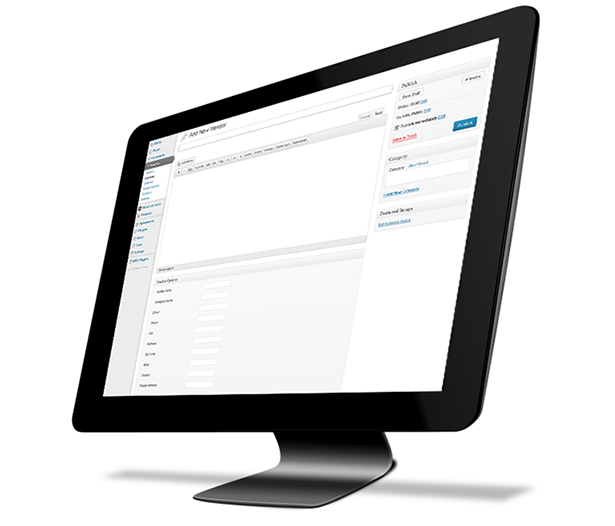
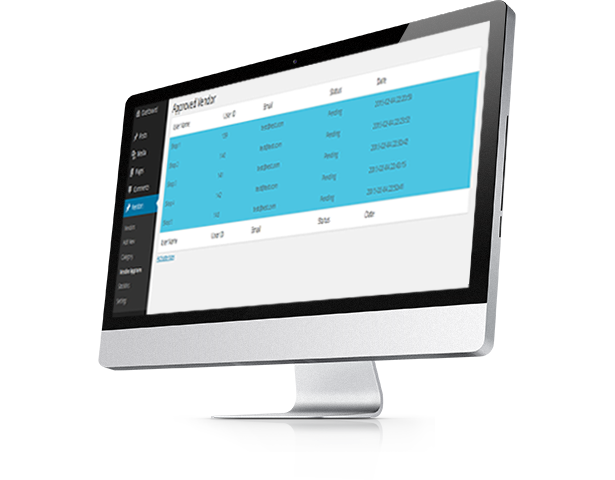
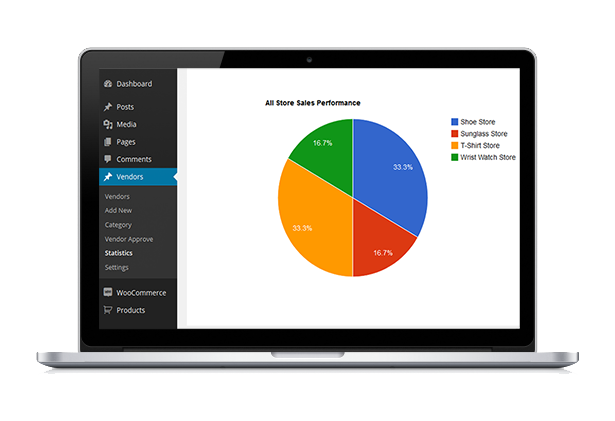
Only admin has the ability to approve vendor store from dashboard. Admin can also add vendor, edit vendor, and set commission rate for vendor. By this plugin admin can monitor all store sales performance.

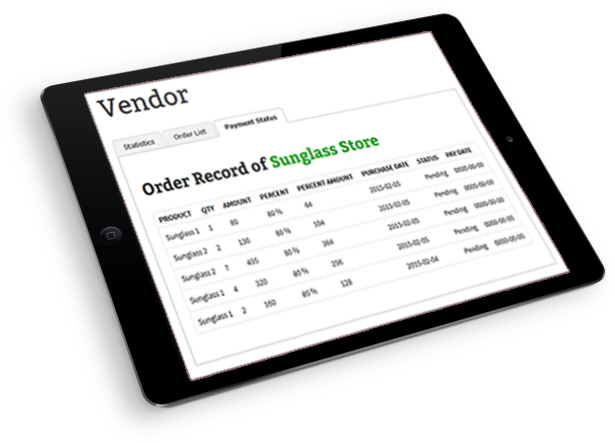
Each particular vendor can view the sales statistics, order list and payment status from his profile. “WooCommerce Multi-Vendor Marketplace plugin” is a WooCommerce Extension Plugin which turns your WooCommerce Site into a Multi-Vendor Site. “WooCommerce Multi-Vendor Marketplace plugin” works for All Default Products of WooCommerce.

“WooCommerce Multi-Vendor Marketplace plugin” has some excellent features and quick & easy to set up. “WooCommerce Multi-Vendor Marketplace plugin” is more flexible and compatible with many existing plugin in the WordPress repository. This plugin is fully customizable. Users can easily configure the plugin into the new or existing WP websites.

For check the Demo go to My Account Page and login with Username: test & Password: 123456 and click to Vendor page.


Features

  • Multi-Vendor System for WooCommerce.
  • Anyone can register for vendor store which goes to site admin for approval.
  • Vendor can view the sales statistics, order list and payment status after login.
  • Admin has the ability to approve vendor store from dashboard.
  • Admin can create and edit vendor.
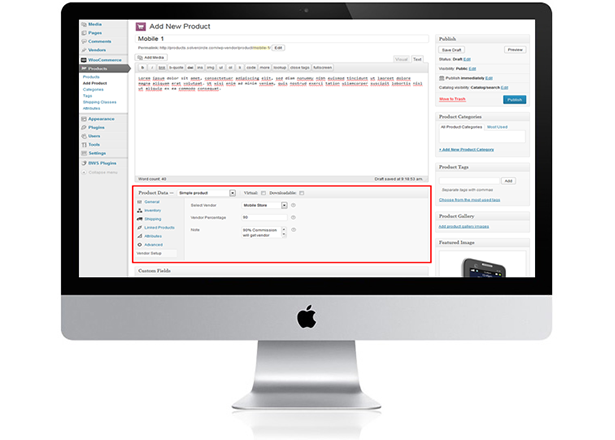
  • Admin can select vendor, insert vendor percentage and put some notes from product metafield for individual products.
  • Set the commission rate.
  • Admin can monitor all store sales performance statistics.
  • Stores can be organized by category base.
  • Shortcode for vendor page

Download Multi Vendor Marketplace for WooCommerce (WooCommerce)

Interactive Map of Italy – HTML5 (Charts and Graphs)

This is an interactive resizable vector map template of Italy built in HTML5 code and runs with javascript based on Scalable Vector Graphics (SVG).

Features:

  • Easily customized and NO Javascript knowledge required.
  • SVG (Scalable Vector Graphics) based, so it can be enlarged as much as you want while preserving the quality.
  • Works perfectly on desktop along with mobile devices including Smartphones: iPhone, iPad, Tablets, etc.
  • Responsive and fully resizable.
  • The map has 20 clickable regions and you can put unlimited number of clickable push pins anywhere on the map.
  • The map can be used as interactive regional map of Italy or a blank map with clickable pins or both (regions and pins) as in the demo.
  • Each region or pin can be linked to any webpage.
  • Each region or pin can be activated/deactivated.
  • Each pin can be customized individually (shape, position, colors, hover content, URL, etc).
  • Easily integrated with WordPress using HTML Snippets plugin.
  • The map is 100% hand drawn dot by dot in Adobe Illustrator for highest quality and best optimization.
    Note: We can customize the map for your own needs (private work).
  • Small file size > Faster load speed > Better for SEO and Google ranking.
  • Compatible with all major browsers including Google Chrome, Firefox, IE9+, Safari and Opera.
  • Full documentation is included. and an interactive X, Y coordinates guide is included (Similar to this).

Download Interactive Map of Italy – HTML5 (Charts and Graphs)