


Category: code
download PHP, ASP.NET, Java and Javascript from CodeCanyon – the marketplace for code scripts and snippets.Javascript, Java, Program, Code, Snippet, Script, Dev, Development, Codebase, MySQL, Class, Widget, System, CMS
Woocommerce Add Funds (WooCommerce)
Did you notice, how Codecanyon charged their buyer? Yes, you need to add funds first before make any purchase. Good News is, from now using this plugin you can enable same facility on your Woocommerce powered store.
No # 1 Plugin for you to enable Deposit, Funding and Partial Funds Payment on Your store.
You may used some other Deposit or partial payment plugin, But if you wanted all those system in one place, then this plugin is the right solution for you.
This is an awesome Woocomerce extensions will helps to build customer loyalty and repeat business by ensuring that they spend their funds only on your store. Even you can reward them with discounts and instant order processing if they purchase using their Account Funds.
Features:
Download Woocommerce Add Funds (WooCommerce)
The Stylish Loader (UI Elements)
This component is a stylish Loader template built using the Appcelerator Titanium Mobile framework. This template will help you to integrate the time-based loader into your existing code very quickly. Easy to integrate and reskin. There are tons of apps where you can use this loader like quiz app, survey app etc. Also you can use this loader to show progress while task is getting done.
This is a really Stunning Stylish Loader implemented with Titanium Alloy Engine and is been tested on both iOS & Android and support all latest iOS & Android OS versions. It is out for sale on Code Canyon.
Download The Stylish Loader (UI Elements)
Numerologi for You with AdMob (Full Applications)
Description
Numerology for You shows what is our destination number, which can be calculated on the basis of date of birth.
User chooses birth date and gets full numerolgical description.
User also can save birth date and gets notification when his numerological day becomes.
The App provides AdMob banners.
Demo
Check out functionality and amazing features of our mobile Application.
We have made Demo Version (APK) of our App available to you.
Enjoy!
Download Numerologi for You with AdMob (Full Applications)
Turkish Language for Crea8Social (Add-ons)
Keymaster Chord Notation (Miscellaneous)
Easily add chords to any musical WordPress website using shortcodes! Users can transpose to any key with the click of a button and print. Admins can choose multiple layout options and from unlimited colors using LESS and Bootstrap CSS. Add chords without needing to write on two lines in an ugly mono-spaced font with the auto-placement feature.
Make your lyrics website more user-friendly and make writing easier, with better styling control than the old text-document look.
Setup:
This plugin will work without additional setup, but there are several options on the Keymaster Chord Notation page under the Settings menu.
Use:
To add chords to any song lyrics, just use the [chord] shortcode before any syllable you would like a chord notation to be placed above. For example, instead of writing like this:
    Key of C

    G7           C    Fsus       C
    This is my story, this is my song
You would write like this:
    [key c]

    [chord g 7]This is my [chord c]story, [chord f sus] this is my [chord c] song
Which will enable you to customize the way it looks to the users, allow the users to transpose at the click of a button and allow them to print it easily. By default it would look like this:

And when users click to transpose up a few times it would look like this:

Download Keymaster Chord Notation (Miscellaneous)
Spanish Language for Selfie (Add-ons)
Vitubo Message For Vitubo CMS (Add-ons)
Description
Vitubo Message is a plugin of Vitubo which gives users the ability to interact with each other. This plugin provides private messaging between users and allows users to receive notifications about new messages.
Demo
Backend
- Demo Backend
- Account: admin/admin
Frontend
- Demo Frontend
- Account: member/member
- Account: vitubouser/vitubouser
Installation
To install, please follow these step below.
1. Copy all files in /source/ directory into your Vitubo CMS directory
2. Login Vitubo CMS admin site with admin account.
3. Click “Plugins” item on admin menu, find “Message” plugin and click “Activate” button.
4. Create a page with URL is: “message” and Content is: “{message:display}”
Finished, enjoy it.
Requirement
Changelog
Message Plugin For Vitubo CMS v1.0 2015-04-1
------------------------------
- first release.
Download Vitubo Message For Vitubo CMS (Add-ons)
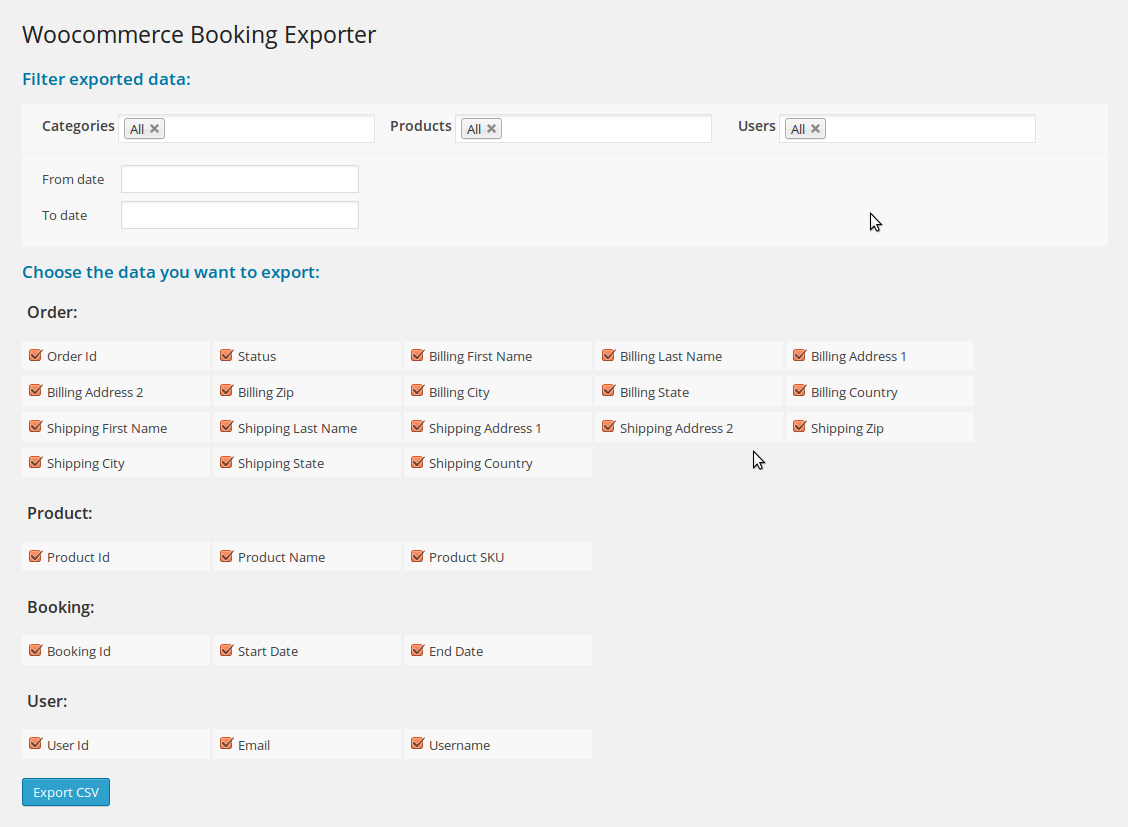
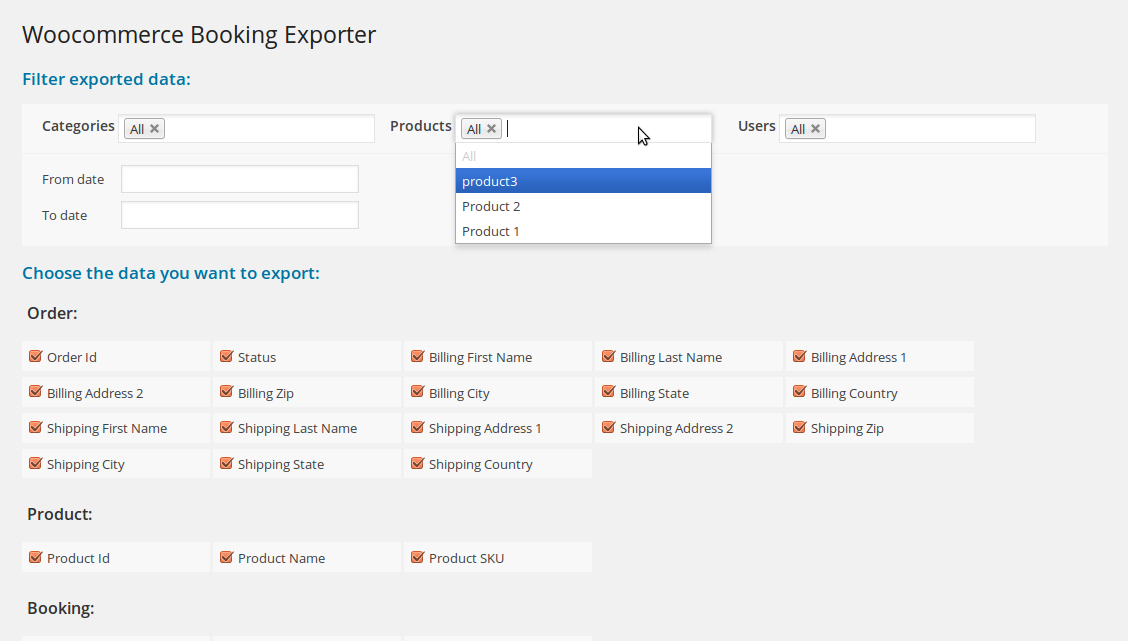
WooCommerce Bookings Exporter (WooCommerce)
SP Categories – Responsive Prestashop Module (Prestashop)
SP Categories powered by the best features designed for product showcasing, supports Prestashop 1.6.0.9. Take a look at demonstration, you’ll be impressed by clear and modern layout along with professional arrangement of categories and products in them.
At first sight, you can see the name of main category, sub-categories and products include preview images, title, star rating, price, created date and brief description within a single area of module. Besides, you can be able to decide on which you want to display or hide such as small images and description of categories or item’s ratings, created date, etc. With support of 2 tab event types (Hover and Click), products’ description in each category will spread out automatically if you use Hover. But for Click, you have to use mousewheel clicking into navigation button in order to see more hidden items.
With responsive layout, this module can fit all device screen sizes. You can either display price detail, add to cart or add to wishlist button for websites selling products and other types of webpage.
Furthermore, friendly user interface in Admin panel is totally easy for you to control every parameter we provide. You can decide the number of categories to show on frontpage… Based on your configuration in this important area, your website will perform as exactly as you want. Refer to the photos we captured and specified below to see how it works.
Now, let’s click Live Preview button to see its best performance!
MAIN FEATURES:
- Support Prestashop 1.6.0.9
- Fully compatible with IE9+, Firefox 2+, Flock 0.7+, Netscape, Safari, Opera 9.5 and Chrome
- Support Responsive layout
- Allow to set the number of columns for devices that have different screen width.
- Support to open link in Same Window, New Window and Popup Window
- Support Multi-Module in the same page
- Support 4 theme layouts. You can see the screenshots below.
- Support 2 types of tab event for Theme 4: hover or click
- Allow to select a main category to be shown
Limit the number of categories to be shown in the module - Allow to change width/height of category’s image presentation
- Allow to change max length of category title
- Allow to change max length of sub-category title
- Support to add content at the top of module and the end of module
Download SP Categories – Responsive Prestashop Module (Prestashop)
Material Based Spicy Form for WordPress (Miscellaneous)
Spicy form uses latest material design concept and you can create any type of form like contact form, poll or survey. Your site user will just love to fill the form resulting in higher conversion ratio after all. The admin panel provides form generator and option to customize form display.
Front End Features:
- Awesome Material design concept
- Spam Protection with captcha
- Easy to customize
- Auto-responder
- Multiple Language support
- Unlimited forms
- Place form anywhere with shortcodes
- Form Builder
- Easy to Customize
- Extensive User guide
- File Upload feature
- Customized Alerts
- Responsive Design


Download Material Based Spicy Form for WordPress (Miscellaneous)
AllDocs – Knowledge Base for WordPress (WordPress)
AllDocs is a knowledge base built as a plugin for WordPress. It includes all the features that you need to offer proper documentation to your customers. If you’re using bbPress, it also integrates with it. Here’s a few highlighted features to work with documents:
- Write documents, categorize and tag them. Organize them in hierarchies.
- Edit the documents using the useful extensions provided in the WordPress Editor: highlight text, pullquotes, frequently asked questions, code syntax highlight.
- Mark documents as featured and exhibit them in a special area in the knowledge base home.
- Allow users to upvote and downvote documents and display them in the knowledge base home sorted by their number of positive votes.
- Write an abstract or excerpt and choose whether to show it in the single document or not.
- Insert documents in other entries, such as posts, pages or other custom post types.
- Display a table of contents in the document single view.
- Quickly insert Frequently Asked Questions when authoring a document
- Add code blocks with syntax highlight
Knowledge Base Home Features
- Choose to display:
- latest documents
- featured documents
- top rated documents
- documents by categories
- list of document tags
- Show message for your users
- Show document search form with autosuggest. When users click one of the suggestions they are automatically taken to the document.
- Show latest bbPress forum topics
- Change colors quickly and visually thanks to the integration with WordPress Customizer
Widgets and Sidebars
AllDocs includes custom widgets tailored specifically to work with documents. They can be added in any sidebar registered by your theme or another plugin. Or, you can add them in AllDocs’ Sidebar and your theme’s sidebar will be replaced when you’re in a document single view and you’ll only see the widgets you added to this AllDocs Sidebar. These are the widgets included with AllDocs:
AllDocs – Related Docs
Displays a list of documents in different modes:
- By Document Category: will display other documents published under the same category.
- By Document Tag: displays other documents tagged similarly
- Sub-Documents: only displays documents published as children of the current document. Documents can be sorted in Documents > Sort to specify their order.
- Random documents: displays random documents with no particular relationship to the current document.
AllDocs – Search Docs
Displays a search field with autocomplete similar to the one found in the knowledge base home.
AllDocs – Table of Contents
Generates a table of contents based on the headings in the current document.
In addition to widgets, AllDocs registers a custom sidebar that appears on document single view, document category view or document tag view. You can add AllDocs widgets in your theme sidebar or add them to AllDocs’ sidebar and have them displayed only when in the knowledge base context.
Shortcodes
AllDocs includes two versatile shortcodes to use in any post, page or another area that parses and executes shortcodes:
[ql-document]: display a list of specific documents by their id or querying them by their document category or tag.
[ql-search-form]: insert a complete search form with autocomplete and customize its layout.
Customization
- Powerful templating system to adjust the templates and perfectly match your theme markup.
- Show or hide the excerpt in category or tag views.
- Stylize appearance in different views using WP Customizer.
- Add Custom CSS and JavaScript to adjust the appearance and keep them safe during updates.
- Take advantage of WordPress filters and action hooks added in key locations in the code.
- Add custom PHP code and functions and keep it safe during updates.
More Features
- If you’re using bbPress, you can load the latest topics complete with pagination in the knowledge base home view.
- You can restrict access to the knowledge base only to users that meet a certain WordPress role or make it publicly visible.
- Display published date and updated date in documents.
- Font icons for crisp view in retina and high density displays.
- Fully translatable.
- Extensive documentation.
- Friendly and expert support.
Access the support forum
Assistance is provided exclusively through the support forum.

See Also
Visual Attributes for WooCommerce Variable Products
Product Slider Carousel for WooCommerce
Allground – Responsive Fullscreen Backgrounds for WordPress

AllSlider – Responsive Slider Carousel for WordPress
Alldion – Responsive Accordion for WordPress
Download AllDocs – Knowledge Base for WordPress (WordPress)
Content Fire – Custom CTAs for WordPress (WordPress)

Content Fire for WordPress is most effective way to convert visitors into subscribers. The Content Fire plugin enables you to create custom designed CTAs (call to action) forms without writing a single line of code.
Why You Need Content Fire
- Convert website visitors into subscribers and buyers
- Target specific pages with different, relevant offers
- Double or triple your subscribers
- Build a massive email list for marketing purposes
- Test your promotions with A/B testing to optimize conversions
- Display CTAs on any page or post
- Increase your social engagement by gaining more followers
- Get visitors’ attention immediately
- Increase click-through rates to targeted pages
Templates Ready to Customize
We researched hundreds of CTAs and looked at all the metrics. Based on that extensive research, we were able to identify the most effective CTA templates. Now you can choose any canvas template and have a custom CTA running in just 60 seconds. Take a look at these templates.
Schedule CTAs / Automatic Expiration
You can schedule your CTAs to start and expire at a certain point. This lets you focus on your site rather than the administrative details of configuring CTAs for time-sensitive promotions or marketing campaigns.
Display CTAs on Any Post, Category, Page, or Site-wide
Want custom CTAs based on a specific post or category? What about custom CTA only for a specific tag or post type? Don’t fret because this plugin lets you select exactly where to display which CTA.
A vs. B Testing
Similar to the other expensive options in the market, Content Fire comes built in with A vs. B testing so that you can gather data on the best converting CTAs and continue to optimize. Data!
CTA Triggers
You can decide exactly when to show each CTA giving you full control. CTAs can be triggered based on the following:
- Timed Delay – set a short amount of time (i.e., 30 seconds) before a CTA displays to the visitor
- Exit Intent – set a CTA to display on when visitor is leaving the site
- Scrolling % – set a specific point on your page that visitor must scroll before the CTA displays
Trigger by Referring Domain
Show a specific CTA when a visitor comes from a specific domain. For example, if a visitor comes from Twitter, display a CTA requesting they follow you on Twitter. WOW! Control!
Google Fonts Integration
Use any Google Font for your CTA headline and body text. It’s ready!
Control CTA Styles
You can set the button color, background color, background image or pattern, and more.
Want More?
- Unlimited CTAs: Create as many CTAs as you want.
- A/B Testing: Setup A/B testing campaigns and determine the optimal CTA for your needs.
- Custom HTML: Use the HTML CTA template and add any custom HTML you want.
- Use Shortcodes: Use any shortcode from another plugin inside the HTML template
- Ajax Form: Content Fire will use AJAX subscription form.
- Social Icons Supported: Link to your social accounts inside the social CTA template
- Newsletter Services: MailChimp, Aweber, Get Response, Campaign Monitor, Mad Mimi, Feedburner, and more coming soon. Don’t have a newsletter provider? No problem, just use the plugin to collect email addresses.
- CSV Export: If you use the plugin’s email collection, simply export all subscribers as a CSV file to be used with any newsletter systems.
- Different CTA per page, post, custom post type: assign different CTA per page, post or custom post type.
- Open Delay / Timed Delay: Trigger a CTA with a timed delay setting.
- Exit Intent Trigger: Trigger any CTA when user moves mouse pointer to the top of browser windows.
- Page Scroll % Trigger: Trigger any CTA to display when visitor scrolls down to a certain point on the page
- Pre-defined CTA Layouts: From 1 column to 2 column plugins, or video or more, we have a template for you.
- CTA Preview: Check our a preview of your CTA right from the WP Dashboard.
- Responsive Design: Every template is responsive and will look right on a tablet or phone.
- Automatic Plugins Update: Receive plugin updates automatically like any other WordPress plugin.
- Easy to Install: Install and activate the plugin just as you would any other plugin.
Wait! Need More Reasons to Buy This Plugin?
We work frequently with large, high-traffic fashion, tech, and gaming blogs and some are running this very plugin. It simply works!
Created by Experienced Webmasters
We work frequently with large, high-traffic fashion, tech, and gaming blogs and some are running this very plugin. It simply works!
We plan on adding more features to Content Fire so don’t hesitate to purchase this premium plugin. If you have any issues, simply ask us on our support forum and we’ll handle it. Buy from trusted developers who stand behind their products.
SUPPORT: http://support.wpsite.net
If you want to see what else we’re up to, check out http://www.wpsite.net – And don’t forget to rate this item the 5-stars that it deserves.
Download Content Fire – Custom CTAs for WordPress (WordPress)
Social Bubble Share (Social Networks)
Social Bubble Share is a complex little jQuery plugin that lets your site visitors easily share your content.
Make it more easier for your visitors for users to share your content to social networks and drive high quality social traffic to your website.

Social Bubble Share can be easily skinned with CSS and you can even choose how the social network buttons are displayed.
Support for popular social networks.
Choose from over 10 social sharing networks to display on your website. Add any number of available networks to create a nice bubble menu of sharing content for your visitors.
You have a lot of traffic on mobile? Don’t worry, it`s fully responsive !
Social Bubble Share icons are fully responsive and look great all the way down to even the smallest mobile devices. Social Bubble Share is aimed to provide an optimal viewing experience and a good navigation with a minimum effort.
TOUCH AND DRAG
GRAB
Encourage sharing – Increase social engagement
Make it easier than ever for users to share your content to social networks and drive high quality social traffic to your website. Social Bubble Share gets users sharing the right content at the right moments, and keeps them engaged on your website.
Download Social Bubble Share (Social Networks)
5 Touch – Puzzle Games (Games)
A android puzzle game.The logic of the game “Lights Out” is similar to the game.Clicking on a cell toggles that cell and each of its immediate neighbors. The goal is to red all the square, ideally with the minimum number of clicks. There is a fairly easy method for solving the puzzles, but it will very rarely result in the minimum number of moves.
Features
+ 2D Modern Design and Graphics (Retro)
+ Two languages (English and Turkish)
+ No disturb the sound
+ Vibration
+ 50 different puzzles
+ Scores share options
+ Not Using Game Engine
+ Admob Ads Place
+ Simple Code
Demo : https://play.google.com/store/apps/details?id=com.game.fivetouch