Visual Composer Responsive Inner Columns and Rows (Add-ons)

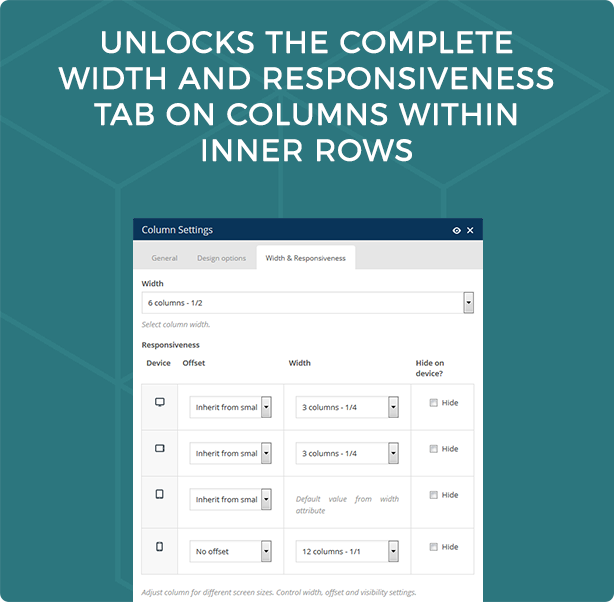
Visual Composer Responsive Inner Rows and Columns is a VC extension that gives Visual Composer users the option to add custom responsiveness to each interior column, giving infinite responsive options. The non-extended version of Visual Composer only allows users to choose individual column responsiveness in a primary row… but what if you want to have completely responsive columns within rows within rows?

For example, you have a row with a parallax background image. Within this row you want to have a title on one line and then four icon/text blocks on the next line. You also want these four icon/text blocks to be distributed as 4 per line on a desktop, 2 per line on a tablet and 1 per line on mobile. How would you do this? This plugin makes it possible. Just install and the complete width and responsiveness tab will be available on columns within inner rows.

\

\

\

Download Visual Composer Responsive Inner Columns and Rows (Add-ons)

Pricing Table Layers Extension – WordPress Plugin (Add-ons)

Built for Layers, A free WordPress site builder so simple, you'll be a pro the first time you use itLayers Pricing Table Extension Live DemoLayers Pricing Table Extension Back-office DemoLayers Pricing Table Extension Features, Two Layouts, Customizable Design, Tooltips Support, 10 Bundled Icons, Column Highlighting and Animation, Google Analytics integration and Markdown Support.

Pricing Table extension for Layers, It provides many options that help you in creating your perfect pricing table, This extension is made to be simple, flexible and powerful at the same time, It’s fully responsive and has multiple layouts (Vertical and Horizontal), Along with many features.

Features

  • Responsive.
  • 2 Layouts : vertical and horizontal.
  • 10 Bundled icons.
  • 9 CSS3 Animations.
  • Google Analytics Integration.
  • Tooltip support.
  • Column highlighting.
  • Customizable design.

Back-office credentials

Sign in

username: demo
password: demo

Download Pricing Table Layers Extension – WordPress Plugin (Add-ons)

Magic Box – Customization Pack for Layers (WordPress)

Intro

Magic Box is an extension for Layers theme that adds some custom widgets and more features than the theme has.


Magic Box for Layers works damn fine with WordPress' frontend customizer.
Magic Box for Layers is always responsive.
We're listening!
Head over the preview using your phone!

Features

  • Dribbble feed widget
  • Instagram feed widget
  • Custom shortcodes
  • Pricing tables (coming soon)
  • Twitter feed widget (coming soon)
  • Team pages widget (coming soon)
  • 500px feed widget (coming soon)

Charity² — 10% in charity

Starting from February, we’ll donate 10% of our earnings to charity organizations each month. Some people may not have our facilities nor our basic needs, that’s why we want to help them! Do you want to know more or want to have a proof of our donation? Send us a mail and we’ll be glad to talk with you!


Download Magic Box – Customization Pack for Layers (WordPress)

Lie Detector (Prank) (Full Applications)

Lie Detector prank is a perfect app to make a joke of your friends. This App only pretends to be a real polygraph. It is not a real truth machine! You need to know the answer for the question to make a good prank.

Admob intergrated ( Banner + Interstitial).

Full Documentation.

Download Apk :
https://www.dropbox.com/s/mnthrlgfz1tsmr7/com.sandroid.liedetector_1_www.APKdler.com_.apk?dl=0

Download Lie Detector (Prank) (Full Applications)

WooCommerce Write a Review Reminder (Marketing)

Automatically sends an email reminder to customer after specified amount of days, to write a review. After the customer has written the review for product and it is approved, they will receive a coupon for thank you automatically.

The generated coupon needs a role model coupon, which can be configured via Coupons managements in WooCommerce.

This plugin is in English, but is also translated into Estonian and supports any other language as well!

Fully compatible with WordPress 4.1.x and WooCommerce 2.3.x!

Download WooCommerce Write a Review Reminder (Marketing)

WooCommerce Product Promotion / Reminder (WooCommerce)

WooCommerce Product Promotion / Reminder Plugin allows Admin and seller to send mail when new product is added or update exisitng one. This is best plugin for promoting your product via mail.

This plugin Have many option to send mail like sent to users, customers and one extra functionality is importing mail list via CSV, email templates settings etc.

Note : If you want to change email template, then go to this plugin directory > includes > templates > emailtemplate > htmlemail.php. You can change your new template here.

Functionality:

  • Send product production email to sellers, customer or import list.
  • Fully Dynamic Mailing Functionality.
  • Set you own template for email.
  • Send promotion mail when create or update any product.
  • Send mail to your selected list only.
  • Send mail to your users.
  • Send mail to your customer.
  • Send mail to your importing list.
  • User Friendly.

Future Functionality

  • Send notification via whatsapp.
  • Send notification for page, post, custom post type etc..

Need help? or more infornation about product than Please be sure to read the Document. For read Document Click Here. You can also email us on [email protected] for any pre-sale inquiry only.

Download WooCommerce Product Promotion / Reminder (WooCommerce)

Accordion – For Layers WordPress Theme (Widgets)

Layers Accordion is an accordion widget for the Layers theme. It allows you to quickly create accordions, author its content and stylize its appearance. You can choose the accordion layout, flexible width, set images for the title and content of each accordion panel, change the easing animation, and much more.

Features

  • Responsive, touch enabled accordions that fit mobile or desktop devices
  • Choose between a layout without space between panels or a spaced one
  • Select swing, bounce, lineal, smooth start/end transitions or disable it completely
  • Set the animation speed
  • Customize each panel title and background: add images, set background color, change text properties, set height
  • Can customize each panel and content differently from the others or copy settings from previous panel
  • Create full width accordions or set a flexible, responsive size
  • Open multiple panels at once, or only one at a time
  • Align accordion towards left or towards right so it floats alongside your content
  • Show or hide panel arrows
  • SEO friendly: uses semantic elements for accordion and panel title and content
  • Set a title for the area or leave it blank
  • Easily customizable through visual controls that update a live preview
  • Write custom CSS & JavaScript directly in the plugin settings to keep them safe during updates.
  • Developers can benefit from the JavaScript events included
  • Fully translatable
  • Good documentation and prompt support

Access the support forum

Assistance is provided exclusively through the support forum.

Support forum

See Also

Alldion – Responsive Accordion for WordPress

Alldion - Responsive accordion for WordPress - CodeCanyon Item for Sale

Rotating Tabs Widget for WordPress

Tabs Widget for WordPress - CodeCanyon Item for Sale

Visual Attributes for WooCommerce Variable Products

Visual Attributes for WooCommerce Variable Products

Allground – Responsive Fullscreen Backgrounds for WordPress

Allground - Responsive Fullscreen Backgrounds for WordPress

AllSlider – Responsive Slider Carousel for WordPress

AllSlider - WordPress Responsive Slider Carousel - CodeCanyon Item for Sale

Download Accordion – For Layers WordPress Theme (Widgets)

SAM – Project Management Tool (Project Management Tools)

SAM – Project Management Tool

Customer Login Details

User: client
Pass: client

Team Member Login Details

User: tm
Pass: tm

Project Manager Login Details

User: pm
Pass: pm

Admin Login Details

User: admin
Pass: admin

Purpose

SAM – is an online app which is designated to manage tasks allocation within a company with the possibility to interact with customers, for projects that are developed for an external use.

SAM – helps you to have control over your current workload, helps you manage the communication with your customers, gives you a history of your projects and help make a better use of your time. Projects and tasks have the ability to be assigned with specific deadlines (for a project or a task). This way you will always know how to use the time and how to share it between projects, in order to deliver them on time and keep your team and customers updated on each project.

Features

Key Features

  • Friendly and easy to use UI
  • Multi-language (supports 5 languages)
  • Support Ticket API
  • Contextual help
  • Easy to install and setup using installation wizard

General Features

  • Responsive and fluid design – looks great on: desktops, tablets and mobile devices
  • Dashboard with different stats
  • Project and task management (create, edit, assign, etc)
  • Client and staff management
  • User profile
  • Transactions
  • Integrated To-Do list
  • Notifications: online and by email
  • Reports
  • Support ticket management
  • Support ticket API
  • Logs
  • General settings
  • Email stack engine for sending email notifications
  • User groups:
    • Administrator
    • Project Manager (this can be changed in whatever you want from settings)
    • Team Member (this can be changed in whatever you want from settings)
    • Client
  • Attachments in discussions/comments:
    • Allowed files: doc, docx, xls, xlsx, odt, pdf, csv, txt, jpg, jpeg, png, zip, psd, ai
    • Max file size: 10MB
    • Simultaneous file upload: 5
    • Thumbnail for images: yes

Workflow

Dashboard

A summary of projects, tasks, tasks per projects, billable hours and relevant information based on the user’s group.

Projects

A list of all projects is displayed providing critical information (name, client, status, due date) and the possibility to view tasks or details from that project. Or if you are a project manager or admin user you can add/edit or delete projects.

When a project is created, the project becomes “In Progress” and it will be updated to complete by the PM once all the tasks are completed. All tasks from that project need to be completed in order to be able to close a project.

My Tasks

Two lists of all completed tasks and all in progress tasks providing critical information (name, project, status, due date) and the possibility to sort the list by any of the fields or to perform a search within the table content.

Task status:

  • Not Assigned – a freshly new task
  • Assigned – a task that has been assigned to one or more team members
  • In Progress – a task that has been quoted by the team member
  • Completed – a task that was marked completed by either team member or project manager

Task priority:

  • Normal
  • High
  • Urgent

Support Tickets API

This customisable feature can be use for either support ticketing, feedback, contact or any other customer interaction.

Easy to integrate using a private key and a generated script. API Script just needs to be copy into the webpage/app (usually on homepage between the “head” tags).

The script will generate a side button that triggers a pop-up window where your customers will easily get in touch with you. From Tickets Settings section you can set one or more email addresses to be notified as well as the button appearance, different for each website/app you’re managing.

For a functional version please check our demo.

Transactions

Displays a log table with numbers of worked hours for each task/project and the cash outs made.
Gives the staff member the possibility to cash out a number of hours from total balance available. Once a cash-out is made an email is sent to PM/payroll.

Admin Section

Section designated for the administrator where he can edit the general settings about the company and also to edit the user groups. The possibility to add a new client or team member it is available for the Admin user only!

Translations

Available translations:

  • English
  • German
  • Hungarian
  • Romanian
  • Spanish

If you need SAM in your language which is not supported currently – you can help SAM by translating it. Don’t worry, translating is extremely easy – just send an email here and I will tell you how to do it. Your help will be really appreciated!

Download SAM – Project Management Tool (Project Management Tools)
Vimuse Media Player – Layers Extension (Widgets)

jQuery plugin version available here

Vimuse Media Player is now available as an Extension for Layers, a free WordPress site builder framework. This extension allows you to embed the Vimuse Media Player in a page that can play both audio and video in a modern and sleek interface. You can choose to play your own audio/video files or videos from Youtube/Vimeo/Dailymotion or even Shoutcast/Icecast streams. The player features a fluid responsive design and can fit in any screen size ranging from mobile phones to desktop browsers. The player is also optimized for retina and touch screens and provides the feel of a native app.

Vimuse plays audio/video using HTML5 in supported browsers and fallbacks to Flash in older browsers. You can pass only a mp4 file for video and mp3 file for audio or pass all the necessary formats for the widest possible support of native HTML5 playback. Whatever you choose to do the player will work in both modern and old browsers (with suitable fallbacks where necessary).

The key features are:

  • Play video and audio files.
  • HTML5 playback with Flash/Silverlight fallback.
  • Create your playlist by adding your own files/items or through Youtube/Vimeo/Dailymotion feeds.
  • All files are uploaded through the WordPress Media Library, which allows you to use pre-existing files from the library.
  • Special layout for audio-only mode.
  • Pull videos from Youtube user, playlist or search query.
  • Pull videos from Vimeo user, album or channel.
  • Pull videos from Dailymotion user, group, playlist or channel.
  • Show subtitles for videos (only for video files).
  • Show postroll content for videos (only for video files).
  • Play Shoutcast/Icecast streams and show track info and cover-art.
  • Extract audio info from ID3 tags – cover, track, artist, album.
  • Several layout options.
  • Mobile, retina and touch screen optimized
  • The player features a fluid responsive design to account for various screens sizes ranging from mobile phones to desktop browsers and can also be placed in a container of any width.
  • Two colour schemes – Dark and Light.

Configurable options are:

  • Playlist can either comprise of both audio and video or can only contain audio with a corresponding special layout for the main player area.
  • Option to have autoplay of media.
  • Option to start autoplay only when the user manually starts playback after the player loads.
  • Can set the volume during initialization.
  • Option to turn on playlist shuffle when the player loads.
  • Option to set the starting language for subtitles.
  • Option to show/hide the playlist when the player loads.
  • Choose to have auto-progression of playlist as each media finishes playing.
  • Option to show links to external pages in the playlist.
  • Can choose to open the external page links in new windows/tabs.
  • Option to show links for purchase pages of items in the playlist.
  • Can choose to open the purchase page links in new windows/tabs.
  • Option to show download links to media files.
  • Option to provide lyrics for audio items whose download links are shown in the playlist.
  • Option to show file-type icons (audio, video, radio) in the playlist.
  • Can choose to show delete buttons in the playlist.
  • Option to show item durations in the playlist.
  • Can make the playlist sortable.
  • Can choose to stop playback when the tab/window in which the player is embedded loses focus. This feature only works in browsers that support the HTML5 Page Visibility API.
  • The playlist can be at the bottom, left or right of the main player.
  • If the playlist position is set to “bottom” then option to set a max-height for it or just let it have auto-height.
  • Option to show thumbnails for the media in the playlist.
  • Can choose to show audio item details, such as cover-art, track, artist, album, in the main player area when “audio-only” mode is chosen.
  • Option to show cover-art when audio-only mode is chosen.
  • Option to show track details in audio-only mode.
  • Can choose to show the auxiliary control-bar beneath the main player.
  • Option to fix the main player at the top when scrolling the playlist. This option is only effective when the “bottom” playlist position is chosen.
  • Option to extract information from mp3 id3 tags, such as cover-art, track, album, artist, duration. You can also of course provide all or part of this information yourself.
  • Option to pull cover-art for the currently playing track in a Shoutcast/Icecast stream.
  • Can set the polling interval during which the track information for a Shoutcast/Icecast stream will be refreshed.
  • A playlist caching option is provided. This is very useful when pulling videos from Youtube/Vimeo/Dailymotion or extracting ID3 info or scanning folders for mp3’s, because the entire generated playlist is stored in the cache thus resulting in substantially faster loading of the player. Can also mention the interval after which the cache will be refreshed.
  • Option to detect mobile devices, so that they can be served special low resolution videos. The low resolution video file has to be supplied by you.
  • Can specify the source from which Youtube videos will be pulled (user, playlist or search query). Option to also specify the number of videos that are to be pulled.
  • Can specify the source from which Vimeo videos will be pulled (user, album or channel). Option to also specify the number of videos that are to be pulled.
  • Can specify the source from which Dailymotion videos will be pulled (user, group, playlist or channel). Option to also specify the number of videos that are to be pulled.

Special Notes

  • Autoplay option will not work in mobile devices. This is disabled by device manufactures.
  • Only mp3 streams for Shoutcast and Icecast are supported. aacp streams are not supported.
  • Player volume setting will not show up or work in Android devices. You have to control the volume through the device’s own volume buttons.
  • Also some of the modern HTML5 features such as Fullscreen and Page Visibility will only work in modern browsers.
  • The plugin uses Youtube API v3 for which you need to get an API key from Youtube.
  • The player script has been tested and is fully compatible with jQuery 1.9+. and also jquery 2.0+.
  • If you have any query regarding any feature of the player before purchasing then please post your query in the comments section and I will get back to you as soon as possible.

More Items by CosmoCoder

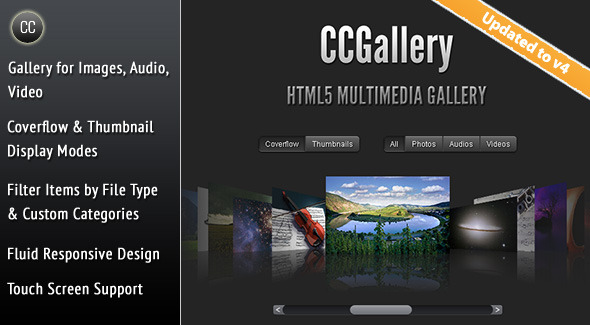
Nova Gallery - Responsive HTML5 Multimedia Gallery

CCGallery - HTML5 Multimedia Gallery

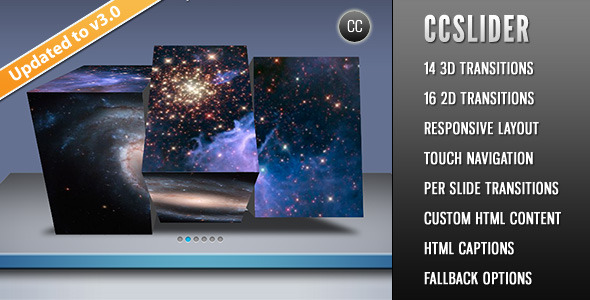
CCSlider - jQuery 3d Slideshow Plugin

Download Vimuse Media Player – Layers Extension (Widgets)

Essential Grid Title & Content Popup Add-on (Add-ons)

Essential Grid is a premium plugin for WordPress that allows you to display various content formats in a highly customizable grid. Possible applications range from portfolios, blogs, galleries, WooCommerce shops, price tables, services, product sliders, testimonials and anything else you can imagine.

Default Essential Grid show popup image, EssExtra add-on will help you show Title & Content in popup.

Download Essential Grid Title & Content Popup Add-on (Add-ons)

Website Dereferer System (Miscellaneous)

Create your own website anonymize or website derefer service.

Just upload the script as is or make a few changes and you’re website is ready to use. No MySQL database required!

Live Preview

To try out the script, just use the live preview button above and make sure to click on the ‘Remove Frame’ button, else it wont work.

Or use click this url: http://bit.ly/1PfLRr8 for testing.

Features:

  • Easy to deploy
  • Writen in PHP
  • Bootstrap/Bootswatch Themed
  • Mobile Friendly (Responsive)
  • Easy to customize using bootswatch themes

Acknowledgement

  • Bootswatch © Made by Thomas Park, MIT License.
  • Based on Bootstrap. Icons from Font Awesome. Web fonts from Google.

Download Website Dereferer System (Miscellaneous)