ShotPro Community Script (Images and Media)

ShotPro Community Script is a community of graphic designers and web where they share their latest and most impressive works. users can create projects with attachments, lists, follow other users, comment and give me like a shot. In addition to receiving notifications, send private messages with attachments, designers look for skills, location or available for hire, create jobs and ads.

This community is inspired by Dribbble

  • Demo User: John
  • User Pass 123456
  • (Features are disabled)
  • Admin Demo: John
  • User Pass 123456
  • link Admin Demo
  • Features:

    Users/General:

  • Built with Laravel
  • Bootstrap
  • Authentication with Twitter
  • Font Awesome
  • IcoMoon
  • Flat UI
  • Send message direct/private with attachments
  • Teams
  • Team Members
  • Users can create Projects
  • Users can create Lists to organize your favorite designers
  • Follow/Unfollow users
  • Tags
  • Find people
  • Notifications Real-time
  • Comments on Shots
  • Like on Shots
  • Like on Comments
  • Block/Unblock users
  • Option Delete Account
  • Upload cover
  • User validation by email
  • Recovery password
  • An email, by account
  • Report users/publications
  • Change password
  • API for developers
  • SiteMaps
  • Edit/Delete publications
  • Users can create Ads
  • Users can create Jobs
  • Integration with Paypal
  • Animated Gifs allowed(Only if it is enabled on the server Imagick)
  • Views Counter
  • Color Palette in the shots/publications
  • XSS: Protection from cross site scripting
  • Secure Bcrypt password hashing
  • SMTP Support
  • Navigation with arrow keys
  • Like in the shots with the “L” key
  • Share social
  • Skills of the user
  • Availability to be hired
  • Last Shots, Popular, Most Commented, Most Viewed
  • Feed users you follow
  • Overall statistics
  • Goods for Sale / Users can link their products for sale
  • Admin Features:

  • Change the site name
  • Change the site title welcome
  • Statistics
  • Enable/Disable news registrations
  • Enable/Disable login with Twitter
  • Enable/Disable Captcha
  • Enable/Disable Email Verification
  • Allow attachments in Shots
  • Allow attachments in Messages
  • Set keywords for the site. (SEO)
  • Add a description (SEO)
  • Long of private messages, and shots
  • Create/Edit pages e.g.: Help, Privacy, etc.
  • Payments Settings.
  • See payments – Ads / Jobs / Teams
  • Social Login
  • Set up social accounts
  • Manage members.
  • Manage members reported.
  • Manage shots reported.
  • Manage Lists
  • Manage Projects
  • Manage Ads
  • Manage Jobs
  • Admin can enable or disable the members records, and to invite with PRO User whether or not members all from the admin panel.
  • Requirements:

  • PHP 5.4 or Greater
  • cURL
  • PDO Driver
  • GD Library or ImageMagick or Imagick.
  • Enabled function mbstring
  • allow_url_fopen (PHP.INI) is ON
  • MCrypt PHP Extension
  • Important: All images used in this demo are solely and exclusively from their owners, not be included in the script.

    Download ShotPro Community Script (Images and Media)

    2 Airs Planes with Admob (Games)

    Tap to control the air plane, avoid the rock and collect the coins.
    Aircraft returns with the addictive, simple tap game-play!

     photo octapad_zps1fuvwnk1.jpg

    Main features:
    – Great sound effects to accompany the game
    -Smoother gameplay
    – 8-bit style design
    – Easy to customize
    – Libgdx for Android and Desktop
    – Admob banner
    – Compatible with Android 1.5 to 5.1.1 (and newer)
    – Eclipse Project, easy to import to Android Studio

    SUPPORT:
    If you have any problems, I am willing to solve it. Don’t hesitate to contact me.


    Get it on Google Play

    Download 2 Airs Planes with Admob (Games)

    Legacy – White label WordPress Admin Theme (Interface Elements)

    Legacy Admin is most advanced and elegant White Label WordPress Admin Theme in marketplace.

    Along with White Label Branding features, It comes with 20 Elegant themes and gives you an option to Create your own custom theme. You can also control full appearance of Admin Menu, Top Bar, Buttons, Content Boxes, Typography, Forms, Text and background colors, logo and so on…

    Legacy Admin is compatible with both LTR and RTL modes so can be used for any language. Legacy admin is also Multisite compatible.

    Admin Menu Management Addon is again outstanding feature to use. You can easily Rename,Rearrange menu and submenu items, Change menu icons, Enable/Disable Menu and submenu items.

    Legacy admin comes with Fully customizable Beautiful Login Screen theme. Also Control Top bar links, Customize Footer, Plugin access permissions, Login page customizing options etc. features help you to design web project (in WordPress) for your clients with your own company branding.

    Check our online demo: Legacy – White Label WordPress Admin Theme Demo. Login with Username: demo and Password: demo

    Plugin Features:

    White Label Branding

    • Customize Admin Top Bar (All links and CSS Styles)
    • Customize Footer
    • Customize Login Section completly. Inbuilt theme, also create your own.
    • Customize Look and Feel to your Branding needs.
    • Fully customizable Admin Menu.
    • Custom Logo and Favicon for your Own Branding in Admin Panel.

    Menu Management

    • Rename Menu and Sub Menu items.
    • Rearrange/ Reorder Menu and Submenu with Drag and drop interface
    • Custom Menu Icons
    • Enable / Disable Menu and SubMenu Items

    Multisite Compatible

    • Ready to use on a multisite network.
    • Easily install on the multisite network.
    • Customize for Network Activate mode or Individual Sites on network.

    Colors, Themes and Style

    • 20 Awesome Inbuilt Themes
    • Multi color, Dark colored, Light Colored Themes
    • Create your own custom theme
    • Ability to edit elegant themes (using import themes file option)
    • Fully customize look and feel of Admin Panel using vast variety of available options.
    • See Screenshots for all available options.

    Login Screen

    • Beautiful Login Screen Theme integrated.
    • Custom Logo for Login Page
    • Fully customize look and feel with vast range of integrated styling options
    • Show / Hide URL links like “Back to Site” and “Forgot Password”
    • Control colors, opacity, background, fonts etc. of any element on login page.

    Styling Options

    • Pick a inbuilt theme or create your own.
    • Form customizing CSS options panel
    • Buttons customizing options (Primary and Secondary button options. Control Hover colors also.)
    • Logo and Favicon options
    • Update images from external URL. To control images on all your client websites from one place only.
    • Enable / Disabled Page Loader
    • Fully Customizing CSS of Main Admin Menu
    • Control Admin Top bar styling
    • Content Box Styling Options
    • Primary Color of theme option
    • General Layouts CSS customizations
    • and much much more…

    Admin Top Bar

    • Control All Admin Top bar links.
    • Customize CSS options as per need.
    • Available in 2 different styles (Fullwidth and Partial Width)
    • Remove unwanted links using node IDs
    • Show Logout link in top bar
    • Enable / Disable Top bar (both on front and back ends)
    • Change User Greeting (Howdy) to desired text.

    Typography

    • 650+ Google Fonts integrated
    • Multi Fonts support. Eg: Different font for heading, menu, body text.
    • Use default computer fonts as back Up fonts for Google Fonts.
    • Advanced Typography options to control font-size, line height, font weight, font subset etc.

    Admin Footer

    • Custom Text in Footer.
    • Show / Hide WordPress version info from footer

    Import / Export

    • Easy import and export settings panel
    • Transfer settings to any other site also
    • Ability to edit inbuilt themes by importing settings.

    Other

    • Smooth Scrolling integrated
    • Page Loader integration
    • Black Box Coding Standards
    • Detailed Documentation
    • Admin Menu Editor Pro plugin compatibility added.
    • Cross Browser compatible
    • Fast and Dedicated Support
    • More themes will be added regularly
    • Compatible with almost all of the wordpress Plugins & Themes.
    • Ability to add your custom CSS code too
    • Edit Footer text

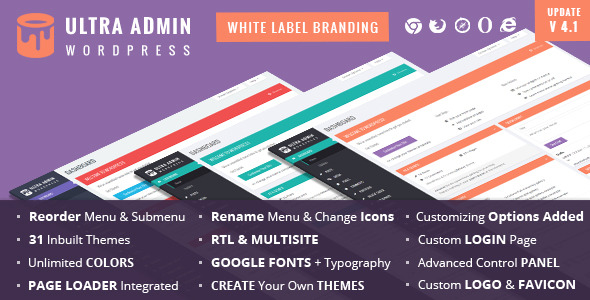
    You are also welcome to try our another similar plugin Ultra WordPress Admin – White Label Admin theme

    Updates:

    Version 1.0 – Initial Release

    Download Legacy – White label WordPress Admin Theme (Interface Elements)

    City Weather for WordPress (Widgets)

    This plugin allows you to easily add super clean weather widget to your site.

    Features

    • Location: Enter like London,UK or just London. You may need to try different variations to get the right city
    • Units: F (default) or C
    • Size: wide (default) or tall
    • Title: Change the title in the header bar to whatever, sometimes it pulls weather from a close city
    • Forecast Days: How many days to show in the forecast bar
    • Hide stats: Hide the text stats like humidity, wind, high and lows, etc
    • Background Image: URL to an image that will be used as the background of the entire module
    • Custom Background Color: Add a hex color to override the default colors
    • Responsive for Mobile or other Devices.
    • Very Easy Installation and Setup.

    Download City Weather for WordPress (Widgets)

    HTML5 Sliding Puzzle Game Starter Kit (Games)

    HTML5 Sliding Puzzle Game Starter Kit is a small game for you to start building a fifteen sliding puzzle game in HTML5 with. Currently designed for desktop browsers, the code has been written with Pure JavaScript, using no third-party APIs, and it would be relatively easy to add support for mobile devices and other platforms.

    What You Get in the Starter Kit

    + /README.md - The README Markdown document
    + /index.html - Game HTML Stub
    + /app/ - Game Root Directory
    + /app/css/game.css - Game HTML StyleSheet
    + /app/images/*.png - Game Image Assets
    + /app/js/game.js - Game Source
    + /app/locale/strings.json - Game Localization Strings JSON

    Notable Features

    + Ready for Easy Localization (English and French included)
    + Designed for Desktop, but should be easy to port to mobile if desired.
    + Fifteen Sliding Puzzle Game Mechanics
    + Mouse and Keyboard Controls
    + Dynamic UI
    + Commented Source
    + Pure JS. Uses NO third-party APIs

    Download HTML5 Sliding Puzzle Game Starter Kit (Games)

    WP Popular Posts Pro (WordPress)

    WP Popular Posts - Best Popular Posts Widget for WordPress

    Popular Posts Pro for WordPress is most power plugin to add your top posts on your website. The plugin allows site owners to display popular posts in a variety of unique layouts using widgets or shortcodes. You have to see the 10 layouts that are baked into this wonderful plugin – all for an insanely low price.

    Why You Need Popular Posts Pro?

    1. Increase click-throughs to your best content by placing popular posts in your sidebar or within post content
    2. Decrease your bounce rate by engaging visitors with only the best content
    3. Popular posts displayed in attractive, eye-catching layouts will get visitors clicking
    4. They’re just awesome!! And you need to fill up your sidebar.

    Popular Posts Pro Features

    Popular Posts Pro has many great features.

    • Will NOT impact page load time
    • Ability to select a date range for popularity (1 week, month, or year)
    • Show popular posts based on most views or most comments
    • Filter popular posts based on: post type, posts in category, or posts with a tag
    • Insert Popular Posts Pro into any post or page via the shortcode builder
    • Show multiple popular lists per page

    10 Amazing Layouts for Popular Posts

    We researched and developed the 10 best layouts. Now you can choose any layout and have your popular posts displaying within just 60 seconds. Take a look at these designs.

    1. Plain List
    2. Numbered List
    3. Thumbnail
    4. Image Tiles
    5. Bar Graph
    6. Line Graph
    7. Masonry
    8. Grid
    9. Slider
    10. Fancy Colors

    Widgets or Shortcodes

    Do you want to make sure your most popular posts are easily seen on your blog? Popular Posts Pro is the most extensive plugin on the market for displaying your blog’s most popular posts. Use Popular Posts Pro to create beautiful widgets on your site showcasing your most popular posts. You can use Popular Posts Pro almost anywhere on your site by adding as a widget or shortcode.

    Want More Features?

    • Widget Title: Use any title just like regular widgets.
    • Number of Posts: Select as many popular posts to display as you want.
    • Colors: Customize the text colors and background colors for variousl elements in layouts.
    • Post Meta Data: Display View Count, Comment Count, Category, Author, and/or Date. You decide.
    • Easy HTML & CSS: Customize the output by using easy to target CSS. Each list is unique and can be targeted based on its unique ID. Fully customizable.
    • Time Range: Select from popular posts this week, this month, or this year.
    • Ajax Ready: For better performance, load Popular Posts asynchronously.
    • 10 Layouts: You dream it and there’s a layout ready to use.
    • Responsive Design: Every layout is responsive and will look right on a tablet or phone.
    • Automatic Plugins Update: Receive plugin updates automatically like any other WordPress plugin.
    • Easy to Install: Install and activate the plugin just as you would any other plugin.

    Wait! Need More Reasons to Buy This Plugin?

    WP Popular Posts Pro is an extremely powerful plugin, and perfect for blogs, online magazines or newspapers.

    Created by Experienced Webmasters

    We work frequently with large, high-traffic fashion, tech, and gaming blogs and some are running this very plugin. It simply works!

    We plan on adding more features to WP Popular Posts Pro so don’t hesitate to purchase this premium plugin. If you have any issues, simply ask us on our support forum and we’ll handle it. Buy from trusted developers who stand behind their products.

    SUPPORT: http://support.wpsite.net

    If you want to see what else we’re up to, check out http://www.wpsite.net – And don’t forget to rate this item the 5-stars that it deserves.

    Download WP Popular Posts Pro (WordPress)

    Burger Maker – HTML5 Game (Games)

    Burger Maker is a HTML5 game where you have to stack the perfect burger by following the order lists.

    The ZIP package contains the game with 1024×768 resolution that scales proportionally to fit current screen device.

    How To Play:
    1. Use finger or mouse to select ingredients
    2. Serve the burger when is ready
    3. Beware of the countdown timer

    Features:

    • High Definition (768×1024)
    • Auto-Resize (Responsive)
    • Mouse and Touch Controls
    • Run in all platforms (Mobile, PC, etc.)
    • Browser not support page
    • Mobile rotate instruction (For Landscape Only)
    • Complete customization (ingredients, score)
    • Share Score (Facebook, Twitter, Google)
    • Make with CreateJS

    Download Burger Maker – HTML5 Game (Games)

    Front-end Theme Changer for WordPress (Utilities)

    Have you ever wondered which theme is more appropriate for your website? You probably hate this, because you have to pick one and drop the others, right? Well, this plugin will solve your dilemma.
    “Front-end Theme Changer” lets your users select the theme they like most from a dropdown (select) menu directly from the front-end.

    screenshot-1
    screenshot-2

    Notes

    • Requires at least PHP 5.3 – most of the hosting companies nowdays run 5.3/5.3+ :)

    Support

    Even though it’s easy to install the plugin, if you face a problem – feel free to contact us. We will be really happy to answer all of your questions and to solve the problem together.

    Download Front-end Theme Changer for WordPress (Utilities)

    QuickBooks(Intuit) Payment Gateway for OpenCart (OpenCart)

    QuickBooks(Intuit) Payment Gateway provides an easier, cost effective and simple alternative for a small business for accepting credit cards.

    And this OpenCart Plugin allows you to accept credit card payments on your site through QuickBooks(Intuit) Merchant Account.

    Important Notes : This Gateway Implementation Requires the cURL to Enabled on your Hosting Account and also make sure your site is SSL enabled.

    Documentation is located at http://www.patsatech.com/docs/quickbooks-intuit-payment-gateway

    Looking for a Payment Gateway and can’t find one in our portfolio or if we haven’t integrated it for your shopping cart just contact us through the form on Profile Page so we can work out the payment gateway integration that your looking for.

    You can also contact us at www.patsatech.com

    For retrieving the App ID, App Login and Connection Ticket refer the documentation at below link.

    QuickBooks Documentation

    Updates

    27.04.2015 - Ver. 1.0
    
       - First Release


    Download QuickBooks(Intuit) Payment Gateway for OpenCart (OpenCart)

    Social Optin – Collect Subscribers Inside Facebook (Windows)

    Collect Leads & Subscribers INSIDE Facebook Newsfeed!

    Social Optin lets your fans & followers subscribe to your Mailchimp newsletter via Facebook INSIDE the newsfeed with only one click!

    Offer incentives and collect Facebook or Google verified emails that users check daily (avoiding fake or “throw away” email addresses). Perfect for bloggers, marketers and businesses looking to grow their subscriber base and increase conversions.

    – Edit optin image templates or upload your own

    – Use your own mailchimp app and unlimited lists

    – Post on your newsfeed (profile, page or groups)

    Download Social Optin – Collect Subscribers Inside Facebook (Windows)

    Filetrip – The easy way to sync & backup your WordPress to Dropbox & Google Drive (Utilities)


    Filetrip is the number one choice for website owners

    To know how to activate Dropbox & Google Drive after installation, go to Demo Website

    Be completely secured with Filetrip

    Your content, database and website will never be lost accidentally again.

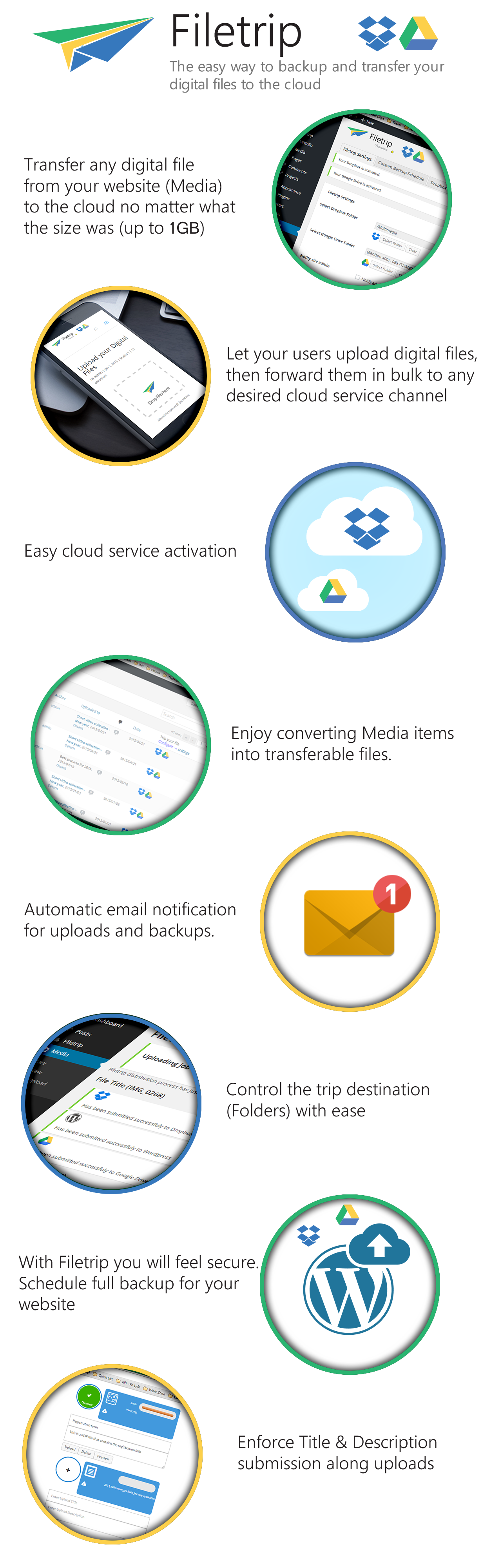
    Filetrip will be your loyal and valuable servant plugin, that not only allow users to upload files and integrates your website content into the cloud, but, it can also automate full backups for your website through archiving either or both (Content & Database), and then trip them to your desired cloud destination.

    Description

    Filetrip is a very unique and powerful wordpress plugin that not only help you acquire & manage digital information (Files, Videos, Music, Audio, Documents and Archives), the plugin mainly integrates your website to the cloud and let you sync almost any digital files into the two top cloud storage services available on the internet (Dropbox & Google Drive), where you can almost forward and distribute all of your website Media and acquired digital content to whatever channel you want.

    The plugin also provides a complete management features and allow wordpress admins to instantiate unlimited uploaders that connect priori and individually to a specific selected folder through either (Dropbox, or Google Drive) channels or the WordPress channel with a singleton media folder. Moreover, the plugin is responsive and highly configurable with a contemporary design and native UX animation for swiftness and maximum usability in both backend and frontend.

    The plugin by default will add the capability of sending any native Media file to whatever selected cloud channel supporting a maximum size of 1GB per file, where the default targeted cloud folder can be configured from Filetrip settings.

    Website owners also will have the privilege of scheduling either complete or specific backup (SQL, Files, and SQL+Files) for their website, in which it can be done manually, or automatically through WP cron jobs. The awsome feature here is that whenever a backup is generated a full configurable automation process of email notification and backup content transmission to either Dropbox, or Google Drive, or both could be configured to be handled gracefully and seamlessly in the background using chuncked upload, letting you easily upload a multi-gigabyte archived backup file.

    Download Filetrip – The easy way to sync & backup your WordPress to Dropbox & Google Drive (Utilities)

    Ninja Forms Captcha Add-on (Add-ons)

    This Ninja Forms extension allows you to easily add captcha form field to your Ninja Forms and prevent any spam submissions.

    Features

    • Small and compact. Forget about bulky and ugly reCAPTCHA.
    • No iframes, external JS or CSS dependencies.
    • Use any background and text color for your captcha.
    • Enjoy free automatic updates.

    Changelog

    v1.0.0
    ------
    * New: Initial release
    

    Download Ninja Forms Captcha Add-on (Add-ons)