WP Related Posts Pro (WordPress)

WP Related Posts Pro - Best Related Posts Plugin for WordPress

Related Posts Pro for WordPress is the best plugin to add anywhere on your website. The plugin allows site owners to display related posts in a variety of unique layouts using the global setting which shows related posts at the top or bottom of your posts. Alternatively, you can use widgets or shortcodes. Though, the best feature is that you have 10 beautiful layouts that are baked into this wonderful plugin – all for an insanely low price.

Why You Need Related Posts Pro?

  1. Increase click-throughs to your best content by placing related posts at the bottom of your posts, or in your sidebar using a widget or within post content using a shortcode
  2. Decrease your bounce rate by engaging visitors with only related content that interests them
  3. Related posts displayed in any of 10 attractive, eye-catching layouts will get visitors clicking
  4. They’re just awesome!! And we all want more clicks on our website.

Related Posts Pro Features

Related Posts Pro has many great features.

  • Will NOT impact page load because we use anynchrounous loading and also cache the related posts
  • Setup related posts logic by:
    • CATEGORY – show posts from same category
    • TAG – show posts with the same tags
    • CONTEXT – BIG FEATURE! show posts that are contextually similar based on keywords in title, category, and tags. This is a unique feature that adds even more precision in relating posts.
    • MANUAL SELECTION – choose specific posts that are related to the post you are writing. And if more are needed, the plugin will fill them automatically.
  • Ability to select a date range for eligibility (1 week, month, or year)
  • Show related posts based on most views or most comments
  • Exclude related posts based on: post type, posts in category, or posts with a tag
  • Insert related posts Pro into any post or page via the shortcode builder
  • Show related posts using widgets, shortcodes, or the global setting

10 Amazing Layouts for Related Posts

We researched and developed the 10 best layouts. Now you can choose any layout and have your Related posts displaying within just 60 seconds. Take a look at these designs.

  1. Inline Card
  2. Stacked Card
  3. Thumbnail
  4. Grid
  5. Slider
  6. Image Tiles
  7. Plain List
  8. Fancy Colors
  9. List
  10. Colored Tabs

Widgets or Shortcodes

Do you want to make sure your Related Posts are easily seen on your blog? Related Posts Pro is the most extensive plugin on the market for displaying your blog’s related posts. Use Related Posts Pro to create beautiful widgets on your site showcasing your most Related posts. You can use Related Posts Pro almost anywhere on your site by adding as a widget or shortcode.

Want More Features?

  • Widget Title: Use any title just like regular widgets.
  • Number of Posts: Select as many Related posts to display as you want.
  • Colors: Customize the text colors and background colors for variousl elements in layouts.
  • Easy HTML & CSS: Customize the output by using easy to target CSS. Each list is unique and can be targeted based on its unique ID. Fully customizable.
  • Time Range: Select from related posts this week, this month, or this year.
  • Ajax Ready: For better performance, load Related Posts asynchronously.
  • Post Meta Data: Display Comment Count, Category, Author, and/or Date. You decide.
  • 10 Layouts: You dream it and there’s a layout ready to use.
  • Responsive Design: Every layout is responsive and will look right on a tablet or phone.
  • Automatic Plugins Update: Receive plugin updates automatically like any other WordPress plugin.
  • Easy to Install: Install and activate the plugin just as you would any other plugin.

Wait! Need More Reasons to Buy This Plugin?

WP Related Posts Pro is an extremely powerful plugin, and perfect for blogs, online magazines or newspapers.

Created by Experienced Webmasters

We work frequently with large, high-traffic fashion, tech, and gaming blogs and some are running this very plugin. It simply works!

We plan on adding more features to WP Related Posts Pro so don’t hesitate to purchase this premium plugin. If you have any issues, simply ask us on our support forum and we’ll handle it. Buy from trusted developers who stand behind their products.

SUPPORT: http://support.wpsite.net

If you want to see what else we’re up to, check out http://www.wpsite.net – And don’t forget to rate this item the 5-stars that it deserves.

Changelog

= 1.0.1 =

  • Enhanced the way a user picks a layout on the settings page
  • Fixed bug with uninstall process

= 1.0.0 =

  • Initial Release

Download WP Related Posts Pro (WordPress)

Unite Gallery – Drupal Module (Drupal)

Demos:

Link to Gallery demo: Unite Gallery Drupal Demo

Another Demos in WordPress Demo: Unite Gallery WordPress Demo

  • The gallery is the same as for WordPress platform

Overview:

The Unite Gallery is multipurpose gallery for drupal.

It’s based on the unite gallery javscript version, and has a very powerfull and intuitive admin for your ease of use.

Every gallery option has it’s description, edvided into logical sections, and the items manager is very intuitive windows explorer style.

Yet this gallery is very powerfull, fast and has the most of nowdays must have features like responsiveness, touch enabled and even zoom feature, it’s unique effect.

Unite Gallery Drupal Module Features:

  • 9 Premium types
  • 120+ gallery options
  • The gallery plays 4 types of videos: youtube, vimeo, html5 video and wistia (special)
  • Premium built in media lightbox
  • You can mix image and video items in every theme
  • Touch Enabled – Every gallery parts can be controlled by the touch on touch enabled devices
  • Skinnable – Allow to change skin with ease in different css file without touching main gallery css.
  • Zoom Effect – The gallery has unique zoom effect that could be applied within buttons, mouse wheel or pinch gesture on touch enabled devices. Works in the themes as well in the lightbox
  • Special video gallery theme with 3 skins
  • Powerfull gallery manager admin
  • Intuitive gallery items manager
  • Tons of options. The gallery has huge amount of options for every gallery object that make the customization process easy and fun.

Download Unite Gallery – Drupal Module (Drupal)

BloggerCordova Ionic Cordova/Phonegap Blogger App (Full Applications)

BloggerCordova is a base to develop android/iPhone apps for your blogger blog. This template is built using ionicframework

which is best suited for developing android and iPhone apps using web technologies.

It is built using latest version of ionic framework(Stable release), angular js and blogger feeds.

Can easily take build using phonegap, cordova or online phonegap build. Cordova is an nice tool to develop HTML5 based

hybrid apps. It will help you to develop apps for multiple platforms without coding in different programming languages.

Download Demo Android App

Features of Ionic BloggerCordova

  • PhoneGap/Cordova ready project
  • Built using stable version of ionic framework
  • Powered by Angularjs
  • Wel structured angularjs code, which is easy to modify
  • Can be used as base for any ionic app project
  • Beautiful UI
  • Easy set up
  • Built using blogger blog feeds
  • Need to enable full feeds for proper working of this app
  • Blogger blog labels
  • Posts from particular blogger labels
  • Search blogger blog posts
  • Native social media sharing
  • About us page
  • Contact us page

Screenshots from app

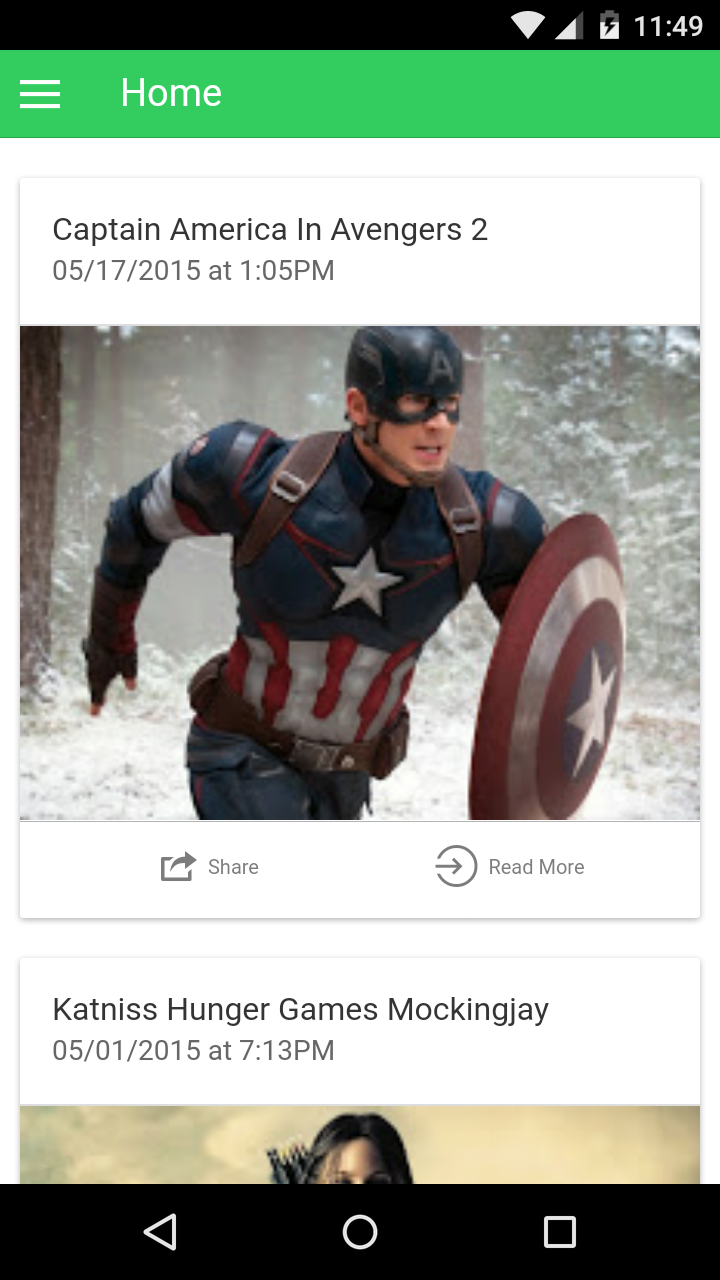
Home screen

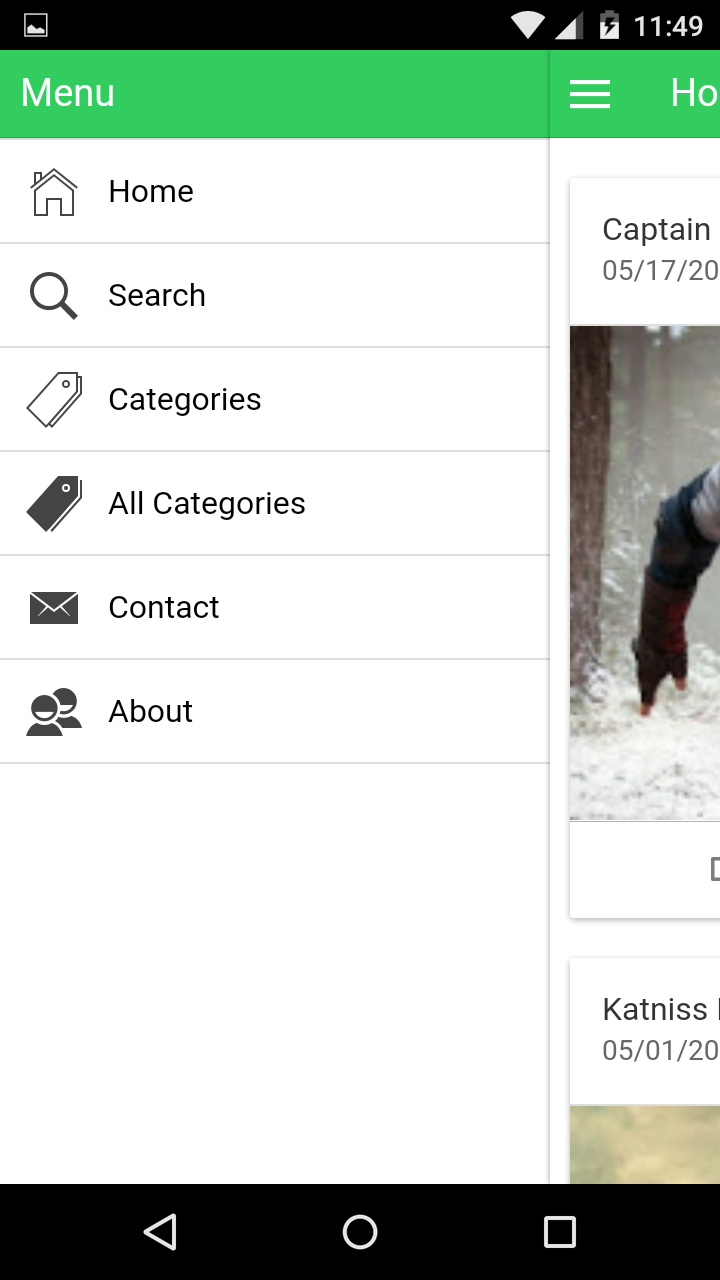
Sidebar

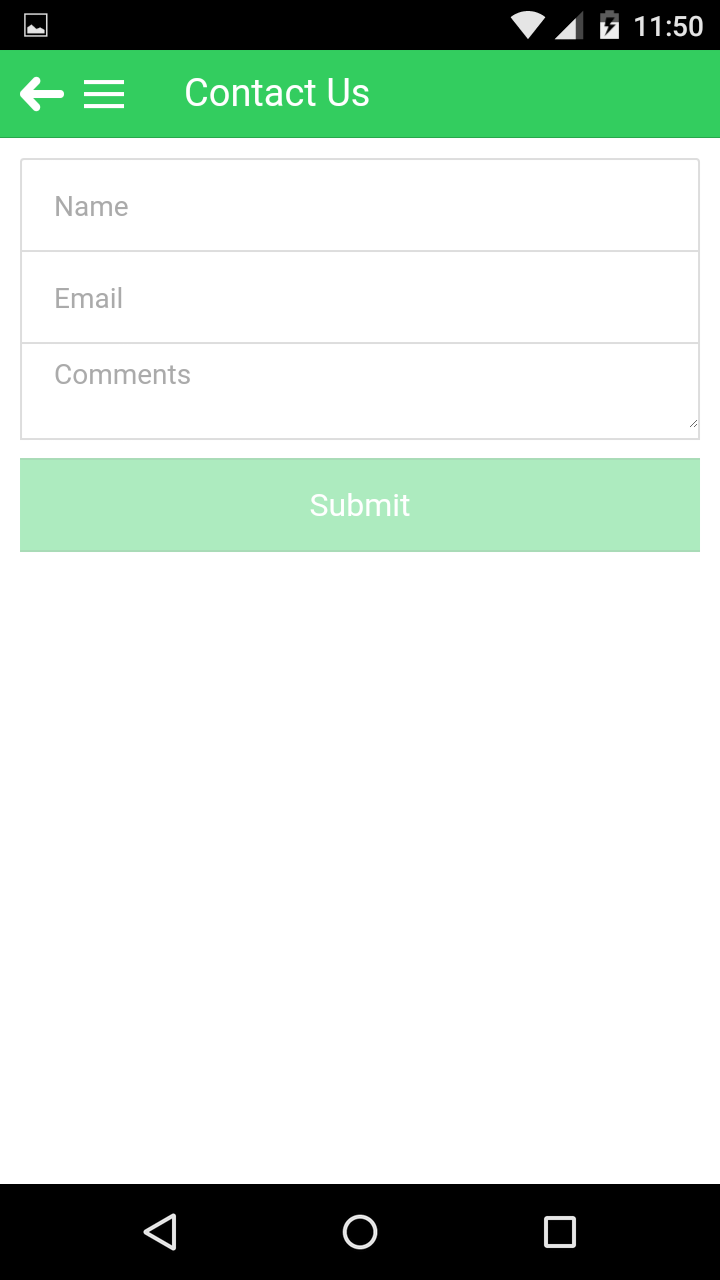
Contact us page


Download BloggerCordova Ionic Cordova/Phonegap Blogger App (Full Applications)

SMS Scheduler (Full Applications)

Description

Schedule SMS in several simple steps and never forget to greet your friends for birthday or for any other occasion. SMS Scheduler is inspired by the latest trends in Material Design and everything within the app happens with meaning. The app has AdMob integrated for monetizing.

Features

  • Android Studio Project
  • Material Design
  • AdMob
  • Easy customization
  • Detailed documentation
  • Dedicated support team

Demonstration

Please note that the demo apk WON’T send real SMS. It will only simulate the process in order to give you option to test it. When you purchase the product, you will get the real SMS feature.

Please read below before adding new comment / contacting us via email

1) There are a lot of questions that are already answered, so please use the search field in Comments section to get answer quickly!

2) If you can’t find answer for your question in the Comments section, please visit the Support section. There you will find some useful information and answers.

3) If you want to ask quick question it’s good idea to post a comment, but if you have an issue, please contact us via the contact from in our profile. Please make sure to point for which product you are asking.

4) Please be patient, while you are expecting answer/reply from us. During the weekends and holidays we will need more time to reply to all comments and emails. Please note that we are doing our best.

Download SMS Scheduler (Full Applications)

Interactive Map of North America (Charts and Graphs)

Interactive Map of North America

This is an interactive resizable vector map template built in HTML5 code and runs with javascript based on the new technique of Scalable Vector Graphics (SVG).

Features:

  • Easily customized and NO Javascript knowledge required.
  • SVG (Scalable Vector Graphics) based, so it can be enlarged as much as you want while preserving the quality.
  • Works perfectly on desktop along with mobile devices including Smartphones: iPhone, iPad, Tablets, etc.
  • Responsive and fully resizable.
  • The map has 16 clickable countries and you can put unlimited number of clickable push pins anywhere on the map.
  • The map can be used as interactive map of North America or a blank map with clickable pins or both (countries and pins) as in the demo.
  • Each country or pin can be linked to any webpage.
  • Each country or pin can be activated/deactivated.
  • Each pin can be customized individually (shape, position, colors, hover content, URL, etc).
  • Easily integrated with WordPress using HTML Snippets plugin.
  • The map is 100% hand drawn dot by dot in Adobe Illustrator for highest quality and best optimization.
    Note: We can customize the map for your own needs (private work).
  • Small file size > Faster load speed > Better for SEO and Google ranking.
  • Compatible with all major browsers including Google Chrome, Firefox, IE9+, Safari and Opera.
  • Full documentation is included. and an interactive X, Y coordinates guide is included (Similar to this).

Download Interactive Map of North America (Charts and Graphs)

Filepicker – Multi file uploader (Loaders and Uploaders)

Filepicker – Multi file uploader

Demo: http://demo.hazzardweb.com/filepicker
Docs: http://docs.hazzardweb.com/filepicker

Filepicker is an advanced file uploader script built with PHP and JavaScript (jQuery) that allows to upload multiple files to a server without any hassle, offering a large number of options to play with and easy ways to change its behavior to better suit it for your needs.

The uploader includes three plugins for pagination, taking pictures with the webcam, image cropping and also makes use of the Intervention Image library allowing for advanced image editing options. Below you can find the full list of features.

Features:

  • Multi file upload
  • Drag & drop upload
  • File upload progress
  • File list display
  • Crop plugin
  • Webcam plugin
  • Pagination plugin
  • Multiple image versions
  • File validation
  • PHP download mode
  • Image editing via Intervention Image
  • Tons of options
  • Easy customization
  • Mobile support
  • RESTful API
  • Follows PSR-2 and PSR-4 standards

Download Filepicker – Multi file uploader (Loaders and Uploaders)

Visual Composer Mailchimp Addon (Add-ons)

Visual Composer Mailchimp Addon lets you easily insert the mailchimp subscription forms into the post and pages using Visual Composer plugin.

MailChimp Sign-Up Forms

Easily create sign-up forms for your MailChimp list. Display the form anywhere on your site using the Visual Composer.

Features

  • Easy to Integrate
  • Just needs Mailchimp api key to integrate with your mailchimp account
  • Design your Forms using existing VC elements
  • Highly Flexible, add any existing VC elements in between your subscription forms.
  • Custom fields supported

Note : You need Visual Composer installed before you can use this addon.

Changelog


Version 0.1
------------------------------------------------------------------------------------
 Initial Release

Download Visual Composer Mailchimp Addon (Add-ons)

Posts Flip Book (Galleries)

Description

Displays Posts as Pages of a Flip Book using Shortcode. You can also create multiple books with multiple Shortcodes.

Features

  • Multiple Shortcodes Support
  • Custom Width
  • Custom Height
  • Touch Support
  • Keypress Support
  • Custom Speed of Turning Pages
  • Custom Starting Page
  • RTL and LTR Reading Directions
  • Custom Content Padding
  • Show/Hide Page Numbers
  • Closed Book View
  • AutoPlay
  • AutoPlay Delay
  • Turn Page by Clicking on Page
  • Navigation Tabs
  • Arrows

Live Preview

WordPress Posts Flip Book

Admin Settings

WordPress Posts Flip Book Settings

Another View

WordPress Posts Flip Book

Download Posts Flip Book (Galleries)

SP Vertical Menu – Responsive Prestashop Module (Prestashop)

SP Vertical Mega Menu – Responsive Prestashop Module

SP Vertical Mega Menu is designed to help you to show vertical category navigation with subcategories follow the columns are configured. In additional, you can add new menu item and add link to this. One of the interesting things about this module is it enables you to show thumbnail icons for parent menu item.

By showing all navigational options at a single glance, we are sure that your visitors can easily find what and where they want without having to spend a lot of time.

The Admin Panel is clear, intuitive and easy to understand, you can create your own custom search engine and put it any position you want. This is really a compact, utility module and indispensable for any eCommerce site.

Let view our Live Preview to feel more!

MAIN FEATURES:

  • Support Prestashop 1.6.0.9 to 1.6.0.14
  • Fully compatible with IE9+, Firefox 2+, Flock 0.7+, Netscape, Safari, Opera 9.5 and Chrome
  • Support responsive layout
  • Support multiple shop and multiple language
  • Allow to add column number for each menu item
  • Allow to select which category sources to be shown
  • Allow to add icon for each menu item
  • Allow to add link for top menu and child menu
  • Allow to set opened links in: New Window/Same Window/Popup
  • Support to add content at the top of module and the end of module

Download SP Vertical Menu – Responsive Prestashop Module (Prestashop)

Hierarchical Category Management (Project Management Tools)

Follow me on CodeCanyon Follow me on Twitter

What is it?

Nested sets or Nested Set Model is a way to effectively store hierarchical data in a relational table. The main features are:

  • Generation of select elements for forms
  • Generation of lists (ul) consistent with Twitters Bootstrap framework
  • Generation of raw nested (multidimensional) arrays so everyone can extend the script if needed without much trouble

As an bonus you get a Database class which makes use of PHP’s PDO for communication with the database. You can
easily get rid of it and implement your own database class.

Example #1: Creating nodes

The following code

// $root stores the id of the new node
$root =  Mptt::factory()->create_root('Root node');
             Mptt::factory()->create_child('Child node 1', $root);
             Mptt::factory()->create_child('Child node 2', $root);
$child = Mptt::factory()->create_child('Child node 3', $root);
             Mptt::factory()->create_child('Child node 4', $root);
             Mptt::factory()->create_child('Child node 5', $root);
                 $sibling = Mptt::factory()->create_child('Child of child', $child);
                 Mptt::factory()->create_sibling('Sibling of child', $sibling);

Please analyze the code carefully…it will generate a data structure similar to the one on the screenshot bellow:

Screenshot of Data structure

Example #2: Generating form elements

To make a select element simply pass the id of the desired node to the factory method and then call as_select() on the returned object

// Calling as_select will generate a valid select element
$root = 1;
echo Mptt::factory($root)->as_select('node_id');

Screenshot of generated html select box

Example #3: Getting the path of a node

// Calling get_path will generate a path to the desired node
echo Mptt::factory()->get_path(7);

You can than print the path with a simple loop.

Array
(
    [1] => Array
        (
            [id] => 1
            [title] => Root node
            [lft] => 1
            [rgt] => 16
        )

    [4] => Array
        (
            [id] => 4
            [title] => Child node 3
            [lft] => 6
            [rgt] => 11
        )

    [7] => Array
        (
            [id] => 7
            [title] => Child of child
            [lft] => 7
            [rgt] => 8
        )
)

Example #4: Deleting

To delete a node and it’s chidlren simply call the delete method and pass the id of the node you want to delete to it

// don't forget to do some validation after you get the id
$node_id = $_POST['node_id'];

Mptt::factory()->delete_id($node_id); ?>

Example #4: Check if node is leaf

A leaf node is a node which has no child nodes. Checking this factor can be usefull if you want the user to specify exactly what’s requested from him.

// don't forget to do some validation after you get the id
$node_id = $_POST['node_id'];

if( Mptt::factory()->is_leaf($node_id) )
{
    // it is leaf ... do whatever you want
}
else
{
    // it has child nodes, show an error message
}

Example #4: Configuration

There is a number of things you can do to make the returned list more suited for your purposes. Please take a look at the config parameters bellow:

echo Mptt::factory(array('only_leaf' => TRUE, 'limit' => 5))->as_select('node_id');

List of configuration parameters, their description, default and expected values

key default type description
only_leaf false boolean (true/false) Select only leaf nodes from the database?
only_leaf_select false boolean (true/false) Make nodes with children unselectable when using as_select()?
limit NULL integer Limit the number of returned nodes (only usefull in combination with the only_leaf parameter)
indenter ` `(four spaces) string The bit of text that makes depth of the node visible in select elements
prefix_leaf ⊢ string Sign that is prepended to the title of leaf items
prefix_non_leaf ∟ string Sign that is prepended to the title of non-leaf items

Complete list of functions and their description

as_array() Returns raw array
as_html() Creates a multi-level menu compatible with the Bootstrap css framework
as_select() Creates a HTML form select element of the whole tree
create_child() Creates a new child node of the node with the given id
create_root() Creates a root node
create_sibling() Creates a new sibling next to the given node
delete_node() Deletes a node and all it’s children
factory() Sets config and returns Mptt object
get_items() Gets items depending on provided criteria and stores them in a local array
get_node() Gets an object with all data of a node
get_path() Gets a array containing the path to defined node
is_descendant() Checks whether the node is a descendant of another
is_leaf() Checks whether the node is leaf or not (A node is leaf when it has no child nodes)

Questions

If you have any questions before buying, please don’t hesitate to send me contact me.

Download Hierarchical Category Management (Project Management Tools)

MC Smart Shop (Miscellaneous)


MC Smart Shop Script is a multi-purpose classifieds listing php script that will meet requirements of sellers. Anybody have products to sell will find this software very useful to manage your products. This script is written in PHP / My-SQL provides a complete Online Shop Portal Development Solution to Sellers.

Features :

  1. Responsive Clean Design.
  2. 2 Versions Included (Multi-Sellers and Light Version for Single Seller)
  3. Right To Left Support
  4. Admin Dashboard.
  5. Sellers Dashboard.
  6. Multi-Languages Support.
  7. 9 Languages Included (English, French, German, Spanish, Russian, Arabic, Farsi, Turkish and Chinese).
  8. Easy to Add New Languages.
  9. Multi-Currencies Support.
  10. Easy to Install and Use.
  11. Monetize With Google AdSense

Customization is available for low cost

Multi-Sellers Version Demo

Front End : http://microcode.ws/demo/smartshop

Admin Dashboard : http://microcode.ws/demo/smartshop/adminlogin.php

User : [email protected] , Password : admin

Seller Dashboard : http://microcode.ws/demo/smartshop/login.php

User : [email protected] , Password : password

Lite Version Demo

Front End : http://microcode.ws/demo/smartshop-light

Download MC Smart Shop (Miscellaneous)

WooCommerce Ceneo.pl / Nokaut.pl Integration (Integrations)


Ceneo.pl / Nokaut.pl Integration is a WooCommerce extension that generates XML files which can be used to integrate your WooCommerce store with Ceneo.pl and Nokaut.pl, which are Poland’s leading e-store platforms. With your your store registered in Ceneo and Nokaut, as well as your products being displayed in their search results and comparisons, you’re definitely more likely to reach more customers and achieve sales success. The extension makes great use of Ceneo’s and Nokaut’s integration rules, allowing you not only to map the categories in your WooCommerce store to Ceneo and Nokaut categories, but also to set special
properties for each of your products depending on the product’s type.

Installation

  1. Connect to your server’s FTP / cloud
  2. Copy the “woocommerce-ceneo-nokaut-integration” folder from the zip into the “wp-content/plugins” directory
  3. Login to your WordPress administrator panel
  4. Click the “Plugins” tab and you will see your newly installed plugin – activate it.

Usage

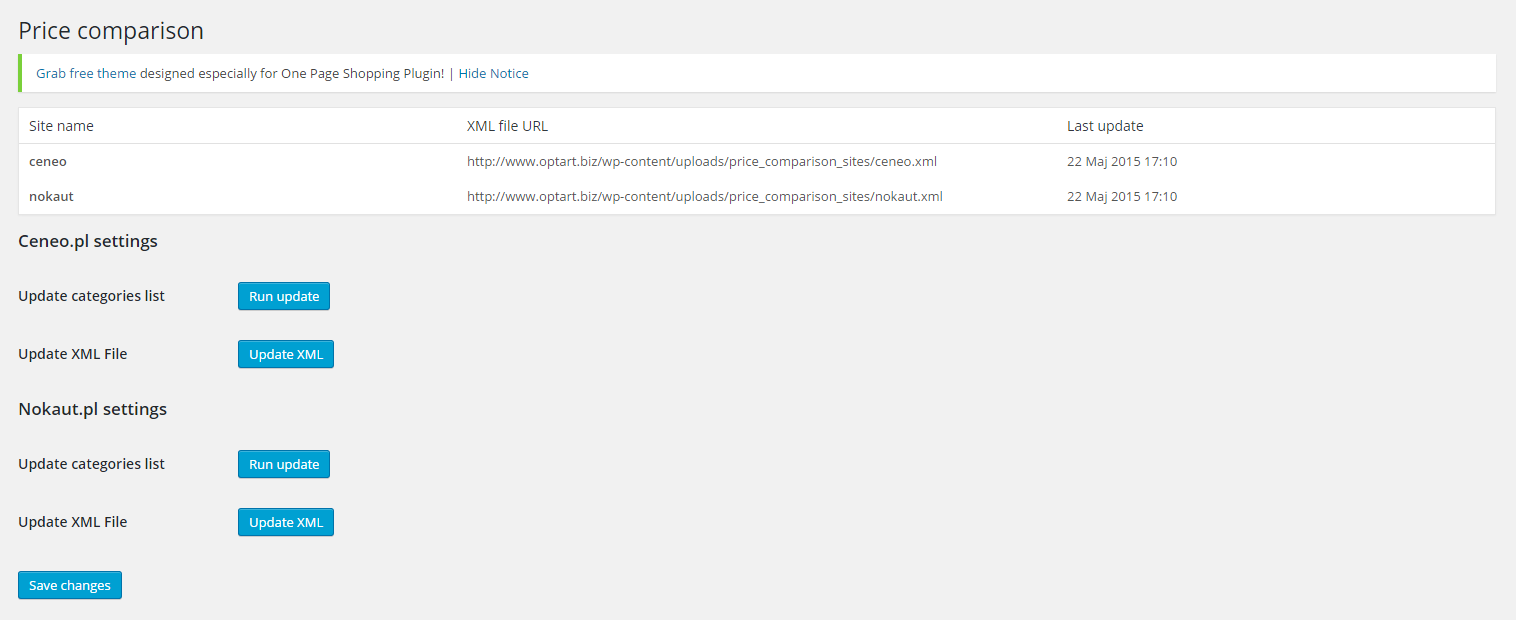
After the activation you will see a new option in the WooCommerce list in your panel – “Price comparison”. Please click it.

On this page you can find links to the XML files, which are updated every 3 hours. There is a last update information next to each link so you can easily check if they are are up to date. You can also update the files yourself using the Update button. In case Ceneo or Nokaut categories change, you can use dedicated buttons to update those categories so you can later map your store’s categories to them. After you configure your e-store for integration, you will have to send the XML links to Ceneo and Nokaut so they can display your products. You only have to do it once, as the files update automatically.

Categories

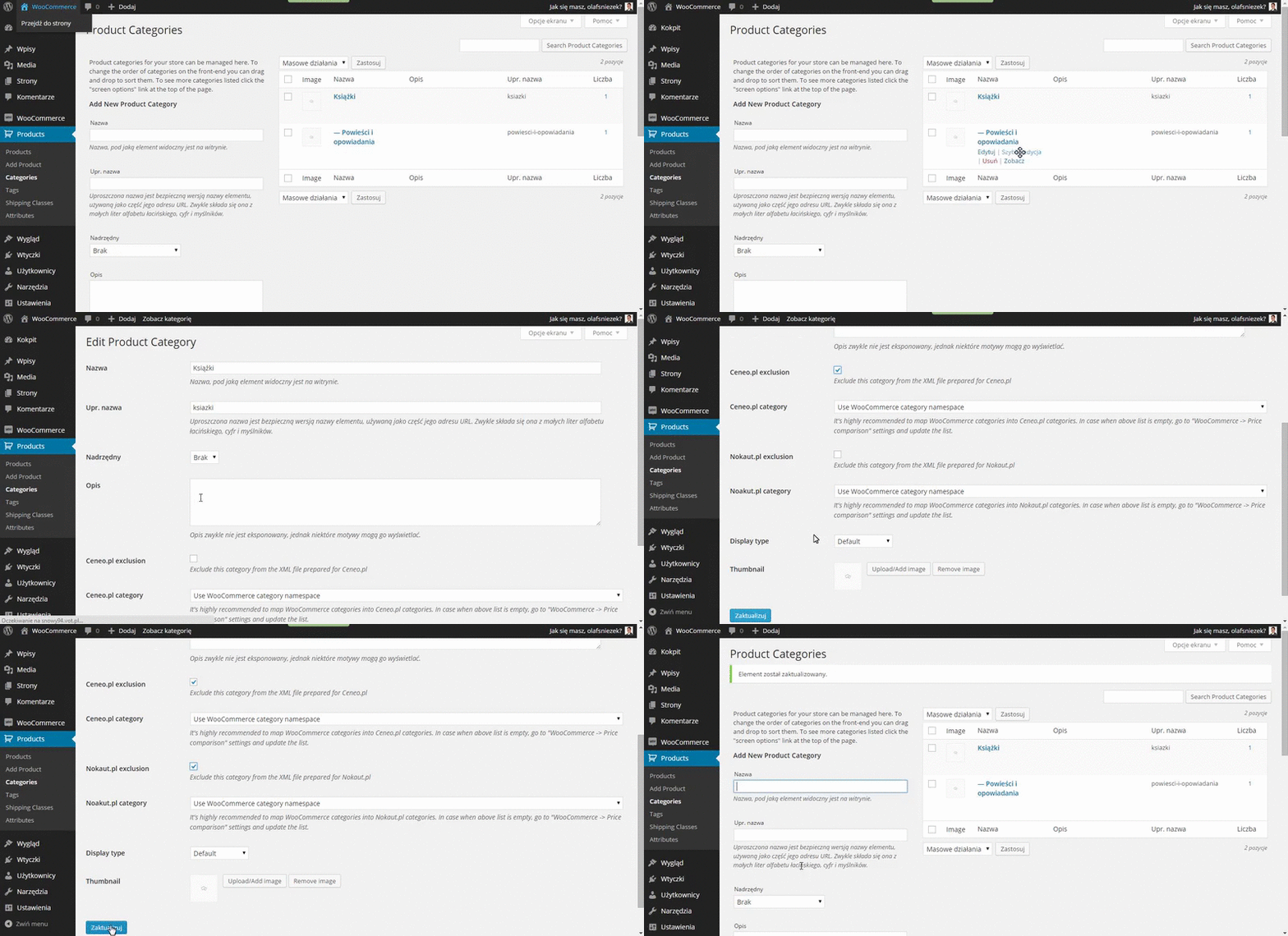
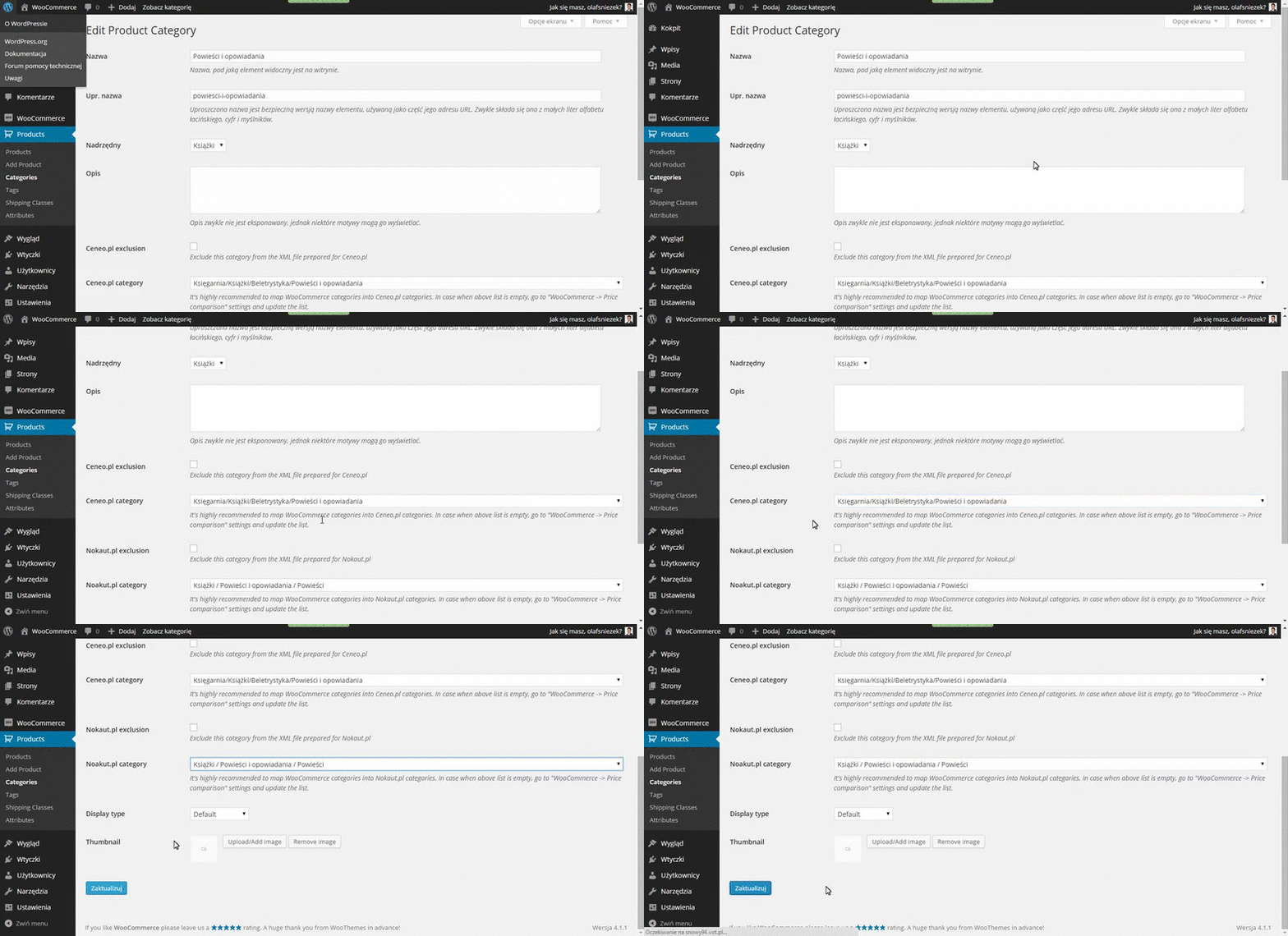
In the picture below we can see two categories: “Ksi??ki” (books) and its subcategory “Powie?ci i opowiadania” (novels). If you look at Ceneo and Nokaut categories, you will see that there is a general books category but in fact all the products in this category belong to its subcategories, novels for example. You can only map your shop categories to Ceneo and Nokaut categories containing products, so most probably only to the lowest level subcategories. Therefore, we exclude the general books category (Ksi??ki):

from the integration and we map our subcategory to corresponding Ceneo and Nokaut categories:

Products

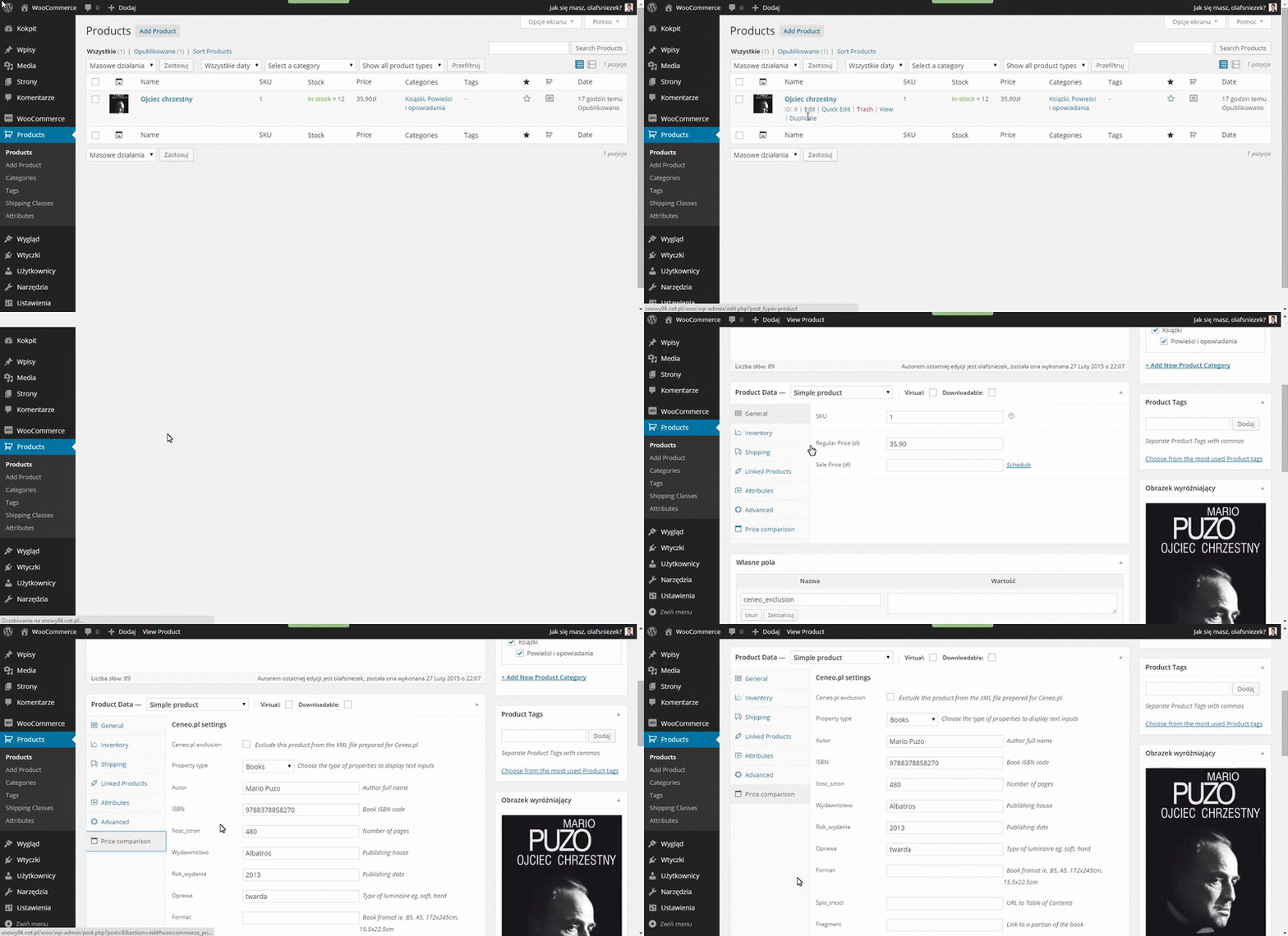
Now we move to our products. In the example below there is a book that belongs to both our categories (parent and subcategory). On its edit page we can see a new section – “Price comparison”. You can choose if you include or exclude the product from Ceneo and Nokaut there, as well as set product properties which will be displayed on Ceneo or Nokaut pages. What’s more, there are several sets of properties for Ceneo depending on the product’s type:

Our product is a book, so we have chosen Books from the Property type list. You can see that we have provided some significant information here like the author or the ISBN code. For Nokaut, the only property that should be set here is the ISBN code. All this data will help integrate your products with Ceneo and Nokaut better, therefore making your products easier to find for Ceneo or Nokaut customers.

Changelog

  • 1.0.1
    2015-05-22

    * Fixed XML update

    * Added manual XML file update for each site

    * Fixed unnecessary ”!” in CDATA in XML files

    * Fixed loosing category list if error on category update
  • 1.0.0 2014-07-07
    * Initial version
    * Removed PHP namespaces
    * Changed text domain
    * Change location of braces, according to WP coding standards

Download WooCommerce Ceneo.pl / Nokaut.pl Integration (Integrations)

Brands List module for Prestashop 1.6 (Prestashop)

Brands List Page is a module for stores with high number of brands.
With Brands module you will be able to present all your brands on one clean list.
Users will be able to filter brands simply by pressing a letter.
Additionally you can promote brands you want to be more visible.

Module is fully customizable – you can change font styles from whole google fonts directory, fonts and background colors.

Brands module is multistore compatible and responsive.

Here you can check how it works:
http://lionshop.polcoder.com/en/brands

Download Brands List module for Prestashop 1.6 (Prestashop)

Crea8social Membership Addon (Social Networking)


NEW!!Turn your Crea8social into a Social Network with Paid Membership features.

Support PayPal Payments

Features

  • Create up to 3 Premium Membership Plans
  • Restrict Page and Communities access based on membership
  • Auto membership expiration
  • Access denied message
  • Payment success message
  • Hide content from public and guests
  • Use PayPal sandbox to test the system
  • HTML messages in the Memberships Page, Access denied page, transaction pages
  • Set Membership plan expiry by days
  • Addon uses Paypal as the payment processor.
  • Works with your existing front end theme or the Admin theme

Updated Documentation

Please visit https://www.codepik.com/crea8social-membership-addon/ for the updated documentation.

Important

Please purchase the extended licence if you wish to add membership fees to the addon.
Feel free to contact me for any Addon installation support or customization.

Download Crea8social Membership Addon (Social Networking)

Plate III – music & streaming plugin for WordPress (Media)

Plate III player is one of the best player plugins for WorldPress. It will be a good choice both for internet radio stations, blogs and artists fan sites. Plate III is fully responsive, also it’s got retina ready design so you don’t have to worry about the picture, the retina display users will see. Say “no” to blurry reflections!

Plate III copes with mp3 files, Shoutcast and Icecast streams, uploads artists and titles from meta, and uses covers from Last.fm. Its fully compatible with WordPress native media gallery.

It’s easy to install and use Plate III on any device. That’s really one of the best WordPress player, you’ve ever seen, as it’s got all you’ve ever wished for. The configuration page allows you to choose the way you’re own player looks without changing the original code. Top internet radio stations all around the word preferred Plate III. Just scroll down and you’ll see the real examples.

Features

  • Alternative Flash backend – our player works even if your users browser doesn’t support html5 media. In such case the user will see the flash player variant.
  • Plugin gives you opportunity to add as many players on one page as you wish.
  • To add players on page you can widget or shortcode.
  • Add songs directly from WorldPress native media gallery.
  • Icecast and Shoutcast streams support.
  • Inertial playlist scrolling – with this user will not have to scroll playlist every time
  • Uploading current artist and title for streams
  • Retina ready
  • Fully responsive
  • Search for big playlists
  • 3 original cool player skins
  • Uploading covers directly from Last.fm
  • Touch screen support

Our player around the world:

The player’s designs listed here are custom-designs. They all are copyright by their authors. The List includes players created both by HTML and WorldPress version of Plate III player.

If you’d like us to include the site developed by you to this list, please email us.

People, who already purchased this player say:

“ Customer Support is great and product is great.”

<footer style=”font-style:italic”>- welshhuw</footer>

“ Best solution for my Radio Station’’
<footer style=”font-style:italic”>- developerx86</footer>

“ work very well, and easy to customize, developer helps if needed. excellent product”

<footer style=”font-style:italic”> – electmedia</footer>

“ Fanstic looks good plays great.”

<footer style=”font-style:italic”> – Techembrace</footer>

“ It’s an excelent player I can use it on my Radio Station!!!!”

<footer style=”font-style:italic”> – replicaradio</footer>

“Great script! Hope the support is great as well!”

<footer style=”font-style:italic”> – rkrossi</footer>

“nice player ever :D”

<footer style=”font-style:italic”> – Lrandom</footer>

“Nice and fine worked plugin ;)”

<footer style=”font-style:italic”> – Nokaari</footer>

Download Plate III – music & streaming plugin for WordPress (Media)