WooCommerce Payplug Payment Gateway (Gateways)

The PayPlug extension for WooCommerce allows you to take credit card payments redirect to their secure third party site to make payment. PayPlug is a leading provider of online payments solutions with a presence in Germany, Austria, Belgium, Spain, France, Finland, Ireland, Italy, Luxembourg, Netherlands, Poland, Portugal, United Kingdom, Slovenia and Switzerland. PayPlug accept the payment in Euro Currency. Supports payments, WooCommerce Refunds API.

PayPlug Accepts Major Credit Cards / Debit Cards

  • Visa
  • MasterCard

Features

  • Data validation performed before submitting to PayPlug.
  • PayPlug payment ID is recorded for future reference on Successfull payment
  • Payplug Refund Functionality using Refund API

Installation

  • Go to Plugins in WordPress dashboard and click on Add New.
  • Upload the plugin zip file and install.
  • Activate the plugin.
  • Go to WooCommerce > Settings > Checkout tab to configure the plugin options.
  • Select PayPlug from the Payment Gateways Menu.
  • Check the field ‘Enable/Disable’ to enable the gateway.
  • Enter your PayPlug private key for your live site as well as sandbox.
  • Select the appropriate settings for your site.

Have any Question?

Email: [email protected]
       Skype: sales.elsner

About Elsner Technologies Pvt. Ltd.

Elsner Technologies is a premier web development and design company in Ahmedabad in Gujarat, India. We specialize in developing professional websites and high end web based applications such as large scale e-Commerce solutions and custom shopping cart development. You may choose from an array of service offerings such as feature rich website design and development, website upgrade and SEO services.

Connect with Us


Download WooCommerce Payplug Payment Gateway (Gateways)

Elegant Slider Addon for WPBakery Page Builder (formerly Visual Composer) (Add-ons)

Introducing – Elegant Slider Addon for WPBakery Page Builder (formerly Visual Composer)

You can create stunning responsive sliders with Elegant Slider Addon for WPBakery Page Builder WordPress Plugin on any page. Video or Image usage, predefined templates included in the plugin.

Free Item Support

Documentation

Top Features

  • Create responsive Elegant Slider to your site within a second
  • Video or Image usage
  • Predefined WPBakery Page Builder templates included
  • One click predefined template/element usage
  • Works/Compatible with Standalone WPBakery Page Builder & Any WPBakery Page Builder bundled Theme
  • Fully responsive
  • Just install and go in a second
  • Extensive free support & documentation

Supported

  • IE8+
  • Firefox (latest)
  • Chrome
  • Safari
  • Android
  • iOS (iPhone, iPad)

Changelog

  • v1.0.0 – Initial Release ( June 14 2018 )

Download Elegant Slider Addon for WPBakery Page Builder (formerly Visual Composer) (Add-ons)

IonFashion Ecommerce UI (UI Elements)

IonFashion is a perfect UI kit for e-commerce apps powered by Ionic 3 Framework. It is ,well designed and structured, fully responsive and provides fully customizable pages along-with a rich collection of UI elements specifically made for your next ecommerce project.
Each component of the application template is custom built and it can be further customized with over 25 pages as templates for the more user-friendly environment. The material design will provide a rich native feel for this hybrid application.

Download IonFashion Ecommerce UI (UI Elements)

Bam Events – WordPress Event Calendar Plugin (Calendars)

Bam Events is probably the easiest way to publish, manage and share events on WordPress.

Designed to be the ultimate events calendar and management plugin for WordPress. Bam Events allows you to start creating and sharing events in minutes, with its simple and modern interface – Bam Events is really easy to get started.

Developers can utilize the built-in hooks and filters to create custom event integrations or even completely custom views and templates. Bam Events was created to provide a perfect platform to build add-ons and scale your event’s website.

Features

Create single day events
Create multi-day events
Create all day events
Create recurring events
Create and save event location
Create and save event organizers
Set timezone for events
WordPress customizer support
Multiple archive types and styles
Display event images on archive
Fully localized including RTL support
Google Map API
Ajax archives
Simple event management
Developer friendly with extensive hooks & filters

Download Bam Events – WordPress Event Calendar Plugin (Calendars)

Real Estate Agency Portal (Project Management Tools)

This Real Estate CRM Portal offer a complete solution starting from a Website listing of Properties to Agent Login , Sales and Commission tracking to small and medium size real estate Company. Built on CakePHP and Bootstrap it offers essential features to run your Real Estate Company.

Download Real Estate Agency Portal (Project Management Tools)

Google Hreflang Tag and Canonical URLs Tag Integration to PrestaShop (Prestashop)

Description

Improve your SEO with tags recommended by Google. This module adds Google Hreflang tags that helps search engines correctly recognise the different languages of your store. And Canonical meta-tag into duplicated pages of your store.

What this product does for you:
  • It will optimize natural search (SEO) on all search engines.
  • Recommended by Google Tags.
  • This module tells Google which language you are using on a specific page,so the search engine can serve that result to users searching in that language.
  • If you run a Prestashop store with targeted pages for different countries and/or languages, this plugin is for you. Hreflang tag helps you improve SEO for those regions and languages.
  • Search engines can easily detect the language of a page and automatically match it to the language settings on user’s browser. However, your pages may still be competing with each other in the search results which may affect your site’s SEO. You can implement hreflang tags to fix that.
  • This module easily improve your store’s SEO Adds canonical tags to home page Adds canonical tags to category pages Improves canonical tags on products pages by including category path Adds canonical tags to info pages (about us, shipping, terms, etc) Fixes duplicate home page URL.
  • Now you can solve the issue of duplicate content like:
    This will make your store convert all of the SEO links to only a single word (without any paths).
    So as a result all links to child categories and products will look like this:
    http://www.yourstore.com/child_category
    (instead of http://www.yourstore.com/parent_category/child_category)
    Looks great, right? No more ugly long URLs – only meaningful paths from now on.

Features:
  • Easy to install.
  • Super easy to configure.
  • Built by SEO experts.
  • Automatically generate the hreflang tags with the correct regional language codes.
  • Supporting different languages and / or region.
  • Automatically add a global default (x-default) tag.
  • Automatically add a Canonical URLs Tag.
  • Multi-language ready.
  • Support Multi-Store.
  • Full documentation.
  • Technical Support.

                Module’s Live Demo
Support:

This plugin is supported. All you need to do is contact the developer through the Webtet e-mail or Webtet profile page.

Follow Me

Responsive Brand Logo Carousel for Prestashop - CodeCanyon Item for Sale

Download Google Hreflang Tag and Canonical URLs Tag Integration to PrestaShop (Prestashop)

Amelia – Enterprise-Level Appointment Booking WordPress Plugin (Calendars)

Amelia is a next-generation Appointment Booking WordPress plugin built with the newest technology by an award-winning team.
Amelia is your automated booking specialist, working 24/7 to make sure your customers can make appointments even while you sleep.
Amelia simplifies your booking process to not-a-care-in-the-world level, where you sit and relax while your customers enjoy a fast and hassle-free booking process.



Where can I see the feature list?

Feature list can be found here. It’s not 100% complete, but covers all major features.
Detailed documentation, tutorials, demos can be found on the plugin’s website.
A demo (fake Gym website) can be found here.
A back-end “sandbox” demo is coming in a few days.

Will Amelia be a match for my business?

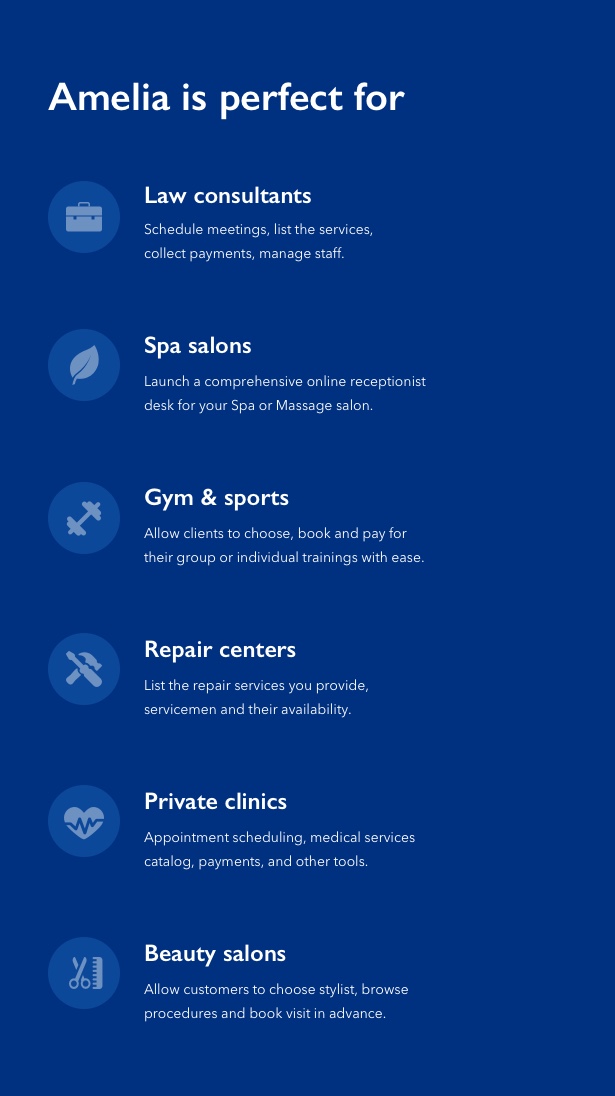
Amelia is perfect for any business that relies on scheduling and booking appointments in advance. Between others:

  • Spa salons.
  • Beauty and hairdresser salons.
  • Private photographers and wedding photographers.
  • Private tour guides.
  • Private clinics, dentists, other healthcare companies.
  • Law and business consultants.
  • Personal life and business coaches.
  • Tourism industry.
  • Repair and service centers.
  • Private psychologists.
  • Cosmetologists.
  • Internet Cafes.
  • And many others…

Is it complicated to set up and use?

Not at all! Installing and configuring are trivial. Each backend page includes tooltips and has a link to related documentation pages in the bottom part.

We tried to make the documentation as detailed as possible to make your onboarding experience smooth – see for yourself!

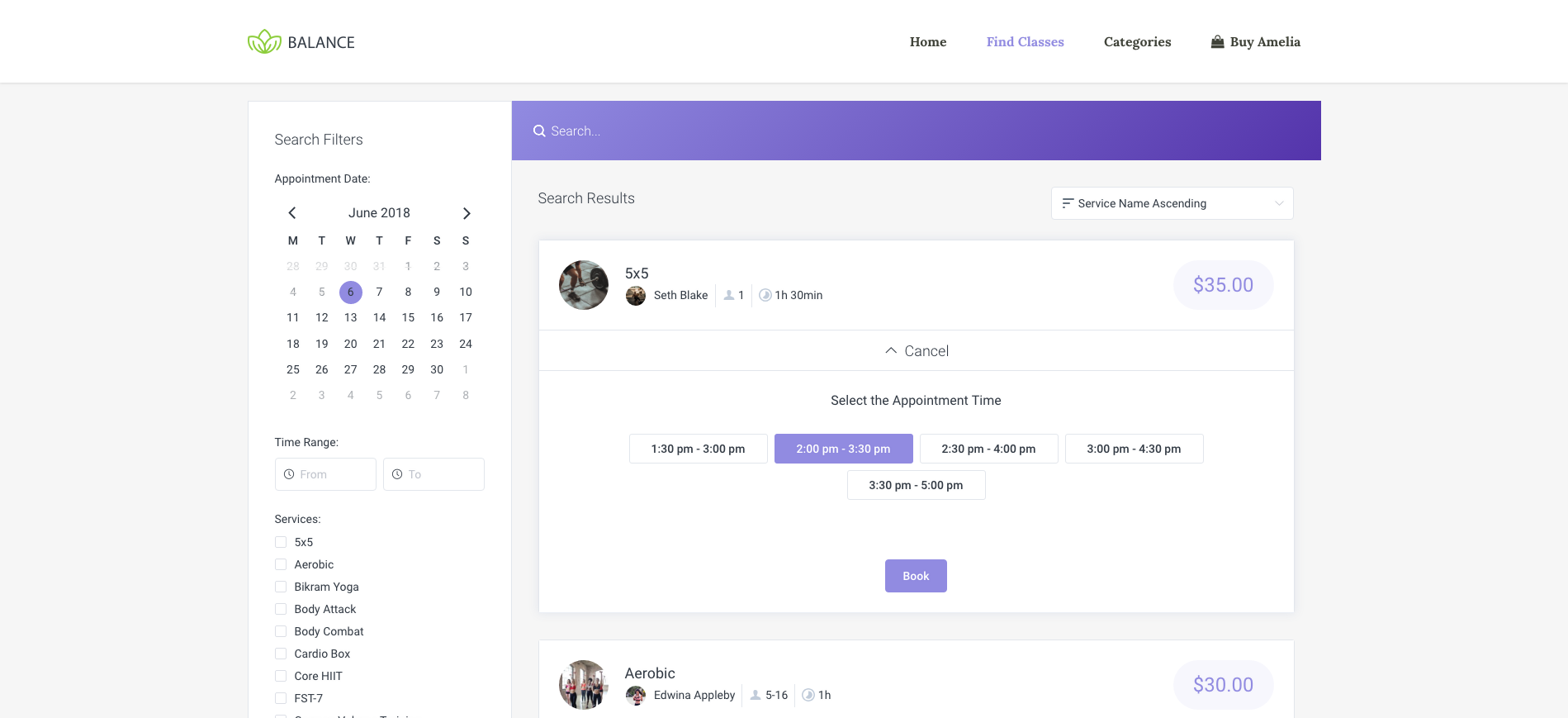
Search-like booking interface

As proved by many major booking websites, it’s very convenient for users to pick an appropriate slot by entering one or more search criteria in a filter interface – if we take a hairdresser salon as an example, one may choose a date and a particular hairdresser and browse through available time slots. Amelia provides a shortcode which allows displaying the search interface in 2 clicks:
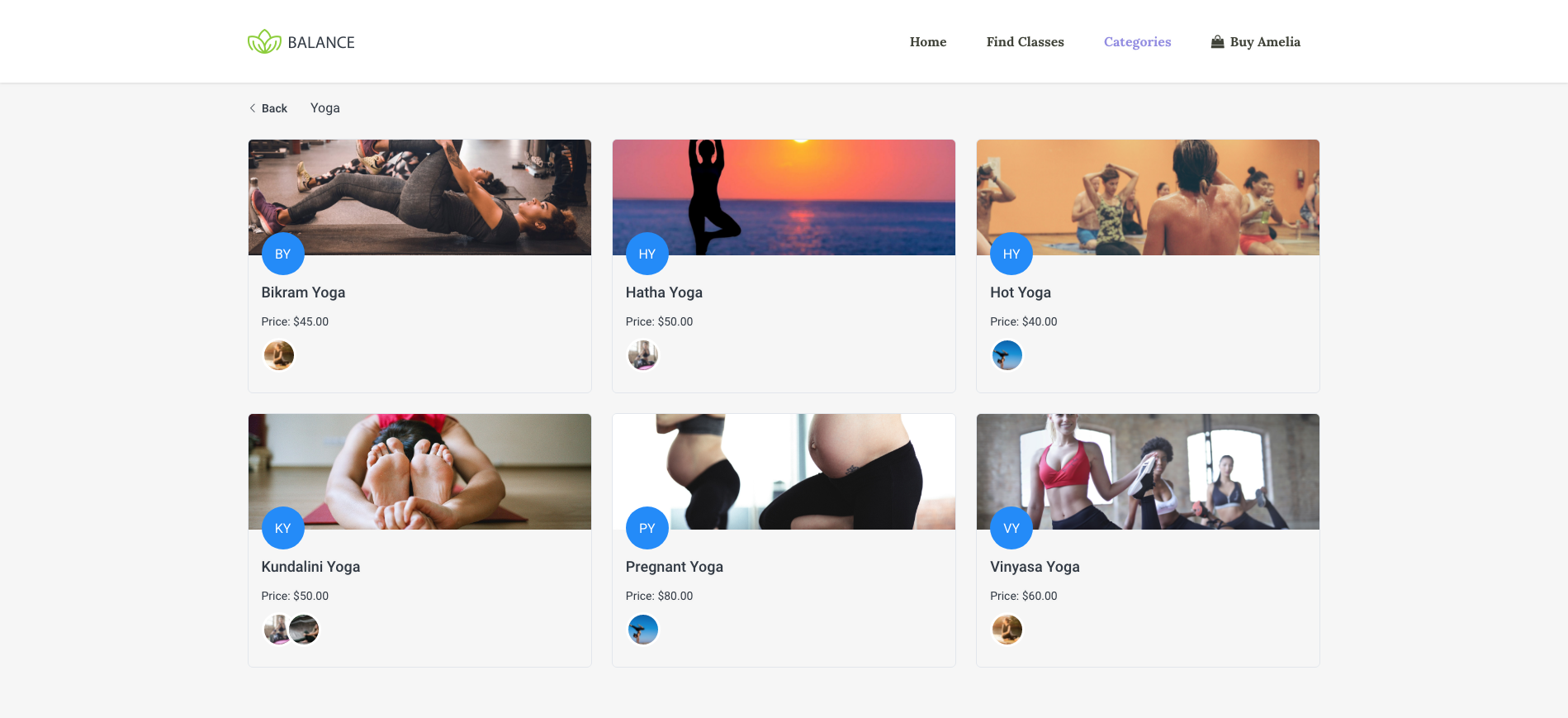
Catalog view for categories and services

If you have Amelia installed on your WP – you don’t have to worry about struggling through adding a separate WordPress page for each service category, each service, use additional plugins for displaying images of a service, or organize services in folders. Amelia provides a built-in interface, where with one shortcode you can show all your service categories on one page, or optionally a single category, or just a single service.
Step-By-Step Booking Wizard

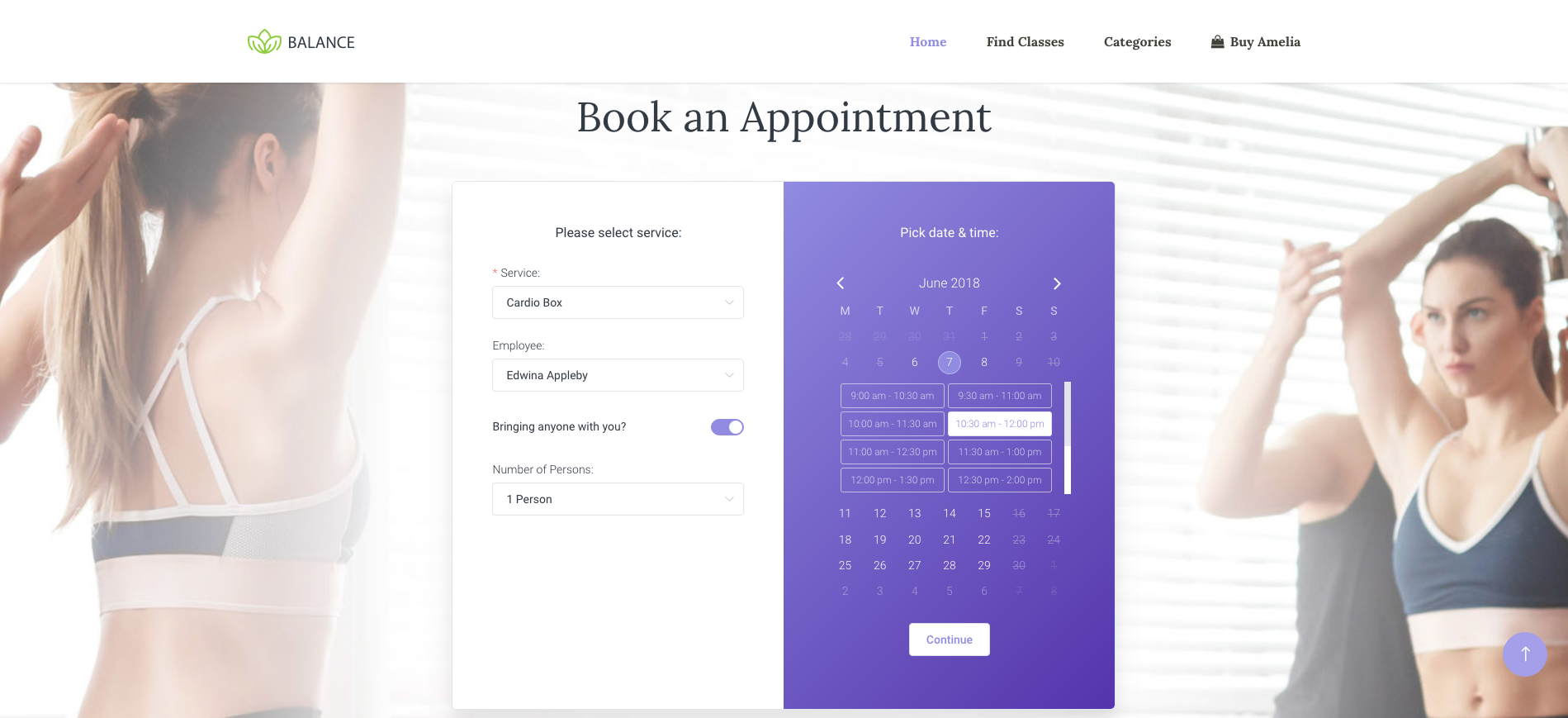
In some cases users prefer booking in a step-by-step manner, where they first choose a service and an employee, then a date, then a time slot, etc. Amelia renders a step-by-step booking wizard as a neat one-page app, which allows to switch between steps smoothly. Wizard is added to any page with a single shortcode.
On-Site Payments Support

If you don’t want to bother setting up external payment systems, and pay transaction fees, you can just use the on-site payments, which means that your customers will pay in cash when they arrive. Payments data is still stored in the database.

PayPal Payments Support

Amelia implements support for the most popular payment system in the world – PayPal. Configuration takes just a couple of clicks, and you can use the Sandbox mode to try it before you launch it in Production mode.

Stripe Payments Support

Stripe payment system becomes more and more popular worldwide. Amelia has built-in support for this system as well – and as everything else, configuration just takes a minute. Stripe allows demo mode before switching to production mode.

Informative back-end dashboard

Amelia was built with the focus on what’s important to all participants of the booking process.
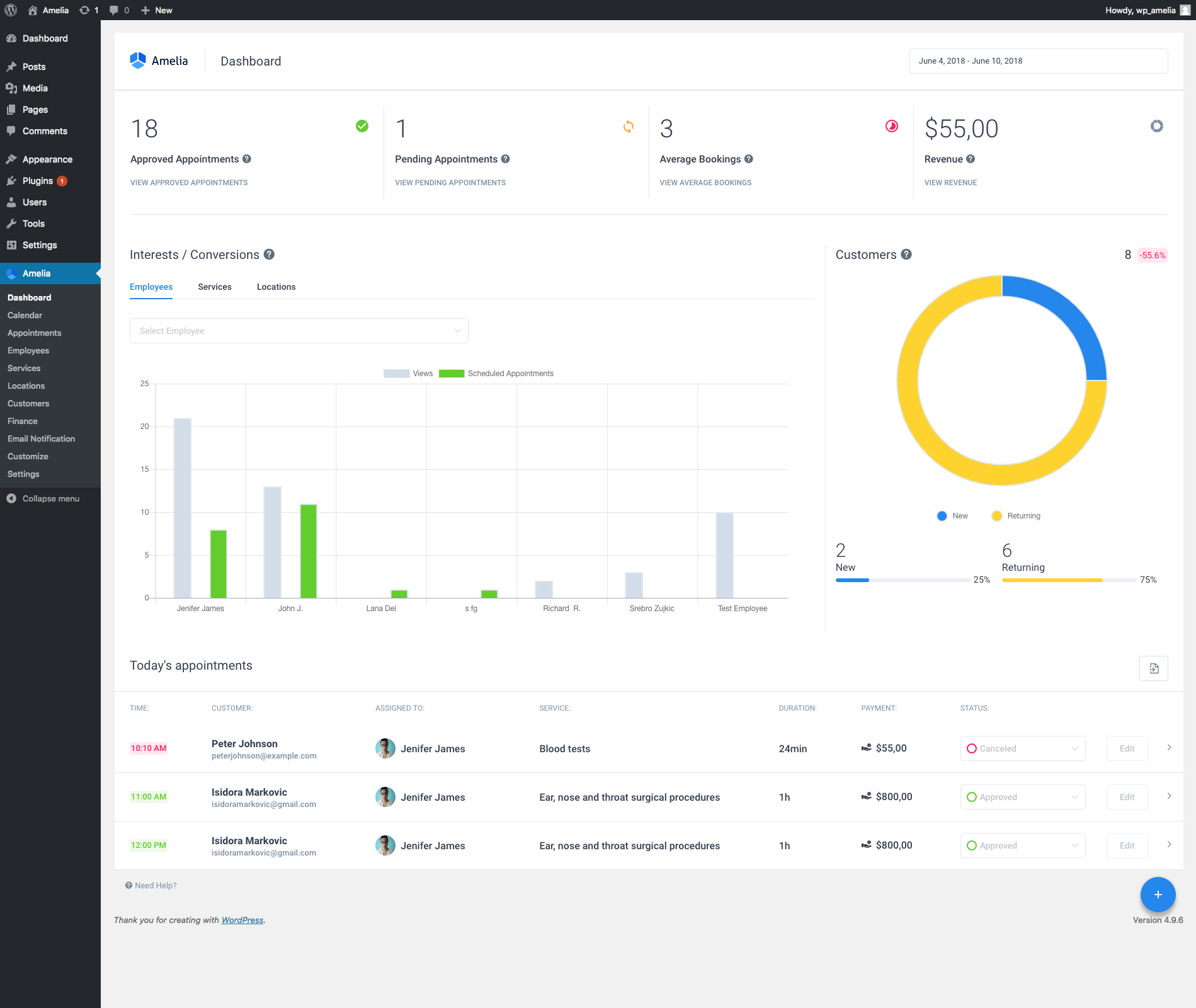
The most important is the business owner. That’s why the main back-end page of the plugin is the Dashboard, which monitors all business-critical KPIs in a single one-page control panel, allowing the business owners and managers to always keep track of all vital parameters.
Interactive Calendar for Scheduling

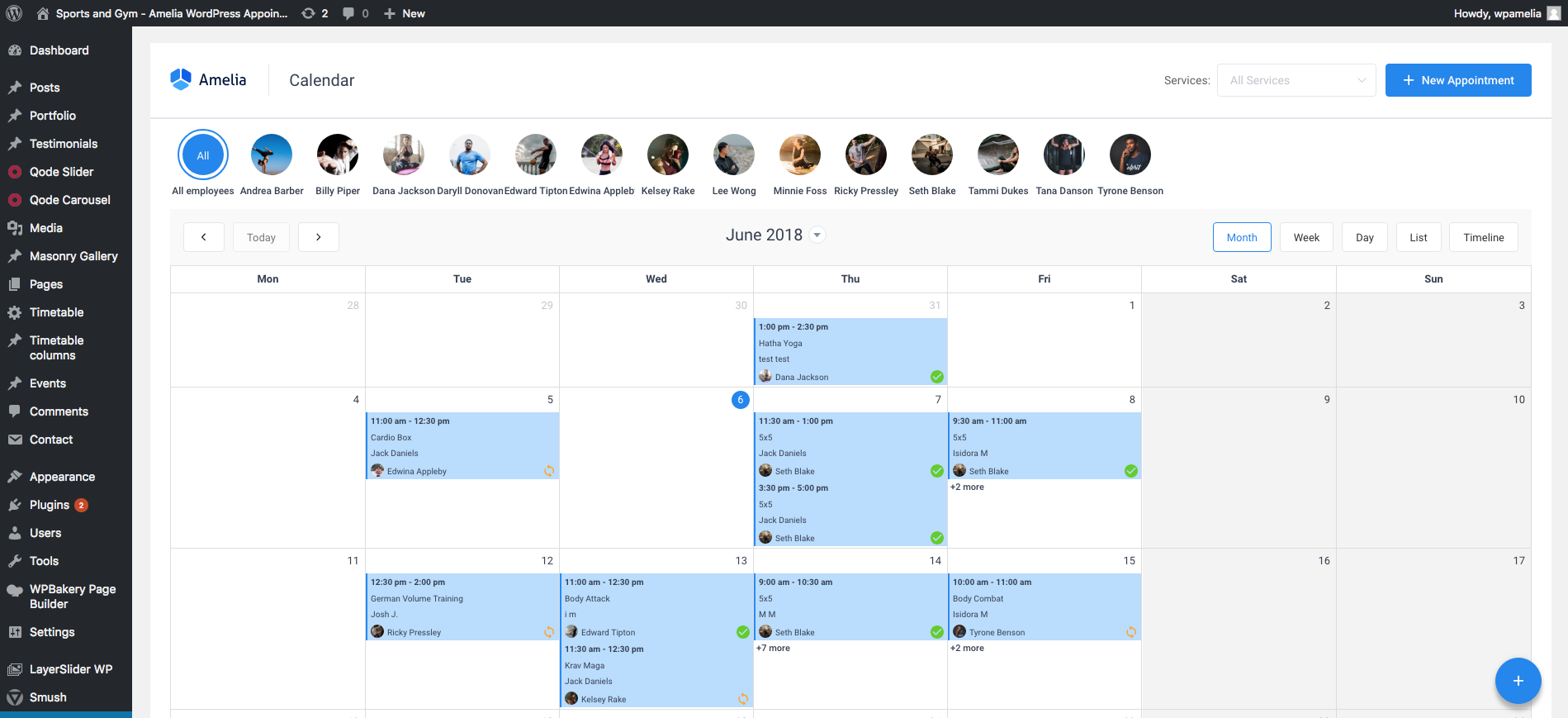
Schedule is always best visualized on a calendar view. We worked hard to prepare a very flexible and detailed calendar view, that can give you any level of insight that you need – all services and all employees, or just particular ones; monthly, weekly, daily views, or more specific List and Timeline views.
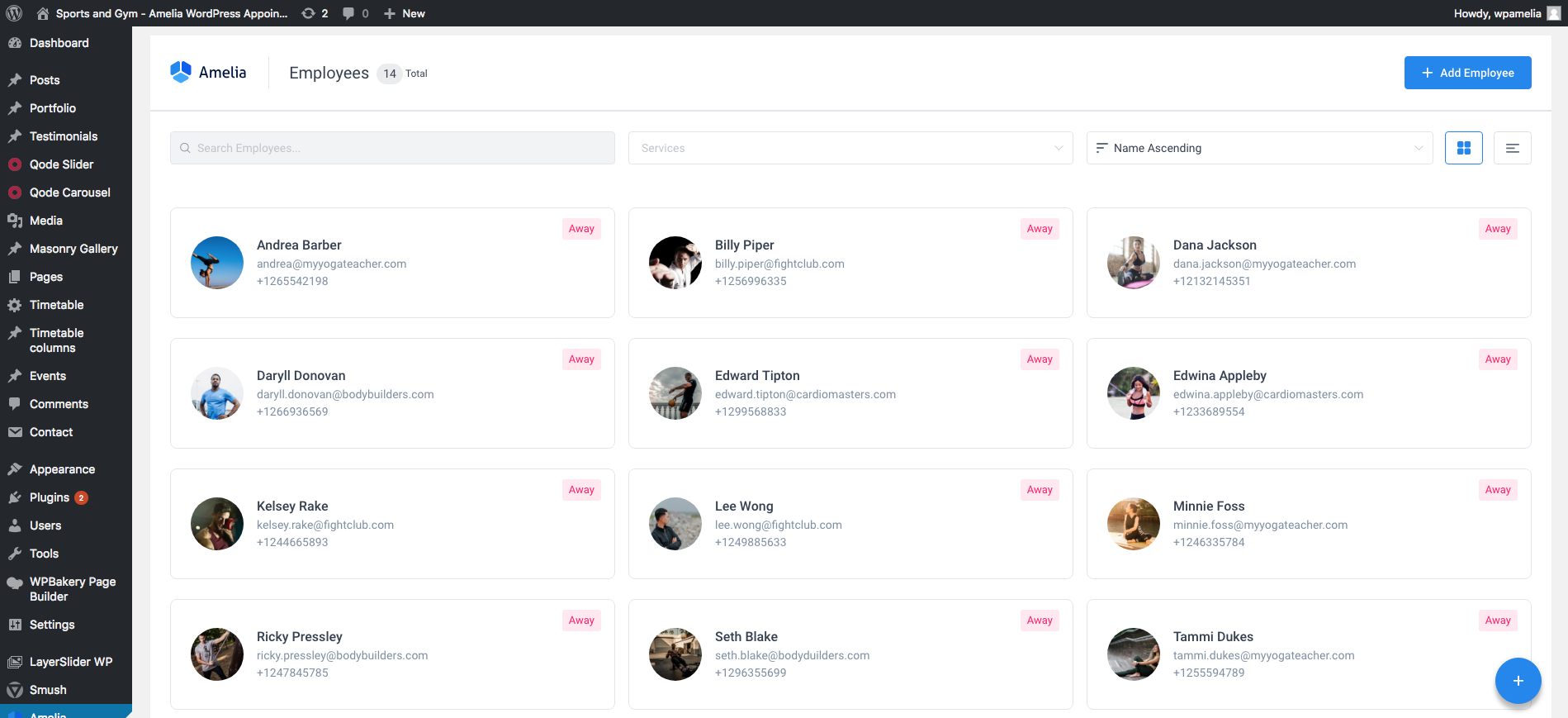
Support for Multiple Employees

It doesn’t matter if your business is a one-man-show, or you have 20 employees – Amelia can support both cases. Each employee can provide a particular set of services, and had individual schedule, days off, working hours and breaks.
Support for Multiple Services and Categories

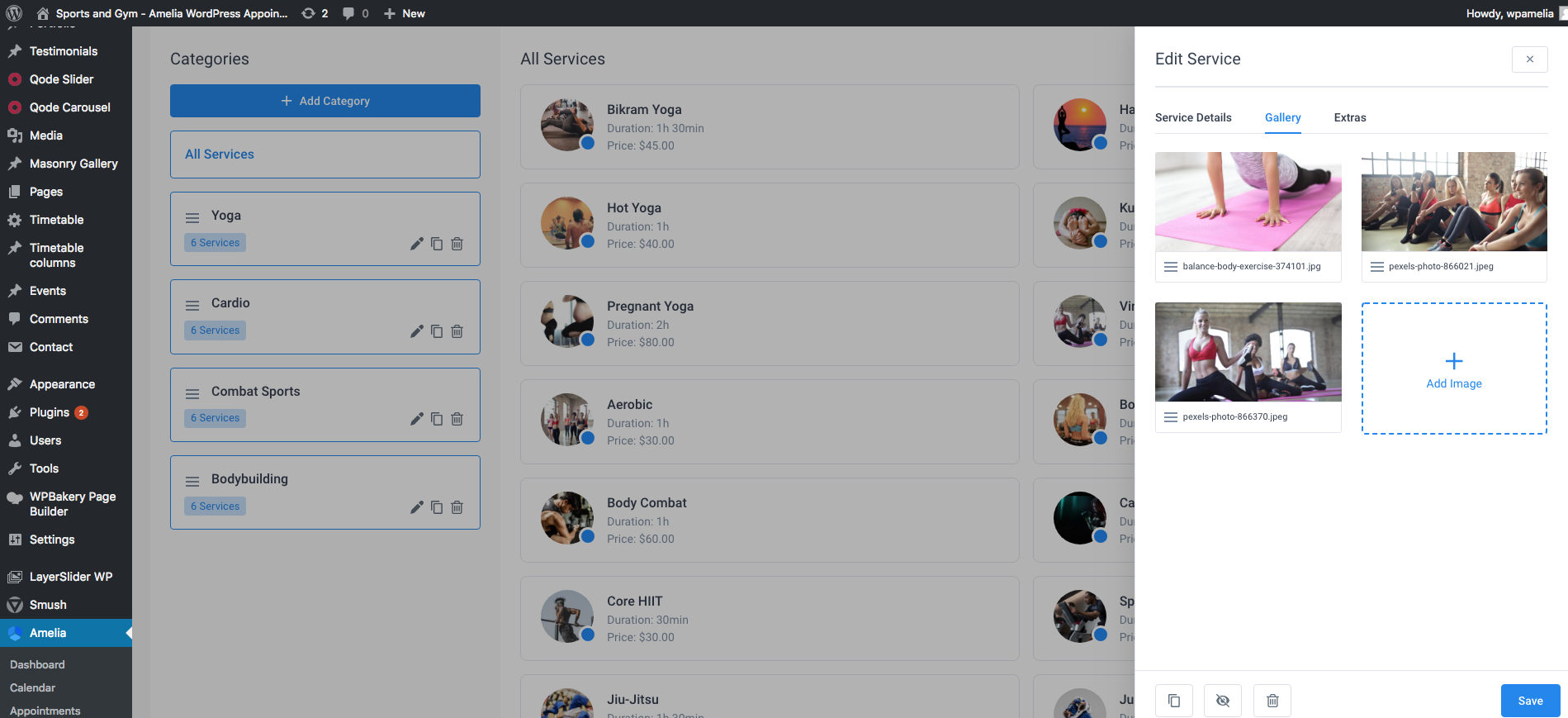
Amelia provides a way to configure a catalog of services and categories (groups) of services – each service can have its own price, duration, allow or disallow group appointments; it is possible to configure buffer time before (time needed to prepare for an appointment) and buffer time after (time needed before same employee will be able to accept new customers, e.g. to rest or clean up).
Support for Appointment Extras (Bonuses)

If you would like to upsell some activities or products to your customers when they book appointments, you can easily do so with Amelia. E.g. if you’re providing a guided tour and would like to sell also a meal during the tour, and several polaroid photos, and include museum tickets – just add these as Extras (Bonuses):

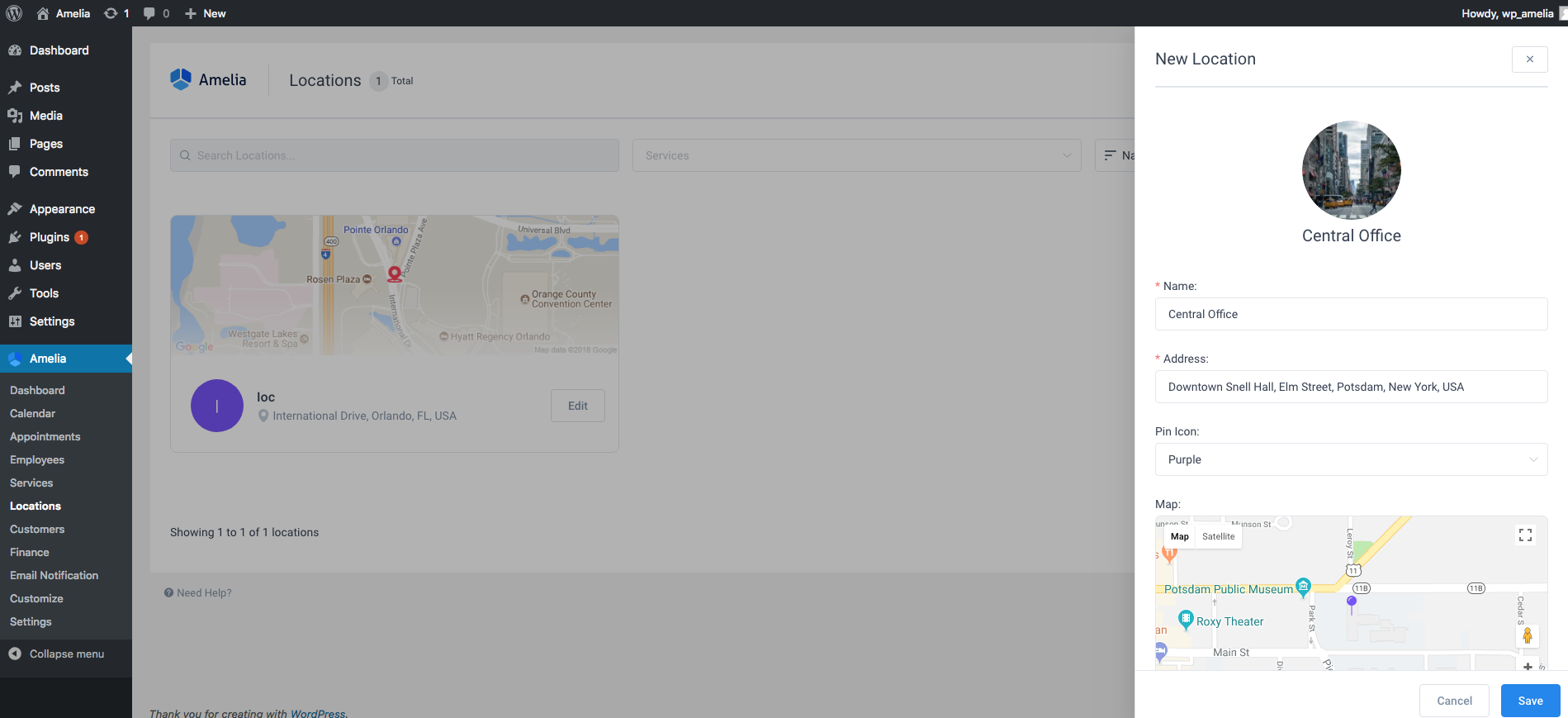
Support for Multiple Business Locations

Amelia will support you as you grow your business and expand to multiple business locations. Each location can be added to the database, employees assigned to locations, and then your customers will be able to additionally choose a location while they book.
What’s next?

We have a lot of our ideas plans for Amelia plugin – however we would love it to bring most value to the end users, so we always listen to the feedback to make it as useful as possible. If you have an idea, suggestion, or if Amelia is missing a key feature that you need – please vote for a feature or suggest your own idea here.

Changelog

Version 1.0 [Submitted 06.06.2018]

Initial Launch.

Download Amelia – Enterprise-Level Appointment Booking WordPress Plugin (Calendars)

HTML5 Banners For Agency – 7 Sizes (Ad Templates)

DOTO-CC-024 Agency HTML5 Banners.

Very easy to edit and detailed help file is included. Google fonts used. This banner set can be customized with Free Google web designer software.

All the files are included with the download file. ( Icons, Shapes)

This set includes the following 7 sizes

-160×600 -180×150 -300×250 -300×600 -320×50 -336×280 -728×90

FACEBOOK MEGA BUNDLE
280 HTML5 Banners

HTML5 VALUE PACK
280 HTML5 Banners

Download HTML5 Banners For Agency – 7 Sizes (Ad Templates)

Multi Purpose HTML5 Banners – 7 Sizes (Ad Templates)

DOTO-CC-084-Business HTML5 Banners

Very easy to edit and detailed help file is included. Google fonts used. This banner set can be customized with Free Google web designer software.

All the files are included with the download file. ( Icons, Shapes)

This set includes the following 7 sizes

-160×600 -180×150 -300×250 -300×600 -320×50 -336×280 -728×90

FACEBOOK MEGA BUNDLE
280 HTML5 Banners

HTML5 VALUE PACK
280 HTML5 Banners

Download Multi Purpose HTML5 Banners – 7 Sizes (Ad Templates)

WooCommerce shortcodes for kingComposer (Miscellaneous)

Missing shortcodes for Woocommerce in KingComposer?
No problem, this is a simple plugin which purpose is to add just that.

What is Woocommerce shortcodes for kingComposer?

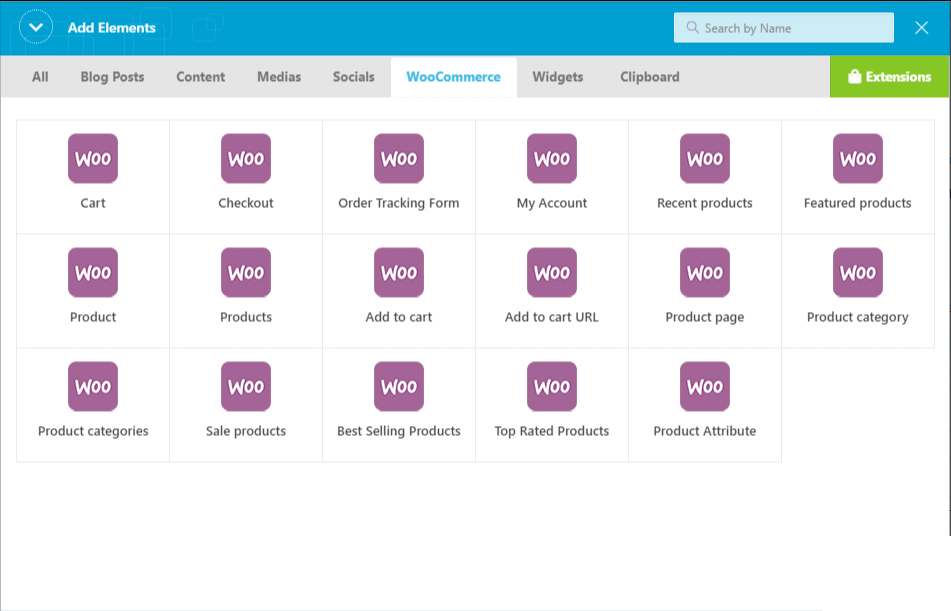
Woocommerce shortcodes for kingComposer – is a KingComposer add-on. will activate WooCommerce shortcodes in your kingComposer. Using this ultimate add-on you can add WooCommerce Shortcodes to content area of any page/post using KingComposer. It is a simple yet powerful KingComposer add-on you ever need.

Screenshots


Download WooCommerce shortcodes for kingComposer (Miscellaneous)

Portfolio Designer for WordPress (Galleries)

Portfoilo Designer PRO WordPress Plugin

Portfolio Designer is a WordPress plugin used to build a portfolio in any desired layout. This plugin is user-friendly, So no matter if you are a beginner, WordPress user, Designer or a Developer, no additional coding knowledge is required in creating portfolio layouts.

This plugin comes with Grid Layout, Masonary Layout, Slider Layout and Justify Layout etc. to build a portfolio. It is very easy and fast to create stunning portfolio layouts and integrate them into your WordPress site using tons of settings options. Using Portfolio Design plugin, you can create new custom post types or use your existing blog posts or custom post type posts. Create unlimited custom post types, portfolios and insert an unlimited number of portfolios on your site or even on one single page via shortcodes. If you like to create a portfolio or looking for a complete solution to manage portfolios, this product is a useful tool for you.

Key Features

1. Unique & effective Effects
It comes with 50+ effective Hover effects using CSS3 and HTML5.

2. Unlimited layouts
This plugin provides unlimited layouts style with the help of Grid layout, Masonry layout, Slider layout and justify layout.

3. 3 Pagination Types
This plugin comes with 3 types of pagination : Standard pagination, Load more and Autoload.

4. Import/Export Portfolio Layouts
Import or Export your Portfolio Layouts easily anytime for your next website or future usage.

5. Filter with Categories & tags
Category and tag wise filtration of your post.

6. Unlimited Custom Post Types
You can create unlimited custom post types and create unlimited layouts using them.

7. Inbuilt Fancybox
In Portfolio designer plugin, fancyboxes are available for portfolio lists.

8. Supports Single Portfolio
In this plugin user can change single portfolio page design using tons of settings option.

9. Support Shortcodes
This plugin gives the support of shortcode. Using shortcode integration, you can easily customize your page.

10. Advanced options
Advanced options to show posts like setting the limit and order of the posts, filtering by taxonomies and terms.

What makes Portfolio Designer Plugin Outstanding?

1. Fully Responsive Templates
Templates are fully responsive with any devices like smartphone, tablets, iPad, laptop, desktop, etc. Individual column options available for each device.

2. Cross Browser Compatibility
Templates are compatible with all major browsers like Firefox, Chrome, Opera, safari etc..

3. Support of Custom Post Type
Set portfolio template design for your custom post types also.

4. No Expert Needed
Plugin is user friendly, no need of expert. Basic WordPress users can also easily use it.

5. Preview of portfolio Layout
Preview style or design of layout before publishing it on front-end.

6. Auto Image Resizing
In this plugin, you just need to upload single image and plugin can generate any size of image on fly.

7. SEO friendly
Portfolio designer plugin is built with search engine optimization in mind to ensure better rankings across all search engines.

8. Import & Export portfolio Layouts
Import & export your favorite layouts anytime and reuse it with another websites easily.

9. Pagination with load more
3 Different type of pagination are available – Paging with Number, Load More and Load on Page Scroll.

10. Google Web Font
Enhance your portfolio page design with 650+ Google Font support. Easily move your portfolio page style to website style via large font collections.

Credits:

Note: Any media, Photo, video used in preview are not included in this item and you need to contact authors to get permission in case you want to use them in your commercial or non-commercial projects.

  • Font Awesome – The iconic font and CSS toolkit.
  • Isotop – Filter and sort layouts.
  • Fancybox – Tool for displaying images, html content and multi-media in lightbox.
  • Slick – slick is a responsive carousel jQuery plugin.
  • SocialShare.js – jQuery plugin for creating custom like buttons and like counters.

Download Portfolio Designer for WordPress (Galleries)

CircleTimer – jQuery Countdown Timer WordPress Plugin (Utilities)

CircleTimer is a WordPress Plugin that allows you to create easy and fast countdown/countup timers for your website. Easy to setup and integrate in any project.

The JavaScript version and Addon for WPBakery Page Builder version of this plugin are now available.

Features Included:

  • Easy plugin installation for WordPress
  • Responsive design
  • Generate shortcode via plugin options
  • Save current timer settings
  • You can change timer type to countdown or countup
  • Supports client-side or server-side (unix timestamp) time
  • Simple and clean interface
  • Resizable width, height, font size and circles thickness
  • Easy font and color change from the plugin options
  • Multicolor circles change over time
  • Show / hide days, hours, minutes or seconds
  • Texts can be changed
  • Supports multiple instances
  • Uses HTML5 Canvas
  • Callback function support after the counting finishes
  • Works in IE, Firefox, Safari, Opera, Chrome
  • Compatible with mobile devices
  • Help file is included

Download CircleTimer – jQuery Countdown Timer WordPress Plugin (Utilities)

SM Product Gallery – Responsive Magento Module (Magento Extensions)

SM Product Gallery is very simple but effective module to display products. With SM Product Gallery, your products’ photo will be well arranged as a gallery with grid layout. Each photo will be displayed on the right side with a large image and short description. This flexible Magento module is totally worth for your website.

In addition, the friendly user Admin interface is really easy for you to control any parameter we provided. You can configures it as your own ideas and place it on any position on your site. Lets see the Demo to feel more.

Let’s access this module’s demo to have the best overview!

<tbody>

</tbody>

# Main Features
1. Support Magento 1.7.x, Magento 1.8.x, Magento 1.9.x
2. Fully compatible with IE8+, Firefox 2+, Flock 0.7+, Netscape, Safari, Opera 9.5 and Chrome
3. Support fully responsive layout
4. Allow to set the number of columns for devices that have different screen widths
5. Allow to select a main category or more categories to be shown
6. Allow to include or exclude Child categories
7. Support to control showing number of products
8. Support to show or hide Featured Products
9. Allow to change max length of title/description of item
10. Allow to display/hide Item Title/Description/Price/Reviews Summary/Add to Cart/Add Wishlish/Add Compare
11. Allow to order to get image with options such as product_image, product_description
12. Allow to change width/height/background of images
13. Allow to set autoplay
14. Support to increase or decrease the speed of each transition effect
15. Support to open link in Same Window, New Window and Popup Window
16. Support pre- and post- text with each instance
17. Support to cache the content of this module.

Download SM Product Gallery – Responsive Magento Module (Magento Extensions)