VisualLine Visual Composer Timeline Addons Pack (Add-ons)

Vt_line_features

Available Features

  • Visual Composer
  • Responsive
  • Bootstrap
  • Major events
  • Events
  • Ending events
  • Vertical layout
  • Horizontal layout
  • Canvas Pointer
  • Canvas Drawing
  • Bootstrap Grid system

DEMO

You can see how the timeline plugin looks like which also been used at one of our theme here

Documentations and Supports

Check the link below for documentation and for related supports questions:

  • You might find what you need at our documentations here
  • Supports are available by submitting tickets via ticksy

5stars_text

We’d be very grateful, it helps us a lot and this is the link on how you give a feedback for purchased items and rate them.

Thanks! :)

Download VisualLine Visual Composer Timeline Addons Pack (Add-ons)

Maps Finder Angularjs Mobile App – With CMS (Full Applications)

Descriptions

Maps Finder Angularjs Mobile App is an application developed using angularjs for maximum performance, App used for helping people when travelling to different city for displays places near to user’s. This app is perfect for those of you who want to develop maps applications based on mobile phone. You could easily compile the application into a native application form using phonegap framework.
You could easily compile the application into a native application use phonegap build.

Android Demo (Apk)

Download

Front-end Features

  • Support multiple platforms
  • Support Admob
  • Support Push Notification Service
  • Support Google Maps v3 (no API key required).
  • Support distances ( Km or Meter).
  • Support Local Storage for bookmark
  • Support launcher for Route and Direction to google maps
  • Support Multi Language
  • Support Review System
  • Support Infinite Scrolling
  • Support save information to phone contact
  • Support Rating System
  • Support Gallery Images
  • Support Infinite Scrolling
  • Get your current location
  • Markers Customization
  • User guide Include
  • Many more..

Back-end Features

  • Support Login System
  • Support Multi User
  • Support User Privilege
  • Fully Ajax Support
  • Upload Lacation Image
  • Support Datatables
  • Support Multi Filter
  • Support Detail Table
  • Support Search and Draggable marker for add location
  • User guide Include
  • Many more..

Demo App

Front-end : Demo

Back-end : Demo (user : admin | pass : admin)

Other Item

Support

You can email me at [email protected] if there is something you want to ask. No problem I’m very happy to answer your questions

Flag Counter

Download Maps Finder Angularjs Mobile App – With CMS (Full Applications)

Vehicle and Taxi Booking for WordPress (WordPress)

Vehicle and Taxi Booking plugin for WordPress is very simple and powerful plugin.

You can easily add booking forms to your wordpress site and take online bookings which willbe stored in wordpress backend and also willbe sent to e-mail.

Your users get address suggestion as soon as they start typing the address.

You can add unlimited vehicle types and set prices per mile per vehicle.

Our plugin automatically calculates the prices per mile per vehicle by calculating the distance users enter for pickup and dropoff locations.

Please see the video demo where we have demonstrated how this plugin works and how it looks on the frontend.

If you have any questions or feature request, please e-mail us at [email protected] and if you like our plugin don’t forget to rate, Thankyou for your Support, i hope you will love our plugin, have a great day :-)

Download Vehicle and Taxi Booking for WordPress (WordPress)

Knowledge Base Manager (Magento Extensions)

Knowledgebase Manager provide feature to the Magento store owner to add Knowledgebase to their website.

Key features

  • Easy and Zero configuration settings
  • Manageable Knowledgebase items and categories from magento admin panel

Demo Url:

http://www.it-heaven.org/demostore/knowledgebase

Admin Demo Url:

http://www.it-heaven.org/demostore/index.php/admin/

user:admin

Password:admin#123

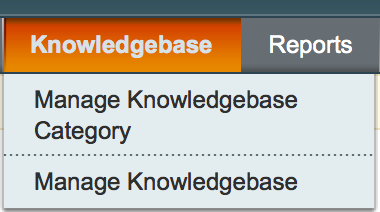
After log in in Magento admin panel we will find the extension in the top menu

In the menu there is two drop down menu

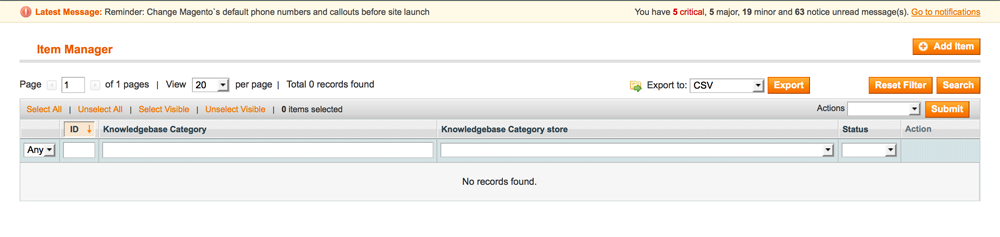
    After click on the Manage knowledgebase category we will see the following screen.

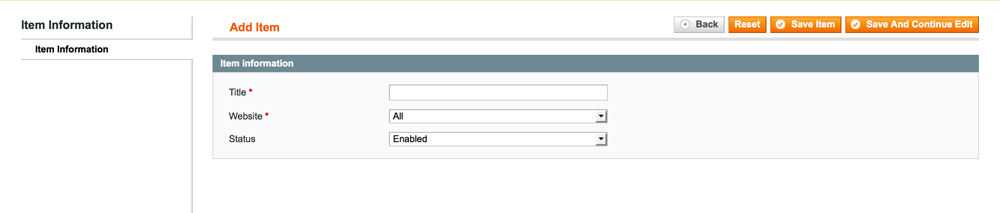
    After click on Add new button we will get the form to add a Knowledgebase Category like the folowing screenshot

    Where we can add the title of the category,status and the store dropdown which indicated which store or website it will be point

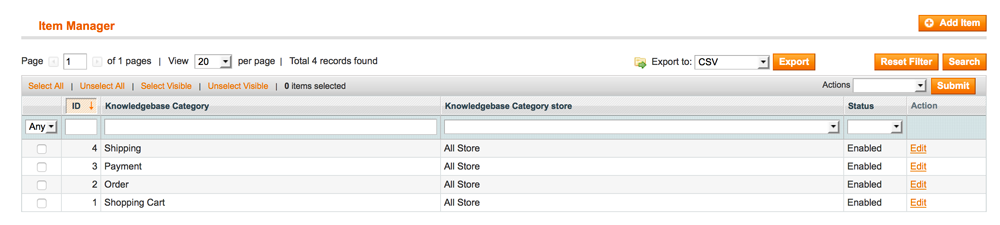
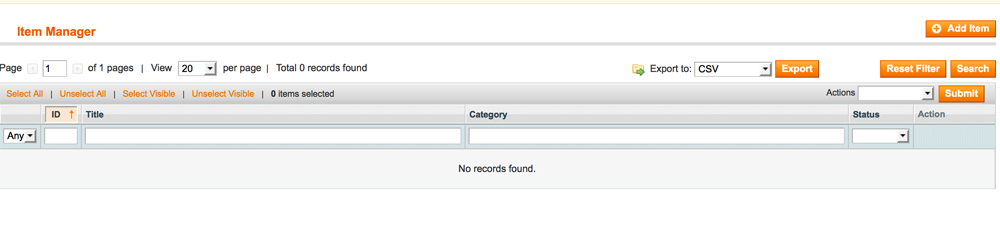
    after add some category we will get the list like this is Manage Knowledgebase Category

    After click on the Manage knowledgebase from the dropdown we will see the following screen.

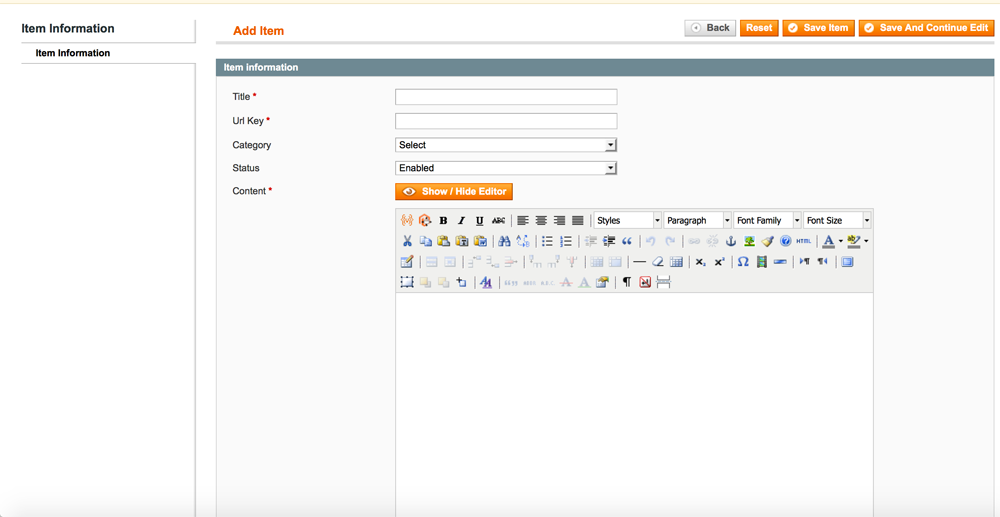
    After click on Add new button we will get the form to add a Knowledgebase Category like the folowing screenshot

    Where we can add the title ,category we created in previous steps,status ,url key and the content same way we can do for Magento CMS pages

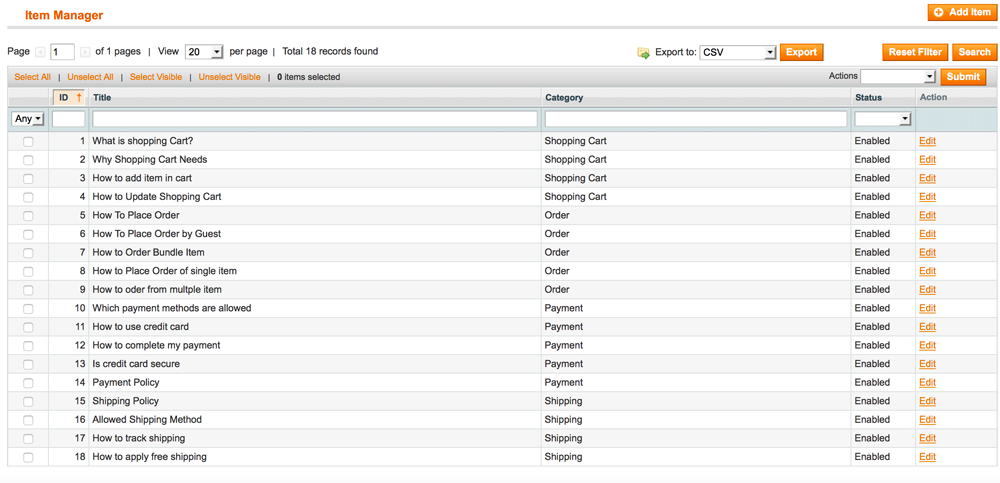
    after add some Knowledgebase we will get the list like this is Manage Knowledgebase

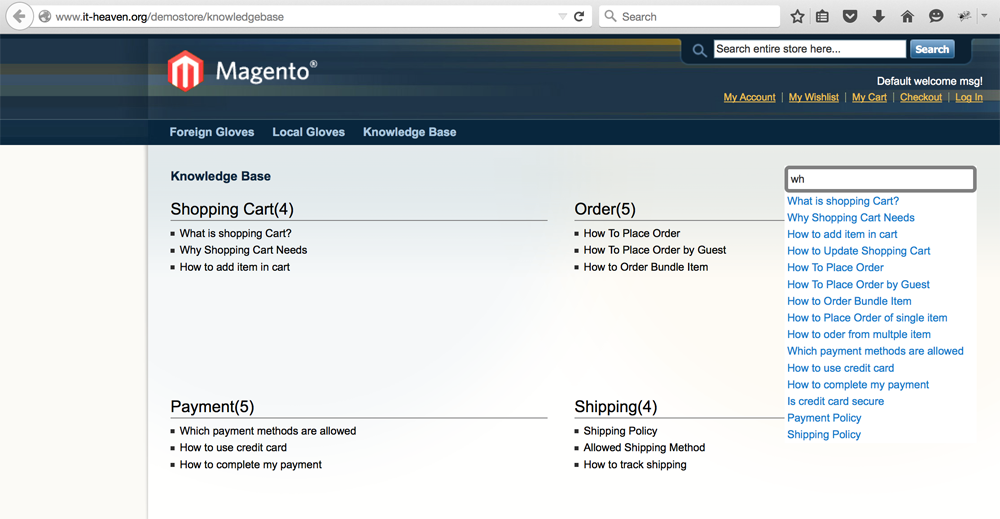
    We have to add a Menu item Knowledgebase in your theme.linked to {store_base_ulr/knowledgebase} and we will see the knowledgebase with autocomplete like this.

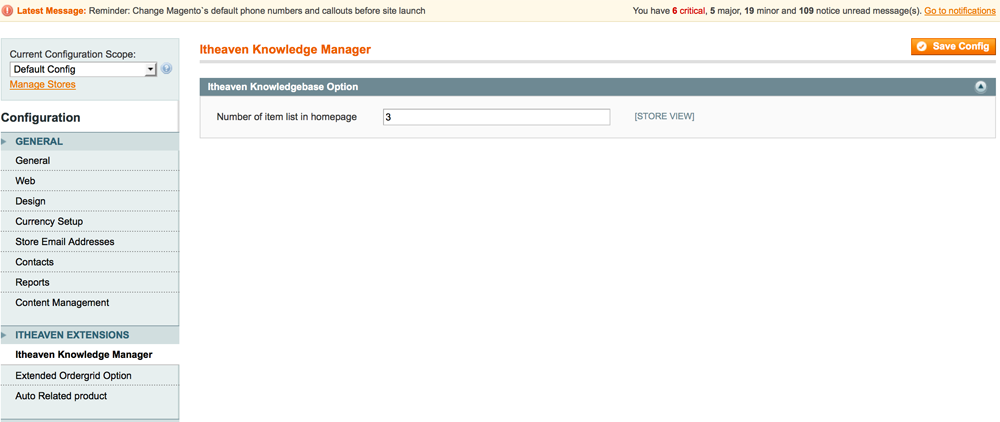
    You can change the number of item per category in Knowledgebase home page from System->configuration

Download Knowledge Base Manager (Magento Extensions)

Mash Mega Menu – Bootstrap (Navigation)

Features

  • Sticky header
  • Responsive design
  • Google web font “Robot”
  • Easy to change menu color
  • Compatible with mobile devices
  • Fontawesome 430+ vector icons
  • 12 columns bootstrap grid system
  • Google material design ripple effect.
  • Menu works with mouse click or hover
  • Various jQuery changeable plugin options.
  • Build with SASS (SASS and CSS files included)
  • Mega menu with forms, search bar or social icons etc.
  • 19 predefined color styles which can be changed easily
  • Auto menu color change based on (morning, afternoon, evening)
  • Drop down with 3 types (full width, half width, multi level small width)
  • Documentation included
  • Clean Design and Code
  • Easy to use

Download Mash Mega Menu – Bootstrap (Navigation)

Automated Product Import for Prestashop (Prestashop)

Looking for fast-paced means of PrestaShop bulk product import? Need to update product catalog through unattended and autonomous import procedures? Automated Product Import is at your disposal. This import utility ensures flawless and accurate PrestaShop import, accomplished at predefined time without your intervenience.

Addon features you will benefit from:
– Schedule Import Tasks – Designate import settings once via intuitive import wizard and run succeeding data uploads at predefined time (on monthly, weekly, daily basis) using them
– Choose File Source – You can import merchandise from local files or those from remote destinations (FTP or HTTP links, URLs containing user credentials)
– Supported File Formats – Data, you need to transfer with Automated Product Import can be stored in CSV, XML, XLS/XLSX (MS Excel format), ODS (OpenOffice format), TXT files
– On-the-fly Data Input or Modifications – Adjust data to be imported or add missing information with the help of expressions instead of manual data handling

You Will Find Addon Advantageous If You:
– create numerous PrestaShop import tasks;
– cooperate with multiple suppliers and expand your business horizont;
– need to ensure consistency and accuracy of data transfer;
– would like to upload internal images or external ones directly from your providers’ sites;
– strive for maintaining PrestaShop inventory on sufficient level, avoiding stockouts;
– manage PrestaShop product combinations in the course of product import;
– want to cut down time spent on data handling and streamline it;

Important! Since Automated Product Import is Store Manager for Prestashop addon, it cannot be used as stand-alone product, thus you should have Store Manager installed.

It means that addon is implemented in Store Manager (Professional and Standard) and by default operates in demo mode, so that you can process up to 10 records only. To unlock full functionality, you have to purchase both applications – Store Manager for Prestashop and Automated Product Import addon to it. Full-functional import will be performed when you register the addon with License Key provided after you purchase this tool. If you use Enterprise version of Store Manager, you do not need to additionally purchase the plug-in.

  • For owners of the PRO version: Addon works without restrictions.
  • For owners of the Standard version: Addon allows you to import up to 2000 products.
  • You can upgrade Store Manager from Standard to PRO version by this link

Automated Product Import is a perfect solution for thriving and resultative Prestashop Data Import which will contribute to your store development a lot. Invest in your business today to get more profit tomorrow!

Link to detailed documentation and quick start guide – http://automated-product-import-documentation.emagicone.com/

Download Automated Product Import for Prestashop (Prestashop)

KidsEducational-Game (Games)

KidsEducationApp

Apps Support All Iphone Device

-Your kids will learn alphabet, numbers, colors, shapes, days of the week, months of the year and much more

-Our educational game shows children the alphabet letters and teach them to recognize letters as they appear.

-Teach your babies with fun.
Your kids will learn alphabet, numbers, animals, fruits, colors, shapes, days of the week, months of the year and much more.

-Our educational game shows children the alphabet letters and teach them to recognize letters as they appear

-As a result, preschoolers kids learn the letters sounds much more faster.!!!

Key Features:

  • Kids Education App for kids free
  • Educational games for kindergarten!!!
  • Sounds of letters
  • Animal sounds for toddlers
  • Colors for toddlers app free
  • Educational games and apps for preschoolers..
  • Shapes for babies apps
  • Numbers for kids games
  • Talking alphabet
  • Learning abc with fun
  • Kids Education App for kids age 10
  • Children recognize letters
  • Educational activities free kindergarten
  • Full ios App source code
  • Admob and Interestrial Add integrated
  • Documentation With Screenshot
  • Video Tutorial

Our Android App source code:

\

Application Video

\

Support Center

[email protected]

Download KidsEducational-Game (Games)

VideoTNT: WordPress In-Content Video Pop-In Plugin (Interface Elements)

VideoTNT – current version 2.0 available for download!

Get New Version of VideoTNT for your WordPress Site Now
Easily Add this Powerful Tool to Your Website - Get More Visitors & Convert Them Easily!#1 Latest Way to Super-Charge Videos in WordPress
Follow PluginStackGet Support for VideoTNT for WordPressGet Latest Version of VideoTNT Plugin for Wp
Three steps to using VideoTNT to create video in-content pop-ups for WordPress
Recently Updated to version 2.0. Lifetime Updates included for Free

VideoTNT is a Powerful Tool to Suprise Your End-Users with Video, then Convert that Attention into Sales & Subscribers

VideoTNT lets you quickly and easily insert highly-impactful video into your posts and pages, then capitalise on grabbing thier attention!

This easy-to-use plugin makes it easy to get more attention from your visitors, and to give them what they want. Whether you want to drive engagement and keep people on pages (boosts your Google Rankings), or to get people subscribed, or buying, VideoTNT has some seriously useful functionality that’ll enhance your website.

  • VideoTNT Drives Engagement:
    • Show video where visitors will see it
    • Mixed-media is proven to engage with visitors
    • Auto-play (or don’t) to drive views
    • Convert the viewers once engaged with on-video CTA’s!
       
  • As well as exploding video in your content, VideoTNT will also:
    • Convert viewers into subscribers
    • Convert viewers into buyers
    • Help viewers share or follow
    • … with 10x powerful built-in CTA pop-overs!
       
  • Which convert your, (engaged), visitors by:
    • Show custom subscribe forms after play
    • Show custom button or image after play
    • Integrated with MailChimp, Aweber, GetResponse & Campaign Monitor
    • Also works with your custom html forms

All this, and more in one super-optimised WordPress plugin

VideoTNT lets you bounce video out at your visitors. These videos get played more, (10x or more in our tests), they get watched for longer (driving up page-engagement times for SEO), and what’s more, as viewers like what they see, they often convert fantastically into subscribers (offer more video for their email!), or sharers/buyers (with lots of custom CTA’s, this is easy with VideoTNT).

Try VideoTNT, before you buy it.

Example of a VideoTNT in action, click to try out the video pop-outs for yourself!

VideoTNT Features

  • Easy Interactive Video Embeds
  • Add’s another channel for Subscribers, Buyers or Sharers
  • Attention-grabbing mid-content pop-outs!
  • Easy to use
    • Create Video Embeds in seconds:
    • Easy-to-add via shortcode [ videoTNT id=123 ] or button
    • Integrated with mail providers
    • Wonderfully fast & easy install
  • 10x Powerful CTA’s:
    • Get Subscribers
    • Get Click-throughs/Sales
    • Get Likes/Shares
    • All Built-in & Customisable!
  • Integrated with:
    • Mailchimp
    • Aweber
    • GetResponse
    • Campaign Monitor
    • Any other provider via Custom HTML!
  • Many, Many Features:
    • Autoplay when Video Pops
    • 45+ Animation Modes
    • 10x Built-in CTA video pop-overs
    • Works with Mobile Browsers
    • New for V2.0: Easily override CSS and more, from settings!
    • New for V2.0: Upload Your Own CTA Image
    • All CTA’s are customisable (text, images, and colours!)
    • + Lots More!
  • Great for:
    • Bloggers with email lists
    • Sales Pages in WordPress
    • Wow’ing visitors with Product Videos
    • Training videos & other video websites
    • Mixing up your content to keep your audience
  • Attracts 10x+ more views to video
  • Add’s another possible channel for subscribers or buyers
  • Improves engagement time of visitors, helping your SEO
  • Add Depth to Your Content!
  • Small footprint (12kb Javascript)
  • Includes Sass Stylesheets for Easy Customisation
  • Modern, efficient code written by pro’s
  • Easy to use settings panel
  • High-performance plugin
  • All the benefits of a stable, much developed & used plugin (v[pluginStackProductVar id=”current_ver”])
  • Full Documentation & Quick Start Guide
  • 5 Star Customer Support via Email
  • Free updates for life

All of this comes with a Super Easy Installer which works out of the box. You can install VideoTNT, add a video and insert the shortcode and have it working from day one. With 10x Customisable CTA forms it’s easy to modify, or tweak to fit with your look and feel, or theme.

VideoTNT Theme Compatibility

VideoTNT will work with all themes. It works fantastically with responsive themes, but because you can set each video’s dimensions specifically, (if you want to), it also works well on older non-responsive themes.

  • All Themes
  • Works fantastically with responsive themes
  • Includes 10x custom pop-overs to match theme
  • Fully customisable colours from inside editor
  • Well ordered elements make CSS tweaking easy
  • Comes with Sass stylesheets for Developer edits

Test drive or Purchase now – Instant Download.

High Quality Code

  • Modern CSS, Easily Customized
  • Compressed CSS for faster loading
  • Uncompressed CSS and Sass also included, for customising
  • Lightweight Plugin Code
  • Tiny Footprint

VideoTNT Tech Specs

  • Current Version: 2.0
  • Requires PHP Version: 5+
  • Compatible with WordPress Versions: 3.0+
  • Uses: CSS3, jQuery
  • All Front-End code Minified and Compressed
  • Tested on multiple server setups
  • VideoTNT Plugin Filesize: 1,593KB
  • VideoTNT.zip MD5 Hash: 00D859C1653E99F1AACF8667AA0CC273

Get Your Copy of the VideoTNT Plugin for WordPress Now

VideoTNT for WordPress Changelog

Version 2.0 – 10/07/2015

CodeCanyon Public Release

>> Improved documentation (Fully re-wrote documentation for v2.0 for improved understanding)
>> Added "Quick Start Guide Video" 
>> Performance Enhancements since v1.7.1
>> Fixed remaining 4 bugs in v1.7.1
>> And still all the goodness of v1.7.1

Download VideoTNT: WordPress In-Content Video Pop-In Plugin (Interface Elements)

Dragon Jump Template (iOS)

Dragon Jump Template – with Game Center

You play as an armed Knight and defending your kingdom and Dragons flying over and try to kill you. Jump on Dragons to kill them or use your spear to kill them while jumping vertically. jump higher by jumping on dragons and Kill the boss for More points.

-IOS source code
-Complete Clear Documentation
-Ads network
-Admob Banner
-Chartboost
-AdColony
-Vungle
-Social Sharing on Facebook and others
-Google Analytics
-GameCenter
-Easy to Reskin
-Interesting Game Play
-Game Rate Feature
-Restart Feature
-Best Score Feature

Download Dragon Jump Template (iOS)

Captain War : Zombie Killer – HTML5 Android (CAPX) (Games)

Captain War : Zombie Killer is a 2d level based game. Kill all incoming zombies.Collect Machine gun and bazooka to destroy all zombies together. Collect Health to increase blood in health bar.

This game is build by Construct 2 Game Engine (Capx File Included).

In Live Preview – Use Keyboard arrow keys to move player and space key to shoot zombies

How To Play

For Desktop Users

Use Keyboard arrow keys to move player and space key to shoot zombies.

For Mobile Users

Use screen arrows to move player and right side fire icon to shoot zombies.

Features

– HTML 5
– Ludei + Ads Supported
– Playable in all platforms (Mobile, PC, etc.)
– Including Constuct 2 file (.capx – all source)
– Easy export to Android & iOS
– Single Touch To Play

Download Android Example APK

Our Other Games

Download Captain War : Zombie Killer – HTML5 Android (CAPX) (Games)

Dynamic Stock Charts (Miscellaneous)

About Dynamic Stock Charts

Dynamic Stock Charts is a JQuery plugin, which allows embedding highly customizable dynamic stock charts of almost any publicly traded company into your website by using simple HTML snippets automatically generated by the included charts builder.

Dynamic Stock Charts

Note: this is NOT a WordPress plugin, but it’s coming soon.

Features

  • Automatically built and refreshed on each page load
  • Area charts, Line charts and Candlestick charts supported
  • Customizable titles, colors and backgrounds
  • Zoom and history navigation controls
  • Any time periods
  • Unlimited number of different charts on one page
  • Comprehensive stock chart builder included
  • Built with Google Charts API
  • Historical stock market data feed from Yahoo Finance

Stay in touch

Do you have a question or would like to suggest a feature? Contact us and we will do our best to help!

Follow us on Facebook
Ask a question

Rate our product

Please help us to make our product better and rate it with 5 stars. Our widgets are cheap, your support is priceless.
Please rate Stock Market Widgets with 5 stars

Download Dynamic Stock Charts (Miscellaneous)

Radical PXL Game – AdMob + Leaderboard (Games)

About

Radical PXL is an incredible addictive and minimalist game! You just need to dodge the walls and score as many points as you can!

The main purpose of Radical PXL Game is to be easy flip reskin and highly converting App.

Source code with universal support, Phone and Tablet support.

AD Networks:

  • Ads network Admob Banner and Admob Interstitial Ads

Artwork Included with .PSD file

Intro

Press Play. Dodge Walls.
30 Scenes: Every next scene bringing something new and it’s getting harder!!!
What’s your Best Score?
Sounds pretty simple, right? You’ll be surprised how hard it is!

Try It

Two Source code of game with two different controls of character:

1. Move character with taping screen Radical PXL Game

2. Move character by touch and drag to move Radical PXL Game

How To:

How To:

  • Import Project into Eclipse.
  • Change Package ID, Version ID, App Name.
  • Setup new icons, launch screens, localization and meta-data for your app
  • Change ID for Ad Networks.
  • Update Review Us URL.
  • Update More Game URL.
  • Configure Game Center.
  • Change Atlases file with new images
  • Export Project and upload to Play Store.

More Games


Download Radical PXL Game – AdMob + Leaderboard (Games)

CJ Api for Coupons CMS (Add-ons)

Requirements

Coupons CMS v2
Commission Junction Account & API Key (Free)

Description

CJ Api – is an add-on for CouponsCMS which allows you to connect your CJ (Comission Junction) account with CouponsCMS via API.

Features

  • Easy installation (upload in Plugins section)
  • View All Advertisers (over 5.000)
  • View All Links
  • View Sales
  • Import Advertisers
  • Import Links

Demo

Can be found in Coupons CMS v2 demo (view “CJ Api” in menu):

http://couponscms.com/demo.html

Administrator Email: [email protected]
Administrator Password: admin

Note*: This add-on works only with CouponsCMS v2 !

Download CJ Api for Coupons CMS (Add-ons)