Employer Zone : Unique Human Resource Manager (Project Management Tools)

Employer zone is a web based human resource management application, which can be used to maitain the records of human resource of your organization. It is a light weight application which is focused to maintain the records with ease.

It provides multi level login to the users. Different logins are:

Admin Level
Username : webmaster
Password : webmaster

Manager Level
Username : robert
Password : robert

User Level
Username : sean
Password : sean

Download Employer Zone : Unique Human Resource Manager (Project Management Tools)

DC Panorama (WordPress)

A wordpress jquery plugin for viewing image panorama. It is super fast and optimized coded and with a new way to add image in the website that makes the loading process faster.

You can use it for any purpose like either your real estate property view or your wedding or room view. In a short, it’s all you want for a panoramic view.

The features of this plugin made it super easy to use without having coding or shortcode knowledge as we have a very good visual option editor for this plugin.

We Provide After Sales Service to our clients

Our Features

  • Super Easy Install
  • Post Editor Visual Editor
  • Supler fast Loading
  • Optimized Code
  • All Major Browser Supported
  • Mobile Optimized
  • Shortcode system
  • Fullscreen Panaroma
  • Different Nav Style
  • Differen size
  • Multi panoroma in Single Page
    • Our Upcoming Features

      • Content Adding Ability
      • layered Panorama
      • Panoramic Slider

      Download DC Panorama (WordPress)

    Easy Content & Social Panels for Visual Composer (Add-ons)

    Easy Content & Social Panels for Visual Composer
    current version 1.1 available for download!

    Easily add customisable, responsive, variable width panels to display a mix of your Posts, Images, Text, Twitter, Facebook feeds and video on your website.
    Multiple options, fully customisable, powerful social and content plugin.

    Key features

    • Adjustable panel widths
    • Social media feeds supported with very easy setup
    • Completely customisable panels through easy to use settings interface
    • Display any content you like – Images, image and text, video or social feed
    • Responsive layout
    • Build content presence on your website – add as many rows as you want
    • Perfect for displaying post, social content or video in panels on your website pages
    • Awesome video controls

    Customisable grid panels containing your latest tweet, Facebook post or WordPress post, a video or a custom element.
    Multiple options, fully customisable, powerful social and content plugin.
    Up to 5 panels per row.
    As many rows as required to create your panel grid.

    Panel widths and what’s displayed in each one totally customisable by width, height, links, icons, text, image, rollover states.

    Customisable features

    Panel settings:

    • Number of panels per row
    • Height of the row
    • Width of each panel in the row
    • Border (thickness and color) of the panels
    • Space between the panels
    • Image link overlay color
    • Font size
    • Line height
    • Font primary color
    • Font hover color

    Element types:

    • Tweet (latest, before-last, second-to-last, etc…)
    • Facebook post (latest, before-last, second-to-last, etc…)
    • WordPress post (latest, before-last, second-to-last, etc…)
    • Video (YouTube link or file link)
    • Custom

    Video options:

    • Autoplay on page load (works also with YouTube video)
    • Keep paused and play on hover
    • Autoplay with sound off / Unmute on hover
    • Autoplay with sound off / Rewind to beginning and unmute on hover
    • Full screen on click (double click with YouTube)

    Element content:

    • Background image
    • Background color
    • Icon (Twitter/Facebook and more, or just text icon)
    • Text
    • Link
    • Label for the link

    See Easy Panels in use on the following websites

    http://www.the-mermaid.co.uk/
    http://www.barrumbadisco.co.uk/
    http://bombardier.theisland.agency/dev/
    http://www.nordicbar.com/

    Changelog

    July 21, 2015 – Version 1.1

    - Initial release

    Download Easy Content & Social Panels for Visual Composer (Add-ons)

    Space Rocket – Android Arcade Game (Games)

    ‘Space Rocket’ is a native Android game written in java, with Android Studio. The aim of the player is to move the rocket by pressing on the screen. The game finishes if the spaceship runs into a planet.

    Check out the Demo on Google Play

    Features

    1. Includes interstitial and Banner Google Play Services Ads – Make money from Ads easily.
    2. All Graphics included – All sprites are also in .ai format.
    3. Google Play Leaderboard – Scores are uploaded to a google Play Leaderboard for everyone to see.
    4. Video Tutorial Included – A video tutorial is included for a quick start.
    5. Top Score – The game saves the Best Scores on the user’s Device.
    6. Share on Facebook and others – Lets user choose where he wishes to share his game screenshot.
    7. Restart Feature – Player can restart game after game over.
    8. Rate Feature – The app asks the player to rate the app after 5 games are played to make it easier for players to give you a good rating.
    9. Very easy to customise – Most of the code you need to customise is in one xml file, Strings.xml.
    10. Pause Feature – Player can pause the game at any time by pressing the back button.
    11. Sound Fx and music – Just replace the placeholder sound fx and music to have music play in the background

    Music and Sound Fx Used

    Other Apps you might like

    Download Space Rocket – Android Arcade Game (Games)

    Multi-Purpose News/Story Board for iOS in SWIFT (Full Applications)

    Main App Features

    • Multipurpose story board
    • Easy app Navigation
    • Story with images
    • Story with youtube videos
    • Story with Your own uploaded videos
    • Follow your interested categories
    • Like/Bookmark Stories
    • Support Push notification
    • Discover Trending stories
    • Browse Most interesting stories
    • Profile Management

    Main Web Panel Features

    • Easily Add Categories/sub categories
    • Update/Delete Categories/Sub categories
    • wysiwyg Editor for Story
    • Image and video uploading
    • And Much More…


    Demo

    Web Admin Panel :

    Demo Link


    Username : admin
    Password : admin

    Demo IPA

    Demo IPA Link


    Reviews Define Us :)

    Download Multi-Purpose News/Story Board for iOS in SWIFT (Full Applications)

    Ajax Layered Navigation Filter Magento Extension (Magento Extensions)

    Description

    Ajax Layered Navigation Filter Extension extends default layered navigation and enhances it with beautiful and fast AJAX approach with check box and price slider. The extension gets all the category products from the server in a background mode, and then uses AJAX to sort and filter the products directly in the browser, without additional server request or page reload. This gives a significant speed increase.

    Ajax Layered Navigation Filter Extension is one of the best fully featured Magento extension that can be easily managed from the back-end from your Magento Store. It allows you to filter Products by Categories, Price, Custom attribute like color,size,brand or Featured products on category pages, Search and Advanced search pages by SEO Friendly url. This Extension optimizes and improves navigation of your online Magento store. Using this extension you can filter multiple attributes and attributes values at a time.

    Ajax Layered Navigation Filter Extension makes your layered navigation more flexible, user-friendly! and efficient. This also provides an impressive price bar that is Ajax based so customers don’t need to wait for the page reload.

    This extension enable your customers to select product parameters and attributes with ajax without page refresh and customer can quickly narrow down for the right product he wants to get.

    General Features

    • Easy installation
    • 100% open source
    • Meets Magento programming practices
    • Life time free updates

    Extension Features

    • Search by Categories, price and custom attributes.
    • Search by SEO friendly Url.
    • All Browser Compatible
    • Based on AJAX so no Page reload
    • It uses nice Price Slider control.
    • It shows the attributes in a checkbox, and links
    • Show icons for colors
    • The extension’s functionality is 100% Open Source
    • SEO friendly (doesn’t create duplicate content)
    • No rewrites, no template patches
    • Boosts user customers experience.

    Installation

    You can install extension by using Magento Connect, It allows you to install free as well paid Magento extensions. You can download extension zip from your order email, and follow the below instructions to install in to your Magento Store. First you need to log into the Magento administrator area, and then go to System > Magento Connect > Magento Connect Manager. Here, login using the same login as for your Magento administrator area. Once logged in you will see two tabs: Extensions and Settings. In Extension Tab you can see a browse button, by which you can upload the extension zip you downloaded from your order email.

    DEMO: Link

    NOTE:

    Please logout and login back after installation of Extension, sometime Magento Cache having some issue.

    Magento Versions Compatibility

    Our Magento Testimonial Extension is compatible with Magento CE:
    1.9.0.1, 1.9.0.0, 1.8.1.0, 1.8.0.0, 1.7.0.2, 1.7.0.1, 1.7.0.0, 1.6.2.0, 1.6.1.0, 1.6.0.0, 1.5.1.0, 1.5.0.1

    
    Version 1.0.0 - Jul 17, 2015
    - 1. Initial version 
    

    Download Ajax Layered Navigation Filter Magento Extension (Magento Extensions)

    Retro Camera Photo Slide Show (Miscellaneous)

    Retro Camera Photo Slide Show – A retro yet contemporary way to animate and display images.

    With Retro Camera Photo Slide Show you can specify a range of images to be displayed each time the animation plays and the instant photograph appears. And it’s all created in SVG (Scalable Vector Graphics).

    Features:

    • Slick and smooth animation
    • Clean, contemporary SVG graphics
    • Add as many images as you like to be displayed when the instant photograph appears
    • Pure JavaScript meaning no JS framework dependencies (and quicker to load)
    • Control the delay between animations
    • Control the length of time a photo appears for
    • Control whether the animation loops forever or only plays your photos and displays your photos once
    • Control the playback speed of the animation
    • Add a unique, clickable link for each photo
    • All graphics are SVG meaning they will always be sharp no matter what size you display them at
    • Responsive and scalable

    Download Retro Camera Photo Slide Show (Miscellaneous)

    Tempus – SVG Animated Countdown – Mega Package (Countdowns)

    jQuery plugin

    Tempus is built as a plugin for jQuery and the visual part of it is made with Raphael js, which supports animations even in old browsers, not to mention that the visual part is displayed as SVG (scalable vector graphic), maintaining the visual crispness on any size and any display.

    Multiple time frames

    “i need a timer that supports multiple timeframes for my events ..”

    Tired of changing your time event over and over after it finished?
    With Tempus you can add how many start/end dates you need in the form of a list with its own complete and active callbacks, so you can sit and relax that tempus will do its job.

    Individual callbacks

    1. completeMessage : “string or html code on complete, replaces counter”
    2. complete : function() { /* custom complete callback code /}
    3. completeURL : “http://domain.com/redirect”
    4. active : function () {/ active callback code */}
    5. activeMessage : “string or html used when countdown is active, after counter”

    Multiple time frames

    Add your events in any order and
    Tempus will reorder them for you


    var dateList = {
    /* one time timeframe */
    "26.01.2016-12:20/22.02.2016-13:20" : {
    ”complete” : function (timer) {
    // custom code
    },
    “active” : function (timer) {
    // custom code
    }
    },
    /* repeating timer each week */
    "friday 15:20/sunday 15:20" : {
    “activeMessage” : {
    0 : "starting offer",
    50 : "half way through",
    90 : "almost done"
    }
    },
    };

    Translation Ready

    “i need the labels to be translated in this language ..”

    You can translate the labels into any language you need, by just adding your own labels to the counter like this:

    ...
    labels : { s: "secs", m: "mins", h: "minutes“,
    d: "days", w: "weeks", M: "months", y: "years"},
    ...

    Built in Designs

    “i need something cool..”

    The count down or up comes with built in designs that will make you feel happy for no reason.

    You can also use the counters option to color it how ever you like it, with one color or a group of up to 60 colors.

    Responsive

    “i need it to support mobile devices too.. and i have a responsive website”

    Tempus is all about being responsive and working even on old mobile devices. If the browser can support SVG, then it will work.

    It will work out of the box with any responsive layout, no need to make upadate calls to the plugin or anything else, just add it to you custom
    design, and if the container is a different size, tempus will resize itself.

    Flexible Design

    “sure but i want a custom design for the timer.. ”

    No worries, the way Tempus was created, allows you to make any type of design you could wish for. It`s as simple as just adding your own custom made images in the form of an object and your design will take life, with custom fonts and sizes.

    If that`s not enough, you can extend the visual handler by yourself, or you can drop me a message and i can add your custom design every month as an update for tempus, available for free to all clients.

    Need a Feature?

    “does it support this type of feature .. ? i need it to do this .. ”

    So maybe you need a custom feature this counter does not have, no worries.. i can add the feature you need and mail you a custom build (48 hours), and once a month i will update the timer with all the custom features i made from customer feedback and custom improvements.

    Also, if there`s some type of feature you want to add in yourself, the logic is made available in the source and commented for ease of use and custom modifications.

    Download Tempus – SVG Animated Countdown – Mega Package (Countdowns)

    Testimonial – Responsive Joomla Extension (Utilities)

    Keep update with our latest news and releases at:


    follow us on evanto


    follow us on facebook


    follow us on twitter


    follow us on pinterest


    follow us on youtube


    forum support

    JUX Testimonial is a Joomla component which helps you to display all of your clients, partners’ testimonials on your website at different positions with many pre-set styles.

    Fully Responsive

    Testimonial responsive

    To be responsive on tablets and mobile devices is now a “must have” feature for any extension and JUX Testimonial is no exception. No matter what size your screen are, JUX Testimonial can adapt for it and run flawlessly.

    10 Fancy Pre-set Styles

    preset-style

    JUX Testimonial offers 10 beautiful pre-set styles that will easily match with different templates. List, grid, slide layout are all available and you can choose whatever layout you want from options.

    Social network interaction

    social-network

    One of the most effective way to broadcast your site is via social network channels. Understanding your need, we included in Joomla Testimonial a unique function which entitle you to share your customer’s testimonial via Facebook, Twitter, Google+ by just one click.

    Particular submission form

    submission form

    Submission form contains various fields, such as user’s name, job title, location, company, email, avatar, website and CAPTCHA – all are there and it up to you to disable or enable each field.

    Fully controlled over testimonials in back-end

    backend

    To help you minimize the number of negative testimonials, we provide option that helps you approve testimonial in the admin panel. So that you can display any testimonial you want in frontend, otherwise it will be hidden or deleted.

    Highlight features

    • Fully responsive
    • 10 beautiful pre-set style layout
    • Particular submission form
    • CAPCHA Supported
    • Social share integration: Facebook, Twitter, Google+
    • Module position supported
    • jQuery noConflict supported
    • Quick and effective support

    Support

    All support is handled in our Community Support Forum. We encourage you to post all your questions concerning our extension there as your questions may have already been answered or may be of help to other people that have also purchased the extension.

    Download Testimonial – Responsive Joomla Extension (Utilities)

    Ultimate Membership Pro WordPress Plugin (Membership)


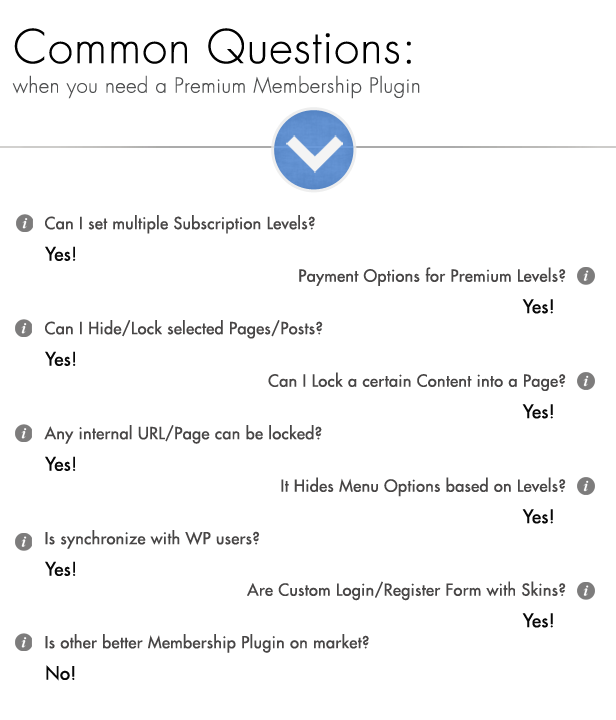
    Ultimate Membership Pro is the newest and the best Membership WordPress Plugin that allow you to create and work with multi-level exclusive access for your Users based on simple Free packages or Payed packages.

    You can turn on your Website into a income supply by protecting your valuable content or only part of it.

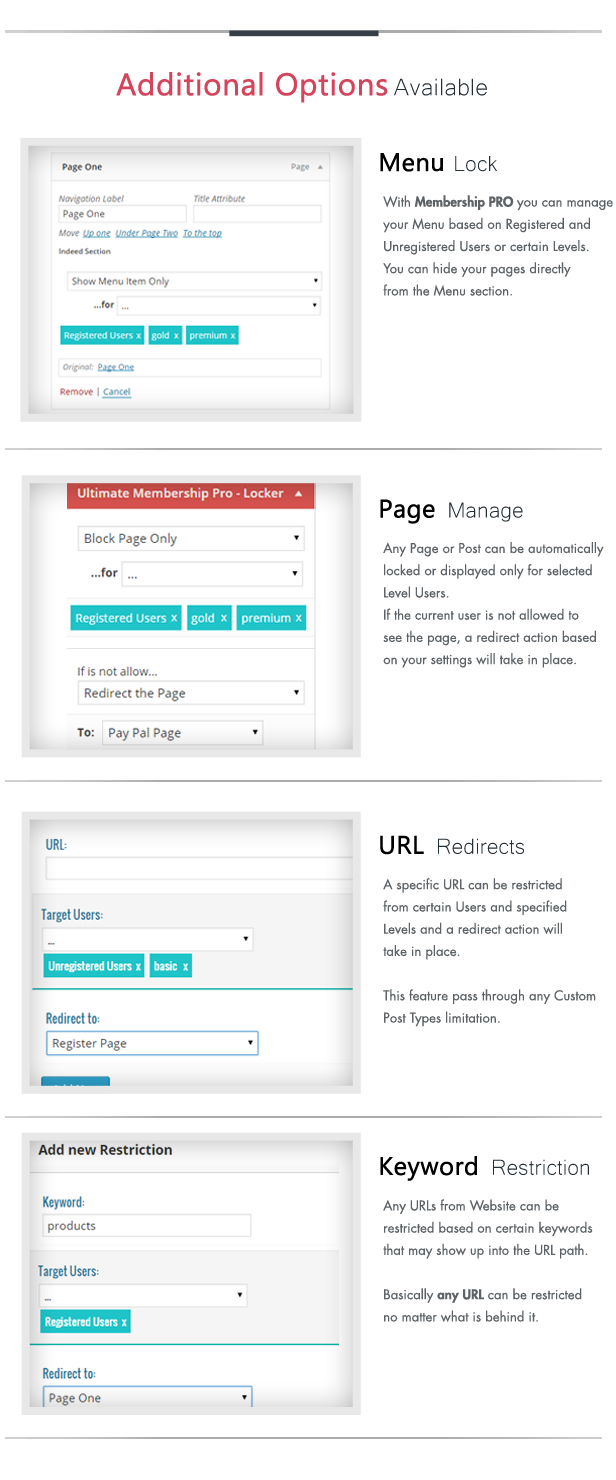
    Protect your: Pages, Products, Categories, any URL, Content Sections, Images, Menu, anything and set a Redirect or Replace Content Rule.

    Membership Pro main Features:

    • Multi-Levels
    • Content Lockers protect
    • Reliable PayPal Payment
    • Restrict Pages or any URL
    • Subscriptions Plan
    • Login Predefined Templates
    • Register Predefined Templates
    • Menu Protection
    • 9 Email Marketing Platforms integrated
    • Visual Composer Integrated
    • Keywords Restrictions
    • Dashboard Stats
    • Unlimited Registration Fields
    • Redirect or Replace Content Page
    • WordPress Users Synchronize


    Membership Pro let you create Unlimited No. of Users and Levels into a simple Registration Process keeping the Users synchronized with WordPress Users. So, the users will be able to use the WP for WooCommerce purpose also.

    Email Subscription

    Provides all the best ways to keep and manage your registrations emails in a dedicated Marketing Platform for further purpose. 9 Email Marketing Platforms are available:
    MailChimp, MailPoet, AWeber, Campaign Monitor, Constant Contact, MyMail, iContact, GetResponse, MadMimi.

    Depends of your design you can use one of the predefined Templates for Login cutting of the additional Links and the Remember Me option.

    Also, for special desires, a Custom CSS is available, so any Template can be customized.

    Besides the Predefined Templates, all the Fields are customizable being able to change the Labels, Order and the Required Conditions.

    For additional purpose, Unlimited No. of Fields can be added in different type with other great options like Password Strength, a Capcha Verification or TOS validate condition.

    Depends of your Level Plans and Strategy the Registration may passtrough a Subscription Plan first or just a Simple Registration Process.

    With all those Great Locker Templates you can build Unlimited Lockers based on a Custom Content Message with or without a Login Form directly from Locker box.

    An Inside Locker can be set to hide and protect part of a Content for a specified Levels or type of Users (Registered/Unregistered).

    All the Details for any Subscription Plan are customizable for each level. You can built your Subscription Plan with any details or images you want it.

    If you are already using another Pricing Table, you have the option to use only the link for Sign Up. For each Level a Simple Link is enough to pick that Level for registration.

    The Registered Process is not completed until the PayPal service will not confirm the payment.

    The Registered Users can be moved from one Level to another very easily, with few click.


    Visual Composer Page Builder is one of the best Page Builder for WordPress on the wwww. If you are using it, now you can play and manage your Membership Forms, Membership Pages and Content Lockers directly from Visual Composer.
    Ultimate Membership PRO

    Everything what you needs for a proper Membership Workflow or a Directory Section, Ultimate Membership PRO will allow you to accomplish.

    With a great intuitive Dashboard, you will finish your settings in minutes and your website will be ready to protect your contents.

    In the Future…

    Ultimate Membership Pro plugin is already in use on some of our regular clients websites and we know that the next think they want is to have a nice new features.

    Requirements

    If you want to use Ultimate Membership Pro plugin, all you need to do is install WordPress 3.0+, and install the plugin.

    Credits

    Employee Performance Management System (Help and Support Tools)

    The system for managing company and employee’s performance information and manipulating them runs on some simple rules.

    Once installing the script by following the documentation,

    The admin dashboard welcome you and shows the main controls of the system on the top side, you will see the navigation for management of various options.

    Following are the features :

    • Manage employees
    • Manage permissions
    • Manage levels
    • Manage branches
    • Manage departments
    • Manage daily fixed and variable works
    • Work reports
    • Master reports
    • Attendance form
    • Task board
    • Manage meetings

    Here is the demo link :

    http://epms.webappsdemo.in/
    Demo Username : admin
    Demo Password : password

    Download Employee Performance Management System (Help and Support Tools)

    Feed the Birds (Games)

    Description:

    • Touch the screen to change the big bird’s moving direction and feed as many little birds you can! Made in Construct 2. Enjoy the game!

    • Don’t you have Construct 2? Don’t worry, i can help you..
    .. If you need customization/any work feel free to contact me via email.

    • Available on Google Play: Link here
    • or download it from my Dropbox Account: Link here

    Features:

    HTML5 & Android Game
    • 720x1280 Resolution
    • Touch or Mouse
    • Graphics Included (AI, PNG)
    Sound Effects Included
    • Source code Included (CAPX)
    • Admob Ads (Banners & Interstitials)
    • In-App Purchases (Remove Ads, Shop Area)
    • Social Buttons (Twitter & Facebook)
    • Leaderboard (Google Play)
    Rate Button
    • Splash Screen (Replace with Yours)
    • Full Documentation (HTML)
    • Email Support

    Update:

    Version 1.0
    • Release

    Screenshots:


    Support:

    • If you have any questions and/or requests, please contact me at [email protected] or using contact form.

    Download Feed the Birds (Games)

    Magento Product Images Slideshow Extension (Magento Extensions)

    \\\\

    Magento Product Images Slideshow extensions helps to attract your customers to your products, displaying photos with beautiful effects and providing a far much convenient and attractive tool to view images.

    Your website introduces different products in which have different items and you want to display a number of items on the product details page, Magento Product Images Slideshow Extension will be a brilliant concept for adding items’ images on the product page. This module will convert items’ images of a product into slideshow style. Your customers will be more convenient to compare different items of a product.

    We all know that images sell products. With our Magento Product Image Slideshow Extension, you can display photos more conveniently in beautiful effects attracting customers on products that you sell on your site. Now, your products pages will have an attractive tool to view images larger on clicks.

    View more about Magento Product Images Slideshow Extension

    FEATURES

    – Moving the mouse onto the main images, there will be zoom effects and light box

    – Type of Slide Product Effect Beti

    – Type of Slide Product Effect Default

    – Type of Slide Product Effect MediaEffect

    – Type of Slide Product Effect Spanish

    – Set up more view thumbnail size in administration

    – Choose the effect you prefer, the color scheme and size for images in Back-end

    CHANGE LOG

    Version 2.0 – Updated: 2015, Jan 23

    + Compatible with Magento CE 1.9.x

    + Re-arrange folder structure

    + Upgrade the latest jQuery library, use the same jQuery library and selector

    + Fix function Lightbox Full Screen

    Version 1.0 Updated: 2014, Sep 08

    + Compatible with MCE 1.5.x – 1.9.x

    Magento Themes | Magento Extensions

    Download Magento Product Images Slideshow Extension (Magento Extensions)

    Virtuemart Multiple Image Upload Plugin (VirtueMart)

    \\\\

    You have more than one photo/image of your products, and you want to have a super fast tool that allow you to upload other images related to your main images just in one click? Thus, Virtuemart Multiple Image Upload plugin is your right choice.

    One of the best features of this plugin is a perfect tool for you to simply browse image files to upload multi images into products at the same time. It is able to upload multi images with a super fast speed to optimize your images uploading process and save big time, you can create more other products listings inVirtuemart.

    This image upload plugin for Virtuemart can be automatically created thumbnail photo for uploaded images. Conveniently, it is easy for you to edit or remove images while uploading if wanted. Customers can easily go to the “Image” tab on the product detail page and upload multiple images besides the main product image just by one click. The upload button will only be active after you saved the first product.

    Virtuemart Multiple Image Upload Plugin is compatible with latest Virtuemart and Joomla version. It is 100% open source without core Joomla Virtuemart hacks.

    Demo Account:

    Username: demo-cmsmart
    Password: cmsmart123

    View more about Virtuemart Multiple Image Upload Plugin

    FEATURES

    – Multiple images upload

    – Automatically create thumbnails

    – Easily edit/remove images

    – Save your time

    – Cross-Browser Support

    – Compatible with Virtuemart V2.x, Joomla 2.5

    – The only solution on the market for multiple images upload for Virtuemart V2.x

    – Choose multiple images at the same time, and upload all of them automatically

    – Cancel any image during the upload process

    – Automatically create thumbnails for uploaded photos

    – Super fast, no hassle bug

    – 100% no hacks into any Virtuemart file. Just install the plugin as normal Joomla plugin!

    – All mages will be displayed under the Tab “Product Images”, you will not have to come back to the product listings page -> media management.

    – Save big times and get convinient!

    CHANGE LOG

    Version 4.1.0 – Updated: 2015, Jul 07

    + Compatible with Joomla 3.4.1 and Virtuemart 3.0.9

    + Fix failed upload in backend

    Version 4.0.0 – Updated: 2014, Oct 09

    Fix errors on Virtuemart 2.6

    + Compatible with Joomla 3.x and Virtuemart 2.9.8

    + Update multiple image upload layout

    + Turn on/ off the auto save function

    + Update options with IOS 7 style

    Version 3.0 – Updated: 2014, Oct 09

    + Compatible with Joomla 2.5.x and Virtuemart 2.6.x

    Version 2.0 – Updated: 2014, Oct 09

    + Upgrade layout

    + Add features on/off auto save feature

    + Fix bug: cannot display upload button

    + Clear code

    Version 1.0 – Updated: 2014, Sep 08

    + Compatible with Joomla 2.5.x, Virtuemart 2.x.x

    Virtuemart Templates | Virtuemart Extensions

    Download Virtuemart Multiple Image Upload Plugin (VirtueMart)