WooCommerce Collections – WordPress Plugin (WordPress)

follow on envato
follow on facebook
support

WooCommerce Collections gives your customers the ability to gather and share products they like, want or recommend. It allows you to show buyers what you have for sale or share and organize your favorite products.

Features:

  • Customers
    • Quickly add a product to a collection, and create new collections without leaving the product’s page
    • Create an unlimited number of collections. Guest users can store a Collection for 30 days (or until cookies are cleared). Registered users can store collections indefinitely
    • Privacy controls. Users can either create a public or private Collection. Public collections can be shared and are viewable by anyone. Private collections are only viewable to the user.
    • Share collections to various social networks via a unique short url. Facebook, Twitter, Google + and LinkedIn.
    • Share collections via email to your friends and family.
  • Shop Managers
    • View and manage your customer’s collections from the WordPress admin.
    • Show a plain text link or button.
    • Choose from 5 different icons (works with both plain text link or button) or have no icon at all.
    • Disable guests from creating collections.
    • Ability to set any collection as featured collection.
    • Easily modify the text for the “add to collection” link.
    • Enable only the social sharing services that your customers can share to.
    • Supports both pretty/non pretty permalinks.
  • Developers
    • Extremely flexible layout. Use any page on your website to display a user’s collections, display individual collections, to edit collections, or to create new collection.
    • Collection, Light Box, Watch List, Wish List or Want List. Easily change the terminology.
    • Fully localized/translation-ready. Easily translate and use the plugin in your native language.
    • Super flexible links. Create your own add to collection buttons with a simple function call and arguments.
    • Easily customize the different pages by copying the templates into your child theme’s woocommerce/woocommerce-collections folder.
    • Easily customize the CSS and/or fonts by copying into your child theme’s woocommerce/woocommerce-collections folder.
    • Easily change the various messages displayed throughout the plugin from 1 simple filter.
    • Easily move the icon to the right of the add to collection text by using 1 simple filter.
    • Easily change the size of all add to collection links (plain or button) by using 1 simple filter, or by creating your own link and passing in a size.

Support for Follow My Blog Post

Collections extension is fully integrated with Follow My Blog Post plugin. Users can be automatically set to receive emails when new items added under their followed collection.

Demo:

Documentation:

Please see the Documentation of the plugin to learn how to use the plugin.

Support:

Need help? Please be sure to read the Documentation. If you’re still stuck you can contact through our support platform or email us on [email protected] for any pre-sale inquiry only.

Download WooCommerce Collections – WordPress Plugin (WordPress)

Universal Bundle of Addons for Visual Composer (Add-ons)

\

\
\


It contains 3 visual composer add-ons which will help you to include in your projects, the following: video players, audio players, radio players


THE BUNDLE INCLUDES:

\ Visual Composer Addon – Universal Video Player – $13 value find out more

\ Visual Composer Addon – HTML5 Audio Player PRO – $13 value find out more

\ Visual Composer Addon – HTML5 Radio Player – $13 value find out more


If you need additional information don’t hesitate to contact us at [email protected]. We’ll try to answer you as quickly as possible.

Enjoy!

Download Universal Bundle of Addons for Visual Composer (Add-ons)

php Gallery Manager (PHP Scripts)

Quick Video Demo: Video Demo

Quick Video Upload Demo: Video Demo


Quick Video Admin Demo: Video Demo

Demo: Demo

Admin Demo: Admin Demo

Features:

  • 100% Responsive Themes Design.
  • 100% Responsive Admin Design.
  • 6 Steps installation
  • Easy Control Panel.
  • Multiple Categories.
  • Used PHP Installation Manager v1.0.
  • Used Mega Template System v2.0.
  • Used Creative Upload Plugins Pro v2.0.
  • Multi Pagination.
  • Multi Language support
  • import/export Language to .xml
  • Used Change The Default Items Category.
  • Used Change Items Per Page.
  • API Documentation.

and more…

User Features:

  • Stream
  • displays uploaded by users following.

  • Profile
  • Profile (Page): displays the user profiles along with the quick access to Posts, Likes, Favorite, followers, following. and more…

  • Edit profile
  • change the image and personal the cover and basic data and Socials.

    Social Profiles for: Facebook, Twitter and Google+ and other social

  • Account Settings
  • Change email address
    Change your password
    Filters Notifications ( Notifications Comments – Notifications Likes – Notifications Followers – Notifications Favorites )
    API KEY

  • Draft
  • The work can be saved as a draft to be published later

  • Pro Accounts
  • have more features such as pro API, more upload space, etc and more…

  • Likes
  • shows all the likes you post

  • Favorites
  • shows all the Favorites you post

  • Unified Search Box
  • Live search for posts

  • Covers and avatars for user profiles.
  • Retina Display Ready and Responsive Design (optimized for iPhone 5 and newer iOS devices).

and more…

Script/Admin Features:

  • General Settings
  • Allows you to change various settings about the website and limitations.

  • Themes Setting
  • Allows you to change the whole website layout, the current theme enabled is marked Active .

  • Pro Accounts
  • Allows you to enable or disable Pro Accounts, change settings such as upload size, monthly plans, currency, etc.

  • Manage Categories
  • Allows you to add certain categories.

  • Manage Users
  • Allows you to edit users, suspend, delete accounts, view transaction history and more.

  • Manage Gallery
  • allows you to control the Gallery.

  • Manage Commentes
  • allows you to control the comments.

  • Manage Countrys
  • Allows you to add certain Countrys.

  • Manage Pages
  • Allows you to the amendment on pages

  • Manage Payments
  • Allows you to view the payments details, suspend or enable a certain payment.

  • Manage Ads
  • Allows you to add Advertisments in certain places on the website.

  • Email Templates
  • allows you to change the form and format your e-mail message.

  • API Setting
  • allows you to Giving the permits to API.

  • language settings
  • allows you to change or add language and Edit Phrase.

Version History

/*-----------------------------------------------*/
 * Version 1.0
 *  - Initial version.
/*-----------------------------------------------*/

Download php Gallery Manager (PHP Scripts)

VC Coming Soon Pages (Add-ons)

Are you sick of not having your coming soon pages YOUR way? Introducing VC Coming Soon Pages.

Use VC Coming Soon Pages in conjunction with Visual Composer to create “Coming Soon” pages how you really want them. Hide your site while you’re building it or put up a “Maintenance Mode” page while you make big changes. All you need is the Visual Composer Plugin, which comes with most themes these days.

Features

  • Build pages the way you already do with Visual Composer
  • Use all the VC elements you know and love
  • Easy to use with no code required
  • Four Widget Areas for you to use with the Visual Composer “Widgetised Sidebar” element.
  • Boxed or Full Width option
  • Compatible with VC’s Frontend Editor
  • Contact me with your feature requests :)

How it Works

Once installed, a new menu item in the backend appears called “VC Coming Soon Pages”. In there you can add and edit your Coming Soon pages, Enabled/Disable the page, and select it’s various options.

Usage Instructions

  1. If you don’t have the Visual Composer Plugin installed, install it. Although you can use this plugin without it, it’s designed to work with it.
  2. Install and activate the plugin (WordPress Plugin Installation Instructions)
  3. Add your first page under your Dashboard -> VC Coming Soon Pages -> Add New. You can edit the page the same way you would with normal pages. You can also use Visual Composer’s Frontend Editor, which I highly recommend, if available.
  4. Go to Dashboard -> VC Coming Soon Pages -> Settings, or click the button in the Admin Bar. Select the page you just created and tick enable.
  5. Visit your site while logged out (I just use an incognito window in Google Chrome to make this quick and easy). You will see the page you just created!

Remember to contact me with your feature requests :)

Download VC Coming Soon Pages (Add-ons)

SEO Information Portal (Miscellaneous)

Introduction

SEO Information Portal is a powerful php based script to get complement seo stats of website. User can easily export seo report in XLS,CSV,JSON or XML format. User can also compare multiple websites with unique comparison tool provided with this script.

Script is fully responsive based on bootstrap 3 and adjustable on any mobile or tablet screen. This script has powerful admin panel to manage all Site options,SEO reports, API keys, custom pages, advertising spots, and more.

SEO Metrics It shows

  • Website Meta info
  • Code to Text ratio
  • Important html tags count
  • Google Indexed Pages
  • Yahoo Indexed Pages
  • Bing Indexed Pages
  • Google Backlinks
  • Google PageRank
  • Alexa Rank
  • Moz backlinks
  • Moz rank
  • Page Authority
  • Domain Authority
  • SemRush rank
  • Number of keywords in first 20 Google search results
  • Number of visitors coming from first 20 Google search results
  • Traffic Cost (How much need to spend if get same number of visitors from Google Adwords)
  • Dmoz Listing
  • Social Popularity (Share count from facebook, twitter, google, linkedin, pinterest, stumbleupon and delicious)

Script Features

  • More than 20 SEO metrics
  • Export SEO metrics in xls,csv,json or xml format.
  • Compare multiple website’s SEO metrics
  • Export comparison data
  • 100% Responsive design
  • 17 bootswatch themes to choose from
  • SEO friendly
  • Dynamic Sitemap
  • 3 Ad spots
  • reCaptcha enabled 
  • Powerful admin panel
  • Easily add/edit custom pages
  • Manage Ads spots
  • Analytics Integration
  • Quick and Easy Installation
  • Easy to Use
  • and more..

Server Requirements

  • Apache 2
  • PHP 5.2+
  • PHP CURL
  • MySql 5

Live Demo

Frontend http://demo.99webtools.com/seo/

Admin Panel http://demo.99webtools.com/seo/admin/

Login Email: [email protected]
Password: password

Download SEO Information Portal (Miscellaneous)

Fresh News Ticker (JavaScript)

About

Fresh News Ticker is a modern, powerful, light weight, flexible, fast, easy to use and customize news ticker. It offers unique features as follows:

  • You can create,
    1. Text news ticker
    2. Image / Logo carousel
    3. Post / Article slider
  • It has 3 different layouts.
  • It can have either round or square corners for news ticker. [text only]
  • It offers options to control effects, delay, timings, background and foreground colors, visibility options for mobile, tablet and desktop etc..
  • Dynamically loaded data can be set to automatically refresh at an interval of time.

Notes

This is not a WordPress plugin, it is a standalone HTML, CSS and JavaScript plugin. This ticker is in the “JavaScript” section on CodeCanyon and it is a standalone project.

Download Fresh News Ticker (JavaScript)

E-office (Project Management Tools)

Eoffice is an online application software for synchronizing and coordinating hectic and messy office works,its buit upon on mysql and simple core php. It is a customer friendly and efficient software to effectively monitor and coordinate the functionalities in a office, by managing the employee working time, employee work reports, attendance management, project management and leave management.
e-office is an excellent application software that has several out of the box features that could effectively manage all the tasks in an office. This helps in maintaining a regular attendance report of the employees/users, create and assign tasks and projects for users. The admin can evaluate the work performance of an employee. One of the unique features is that when an admin create a profile for the user the password is automatically set to username.

Features

User Management

Daily attendance mark-in/mark-out

Attendance Management

Work status and report Management

Role Management

Profile Management

Leave Management

Daily Feeds and thoughts, appreciations and upcoming events

Employee/User evaluation and project Management

Custom attendance mark-in/mark-out features in case of system or network error

Demo url: http://envato.techware.in/

username: admin
password: admin

Download E-office (Project Management Tools)

Event – GWD HTML5 Ad Banners (Ad Templates)

Event – GWD Ad Banners are designed with Google Web Designer. And provided 4 most frequently used sizes in the market

Sizes

1. 300X600
2. 300X250
3. 728X90
4. 160X600

Features

A. Google Web Fonts
B. Repeating Animation Effects.
C. Fully Editable
D. 24X7 Support N Free Updates

About

You can use these ad banners for any purpose, just by changing content,, it is very easy.. you can use this for many more ways.. Business, Corporate, Promotional Based etc…

Design of the ad banner is very trendy and catchy to users.. and you can change all elements as per your need.

All files are included for buyers to edit content easily.. buyers can modify content like Background-color, Titles, Logo, Images etc.. easily according to their requirement. No Need of Technical stuff.. Sources

Source

http://photodune.net/item/happy-booze/10249726

Support

Feel free to ask any queries, it is our pleasure to help you..

And Ask Us For Any New Sizes, Will provide you in 24 Hrs

Download Event – GWD HTML5 Ad Banners (Ad Templates)

WooCommerce Wholesale (Miscellaneous)

About wholesale

WooCommerce Wholesale is a WooCommerce e-store extension that allows to create custom product tables, which make buying far more quicker and convenient. Although it can be useful for retail buyers, Wholesale is directed to wholesale buyers, who buy many different variations. Wholesale allows them to complete their order on one page through clear tables, increasing their productivity significantly.

How does it work?

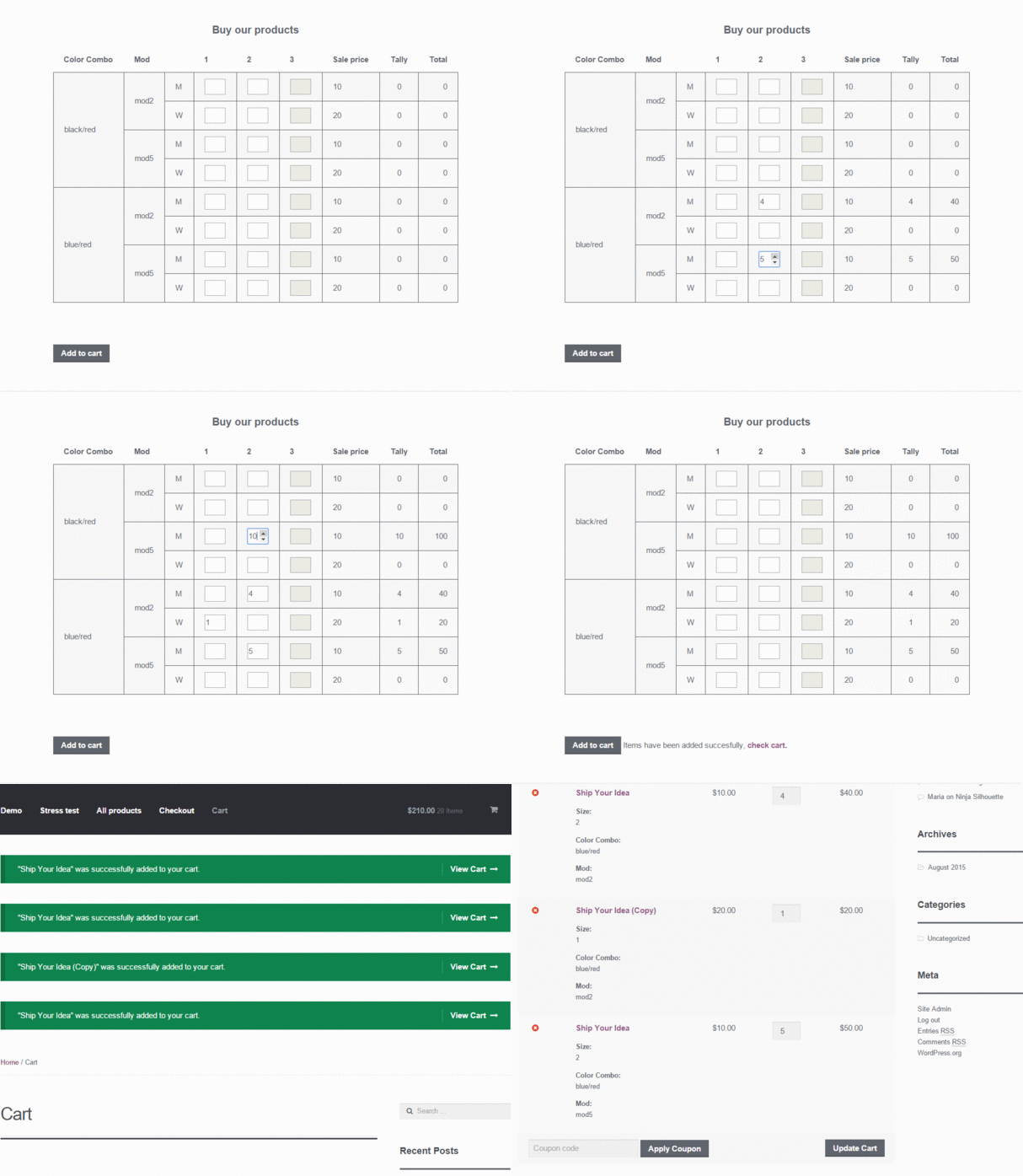
Completing orders with Wholesale is really easy. A user specifies a desired number of products and then clicks “Add to cart”. It is really that simple.

output_MwbAKa

Any compatible plugins?

We can recommend you a Wholesale Pricing Pro plugin. If the plugin doesn’t work with your discount system – let us know and we’ll check it out!


How do I create a table?

Well, all you have to do to add a table to a page is to type something like this:

[!wholesale columns="buy,sale-price/,tally/,total/" products="40|130" buy="vertical-attribute/Color Combo|Mod,label/M|W,horizontal-attribute/Size"]

but without ’!’ before ‘wholesale’.


How do I create such a shortcode?

A shortcode consists of 3 optional tags: columns, products and buy.

  • columns – Put there names of columns, you want to display. You can rearrange them as you wish. Available columns are:
    • SKU – displays product SKU
    • image – displays product image
    • rating – displays product rating
    • regular-price – displays product regular price
    • sale-price – displays product sale price. If a product is not on sale, then a regular price is displayed. Use it to display a final price.
    • buy – In case of one simple product, an input is displayed, allowing a user to specify how many products is ordered. If there are more simple products or variations, it displays a label for each product and/or attributes and inputs
    • tally – displays how many products from a row a user have added.
    • total – displays total sum a user will pay

    If you do not specify columns, default columns are displayed: image, buy, sale-price, tally and total.
    By default, a column heading are the same as a column name, you can easily change that by adding ’/’ at the end of a column name, just like ‘sale-price/Price’. If you do not want a heading, just add ’/’, like ‘sale-price/’ – This creates a column with an empty heading. This applies to all columns except ‘buby’, because it prints attributes.

  • products – Put products IDs there. If you want to connect two or more products under one title, use ’|’ symbol to connect them. For instance, ‘products=”1|2|3|4”’ creates a connection of products with IDs 1, 2, 3 and 4. You can add a name to every connection, as in case of a column, by adding ’/your-name’ at the end of a connection. Especially ’/’ left at the end of a connection creates an empty title. Remember that you can have as many connections as you want, use commas to separate them, like ‘products=”1|2/First title,3|4/Second title,5|6/’. Remember to add every item in connection a label.
  • buy – add this tag if you:
    • have connected products in a ‘products’ tag
    • have added variable products

    In this tag, you can specify attributes and labels which are used to generate a table, in detail:

    • vertical-attribute – add ’/’ after this and write atrributes you want to add, connected by ’|’, like ‘buy=”vertical-attribute/Color|Type|Size”’
    • horizontal-attribute – add ’/’ after this and write atrribute you want to add e.g. ‘buy=”horizontal-attribute/Size”’. There can be only one attribute name!
    • label – add ’/’ after this and write labels you want to add to each product in connection connected by ’|’, like ‘label/Man|Woman|Child”’

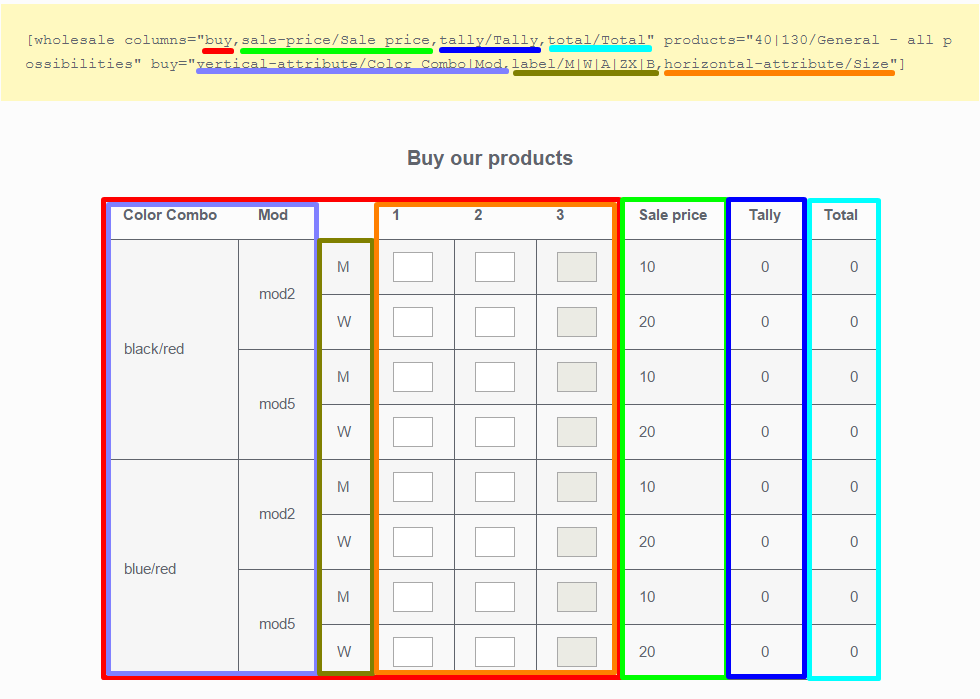
This image shows a relation between a shortcode and a table:
Screenshot_13

General recipe for shortcode:

[!wholesale columns="SKU/Title,image/Title,rating/Title,buy/Title,regular-price/Title,sale-price/Title,tally/Title,total/Title" products="ID1|ID2/Title,ID3|ID4/Title,ID5|ID6/Title" buy="vertical-attribute/Attribute1|Attribute2,label/label1|label2,horizontal-attribute/Attribute3"]

Remove ’!’ at the beginning, remove unwanted columns, change titles, attributes and labels and it is ready!

Examples

For working examples, visit wholesale demo

Download WooCommerce Wholesale (Miscellaneous)

Progressive Draw – SVG (Animated SVGs)

Watch your vector artwork draw itself right onto the screen!

Easy to Use

Setting up a new animation couldn’t be more simple. You just save your artwork directly from Adobe Illustrator, add a line of code to your HTML, and you’re ready to go!

Easy to Customize

  • Change the following with just one variable:
  • Animation speed for lines and fills
  • Play on load, on click, or when it becomes visible on scroll
  • Draw everything at once or one element at a time
  • Draw fills in order or at the very end of the animation
  • Delay time between images
  • Enable/disable the play/pause button on hover

Other Features

  • You can control play, pause, resume, reverse, and restart externally
  • Responsive design
  • Works on all major browsers, even mobile and Explorer
  • Works great even if the artwork has mostly fills instead of lines
  • Add an unlimited number of SVG’s to your page

Excellent Support

It’s no coincidence that I’m a 5-star Elite Author here on CodeCanyon – I provide great support. Not only are there comprehensive instructions, the code is well commented and I’m prompt and helpful when you contact me. Look what some of my customers have to say about me:

Some things to note:

  • Modern browsers can’t handle SVG’s with variable stroke widths so they either need to be converted to normal strokes or converted to fills
  • This file is for vector, not raster artwork – meaning it won’t animate your PNG or JPG images

Related Items

40 animated social media icons
Animated SVG Browser Icons
jQuery Goal Thermometer
Customizable Analog Clock - jQuery
WordPress Goal Thermometer

Download Progressive Draw – SVG (Animated SVGs)

Multipurpose Business Banner 002 (Ad Templates)

MULTIPURPOSE BUSINESS BANNER 002 – HTML5 AD BANNER BASED ON GOOGLE WEB DESIGNER

    Attractive HTML 5 based ad banner features-

  • 5 Standard Sizes (160×600, 728×90, 300×250, 300×600, 160×600)
  • HTML5/CSS3 based
  • Fully editable using Google Web Designer
  • Google based web fonts
    Download will include-

  • 5 fully editable layered PSD files
  • 5 HTML5 ready banners for multipurpose usage
  • Banner image and CSS included

More colors will come soon…

Google Fonts used-
Open sans & Oswald

Preview Image used can be downloaded from here –
business-man-smiling
http://photodune.net/item/business-man-smiling/6699046

BG image
https://images.unsplash.com/photo-1433557594689-4aa1ddd9706e?q=80&fm=jpg&s=afa82c1295e0ffc032306483a1884a9b

Please rate us it will help us a lot :)

Download Multipurpose Business Banner 002 (Ad Templates)

Animated SVG Weather Icons (Animated SVGs)

Beautifully designed flat weather icons, each with their own unique and subtle animation. Each icon waits to animate into view until it’s visible on the screen.

Icons Included

The pack includes icons for the following weather conditions:

  • Sunny
  • Thunder
  • Thunderstorms
  • Clear night
  • Cloudy night
  • Partly cloudy
  • Mostly cloudy
  • Partly cloudy night
  • Rainshowers
  • Rainstorm
  • Snowshowers
  • Snowstorm
  • Windy
  • Hot
  • Low temperatures
  • High temperatures

Excellent Support

It’s no coincidence that I’m a 5-star Elite Author here on CodeCanyon – I provide great support. Not only are there comprehensive instructions, the code is well commented and I’m prompt and helpful when you contact me. Look what some of my customers have to say about me:

testimonials

Want the Illustrator Graphics?

Get them here on GraphicRiver.

Related Items

40 animated social media icons
Animated SVG Browser Icons
jQuery Goal Thermometer
Customizable Analog Clock - jQuery
WordPress Goal Thermometer

Download Animated SVG Weather Icons (Animated SVGs)

Driving cars. Swift. IOS 7.x/8.x (Games)

Driving Cars is a game made in Swift with Xcode for IOS 7.x/8.x.

The aim of the game is to get the maximum number of points getting the circles and avoiding the squares while you drive both cars. You can change the side of each car just typing the screen.

The game includes Game Center Leaderboards so you can compare your scores with other players!

Also, you can choose between different designs and combine them.

Video HERE

THE GAME INCLUDES A README EXPLAINING:

– How to change Admob ids.
– How to change the app id for rate.
– How to change Leaderboard id.
– How to change IAP product id.
– How to change the design..

Download Driving cars. Swift. IOS 7.x/8.x (Games)

Magic Words! (Games)

Magic Words

Is actually two games molded into one pack!

Magic Words – Word Scramble!

Magic Words – Word Scramble contains a word scramble game where the player has to find the scrambled word in order to survive from monsters.

Magic Words – Word Find!

Magic Words – Word Find is a word game where the player must find hidden words between letters in order to defend from monsters.

Please rate if you enjoyed it!

Download Magic Words! (Games)

Undermine (Games)

About the Game:

Undermine

Humans are starting another war and its consequences are affecting other creatures too. They have deployed naval mines across the sea that can be very dangerous for fishes and all other marine animals. So the wise turtle (!) tells you that you have to destroy these mines and get rid of them so sea can be safe again. But you start as a clownfish that is not strong enough. So you have to swim across the sea, dodge mines and gather stars to unlock other stronger fishes in store. There are 6 fishes in total and each have its own unique special ability. In order to complete the game, you have to unlock them in order till you reach the final one (shark) that has the ability to destroy mines. After destroying a certain number of mines with shark, you will finish the game and sea will become safe!

How to Play:

You can play this game with mouse or touch in mobile devices.

Features:

» 6 different characters (fishes)
» Easy to personalize the game’s appearance
» Easy to personalize the game’s sounds
» Supports touch
» Made with Game Maker Studio
» Auto-resize (responsive)

We will be happy to hear your ideas and opinions about the game, so if you like write a comment or send it to our e-mail:
[email protected]
And if you liked it, don’t forget to rate it!

Come & See Our Website: www.01Smile.com

Flag Counter

Download Undermine (Games)