Gallery Feed (Galleries)

Gallery Feed is a social plugin for WordPress that will help you to build a nice looking gallery using data from different social networks like Facebook, Twitter, Instagram and Flickr. Gallery Feed can also serve you as a Portfolio gallery where you can add custom content like text, photos and even videos!

Features

– Responsive grid-style layout
– Facebook Photo Albums and Videos
– Instagram Photos
– Flickr Photos and Videos
– Twitter Feeds
– Custom Projects
– Lightbox features include: Social Share Buttons, Item Description, Hotspots, Image Dominant Colors, Read Facebook/Flickr/Instagram Comments, Tags, Views, Likes and more
– Color and Font customizable
– Ajax Oriented

Installation

1. Go to Dashboard > Plugins > Add New.
2. Click “Upload Plugin”, “Browse” and pick the plugin archive
3. Click “Install Now” and “Activate Plugin
4. A new menu should now appear in the Dashboard named “Gallery Feed

Adding Categories

1. Go to Dashboard > Gallery Feed > Categories
2. Enter category name and click “Add to the list

Adding Projects

1. Go to Dashboard Gallery Feed > Projects
2. Click “Create New Project
3. Fill Project Details and Text Content
4. Click “Save Information

Adding Social Networks (Facebook, Twitter, Instagram, Flickr)

1. Go to Dashboard > Gallery Feed > Social Networks
2. Select Social Network type and click “Add Album” or “Add Account
3. Fill details (Category, Account ID/Album ID…) and click “Save Information

Displaying the plugin on the front-end

The plugin uses the shortcode [gallery_feed]
On your Page/Post simply enter [gallery_feed]

API Settings

Facebook API

1. Go to https://developers.facebook.com/quickstarts/?platform=web
2. Enter app name and click “Create New Facebook App ID”
3. Choose some category for example “Utilities” and click “Create App ID”
4. Complete the setup page (Tell us about your website section) and on the “Next Steps” section click “Skip to Developer Dashboard”. You can see your App ID and App Secret on this page.
5. Go to https://developers.facebook.com/tools/explorer/
6. At the top right corner change “Graph API Explorer” to your App Name. Click “Get Token” and pick “Get Access Token”. For Permissions pick “user_photos”, “user_videos”. Click “Get Access Token” and then “OK”
7. Your access token is now generated in the “Access Token” field
8. Paste your App ID, App Secret and Access Token in the Dashboard -> Gallery Feed -> API Settings -> Facebook API Settings

Twitter API

1. Go to https://apps.twitter.com/
2. Click “Create New App” button
3. Fill Application Details, leave Callback URL empty and click “Create your Twitter application”
4. Go to “Keys and Access Tokens” section
5. Generate Access Token and Token Secret in the “Token Actions” section
6. Paste your Consumer Key, Consumer Secret, Access Token and Access Token Secret in the Dashboard -> Gallery Feed -> API Settings -> Twitter API Settings

Instagram API

1. Login and go to https://instagram.com/developer/clients/register/
2. Fill Details (for Valid redirect URIs enter the website url) and click “Register”
3. Go to https://instagram.com/developer/clients/manage/ You can see your Client ID here. Click “Edit” button on your App
4. In Securty tab uncheck “Disable implicit OAuth” and click “Update Client”
5. Go to https://instagram.com/oauth/authorize/?client_id=CLIENT_ID_HERE&redirect_uri=WEBSITE_URL&response_type=token
Where CLIENT_ID_HERE is your Client ID and WEBSITE_URL is the WEBSITE URL you registered (this info visible in the Manage Clients page)
6. On success you will be redirected to http://WEBSITE_URL/#access_token=MY_ACCESS_TOKEN
7. Paste the MY_ACCESS_TOKEN value in the Dashboard -> Gallery Feed -> API Settings -> Instagram API Settings

Flickr API

1. Go to https://www.flickr.com/services/apps/create/apply/ and fill the details
2. Paste your Key in the Dashboard -> Gallery Feed -> API Settings -> Flickr API Settings

Stay up to date!

Follow us on Facebook or Twitter and get latest news about item updates and upcoming plugins and scripts!

You can also follow us on Instagram and on YouTube with video tutorials on how to install and use our plugins and scripts!

Changelog

– 12/09/2015

Version 1.0 Initial Release
Download Gallery Feed (Galleries)

Angry Bird Blast – Match 3 Game (Games)

Demo

APK link: Please click this for demo apk

Angry Bird Blast – Match 3 Game

Angry Bird Blast is a brand new and exciting match 3 puzzle game! Just tap to play, and you do not want to stop! Exercise your brain with exhilaration! Have fun!.

Application Features

– Very Addictive.
– Amazing Design.
– No extra code is required
– High quality user interface
– Easy to Reskin
– Many levels
– Very easy to add new levels
– Step-By-Step Documentation Included
– Admob Enabled
– Built using eclipse.

Support Notes

Due to the heavy load on the work, support and comments are treated twice a day. Right now we receive many emails and requests for support than we can manage quickly. Many times we can answer the same day but others take much longer.
Before you send a request for support please read the entries below:
– Support from Envato authors is optional but we will do our best to help.
– Support doesn’t mean customization.
– Read the full documentation file.
– Check if your question is not already in the Item Discussion section.
– We do not give support for third party code in this case you need contact the authors.
– We do not support errors caused by strong modification to the original files.
– We do customization but this is not included in the package price. To get a quote for a modification you can send an email using the form in the right sidebar.
– We can’t teach how to code in Java or any other language.
– We can’t give refunds, if you want a refund please contact Envato directly.
– If you have a general question you can use and asking your question in the Item Discussion section.
– Our time zone is (currently) GMT – 4:00, so please keep in mind our timezone might be different from yours.
You can read more about item support on the Envato wiki Thanks for reading.

Also check our other Apps:

Other Game

Other Game

Other Game

Download Angry Bird Blast – Match 3 Game (Games)

Sporty – Match 3 Game (Games)

Demo

APK link: Please click this for demo apk

Sporty – Match 3 Game

Sporty is a brand new and exciting match 3 puzzle game! Just tap to play, and you do not want to stop! Exercise your brain with exhilaration! Have fun!.

Application Features

– Very Addictive.
– Amazing Design.
– No extra code is required
– High quality user interface
– Easy to Reskin
– Many levels
– Very easy to add new levels
– Step-By-Step Documentation Included
– Admob Enabled
– Built using eclipse.

Support Notes

Due to the heavy load on the work, support and comments are treated twice a day. Right now we receive many emails and requests for support than we can manage quickly. Many times we can answer the same day but others take much longer.
Before you send a request for support please read the entries below:
– Support from Envato authors is optional but we will do our best to help.
– Support doesn’t mean customization.
– Read the full documentation file.
– Check if your question is not already in the Item Discussion section.
– We do not give support for third party code in this case you need contact the authors.
– We do not support errors caused by strong modification to the original files.
– We do customization but this is not included in the package price. To get a quote for a modification you can send an email using the form in the right sidebar.
– We can’t teach how to code in Java or any other language.
– We can’t give refunds, if you want a refund please contact Envato directly.
– If you have a general question you can use and asking your question in the Item Discussion section.
– Our time zone is (currently) GMT – 4:00, so please keep in mind our timezone might be different from yours.
You can read more about item support on the Envato wiki
Thanks for reading.

GRAPHICS CAN BE PURCHASED FROM THIS LINK
http://graphicriver.net/item/sports-trivia-full-game-kit/8839921

Also check our other Apps:

Other Game

Other Game

Other Game

Download Sporty – Match 3 Game (Games)

Mashup – Responsive Grid Content Module For Joomla (Joomla)

Keep update with our latest news and releases at:


follow us on evanto


follow us on facebook


follow us on twitter


follow us on pinterest


follow us on youtube


forum support

JUX Mashup is a Joomla module that supports retrieving content from Joomla and K2 source. With this extension, your blogs and articles will be displayed nicely in list and grid layout with beautiful animated filtering and sorting content by tags and categories.

Fully responsive

responsive

As always, JUX’s products always design to run smoothly on any high-tech devices in any screen size including smartphones, tablet, laptop, desktop, etc.

Support Joomla and K2 source

source

With JUX mashup, your site’s content can retrieve from both Joomla and K2 source. In order to displays contents from both Joomla and K2 source, you can create different modules at the same page and retrieve content you want.

Multiple filter and sort options

filter and sort

No more wasting time on looking for the right categories. With filter options by categories and tags, you and your site’s visitor can easily find the right articles and topics.
Moreover, JUX Mashup also supports to sort articles by date and alphabet so that the latest news or most relevant topic will be showed up without long time searching.

Display nicely in list and grid layout

layout

There are 2 layouts for your article to be displayed which are list and grid.
With grid layout: article’s title, category, date, description will showed in one frame.
With list layout: those options will be arranged nicely beside the main picture of that article. Each article’s options can be hidden in backend and you can easily change the number of item display and item load also.

Fully control over backend

backend

If you have used JUX’s products before or you already our members, we believe you already familiar with our extension’s backend setting.
Easy to set config with on/off, show/hide options, drag and drop in backend, everything will be done as easy as pie.

Highlight Features

  • Support multiple download file types
  • Download all files in one time
  • Easily manage user, download times, items, etc…in backend
  • Allow setting permission for different access level
  • Statistic download number and users
  • SEO Supported
  • Drag and drop in backend
  • Create new items with many options and simple config
  • Tag Support
  • Responsive template
  • Unlimited file per document
  • Image gallery supported
  • Document change log

Support

All support is handled in our Community Support Forum. We encourage you to post all your questions concerning our extension there as your questions may have already been answered or may be of help to other people that have also purchased the extension.

Download Mashup – Responsive Grid Content Module For Joomla (Joomla)

Fly or Don’t Fly (Games)

Demo

APK Please click this for demo apk

Fly or Don’t Fly

Fly or Don’t Fly is an android mobile game inspired by ages old popular childhood game.
The base concept of the game remains the same, if the object flies, press “fly” button and if it doesn’t then press “dont fly” button.

But wait, its not just as simple, the game has very interesting five levels, and with each level, the curiosity to play becomes more intense.

The game also features one quick play mode, as well as two difficulty levels: easy and hard.

Application Features

– Very Easy to reskin
– Google Leaderboard
– No extra code is required
– High quality user interface
– Supports Android 2.3 & Up
– Step-By-Step Documentation Included
– Admob Enabled

Support Notes

Due to the heavy load on the work, support and comments are treated twice a day. Right now we receive many emails and requests for support than we can manage quickly. Many times we can answer the same day but others take much longer.
Before you send a request for support please read the entries below:
– Support from Envato authors is optional but we will do our best to help.
– Support doesn’t mean customization.
– Read the full documentation file.
– Check if your question is not already in the Item Discussion section.
– We do not give support for third party code in this case you need contact the authors.
– We do not support errors caused by strong modification to the original files.
– We do customization but this is not included in the package price. To get a quote for a modification you can send an email using the form in the right sidebar.
– We can’t teach how to code in Java or any other language.
– We can’t give refunds, if you want a refund please contact Envato directly.
– If you have a general question you can use and asking your question in the Item Discussion section.
– Our time zone is (currently) GMT – 4:00, so please keep in mind our timezone might be different from yours.
You can read more about item support on the Envato wiki Thanks for reading.

Download Fly or Don’t Fly (Games)

WHMCS Advanced Menu Manager (PHP Scripts)

It was hard before to manage WHMCS menu, for example if you want to add new menu item, change it’s place or make it hidden or shown in certain condition, or even to translate the title.

Earlier it required you to know at least the basics of HTML and CSS, or to deal with PHP sometimes.

Now you can do all of this and even more using this module that enables you to do numerous actions like adding unlimited menus and sub-menu items, identifying when and to whom each item will be displayed, add translations to several languages from the same place, changing the order of menu items using Drag-Drop technique, and many more, all of this can be done easily only with few clicks.

Key Features:

  • Add Unlimited Menus and Sub-menu links
  • Compatible with WHMCS Six and Five Templates
  • Compatible with Custom Templates
  • Change menu links ordering with Drag-and-Drop
  • Add translation to each item easily
  • Add additional attributes to each menu link
  • Add core system URL from categorized lists, or external URL
  • Add icon to each menu item
  • Display stats inside menu links number (ex. Total Active Services, Open Tickets, Due Invoices, etc)
  • Visibility Options, Choose when to display specific menu links
  • Open URL in the same window or in new window
  • Install WHMCS default menu items with one click
  • Well Documented

\

Online Demo:

Menu Manager Admin Area
Username: menumanager
Password: menumanager
Menu Manager Client Area

Requirements:

WHMCS v6 and above

Download WHMCS Advanced Menu Manager (PHP Scripts)

Halkhata Due Payment Management (PHP Scripts)

HalKhata : Simple Payments And Due Management System

Thousands of clients and their payments and dues can be managed through this application.

Features like creating clients, adding payments, invoice generation, emailing clients, currency, date-to-date income, payments and due reports etc are available HalKhata.

Download Halkhata Due Payment Management (PHP Scripts)

FZ-Dtree Tree Navigation Plugin (Navigation)


You can create levels and sub levels as many as you want. you can simply add sections, folders and files inside your navigation tree, and customize their icons easily. All customizations can be handled via jQuery You can create a static or a dynamic version.

Create your tree live | Extended HTML documentation | Support

You can create your tree by visitiong our Demo page. There you can customize your theme in no time by copying the generated code to create your tree version.
you can also create a dynamic tree by using our cool functions and methods to add new sections, folders and even files dynamically.

Watch a video to know more about our demo


FZ-Dtree Themes

FZ-Dtree plugin Comes with a Flat UI pixel-perfect 8 themes to make your applications look perfect.

Download Package

  • Source and Minified JS
  • Source CSS
  • Documentation
  • Example HTML pages:
    • Plug-in Themes
    • Tree appending options Live Video
    • Create files without folders
    • Create folders inside sections
    • Create an unlimited nested folders
    • Create an unlimited number of sections
    • Create tree without icons

Sources

We’ve used the following resources.

Download FZ-Dtree Tree Navigation Plugin (Navigation)

WooCommerce – Minimum/Maximum Quantities (Products)

WooCommerce – Minimum/Maximum Quantities extension for WooCommerce allows you to define minimum and maximum allowable product quantities per product, order or variation. It also lets you define a group quantity if your product must be bought in groups of x.

Features:

  • Easy to customize, setup and use.
  • Set a minimum and maximum quantity required to checkout.
  • Set a minimum and maximum cost (of cart items) required to checkout.
  • Exclude product from rules.
  • Group of features(e.g. You must purchase in group of X).
  • Support minimum and maximum rules on variation level also.
  • Support Group of option on Category level also.

Order-level Rules:

Product-level Rules:

Variation-level Rules:

Category-level Rules:

Demo:

Documentation:

Please see the Documentation of the plugin to learn how to use the plugin.

Support:

Need help? Please be sure to read the Documentation. If you’re still stuck you can contact through email on [email protected].

Change Log:


= Version 1.0.0 (2015-09-12) =
* [+] Initial Release.

Download WooCommerce – Minimum/Maximum Quantities (Products)

Kreativ NEWS (Joomla)

Kreativ NEWS is Joomla 3 content display module. Fully responsive and mobile friendy, with touchscreen drag support. Its comes with lots of display options, and custom animations. Choose your In and Out animations, combine them, choose your navigation color, and get a unique content slide on your website.

Note:Kreativ NEWS module can’t display single items.

Features

  • Content Source: Joomla, K2, VirtueMart
  • Fully responsive & mobile friendly
  • Mouse & touch drag support
  • CSS3 Animation
  • Over 30 AnimationIn and AnimationOut that you can combine (lot’s of combinations).(Special, Slide, Fade, Bounce, Zoom…)
  • Image, content, navigation, meta, display options & settings..

kreativ news joomla module

Download Kreativ NEWS (Joomla)

WooCommerce Categories Pro (Miscellaneous)

About WooCommerce Categories Pro

WooCommerce Categories Pro plugin allows you to list wooCommerce product categories and subcategories in accordion or mega or multi-level dropdown options.

You can use this plugin as a widget or shortcode, This plugin highlight the current product parent category and subcategory.

Features:

  • Support (LTR & RTL) Direction
  • 3 Different layout style (Accordion , Mega and Dropdown multi-level)
  • Style 1 support Toggle Accordion with expand collapse.
  • Widget Ready and Shortcode Option
  • Enable / Disable products count
  • Show / Hide Empty Categories option
  • Order by ID, Name, Slug , Count options
  • Order by Ascending, Descending option
  • Excludes category option
  • Highlight current category option (Only in style 1)
  • Support unlimited categories and sub categories
  • Easy to install and setup
  • Translation Ready
  • Cross Browser compatible
  • Limit number of categories

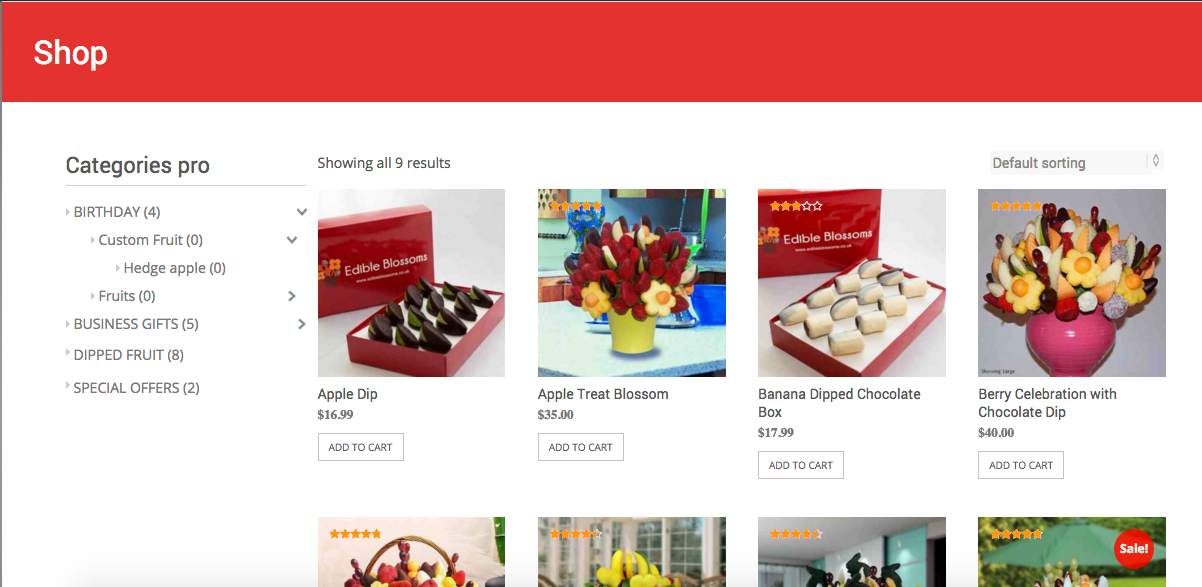
Layout 1: Accordion layout (Toggle Accordion with expand collapse)

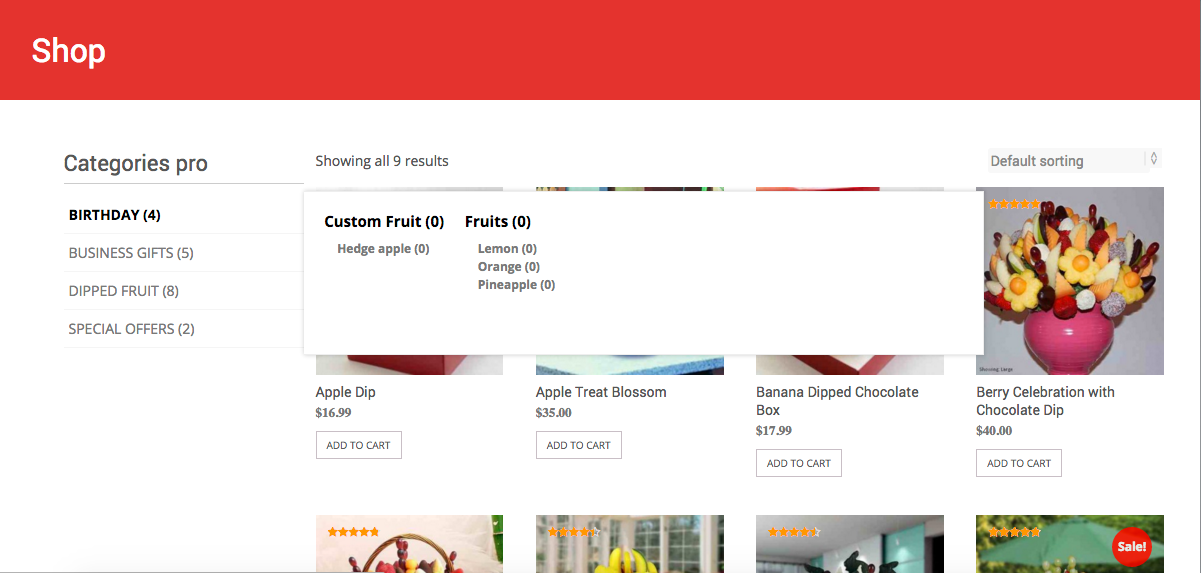
Layout 2: Mega layout

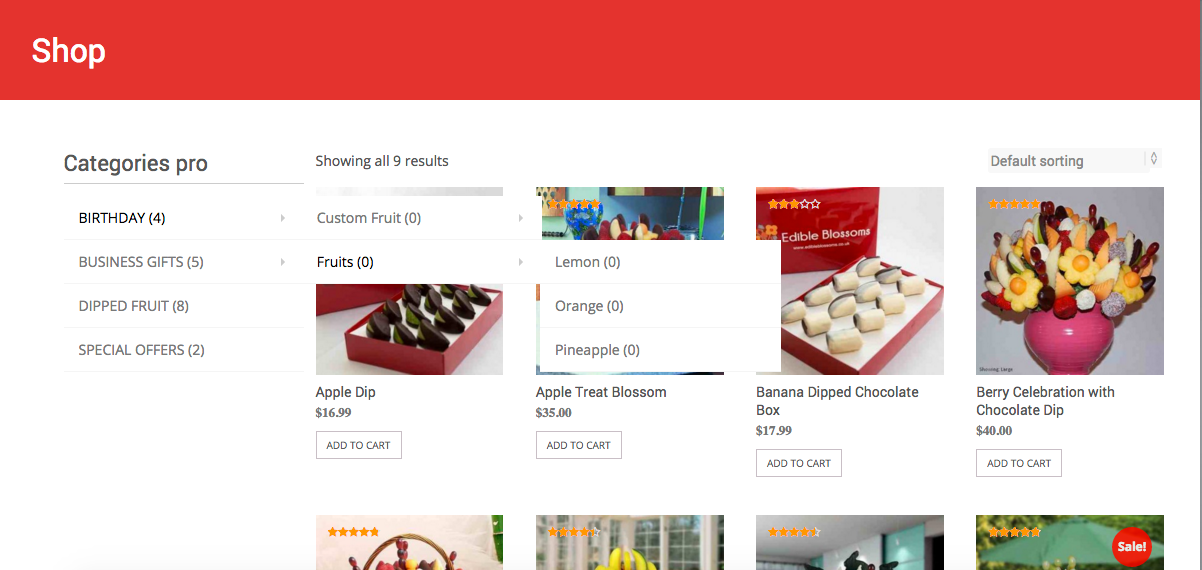
Layout 3: Vertical Dropdown multi-level layout

See Also

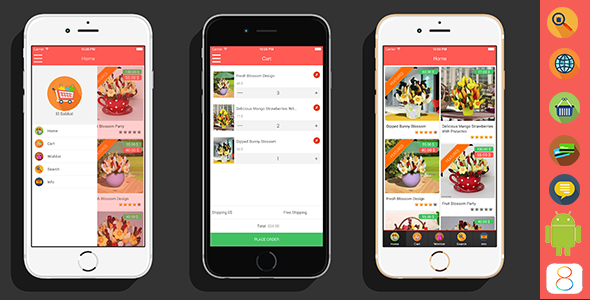
ElSabbat – Woocommerce Titanium App

KolYoumDeal – Mobile Coupons & Shopping App

Download WooCommerce Categories Pro (Miscellaneous)

Diamond Flipbook Vertical -flash&pluginWP (Utilities)

See my other Books:


Features:

– based on flash
– shorcode
– you can add swf, png or swf files (swf file can be attached video)
– you can add a double page
– you can print pages
– you can add logo and logo redirect
– you can attach a file to download (zip )
– you can change the background
– you can add description on home page
– you can change all colors
– you can hide/show shadow for page
– you can enable/disabled smoothing for page
– you can enable full screen at any time
– unlimited number of FlipBook

Video tutorials:

Installing plugin flipbook v5 – CLICK ME

Management FlipBook Plugin – CLICK ME


Download Diamond Flipbook Vertical -flash&pluginWP (Utilities)