Woocommerce Social Reward / Coupon (Marketing)

WooCommerce Social Reward is a plugin that allows you easily rewards your customer when they follow / tweet / share or like your pages.

Very Simple !! : You can choose to show our buttons on your cart page, product pages, and checkout page.
Then, when a social action is done, a coupon of your choice will be applied directly to their cart.

Features

  • Gives discount to customer who want to share your site
  • Use the default Woocommerce coupon system. You Just need to create your coupons and use them directly on the plugin
  • Unlike other plugin, coupon’s code aren’t displayed on the cart
  • You can also choose if you want to block these coupon when they are used manually, so customer can’t use the coupon without a social action
  • You also can choose if you want an unique coupon use by user and reset the marker when you want.
  • You can control where the box will appear on the product page / cart and checkout with Woocommerce template hook
  • You can choose simple mode for a rapid use or multiple coupon to attribute each action a coupon
  • You can change all displayed text on the admin panel
  • Retina and responsive
  • i18n Support, French and English translation provided
  • Free updates!
  • Supported Buttons:
    • Facebook Like and Share Buttons
    • Twitter Tweet and Follow Buttons
  • Compatible With All The Popular Browsers
    • Google Chrome – All Recent Releases
    • Firefox – All Recent Releases
    • Safari – All Recent Releases
    • Opera – All Recent Releases
    • Internet Explorer 8, 9, 10+
    • Works on all iOS5+ devices! iPhone, iPad, and iTouch + Most Android Devices (Note that individual Social Buttons may

    • work differently on all devices and may not be supported on some – out of my control.)

Download Woocommerce Social Reward / Coupon (Marketing)

Customer Analytic Pro (Magento Extensions)

Extended Online Customers
Customer Analytic Pro – gives deep info about customer behavior in real time. You’ll know all about customers! This module enhances the out-of-the-box Online Customers functionality in Magento. It provides additional metrics helping to analyze customer behavior in real time and use received information for marketing purposes and to engage new clients and establish strong customer relationships

This module enhances the out-of-the-box Online Customer functionality in Magento. It provides additional metrics helping to analyze customer
behavior in real time and use the received information for marketing purposes and to engage new clients and establish strong customer
relationships.

Features:
– Upgrades Online Customer functionality of Magento
– Provides summary information for all active users in real time
– Gives deeper understanding of customer behavior for specific users

Download Customer Analytic Pro (Magento Extensions)

FlexMap – Google map plugin for WordPress (WordPress)

Flex Map is a wordpress map plugin that provides many features with different map types such as creating area mapping, polygone, polyline, circle, rectangle, single markers, street view markers. With a simple visual map editor, It is extremely easy to make and place your map anywhere on your frontend wordpress site.

FEATURES:

  • Simple shortcode, you can place it everywhere on frontend.
  • Area mapping allow you to create many type of maps: polyline, polygon, rectangle, circle or your own shape
  • Customizable map layout or auto responsive.
  • Individual control. Rich options.
  • Map markers with diversified icons or upload your own.
  • Map markers legend with slide show style.
  • Big style libraries with Snazzymap.
  • Unlimited maps per post/page.
  • Visual composer ready
  • No more coding, everything is editable via our Visual Map Editor
  • Import / Export maps data.
  • And many interest features will be updated soon.

DOCUMENT

  • Installation and Instruction manual can be found at Flex Map Document
  • If you can’t find what you need please do not hesitate to contact our support team at [email protected]

Area mapping multi-shape type:

Ulimited map style with Snazzymap API integrated

Map lengend slideshow style

Multiple map types

Visual map editor

Visual Composer ready

------------ [09-28-2015] ------------ 
#! Initial Release

Download FlexMap – Google map plugin for WordPress (WordPress)

PlayBuzz and BoredPanda List Importer for Viralist (Add-ons)

Introduction

“PlayBuzz and BoredPanda List Importer for Viralist” is an add-on and must have tool for anyone using “Viralist – Viral lists script with Facebook App” script.

NO NEED TO EDIT YOUR VIRALIST SCRIPT

If you are not familiar with the “Viralist – Viral lists script with Facebook App” script, here is the link:

http://codecanyon.net/item/viralist-viral-lists-script-with-facebook-app/12620588

Salient Features of Importer

  • Import “list” from PlayBuzz.
  • Import “open list” from BoredPanda.
  • Browse and Import multiple “lists” from PlayBuzz.
  • PROGRESS METER – Real time import progress meter for BoredPanda
  • ADD USERS – Easily add new users to your website from within the importer (since VIRALIST has no such option in admin panel).
  • Select different users for different lists, before import.
  • Select category for list, before import.
  • Choose if you want to give credits to “list” author or choose from readymade templates
  • Add custom “credits” templates.
  • Auto approve imported list or mark pending for admin’s approval.

Screenshots

  • IMPORT “LISTS” FROM PLAYBUZZ AND “OPEN LISTS” FROM BOREDPANDA

    With the help of “Viralist Importer” you can import “lists” from PlayBuzz.com and “open lists” from BoredPanda.com in JUST ONE CLICK.
    Additionally, there is an inbuilt browser for PlayBuzz “lists”. You can import multiple “lists” using this browser.

  • WHY BOREDPANDA AND PLAYBUZZ?

    BoredPanda and PlayBuzz are well known viral content sharing websites with over thousands of lists already online. Plus, new content is being added
    on daily basis by visitors like you or me.

    With the help of this importer, you can easily import any of the “open lists” from these websites to yours.

    BuzzFeed? Sorry, buzzfeed isn’t supported by this script.

  • BOREDPANDA “OPEN LIST” IMPORTER

    BoredPanda is a huge website with lots of content like blog posts and open lists. With this importer, you can easily import “open lists”
    from BoredPanda. Some “open lists” have more than 70 or 100 pictures so it takes time to import such lists. To make the import process
    easier and user-friendly, there is a real-time progress monitor showing how many images are imported.

  • PLAYBUZZ BROWSER & “LIST” IMPORTER

    PlayBuzz browser can fill your “viral list website” with lots of “lists” in few minutes.

    • It shows real pages from PlayBuzz with “Older” and “Newer” buttons to nagivate the pages (just like playbuzz).
    • Load Random Page button will load a ramdom page from PlayBuzz. View demo to see how it works.
    • Click import button to copy any “list” to your “viral list” website in seconds.

  • SELECT OR CREATE NEW USER

    VIRALIST has no option in admin panel to add new user accounts.

    BUT, using this importer, you can easily create as many user accounts as you want.

  • CATEGORY SELECTION

    If you have defined any category in your VIRALIST Admin Panel, you’ll see them on import page. Just select desired
    category from the list before hitting import button and “list” will go under that category.

  • CREDITS TO LIST AUTHOR

    You can select which copyright messages you want to use, or create new ones (see after the next screenshot below)

  • AUTO APPROVE OR SAVE AS DRAFT

    You can choose whether you want to auto-publish imported “list” or let admin approve it later from VIRALIST admin panel.

  • CUSTOMIZE COPYRIGHT MESSAGES

    You can create, edit or delete any message you want. For more details,
    click here.

If you have any questions, feel free to ask.

Download PlayBuzz and BoredPanda List Importer for Viralist (Add-ons)

Hero Login Styler – WP Login Screen Customizer (Interface Elements)


Hero Login Styler – WordPress Plugin

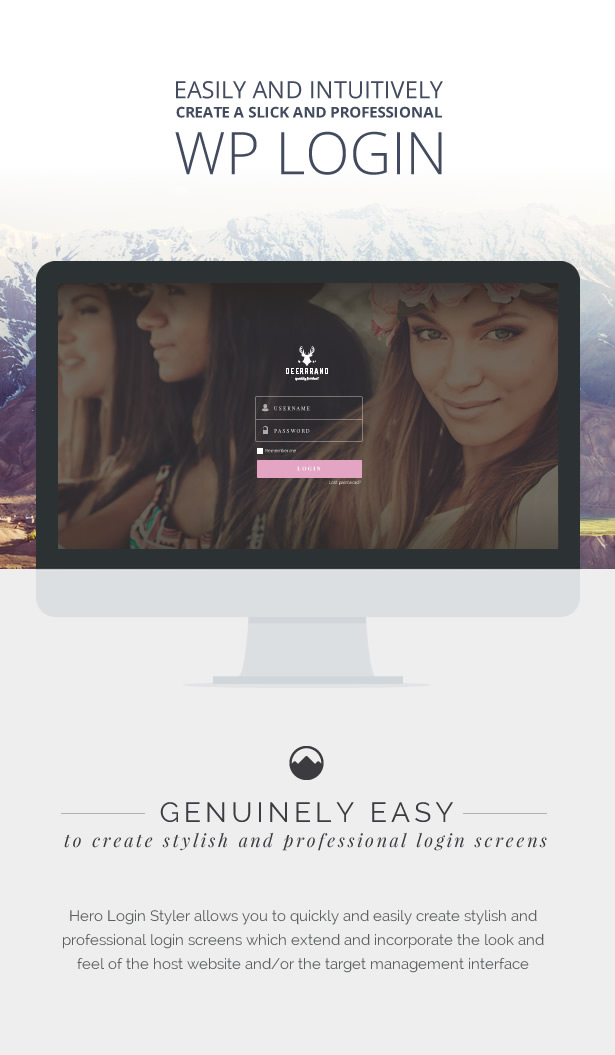
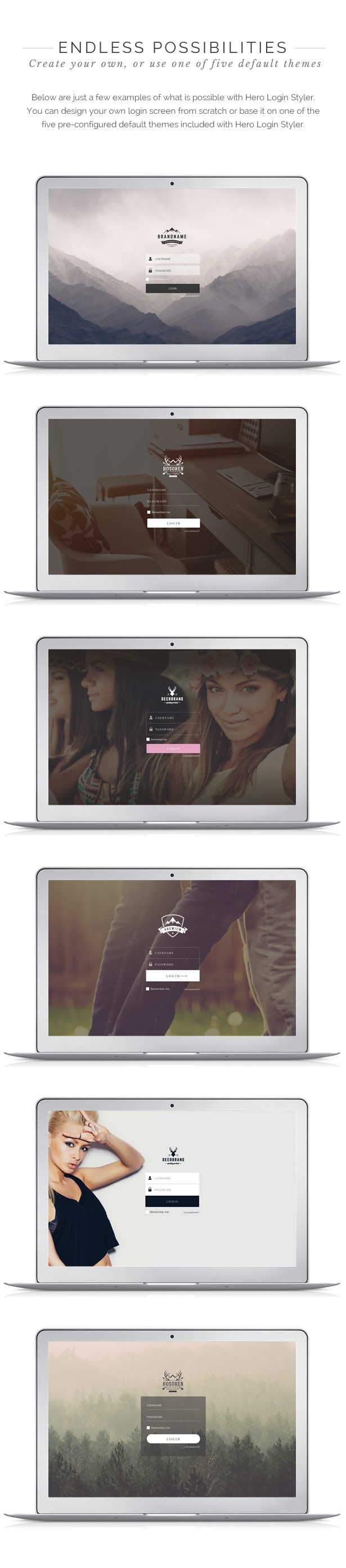
Customize your WordPress login screen. Hero Login Styler allows you to quickly and easily create stylish and professional login screens which extend and incorporate the look and feel of the host website and/or the target management interface

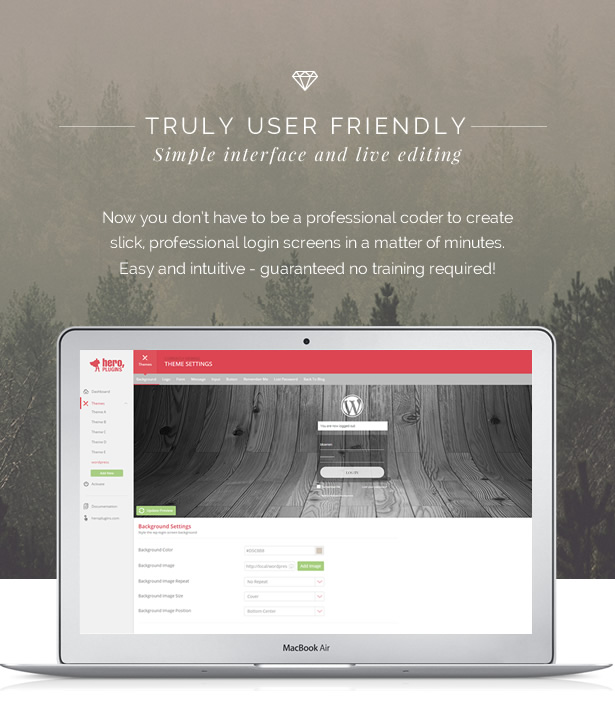
Truly user friendly

Simple interface and live editing. Now you don’t have to be a professional coder to create slick, professional login screens in a matter of minutes. Easy and intuitive – guaranteed no training required!

Background

  • Use your own background image
  • Background image positioning
  • Backround image tiling
  • Choose your own background color

Logo

  • Use the default WP logo and change it to a color of your choice.
  • Upload your own custom logo

Form

  • Set color, opacity, border, all Google Fonts included, font size, padding

Text Links

  • Google fonts included
  • Change color and size

Login Button

  • Color, opacity, border and Google fonts are all editable

Download Hero Login Styler – WP Login Screen Customizer (Interface Elements)

Perspective: Website Navigation Menu + Logo (Navigation and Menus)

Perspective is a website navigation menu created with HTML5 and CSS3. It has the following Features:

  • Dropdown Submenus. You can add an unlimited number of dropdown submenus, that have a subtle animation. You can check them in the Video Preview.

  • Custom Logo. The menu has a customizable text logo, the logo is also animated. Check the Video Preview.

  • 15 Colors Included + Create your own Color. There are 15 colors included in the menu, and you can easily create your own color by following an easy step-by-step guide. You can preview all the included colors in the Screenshots.

  • Responsive Menu. The design of the menu adapts to the screen of the device thus it looks great on Mobile Phones, Tablets and PCs. Check the Video Preview.

  • IE8+ Compatible. The menu works great on Chrome, Firefox, Safari, Opera and IE9+. It works on IE8 using JavaScript.

  • Comprehensive Step-by-step Documentation. Thorough explanation with code snippets to illustrate how to build and customize the menu.

Download Perspective: Website Navigation Menu + Logo (Navigation and Menus)

Swift Filter (Miscellaneous)

Swift Filter is a jQuery plugin, what helps you to make custom search fields which can filter/search in your site content.

It is a great solution to filter any content on your page, search in your FAQ, your portfolio, your products without any back-end programming

You can build complex search with connected search fields, numeric search (>, <, >=, <=, BETWEEN), or simple IN/NOT_IN search fields

Usage is super easy, you can customize your search fields wirth simple javascript initialization or with data attributes.

Check the documentation, our live preview for more examples.

Download Swift Filter (Miscellaneous)

Windows Phone -7 Minute Workout (Mobile)

This app is inspired by the 7 Minute Workout that was originally published in ACSM’S Health & Fitness Journal and then covered by the NYTimes.

The 7 minutes workout for women or men, based on the training principle of “Higher intensity and lower frequency”, is a sure-fire way to get sexy, flat and firm abdominal muscles.

7 minute workout routine contains jumping jacks, wall sit, push ups, abdominal crunches, step-up onto chair, squats, bench dips, plank, high knees, lunge, push-up and rotation and side plank. Do it daily to create a toned, flexible and strong body.

Features:

  • Voice guide you when you need to start 7 minute workout or rest
  • Beautiful character and UI design
  • 7 Minute Only
  • Workout Log
  • HD Graphics
  • Sound

Development Platform:

  • Visual Studio Express for Windows Phone
  • C#
  • Support : Windows Phone 8.0, 8.1 & 10

Download Windows Phone -7 Minute Workout (Mobile)

Indent – Studio Portfolio Style Kit for Layers (Layers WP Style Kits)

INDENT – With a clean and minimal style, Indent suits most creative fields. Easy to use, easy to customize, built for Layers.

Features:
  • 11 Preset Layouts
  • Clean and Minimal Design to Showcase a Portfolio for Design Studios, Agencies, or Freelancers
  • Responsive
  • Easy to Use
  • Easy to Customize
  • Built with Layers WordPress Theme
Recommended Plugins:
Credits:

Images used in this style kit where created using free resources obtained from:

History:
*** Version 1.0 - 08/10/2015 ***
 + Initial Release

Download Indent – Studio Portfolio Style Kit for Layers (Layers WP Style Kits)

Magento Money Manager Extension (Magento Extensions)

Magento Money Manager Extension is a simple, flexible, powerful solution to manage your money from many balance in cash type, bank account or payment account,etc. You can create extra income/expense receipt or transfer from one balance to another one. The extension also does not change any core file of Magento, so you can update your installation with total peace of mind.

Demo Login

Username: demo

Password: abcd1234

Extension Feature:

  • Easy to install.
  • Manage your money balance

    • You can choose which payment method to automatically create new income receipt for itself balance.
    • Separated multiple balance base on multiple type.
    • You can filter balance with all field.
    • Display total balance in admin dashboard.
  • Manage your income/expense receipt

    • You can create/delete your income/expense receipt.
    • Create new income receipt automatically after invoicing.
    • Balance will be automatically calculated after creating/deleting receipt
    • You can filter receipt with all field.
    • Display total income/expense in admin dashboard.
    • Display last 5 income/expense receipt in admin dashboard.
  • Transfer from one balance to another one

    • You can create/delete transfer.
    • Balance will be automatically calculated after creating/deleting transfer
    • You can filter transfer with all field.
  • Report

    • Total income report (day/month/year)
    • Total expense report (day/month/year)
    • Export total income report to csv/excel file
    • Export total expense report to csv/excel file

Download Magento Money Manager Extension (Magento Extensions)

Fashion Sales – GWD HTML5 Ad Banners (Ad Templates)

Fashion Sales – GWD Ad Banners are designed with Google Web Designer. And provided 6 most frequently used sizes in the market

Sizes

1. 300X600
2. 300X250
3. 728X90
4. 160X600
5. 120X600
6. 468X60

Features

A. Google Web Fonts.
B. Repeating Animation Effects.
C. Fully Editable.
D. 24X7 Support N Free Updates.

About

You can use these ad banners for any purpose, just by changing content,, it is very easy.. you can use this for many more ways.. Business, Corporate, Promotional Based etc…

Design of the ad banner is very trendy and catchy to users.. and you can change all elements as per your need.

All files are included for buyers to edit content easily.. buyers can modify content like Background-color, Titles, Logo, Images etc.. easily according to their requirement. No Need of Technical stuff.. Sources

Source

http://photodune.net/item/beautiful-young-woman-with-black-nails/10035824

Support

Feel free to ask any queries, it is our pleasure to help you..

And Ask Us For Any New Sizes, Will provide you in 24 Hrs

Download Fashion Sales – GWD HTML5 Ad Banners (Ad Templates)

Stream Radio 2 (Full Applications)

\

Description:

Custom android based online radio streamer application. It’s can stream lot of file formats.
Check the demo .apk file.

Radio features:

  • Track title detection
  • Music cover detection
  • Smart blur background
  • Use your own radio logo
  • Supports background play
  • Smart headphone detection
  • Notification
  • Support: pls, m3u, mp3, aac, aac+ …
  • Social features:

  • Share function
  • Twitter or Facebook or your page integration
  • Other features:

  • AdMob integration
  • Smart-Tap controll
  • Supports network error handling
  • Checks network availability
  • Easy volume control
  • Animated buffering
  • What you get:

  • Full Android Source Code (Eclipse and Android Studio)
  • Step-By-Step Text and Video instructions (Youtube)
  • Demo .apk file
  • Download Stream Radio 2 (Full Applications)

    CompileGrid CMS (Project Management Tools)

    For any question regarding this CMS send me an email at [email protected] or, add our support skype id : compilegrid

    CompileGrid will allow you to build your website fast and easy!

    If you want to create a personal website, a blog.. or even a ticket management system!! Compile Grid will do it!

    Website Settings :

    • SEO tags
    • Website fast “Contact Details” widget
    • Change default homepage
    • Upload new logo
    • SMTP Settings
    • Multiple administrators

    Default plugins :

    Admin demo :

    Taking into consideration that this demo will be a mess.. I disabled 3 components :

    1. The admin can’t change his password.
    2. The default theme directory can’t be updated.
    3. Default website route can’t be updated.

    Download CompileGrid CMS (Project Management Tools)

    WordPress Refresh (Miscellaneous)

    Developing a WordPress theme just got a whole lot more efficient

    With the WordPress Refresh plugin, you can stop hitting your browser refresh button after each small CSS, JS, PHP or HTML change you make when developing your WordPress theme.? Simply activate the plugin and start coding, you won’t need to manually refresh your browser.

    Responsive option

    The plugin optionally opens a second (smaller) screen that refreshes along with the main screen. This way you can see the changes apply to the mobile and desktop website simultaneously.

    Download WordPress Refresh (Miscellaneous)

    Morphing Icons for Visual Composer (Add-ons)

    Morphing Icons is an addon for Visual Composer. The addon lets you add animated vector icons to your pages/posts. These icons, of course, can instantly be customized — size, fill-color, fill-opacity, stroke-width, stroke-color, stroke-opacity, layout etc, but the main feature here is the Morphing. Morphing is a special effect that changes (or morphs) one shape (icon) into another through a seamless transition.

    Features:

    • 593 vector icons by Fontawesome (vector icons can be magnified infinitely without loss of quality)
    • lightweight: 16kB + lazy modules at frontend and 25kB + lazy modules at backend
    • rich customization features (almost infinite)
    • live search
    • ajax compatible
    • easily scalable javascript (AMD)

    Required WPBakery Visual Composer 4.7

    Download Morphing Icons for Visual Composer (Add-ons)