Zoom | Html 5 Animated Google Banner (Ad Templates)

Zoom | HTML 5 Animated Google Banner is a beautiful set of banner templates, made for all business purposes.

Features:

    -7 standard sizes: -300×250, 728×90, 160×600, 250×250, 300×600, 728×210, 336×280.

  • -HTML5/CSS3 effects;
  • -Easy to Edit;
  • -Google Web Fonts;
  • -Made with Google Web Designer;

What you get:

  • 7 HTML Ad template, ready to use
  • 7 PSD template
  • easy to customize with Google Web Designer free
    software

Image courtesy:

All the images are display only, not included in the main download package. But I must want to give credit to the authors for their wonderful images. To view all image source please visit the following link

Download Zoom | Html 5 Animated Google Banner (Ad Templates)

HTML5 Autumn Sales Banners – GWD – 7 Sizes (Ad Templates)

Fall Sale HTML 5 Banners. APT-CC-022-Autumn sale Banners.

Very easy to edit and detailed help file is included. Google fonts used. Files can be edited with free Google Web Designer software.

All the files are included with the download file. ( Icons, Shapes)

This set includes the following 7 sizes

– 160×600
– 180×150
– 300×250
– 300×600
– 320×50
– 336×280
– 728×90

Download HTML5 Autumn Sales Banners – GWD – 7 Sizes (Ad Templates)

GYM & FITNES HTML5 Banners – GWD – 7 Sizes (Ad Templates)

APT-CC-020-Fitness HTML5 Banners

Very easy to edit and detailed help file is included. Google fonts used. Files can be edited with free Google Web Designer software.

All the files are included with the download file. ( Icons, Shapes)

This set includes the following 7 sizes

– 160×600
– 180×150
– 300×250
– 300×600
– 320×50
– 336×280
– 728×90

Download GYM & FITNES HTML5 Banners – GWD – 7 Sizes (Ad Templates)

HTML5 Multi Purpose Banners – GWD – 7 Sizes (Ad Templates)

RED-CC-013 – Multi Purpose HTML 5 Banners.

Very easy to edit and detailed help file is included. Google fonts used. Files can be edited with free Google Web Designer software.

All the files are included with the download file. ( Icons, Shapes)

This set includes the following 7 sizes

– 160×600
– 180×150
– 300×250
– 300×600
– 320×50
– 336×280
– 728×90

Download HTML5 Multi Purpose Banners – GWD – 7 Sizes (Ad Templates)

HTML5 Audio Player with Playlist for WordPress (Media)


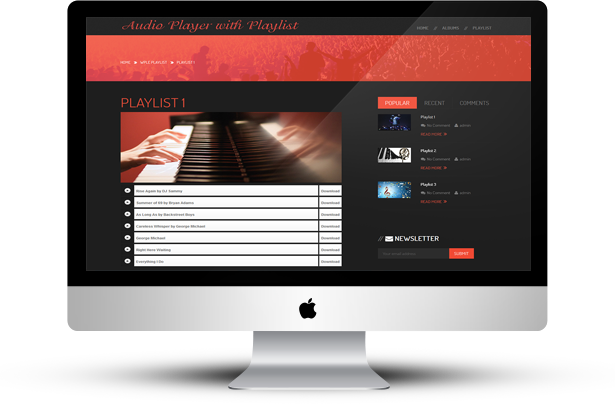
“HTML5 Audio Player with Playlist – WordPress Plugin” is a powerful responsive HTML5 audio player plugin which is used to create, edit and manage playlists with audio files.

“HTML5 Audio Player with Playlist” plugin allows you to organize and plays your audio files with creating playlist and also you can add download URL with share on social networks.

“HTML5 Audio Player with Playlist” supports unlimited playlists and each playlist can have unlimited tracks.

This plugin can be used as single player or playlist and best for any music related websites.

You can upload audio tracks directly using WordPress media manager. When you upload files, WordPress can get all the information including Title, Artist, Album, Description and Images. You can assign images to each playlist any time.

“HTML5 Audio Player with Playlist” plugin has excellent features and very easy to install or setup. “HTML5 Audio Player with Playlist” plugin is more flexible and compatible with many existing plugins in the WP repository. This Plugin is fully customizable. Users can easily configure the plugin into the new or existing WordPress sites.

  • Create, Edit and Manage playlists with audio files.
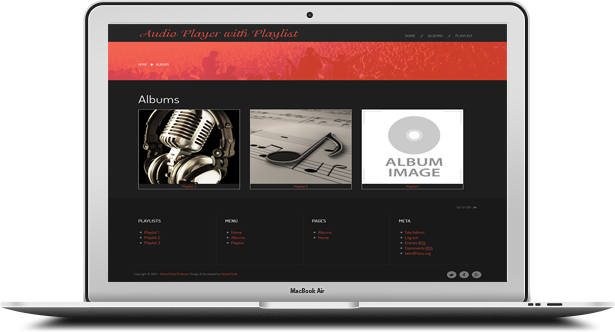
  • Auto create album page.
  • Add download URL with share on social networks (Facebook).
  • Enable/Disable Facebook share and Download button.
  • Supports unlimited playlists and each playlist have unlimited tracks.
  • Best for any music related websites.
  • Upload audio tracks using WordPress media manager.
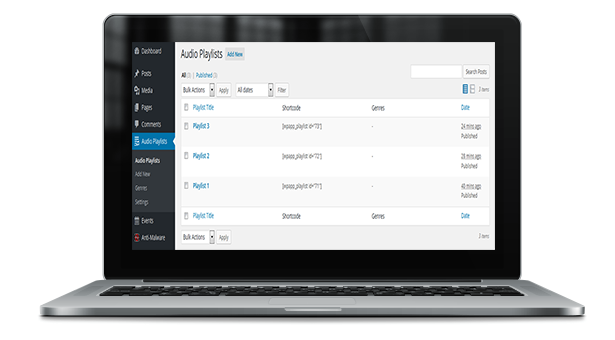
  • Shortcode integrated.
  • Place shortcode in any pages or posts.
  • Every Playlist has individual shortcode.
  • Add Genres.
  • Easy to add Tracks.
  • Playlists support.
  • Direct Link to file download in Playlist.
  • Easy to get started.
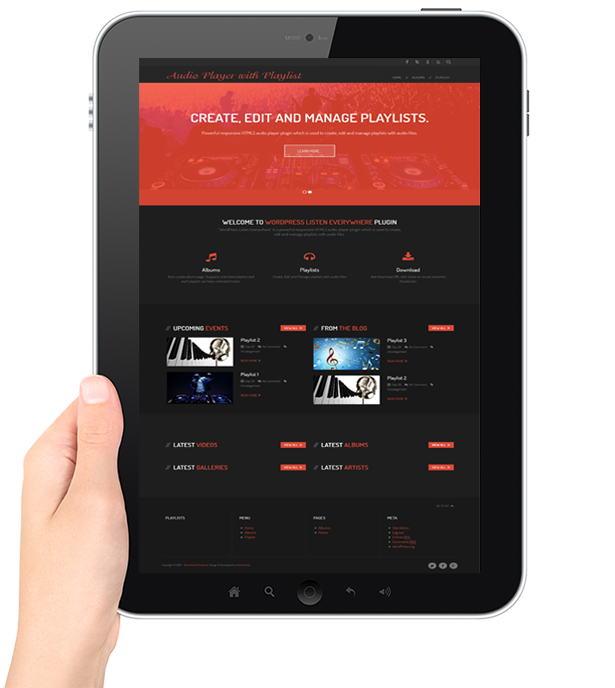
  • Responsive design.
  • Simple and Easy to Use Admin panel.
  • Easy to install.
  • Easy to customize.

For installation process and other information please view our online Documentation

Download HTML5 Audio Player with Playlist for WordPress (Media)

Save My Bike – The Game – iOS9 (Games)

iTunes Game Demo

  1. Save My Bike -iOS9 Ready !
  2. Save My Bike is the Best Game Available on code canyon, it is very unique game play. and Easy to reskine !
  3. Save Yourself from fall, accelerate and move on ! amazing level design. Nice Game Play.
  4. Game Centre Leader-board Scores are uploaded to a GameCenter’s Leaderboard for everyone to see.
  5. Best Score The game saves the Best Scores on the user’s Device.
  6. Share on Facebook’Whatsapp and others Lets user choose where he wishes to share
  7. Restart Feature Player can restart game after game over.
  8. Rate It ! Feature The app has a rate button to make it easier for players to give you a good rating.

Other Games

Download Save My Bike – The Game – iOS9 (Games)

QuickShop AngJS (Shopping Carts)

This store is done on Angularjs. This plugin is breathing ease of use and great UI. In this store, there are search, filter brand and see more.

This store uses technology HTML 5 localStorage. All purchases and customer data will come to you in the mail.

You can add and edit items :

  1. Configure Store by editing config.json
  2. Product management, using folder: details/(file identifier item).json.

    PSFile identifier item product management (where file identifier item = id in config.json).Example 192.json :

    [
      {
        "id_products": 195,
        "Size": "5.2 inches (~70.9% screen-to-body ratio)",
        "Weight": "152 g (5.36 oz)",
        "Display": "IPS LCD capacitive touchscreen, 16M colors",
        "OS": "Android OS, v4.4.4 (KitKat), v5.0.2 (Lollipop), planned upgrade to v5.1 (Lollipop)",
        "Camera": "20.7 MP, 5248 ? 3936 pixels, autofocus, LED flash",
        "Battery": "Non-removable Li-Ion 3100 mAh battery",
        "Memory": {
          "internal": "16/32 GB",
          "ram": "3 GB RAM" 
        },
        "Availability": "September 2014",
        "CPU": "Quad-core 2.5 GHz Krait 400" 
      }
    ]
    

The homepage: partials/phone-list.html

The phone details: partials/phone-detail.html

Features:

  • Powered by Angularjs, jQuery, Bootstrap
  • Responsive Layout
  • See more, Filter, Search
  • Cross-browser compatible

Online demo: http://design.id1945.com

Download QuickShop AngJS (Shopping Carts)

WooCommerce Warehouses (Products)

The WooCommerce Warehouses plugin has the ability to manage stock that are stored in different locations, like warehouses. By creating multiple warehouses you can manage the inventory of your product automatically, also by establishing stock usage priorities.

This plugin works alongside your existing WooCommerce store by adding a new option in the product configuration screen, inside the existing Inventory option, extending its features.

You don’t need to subscribe to any other 3rd party services, it is a standalone solution, to work exclusively alongside WooCommerce.

This plugin adds the following features to WooCommerce:
– Multiple warehouses.
– Stock management.
– Stock movement log.
– Warehouse to warehouse stock transfer.
– Stock usage priorities by warehouse (global and per item priorities).
– Backend orders with warehouse stock usage.
– Handles both products and product variations.

Warehouses Management

To add your warehouse you need to select Warehouses > Add Warehouse.

Fill the form with all the information and press “Save Warehouse” to store it.

Stock Log And Management


This feature is handled inside the product tab.

Go to Warehouses Stocks Plugin Options – List of warehouses to manage the inventory stock of your product.

The total stock amount between all warehouses is handled by our plugin. You do not need to worry about this.

Backend Orders


Adding a product to the current order will show you a Warehouse drop-down with the warehouse name and the respective stock of this product.

You do not need to worry about stock decrease, our plugin will handle that for you.

If you have any question please contact us by the support.

Download WooCommerce Warehouses (Products)

JS Ultimate Social Share for Joomla! (Social Networking)

JS Ultimate Social Share is all-in-one social share solution that allows you share, monitor and increase your social popularity. With JS Ultimate Social Share you will take your social sharing and following on a next level.

Floating Sidebar with shares counter
A floating sidebar is a very common, effective, and sleek way to add social sharing icons to any page on your website. We’ve even included unique hover styles for the vertical and browser edge orientation of a social sidebar.

Above or Below content
Perfect for blog posts and content heavy pages, JS Ultimate Social Share allows you to place sharing buttons either above the content area, below the content area, or in both locations.

On Image
Media is arguably the most shared content on the web, and JS Ultimate Social Sharemakes media sharing even easier. When users hover over media elements within your content, social sharing buttons fade in for quick and easy sharing.

Mobile & Responsive
We know that your website needs to be readable on all devices while still allowing visitors to share your web pages. JS Ultimate Social Share sharing icons are fully responsive and look great all the way down to even the smallest mobile devices.

Features

Content Source: Joomla, K2
Fully responsive & mobile friendly
CSS3 Animation.

Download JS Ultimate Social Share for Joomla! (Social Networking)

Live Chat Business (Help and Support Tools)

Never miss a customer again, deliver first class support, operator conferences, operators private chat and all that without special modifications on your web server or mobile phone. We have build Twilio/Nexmo into Live Chat Business which can send you a text message each time a customer or a client needs your help.

Features like, ProActive, GEO – IP, file sharing, avatar, mobile optimised, unlimited operators, cross browser, departments, slide up, pop up, live status and much more.

That is the most advanced but easist live chat / support you ever seen and used.

It works on all websites included WordPress, Joomla, PrestaShop and all others. One installation will serve all your websites.

Login with any operator first and the chat will go online, it is best to use two browser for testing but not necessary.

Operator Login

http://scripts.jakweb.ch/lc_business/operator/

Client Demo

http://scripts.jakweb.ch/lc_business/demo/

Important

Do not use our main website for demos unless you have a real question.
Thank you very much.

Download Live Chat Business (Help and Support Tools)

Lines – Dropdown Menu (Navigation)

This menu is made with HTML5 and CSS3. Menu is Responsive and works on all major browsers. Menu is easy to edit and integrate into any website. Menu has unlimited animations. You can create your own, unique animations, even different animation for each main link or dropdown menu. jQuery is only used to control the menu on Tablets and Phones.

Menu works (the main structure is 100% the same) on Internet Explorer 9 but animation and some other CSS3 features do not work.

Features

  • HTML5/CSS3
  • Responsive
  • Unlimited Animations
  • Unlimited Dropdown Menus
  • Google Font
  • Clean and Commented Code
  • Easy to Use and Install

Credits

JavaScript Library: jQuery
Font: Google Fonts

Download Lines – Dropdown Menu (Navigation)

Business Card Maker (Mobile)

Description

Business Card Maker is an Android application that help you manage your digital business card.

Full Feature List

  • UI with material design
  • Splashscreen
  • Add new card page
  • Coverflow display page
  • Cardbox page
  • Create business cards using existing templates
  • Easy to add new template or customize existing templates
  • Using sqlite database for storage (add, display, delete, edit)
  • Convert view to .png
  • Send email using .jar lib
  • Share business card (social media, messaging, IM, and others)
  • Smoothly zoom in/out business card
  • Action bar searchView in cardbox page
  • Custom listView
  • Real time view while creating/editing business card
  • Using fancycoverflow lib to display coverflow

App Preview

Demo APK

[download]

Download Business Card Maker (Mobile)

Square Colors Swift 2 (Games)

Descripcion:

How to play?
Rotates the square to match the color

Features

  • Devices: iPhone and iPad
  • iOS: 9.0
  • Developed on Xcode 7
  • Language: Swift 2
  • Game Framework: SpriteKit
  • Ads: iAd, adMob, Chartboost
  • Game Center
  • in-App Purchases

Easy Configurations

If you wish to modify some aspects of the game, you can change the variables and constants in Configurations.swift

//Game Configurations
    let configSound:Bool = true
    let useBackgroundImage:Bool = false
        let scrollingSpeed:CGFloat = 15
        let increaseSpeedPoint:CGFloat = 0.5
        let durationGameOverAnimations:Double = 0.2
    //Font Name
    let fontName:String = "Molot" //Info.plis -> Fonts provided by application
  • scrollingSpeed: the speed at which the moving obstacles.
  • increaseSpeedPoint: the speed increase per point, you can put 0 if you do not want to change.
  • durationGameOverAnimations: duration of the animation for game over, if you do not want animation you put 0.
  • configSound: to use button for mute game.
  • useBackgroundImage: the background of the game can to have an image or only color.
  • fontName: font for the game.
//Sounds
    let soundPoint = "point.mp3" 
    let soundGameOver = "gameOver.wav" 
    let soundClick = "tap.wav" 

Change Sounds:If you sounds have others names change it here

//Ads
    // -  Banners
    let useBannerAds:Bool = true
    let use_iAds:Bool = true
    let use_adMob:Bool = true
    let bannerPosition_bottom:Bool = true
    let adMobID:String = "ca-app-pub-5463627996411476/5864942547" 
    // - Chartboost
    let use_chartboost:Bool = true
    let showChartboostWhenGameOver:Int = 2
    let chartboostID:String = "5384b1f41873da015c88d17d" 
    let chartboostSignature:String = "2166c451c84b24317fefdc953919d123c2cbf489" 

Configure if you want use banner ads -> iAd / adMob and the position Top or Bottom. If you want use “Chartboost” and when show on screen game over.

//In-App Purchase
    let usePurchaseNoAds:Bool = false
    let purchaseID:String = "com.pixelbulls.SquareColors.inapp.noads" 

For use in-app Purchases put usePurchaseNoAds=true and change you productID

//GameCenter
    let leaderboardOneID:String = "com.pixelbulls.SquareColors.One" 
    let leaderboardTwoID:String = "com.pixelbulls.SquareColors.two" 
    let leaderboardThreeID:String = "com.pixelbulls.SquareColors.Three" 
    let leaderboardFourID:String = "com.pixelbulls.SquareColors.Four" 

Change ID of your leaderboard

//Rate App
    let appleID:String = "917615827" 

Change the number of you Apple ID

Custom Sprites

You can replace existing images by drag and dropping your new sprite onto the ‘Set Viewer’ in Assets.xcassets. Make sure to provide all versions of your sprite.
It is also a good idea to keep the size of your new sprites the same size as the old, original sprites.

Download Square Colors Swift 2 (Games)

HelloVideo! – Social Login (Add-ons)

Introducing Social Login from the creator of the HelloVideo! – PayPal plugin.

Now you can enable you’re users to Login/Register from Facebook, Twitter or Google!

Very easy installation and configuration!

You can find the HelloVideo CMS (which is required to use this plugin) here: http://codecanyon.net/item/hellovideo-video-cms/11149598

You can also find our PayPal Subscription plugin here: http://codecanyon.net/item/hellovideo-paypal-plugin/11986570

Download HelloVideo! – Social Login (Add-ons)