WP Real Media Library – Organize your uploads (Media)


Features

  • Easy to use!
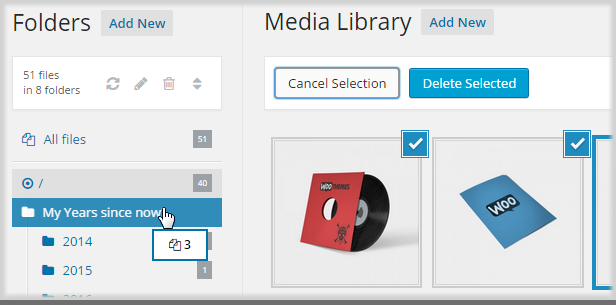
  • Drag and drop your files via mouse
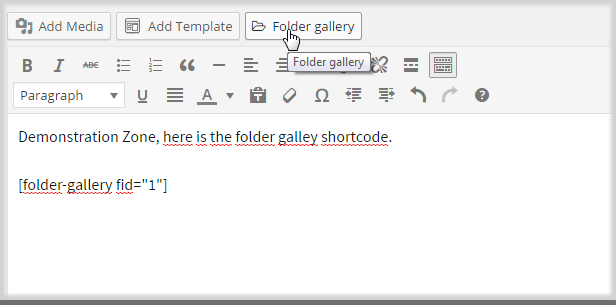
  • Create a gallery from a folder
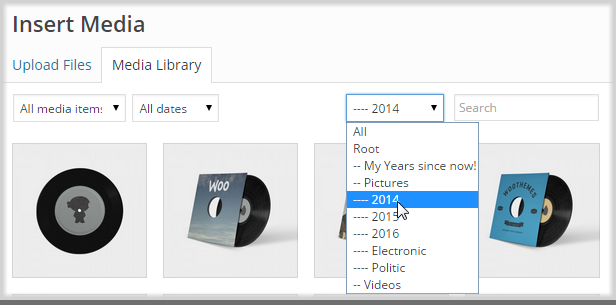
  • Filter when inserting media
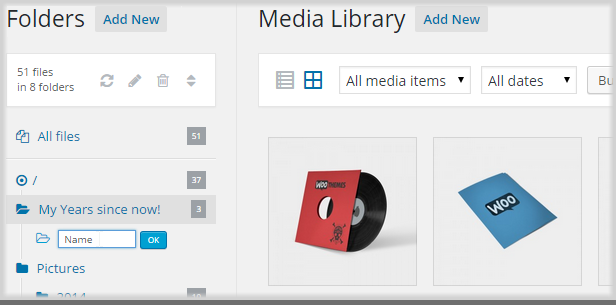
  • Create, rename, delete and reorder your folders

Planned

  • Automatically move uploaded file in current openend directory. Currently, the file will be placed in root directory.

Updates

06 October 15:
- initial review

Download WP Real Media Library – Organize your uploads (Media)

QQ Social Login Script (Social Networking)

QQ Social Login Script

The QQ social login script helps your website’s visitors to login with their QQ social network account. The script will use existing QQ account information of the user to sign into your website. The QQ social login increases registration on a website by minimizing the barriers of putting username & password and permitting users to just authenticate themselves with their current QQ social media IDs and pre-validated QQ accounts.

Download QQ Social Login Script (Social Networking)

WooCommerce Quick Resort & Hotel Booking Calendar (WooCommerce)


If this plugin is useful, could you please help us to rate it? it will be a big encouragement to improve for us.

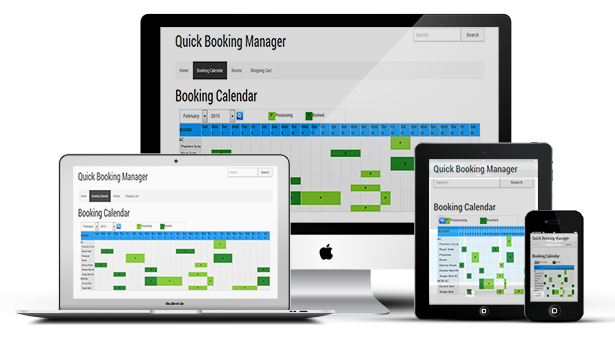
“WooCommerce Quick Booking Manager” plugin will enable online booking services for your site. You can show and manage your apartments/houses/hotel rooms/hotel/resorts (or something else) availability for rent.

You can manage the bookings (availability) on a daily basis. Rooms gallery and booking calendar page will be created automatically and shortcode to generate.

Calendar will be automatically copied. You can add/edit rooms/cottage or any service and add/edit or delete bookings from admin to manage the full system.

“WooCommerce Quick Booking Manager” plugin is integrated with WooCommerce Payment systems.


  • Very easy to install and configure.
  • Very flexible functionality. Fit to wide range of business.
  • All bookings and settings are stored in your DB. You don’t need third party account(s).
  • An easy to use Booking Admin Panel that displays bookings in Calendar Overview and lets you manages bookings.
  • Payment System Integrated with woocommerce payment.
  • Built with jQuery, Ajax and other technologies.
  • Easy to integrate into your site because necessary post or page will be automatically created and shortcode will be automatically copied to page.
  • Make bookings in friendly booking interface – select the date(s) and fill form fields.
  • Prevent of double booking for already reserved days (1 booking per 1 day for a particular room).

  • Comfortable Admin Panel for booking management. View bookings in Calendar Overview Panel (Timeline).
  • Pagination of the booking listing.
  • Administrator can edit specific bookings.
  • View the bookings in booking calendar of any month of any year.
  • Add unlimited room.
  • Set Room category from admin.
  • Booking can be added from admin panel.
  • View the booking calendar at a glance.
  • “Booked” and “Processing” background color can be set.
  • Add custom CSS for frontend design.
  • Integrated with woocommerce payment system.

  • Booking calendar / availability calendar for a holiday home, bed & breakfast, condo or hotel.
  • Booking calendar / availability calendar for a room or office.
  • Booking calendar / availability calendar for a car or boat.
  • A booking calendar or availability calendar for community center or any party hall.
  • A booking calendar for equipment.
  • Booking and availability for clinic, medical rooms and words seat etc.
  • A shift calendar.
  • Whatever you like!

  • Download the plugin.
  • Unzip the file “wc-quick-booking.zip” and upload the folder to the ”/wp-content/plugins/” directory.
  • Activate the plugin from “Plugins” menu in WordPress Admin.
  • Now go to “Woo Booking Manager” of admin dashboard and create room category.
  • Create rooms/resort/else for booking.
  • Admin can edit booking from “Manage Booking” option.
  • View the overview of bookings in “Booking Calendar” option.
  • Admin can set booked and pending background color of Booking Settings option.
  • Advance user can add CSS (Cascading Style Sheet) from “Frontend CSS Fix” option.
  • Integrate with WooCommerce: Create a woocommerce product with SKU “sc_quick_booking” and save this product as “Pending”.
  • Now go to frontend and click on to “Booking Calendar” link to add a Booking.

For installation process and other information please view our online Documentation

Download WooCommerce Quick Resort & Hotel Booking Calendar (WooCommerce)

WC Product Embed (Add-ons)

WC Product Embed plugin now allows you to embed any WooCommerce product in any post/page using Shortcode or Visual Composer interface.

Features:

  • Supports Simple, Variable, Grouped, External and Bundle Products
  • Fully integrated with Visual Composer
  • Fully Customizable from theme to templates
  • Completely hookable and filterable for developers

With just a few clicks you can now add your product to any post/page on your site!!

Enjoy.

Powerful Development Team

Download WC Product Embed (Add-ons)

Book My Doctor (Miscellaneous)

W3Schools

Book My Doc is online application software for booking a Doctor’s appointment over internet. This easy to use application software is built upon PHP with Slim Framework. This easy to use and efficient website helps you to schedule doctor appointments without breaking a sweat. It helps you to book an appointment without going to hospital

Patients can book their appointments online and doctors can approve the appointment if they are available on the requested date. This app helps you to schedule your doctor’s appointment easily online and can find your perfect doctor by reading reviews by other registered users. This also helps you in finding doctor’s availability and can book appointments in just a mouse click.

W3Schools

Modules

Search module

Search module is for searching the available doctor; you can search separately in each department for available doctors. You can book the required doctors online and view their profiles and their location.

Appointment booking

This module is for scheduling an appointment with the doctors you require, here your medical history and date of appointment is to be entered. Only the registered users can login and can schedule a doctor appointment.

Check-in form submitting

Check-in form is for users to submit all their previous medical history, and to mention any kind of medical conditions the user has.

Appointment management (doctor)

This module is for the doctor’s to approve and cancel the requested appointments by patients and they can also list out the days they are available.

Schedule a timing (vacation, leave and available time fixing)

This module is for doctor’s to submit all their available dates and times, so that patients can request for appointments on the available dates. In this module doctor’s can schedule their availability dates and also the days they will be on vacation.

Past appointment management (user)

This module is for users to view all their past appointment history. And to update their medical status and any new medical conditions they have.

Get a copy of check-in details

Here check-in details of users are available, and they can get copy of their check in details and can print keep it with them for further procedures if they want.

Registered User Features

Easy and user friendly Sign up, Sign In and Account Password Recovery
Book and cancel appointments anytime as they want.
Can edit/update or delete the booking details.
Can write review about doctors and can select doctors according to other user feedback. 
Can access all previous check-in details and medical past appointments.
Can select and schedule appointment with any doctor as he want.
Doctor details and location is available.

Doctor Features

Easy and user friendly Sign up, Sign In and Account Password Recovery
    Doctor’s can approve on the requested appointments by patients.
    Can update/edit their profiles and can add videos and images.
    Can schedule their availability dates and the day they are on vacation.

http://bookmydoctor.azurewebsites.net/

Doctor Login:
username: [email protected]
Password: 123456

Patient Login:-
username: [email protected]
Password: 123456

W3Schools

Download Book My Doctor (Miscellaneous)

Easy Customer and Order Import in WooCommerce (Products)

Easy Customer and Order Import in WooCommerce

Easy Customer and Order Import in WooCommerce

The “Easy Customer and Order import” WooCommerce plugin helps a store admin to easily import WooCommerce customers, orders & coupons in a CSV file format. With its simple import format, this user friendly importer works as an ideal tool when moving other eCommerce platform to WooCommerce and provides a store admin with the ability to maintain customer accounts & order records.
In case of your current store’s database failure, migration from old eCommerce platform or updating the version of WooCommerce store, the plugin is helpful to import data (related to customers, orders and coupons) in all such cases with a minimum of hassle. It is a powerful plugin which supports importing of thousands of records within just few click process.

Download Easy Customer and Order Import in WooCommerce (Products)

Prestashop Abandoned Cart Alerts Module (Prestashop)

Why use PrestaShop Abandoned Cart Alerts Module on your store?

Improve your conversion rate by 25% (and more), customize email template, automatic email reminder, track & count view, click, checkout from email.

Analytic with chart in daily, weekly, monthly or any date about emails sent, view, click, checkout.

For Merchant

According to recent research the average abandonment rate in the sales sector is over 70%. Some of the common reasons for that, customers tell the following:

– High shipping costs (44%)

– Hesitation, simply being not ready to purchase (41%)

– Too high product prices (25%)

Removing these hesitations with the Abandoned Cart Reminder Module will boost your sales, by motivating customers to restore their abandoned shopping carts.

  • Reduces cart abandonment and improved conversion rate by 25% (and more), Increase store revenue
  • Analytic with chart about emails sent, viewed, clicked, ordered.
  • Send discounts code, coupon directly via the email
  • Recover lost sales, Track uncompleted orders
  • Send cart reminders to get more visitors
  • Preview, send email template for test before send to customer

Features

  • Enable customers to automatically recover their cart (optional)
  • Support Chart for analytic, report emails sent, viewed, clicked, ordered.
  • unlimited cart reminder email.
  • Following customer since view email, click email, visit and checkout. Track which customers came back and when.
  • Create numerous templates for a first, second, and third reminder email!
  • Choose the delay period between the first reminder email, second reminder email, etc.
  • Easily view and manage all the Abandoned Cart’s Products
  • Send either automatic reminders or individual e-mails right through the module admin panel.
  • Easily create email templates tailored to match your online store’s theme in Backoffice. WYSIWYG editor allows you to personalize the email, create a compelling email content by using text, images, HTML etc.
  • Preview, send email template for test before send to customer
  • Create an infinite number of email templates for every occasion.
  • Custom email name, email subject, email from, email reply-to
  • MULTIPLE placeholders like – {customer_firstname} {customer_lastname} {cart_price_total} {cart_product_count} {product_table}{cart_creation_date} {order_page_link}
  • Include Cart Summary in the customer reminder emails
  • Support both of SMTP and PHP mail while sending email.
  • Compatible multiple language.
  • Compatible multiple stores.
  • and more

Benefit for Customer

Your customers will receive one or several reminder emails after they abandon their shopping carts.

Our Abandoned Cart Reminder will automatic restore their abandoned shopping carts after customer visit website from email.

It makes your PrestaShop store look professional with good, timely customer follow up.

OTHER FEATURES

  • Easy to install, easy to upgrade, just copy to use
  • Friendly and flexible configuration
  • HTML/CSS validation
  • Easy to customize front-end via HTML/CSS
  • Clean code
  • Cache system…

Some Screenshot

– Analytics Abandoned Cart, Email sent, viewed, clicked, visited and order

– Manage Abandoned Cart

– Email to individual Abandoned Cart

– view a products in Abandoned Cart

– Manage Email Template

– Add/Edit – Preview/Send test Email in Email Template

– Setting Time for Reminder.

– Setting Email, SMTP or other:

Download Prestashop Abandoned Cart Alerts Module (Prestashop)

VC Particles Background (Add-ons)

Add a stunning animated background to your Visual Composer row with a HTML5 canvas-based particles animation!

Requires Visual Composer. Based on particles.js plugin by Vincent Garreau.

Updates

v1.1
- Fixed problem with default values showing up on some versions of Visual Composer after editing existing VC Element of VC Particles Background

v1.0
- Initial release

Download VC Particles Background (Add-ons)

InvPos Management (Project Management Tools)

Welcome to InvPos Management

Use the following authentication information:

To login as admin:

Email: [email protected] 
Password: 12345

To login as Sales:

Email: [email protected] 
Password: 12345

To login as Purchase:

Email: [email protected]
Password: 12345

To login as Customer:

Email: [email protected] 
Password: 12345

Features

  • MVC 5 Application
  • Code First Technology
  • Entity-Framework 6
  • Bootstap Design
  • MSSQL Database
  • Net 4.5.1
  • Responsive Design


Download InvPos Management (Project Management Tools)

WPRM – WP RESTful APIs Manager (Utilities)

About

WPRM or WP RESTful APIs Manager plugin is multi-purpose and can be generally used. It enables you to create, manage RESTful APIs data starting from establishing a connection to creating templates and positioning the results.

Key Features

  • You can integrate most common APIs without researching for any custom integration.
  • Creating a connection with any restful API just copy the link and set the parameters.
  • Add dynamic data to your request such as post title, content, post meta and more.
  • Customize where to show the request output including using a shortcode.
  • Handling repeatable results and templating all types of results.
  • Ability to save request results in WordPress database tables.
  • Check request results with dummy data using initial request engine.

Quick launch and tutorials

Have an idea to improve the plugin’s capabilities? please, leave it in the comments section.

Download WPRM – WP RESTful APIs Manager (Utilities)

Zombie Word-Html5 mobile game (Games)

How To Play

TAP SCREEN TO JUMP,GET THE HIGH SCORE, AND BE CAREFUL,ZOMBIE WILL COME!!!

Mobile platform optimization!

Customize

Easy to change the image ,just replace the image file!!Customize your own game!!Put it on ios or anroid!!

Features

  • Touch&Mouse
  • Construct2 File included
  • Anroid&Ios support
  • Sound Fx
  • Resulotion 854*480
  • AdmobAds Supported

Download Zombie Word-Html5 mobile game (Games)

Frog – Super Bubbles HTML5 Game (CAPX) (Games)

Frog – Super Bubbles HTML5 Game (CAPX)

Description:

Frog-Super Bubble is a simple match game, shoot in 3 or more balls with same colors, and get high score!. Made in Construct 2. Enjoy the game!

Features:

  • Full Game;
  • One-Touch Control;
  • Simple Gameplay;
  • Easy to Reskin;
  • Easy to Add Content;
  • Easy to Change Source;
  • Touch & Mouse;
  • Sound Fx;
  • High Resolution: 960×640px;
  • Online Support 24/7;
  • Commented Source;
  • No Programming Knowledge Needed!
  • Including Constuct 2 file (.capx – all source);
  • Screenshots:


    Download Frog – Super Bubbles HTML5 Game (CAPX) (Games)

    Four Dots TV – Apple TV Game Template (Swift) (Full Applications)


    Four Dots TV – Full tvOS 9 Board Game Template for Apple TV (Swift)


    Four Dots TV is a 1-tap nice endless game template for Apple TV where you have to turn a rose of 4 circles and match the color of the dots that fall down the screen when they collide with those circles. Dots get randomly generated, you get more falling dots while collecting more score points so you must be quick and tap the controller to match all the right dots.
    It’s a simple game, yet very addictive!

    This game has a Game Center Leaderboard to show best scores of players, it is easy to customize, native XCode project, Swift language.

    Please note that you’ll need to download the latest XCode Beta version and tvOS firmware from here: https://developer.apple.com/tvos/download/

    If you’ve got the Apple TV Developer Kit, you must configure it as described here: http://adcdownload.apple.com/iOS/tvOS_beta/tvOS_beta_Software_Installation_Guide.pdf

    Otherwise you’ll be able to use the Apple TV Simulator, although it may fail on Game Center tests yet.

    Check this video out to see how to setup a Game Center Leaderboard for your app’s page on iTunes Connect: https://youtu.be/4QwjqFpBm_k


    IMPORTANT: As per Envato rules, you must purchase Four Dots TV under an Extended License if:
    1. You plan to sell your own version of this app as a PAID app on the AppStore
    2. You plan to add In-App Purchase to your own version of this template (which means that your users get charged of money).
    3. You plan to sell your own version of this app on Flippa and similar markets.
    Thanks!

    FEATURES:

    • tvOS 9 – XCode 7.1 Beta project – Swift
    • Game Center Leaderboard for Best Scores
    • Easy to reskin
    • Well commented code
    • User Guide included


    Have fun with Four Dots TV, and don’t forget to rate it on your Downloads page!


    Important Disclaimer: We’e recently found out that some developers have bought our app templates, reskinned them just a bit and put them on sale on other source code markets smilar to CodeCanyon, saying that they developed and own such source codes.
    That is a serious copyright infringement, developers who buy our templates are allowed to reskin and sell them as apps on the AppStore (accordingly to the License type they’ve purchased a template for), but are not allowed to put our original source codes for sale on source code markets, including CodeCanyon.
    We will report developers who made copyright infringements to the competent authorities.
    Thanks.

    Download Four Dots TV – Apple TV Game Template (Swift) (Full Applications)