As
the name hopefully suggests, computer-based music production includes
one critical component in the overall set-up; a computer. Mac or PC,
purchasing a computer for music production—or even building one
yourself— can be a significant investment. If you are not on the more
technical savvy side, this can be a overwhelming experience.
In this article, I will share my expertise of computers to give you a
working knowledge of the core computer components as they relate to
music production to help you make the best decisions for your music
production goals.
Core Components
While there are numerous parts that go into a computer, there are some
core components that play a bigger role–and thus are normally the
focus–when determining a computers overall performance. When purchasing
and customizing, the main four of focus are:
- Central Processing Unit
- RAM (Memory)
- Storage
- Graphics Processing Unit
I’m sure most people have heard these terms before; but without having a
good understanding of what they are, what they do, and why they are
important and for which tasks, it will be difficult to make an informed
decision based on your musical goals.
Let’s have a closer look at each of
these core components and understand how they play a role in computer
based music production.
1. Central Processing Unit

Analogy
The Central Processing Unit, or CPU and processor for short, can be
thought of as the brain of the computer. The processor is the core
component of a computer that is doing all the heavy thinking.
What It’s Good For
The processor is going to be important when using any kind of virtual
synthesis or sound generating plug-in that is not heavily using audio
samples. DSP—which stands for Digital Signal Processor— synths like
Massive, Sylenth1, and DIVA rely solely on a computer’s processor to
generate the sounds they produce.
Some synths like U-he’s DIVA have an option to enable
multi-core processing. Multi-core refers to a single processor that has
more than one processing core. The easiest way to think if this is as
having multiple processors in one. Since DIVA is a DSP synth, it’s not
using any samples and is generating all the sounds you hear. DIVA is
probably the most processor intensive synth I’ve used, but it definitely
shows in the quality of sound it can produce.

Sound processing plug-ins are no different. In fact Universal Audio, the
makers of some amazing sounding sound processing plug-ins, require you
to use their supplied hardware which is actually computer processors in a
box that help off-load the required processing power from your main
computer.

Key Terminology
Clock Rate refers to how fast a processor can perform calculations,
often notated in GHz. In theory, the faster the clock rate, the faster
it can process and therefore perform. a 3.5GHz processor will be
significantly faster and outperform a 1.5GHz processor, not that any
computers made within the last few years will have a processor that
slow.
Over-clocking is the automatic or manual speeding up of a processor core
past its stated clock rate. This lets the processor speed up
momentarily to complete a task faster. Intel processors for example
feature Turbo Boost, which is the temporary automatic over-clocking of
the processor to speed up processor intensive tasks. For example a
2.5GHz processor will temporarily speed itself up to 3.2GHz in order to
perform a fast faster.
Multi-Core refers to a processor that has more than one physical processor core, which is the part of the processor that is doing the
“thinking”. The easiest way to think of this is to imagine having
multiple processors in one. Now days multi-core processors are the norm,
with quad-core (i.e. four processor brains) becoming the starting point
for most mid-level computers. A quad-core 2.5GHz processor then has
four physical processor cores, each running at 2.5GHz; in theory giving
you 10GHz of processing power.
Hyper-threading is a technology that allows one physical processor core
to act and be seen by the operating system as two processor cores. While
not as fast as two physical cores, it does offer a significant speed
boost over a single, non-hyper-threading processor core. So a quad-core
2.5GHz processor that features Hyper-threading can in theory give you
close to 20GHz of processing power.
Cache refers to a small amount of storage memory on the processor that a
processor can use to store bits of information that it is going to use
multiple times in a short timeframe. this feature is often overlooked
when choosing a processor option, but it can make a noticeable
difference. If your processor is receiving bits of information from a
software program, you can think of the cache as being a desk within arms
reach that the processor can grab from, instead of having to walk
across the room to get the information.
2. RAM

Analogy
RAM can be thought of as the
short-term memory of the computer, where it stores information that it
is using at that particular moment for a specific task.
What It’s Good For
RAM stands for Random Access Memory. The more RAM your computer has, the more it can have quick and easy
access to all the various files it needs, such as audio samples, and the
more it can handle and do at once when multi-tasking. If your workflow
is going to be using sample-heavy plug-ins or you are going to be
recording into your computer, you will want to have as much RAM
available as you can.
An over-simplified explanation of how your computer uses RAM is that
when turned on, it will eventually load the operating system into the
computers RAM, along with any applications you then use like your DAW
and any plug-ins. Once that’s loaded, then you are loading individual
projects.
If you’ve ever opened up a music project that uses a lot of samples and
audio files, and you’ve felt like you were waiting forever for it to
“load up”; what you were actually waiting for in part is for all the
various audio files, drum samples, and sample based instruments to load
from the computers hard drive into the RAM.
Tip: Mac Pro Video has a great example of what can happen when you run
out of RAM on a computer. While technically explaining the difference
between 32-bit and 64-bit processing in Logic Pro, the concept is the
same if you have an amount of RAM such as 4 gigabytes that you could
potentially max out.
Key Terminology
A Gigabyte is a measure of data size in the computer world—one thousand
megabytes—and for all intents and purposes is the main thing you will be
concerned with when making your RAM decisions.
The MHz speed and Dual Data Rate, or DDR, generation of RAM you get is generally determined for you by what your system can support. If you are building a computer, the rule of thumb here is the faster the better.
A Module or Stick simply refers to the actual RAM chip. If your computer
can support 16 Gigabytes of RAM and has four module slots, you’ll then
want to make sure you are getting the appropriate RAM module size. In
this example you’ll want four 4GB RAM modules to have the maximum amount
of RAM. This also happens to be my iMac’s RAM configuration.

3. Storage
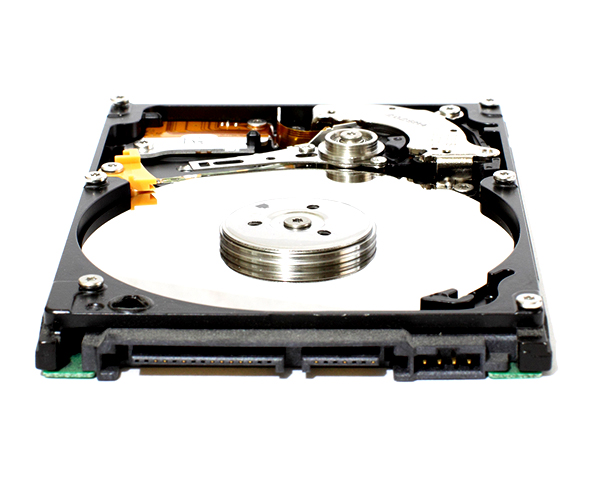
Analogy
The Storage device can be thought of as the long-term memory of the
computer.
What It’s Good For
Where RAM is short-term storage that gets cleared out once a computer is
done using it, such as when closing a DAW project,or when turning off
or restarting the computer (or when your application crashes, which is why you most often lose your work); the long-term storage will remain in place
when restarted or closed. This is where all your files are kept such as
your music, sample libraries, DAW project files, movies, emails,
applications, and even the operating system.
The amount of storage you will need will depend on your personal usage
and also which applications and plug-ins you plan to use. Logic Pro X
for example ships with over 30 gigabytes of musical content. Omnisphere
from Spectrasonics comes with a whopping 40+ gigabytes of sample
content, as does Kontakt from Native Instruments.
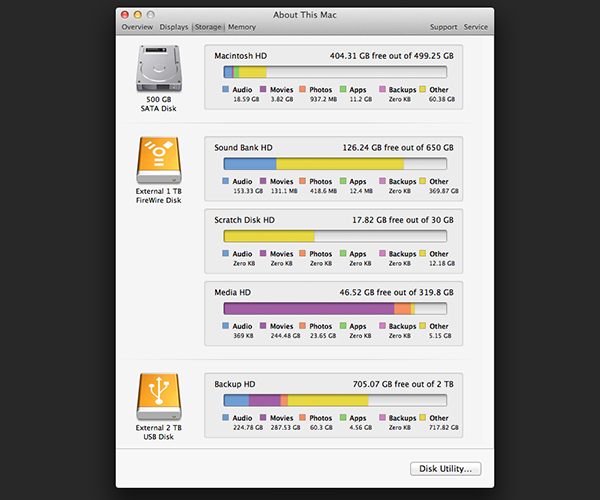
As you can see with
just a few select applications you can quickly fill up most of your
computer storage with just sample content.
Key Terminology
A Hard Disk Drive or HDD has become a general term for a computers
storage, but this is actually a kind of storage; much like in America
how the brand name Kleenex has become the general term for all
disposable paper tissue. HDDs are the oldest style of mass storage,
using physically moving parts to write data to magnetic patters. HDDs
are the slowest storage available now, but are still in use because they
are inexpensive. HDDs use a connector inside the computer called
Serial ATA, so you will sometimes hear these referred to as Serial ATA
Hard Disk Drives.
A Solid State Drive or SSD is a newer technology that use no moving
parts. This allows them to read and write data much faster than HDDs,
and they are more reliable because there are no moving parts that can
get damaged. The trade-off is that they cost more than a traditional HDD
of the same storage capacity would. SSDs also use the same Serial ATA
connection inside the computer.
PCIe-based Flash Storage is the newest storage option currently
available. PCIe-based Flash Storage uses the PCIe connection—which
stands for Peripheral Component Interconnect express– inside of the
computer instead if the slower Serial ATA connection that HDDs and SDDs
use. PCIe storage allows for ultrafast data transfers that are up to ten
times faster than a traditional HDD. As you can imagine, the price for
this storage option is still fairly high.
Tip: It’s a good idea to store your samples and media content on an external storage device. This will speed up your
systems performance when using a lot of sample content.
4. Graphics Processing Unit

Analogy
The Graphics Processing Unit, sometimes called the graphics card, video
card or GPU, can be thought of as a smaller computer-within-a-computer that is handling all things graphics related.
What It’s Good For
As silly as this
analogy sounds, it makes sense once you realize that modern graphics cards have
their own dedicated processor and dedicated RAM built right onto the
physical card. The GPU may seem like something that could be considered less important
when dealing with audio production, but it’s a piece of the overall
computer’s performance that will definitely be noticed if lacking.
Sluggish screen performance and User Interface issues can distract from
the creative flow when working on anything. When Mac OS X Mountain Lion
was released, Logic Pro 9 users quickly voiced a bug that was causing
the channel EQ to make even the most powerful system’s screens slow and
near unresponsive.
The issue was finally dealt with in an update that
fixed the way the Channel EQ was utilizing the graphics card,
highlighting the importance of having a good GPU when working on any
professional level.
Key Terminology
RAM and Processor speed both apply in the same ways as already
explained, though specifically for graphics. Typically the RAM is going
to be the upgradable option on higher end graphics cards.
An Integrated Graphics Card refers to a graphics card that is integrated
into the main computer. This means that the integrated GPU does not
have dedicated RAM or a dedicated processor, and is pulling resources
from the main system RAM and the main processor, putting additional
strain on performance.
A Dedicated Graphics Card by comparison does have it’s own built-in RAM
and processor, and is the “computer-within-a-computer” that I
illustrated above. Having its own resources to draw from frees the main
computer system resources to be used for other tasks, such as loading
more audio samples and processing more synth plug-ins.
Conclusion
There are a lot of considerations that go into purchasing a computer for
music production. The information in this article will help you have a
working knowledge of the core components that play a part in your
systems overall power and capability. If you have any further questions you’d like answered feel
free to ask them in the comments below.

{excerpt}
Read More