Fetch the encrypted data into the desired textarea

Fetch the encrypted data into the desired textarea

 <form>
    <textarea name="text" rows="12" cols="70"></textarea><br>
    <input type="text" name="password" size="56" /><br>
    <input type="submit" name="encrypt" value="Enc"><br>
    <textarea name="result" rows="12" cols="70"></textarea><br>
    <input type="submit" name="decrypt" value="Dec"><br>
    <input type="text" name="username">Username<br>
    <input type="text" name="email">Email<br>
    <input type="text" name="pass">Password<br>
  </form>

  <script type="text/javascript">
    $(function() {
      $('input[name=encrypt]').submit(function(event) {
        event.preventDefault();
      });

      $('input[name=encrypt]').click(function(event) {
        try {
          var key = $('input[name=password]').val();
          var text = $('textarea[name=text]').val();

          var bf = new Blowfish(key);

          var res = bf.encrypt(text);


          res = bf.base64Encode(res);
          $('textarea[name=result]').val(res);
        } catch(ex) {
          if (window.console && console.log) {
            console.log(ex)
          }
        }

        return false;
      });
      $('input[name=decrypt]').click(function() {
        try {
          var key = $('input[name=password]').val();
          var text = $('textarea[name=text]').val();

          var bf = new Blowfish(key);

          text = bf.base64Decode(text);

          var res = bf.decrypt(text);
          res = bf.trimZeros(res);

          $('input[name=username]').val(res);
        } catch(ex) {
          if (window.console && console.log) {
            console.log(ex)
          }
        }

        return false;
      });
    });
  </script>

 <form>
    <textarea name="text" rows="12" cols="70"></textarea><br>
    <input type="text" name="password" size="56" /><br>
    <input type="submit" name="encrypt" value="Enc"><br>
    <textarea name="result" rows="12" cols="70"></textarea><br>
    <input type="submit" name="decrypt" value="Dec"><br>
    <input type="text" name="username">Username<br>
    <input type="text" name="email">Email<br>
    <input type="text" name="pass">Password<br>
  </form>

  <script type="text/javascript">
    $(function() {
      $('input[name=encrypt]').submit(function(event) {
        event.preventDefault();
      });

      $('input[name=encrypt]').click(function(event) {
        try {
          var key = $('input[name=password]').val();
          var text = $('textarea[name=text]').val();

          var bf = new Blowfish(key);

          var res = bf.encrypt(text);


          res = bf.base64Encode(res);
          $('textarea[name=result]').val(res);
        } catch(ex) {
          if (window.console && console.log) {
            console.log(ex)
          }
        }

        return false;
      });
      $('input[name=decrypt]').click(function() {
        try {
          var key = $('input[name=password]').val();
          var text = $('textarea[name=text]').val();

          var bf = new Blowfish(key);

          text = bf.base64Decode(text);

          var res = bf.decrypt(text);
          res = bf.trimZeros(res);

          $('input[name=username]').val(res);
        } catch(ex) {
          if (window.console && console.log) {
            console.log(ex)
          }
        }

        return false;
      });
    });
  </script>

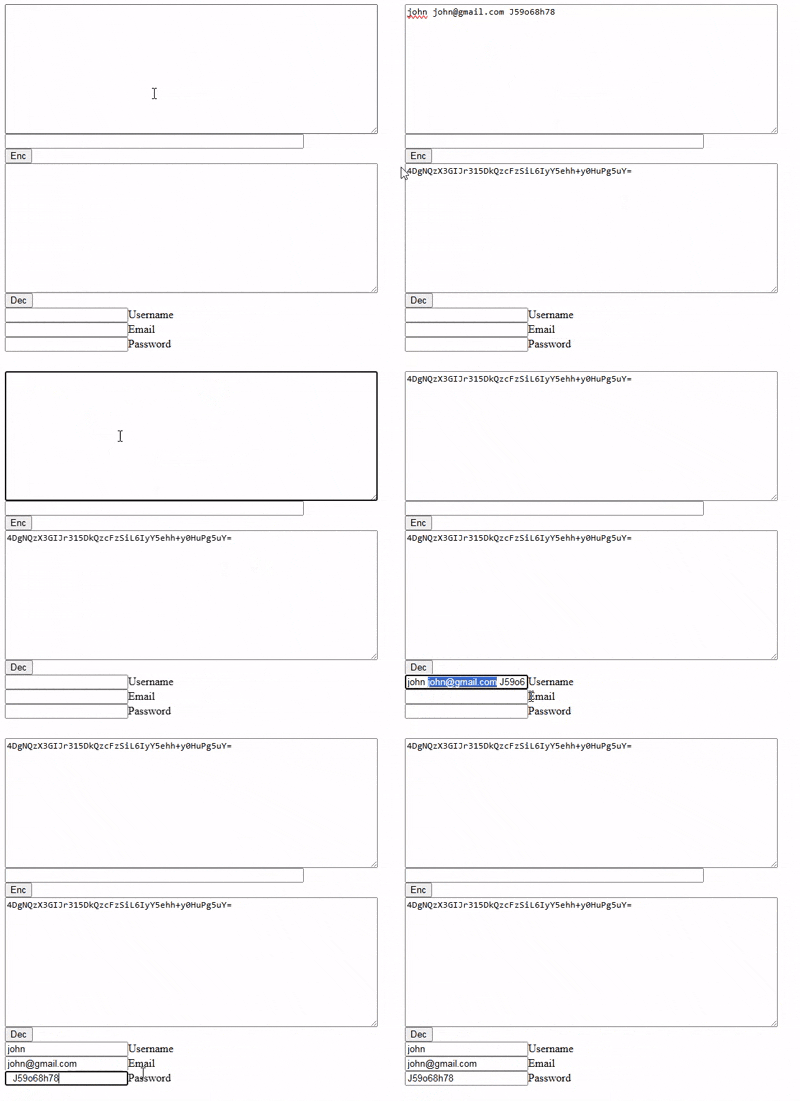
When I press the Decrypt button, I want it to write the username, email and password in the text fields.

https://media4.giphy.com/media/v1.Y2lkPTc5MGI3NjExMHhnbmsyeTY5bG0yM2V6aXgzZXhzOHUxOWVqaXBvY29pY2w1aXZmOSZlcD12MV9pbnRlcm5hbF9naWZfYnlfaWQmY3Q9Zw/3g3BUQoP36AOXwjQXQ/giphy.gif

There was an error uploading a gif to Stack Overflow. I uploaded it to giphy.com.

Using localStorage for persistent-across-pages dark mode and font selection

I’m trying to use JS (which I am pretty new to) for some display settings on my website. Originally I had checkbox labels and a CSS hack for dark mode and a font swap (the default font is a pixel typeface which I thought some users might have trouble reading), but of course these settings don’t follow the user to another page and have to be re-selected every time.

I’ve been poking around trying to make a script that will use localStorage to keep track of whether a user has changed the palette or font, but I can’t seem to get it to work consistently– it either works once and then reverts on the second page clicked, randomly applies the opposite of the previous state, or does nothing. This is the JS I have (patched together from other people’s code):

//change color scheme on click
function lightMode() {
    let element = document.body;
    element.classList.toggle("light");
    if (element.classList.contains("light")) {
        localStorage.setItem("mode", "light");
    } else {
        localStorage.setItem("mode", "dark");
    }
}

// Set color scheme on pageload
function loadMode() {
    let darkMode = localStorage.getItem("mode");
    if (darkMode === "light") {
        document.body.classList.add("light");
    }
}

window.onload = loadMode;

//change font on click
function textMode() {
    let element = document.body;
    element.classList.toggle("sans");
    if (element.classList.contains("sans")) {
        localStorage.setItem("font", "sans");
    } else {
        localStorage.setItem("font", "pixel");
    }
}

// Set font pref on pageload
function loadFont() {
    let darkMode = localStorage.getItem("font");
    if (darkMode === "sans") {
        document.body.classList.add("sans");
    }
}

window.onload = loadFont;

Here’s the relevant HTML: just links that fire the functions.

 <ul class="drop">
    <li>
       <a onclick="lightMode()" class="lightswitch"> Mode</a>
    </li>
    <li>
       <a onclick="textMode()">Change Font</a>
    </li>
 </ul>

In my CSS is a set of color variables for body, another set for body.light (dark mode is the default), a @font-family spec for body and another one for body.sans.

My guess is that the two onload events are colliding somehow, or I have a name I’m using twice? I have found a bunch of methods for applying a dark mode like this but I haven’t been able to find any that explain how to also manage a second setting. Thanks a bunch for any pointers.

I was expecting to be able to set the color palette and font family on one page, then refresh and/or navigate to another and see the same changes applied. Instead, it is erratically applying one or both styles or sometimes neither. JavaScript and coding in general is a mystery to me.

Why my code behave differently with transferControlToOffscreen or new OffscreenCanvas?

I’m trying to use a web-worker to render a scene with threejs. I want to render some dynamic font using a CanvasTexture. But I find that when I use canvas in web-worker from transferControlToOffscreen, if I change the text, the render loop will stop, but this doesn’t happen with new OffscreenCanvas().

//if use new OffscreenCanvas, render loop will work fine.
//if not, canvas2 is transferd from main thread, when change the text, render loop will stop sometimes
//canvas2=new OffscreenCanvas(200,200);  
canvas2.height = 200;
canvas2.width = 200;
let context = canvas2.getContext('2d');
context.font = "40px Helvetica";
context.fillStyle = 'red';
context.fillText("123", canvas2.width / 2, canvas2.height / 2);
this.sprite = new THREE.Sprite(new THREE.SpriteMaterial({map: new THREE.CanvasTexture(canvas2)}));
this.sprite.scale.set(50, 50, 50);
this.scene.add(this.sprite);

If I declare a canvas in the HTML and simply hide it, after transfered to worker, the problem doesn’t occur.

<canvas id="canvas3"style="display: none;" ></canvas>
// spriteCanvas2 = document.createElement('canvas').transferControlToOffscreen();
spriteCanvas2=document.getElementById('canvas3').transferControlToOffscreen();

The live sample is here.The top canvas run in main thread and the bottom run in worker. If click the bottom canvas, it will stop render sometimes.
Some additional information is in the forum.

If run in local not codepen, it will trigger consistently in three clicks. If not trigger, please refresh the browser.

Could anyone tell the difference between them? Thanks in advance.

How to get enough time from Android to save the local app state to disk?

In our app we listen to the AppState, but even responding immediately and as efficiently as possible in the JS thread, we fail to save the state to disk every time. How are we supposed to get our data saved to disk so a user swiping away from the app quickly won’t result in data loss?

We manage to get all the processing of the state done (which is not much but still work) but that state is never successfully written to the disk. If we just had 2ms that would be plenty, but of course, we apparently don’t have even that much time.

How we listen:

  AppState.addEventListener('change', nextAppState => emit(nextAppState));
  AppState.addEventListener('blur', nextAppState => emit(nextAppState));

Recursively adding properties to object

I need a function that I could call like this:

myFunction("a.b.c.d.e.f", value)

and that will return me an object like this:

{ a: { b: { c: { d: { e: { f: value } } } } } } 

I started doing this:

function myFunction(obj, o) {
    let results = []
      let sp =obj.split('.')
      const firstProperty = sp.shift()
      results[firstProperty] = {}

      if(sp.length > 0) {
        return myFunction(sp.join("."))
      }
      return results
}

but it isn’t working.

In `test.projects`, each subfolder is a project, but the parent folder is also treated as one, so tests run twice

I want to run Vitest tests in a monorepo. I’d like to distinguish between the tests of my different packages when running them, so I used the test.projects array in vitest.config.ts. To avoid listing every package manually, I used the following setup:

import { defineConfig } from 'vitest/config'

export default defineConfig({
  test: {
    projects: [
      './packages/*',
    ],
  },
})

However, I noticed that Vitest also treated the packages folder, which contains my packages, as a project, causing my tests to run and appear twice.

packages @my-first-package/src/utils/segment.test.ts (12 tests) 4ms
@my-first-package src/utils/segment.test.ts (12 tests) 4ms
packages @my-first-package/src/index.test.ts (2 tests) 46ms
@my-first-package src/index.test.ts (2 tests) 44ms

Note: The order of the tests is not significant.

When I listed my projects manually without the *, it worked correctly.

import { defineConfig } from 'vitest/config'

export default defineConfig({
  test: {
    projects: [
      './packages/@my-first-package',
      // ...
    ],
  },
})

@my-first-package src/utils/segment.test.ts (12 tests) 4ms
@my-first-package src/index.test.ts (2 tests) 44ms

Is there a way to make packages/* work properly?

Error: Rendered fewer hooks than expected

After adding following condition in ‘getrecyclableTypeName’ function

i18n?.language === 'ar' && product?.RecyclableTypeArbic

started getting error

enter image description here

Here is the functional component :

const RenderProductInfo = ({ product, handleCopyId, currentRoute, isEnvelope }) => {
  const { i18n } = useTranslation()
  const isArabic = i18n.language === 'ar'
  const unit = product.UnitOfMeasurement ? product.UnitOfMeasurement : 'T';
  const title = product.Title
    ? product.Title
    : product.TradeDetails && product.TradeDetails.title
      ? product.TradeDetails.title
      : '';
  const value = `${product?.Currency
    ? product?.Currency
    : product?.TradeDetails?.currency
      ? product?.TradeDetails?.currency
      : 'AED'
    } ${Utilities.formatNumberToCurrency(
      product.BidValue
        ? product.BidValue
        : product.TargetPrice
          ? product.TargetPrice
          : 0,
      true,
    )}`;

  const getrecyclableTypeName = () => i18n?.language === 'ar' && product?.RecyclableTypeArbic ? product?.RecyclableTypeArbic : product.TradeDetails
    ? product.TradeDetails.recyclableTypeName
    : Utilities.getKeywordFromId({
      firstKey: 'defaultRecyclableTypes',
      value: product.RecyclableType,
    });

  return (
    <View style={[styles.productInfoContainer]}>
      <Text numberOfLines={1} style={styles.productName}>
        {title}
      </Text>
      {!(
        currentRoute === 'Guest' || currentRoute === 'unVerified'
      ) &&
        (product?.TargetPrice || product?.BidValue) &&
        !isEnvelope ?
        (
          <View style={styles.productHeader}>
            <Text style={styles.productPrice}>
              {value}/{unit}
            </Text>
            {
              product?.TradeId ?
                <TouchableOpacity onPress={handleCopyId ?? undefined}>
                  <Text style={styles.productTrade}>{product?.TradeId}</Text>
                </TouchableOpacity>
                :
                null}
          </View>
        ) : null}

      <View style={styles.productSubInfoContainer}>
        <RecyclableIcon
          height={styles.subProductIcons.height}
          color={styles.subProductIcons.color}
        />
        <Text style={styles.subProductTitle}>{getrecyclableTypeName()}</Text>
        {currentRoute === 'Guest' ||
          currentRoute === 'unVerified' ? <>
          <RowView>
            <BalanceIcon
              height={styles.subProductIcons.height}
              color={styles.subProductIcons.color}
            />
            <Text style={[styles.subProductTitle]}>
              {product.Quantity ? product.Quantity : 0}
              {unit}
            </Text>
          </RowView>
          <RowView>
            <AddressIcon
              height={styles.subProductIcons.height - 3}
              color={styles.subProductIcons.color}
            />
            <Text numberOfLines={1} style={[styles.subProductTitle]}>
              {product.Emirate}
            </Text>
          </RowView>
        </> : null}
      </View>

    </View>
  );
};

I dont understand this behaviour , I have not used any hook conditionally.
Also I tried replacing the function with useState and useEffect like below

const [recyclableTypeName,setRecyclableTypeName]=useState('')

useEffect(()=>{
  if(i18n.language==="ar") setRecyclableTypeName(something)
},[i18n.language])

this resolved the issue but I still not understand where I was wrong.

Dynamic Language Switching with jQuery IME (Transliteration Example for Hindi, Gujarati, etc.)

If you need to provide multilingual typing (e.g., Hindi, Gujarati, Arabic, Chinese) on a webpage, the jQuery IME (Input Method Editor) library from Wikimedia is a great solution.

By default, jQuery IME attaches to an input/textarea and lets the user pick input methods. But if you want to build your own UI — for example, a custom dropdown to switch languages dynamically — you can manage the IME instance directly in JavaScript.

The following solution shows how to:
• Initialize jQuery IME on a hidden input.
• Capture keypress events and apply transliteration.
• Dynamically change languages with a dropdown ().
• Support multiple IMEs (e.g., Hindi Transliteration, Gujarati Transliteration, Arabic Buckwalter, Chinese Pinyin).

$(function() {
    var LANGS = [
        { code: 'system', label: 'Use system input (OS keyboard)', native: true },
        { code: 'en', label: 'English', native: true },
        { code: 'zh', label: '中文 (Chinese) — Pinyin', native: false, imHint: /pinyin|transliteration/i },
        { code: 'gu', label: 'ગુજરાતી (Gujarati) — Transliteration', native: false, imHint: /transliteration/i },
        { code: 'hi', label: 'हिन्दी (Hindi) — Transliteration', native: false, imHint: /transliteration|inscript/i },
        { code: 'ar', label: 'العربية (Arabic) — Buckwalter', native: false, imHint: /buckwalter|transliteration/i }
    ];

    var currentLangCode = 'en';
    var currentLangObj = LANGS.find(l => l.code === currentLangCode);

    var $selector = $('#language').empty();
    LANGS.forEach(function(L) {
        $selector.append($('<option>', { value: L.code, text: L.label }));
    });

    // Hidden element to initialize IME
    var $el = $('<input type="text" style="position:absolute;left:-9999px;">');
    if (!$el.data('ime')) {
        $el.ime({ showSelector: false, imePath: './' });
    }
    var imeInstance = $el.data('ime');

    // Default: Hindi IME
    imeInstance.setLanguage('hi');
    imeInstance.setIM('hi-transliteration');

    // Capture keypress
    $(document).on('keypress', function(e) {
        var altGr = false, c, input, replacement;
        var $target = $(e.target);

        if (!imeInstance.inputmethod) return true;

        if (e.which === 8) { // Backspace
            imeInstance.context = '';
            return true;
        }

        if (e.altKey || e.altGraphKey) altGr = true;

        if ((e.which < 32 && e.which !== 13 && !altGr) || e.ctrlKey || e.metaKey) {
            imeInstance.context = '';
            return true;
        }

        c = String.fromCharCode(e.which);
        var element = imeInstance.$element.get(0);

        input = $target.val().slice(
            Math.max(0, element.selectionStart - imeInstance.inputmethod.maxKeyLength),
            $target[0].selectionStart
        );

        replacement = imeInstance.transliterate(input + c, imeInstance.context, altGr);

        imeInstance.context = (imeInstance.context || '') + c;
        if (imeInstance.context.length > imeInstance.inputmethod.contextLength) {
            imeInstance.context = imeInstance.context.slice(
                imeInstance.context.length - imeInstance.inputmethod.contextLength
            );
        }

        if (replacement.noop) return true;

        if (document.activeElement === $target[0]) {
            var start = $target[0].selectionStart - input.length;
            var end = $target[0].selectionEnd;
            $target.val(
                $target.val().slice(0, start) +
                replacement.output +
                $target.val().slice(end)
            );
            $target[0].selectionStart = $target[0].selectionEnd = start + replacement.output.length;
        }

        e.stopPropagation();
        e.preventDefault();
        return false;
    });

    // Language change handler
    $selector.on('change', function() {
        currentLangCode = $(this).val();
        currentLangObj = LANGS.find(l => l.code === currentLangCode);

        // Update IME instance
        imeInstance.setLanguage(currentLangCode);
        imeInstance.setIM(currentLangCode + '-transliteration');

        $(':focus').trigger('focusin');
    });

    
    $selector.val('en').trigger('change');
});

How to insert tags on different pages using EJS?

I use EJS to connect repeating parts of page structure. Can you tell me if it is possible to add tags to pages using this or another method?

I understand that you can make a nested object with page keys and tag parameters. But this is not a universal method.

Now I have this code:

import {defineConfig} from "vite";
import {resolve} from "path";
import {ViteEjsPlugin} from "vite-plugin-ejs";

export default defineConfig({
    plugins: [
        ViteEjsPlugin(),
    ],
    build: {
        rollupOptions: {
            input: {
                main: resolve(__dirname, "index.html"),
                order: resolve(__dirname, "order.html"),
                notFound: resolve(__dirname, "404.html"),
                about: resolve(__dirname, "about.html"),
                deliveryPayment: resolve(__dirname, "delivery_payment.html"),
                faq: resolve(__dirname, "faq.html"),
                paymentError: resolve(__dirname, "payment_error.html"),
                successfulPayment: resolve(__dirname, "successful_payment.html"),
                contacts: resolve(__dirname, "contacts.html"),
                corporateInformation: resolve(__dirname, "corporate_information.html"),
                searchError: resolve(__dirname, "search_error.html"),
            },
        },
    },
});
<%- include("src/templates/menu.ejs") %>
<%- include("src/templates/order-call.ejs") %>
<%- include("src/templates/cart.ejs") %>
<%- include("src/templates/header.ejs") %>

Making a Google Workspace add-on interface in HTML

I am planning to build a Google Workspace add-on. However, I am not fond of their CardService that isn’t very flexible. I would like to make a more visually appealing interface of my own, using HTML, JS, CSS.

I know the Editor add-ons lets you do that, but it is the former framework and comes with many limitations.

Is their a way to inject HTML/JS content using the CardService to be able to build custom interfaces?

Pass className to styled-components

I used the styled-components to style react-big-calendar and I need to pass classes to each part I need with a different name instead of passing a generic class to the styled component’s attrs. How can I do this?
here is my sample code

Div = styled.div.attrs(() => ({
    className: "rbc-my-header",
  })) < {
    "calendar": any,
    "offRange": any,
    "offRangeBG": any,
    "header": any,

  } >
  `
          .rbc-calendar {
            background-color: transparent;
            ${({calendar}) => calendar};
            ${({calendar}) => `className: $ { calendar.classes}`};
          }

          .rbc-off-range {
            background-color: transparent;
            opacity: 0.5;
            ${({offRange}) => offRange};
          }

          .rbc-off-range-bg {
            ${({offRangeBG}) => offRangeBG};
          }

          .rbc-header {
            background-color: transparent;
            ${({header}) => header};
          }

        `

i need to pass somthing like this

               .rbc-calendar {
                background-color: transparent;
                ${({calendar}) => calendar};
                ***className --> name of specific class***
              }
.
.
.

              .rbc-header {
                background-color: transparent;
                ${({header}) => header};
                ***className --> name of specific class***
              }

Legitimate way to add an external script to Next.js 15 app router

I’m trying to add cdn-cookieyes policy to a specific page on Next.js project, but no luck achieving that following the doc instructions.
When I add the script tag to the app.js above the main <main> tag inside the <html> tag the script content ‘the policy content’ is displaying in every page at the bottom.

When I add the script tag in cookies-policy.js page only , the content is shown only when I hard refresh the page and it’s being inserted outside the container div.

If I use the HTML generated policy then every time I do the scan I need to update it manually.

Why is JSON, fetched after login form page, displayed fullscreen instead of logged to console? (Jetty web app question)

I have a webapp running in (embedded) Jetty 12 web container.

I surf (tested with Firefox and Chrome) to the home page http://localhost:8080 that queries an endpoint servlet for JSON data and displays it to the console. The home page is behind a login form page.

The issue is as if the login form page redirected to the endpoint page instead of staying on the home page upon successful authentication.

Steps to reproduce the issue (not systematically but issue shows up consistently at the end):

  • launch ./start.sh in a terminal

  • surf to http://localhost:8080

  • login with the foo:bar credential (foo login, bar password)

  • open the browser console (and leave it open) and check that endpoint data is displayed at least once in the browser console

  • shutdown the webapp (i.e. CTRL-C in the terminal, there will be network errors in the browser console)

  • relaunch the webapp with ./start.sh in the terminal

  • check that JSON parsing errors appear in the browser console

  • refresh the browser page (which is the home page which resides at http://localhost:8080)

  • log in again

  • then (unexpected behavior) the JSON data is displayed fullscreen rather than in the console (the address bar of the browser even displays http://localhost:8080/endpoint)

So the question is: how do I prevent a simple JSON fetch to go fullscreen instead of just to the console?

Many thanks in advance.

Here is the source tree:

  • src/main/java/EndpointServlet.java

  • src/main/java/MyServlet.java

  • src/main/java/WebApp.java

  • src/main/webapp/identification.jsp

  • src/main/webapp/logout.jsp

  • src/main/webapp/WEB-INF/web.xml

  • pom.xml

  • start.sh

import java.io.IOException;
import jakarta.servlet.http.HttpServlet;
import jakarta.servlet.http.HttpServletRequest;
import jakarta.servlet.http.HttpServletResponse;

public class EndpointServlet extends HttpServlet {
  protected void doGet(HttpServletRequest req, HttpServletResponse res) throws IOException {
    res.setContentType("application/json; charset=UTF-8");
    res.getWriter().append("{ "key": 123456789 }");
  }
}
import java.io.IOException;
import jakarta.servlet.http.HttpServlet;
import jakarta.servlet.http.HttpServletRequest;
import jakarta.servlet.http.HttpServletResponse;

public class MyServlet extends HttpServlet {
  protected void doGet(HttpServletRequest req, HttpServletResponse res) throws IOException {
    res.getWriter().append("""
<!DOCTYPE html>
<html>
<head>
<script>
const url = "/endpoint";

async function f() {
  const response = await fetch(url, { method: "GET" });
  const data = await response.json();
  console.log(data);
}

setInterval(function() { f() }, 5000); // fetch JSON data from /endpoint every 5s
</script>
</head>
<body>Hello, web!</body>
</html>
""");
  }
}
import org.eclipse.jetty.server.Server;
import org.eclipse.jetty.security.HashLoginService;
import org.eclipse.jetty.security.UserStore;
import org.eclipse.jetty.ee10.webapp.WebAppContext;
import org.eclipse.jetty.util.security.Credential;

public class WebApp {
  public static void main(String[] args) throws Exception {
    Server server = new Server(8080);
    WebAppContext context = new WebAppContext();
    context.setContextPath("/");
    context.setWar(args[0]);
    HashLoginService loginService =
      new HashLoginService("Form-based user authentification realm");
    UserStore userStore = new UserStore();
    userStore.addUser("foo", Credential.getCredential("bar"), new String[] { "admin" });
    loginService.setUserStore(userStore);
    server.addBean(loginService);
    server.setHandler(context);
    server.start();
    server.join();
  }
}

identification.jsp:

<html>
<body>

<form method="POST" action="j_security_check" name="loginForm">
<input type="text" name="j_username" id="j_username" />
<input type="password" name="j_password" id="j_password" />
<input name="submit" type="submit" value="Connection" />
</form>

</body>
</html>

logout.jsp:

<%
request.getSession().invalidate();
%>

web.xml:

<?xml version="1.0" encoding="UTF-8"?>

<web-app xmlns="https://jakarta.ee/xml/ns/jakartaee"
  xmlns:xsi="http://www.w3.org/2001/XMLSchema-instance"
  xsi:schemaLocation="https://jakarta.ee/xml/ns/jakartaee https://jakarta.ee/xml/ns/jakartaee/web-app_6_0.xsd"
  version="6.0">

<servlet>
  <servlet-name>LoginServlet</servlet-name>
  <jsp-file>/identification.jsp</jsp-file>
</servlet>
<servlet-mapping>
  <servlet-name>LoginServlet</servlet-name>
  <url-pattern>/identification</url-pattern>
</servlet-mapping>

<servlet>
  <servlet-name>LogoutServlet</servlet-name>
  <jsp-file>/logout.jsp</jsp-file>
</servlet>
<servlet-mapping>
  <servlet-name>LogoutServlet</servlet-name>
  <url-pattern>/logout</url-pattern>
</servlet-mapping>

<servlet>
  <servlet-name>MyServlet</servlet-name>
  <servlet-class>MyServlet</servlet-class>
</servlet>
<servlet-mapping>
  <servlet-name>MyServlet</servlet-name>
  <url-pattern></url-pattern> <!-- empty "" actually means "/" -->
</servlet-mapping>

<servlet>
  <servlet-name>EndpointServlet</servlet-name>
  <servlet-class>EndpointServlet</servlet-class>
</servlet>
<servlet-mapping>
  <servlet-name>EndpointServlet</servlet-name>
  <url-pattern>/endpoint</url-pattern>
</servlet-mapping>

<login-config>
  <realm-name>Form-based user authentification realm</realm-name>
  <auth-method>FORM</auth-method>
  <form-login-config>
    <form-login-page>/identification</form-login-page>
  </form-login-config>
</login-config>

<security-role>
  <role-name>admin</role-name>
</security-role>

<security-constraint>
  <web-resource-collection>
    <url-pattern>/*</url-pattern>
  </web-resource-collection>
  <auth-constraint>
    <role-name>admin</role-name>
  </auth-constraint>
</security-constraint>

</web-app>

pom.xml:

<?xml version="1.0" encoding="UTF-8"?>

<project xmlns="http://maven.apache.org/POM/4.0.0"
  xmlns:xsi="http://www.w3.org/2001/XMLSchema-instance"
  xsi:schemaLocation="http://maven.apache.org/POM/4.0.0 http://maven.apache.org/maven-v4_0_0.xsd">

<modelVersion>4.0.0</modelVersion>

<groupId>testproject</groupId>
<artifactId>testproject</artifactId>
<packaging>war</packaging>
<version>1</version>

<name>Test project</name>
<url>http://localhost/</url>

<properties>
  <project.build.sourceEncoding>UTF-8</project.build.sourceEncoding>
  <project.reporting.outputEncoding>UTF-8</project.reporting.outputEncoding>
  <maven.compiler.source>21</maven.compiler.source>
  <maven.compiler.target>21</maven.compiler.target>
  <jetty.version>12.1.0</jetty.version>
</properties>

<build>
  <plugins>

    <plugin>
      <groupId>org.apache.maven.plugins</groupId>
      <artifactId>maven-compiler-plugin</artifactId>
      <version>3.3</version>
      <configuration>
        <encoding>UTF-8</encoding>
        <meminitial>256m</meminitial>
        <maxmem>2048m</maxmem>
        <compilerArgs>
          <arg>-Xlint:all</arg>
          <arg>-O</arg>
        </compilerArgs>
      </configuration>
    </plugin>

    <plugin>
      <groupId>org.apache.maven.plugins</groupId>
      <artifactId>maven-war-plugin</artifactId>
      <version>3.4.0</version>
      <!-- manually remove all jars from WEB-INF/lib/ -->
      <configuration>
        <packagingExcludes>WEB-INF/lib/*.jar</packagingExcludes>
      </configuration>
    </plugin>

    <plugin>
      <groupId>org.codehaus.mojo</groupId>
      <artifactId>exec-maven-plugin</artifactId>
      <version>3.5.0</version>
      <executions>
        <execution>
          <id>run the webapp</id>
          <goals>
            <goal>java</goal>
          </goals>
        </execution>
      </executions>
    </plugin>

  </plugins>

</build>

<dependencies>

  <!-- https://mvnrepository.com/artifact/org.eclipse.jetty/jetty-server -->
  <dependency>
    <groupId>org.eclipse.jetty</groupId>
    <artifactId>jetty-server</artifactId>
    <version>${jetty.version}</version>
  </dependency>

  <!-- https://mvnrepository.com/artifact/org.eclipse.jetty/jetty-security -->
  <dependency>
    <groupId>org.eclipse.jetty</groupId>
    <artifactId>jetty-security</artifactId>
    <version>${jetty.version}</version>
  </dependency>

   <!-- https://mvnrepository.com/artifact/org.eclipse.jetty.ee10/jetty-ee10-apache-jsp -->
  <dependency>
    <groupId>org.eclipse.jetty.ee10</groupId>
    <artifactId>jetty-ee10-apache-jsp</artifactId>
    <version>${jetty.version}</version>
    <!-- workaround to remove duplicate logging classes
         see https://stackoverflow.com/questions/63910110/java-util-serviceconfigurationerror-org-apache-juli-logging-log-org-eclipse-je -->
    <classifier>nolog</classifier>
  </dependency>

  <!-- https://mvnrepository.com/artifact/org.eclipse.jetty.ee10/jetty-ee10-annotations -->
  <dependency>
    <groupId>org.eclipse.jetty.ee10</groupId>
    <artifactId>jetty-ee10-annotations</artifactId>
    <version>${jetty.version}</version>
  </dependency>

  <!-- https://mvnrepository.com/artifact/org.eclipse.jetty.ee10/jetty-ee10-servlet -->
  <dependency>
    <groupId>org.eclipse.jetty.ee10</groupId>
    <artifactId>jetty-ee10-servlet</artifactId>
    <version>${jetty.version}</version>
  </dependency>

  <!-- https://mvnrepository.com/artifact/org.eclipse.jetty.ee10/jetty-ee10-webapp -->
  <dependency>
    <groupId>org.eclipse.jetty.ee10</groupId>
    <artifactId>jetty-ee10-webapp</artifactId>
    <version>${jetty.version}</version>
  </dependency>

</dependencies>

</project>

start.sh:

#!/bin/bash
mvn exec:java -Dexec.mainClass=WebApp -Dexec.args="target/testproject-1.war"

How can I make div content appear on page load if a specific value is saved to session storage?

I’m making an online choose-your-own-adventure-style novelization of Deltarune, and there are events that only happen if you’ve done something previously (like speak to a character or collect an item). I’m doing this with sessionStorage/localStorage, and it’s working well to display a name the player chooses, but I can’t figure out how to make a section of text appear with this method (though I assume it’s possible).

Basically, if the player selects a certain dialogue option, the value “yesChalk” of key “talkNoelleChalk” will be saved to sessionStorage (this part is not actually implemented yet, but I know how to do it. I’ve been doing this manually with the inspect tool for testing). On another page, I want to automatically run a function when the page loads to check if the player has this value, and if they do, to then show a div containing extra dialogue.

JavaScript:

function showNoelleChalk() {
  const talkNoelleChalk = sessionStorage.getItem("talkNoelleChalk");
  var x = document.getElementById("noelleChalk");
  if (x.style.display === "block" && talkNoelleChalk === "yesChalk") {
    x.style.display = "none";
  } else {
    x.style.display = "block";
  }
}

HTML div with extra dialogue:

<div id="noelleChalk">
  <p>this is the dialogue</p>
</div>

Running the script:

<body onLoad="showNoelleChalk()">

CSS that should keep the div hidden:

#noelleChalk {
  width: 100%;
  padding-left: 0;
  padding-right: 0;
  text-align: left;
  display: none;
}

I have also tried giving the div a class with display:none;, but that doesn’t seem to work either. I think there’s probably something I’m doing wrong with the script.

The GreedyMesh Function is not rendering correctly

Ive tried multiple different versions and tried bug fixing, but i cant figure this out. My game is failing to render anything and it gives this error:

(index):568  Uncaught (in promise) TypeError: Cannot read properties of undefined (reading 'mergeGeometries')
    at greedyMesh ((index):568:52)
    at rebuildWorldMesh ((index):617:16)
    at Socket.<anonymous> ((index):777:3)
    at Emitter.emit (index.js:136:20)
    at Socket.emitEvent (socket.js:553:20)
    at Socket.onevent (socket.js:540:18)
    at Socket.onpacket (socket.js:508:22)
    at Emitter.emit (index.js:136:20)
    at manager.js:217:18

Does anyone know how to fix it? heres the github repo and the game link

Ive tried different versions, asking on other platforms, looking at the lines of code individually