Appl For Android And Windows7

This is a simple application with powerful search capability. It is to be designed to run on android and Windows7 tablets.
• The application is to host couple of books as ebooks.
• The books should be searchable by word, phrase, section number, etc.
• Search results should be bookmarkable for ease of future reference.
• Where the search word or phrase is misspelt, the software should give a result for a correct word or phrase that is closest to the misspelt one, just like Google does.
• I want to be able to produce the user installation CD from home. The software should come with an adminstrator panel from where I can make the selection of the books to go into each user installtion CD from a library of books. I will need from this administrative-end to be able to add new books to the library as new books become available. It is important to make the process of adding new books to my library as simple and less technical as possible. MS word, Rich Text or PDF should be accepted. When the “burn installation CD” is pressed, the pre-selected books that are going into a particular installation CD should be protected (encripted)to avoid piracy and violations of digital rights.
• The software should launch at start-up of the device (i,e. the tablet PC)
• Users should not be able to extract text or images, copy text or images,or make screen-shots etc. Where print outs are made the product’s holograph should appear on the background.
• When a search result window is displayed, the user should be able to minimize the search result and make further searches without loosing the initial window(s).
• Users should not be able to extract text or images, copy text or images,or make screen-shots etc. Where print outs are made the product’s holograph should appear on the background. Probably there should be some scripts too at the footer of every printed page.

Summary of Application from a user perspective
Let me describe how it works from a user point of view
1)User starts the tablet PC, app launch at start up.
2)User sees the home page of the program with search window conspicously positioned and an index of the the ebooks installed.
3)User either searches for a key word, phrase etc or go to a specific book from the index. The Table of content should be hyperlinked to the main text.
4) Default search should be to all books but option should be there to restrict search to a partucular book or books.
5)Results can be bookmarked

Part of my expectations are:
•Source Code delivered including a proper documentations
•App must run on Android and Win7 Tablets
•Improvement iterations until we have a stable application which is according to the specification.

Happy bid

Automated Service Estimator

Hi,

We need an automatic service estimator. Must come with admin panel, where all configurations will be done.

Basically it must work like that, when customer enters a question such as “how much it cost to replace lcd screen”? Script will search the Data Base for the answer using multiple formulas which you must design, in order to provide the correct estimate.

Scratching Your Niche Market


As opposed to discussing just the specific techniques used to target a precise niche market, I would like to start off with a few overarching thoughts. I will cover some basic, yet very useful principles to keep in mind for the bigger picture (Get it? ‘Bigger picture,’ like your career – hehe), and then supply a case study of how I have used them in my work.

Continue reading “Scratching Your Niche Market”

Quick Tip: How to Emulate a Theremin Sound in Ableton Live

In this Quick Tip we’re going to emulate a theremin sound using Ableton Live’s Operator (although the same principles apply to other synths as well).

The theremin (named after its Russian inventor, Professor Leon Theremin, who patented the device in 1928), often viewed to be the first electronic instrument, has two metal antennas which sense the position of the player’s hands (it is played without contact from the player), who can control oscillators for pitch (frequency) with one hand and volume (amplitude) with the other. A similar device is the Ondes Martenot, with the main addition of timbral controls, switchable loudspeakers, and a keyboard.

Many people just call it “that ghost thing sound you hear in old horror movies”. Although that is quite true, it has also been featured in classical music, modern film music, rock, etc.

The idea is pretty simple: sine oscillator, slow attack, one voice (monophonic), glide between notes, and vibrato.

So this is what we’re going for:

Download audio file (ther0.mp3)

Step 1: Synthesizing the Sound

Open a new instance of Operator and leave the Wave to “Sine”. Set the filter to “Band 24 dB” (perhaps the most suitable filter, but make your own choice if it doesn’t fit your taste), and lower the Frequency to about 350 Hz. Lower the “peak” value down to -inf dB, to get a slow, very smooth attack.

Click on the “Time-Tone-Volume” tab and select “Voices: 1″, since the theremin is a monophonic instrument.

Download audio file (ther1.mp3)

Let’s add some Vibrato. It’ll give us a more convincing theremin sound (some might say spookier). I like having the LFO at Sine, the Rate value at about 80 and the Mod value at about 15%. But experiment with different values until you have the one you like the most. After all we can connect those two knobs to some macro controls and tweak them as we wish (that’s what we’ll do later).

Enable “Glide” to have the notes connect slowly when played legato. Let’s set the time at about 70 ms.
Now let’s try something out with Operator’s Pitch options. By lowering the pitch envelope down to -100%, the “peak”, “sustain” and “end” values down to -12 steps and the “initial” value to +48 steps (slow attack at about 300 ms) we get a cool gliding effect when playing the first note:

Download audio file (ther2.mp3)

Step 2: Polishing the Sound

What I personally don’t like about that sound some times, is that it can get too intruding within a song’s mix. I like cutting some of the more “harsh” frequencies, depending on the song and music of course.

Ableton’s “Spectrum” plug-in can be quite helpful in this situation, making it easier to recognize the Hz values of the frequencies we want to reduce.

For those who don’t use Ableton Live, you can try out a freeware program called Blue Cat’s FreqAnalyst, available for both Windows and Mac users. I usually cut around 370 Hz (Low Shelf) and do a slight LowCut at about 100 Hz, using the EQ Eight plug-in, like this:

Try adding a slow Autopan plug-in with a 360 phase, making the vibrato effect a little more dramatic, and increase Operator’s Spread knob to 50% if you want it to sound more stereo and wide. We could “polish” the sound a little further by adding a subtle Delay effect, and a Compressor and Limiter to even out the volume levels.

Step 3: Performance and Expression

It sounds nice, except the fact that we haven’t really set any knobs and values to be controlled in real-time while playing. The attack values (change of volume with one hand) for example are usually altered all the time during a theremin performance, and the pitch can get quite crazy and unstable in purpose. By grouping the racks into an Instrument Rack, we are able to map some Macro Controls to knobs like Volume, LFO Rate and Mod, and Transpose.

Keep in mind that you can program the Min and Max values of the Macro Controls, by pressing on the “Map Mode” button and changing the values as you wish.

Download audio file (ther3.mp3)

If you program your melodies and don’t play them via keyboard, MIDI-automations are quite simple to program with your mouse.

Right click and select “Show Automation In New Lane”.

You can either draw the automations (Ctrl-B) or set and transpose points with your mouse.

And here it is used in the context of a mix.
Download audio file (ther4.mp3)

Conclusion

I hope you found this tutorial useful. Thanks a lot for reading! Don’t hesitate to leave a comment with any suggestions, questions or requests.

Happy music making!


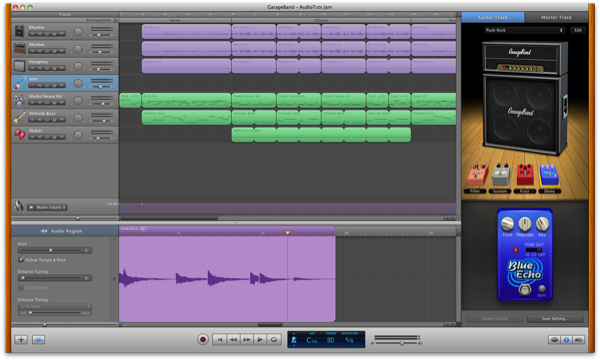
How to Compose Song Demos in GarageBand, Wrap-up – Basix

Are you new to audio? Apple’s GarageBand is a great way to get into music production. Recently guitarist Glynn Davies gave us a series of tuts focussed on using GarageBand to record song demos with your guitar.

GarageBand is a digital audio workstation (or DAW) designed with beginners in mind. If you use a Mac, it is the best way to get your teeth into audio production. The program has streamlined the process, letting you worry less about the technical process, and jump straight into making music. It is also inexpensive, removing the large financial burden usually associated with audio production. It also probably came preinstalled on your Mac, but even if it didn’t, it is part of Apple’s inexpensive iLife package, costing around $65.

That’s all great news if you have a Mac. Unfortunately there isn’t really an equivalent in the Windows world, though I’d love to hear your suggestions for an entry-level Windows DAW in the comments. You might like to check out our article, 7 Free Digital Recording Apps for Windows.

Of course, the program has its limits, and depending on your goals you may run into them sooner rather than later. If you think that’s likely to happen to you, you might want to consider starting with a full-featured DAW like Logic Pro, Pro Tools or others. If you’d like to get to know many of the options when choosing a DAW, follow along with our Exploring DAWs series each weekend. If you have thoughts about whether it’s best for a beginner to start with a program like GarageBand or just jump straight into a full-featured DAW, I’d love to hear them in the comments too.

If you missed the series, you can find the previous tutorials here:


Part 1

Part 1 of the series takes you through how to set up your first project. It goes through what equipment you’ll need (taking the easiest and least expensive route), how to initally set up GarageBand, how to EQ your guitar and use GarageBand’s built-in effects pedals, and some basic ideas and concepts to get started with your recording.


Part 2

Part 2 introduces you to the world of loops. Glynn takes you through how to create a rhythm track for your masterpiece by using and arranging drum loops. Then he shows you how you can rehearse and later record your guitar part and backing track by playing along with your drum loops.


Part 3

Finally, in Part 3, we learn how to polish our demo track. Glynn covers how to trim and align tracks, add effects, set levels, add EQ, choose master track presets, and export to MP3 for others to enjoy.


Conclusion

If you follow these tutorials, you’ll end up with a finished demo track. What do you think of your masterpiece? It might take you a few goes before you create something you’re happy with.

If you’re fairly happy with your track and would like to get feedback from others, consider submitting your track for a workshop. We run workshops several times a week, uploading tracks for constructive feedback from the Audiotuts+ community. You can learn more about workshopping here, and you’ll find a link to the form for uploading your track at the bottom of the article.

Where do you go from here? Glynn finished the series with five suggestions which are worth repeating here:

  1. Keep it simple: Don’t go overboard with multiple parts and special effects. Think of this as the musical equivalent of a sketch on the back of a napkin: just put down what you need to communicate your idea.
  2. Get it down: Don’t spend too long tweaking. Get a basic “meat and potatoes” backing track down and record your parts over it. You can always expand and improve it later; don’t let the inspiration fade while you’re programming a tambourine part!
  3. Come back to it: When you’re done, leave it alone and do something else for a while. Come back to it later with fresh ears and see how it sounds.
  4. Don’t be too hard on yourself: Don’t worry that your demo doesn’t sound like a professional recording. Remember that a demo is only meant to communicate an idea, and many of your favourite songs will have started life in the same way.
  5. Experiment: If you don’t know what something does, use it. The more you play around with things, the more you’ll learn and the better your recordings skills will become.

Have fun, and let us know in the comments how you went with this tutorial series.


American Native Expereinced Writer by GloBiz

Hello, I am looking for American Native Writer who are experienced in using styles of writing with tone (hind command) and have the understanding of the terms and mechanism in [Translation], [Desktop Publishing], [Voice Over Work] as well as related services to edit and rewrite the text… (Budget: $30-250, Jobs: Copywriting, Speech Writing, Technical Writing)


Looking For 2-3 Native English Speaking Re-Writers! by RedThunder

I’m currently looking for 2-3 NATIVE SPEAKING WRITERS to re-write 375-475 word articles on a long term basis. Here is a quick look at the requirements for this role, please make sure you can meet ALL of them: -The article must be re-written 3 times, sentence by sentence… (Budget: $30-250, Jobs: Article Rewriting, Articles, Ghostwriting, Report Writing, Technical Writing)