Need To Redesign Our Old WebDesign by mobiocean

Respected Freelancer, We will launching soon our brand new website mobiocean.com(Not Yet Launched) Description Of The Website: Mobi Ocean will provides quality mobile content such as ringtones, color logos, picture messages, MMS Cards and mobile themes to mobile operators… (Budget: $250-750, Jobs: Dreamweaver, HTML, Templates, Website Design, Website Testing)


Realistic Vector Motorcycle Portraits


Every semester, in my Illustrator classes, my students always want to know how I create the Motorcycle Portraits I am known for. I often give them a brief explanation, but I have never really sat down and described the process in detail…until now. My approach to getting a “realistic” look in my work is a bit tedious, but I think you will agree that the end results are well worth it. Enjoy!

Continue reading “Realistic Vector Motorcycle Portraits”

Quick Tip: Use Puppet Warp in Photoshop CS5 to Tweak Your Images


Photoshop CS5′s new Puppet Warp feature can be extremely useful if you need to make minor adjustments to your photos. In today’s quick tip tutorial we will demonstrate how to correct a Photo with this new tool in minutes. Let’s get started!


Step 1

First, let’s load our image. I have selected this stock image.


Step 2

Create a selection around the object. The selection needs to be fairly accurate but we will use the refine edge tool to fix the selection just in case, later on. So using the Pen Tool (P) trace the path around the object as best as you can, making sure you finish where you started creating a single loop.


Step 3

With the pen tool still selected, right click the path and click "Make Selection". This will now load the path as a selection. Enter the value 0 for feather radius and select ok.


Step 4

With the selection still active, click on the Marquee Tool (M) and under the options for the tool, click the button for "Refine Edge". This tool allows us to refine and fix the selection as best as possible. Feel free to experiment with the settings to find the best selection for the object if needed. Once you have made your selection, change the output from "Selection" to "New Layer with Mask".


Step 5

We now have two separate layers, one with just the flower and the original. We now need to delete the flower from the original background image. To do this, load the original selection again (Cmd/Ctrl + Click Masked Layer icon) and use CS5′s new content aware fill to delete the area. For best results, expand the selection by going to Selection > Modify > Expand, Expand by 10px and click ok. Now press Delete on the original layer and select content Aware Fill.


Step 6

Sometimes Photoshop won’t get it right the first time and may leave some contrasting lines. To fix this, we can use the Spot Healing Brush Tool (J) using some content aware settings and simply paint over the lines to blend them in.


Step 7

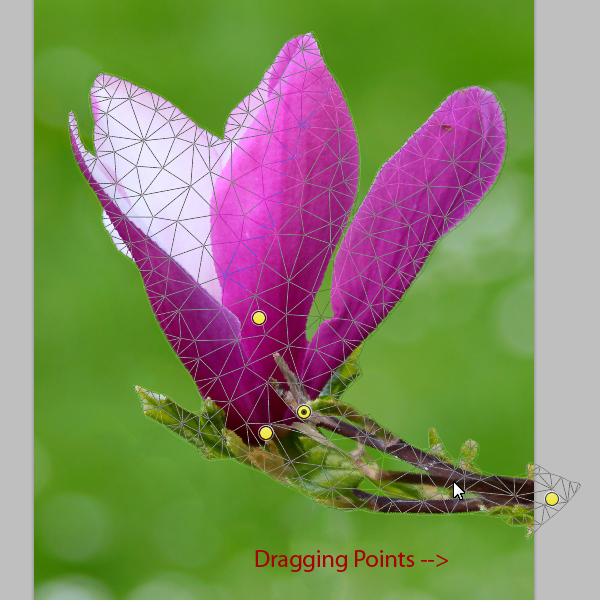
We can now very easily apply the puppet warp tool without destroying or distorting the background. With our masked layer selected, go to Edit > Puppet Warp. This will open the tool and allow us to manipulate and warp the object. Placing points systematically around the displayed mesh will create bending/warping points. Place them on your object in the best arrangement to create joints to bend as shown below.


Step 8

Dragging or rotating these points (Alt + Click and move over point) will warp the object in the desired direction. Using this we can drag the stem of the flower to come from the side, while still allowing the flower to stay upright.


Final Image

And that’s how you use the Puppet Warp Tool. I hope you enjoyed this tutorial!


Additional Uses

Moving arms, or changing body stance.

Straighten lines, or correcting lens distortion.

More Than 620 Bokeh Background Textures


As I’m sure you already know, textures can come in very handy; whether you’re using them to subtly add interest to your work, or in full-blown, award-winning photo manipulations. Bokeh is the term used to explain the blur, or the aesthetic quality of the blur in photography, and is usually seen in good quality macro shots, in the areas that lay outside the depth of field.

As bokeh is more than often very pleasing to the eye, photographers tend to purposely produce bokeh in their images, and sometimes deliberately take out-of-focus shots to take images that show nothing other than bokeh. Designers have picked up on this, and over the years there has been a huge increase of bokeh being used in graphic, print, and web design. This round-up consists of a whopping 626 textures, both free (the majority) and premium, which you can use to spice up your photos, as backgrounds for your latest web design, and, as most of them are high resolution, even in your print design projects.


Free Bokeh Textures

Take a look at these incredible free bokeh textures available on the web.


Five Colourful Bokeh Textures (5 Textures)


Out of Focus: 30 Free Bokeh Textures (30 Textures)


Colored Grungy Bokeh Textures (5 Textures)


Raining Light Bokeh Pack (11 Textures)


Crazy Firework Bokeh Stock (1 Texture)


Heart Bokeh Textures (3 Textures)


Bokeh Collection (4 Textures)


Bokeh 2 (1 Texture)


Bokeh Textures Pack (10 Textures)


Bokeh Texture 3 (1 Texture)


High Resolution Bokeh Texture (5 Textures)


Bokeh Texture Pack 001 (20 Textures)


Rainy Night Street Light Bokeh (1 Texture)


Grungy Bokeh Pack (6 Textures)


Bokeh Collection II (5 Textures)


Bokeh Stock Images (11 Textures)


Glitter Bokeh Texture Pack (33 Textures)


Bokeh Texture Pack 002 (10 Textures)


Bokeh Pack 2 (27 Textures)


Regularjane’s Bokeh Textures (11 Textures)


Christmas Bokeh Stock Pack (15 Textures)


Bokeh Super Pack (14 Textures)


Bokeh Pack 5 (22 Textures)


Bokeh Texture Pack 003 (14 Textures)


Bokeh Pack 6 (30 Textures)


My First Bokeh (1 Texture)


Bokeh Texture Pack 004 (7 Textures)


Bokeh Pack 3 (39 Textures)


Royale Bokeh (4 Textures)


Lensbabie Bokeh Stock 2 (14 Textures)


Bokeh Texture (1 Texture)


Lensbabie Bokeh Madness Stock (13 Textures)


Bokeh Textures (5 Textures)


Bokeh Textures (10 Textures)


Freaky Distorted Bokeh (5 Textures)


Night Bokeh (4 Textures)


Color Bokeh Textures Pack (4 Textures)


Bokeh Pack 4 (20 Textures)


Bokeh Bubbles Icon Textures (24 Textures)


Grungy Abstract Bokeh Textures (3 Textures)


Heart Bokeh Pack (6 Textures)


Water Bokeh Stock (9 Textures)


Natural Bokeh (4 Textures)


Bokeh VII (3 Textures)


Premium Bokeh Textures

Take a look at these incredible premium bokeh textures available on the web.


Circle of Bokeh (1 Texture, PSD Included – $3)


Light Bokeh Abstract Background (14 Textures/Backgrounds, PSD Included – $4)


Bokeh Effect Background (10 Textures/Backgrounds, PSD Included – $3)


60 Bokeh Abstracts (60 Textures – $5)


7 Bokeh Textures (7 Textures – $6)


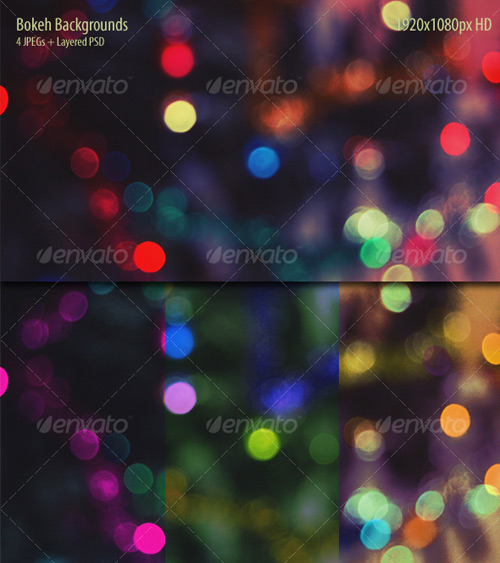
Bokeh Backgrounds (4 Textures – $3)


8 Bokeh Effect Backgrounds (8 Textures/Backgrounds, PSD Included – $4)


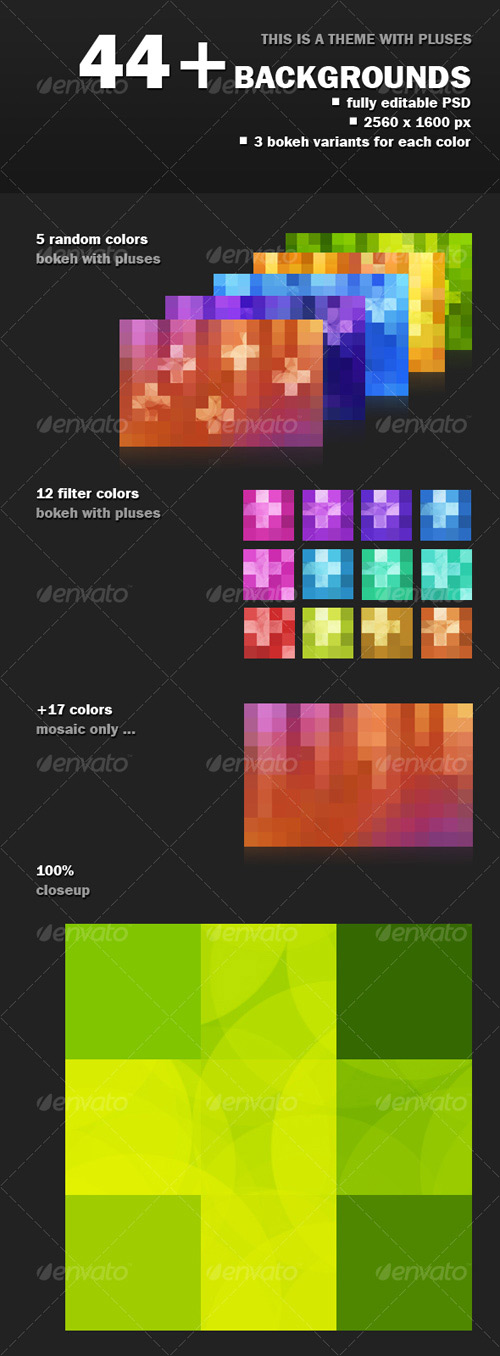
44+ Mosaic Bokeh with Pluses (44+ Textures/Backgrounds, PSD Included – $5)


8 Colorful Abstract Backgrounds (8 Textures/Backgrounds – $8)


You May Also Like…

20100623 Marketer for eBay Ads-need basic html photo editing by adrian078

I need someone with skills in writing or sales/marketing and very basic html to complete eBay ads for me. I will give you the product name and some images, I will need you to: 1. Research the product using eBay and the internet to find out the best features of the product 2… (Budget: $30-250, Jobs: Advertising, eBay, Internet Marketing, Marketing, Sales)


Wanted: Anti-Flagging Script for Craigslist to post Ads. by casualfornow

Wanted: Anti-Flagging Script for Craigslist to post Ads. Script will not be resold or marketed to others. Just for our small company. We will sign a non-disclosure agreement. Let me know what you have and how we can test it and how you would like to be paid… (Budget: $30-250, Jobs: Advertising, Anything Goes, Classifieds Posting, Craigslist, Internet Marketing)


Sh404sef Help+custom Font Help

I have a client with three Joomla sites. I am somewhat new to Joomla (am more of a WordPress site builder), but I want to learn more and be able to do more for this client. In all the cases below, I expect you to fix the problem. In some cases (where noted) I also want you to tell me how to do it myself.

Issue #1: trouble with sh404SEF component
I am trying to get sh404SEF to recognize a manual posting of a custom URL on the http://txconferenceforwomen.org/ site because I can’t find the original long URL in the list of ones to change. I am new to sh404SEF, so I may just be doing something wrong. Need someone to talk me through this so I know how to do it in the future.

Issue #2: Custom font on home pages
Another developer before me set up the custom font on the home page at http://www.maconferenceforwomen.org/ (to the left of the rotating banner). They want the same thing to happen to the left of the rotating banners at http://www.pagovernorsconferenceforwomen.org/ and http://txconferenceforwomen.org/. On PA, the font should be Garamond. On Texas, the font should be Interstate. I have both of these fonts and can “build” them for use on the sites if given instruction. Include time in your estimate to both do the work and then let me know how to apply the font to other places on the site or home page in the future.

Issue #3: formatting fixes
– On http://www.maconferenceforwomen.org/ where they have the custom font on the home page, the font has no right margin and hits the rotating banner. It needs some space there (12px). Please fix and tell me what to edit to do this in the future.
– On http://www.pagovernorsconferenceforwomen.org/ when viewed in Safari on the Mac, the copy with the date information in the header runs to a second line. It needs to be on one line. Please test your fix in multiple browsers. I have a testing service you can use for free if you want access (litmus).
– On http://www.pagovernorsconferenceforwomen.org/ home page, we need to remove the empty space below the twitter feed and above the word “SPONSORS”. Tell me where to fix after you have repaired it.
– Same issue as above (too much space) applies to http://www.maconferenceforwomen.org/ where social networking icons are above the words “presenting sponsor” on the home page.
– On http://www.maconferenceforwomen.org/, when viewed in Google Chrome (and maybe elsewhere), the search box does not align horizontally with the other main navigation menu items on all pages. Please fix and test in multiple browsers.
– At http://www.pagovernorsconferenceforwomen.org/pacblog.htm, the title of the page shows up as pablog. Where can we edit this?
– On the http://txconferenceforwomen.org/ site, when one does a search on the home page, it doesn’t go to a new window — the search results appear at the bottom of the page in a bad looking fashion — the text extends beyond the page borders. It should take the user to a new page (not a new browser window) to display the results. Then what happens on the home page will be just like what happens on the other pages of the http://txconferenceforwomen.org/ site.

Need A Logo Design

I am in need of a logo for a maternity clothing store. The theme is boutique and utilizes an array of feminine styles and colors. The site template that is going to be used is seen here: www.southernbellies.com

Please look at the header image on the site and think of creative ways to fill that space. One of the ideas I had in mind was a high quality cartoon-like image of a fashionable pregnant woman, possibly carrying shopping bags, pushing a baby carriage, etc.

Will look at all offers, especially ones that have samples of ideas that you have for the logo and header.

Thanks!

Magneto E-commerce Store

Hello,

A.) I need Magneto E-commerce script installed.

B.) As well as take the stock e-commerce store (magneto) and integrate my new design into the script.

C.) Finally- I need you to visit my wholesaler/distributor’s web site & add their 500-800 products to my site. You will take product picture, details (product description/name), & prices….at which point you will implement (add) said product to our site.

1) Install magneto store/e-commerce script
2) Add my custom design to the above e-commerce site (store).
3) Add products to my store. Products to be found online via provided URL.

Adding Directly from their site to mine.
The prices: With each and every product- You will randomly add 15%, 18% & 20% price mark-ups to each product. Evenly between the products & at random. Thus if you were to add 300 products. 100 would be marked up 15%, 100 at 18%, 100 at 20%….I need this all in one service, along with the merchant account of my choice implemented.

LASTLY- I can only send payment upon site completion. I realize this will make plenty of you nervous. However please take note the site I own and am looking for you to work on has a $50,000+ domain name. I’m not looking to scam anyone over, and have too much to lose if I were. Said domain name is Diecast .com – Selling those collectable die-cast cars. The site is something like this:
http://www.collectablediecast.com/
http://www.diecast.org

I thank you all for your time, interest & consideration.

Have a great week. Very best,
-Mike

Seo & Pagerank Project

I am looking for an experienced SEO specialist to get my website within the top 5 results of Google for a number of keywords.

Requirements

Only whitehat practices – This is an actual relevant site.

All techniques used should be aimed at developing long term rankings (don’t want 1000 links adding one minute to achieve results, and then suddenly the links are removed after the project has been completed).

Payment Terms

1. 25% when 5 keywords reach 1st page on Google
2. 25% when all 10 keywords reach 1st page on Google
3. 25% when 5 keywords reach top 5 results on Google
4. 25% (balance) when all 10 keywords reach top 5 results on Google

Please note: Payments will be made at each stage only after the results have been verified and have remained in the relevant position for 14 days. (I don’t want to pay for results which only last for a couple of days and suddenly drop again).

Long Term
Providing the winning bidder carries out the work to a good standard and meets the requirements above, further work will be given. I am happy to discuss a long term maintenance fee with the winning bidder to continue to provide link building for the 10 keywords to maintain and improve the rankings long term.

***** BID REQUIREMENTS *********************************
If you are going to bid on this project, please pm me for the URL and keywords. Also provide the following information:

1)An approximate completion time for the project
2)outline what techniques you intend to use
3)provide examples of past work – keywords on 1st page of Google

***********If you can not meet the requirements Don’t Bid Please******

Php-oscommerce Optimization

Current website is OS commerce and new website will be a combination Html with OS commerce.

We need assistance with either migrating current page to folder and change the MySql db and all the nested phps from OS commerce OR combining new Html pages (index.html) with current OS commerce php nested pages and changing current path (index.php?cPath…) to shop.php?cPath…

Existing Site Into WordPress

Looking for wordpress gurus. Urgent job. Need completion asap.
=======

We have a website that needs to be integrated into wordpress.

The site is already built in standard php (page, header, footer) and only contains 4 pages with the homepage being static.

All css/images are already built and provided, this is not a design project. It is a strictly wordpress integration project.

1. homepage (static wordpress)
2. about us, contact us (wordpress)
3. blog (wordpress default blog)

i. wordpress and db already setup on our test server
ii. we are using wordpress 3.0
iii. you need to complete this in within 36 hours time.

This is a simple job but we need someone who really knows their “WordPress”.

Please type “iamnotarobot” into the bid, all others will be ignored.