Iceland is not exactly known for their R’n’B. It’s a country more known for the more peculiar music of Sigur Ros and the electronic craziness of songstress Björk. However, in the past year or so a new team has been making all sorts of waves in the music industry in Iceland. They want to raise the bar in Icelandic pop music, taking the stagnant pop that’s been crowding the airwaves for the last decades and injecting it with a new type of vitriol. And what better way of saving pop music than converting it into Electronic R’n’B?
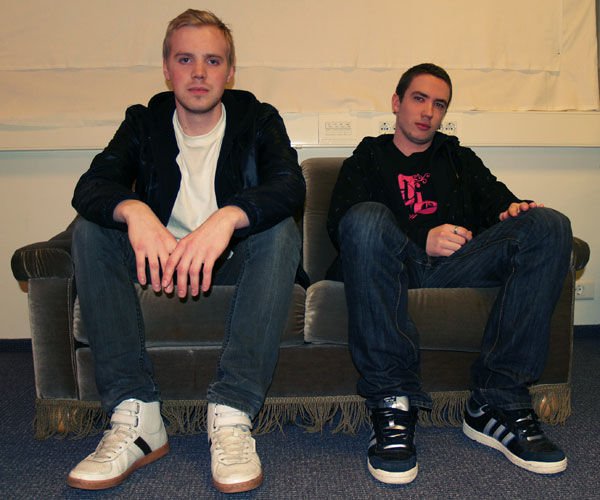
I met with Redd Lights, a production team that is behind the sound of Fridrik Dor, an Icelandic R’n’B/Pop artist that might be one of the most popular new artist in the Icelandic music scene. And since a relatively small country of 330 thousand is “missing themselves” (to translate a term) over this blend of Electronica and R’n’B, which is a microscopic niche market here in Iceland, I deducted that what they are offering must be good enough to warrant some further investigation. Therefore I met with them in their office space turned production studio where we discussed the nature of which they craft and produce their sound and their songs.
Download audio file (optimal.mp3)
Sometime – Optimal Ending Redd Lighs Remix
When you are producing and creating your songs. Where do you start?
We begin by finding a solid chordal structure to the song. A good base to produce the rest on. A solid chord progression that works, often times with a steady kick sound that we can then start building the drums around the direction we want to take the song.
For example, if we talk about Hlid vid Hlid (their biggest hit to date), it was originally an acoustic guitar track right?
Right. Frikki (Fridrik Dor’s nickname) just played an acoustic guitar loop, with the chords that were in the song. The original loop was actually much simpler than the one that made it to the final version. But over that acoustic chord progression he sang the whole song, in one take, which is actually the same vocal take that is on the single that’s playing on the radio. Then we just built and layered everything after that. Frikki wasn’t really here for most of the production process. We just took our time to create a completely different sound out of that guitar and vocal track.
Listen to Hlid vid hlid below:
Download audio file (Hlidvidhlid.mp3)
It’s a great example of when the artist just comes in and says, “All right, let’s do this,” does one perfect take and then leaves.
Exactly. He originally wrote it for another guy. We weren’t doing this to get it on the radio, but for a musical actually. He had written it for this guy who is a rapper, so he started out rapping it. But we had the idea of making him sing the whole song, not just the chorus, and that was the take that went through and got on the radio. Which is a great example of what a great artist he is.
The track itself was actually well thought out. We followed some pretty standard production ideas. You can hear the wind chimes and the violin outro (laughs) you know! It was a case of doing what works, and we just tried to do that really well.
It was also a challenge to create a different pro sound to Icelandic pop music, which we think is pretty boring. The idea is to push the envelope a little, create a new standard if you will. If you look at the modern music world maybe we aren’t really doing anything new, but compared to the Icelandic pop market this is a new sound. Pop music production here in Iceland has been pretty dry and tiring lately, and we want to change that.
What’s it like when you’re producing? How do you select the synth patches and drum samples?
Well, it really depends. We’ve got drums all over the place, and access to so many different sounds. Sometimes we use the Motif or Korg drums, but most of the time it’s really random. Actually, we usually start with an 808 kick and hi-hat, to begin with and then we work from there.
Do you have any templates that you like working from?
No, not really. We always start from scratch. But we usually load the 808 kick to start the beat off, but it depends if we continue using that specific sound or not.
Do you have any specific drum loops or synth sounds that you like more than others? Any favorites?
We never really use any pre-made drum loops. We create all our drum loops ourselves. But we have our favorite sounds. I don’t know if we should tell anybody about it, we’ve used it so often. But that’s off the Yamaha Motif, that’s a rack synth. But there are sounds that we favor more than others and we really try to not over use them. We use our go to sounds when we’re creating the basic structure, but that doesn’t mean those sounds make it to the final mix. Sometimes we try to see what would fit a specific situation, but then try to add some off the wall elements to stir things up beat-wise. Just so it doesn’t end up sounding generic and typical.
Do you create your sounds from scratch? Putting in a saw-tooth wave and then creating your synth sounds from the LFOs and envelopes, or do you work from the presets that are already installed on the synths?
Well, in the past yes, but now we don’t have the time for it. We just want hot sounds right now! (laughs)
But we do modify the sounds and edit them. Especially in the Korg M3 synth. We edit the sound to give it a different character but we rarely start synth sounds from scratch, we just don’t have the time.
You rather select a preset and then go from there, tweaking it until you get what you want?
Yeah, and sometimes it’s as simple as switching the sound from poly to mono, but it can get pretty complex as well. Changing all the envelope filters, the attack and release and such. The tone as well, or changing the original wave, from a saw to something else. Just changing the character of the sound really. Nothing incredible technical, but we’ve ended up with a lot of different custom made sounds we like to use.
But enough tweaking to create something new instead of using all the standard synth sounds?
Yeah, you can’t categorize our songs and say “that sound is from that synth patch”. Also, we use Karma a lot, which is an arpeggiator from the Korg M3, but it’s like twice as advanced. Our most creative synth sounds are done with Karma. We also process these synth sounds even further in the post-production or mixing process, adding on distortion or other crazy effects.
So you mix all your songs as well?
Yes. Everything happens in here really.
What about mastering. Do you master yourself as well?
No, we send all our mixes to a mastering studio in the UK to be mastered.
Do you record a lot acoustically, with microphones or do you focus mostly on using loops and samples inside the computer, recording MIDI and such?
Well, it’s mostly guitar and vocals. We’ve gotten away with nice sounding vocals by just recording it in the middle of the room. We usually just use our Line 6 POD which is a great all around guitar amp modeller to get our guitar tones, so the only acoustic recording that goes on is mostly just the vocal tracks.
Every once in a while we record some percussion in here as well, but we usually just use our samples and sample banks. Sometimes we record something and then try to process it so that it sounds completely different than the original recording.
For recording we’re just using a nice SE Electronics FET condenser, the sE2200a connected to an Edirol FA-66 Firewire interface, which just works really well for us. Sounds solid and simple to use.
So you adhere to the fix-it-in-the-mix mentality?
Well, we record scratch mixes to get the song going, but when we are working on the final product we make sure we get the best takes possible. If we do a bad job during recording but are able to salvage things and make them sound good, they are good. But we usually don’t try to fix recorded stuff like vocals in the mix. We’d rather get the best take with the best sound instead of trying to fix a badly recorded source sound. There is a lot of a/b going on between headphones and monitors if we’re trying to hear something specific, and then when we think the mix is finally done we go all over the place and listen to our mix in as many sound systems as we can.
You say you don’t use pre-made loops, but you obviously use samples. Do you just play everything in on the keyboard?
Yeah, it depends. When we’re searching for sounds and finding the rhythm we play everything on a MIDI keyboard. Then afterwards we edit the structure and the rhythm of the drums. We just know the beats we want in our heads and we edit them from sound memory really. It usually ends up being exactly like we wanted it to sound. We’ve used so many sample banks and drum samplers that we’ve gotten pretty good at understanding the beat and rhythm structure.
But aren’t you worried about your beats becoming sterile and uninteresting? Are you using automation and such to create excitement in the song?
We edit all the automation as well, the velocities of the MIDI samples and such to create a natural feel. Sometime we switch the hi-hat to a swing setting and then back to create a varying feel to our tracks. We don’t want the tracks to be too structured and machine-like so we try to draw in all the automation after the fact, in order to make it more organic.
It’s easiest to notice a sterile drum loop by the machine-like hi-hat sound…
Yeah, exactly, that’s why we try to vary the velocity setting to create a more natural feel. We layer the drums a lot too, taking varying samples to create the complete drum sound. Maybe we have an 808 kick drum sound as a base kick, but then we want to add something on top if we feel like we need more punch to the 808, which sometimes sounds a little too bassy.
The structure of our loops is also important to us. We rarely use the same two loops for 8 bars straight. We almost always vary each 4 bar beat with different loops and samples, just to create variety.
Is there any specific music that inspires you?
We just really try to deconstruct and understand the arrangements and structure of the music we listen to. It’s important to understand what you are listening to and why you are attracted to it. Although our influences change very rapidly. 80′s pop music, Stargate, Timbaland and Tricky Stewart to mention a few, but it almost changes every week.
What DAW are you using to produce your music?
We do everything from A to Z inside Cubase. We just recently upgraded to the newest version of Cubase and it’s just a great software that allows us to do everything. Plug-in wise we almost exclusively use Waves plug-ins. We could almost survive without anything else, the V-Series plug-in package, the SSL package and some vocal effects from Antares. We’ve also found some free plug-ins online that do simple effects like tape-stop and specific effects like that. It’s nice to be able to find plug-ins like that online for free.
Do you mix your music alongside the production process, or do you sit down and go, “Now we’re having a mixing session”?
We usually mix the beat and such before we record the final vocals. Then we mix the vocals to the rest of the beat and then mix the whole song together, when all the elements are in place. A song that’s published by us has been mixed around three times, the beat first, then the vocals on top and then we build, produce and mix everything together.
Like when we’re working with Fridrik Dor, we usually try to get him to sing over a minimalist outline of the song. Then we can build the production around the vocals, see what we can get away with. We try to get away with as few elements as possible, without it sounding empty. That way we don’t run the risk of overloading the song with different production elements and then trying to the fit the vocals on top. But if you can’t get away with leaving the mix sparse, then we layer all sorts of stuff on top if the song calls for it.
That’s a good method. So you have the vocals as a main lead element from the beginning?
Yeah, that’s usually the way we work with Fridrik. We try to put as many crazy sound ideas into the song as we can, but we usually don’t want to take away from the vocal.
How do you approach the engineering of the mixing process? Using compressors and EQ and such?
We usually start by setting up our favorite compressors, the V compressor and all that, and then we work from presets that we’ve created that we’ve found to work with specific artists. We put up our presets inside the compressor itself and then tweak the settings according to the track itself and what the song calls for.
Effect-wise we sometimes mix alongside the production process yes, say we have a synth line that doesn’t sound cool by itself, but during the pre-production process we’ve found that loads of delay works really well to enhance it, then we know how to work it.
The mixing process is a big part of the beat making process, in order for it to work out like we want it to, and we try not to change the synth sounds during the mixing process, but rather try to fit all the sounds together. When we have too much going on it’s become natural to try to fit everything together. If there’s too much going on we don’t have a problem with canceling a specific idea. It often works better to start from scratch sometimes, although it can be tedious to begin anew sometimes a better idea emerges.
Do you get inspired by anything else when you are creating your music?
Well, we don’t really think of ourselves as artsy types (laughs). But it’s funny how the process of creating this kind of music is mechanical. It’s almost like we’re solving a problem but the outcome sounds like it’s very emotional.
We try to achieve the same emotion that the artist is trying to portray with his song. Bringing all that forward and structure the production around what the artist is trying to say. Also, we try to achieve an ambience or a feeling that people can relate to. Like movies and such, we see a specific movie and we try to capture the same feeling from the film in one of our songs. It’s a visual process sometimes, everybody sees it differently but we try to create situations that we visualize in our heads into a specific soundscape you can listen to.
The team lets me listen to a few of their tracks that they are working on at the moment before I leave. It’s obvious that they take pride in their arrangements and choice of sounds, the occasional odd instrument choice creating an exciting edge to the already established pop R’n’B sound that’s so popular today.
I get to hear some of Fridrik Dor’s stuff as well as an orchestral rap song foundation inspired by cinematic film scores. Their creative intellect and desire to create the best music they can is what fuels their ambition, resulting in beats and tracks rivaling the biggest electronic and R’n’B artists out there.
To end I want to add Fridrik Dor’s latest single, Fyrir Hana (“For Her”) that has a more aggressive production to it than the more sparse Hlid vid Hlid.
Download audio file (Fyrirhana.mp3)
Check out more of their tracks at their website and follow them on Youtube for their latest work.