Quick Tip: Getting Realism in Orchestral Music

Getting the best of an orchestral library is sometimes the worst nightmare for a composer or orchestrator. The main goal is to make a mock-up that sounds as real as if the melody was played by a huge group of professional musicians.

There are lots of ways to achieve that, and in this quick tip I’ll explain a way to get that tense and dynamic staccatto feeling in your music. By the end of the tutorial, we’ll try avoiding the so-called “machine gun” effect of very synthesized orchestral sounds.

Here’s our melody – 4 bars of eight-notes with constant rhythm.

Download audio file (ShortTip-staccatto_1.mp3)


Load Different RR Samples

In the demo above you can hear five instrument groups playing – contrabasses, celli, violas and both violins (first and second). I loaded default staccatto patches for all of them, making no velocity or volume tweaks. Therefore we get the “machine gun effect” that can blow your ears off!

First load the RR samples. What does RR mean? “Round-robin articulation”, which means that for each tone of the instrument diapazone we have various types of recordings – each one with different attack, velocity, volume and so on.

So, practically, if we have loaded the sample “VCS Spiccato RRx6” this means that each six notes would be unique. This gives us a feeling of realism.

Also, you can load different types of articulations – spiccatto, staccatto, up-down bows, marcatto, martelle and so on. They are all short articulations, and having different sounds can add colour to your orchestration. Keep in mind that this won’t be practical if you have your work played by live orchestra.

The one problem with RR samples is that they are heavier than the normal ones – so you must have a stable and fast machine.

Download audio file (ShortTip-staccatto_2.mp3)


Make Velocity Changes

After you’ve loaded up the RR samples try to edit the velocity of each tone. Imagine for a while that you are a conductor, standing in front of around 60 players (strings only). When they start playing, they won’t play two identical notes – especially when it comes to volume.

So, going back to the MIDI orchestration, when you make slight velocity edits, you can add additional realism to your music. Sometimes this could take much of your time and you can use some helpful tools like randomizer plugins.

Download audio file (ShortTip-staccatto_3.mp3)


Humanize

The humanize technique can help you achieve the “live” sound of your music. This helps you escape the quantize-jail, and add slight rhythmic MIDI notes as it would be played by a live player.

No human player can possibly play as exact as a computer. Remember those 60 players we were talking about? It isn’t possible for them all to start playing at the exact time – every time one of them would be a bit late or early. And this is that magic that we all feel when we go to a concert (whether we’re listening to Haydn or U2).

Download audio file (ShortTip-staccatto_FINALComparison.mp3)

As you can hear from the final demo, there is audible difference between where we started at the beginning and when we found ourselves at the end. I hope I gave you some inspiration and ideas about sequencing music.


Quick Tip: Draw an Ink Painting in Photoshop


Sometimes all you need to create a quick graphic in Photoshop is a piece of paper, a pen, and a scanner. In today’s tutorial we will demonstrate how to convert a hand drawn sketch into an ink-style painting in Photoshop.


Step 1

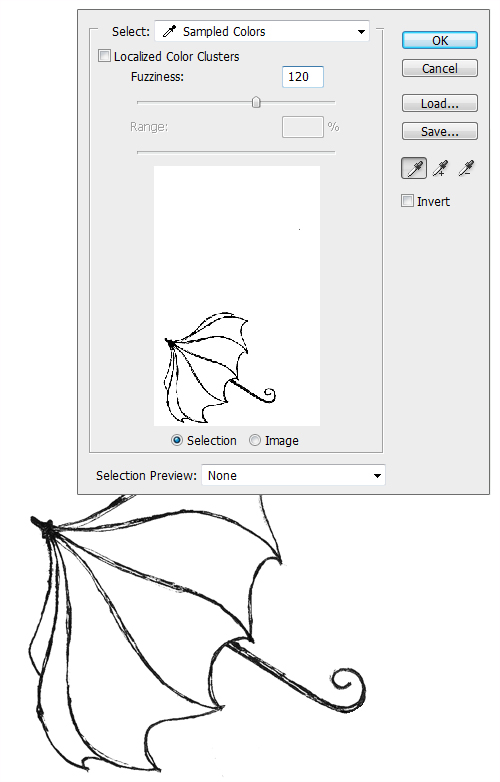
First, create a simple drawing in pen or pencil and scan it into your computer. Open Photoshop and separate the drawing from the background by going to Select > Color Range and clicking on the part of the image in the preview that you want to select. You may want to experiment with the "Fuzziness" settings to see what looks best. Generally for hand drawn objects a setting between 90 and 170 works well. Then click "OK" and copy (Cmd/Ctrl + C) and paste (Cmd/Ctrl + V) the drawing onto a new layer. Make sure to name it appropriately so it does not get lost.


Step 2

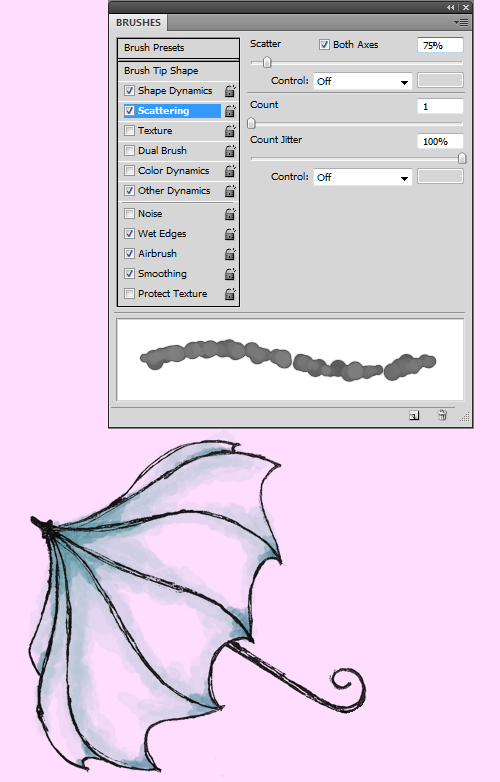
Now choose a pastel (#ffddff) background for the image and start shading in the drawing. Create a new layer and call it "Shading". Then chose a hard round brush, set the Opacity to around 20% and press F5 for further refinement. In Shape Dynamics set Size Jitter to 50% and leave everything else in that section at 0%. In Scattering set Count Jitter to 100%, Count to 1 and Scatter to 75% (both Axes). In Other Dynamics set both Opacity and Flow Jitter to 20% (Pen Pressure). And most importantly put a check in the "Wet Edges" box.

The size of the brush you use depends greatly on the image that you are working on; sizes 15 and 10 were used on the image below. Use larger brushes first to make the light base. Then go back over the spots you think should be darker with a smaller brush, you may repeat the process decreasing the size of the brush you use for as long as it seems appropriate.


Step 3

After the shading is done it’s time to work on the highlights. Create another layer on top of "Shading", called "Highlights" and use a medium sized brush to draw in the highlights in white.


Final Step

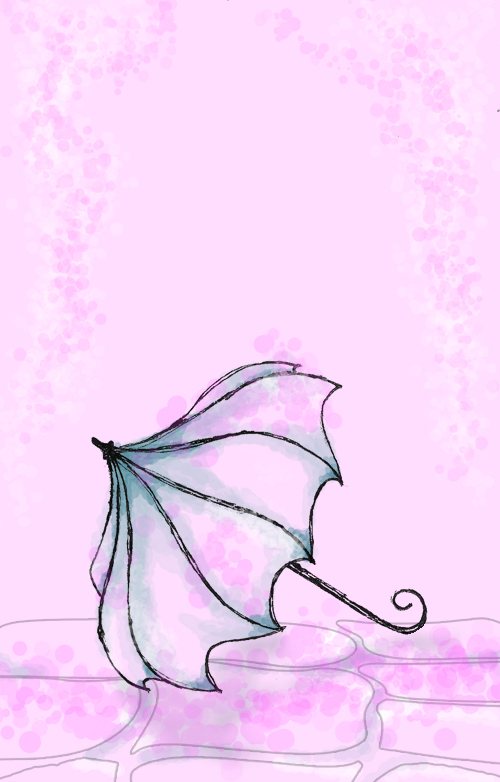
Now come the final touches. In the image below, I’ve made the pavement with the pen tool and added shadows and highlights to it. I’ve also drawn a darker shadow under the umbrella, all using the same brushes and the same technique of layering as before. And finishing the picture I’ve added some falling petals in pink. This was done again with the same technique and brush though increasing the "Scattering" in the brush settings to 500%.

Project: $3 Each – Articles – Long Term (76) – Monthly $300 by mohds2

Hello We need 100 Articles written of 2000 Words at $3. The Pages Should be 100% copyscape Free with good Grammar. Only Bid if your agree to the price If you do not Give articles on deadline you will not be paid… (Budget: $250-750, Jobs: Article Rewriting, Articles, Copywriting)


Ipad Dummy Site – Jqtouch

Hi,

we need for demo purposes a dummy website which has special iPad GUI using JQtouch or SENCHA.

There is not much to do except making the menu structure “interactive” using the frameworks described above. All content will just be images. So in fact it is nothing more than a menu structure dummy of a iPad website.

Time frame: 24 hours. URGENT!

Work Place Admin System 2

Our company have different department and different workers. And eact department have there own access pages…..we will give u the review design and everything, that what you will use and create each department templates design per category.

The system is just if u send someone request..the person see details which u send, and they send back details to you, you have system to view other things, like task reminder, to store your day 2 day work etc…..

We want this project done in 15-20 Days.

We will pay you around USD500 – USD700…we don’t want lazy programmer…if you no u can’t work full time and overnight..DO NOT BID.

—————————————-
5 Different Department – with Over 6 Different Types of Design plateform on each department.