Copy And Paste In From Word To Text

I have 20 Word files. Each file has 10 words and 10 definitions. I need those words and definitions copied to an xml (txt) file.

In the attachment I have showed you what I need with lesson11/11Medical Vocabulary. lesson11 is completed using 11 Medical Vocabulary.

I have taken the “prefix/suffix” and pasted it into WORDS. I have taken the “meaning” and pasted it into Part 1.

You can open the lesson11 file with notepad and edit it using that, then just saving it. So when you copy and paste all of “12 Medical Vocabulary” you would save it as “lesson12”

It’s a simple job for whoever can figure it out. Should take about 2-3 hours, so please don’t overbid. It’s an easy 10 rating for someone who is careful about their work.

Lowest bid will probably get this, and I’d like you to show me how you do lesson12 before I select you.

Money goes into escrow and is released upon me having all the lessons.
Thanks!

Implement Psd To WordPress Design 2

Implement the following design to WordPress to http://www.MillionstheSeries.com. PSD will be provided.

Need to slice up to PSD and HTML. Implement theme to wordpress.

Requirements:
1) cross-browser compatible
2) valid XHTML / CSS markup
3) Well structured and clean markup
4) For the email list integrate this plugin
5) There should be we Should be able to edit and upload the ads.

New Auction Types 6

I have a penny auction site currently in re-developement

I want some new auction types added to it

Seated auction now second part I want a seated auction format kinda lik ethis http://biddingyard.com

scratch to reveal auction. (dubli.com bidster.com)
lowest unique bid tye
highest unique bid type.
Bid pack auctions already have this type however bids need to credit after payment instead of by admin intervention
couple modifications to layout and a few switches for certain auction types to display in those new layout areas
Need some minor coding completions/fixes on some things related to
email templates
buy it now auction
multi language system
some odds and ends not a whole lot and nothing major basically wrapping up some stuff another coder gave up on. noted after being paid in full, another reason i no longer issue downpayments… 🙂
anyways as noted just finishing touches.
I will be helping you with this as much as i can as i am a realy busy person, and due to this i expect you to work independently im not here to hold your hand but to guide you.

I would also like a rewards sytem kinda like credit card bonus points that can be used to purchase items and or discounts from a estore we already have a voucher system may tweak this to handle it.
I want a contest system or better said a bonus point system the script currently has a rewards system so youll be tweaking that to fit my needs please see attached video for explanation of this okay cant attach it ists to big so go heres a video http://rpandassociates.biz/the+hunt.avi

All the hard stuff is already done just need some addons please bid accordingly.

Please NO copy and paste portfolios responses I want to know you read this and understand what you are about to partake upon.

you need to be at the top of your game dont want no beginners here I have alot of time and money invested in my script, if you think your going to get a free copy think again certain sections we have incorporated a tracking licensing system and every thing in encoded in ioncube, we will not provide you wit h a unencoded source for any reason dont ask, you dont need to edit anything inside the encoded file set, we encoded it we know. Have had bad experiences with people on here trying to steal my source code and it has NOT ended well for those people, so be forewarned.

If your even hesitatant in your abilities dont waste my time im tired or hiring people and firing them and cancelling projects as a result. You will need to know
PHP
SQL
all interations ther of
html of course
Paypal IPN
AJAX
CSS

You must be able to complete this in the time frame you bid NO Excuses, NO escrow not going to do it been burned 2 out of 4 times on here 50% loss so dont even ask FUll payment upon project completion and testing.. Yes everything must work. I will test fast upon completion. Payment to be made directly via paypal if i use scriptlance to transfer i can do but its going to cost you 3.9% deposit fee not me… I dont like scriptlances paymetn systems or escrow systems and especially dont like the milestone system people cant stick to them and that angers me.. I may be inclined to use the milestone system again and pay upon milestone but lets be clear here a milestone is accomplished once it is live on the server and verified working. I prefer to pay in full upon completion but am willing to work with the right person, just dont have much faith in the escrow system here or scriptlance ability to handle it.

I have my own project collaboration area which you will use during this project.

No crazy bids ill ignore you .
I dont care if you have 0 reviews or 10000 reviews I just need to know you can do it
and do everything you say you can do
andyou can do it in the time you bid

I fixed the timers myself last night kept getting crazy bids on that someone could of made a quick 50$ on that project seriously people 1200 bids for a simple JS fix… 🙂 took me 45mins to isolate and repair.

Groupon Project

>>Groupon Clone Script<<

groupon clone script

Just $89, Full Featured ,Paypal, Tweet Machine

Want a groupon clone for a complete website.Need to be full version.
I need website design and functionality similar to youswoop.com, groupon.com, buywithme.com, coupme.com and http://deals.livingsocial.com. I really like the simplicity and look of http://deals.livingsocial.com.

I will only accept bids from programmers who have completed similar websites already, and you can sell me the same script you created so long as you have the rights to do so.

If you have created similar sites like livingsocial.com/groupon.com, please PMB with the exact sites you have created including links to demo site with admin password. Also, provide a link to your portfolio of work.

Thank you, please PMB with any questions.

Joomla Site Revisions And Details To Updated Needed

My joomla site requires revisions and updates which includes:

1. the product section “notify me” button form is not sending email to me
2. the product section “more information about a product” form is not sending email to me
3. the “notify me” is not visible in the button in a certain view
4. like to add google check out as an option in the check out chart linked to our google payment area.
5. like to use alpha registration (re-capitca) in joomla plug instead of current spam check. customer form should not blank out if customer place incorrect spam input
6. change side 3 links from pictures to visually the actual video image link.
7. disable local pickup (but not delete it)
8.update patch joomla to latest version
9. update paypal checkout link to a link that shows mastercard, visa fill-in form on the left and paypal payment sign on to the right.

Writing Effectively in InDesign Using Book


InDesign allows you to collect all documents in a Book. Using Book, you can easily synchronize styles in every document and maintain a consistent layout throughout your project. In this tutorial, we will create a book made from 3 chapters, complete with Table of Content, Introduction, and a Cover. You will learn the concepts of InDesign, from applying styles, adding page numbers, warping text, using variables and master pages. Let’s get started!

Continue reading “Writing Effectively in InDesign Using Book”

Quick Tip: Single Low/High Pass Filter for Ableton Live

In this quick tip, I’m going to show you a neat way of implementing a low/high pass filter using the Auto Filter device in Ableton Live. By that, I mean that we are going to be able to construct a filter that goes from a full low pass to a full high pass with the turn of one knob, leaving the unprocessed signal to pass in the middle position.


Setting Up

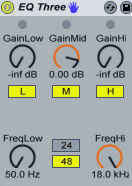
Quick tip before we start. I am going to show you a way of implementing a low pass and a high pass filter in one EQ3 device as two separate controls, though. On the EQ3, turn the GainLow and GainHi all the way down and set the GainMid to 0dB.Set FreqLow all the way down to 50.0 Hz and FreqHi all the way up to 18.0kHz. FreqLow acts now as a high pass filter and FreqHi as a low pass one.

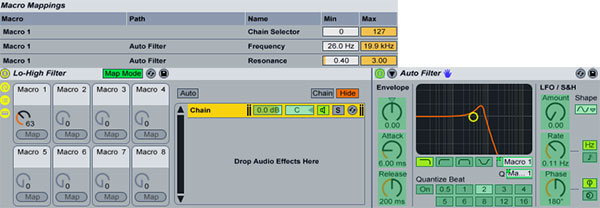
Now, let’s start again by dragging an Auto Filter device, then grouping it so that is occupies a place in a chain inside an Audio Effect Rack. Rename it to Lo-High Filter. Set the Filter Type to Lowpass and map the Filter Cutoff and Filter Q to Macro 1 Macro Control. Hit Map Mode and set the Auto Filter’s Resonance Min value to 0.40. Hit Map Mode again to exit the Macro Mappings.

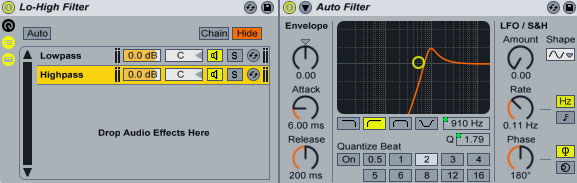
Copy the existing chain to create another one and set the new Auto Filter’s Filter Type to Highpass. Notice that all Macro mapping are also copied from the initial rack. Rename the first chain to Lowpass and the second to Hipass.

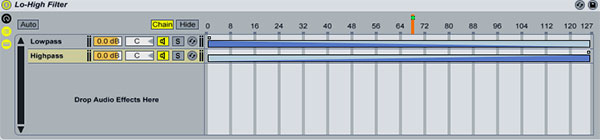
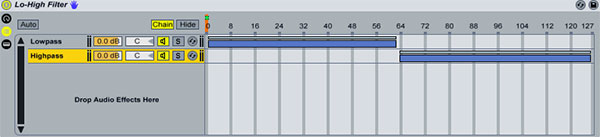
Hit the Chain button to show the Show Chain Selector Editor. For both racks define a range between 1 and 126. Click the first rack’s right Fade Range handle and drag it all the way to the left. Click the second rack’s left Fade Range handle and drag it all the way to the right. Finally, map the Chain Select Ruler to Macro Knob 1(by right-clicking and selecting Map to Macro 1).

Turning the knob from left to right executes a full filter sweep from low pass to high pass. What we are doing is morphing or crossfading between the two filter types. The Macro knob at 0 setting prevents any audio from passing through, same thing happens by turning the knob all the way to the right after the high pass has been executed. We need to do that since extreme highpass and lowpass Auto Filter’s settings don’t silence the audio completely. Since audio is not passing through the filters, we also save on CPU resources.

Listen to a sample:

Download audio file (sweep1.mp3)


Fine-tuning the Effect

Although the effect sounds good, there are certain issues that could be addressed. For once, when the 2 filter types are being mixed into each other, there is never a clean lowpass or highpass signal since there will always be an opposing signal fading in or out. Also, on the middle Macro knob 1 position with the value of 63, we don’t get a clean, unprocessed signal, instead the signal is still affected from both filters.

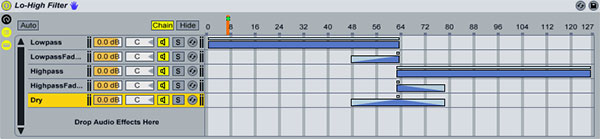
On the first chain, set a zone range from 1 to 63. Drag the right edge of the Fade Range all the way to the right. On the second chain, set a zone range from 63 to 126. Drag the right edge of the Fade Range all the way to the left.

Make a copy of the first chain and rename it to LowpassFadeOut. Drag a Utility plugin to the newly created chain and select the Invert preset. Set a zone range between 48 and 62. Drag the left side of the Fade Range all the way to the right. Make a copy of the second chain and rename it to HighpassFadeOut. Drag a Utility plugin to the newly created chain and select the Invert preset. Set a zone range between 63 and 78. Drag the right side of the Fade Range all the way to the left. Finally, create a fifth empty chain with no effects and rename it Dry. Set a zone between 48 and 78. Drag the left Fade Range edge towards the right to a value of 63. Drag the right Fade Range edge towards the left to a value of 63.

Let me explain: As we turn the knob to the right the low pass filter is activated from range 1 to 48. From 48 to 63 its inverted signal(LowpassFadeOut rack) is gradually mixed in meaning that at the mid point of 63 the low pass signal is going to be cancelled out completely(silence). Meanwhile le the dry unprocessed signal is mixed in(bottom rack). At point range of 63 we get only the dry signal playing. Then as we continue turning the knob the high pass filter is activated but is initially also cancelled out by its inverted one(HipassFadeOut rack) allowing the dry signal to fade out completely at point 78 and the highpass one to be mixed in as well.

Listen to a sample:

Download audio file (sweep2.mp3)

I think, once you see the source files you will get what’s going on. The good thing about the whole setup is that you are able to make use of the Auto Filter’s filter modulation capabilities, as well. Finally, you can use any filter or EQ plugin of your choice.

Download the Play Pack for this tutorial (14 KB)

Contents

  • Ableton Live Source Files


Showcase of Macintosh Dashboard Widget UI Designs


There are various ways an application (or more specifically, a widget) can be presented to its users; some bad, some good and some tremendously well. Other than a widgets purpose, its user interface is the most important aspect; it makes the widget look good and (hopefully) makes it easy to use, making it compelling and user friendly, which is what all application developers should be aiming to achieve. Dashboard widgets are actually relatively easy to make, and most web designers/developers can produce them without much difficulty. They are developed using HTML, CSS and JavaScript, meaning everything that is possible on the web, is possible in a dashboard widget, making it relatively easy to achieve a great looking and easy to use widget.

This inspirational compilation post showcases a collection of 32 creative, unique and easy to use Apple Macintosh Dashboard Widgets, including a selection of default widgets that ship with your Apple Mac, and a good handful or two of third party widgets.


Participate in this Session’s Group Project

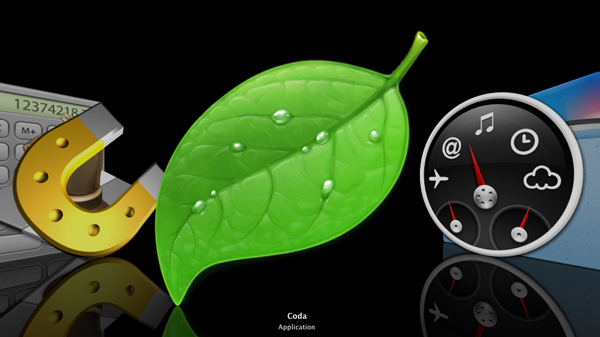
Jump over to this Session’s creative project on Create an Application Icon or Dashboard Widget. Choose the project to participate in that best fits your skill level and interest. This session’s Beginner/Intermediate project the brief is to make an icon for applications, which is great practice for building your GUI skills.

coda

We also have an Advanced project where you design a widget, which is a great way to get some hands on experience with designing interfaces, as they are typically smaller apps with a tight focus. You can post your projects in the comments here and get some feedback from the community.


Default Dashboard Widgets

A selection of default dashboard widgets that ship with Macintosh computers as standard. These are no doubt some of most elegant dashboard widget UI designs to date.

Weather

The weather widget allows users to quickly check the current and upcoming weather forecasts for towns and cities all over the world.

Unit Converter

Unit Converter is an incredibly easy to use widget, allowing you to convert all kinds of figures, from currency to weight and distance to energy.

iTunes

The iTunes widget allows you to view the current song playing, pause, play, skip and change your settings (i.e. repeat and shuffle) at the speed of light.

Calendar

Calendar is a very basic widget that simply allows you to scroll through months and view dates. It’s handy to check which dates fall on which days.

Dictionary

The Dictionary widget actually triples up as a dictionary, a thesaurus and an “Apple dictionary” that allows you to check different Macintosh words to find out their true definition (i.e. “spotlight”).

Calculator

A very straight-forward calculator widget that does what it says on the tin, it’s not used very much due to the ability of being able to calculate sums directly into the Spotlight search bar.

Flight Tracker

A slightly more complex widget that allows you to check incoming and outgoing flights from all over the world.

Ski Report

A funky designed app making good use of wooden texture, reporting current ski conditions from over the globe.


Third Party Dashboard Widgets

Loremify

Loremify is a one-click tool to copy Lorem Ipsum. It lets you wrap in html, specify the amount of text, and copy it to your clipboard—all in one click.

Prototype Reference

A simple dashboard widget to allow you to get quick access to Prototype JavaScript Framework documentation.

Page Capture

An easy and fast way to take screenshots of entire web pages, no matter how long the page.

ColorSchemer Galleria

A refreshing take of inspiration, allowing you to scroll through the entire collection of color schemes from the ColorSchemer library.

Colourmod Dashboard Widget

A super simple way of finding out a color value (Hex, RGB, CMYK and HSV modes) without having to open up a demanding applications such as Photoshop.

Color Theory

The Color Theory widget allows you to create your own color schemes for your websites, your interior designs or even to help you choose your outfits in the morning. It can even simulate various forms of color blindness!

Hangman! Dashboard Edition

Hangman! Dashboard Edition is a version of the popular puzzle game. In this case, it has been completely reproduced to work as a Mac Dashboard Widget, and has a dictionary of 500 words.

Symbol Caddy

Symbol Caddy keeps a bunch of common “special” characters and HTML codes right on your dashboard, making it super easy to find, copy and paste those tricky symbols that are hard to remember when writing up copy for a new website or blog post.

Tags – CSS

Tags – CSS is a library for CSS properties and attributes, featuring an easy to use search feature. You can also copy the properties, making editing your stylesheets a breeze.

GoDaddy.com Domain Name Search

The Official GoDaddy.com Domain Name Search tells you if a domain name is taken in seconds, and if not presents you with various options and prices.

Dashalytics

Dashalytics offers quick and direct access to your Google Analytics website statistics, meaning you can take a brief look over your statistics within seconds, any time of the day.

The Weather Channel Widget

The Weather Channel Widget provides detailed weather forecasts from all over the world, and even includes maps and severe weather warnings.

Albi und Nero RSS Widget

Albi und Nero RSS Widget is a simple RSS reader, delivering the latest updates and news from their own website.

Amazon Total

The Amazon Total widget allows you to search Amazon’s site, whether site wide or a specific category.

SafariBar

A quick and easy way to search the web for content, images, video, news, maps and blogs via Apple’s web browser, Safari.

SafariSearch

Another widget that allows you to search Safari from your dashboard, this time a traditional Safari themed UI.

FontSee

FontSee is a very helpful and unique widget that allows you see preview text in various fonts from your system; you can either choose the font you want to test, or “play” through them and view your dummy text in every font on your system.

Currency Converter

Currency Converter is an easy way to convert over 200 world currencies, including old legacy European, world legacy and unrecognised currencies.

Sudoku

Sudoku is a logic-based, combinatorial number-placement puzzle, right on your dashboard.

iStat Nano

iStat Nano is an advanced system monitor in a tiny package, featuring beautifully animated menus and transitions. It allows you to view detailed performance stats from your Mac, including CPU usage, memory usage and HDD space.

BBC News Widget

BBC News Widget is a news widget direct from the BBC, and is available to read in 32 different languages. All styled up in an elegant and easy on the eyes UI design.

TV Forecast

TV Forecast allows you to select your favorite TV shows and have them be display in a simple list, informing you of when they are next on TV. You’ll never miss your favorite TV shows again!

World Weather

Get simple weather forecasts (much like those in the standard Weather widget) wrapped up in a sleek, modern UI design.

Simsen

Simsen is a widget that allows you to send free SMS text messages to other mobile phones in Germany, Austria, Switzerland and many other countries.


Orange Grunge Textures – Psd Premium Texture Pack


Today, we have a new set of Premium Textures available for Psd Premium Members. This set was crafted by Caleb Kimbrough of Lost and Taken and includes 32 high resolution orange grunge textures. If your next project calls for some grungy textures with pealing orange paint, than this set is perfect for you. Learn more at the jump!


New High Resolution Orange Grunge Textures

This new Premium Psdpack Pack is available for Psd Premium Members today and includes 32 high resolution orange grunge textures (3264px by 2448px). Members can Log in and Download! Otherwise, Join Now! You can view a preview of the textures below.

sample

This new Premium Psd Texture Pack was created by Caleb Kimbrough of Lost and Taken and is available for Psd Premium Members to download today. Caleb is a freelance blogger and the brains behind Lostandtaken.com, a blog solely focused on giving away free, high-res textures. We’re excited to partner up with him on this release.

pack

Psd Premium Membership

As you know, we run a Premium membership system that costs $9 a month (or $22 for 3 months!), which gives members access to the Source files for tutorials as well as periodic extra tutorials, and Premium Packs like this one! If you’re a Premium member you can log in and download the tutorial. If you’re not a member, you can of course join today!