The site is here
http://www.pharmatemp.com.au
It is ok in FireFox but the layout is messed up in IE and need to be fixed. Thanks

Freelance Projects, Design and Programming Tutorials
The site is here
http://www.pharmatemp.com.au
It is ok in FireFox but the layout is messed up in IE and need to be fixed. Thanks
Looking for programmer to write a php script to change the data in a mysql db. This script is actually a wordpress 3.0 multisite upgrade script. If you know wordpress well, it’s good, you will understand the following logic easily.
Here are the things you need to do:
1. change table name.
…
the current mysql structure is like this:
wp_domain2com_something1….
wp_domain2com_something2….
wp_domain2com_something3….
wp_domain3net_something1….
wp_domain3net_something2….
wp_domain3net_something3….
…….
You need to change it to someting like:
wp_2_something1….
wp_2_something2….
wp_2_something3….
wp_3_something1….
wp_3_something2….
wp_3_something3….
…….
2. add additional info under wp_blogs table
you need to add the info just like below to wp_blogs table:
blog_id : 2 (you need to match this with step 1)
site_id : 1
domain : www.domain1.com
path : domain2com (you need to match this with step 1
registered : 2010-07-05 15:27:50
last_updated :2010-07-05 15:27:50
public :1
archived :1
mature :0
spam :0
deleted :0
lang_id :0
3.change the following values under wp_options
home http://www.domain1.com/domain2com/
siteurl: http://www.domain1.com/domain2com/
fileupload_url: http://www.domain1.com/domain2com/files
upload_path: wp-content/blogs.dir/2/files
domain2com_user_roles –> wp_2_user_roles
I own a gadget blog and am in need of editors to write upto 5 blog posts a day.
Requirements:
– Post length required is 100-200 words.
– Good English/Grammar is a must.
– I will supply gadgets to write about, editor must rewrite or source information for the post.
– Content must be unique and not simply copied from other gadget related sites.
– All posts are sent to me daily to be uploaded.
If your looking for an example of what I expect, check out uber gizmo .com (remove spaces)
This project is not a one off, im in need of long term relationship with someone willing to work regularly, please dont bid if you are not available for this.
2 main task on this small project
Payment is between $20 – $50
Task 1 – fix bug in php table
Task 2 – make site to have http
Project must be completed by Monday night
We will upload and test (just send us php codes)
No Access to FTP Server, all php have been provided and also sql dump
Full details is in the attached document
No escrow payment (part or full) before work is done
regards
Olu
I will provide all the raw materials with the voice over. All you need to do is edit the video. Please attach sample of works on your bid.
I am looking for someone who can create a WordPress plugin that uploads photos to microstock agencies and into my wordpress portfolio at the same time. It should work similar to the way the freeware software from prostockmaster.com works. I have a plugin and theme that this can be built to work with if you think you can make it work. Please Pm me with something more than “Dear Sir I am Eager To…” I want to know why I should hire you.
We need a flash expert to build a flash gallery that will be used on a dating website.
The flash will have 10 themes, 5 for men and 5 for women, so 10 flash files (or 10 layers).
The need is to create a dynamic presentation for each member, based on their name, pictures and selected theme
Please see the attached picture to see an exemple of a theme with the description of what a theme is.
Exemple: if I choose the love theme :
– on the background, my pictures will slide or zoom
– on the front layer, there will be hearts and animated red waves and my name with a specific font
– a “LOVE ME” soundtrack will play.
The images of the profile (and albums files) will be dynamically taken, just give us the structure of flashvar or XML and we will do the PHP logic.
The nickname must be taken too, and the link to all photo, if I see the photo with my face, it will be to this Album-Photo link, if it’s the holidays photo, it will go to the holidays photo page…
The flash will be used more than one time the web pages : we will use it on the mainpage of the site for the top members and on each members profil page
IMPORTANT:
– ONLY BID IF you are a flash expert with experience.
– START YOUR BID OR PM with “AGREED” otherwise your bid or message will not be considered. This is to avoid copy/paste answers or bots.
Project is ready to start
Thanks
 Well, that didn’t take too long. After a rather horrible debut Friday Adobe has fixed Photoshop Express so it can now open in the landscape mode.
How exactly was this app tested by Adobe and Apple? You’d think since most photo editing is done in the landscape orientation it would have been operated that way. I’d expect that kind of bug to be discovered immediately. Since Adobe is a premier graphics company you’d also think they would choose a logo for the product that doesn’t resemble a roll of toilet paper.
Anyway, the app now works properly and it’s free. You can crop, sharpen, blur, make frames and do other basic adjustments and send your edited pix to Photoshop.com or to Facebook.
The app also works on an iPhone and an iPod touch. Have at it, and unlike the iPhone 4 antenna, you can hold your iPad anyway you want.
TUAWWorld rejoices as Photoshop Express for iPad is fixed originally appeared on The Unofficial Apple Weblog (TUAW) on Sat, 14 Aug 2010 23:00:00 EST. Please see our terms for use of feeds.
Read | Permalink | Email this | Comments
 The set overlap between “iPhone owners” and “fans of professional golf” isn’t trivial, so it’s worth mentioning that the free app for the 92nd PGA Championship is available in the App Store. You can follow along with the action at Whistling Straits this weekend in glorious Retina Display detail, and with a $1.99 in-app purchase you can get live video of marquee players through their entire rounds, or see the entire field play the course’s par 3 holes. Of course, live coverage is also available at pga.com or on television.
Even without chipping in for the live streaming, there’s plenty of video in the app: highlights, course overviews and instructional clips are all included gratis. The app includes customizable push notifications, so you can keep abreast of the latest news or zero in on particular players, round schedules or exceptional events (double bogeys, birdies/eagles, etc.).
If you like the PGA Championship app, there’s more around the corner; the 2010 Ryder Cup App will be in the store in September.
Check out the gallery below for more views of the app.
Gallery: PGA Championship App for iPhone


TUAWPGA Championship app pushes latest scores, includes buy-up live video originally appeared on The Unofficial Apple Weblog (TUAW) on Sat, 14 Aug 2010 20:15:00 EST. Please see our terms for use of feeds.
Read | Permalink | Email this | Comments

As a bona fide fan of cruise ships and iPads, I was happy to see a short note from CruiseInd.com today outlining what Celebrity Cruises is doing with the iPad on their Solstice Class ships.
Starting tomorrow (August 15th), iPads will be available on the Celebrity Solstice, and the sister ships Eclipse and Equinox will see a group of iPads on board starting August 21st. Guests can launch a custom app to be able to view the collection of art on their particular ship. The Solstice class ships currently in service, Solstice, Equinox, and Eclipse, have a total of 14,000 original contemporary art works between them that decorate the various decks. Deck plans are displayed on the iPad, and guest can touch artworks represented on the plans to see the exact location, title, artist’s name, medium, a description, and an image of the work.
This isn’t the first time that iPads have been used on Celebrity’s ships — the cruise line uses the devices to display the menu and wine list at the Qsine specialty restaurant on the Celebrity Eclipse. Celebrity also features the Mac-centric iLearn program on the Celebrity Solstice, Equinox, and Summit, a series of classes that mimic the One-to-One experience available in Apple retail stores.
It’s refreshing to see Celebrity embracing Apple technology on their ships, as most other cruise ships seem to feature old PCs running Windows XP in their Internet lounges.
TUAWThe iPad as an art gallery tour guide on Celebrity Cruises originally appeared on The Unofficial Apple Weblog (TUAW) on Sat, 14 Aug 2010 19:00:00 EST. Please see our terms for use of feeds.
Read | Permalink | Email this | Comments

Reports are coming in that people visiting http://discussions.apple.com have been seeing the cryptic message “for fun, by tojen” rather than the index of discussion forums they were expecting.
We’ve managed to reproduce this here at TUAW, but only haphazardly. I saw it earlier in Safari under OS X, but since clearing my cache I cannot reproduce it. Firefox doesn’t do it, but lynx (a command line browser) on my Linux server does. Steve Sande has seen it under Safari but not on his iPad. Other people have reported seeing it on their iPhones.
This mixture of affected devices and operating systems that show the message suggest it is neither an OS X nor a Safari hack of any kind. If you have seen it, your computer has not been compromised. Rather, it’s something server-side; either on Apple’s servers themselves, within the Akamai caching network (this would be my guess based on some quick tests), or some sort of DNS hijack.
For the time being I’d suggest being cautious and steering clear of discussions.apple.com. However, don’t panic. If this was a hack aimed at stealing your accounts then it wouldn’t put up the message at all, it would show you the normal page and sit quietly in the background accumulating data.
Nevertheless if you’ve seen this message and are worrying about the implications, you should consider changing your iTunes account password, if only for peace of mind. It is just about possible that your session cookie will have been intercepted by “tojen” for nefarious purposes and changing your password will protect you against that.
Thanks to everyone who sent this in.
Update: the whole discussion forum is now closed, replaced with the cheerful “we’ll be back soon” sticky note normally reserved for the Apple Store. Presumably a number of system administrators just had their Saturday evening plans cancelled. (Thanks to commenters snoanim and John for pointing this out.)
TUAWApple’s discussions site redirected for some originally appeared on The Unofficial Apple Weblog (TUAW) on Sat, 14 Aug 2010 15:55:00 EST. Please see our terms for use of feeds.
 Here’s something that will be welcomed by the health community. Nuance Communications has released a free, medical version of Dragon Search called Dragon Medical that lets mobile physicians and other health workers search a variety of medical publications on their iPhone or iPad by just speaking search phrases.
Information on drug interactions, latest medical news and diagnoses are available from the app, as well as a search though Google.
The original Dragon Search allows general information lookup using several search engines. Nuance is now moving toward more specialized apps for professionals.
The app is free for a limited time, and Nuance intends to bring out more apps for health workers, including a version of Dragon Dictation so patient notes and other information can be turned into text and saved.
You can watch a video of the app in action here.
TUAWDragon Search now available for medical professionals originally appeared on The Unofficial Apple Weblog (TUAW) on Sat, 14 Aug 2010 14:30:00 EST. Please see our terms for use of feeds.
Read | Permalink | Email this | Comments
 The Mercury News is reporting that Sunnyvale, CA resident Paul Shin Devine, a 37-year-old Apple manager in global supply, has been arrested and charged with accepting kickbacks from Asian suppliers. In return, he provided confidential information that allowed these suppliers to negotiate more advantageous contracts with Apple.
Devine, and his alleged co-conspirator Andrew Ang of Singapore, have been indicted by a federal grand jury on 23 counts including wire fraud, money laundering and other charges. Devine is being held by the US Marshals Service.
Apple’s statement on the matter comes from PR lead Steve Dowling: “Apple is committed to the highest ethical standards in the way we do business… We have zero tolerance for dishonest behavior inside or outside the company.”
Devine is alleged to have collected over $1 million in funds from various suppliers in China, Taiwan, Singapore and South Korea during the scheme; the companies involved have not yet been named publicly. Devine opened bank accounts in several countries in his wife’s name to disguise the bribes.
[via Apple 2.0]
TUAWApple manager held on kickback charges originally appeared on The Unofficial Apple Weblog (TUAW) on Sat, 14 Aug 2010 09:45:00 EST. Please see our terms for use of feeds.
Read | Permalink | Email this | Comments
In this guide you’ll learn how to downgrade iOS 4.0.2 to iOS 4.0.1 / 4.0 on iPhone 4, 3GS, 3G and iPod Touch 3G, 2G. Instruction on how to downgrade iPhone, iPod Touch iOS 4.0.2 to 4.0.1/4.0 firmware can be found below.

iOS 4.0.2 fixes the exploit used in JailbreakMe 2.0, the jailbreak for all iPhones and iPod Touch. So, if you want to jailbreak iPhone 4, 3GS, 3G or iPod Touch 3G, 2G then you MUST downgrade to iOS 4.0.1 or 4.0 first.
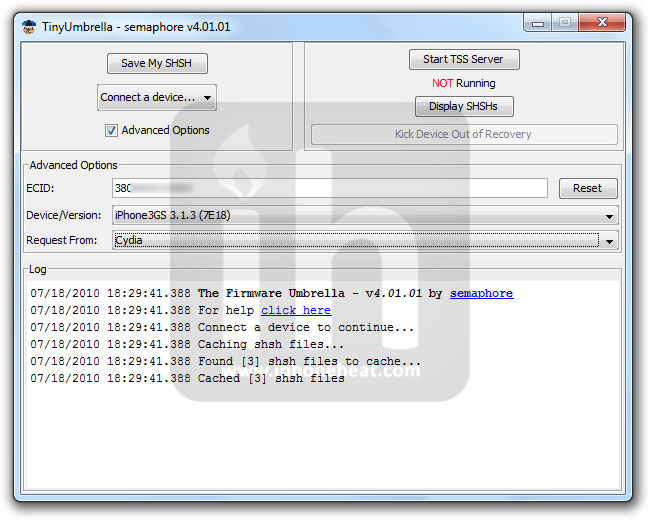
In this guide we’ll use TinyUmbrella to downgrade iPhone / iPod Touch firmware. There’s no need to edit any Hosts file that is required in other guides found all over the cloud. We are going to setup downgrade server the TinyUmbrella way: with a single click.
iPhone 4, iPhone 3GS, 3G, iPod Touch 3G and iPod Touch 2G users MUST have SHSH blobs saved for 4.0.1/4.0 firmware in order to downgrade from iOS 4.0.2.
How to: Save SHSH blobs for iPhone, iPod Touch
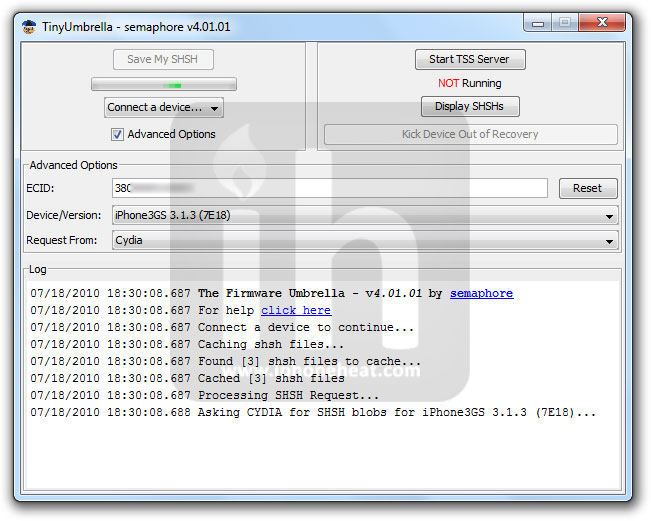
If you’ve SHSH blobs saved on Saurik’s server via Cydia, download them into your computer first. To do that:
(e.g: to download 3.1.3 SHSH blobs from Cydia see the screenshot below)

Click to enlarge.
NOTE: If iPhone 4, 3GS, iPod Touch 3G and iPod Touch 2G (MC) users do NOT have SHSH blobs saved for an older firmware, they can NOT downgrade unless Apple is signing the Firmware.
*** Read the whole process first and then try.***
Download TinyUmbrella and desired firmware for iPhone 4, 3GS, 3G, iPod Touch 3G, 2G from the links below:
Put your iPhone into DFU Mode (How to: enter DFU Mode)
iPhone 3G and iPod Touch 2G (Non-MC) please skip to step 4. iPhone 3GS and iPod Touch 3G and iPod Touch 2G (MC) users:
iTunes will bring up error 1015, 1013 or 1011 message. Don’t worry, it’s normal. You’ve successfully downgraded your iPhone/iPod Touch firmware.

Now in order to get out of recovery mode, hit the “Kick Device Out of Recovery” button on TinyUmbrella right below the Start TSS Server button. That’s it!
Now you can jailbreak iOS 4.0.1 and iOS 4.0 using the guides linked below:
How to: jailbreak iOS 4.0.1
How to: jailbreak iOS 4.0
You can follow us on Twitter, Join us at Facebook, and also Subscribed to RSS Feed to receive latest updates.


FaceBreak, a new jailbroken app, enables FaceTime over 3G network. By default, you can make FaceTime calls over WiFi network only. But once you’ve FaceBreak installed, reboot your iPhone and enjoy FaceTime calls over 3G.

“Enable FaceTime over 3G ! With 1 click and no setup, you can get FaceTime running over 3G and use it anywhere you want. No more looking up for nearby WiFi connection to use FaceTime. – Just install and Respring. FaceTime will now also work when on 3G!”
You can always enable/disable FaceTime from the iPhone Settings under “FaceBreak“. Your iPhone 4 MUST be jailbroken. (Jailbreak guide linked at the bottom.)
WARNING!!!
Absolutely do not update to 4.0.2 / 3.2.2. This update does nothing except break your jailbreak! If you have to restore, make sure you use Saurik’s server with your stored SHSH so that you can restore 4.0.1 firmware.
For the safari pdf security patch offered in 4.0.2, you can install Saurik’s patch for this by installing PDF Patch in cydia.
FaceBreak is available for iPhone 4 only in the Cydia store for $1.49.

Also checkout:
You can follow us on Twitter, Join us at Facebook, and also Subscribed to RSS Feed to receive latest updates.