Old Sierra On-Line games now available on iPad via the web

Get ready to lose your weekend. As we reported it would a while back, Sarien.net is now offering up a whole slew of old Sierra On-Line games, playable through your iPad’s web browser for free. The first three King’s Quest games, the first two Police Quest games, and even a Leisure Suit Larry title are all online and available. Sarien.net even allows for multiplayer within these old games, so you might see some other players in there while you’re wandering around trying to solve puzzles. For those of us who grew up or cut our gaming teeth on these Sierra titles, this is kind of a goldmine.

Sarien, a.k.a. Martin Kool, hasn’t received a cease-and-desist from Activision yet, but he has received some kudos from some of the original games’ creators. Hopefully that will be enough to keep Activision’s legal team at bay, at least until they get these games on the iPad officially.

Don’t let that stop you from enjoying these games while they’re up and able to play — I just gave King’s Quest another shot, and it’s weird to go back and play a game where actual death is around every corner.

[via TouchArcade]

Old Sierra On-Line games now available on iPad via the web originally appeared on TUAW on Fri, 14 Jan 2011 17:00:00 EST. Please see our terms for use of feeds.

Source | Permalink | Email this | Comments

Mental Killer is an iPhone magic trick that should throw your friends for a loop

I love a good trick, and it’s been ages since I’ve reviewed any iPhone-based magic, so with the weekend coming up, here’s a suggestion for something to keep your friends guessing. The trick is called Mental Killer, and it’s just that.

Basically here’s the effect: You place a note with a phone number of a friend on the table in full view. You have someone select a card, or if you don’t have a deck nearby, they can just name one at random. Let’s say the four of diamonds was selected — the friend’s phone number is then dialed and verified to match the written number, and your assistant will hear a voice mail message from your friend that names the card. Whoa!

It’s a slick variation on a trick most magicians will understand. If you have a few people standing around you can have the spectator put the call on speaker phone. I’ve tried the trick on a few friends, and it was definitely a fooler. The trick can be repeated with another card named, but I think it dilutes the impact — just do it once and leave ’em guessing. The app was originally $20, but since it’s on sale for just US $0.99, you can get a good price for such a grand effect. Check out YouTube to see the act performed live.

Mental Killer is an iPhone magic trick that should throw your friends for a loop originally appeared on TUAW on Fri, 14 Jan 2011 16:00:00 EST. Please see our terms for use of feeds.

Source | Permalink | Email this | Comments

Ted Landau explains it all when it comes to Mac App Store restrictions

Ted Landau with the Mac Observer provides an extremely user-friendly look at apps installed via the Mac App Store vs. pre-installed apps and why MAS apps are different from the other apps on your drive. The article gets down to the root level and explains concepts we touched on since MAS’ launch as well, such as why third-party apps might appear as being installed, receipt checking and how purchasing MAS apps works when you have multiple Macs.

The article makes it clear that you shouldn’t switch to the MAS version of an app unless a developer decides to exclusively offer their software through the MAS and forces the switch. Landau also looks at a new CommerceKit private framework installed with OS X 10.6.6 which prompts an Apple ID sign in when launching unverified MAS apps.

Ted Landau explains it all when it comes to Mac App Store restrictions originally appeared on TUAW on Fri, 14 Jan 2011 15:00:00 EST. Please see our terms for use of feeds.

Source | Permalink | Email this | Comments

Celebrate the 25th anniversary of the Mac Plus with a crazy helmet

1986

It was the year that The Hacker Manifesto was written, Halley’s Comet was in the skies, the Chernobyl reactor disaster occurred, and the Voyager aircraft did the first round-the-world flight without refueling. The year started on an auspicious note on January 14 with the introduction of the Mac Plus.

At the time, this was a heck of a computer. 1 MB of RAM (kids, that IS correct — one megabyte) that could be expanded to 4 MB, a single 800 KB floppy disk drive, and a SCSI port. The SCSI port allowed the Mac Plus to be attached (and not without a lot of pain) to external peripherals such as SCSI hard disk drives and scanners. It was a speedy machine, with a Motorola 68000 CPU crunching along at 8 MHz. The base machine sold for US$2,599.

Fast-forward to 2011. For a mere pittance, you can pick up a Mac Plus on eBay or at a garage sale. And, if you’re Terrence Scoville, you’ll use your ingenuity to turn that Mac Plus into an amazing helmet for DJ Kid Chameleon. The helmet features a gutted Mac Plus, strategically located sponges, and an iPad to turn Kid’s head into a work of art. There’s video after the break, and if you happen to be anywhere near Glendale, CA this evening, be sure to see this helmet in action at LA Art Mix.

[via Macstories]

Continue reading Celebrate the 25th anniversary of the Mac Plus with a crazy helmet

Celebrate the 25th anniversary of the Mac Plus with a crazy helmet originally appeared on TUAW on Fri, 14 Jan 2011 14:30:00 EST. Please see our terms for use of feeds.

Source | Permalink | Email this | Comments

Verizon was "never in the running" for original iPhone

Verizon CEO Ian Seidenberg sat down with Charlie Rose of Business Week and confirmed that Verizon was never in the running for the original iPhone. Though Verizon and Apple discussed the iPhone early on, Seidenberg claims that Apple was only interested in choosing one carrier per market and that carrier was AT&T in the U.S. AT&T was selected first because its network was GSM-based and compatible with other carriers worldwide. This revelation is contrary to the popular belief that Verizon was offered the iPhone first and turned it down.

After a few years, Apple began to expand to alternate carriers in Europe and Verizon positioned itself to be Apple’s #2 pick when it was ready to branch out in the U.S. The carrier installed CDMA towers on Apple’s campus and let Apple test out its CDMA technology. Seidenberg says this about Verizon’s preparation for Apple, “when they (Apple) were ready to make a decision to add a second carrier, we made sure that they had a favorable impression.”

Now that Apple and Verizon have come together to offer an iPhone, the next evolution, according to Seidenberg, will be in LTE. The wireless carrier is ahead of AT&T in LTE deployment and Apple will benefit from Verizon’s advanced position. Seidenberg notes that Apple gets “to establish a relationship with us early in their cycles to take advantage of the 4G stuff that’s going to come out over the next 12 months.” It’s not a confirmation, but Seidenberg’s comments strongly suggest the next generation iPhone for Verizon will include LTE connectivity.

[Via AppleInsider]

Verizon was “never in the running” for original iPhone originally appeared on TUAW on Fri, 14 Jan 2011 14:00:00 EST. Please see our terms for use of feeds.

Source | Permalink | Email this | Comments

LittleSnapper on the Mac App Store and on sale

LittleSnapper from RealMacSoftware is on sale for $5 until January 17th through the Mac App Store. The app normally sells for $25 and had sold for $40 before the Mac App Store.

LittleSnapper is a screenshot management application. Think of it as a combination of Skitch and an iPhoto-like application for managing your screenshots.

We covered LittleSnapper before back when it was released in 2008, if you want more information about the app. You can also download a demo version of the app from RealMacSoftware’s website.

LittleSnapper on the Mac App Store and on sale originally appeared on TUAW on Fri, 14 Jan 2011 13:00:00 EST. Please see our terms for use of feeds.

Source | Permalink | Email this | Comments

Apple will announce Q1 2011 financials on January 18

Apple has officially announced its intention to share Q1 2011 financial results on January 18 at 2:00 p.m. PST (5:00 p.m. EST). There will be a live audio stream available here. Apple also notes that the call will be made available for replay for 2 weeks.

We’ll have a live blog of the results, so be sure to check back on the 18th. Analysts expect Apple’s announced results to be ridiculously positive, and we’re not going to argue with that.

Apple will announce Q1 2011 financials on January 18 originally appeared on TUAW on Fri, 14 Jan 2011 12:30:00 EST. Please see our terms for use of feeds.

Source | Permalink | Email this | Comments

Spotify moving closer to US release

It seems, according to the New York Post, that Spotify is coming to the U.S. imminently.

Spotify is a Luxembourg-based streaming, ad-supported or subscription based all-you-can-eat music service, currently only available in Sweden, Norway, Finland, the UK, France, Spain and the Netherlands — much to the dismay of many U.S. music lovers. Spotify is supported on both the Mac and iOS platforms in these countries.

According to The Post, music-industry sources familiar with the discussions between Spotify and major U.S. music companies suggest that a deal between Spotify and Sony Music is just days away. Spotify has also reportedly gained the support of at least one other major music company. However, a Spotify spokesman told The Post, “Negotiations are progressing well, but [we have] nothing to confirm at this stage.”

The last we heard on the matter was early last December when Spotify CEO Daneil Ek said, “[the labels] are still trying to get their heads around the space. They are seeing what we are seeing, with mobile and social. They want to make sure that if this is going to move on to be the next thing they want make sure they are setting the right precedents with free models, ad models, subscription models,” according to an interview conducted by Mark Sullivan of PC World.

Back then, it didn’t look like things were going to be moving forward anytime soon, but in light of The Post’s report, it seems some serious head-way has been made. Here’s hoping, for our U.S. readers, that we’ll see some exciting announcements in the coming days.

[Via Boy Genius]

Spotify moving closer to US release originally appeared on TUAW on Fri, 14 Jan 2011 12:00:00 EST. Please see our terms for use of feeds.

Source | Permalink | Email this | Comments

Apple to celebrate 10 billion app downloads

Are we really at nearly 10 billion app downloads? It seems like only yesterday that the App Store was born and we celebrated its 1 billionth and 2 billionth downloads. It broke 3 billion downloads just over a year ago. But, thanks in part to the iPad and the growing accessibility to the iPhone worldwide, indeed there have been more app downloads than the current world population and Apple wants to celebrate. The person who downloads the 10 billionth app will win a $10,000 iTunes Gift Card (that’s US dollars).

You can enter the contest without purchasing or downloading an app. You must be age 13 or older and a legal resident of participating countries — if the contest is promoted on the front page of the App Store in your country, you’re good. Only 25 entries per iTunes account or e-mail address are accepted per day. Read the complete rules to find out all the details and good luck!

Apple to celebrate 10 billion app downloads originally appeared on TUAW on Fri, 14 Jan 2011 11:00:00 EST. Please see our terms for use of feeds.

Source | Permalink | Email this | Comments

Twitter for Mac lets you tweet from anywhere in Mac OS X

Here’s a nifty feature of the recently-released Twitter for Mac. It adds a contextual menu option to Mac OS X 10.6.6 for super-easy tweeting. Just highlight a bit of text, right-click (or Control-click if that is your wont) and select “Tweet” from the contextual options. Twitter for Mac will produce a compose window with your selected text intact.

We’ve found that it works in Safari, Chrome, iCal, OmniFocus, TextMate…pretty much any Cocoa app that supports contextual menus (but not Microsoft Office apps). It’s certainly convenient, especially for those for whom copy-and-paste is just too much work. Check it out and enjoy contextual-tweeting.

[Via MacStories]

Twitter for Mac lets you tweet from anywhere in Mac OS X originally appeared on TUAW on Fri, 14 Jan 2011 10:30:00 EST. Please see our terms for use of feeds.

Source | Permalink | Email this | Comments

HackCenter Hacks iOS Game Center Scoring [Video]

HackCenter is a new, yet to be released, hack that allows you to send any score, for any game, to the iOS Game Center. Checkout the HackCenter in action below. The hacker demonstrates how you can use HackCenter to submit a fake score for Fruit Ninja.

HackCenter will available in Cydia soon. Stay Tuned! [9to5mac]

You can follow us on Twitter, Join us at Facebook, and also Subscribed to RSS Feed to receive latest updates.

Also checkout:

Digg
Twitter
StumbleUpon
Facebook
Reddit
del.icio.us

iPad 2 and iPhone 5 References Spotted in iOS 4.3 Code

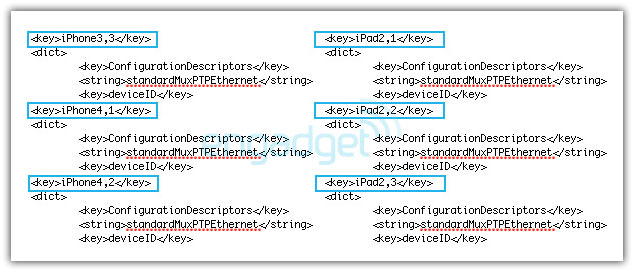
Since the release of iOS 4.3 beta, we not only found out many new features in iOS 4.3 beta but the folks at Engadget dug far enough into the iOS 4.3 beta code and found references to a bunch of new iPhone and iPad models.

These are the model names found in the iOS 4.3 beta code: iPhone4,1 – iPhone4,2 – iPhone3,3 – iPad2,1 – iPad2,2 – iPad2,3.

These Devices’ codes most likely refers to the upcoming iPhone 5 and iPad 2 models:

  • iPhone4,1 – AT&T iPhone 5
  • iPhone4,2 – Verizon iPhone 5 (CDMA)
  • iPad2,1 – AT&T iPad 2
  • iPad2,2 – Verizon iPad 2 (CDMA)
  • iPad2,3 – iPad 2 (Wi-Fi only)

But what is iPhone3,3 identifier for? Could it be the CDMA iPhone 4 for the rest of the world? or Sprint/T-Mobile iPhone 4? via [Engadget]

Go wild in the comments section below.

You can follow us on Twitter, Join us at Facebook, and also Subscribed to RSS Feed to receive latest updates.

Digg
Twitter
StumbleUpon
Facebook
Reddit
del.icio.us

The Verizon iPhone is here, Gingerbread NDK is awesome, and more in this week’s news.

Since there were no major announcements this week I have no idea what kind of news I will post…

With that said you can sign-up to be emailed when the iPhone becomes available on Verizon.

A new survey conducted by ChangeWave indicates the Verizon iPhone will have a big time impact on wireless services.

It looks like the CDMA iPhone is headed to other countries, including China.

Google is touting the greatness of the Gingerbread NDK.

Finally, the first update for Windows Phone 7 will fill the hole that allowed you to unlock your phone.

The Latest in iOS 4.3 and iPad 2 Rumors

Even though the torture of several years of Verizon iPhone rumors is now thankfully over, there has still been plenty of discovery and speculation floating around on the web the past few days regarding iOS 4.3 and the upcoming iPad 2.

Buckle your seatbelt, it looks like the wizards of Infinite Loop have another great round of tricks up their sleeve to change everything once again.

More Gestures

As iOS 4.3 began to make its way into the hands of certain privileged individuals, it immediately became apparent that Apple had completely overhauled the way you interact with the iPad by adding a number of new gestures.

One new gesture allows you to perform a four or five finger pinch that will exit out of any app and return to the home screen (the same action as the current home button). Another allows you to swipe with four fingers to switch between open apps, finally when the same four finger swipe is performed in an upward motion, the multi-tasking menu slides into sight from the bottom of the screen.

MacRumors recently posted a video that shows these gestures in action. No word yet on whether we’ll see these implemented on the iPhone as well (they’ll be much more natural on the iPad’s large screen).

No Home Button!?

screenshot

Will Apple ditch the home button?

Speculation is running wild now that Apple is adding gestures that functionally eliminate the need for a home button and reports are pouring in that Apple is indeed planning on removing the home button from future iOS devices.

If the rumors are true, this is definitely an interesting move for Apple and I’m quite interested to see how customers react to losing one of the few physical buttons on these devices. Presumably, the only way to wake up an iOS device will now be to hit the sleep button on the top.

Also, there’s going to be a huge usability hit for new users. The home button is friendly, intuitive and easy to spot. A four finger pinching gesture? Not so much. What do you think? Is this is a good move?

That Pesky Mute Button

While we’re on the subject of buttons, Apple made tons of customers really angry when they repurposed the orientation lock button on the iPad by turning it into a mute button.

It looks like iOS 4.3 will ease these complaints by providing an option in preferences to use the button for either muting the device or locking the orientation (source).

iPad 2 Has Cameras? Duh.

It comes as no surprise that the certainty of the iPad 2 being equipped with cameras is growing every day. Leaked case designs hint at rear and front facing cameras. Further, new UI images found hidden inside iOS 4.3 point to both photo and video capabilities and maybe even a new effects system similar to that in Photo Booth on the Mac.

As we’ve mentioned before on AppStorm, you can bet the new iPad will have FaceTime video conference capabilities due to Apple’s all out drive to increase the number of FaceTime ready devices.

If you’re interested, OneIndia has posted a video that’s supposed to be of a non-functioning display version of the new iPad. In all likelihood, the video is a complete fake, but still worth a look.

More on iOS 4.3

Before we close, there are two more things worth noting about iOS 4.3. The first is a new feature called “Find My Friends” reported by Mashable and various other sources. The true functionality of this feature isn’t currently known but everyone’s best guess is a MobileMe location service that allows you to see the current location of various friends.

Finally, iOS 4.3 brings with it the ability to setup your iPhone as a mobile hotspot, just as we saw announced with the new Verizon iPhone. Unfortunately for some users, this feature will still have to be supported by individual carriers. So just because the functionality is there, doesn’t mean AT&T customers will be able to use the feature any time soon.

What Have You Heard?

That’s just about everything we’ve heard from putting our ears to the ground over the last week. As expected, the new iPad will definitely be a must-have device and the new gestures and other 4.3 benefits are just icing on the cake.

Now it’s your turn to share some dirt. Leave a comment below and tell us what you’ve heard and/or what you predict about the next iOS, iPhone, iPad or anything else Apple related.

Image Source: Flickr Creative Commons

The Wonder of Wunderlist: A Free Task Manager for iPhone and Mac

So you’re looking for a good task manger? Join the club. We all want the same thing: something beautiful with plenty of features and automatic cloud syncing. We also don’t want to pay for either the iPhone or desktop version. The current trend in web content has taught us that we are entitled to such a service completely free of charge.

Strangely enough, such apps do in fact exist! Today we’ll take a look at Wunderlist, a newcomer making a big splash in the task management world. Also be sure to check out our review of the Mac version over at Mac.AppStorm.

Meet Wunderlist

The first thing you’ll notice about Wunderlist is that it’s a sharp looking app. The interface is nice and clean with just enough eye candy to draw you in without overdoing it and affecting the usability.

screenshot

Wunderlist for iPhone

As you can see, the iPhone UI closely mirrors that of the desktop app, which you can grab free over at 6wunderkinder’s website.

screenshot

Wunderlist for Mac

Wunderlist is fairly new but’s it’s already available on a surprising number of platforms, including Mac, iPhone, Windows and soon, Android.

Managing Lists and Tasks

The first screenshot above shows the screen that you’ll see upon launching Wunderlist. Rather than simply giving you one place to hold your tasks, Wunderlist allows you to create separate lists, each containing it’s own set of tasks. This screen shows you all your current lists and allows you to create a new list simply by typing in the bar at the top.

Once you create a list, tap on it to see its contents (empty by default). From here you can follow the same step as above to add a new task: simply type into the bar at the top. This single-step process is really nice and is much better than apps that require you to go through a lengthy procedure for every task.

screenshot

A Wunderlist task list

Once you’ve got a few tasks thrown into a list, you can then perform a number of typical actions. This includes completing a task (just tap on the checkbox) and deleting/rearranging tasks (tap the “Edit” button). If you tap near the center of the task, you are brought to the screen below on the right where you can rename it, move it to a different list and assign a due date.

screenshot

The typical task management actions

Filtering Tasks

In addition to allowing you to organize your tasks into multiple lists, Wunderlist offers a number of filtering options so you can easily drill down to the tasks you need to see.

The first two of these are “Starred” and “Today.” These two functions are pretty self-explanatory and work exactly like you’d expect them to. Tapping on the little star on any task will cause it to appear in the “Starred” section. Save this action for particularly important tasks.

The “Today” screen automatically updates to include any tasks that are set to be due on a given day. This is a great way to quickly see everything that you have to get done from all of your various task lists.

screenshot

Starred and Today

The third way to filter your tasks is by those that are overdue. Again, no surprising functionality here, if you scheduled a task and didn’t complete it on time, it’ll pop up in the “Overdue” section.

As if these weren’t enough filters to make you happy, Wunderlist offers a bunch of additional options under the “More” screen. This includes the ability to see all your tasks regardless of lists, those due tomorrow or next week, those due “later”, and finally, all tasks with no due dates set.

screenshot

Overdue and More

These filters may seem like basic functionality, but a lot of other apps really fall short in this area. No two people are going to work quite the same and it’s a killer feature to be able to view your tasks in so many different ways.

Customization

The really great thing about both the desktop and iPhone app is the ability to customize the interface’s background. This functionality is fairly limited at the moment, but still really helps you make the app your own.

In the settings menu you are given a number of pre-built backgrounds to choose from (you may have noticed a few different ones shown above). Simply tap on a background thumbnail to view it large and set it as your default background. Note that the backgrounds are the same between the Mac and iPhone version but this option doesn’t sync, meaning that you can set different backgrounds for your different devices.

screenshot

Choosing a background

Worth A Download?

Admittedly, the Wunderlist Mac application doesn’t quite have the feel of a native app, but it’s still a great deal considering the price tag. The iPhone version doesn’t carry over any of this slight awkwardness however and really feels like a polished, rock solid app.

The functionality is smooth, the design is excellent and the cloud sync is literally effortless. There’s simply no reason for you to not check out Wunderlist. There are also some great new features to check out on the desktop app, including shared lists with fully synced collaboration!

With that said, there are a couple of small things that could improve. It would be really nice to schedule recurring tasks. This is a feature that a lot of other task manager developers have had to learn about the hard way through user complaints and I suspect it’ll be the same here.

It would also be nice to use your own images as background graphics. I appreciate the selection already included but it seems like it would be pretty easy to add the functionality of allowing you to select something from your own library.

Finally, I would really love to see an iPad implementation here. Since I use my iPhone, Mac and iPad all on a daily basis, any task management solution that I choose would ideally appear on all three devices (you can run the iPhone version on the iPad, but it’s not a true iPad app).

Conclusion

To sum up, Wunderlist is really a fantastic new solution for productivity addicts like myself. The functionality, design and spread of available devices is extremely hard to match for a completely free service. Go ahead, search for another free task management app that has cloud sync, multiple desktop clients and collaboration, let me if you find one because I haven’t! The closest thing I can think of is Producteev, which has a ton of features, but their Mac application hasn’t launched yet (though it’s looking excellent).

Go download Wunderlist and let us know what you think in the comments below. How does it stack up to more expensive and powerful task managers like Things and OmniFocus?