Apple G4 turned into a mailbox

We love mods of older Apple hardware and the resurgence of this oldie but goodie is no exception. Spotted and photographed in the Te Atatu suburb of Auckland, New Zealand, this classic mailbox features a gutted G4 that has been modified into a mailbox, complete with a front flap and address numbers. Stuck waist-high on a post, this novel use of non-functional Apple products brings new meaning to the words “You’ve got mail.”

We have seen several other G4 and G5s used creatively in the past, including our favorite G4 cube aquarium, which turned a gutted and cleaned G4 cube into a stunning Maquarium. We also have the defunct G5 that was morphed into a clock and the simplistic, yet practical G4 tower table that was lovingly placed outside as a stylish shelf. Any other mods you have seen, or perhaps even done yourself, that are worthy of a shout out?

[Via WeLoveApple]

Apple G4 turned into a mailbox originally appeared on TUAW on Mon, 17 Jan 2011 12:00:00 EST. Please see our terms for use of feeds.

Source | Permalink | Email this | Comments

App Store could surpass total iTunes music sales by March

Anyone who has visited the Apple website in the past few days knows that sometime in the very near future, the total number of apps sold through the iTunes App Store will go over 10 billion. After all, Apple is conducting a contest in which the person who buys that magic 10 billionth app will win a US$10,000 iTunes gift card, so many of us are taking a frequent peek at the numbers.

What most people might not realize is that the iTunes App Store is poised to reach the 10 billion app mark in less than half the time it took for iTunes to sell 10 billion songs. An insightful analysis by Asymco published yesterday shows that while it took approximately 67 months from the opening of the iTunes Store for the number of music downloads to hit 10 billion, only 31 months will have elapsed between the day the App Store opened and the point where 10 billion apps have been sold.

The article, by analyst Horace Dediu, supplies another fascinating statistic: more than 60 apps have been downloaded for every iOS device sold — iPhone, iPod touch or iPad. Dediu points out that not only are more than 30 million apps being downloaded each day, but that rate is accelerating quickly. By March, the number of app sales should exceed the cumulative number of music sales.

Dediu ends the article by pointing out three conclusions: apps are a new medium that will impact all other media; as the number of apps on a device increases, apps create increasingly higher switching costs for users, and; app consumption is increasing so rapidly that the market will soon overshadow the PC software market.

It looks like it’s a great time to be in the app market as a developer.

[via AppleInsider]

App Store could surpass total iTunes music sales by March originally appeared on TUAW on Mon, 17 Jan 2011 11:00:00 EST. Please see our terms for use of feeds.

Source | Permalink | Email this | Comments

AAPL down on foreign exchanges after Jobs announcement

With the US Stock Exchange closed for the Martin Luther King Jr. Day observance, the overseas exchanges will be the venue for reaction and reflection on the announcement this morning of Steve Jobs’ medical leave.

Some analyst predictions have forecast Apple’s stock to reach the $450-500 level, but that may need to be reconsidered in light of the news today. Apple’s most recent stock price was $348.48. Apple shares fell more than 6 percent in German trading today, according to a CNBC tweet (most US financial networks are dark for the holiday, although the gang at Fox Business News are live all day; our own Victor Agreda is scheduled to be on at 1 PM ET to discuss the story).

Apple has been criticized in the past for failing to have a clear and public plan of succession should Jobs leave the company or be incapacitated for health problems (although, in fairness, few public companies make their succession plans a matter of record). During Jobs’ leave for his liver transplant, Tim Cook was in charge and was generally considered to have steered a smooth course for the multi-billion dollar enterprise.

Those succession discussions are sure to be renewed in the days to come; at the same time, everyone joins us in wishing Steve Jobs good luck and a rapid recovery.

AAPL down on foreign exchanges after Jobs announcement originally appeared on TUAW on Mon, 17 Jan 2011 10:20:00 EST. Please see our terms for use of feeds.

Source | Permalink | Email this | Comments

iPad competitors place strain on parts suppliers

iPadThe Apple iPad kicked off a tablet revolution in 2010 that promises to explode in 2011. Global tablet shipments are expected to triple in this upcoming year as competing manufacturers rush to produce a variety of slate devices to compete with the iPad. According to IHS iSuppli, this plethora of tablets will disrupt the global display industry, leading to both shortages and excess inventories over the next 12 months. In an attempt to meet anticipated demand, display manufacturers will produce a variety of screens in different configurations. Market forces will cause some displays to sell briskly, while others will sell poorly. Inventory that is leftover will be scrapped or sold at a heavy discount.

The tablet market in 2011 will be comprised of a wide variety of devices from large manufacturers (like HP and Dell) as well small manufacturers (like Viliv and Notion Ink). The total volume produced is expected to reach a staggering 57.6 million units, up from 17.1 million in 2010. The bulk of these devices will be powered by some flavor of Android including the tablet-optimized Android 3.0 Honeycomb. RIM is also expected to jump on the tablet bandwagon with its QNX-powered BlackBerry PlayBook, and HP reportedly has a webOS tablet in the works. In the face of this growing competition, Apple should remain confident as the iPad is projected to retain its title as market leader for at least the next two years.

iPad competitors place strain on parts suppliers originally appeared on TUAW on Mon, 17 Jan 2011 10:00:00 EST. Please see our terms for use of feeds.

Source | Permalink | Email this | Comments

Steve Jobs to take a medical leave of absence

Apple logoAccording to wire reports, Steve Jobs sent out an email to Apple staff stating that he is taking a medical leave of absence. In the email, reproduced by BusinessWire here, Tim Cook is named as being in charge of Apple’s day to day operations for an indeterminate amount of time; Steve will remain CEO and weigh in on strategic decisions. The text of the note is below:

Team,
At my request, the board of directors has granted me a medical leave of absence so I can focus on my health. I will continue as CEO and be involved in major strategic decisions for the company.
I have asked Tim Cook to be responsible for all of Apple’s day to day operations. I have great confidence that Tim and the rest of the executive management team will do a terrific job executing the exciting plans we have in place for 2011.
I love Apple so much and hope to be back as soon as I can. In the meantime, my family and I would deeply appreciate respect for our privacy.
Steve

Jobs had a liver transplant in 2009 to treat complications from pancreatic cancer.

All of us at TUAW extend our best wishes for a rapid recovery to Steve and our support to his family, friends and colleagues at Apple.

Steve Jobs to take a medical leave of absence originally appeared on TUAW on Mon, 17 Jan 2011 09:05:00 EST. Please see our terms for use of feeds.

Source | Permalink | Email this | Comments

iPad 2 specs starting to take shape

A number of rumors and possible hardware leaks over the weekend are starting to give us a clearer picture of what the iPad 2 might look like and its possible specs. Before the weekend, we’d already heard the next-gen iPad will have a redesigned case with a flatter backside (similar to the iPod touch), and the new iPad is rumored to be shipping in early April, one year after the original’s release to market. The next-gen iPad is also supposedly shipping with front- and rear-facing cameras.

Engadget scored an exclusive over the weekend with a well-placed source who confirmed the iPad 2’s shipping date, cameras, and case redesign. Their source also claims the iPad 2 will have an SD slot; if true, it will almost certainly be for data transfer and not for expanding the iPad’s built-in storage. The iPad 2 may also feature a dual GSM/CDMA chipset that will allow Apple to manufacture a single, unified iPad line for use with CDMA carriers (Verizon, in other words) and GSM carriers (almost everyone else in the world).

Engadget also hinted at a “super high resolution” display on the next iPad, and most of the rumors over the weekend have revolved around that display. Developers picked apart iBooks and found multiple pieces of artwork in the program that appear to be designed for an iPad with exactly double the 1024 x 768 resolution of the current model. This would put the iPad 2’s screen resolution at 2048 x 1536, for a pixel density of 260 dpi. This is not quite as pixel-dense as the iPhone 4’s Retina Display, which at 960 x 540 and 326 dpi is of high enough resolution that most people with average eyesight are incapable of discerning individual pixels. However, a 2048 x 1536 pixel screen also exceeds the resolution of any other Apple portable by a wide margin; the 17″ MacBook Pro’s 1920 x 1200 screen pales in comparison.

Continue reading iPad 2 specs starting to take shape

iPad 2 specs starting to take shape originally appeared on TUAW on Mon, 17 Jan 2011 09:00:00 EST. Please see our terms for use of feeds.

Source | Permalink | Email this | Comments

Downgrade iOS 4.3 to iOS 4.2.1, iOS 4.1 (iPhone 4, 3GS, iPod Touch, iPad)

You can downgrade iOS 4.3 to iOS 4.2.1 / 4.1 on iPhone 4, 3GS and iPod Touch 4G, 3G and iPad. Follow the steps below to downgrade iOS 4.3 to 4.2.1/4.1 firmware on iPhone, iPad and iPod Touch.
downgrade iOS 4.3 iPhone 4, 3GS, iPad, iPod Touch
If you’ve updated to iOS 4.3 beta to test it but now want to go back to iOS 4.2.1 or 4.1, this guide is for you. We’ll discuss following two methods to downgrade iOS 4.3 iPhone / iPad / iPod Touch firmware:

  1. Using TinyUmbrella (Recommended)
  2. By Editing Hosts file

IMPORTANT: You can downgrade iPhone 4, 3GS, iPod Touch, iPad only if you have SHSH blobs saved for 4.1/4.2.1 firmware in order to downgrade from iOS 4.3.

How to: Save SHSH blobs for iPhone, iPod Touch

How to Downgrade iOS 4.3 to iOS 4.2.1, iOS 4.1

Download your desired firmware for which you’ve SHSH blobs saved and want to downgrade to:

Method 1: Using TinyUmbrella

If you’ve SHSH blobs saved on Saurik’s server via Cydia, download them into your computer first. To do that:

  1. Connect your device, Fire up the TinyUmbrella and Check mark the Advanced Options.
  2. Select your devicefirmware (the one for which you’ve SHSH saved at Cydia; 4.2.1, 4.1 or older) and Cydia as Location.
  3. Hit the save My SHSH button. that’s it.

Step 1 – DFU Mode

Put your iPhone into DFU Mode (How to: enter DFU Mode)

Step 2 – Start TSS Server

  1. Run the TinyUmbrella
  2. Hit the Display SHSH button to confirm that downloaded SHSH blobs has been cached by TinyUmbrella for iOS 4.2.1, 4.1 or older. (If you already have them in your PC, drag and drop the SHSH blobs in the TinyUmbrella window then hit the display SHSH blobs button to confirm).
  3. Now hit the Start TSS Server button.

Step 3 – Restoring The Firmware

  1. Open the iTunes.
  2. Hold down the Shift (Windows)/Alt (Mac) key and hit the Restore button.
  3. Select the downloaded firmware (iOS 4.2.1, iOS 4.1 or older) and let the restore process complete.

iTunes should bring up the error 10151013 or 1011 message. Don’t worry, it’s normal. You’ve successfully downgraded your iPhone/iPod Touch firmware.
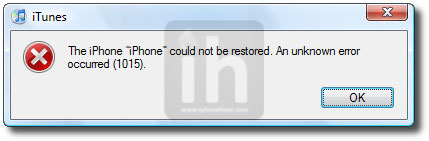
downgrade ios 4.3

Step 4 – Getting Out Of Recovery

Now in order to get out of recovery mode, hit the “Kick Device Out of Recovery” button on TinyUmbrella right below the Start TSS Server button or you can also use RecBoot. That’s it!

__________________________________________________________________________________
__________________________________________________________________________________

Method 2: Edit Hosts File

**We assume that you’ve SHSH blobs saved via Saurik’s server.

Download your desired firmware for which you’ve SHSH blobs saved and want to downgrade:

Step 1 – DFU Mode

Put your iPhone into DFU Mode (How to: enter DFU Mode)

Step 2 – Editing Hosts File

Now we are going to redirect iTunes from Apple Servers to Saurik’s server.

———————————-
Windows:

Go to C:\Windows\System32\drivers\etc\ and locate hosts file.
Open the hosts file in Notepad.
NOTE: Win 7 and Vista users MUST run Notepad with admin privileges. Right click on Notepad app and select Run as Administrator.

Mac OS X:

Go to \etc\ directory and locate hosts file. Copy it on your desktop
Open the hosts file in TextEdit.
———————————-

Add the following line at the end of the hosts file and then save and close the file:

74.208.105.171 gs.apple.com

Mac OS X users needs to copy the edited hosts file from desktop back to /etc/ directory and replace the older one.
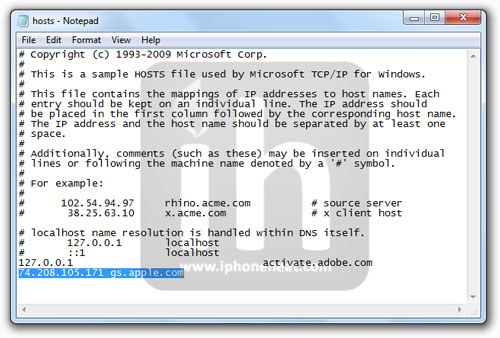

(Click to enlarge)

Step 3 – Restoring The Firmware

  1. Now Open the iTunes.
  2. Hold down the Shift (Windows)/Alt (Mac) key and hit the Restore button.
  3. Select the downloaded firmware (iOS 4.1, iOS 4.0.1 or older) and let the restore process complete.

iTunes will bring up error 10151013 or 1011 message. Don’t worry, it’s normal. You’ve successfully downgraded your iPhone/iPod Touch firmware.

downgrade ios 4.3

Step 4 – Getting Out Of Recovery

Now in order to get out of recovery mode, hit the “Kick Device Out of Recovery” button on TinyUmbrella right below the Start TSS Server button or you can also use RecBoot. That’s it!

Note: You must now remove 74.208.105.171 gs.apple.com line from the host file and save it. Doing this will let iTunes to prompt you about future updates from Apple.

Jailbreak iOS 4.2.1, 4.1

How to: Untethered Jailbreak iOS 4.2.1 on iPhone 4, iPad, iPod Touch 4G with RedSn0w 0.9.7b1

How to: Jailbreak iOS 4.2.1 with RedSn0w 0.9.6b4

How to: Jailbreak iOS 4.1 [All Guides]

You can follow us on Twitter, Join us at Facebook, and also Subscribed to RSS Feed to receive latest updates.

Digg
Twitter
StumbleUpon
Facebook
Reddit
del.icio.us

Interesting App Store stats: 60 apps downloaded per device sold.

As we reach 10 billion downloads on the App Store Horace Dediu of asymco decided to revisit app growth metrics. While his September 2010 prediction that app downloads would out number music downloads by the end of 2010 didn’t come true the stats are impressive any way.

One of the most impressive is the fact that 60 apps are downloaded for every iPhone, iPad, and iPod sold. Check out this graphic:

You can read the entire article along with some other interesting stats here.

iOS Developer Cheat Sheets

I was browsing through the referral log to this site, and found an excellent post containing cheat sheets for iOS development, and other mobile platforms.

I have mentioned a few of these in the past, but there were a couple that I didn’t know about.

Here’s what you’ll find for iOS developers in the article:

1. iPhone Objective-C Cheat Sheet – a cheat sheet for iOS developers that I made some time ago created for easily transitioning to Objective-C from a language such as Java.

2. X-Code Shortcuts Cheat Sheet – a nice Xcode shortcuts cheat sheet from the Pragmatic Programmers.

3. Xcode Tips And Tricks – Not really a chea sheet, but a collection of tips on stack overflow for Xcode users.

4. Xcode Keyboard Shortcuts – An extensive list of the many keyboard shortcuts in Xcode in bright shimmering blue.

5. Cocos iOS 3.0 – A cheat sheet listing the APIs available in iOS 3.0.

6. App Distribution Cheat Sheet – A small checklist to make sure you get all the little things right when distributing an app.

7. iPhone Application Development For Dummies Cheat Sheet – A cheat sheet covering selected aspects of iOS development from the creators of iPhone Application Development For Dummies.

The original post can be found on the Speckyboy design blog and also includes some other great references for app development on other mobile development platforms, and references for those performing web development on mobile devices which can be found at:
Mobile Cheatsheets for iPhone, Android and Blackberry App Development

Definitely worth checking out.t

©2011 iPhone, iOS 4, iPad SDK Development Tutorial and Programming Tips. All Rights Reserved.

.

DeliciousTwitterTechnoratiFacebookLinkedInEmail

Company Contact Database by dataexpobd

I have a database of company’s contact information and all of the companies are in UK. The database contains information of: Company name Mailing address Phone Fax Email address Web-site address There are about 5000 companies contact information in Excel worksheet… (Budget: $30-$250 USD, Jobs: Data Entry, Data Processing, Excel, Web Search)
