Bump: Connect and Share in an Instant!

So you’re hanging out with a friend you haven’t seen for ages, and while eloquently discussing the ups and downs of the past few months it suddenly dawns on you that you don’t have his/her contact information! Sound familiar? Maybe not, but you have to admit that typing in someone’s contact details and then manually finding them on Facebook and Twitter seems a little cumbersome for people living in the age of the iPad.

There is a solution. Probability suggests that 68% of people reading this will already be familiar with Bump (just don’t ask me to show you how I worked that out!). It’s been around for a while and has gathered a strong following. Bump’s core purpose, as it seems to me, is to make your life easier while simultaneously making you feel like you’re living in the future.

Intrigued?

“To Bump”

Bump has increased in popularity to the point where it’s developed its own linguistic additions to the English language. “To bump” doesn’t simply mean ‘to knock or run into someone or something, typically with a jolt’, but also “to share contact info, pictures, calendar events, and even connect on social networks by *gently* bumping your phone with someone else’s.”

Bumping

Bumping

It must be said that the concept behind bump is brilliant! It’s a simple and fast way to share information that is becoming more and more ubiquitous and exactly what iPhones were made for – Apps that make your life easier in a way you didn’t think possible!

Design & Interface

In July 2010 Bump 2.0 was released for the iPhone and included a major facelift. Bump now looks stunning and is a joy to use! The consistent attention to detail throughout and the use of well designed custom icons make for a great user experience.

Bump

Bump 2.0

Bump has clearly had a lot of thought put into its interface and it shows. It’s easy to navigate and intuitive to the touch. I especially appreciate the concise and straightforward settings menu, which gives access to multiple options including:

  • Automatically add received photos to Camera Roll
  • Automatically add received contacts to Address Book
  • Use my Address Book to find people I know who use Bump
  • Let people find me on Bump

It also lets you sign in to Facebook, Twitter, and LinkedIn so you can immediately connect via Bump!

Settings

Updating Your Settings

Get Bumping

There are two ways to do this. The first is to select what it is you want to share and then go for the Bump. The second is to connect and then decide what it is you want to share. To Bump you simply hold your phone in your hand and bump it against another – a smart matching algorithm listens to the bumps from phones around the world and pairs up phones that felt the same bump!

If it doesn’t work the first time then just go for it again! Try and make sure the motion sensors are feeling the same thing.

Sharing Contacts

Sharing Contacts

Bump is extremely useful for sharing contacts, photos, and connecting with people on social networks. It can also come in useful for sharing the odd calendar event, although for heavy calendar sharing there are better ways…

Sharing Calendar Events and Photos

Sharing Calendar Events and Photos

The newest addition to Bump is the ability to ‘share’ music with others using the App. On first reading this sounds incredible! When I’m in a conversation with someone about music I can now just Bump them the tracks they need to hear? Well, er… no.

Sharing Music

Sharing Music

Actually all Bump does is send the other party the information related to the song – along with links to listen on Youtube and a link to preview or buy it on iTunes (assuming it’s available). There are, of course, legitimate reasons to explain why Bump can’t actually send music files; beginning with the potential difficulty in maintaining a strong connection for long enough and ending with a fiery discussion about copyright law.

The Future

It’s worth mentioning at this point that Bump is free, and the developers maintain that it always will be. This is amazing, and reason enough for everyone to have Bump tucked away somewhere on their iPhone. It’s also good news in general for the functionality of Bump as it gets progressively more useful with every new user!

It’s also worth noting that the development team behind Bump have made the technology staggeringly easy to integrate into other apps. Only time will tell how interesting this development will be, but there are already some great examples of developers integrating with Bump. A great example is included in the newest version of the PayPal App – it’s now possible to send or request money by simply bumping your phones together!

Using Bump in PayPal

Using Bump in PayPal

Final Thoughts

Despite being an early addition to the App store, Bump is still a shining example of what great ingenuity can accomplish! It has a determined development team behind it and has been updated numerous times, always something to look out for.

The core functionality of Bump is simply great and achieves exactly what all good inventions should (in my book) – it makes your life easier while simultaneously making it more fun! If you’re new to the iPhone then get Bump immediately. If you’ve had Bump for years then perhaps just take a moment to appreciate how it made you feel the very first time.

Weekly Poll: Do You Judge an App by Its Icon?

In addition to being the Editor here at iPhone.AppStorm, I’m also a graphic designer. This means that I’m generally a bit over-obsessive about aesthetics.

One place where this obsession pops up on a daily basis is my app selection. When I’m searching around for an app in the App Store, my first criteria tends to be the design of the icon. I know this is shallow and I’ve seen it lead to complete ignorance of some really great apps, but I almost can’t help it! There’s just no way I can bring myself to click on all the apps with ugly icons, much less download them and display them on my iPhone.

Today we want to know if you share this visual standard. Do you judge an app by its icon? Leave your vote on the right and then let us know about some of your favorite icon designs in the comments below. Some of mine are Evernote, Wikipanion, CSS3Machine and FLUD.

iPhone Game Friday: New Releases

This week’s roundup features everything from nostalgia to ninjas, so there’s plenty to keep you busy.

While you’re at it, don’t forget to send us tips about interesting upcoming titles and things you’ve discovered about old ones. But for now, kick back after your long week and take a peek!

Dink Smallwood HD

Dink Smallwood HD

Dink Smallwood HD

Once you’re all done giggling about the name, search your memory and you’ll likely recall that Dink Smallwood started out as a classic RPG way back in 1997 before being released for free in 1999 and continuing to please its devout cult of followers ever since. After much improvement to the original coding, the original creators are now offering the more polished game on the iOS platform. And it’s a stellar title.

The game is essentially a mash-up of classic RPG tropes and you will likely find yourself reminded of Monkey Island, Diablo, and perhaps even Zelda in equal measure as you’re playing. You control Dink Smallwood, a pig farmer who lives with his mother and is thrust into adventure in a world that is often hilarious and quirky. The plot is surprisingly involved and there are plenty of hours of gameplay to be had.

With refreshed music, old-fasioned isometric art design with a facelift, a revamped save system, and two different control methods for navigating the basic gameplay mechanics that characterize the genre, Dink Smallwood is a worthy and witty addition to your game collection.

Price: $2.99
Developer: Robinson Technologies
Download: App Store

Sky Wars

Sky Wars

Sky Wars

A warning: this one’s very addictive. Sky Wars is the kind of game that does mobile multiplayer just right, and even if you’re on your own there’s still plenty of fun to be had with the single-player, though beating the computer-controlled opponent may not be as satisfying as conquering a live foe.

The premise is basic and involves you flinging a line of airships against your enemy. Each turn, you get two moves and the object of the game is to knock your opponent’s airships off the edge of the screen by flicking your finger to send one of yours hurtling into it. Think steampunk bumper cars and you’ll have a good idea of what this game is all about. There are also a number of randomly appearing special powerups that can help turn the tide, and there is a good deal of strategy involved.

Of course, there are online leaderboards, achievements and more perks to the multiplayer, and the best part is that said multiplayer doesn’t require wifi to run: you can compete over 3G and Bluetooth as well. If you really hate ads, then there’s a paid version, but otherwise this is one great-looking freebie you do not want to overlook!

Price: Free
Developer: Digital Prunes, Inc.
Download: App Store

Hollow Episode 1

Hollow Episode 1

Hollow Episode 1

Hollow is the inevitable iOS homage to Limbo, and serves its purpose admirably. This is one unforgiving game. Fans of cheerful, predictable platforming puzzlers need not apply.

First thing’s first: expect to die a great deal in Hollow. The levels feature a number of traps, many of which you will only become aware of when you activate them. Danger lurks in the darkness. Somehow, this adds to the challenge but doesn’t frustrate too much so long as you go in with an understanding that this isn’t intended to be your average run & hop title.

The art is characteristically dark and high contrast, and while the movement physics aren’t as tight as Limbo’s nor the story as developed, Hollow Episode 1 (sequels incoming, we suppose?) is a challenging and very atmospheric game that will creep you out as soon as entertain you.

Price: $0.99
Developer: Asali
Download: App Store

Bunny Ninjas

Bunny Ninjas

Bunny Ninjas

Here’s a management game with a serious dose of cute. Bunny Ninjas puts you in charge of raising a clan of rabbit warriors with which you will then fight the rival porcupine clan.

As per the genre’s standards, you’ll be doing a lot of growing, planting, and collecting, but for fans of this gameplay style that caters to the recurring play crowd, this title won’t disappoint. There is a good variety to the items you can purchase and produce, and the aesthetic is attractive and nicely polished. Don’t be tempted to jump into the raids too soon because they do pose a challenge, but certainly enjoy them once you work up to it.

Bunnies + ninjas + lots of long-term gameplay potential and promised updates = good combination. Go kick some porcupine butt!

Price: Free
Developer: YayNinjas LLC
Download: App Store

Shiny Restaurant

Shiny Restaurant

Shiny Restaurant

If you’ve worked up an appetite with that last one, then here’s another quick freebie micromanagement game to nourish your gaming hunger.

Shiny Restaurant has you designing and operating an eatery, and it differs from some of the other games in the genre in that there is a lot of content that you are given for free without having to do any in-app purchasing. Free gifts each day, and expansion packs that are unlocked whenever you level up means that it feels particularly rewarding without draining your bank account.

So while it may not be breaking too much new ground and still has the odd bug to be squished, Shiny Restaurant is still an excellent genre item and a great value for the price tag.

Price: Free
Developer: Big Shiny Factory Inc.
Download: App Store

What Have You Been Playing?

Have fun with those this weekend and drop in some comments if you get the chance to let us know what other goodies you’ve been playing this week!

Quick Look: CurlingtonH D

Quick Look posts are paid submissions offering only a brief overview of an app. Vote in the polls below if you think this app is worth an in-depth AppStorm review!

In this Quick Look, we’re highlighting Curlington HD. The developer describes Curlington HD as New & Noteworthy (Action + Family) in United States with a special introductory price!

Until now, this classified branch of Curling has only been available to the inner circle of special agents around the world! Use gadgets, special stones and the interior to your advantage! Standard curling rules with a new gameplay!

Read on for more information and screenshots!

Screenshots

screenshot

Curlington HD

screenshot

Curlington HD

About the App

Here are the top five features you can expect to see in the latest version:

  • Extremely fine tuned and super smooth controls
  • Detailed HD Graphics with a steady 30 frames per second
  • Arcade Curling with quality 3D graphics
  • Earn and collect bonus point and use them in the equipment store
  • Bonus-game inside cargo aircraft

Requirements: iPad
Price: $1.99
Developer: Operatio

Vote for a Review

Would you like to see us write a full review of Curlington HD? Have your say in our poll:

Would you like to see Curlington reviewed in-depth on AppStorm?online survey

Quick Look posts are paid submissions offering only a brief overview of an app. Vote in the poll if you think this app is worth an in-depth AppStorm review! If you’re a developer and would like to have your app profiled, you can submit it here.

Find Out What You’re Really Eating With FoodMeter Free

If there’s one thing most of us could do to improve our health, it would be to eat healthier.  Most of us know off the top of our heads that, say, a carrot is better for you than a Starbucks Venti Latte.  But exactly how many more calories are in your coffee than the carrot?

FoodMeter Free is a simple app that helps you stay on top of the exact nutritional values of the foods you’re eating.  From vegetables and fruits to brand name food products from supermarkets and chain restaurants, it contains both a quick summary of whether the food is good for you or not, along with a full nutritional value label so you’ll know exactly how many calories, sodium, and more the food has.  This might be just what you need to help you keep on track with your health related New Year’s resolutions!

Find Info on Almost Any Food

FoodMeter Free is designed solely to help you find info about food.  When you launch the app, you can immediately look up any food you want by name or barcode in the search box.  Or, choose a quick pick entry to browse foods by brands, categories, restaurants, or supermarkets.

Note: FoodMeter Free can only lookup foods when online, so you’ll have to be connected to a WiFi or cellular internet connection to search and view nutritional info.

Find info on almost any food quickly … assuming you're online.

The Quick Pick options include an amazing amount of popular stores, restaurants, and brand name foods.  Find the company or product name you want, then select from the different food items sold by that brand or store.  Or, select the Food Categories section to browse fresh foods by category, and then find the exact vegetable, meat, and more that you’re looking for.  We were able to find most things we looked up this way, and it’s an easy way to find out what the Big Mac you’re fixing to eat really looks like nutritionally.

Locate foods by type, brand, restaurant, or store

Alternatively, just enter what you’re looking for in the search box, and FoodMeter will bring up a list of the items it found.  Often, you’ll have many variations of the same product or food listed, so just pick the one closest to what you’re looking for.  One nice touch is that you can quickly see the amount of calories and fat right from the search page.  If that’s all you’re looking for, you won’t even need to tap and see the whole listing.

Sometime it can be hard to find the exact food you're looking for

Once you’ve found what you’re looking for, tap on it to see its food score.  You’ll see a quick rating number from -5 to 5, with a -5 the worst for you and a 5 the best.  For more detailed info, tap the i to see the full Nutritional Facts about the item.  This is the same as you’d see on packaging, but is very handy for restaurant food or fresh vegetables since you usually don’t have the full nutrition facts available about them.

While the meter isn't very informative, the Nutritional Facts are great to have handy!

If you’d rather not spend the time looking at the nutritional information facts directly, the food meter itself does give you a rough idea of how good something is or isn’t for you.  You can also share the score on Facebook or Twitter if you’d like, though the descriptions of the score are often worded somewhat oddly.  For me, the real nutritional facts are the best part, and I find myself checking it just for those.

The meter descriptions are somewhat odd, but are at least handy for quick info.

Only 5 a Day

Unfortunately, FoodMeter Free only lets you look up info on 5 items per day.  Once you’ve hit your daily limit, you’ll be prompted to purchase the full app.  You can at least still view the info about items in your history, though.  For the most part, a 5 item limit would not be a problem on most days, and often you’d likely only look up 1 or 2 items.  However, if you find yourself enjoying FoodMeter Free but want to look up more items per day, you can purchase the full version for $0.99.  The full FoodMeter app also lets you scan barcodes to lookup nutritional information in stores without typing in anything, which could definitely be handy if you regularly lookup nutritional info on everything you try.

The free app only lets you lookup 5 foods a day

Conclusion

While FoodMeter Free isn’t the best designed app we’ve ever used, it definitely gets the job done.  After all, you won’t be spending forever in this app, so the vast database of foods and nutritional information facts are the most important.  We wish the app cached recently viewed nutritional facts so you could view them offline, and also wish it didn’t limit you to 5 food lookups per day.  But, if you’re looking for a quick and free way to find info on anything you eat from Arby’s, Albertsons, a nearby apple tree, or almost anywhere else, FoodMeter Free’s a handy way to find the info you need.

The Worst Possible Time to Purchase a Verizon iPhone?

February is a really interesting time to release a new Verizon version of the iPhone 4, don’t you think? I spot several impending complications with this timeline, not the least of which is a wrench in the typical cycle for a new iPhone arrival.

Today we’re going to discuss why you should think twice before purchasing a Verizon iPhone in February. Hint: It has to do with the upcoming iPhone 5!

iPhone 5: Coming This Summer

screenshot

The iPhone 5 is on the way

Why are we so certain that an iPhone 5 is coming in just a few months? Completely baseless iPhone rumors abound on the web, making it hard to trust anything we read. So let’s start by tossing out rumors altogether and look at something a little bit more concrete: history.

Interpreting recent data to spot a trend in Apple’s iPhone release practices doesn’t exactly take a statistician. All one has to do is look at the release dates for the past four iPhones. Let’s start with the very first version: June 29, 2007. Already we can see that the first iPhone was released four years ago. When you combine that with the fact that we are currently on the iPhone 4, we can set down our pencils because we already see that Apple is launching these things out at a rate of one per year.

Now, the rate of one per year isn’t enough information. We want to know exactly when Apple will be launching the next iPhone. Do the other versions line up with the same time of year as the first?

  • iPhone: June 29, 2007
  • iPhone 3G: July 11, 2008
  • iPhone 3GS: June 19, 2009
  • iPhone 4: June 24, 2010

As you can clearly see, Apple releases an iPhone every summer with all but one of these releases falling in late June. So without any bogus rumors about case manufacturers ramping up production, we can be pretty confident that Apple will release the iPhone 5 sometime this summer, likely in June.

Now that we have our untainted hypothesis in place, does the rumor mill concur? Yep. According to several sources, the iPhone 5 will begin production in May, supposedly for a June release.

The Verizon iPhone Dilemma

Now, given the near certainty of the arrival of a new iPhone in June, what does this mean for the hordes of Verizon customers waiting to pounce on the new CDMA version of the device in February?

In short, it looks like it means these customers are about to get screwed because their shiny new $200 phone will be old news when June rolls around. There are two possible scenarios that come to mind, and neither looks good for the Verizon early adopters.

Scenario one, Verizon releases the CDMA iPhone in February and AT&T releases the GSM iPhone 5 in June with Verizon following a few months later. This puts Apple on a really weird release schedule where they are juggling multiple handsets simultaneously with different features and varying degrees of outdated technology, which creates real nightmares with iOS updates.

Apple has been continuing to sell the 3GS despite the presence of the iPhone 4 so, while unlikely, this staggered iPhone scenario isn’t exactly unprecedented. Though being consistently ahead would definitely give AT&T a serious advantage over Verizon. Also, it would be hard to pump the Verizon releases if every time one rolled around everyone knew Apple was on the verge of giving AT&T an even newer version!

Scenario two seems far more likely. In this version, Verizon customers purchase an iPhone 4 in February only to get hit with the arrival of the iPhone 5 in June (along with AT&T and perhaps others). This wouldn’t make the iPhone 4 completely obsolete, it would just move to the current position occupied by the 3GS: the cheaper, crippled version of the iPhone that doesn’t do nearly as much or perform as well as the most current version. Again, as a Verizon customer you would no doubt start to regret that February iPhone 4 purchase.

Another Rumor Check

With our two logically derived scenarios in mind, we set out again in search of rumors that might provide some insight into which one is most likely.

screenshot

A hybrid CDMA/GSM iPhone?

It turns out that Cult of Mac is reporting that there is strong evidence indicating that the iPhone 5 will have a dual GSM/CDMA radio. This highly likely scenario puts Apple producing one phone that works on lots of carriers rather than continuing on with separate CDMA and GSM models. This is great news and means you will be able to buy an iPhone anywhere you want and perhaps even switch carriers while keeping your handset.

If the rumor proves true it also means that the Verizon and AT&T versions of the iPhone 5 are one and the same and will both hit stores in June.

Conclusion

If you have a version of the story where Verizon iPhone early adopters aren’t making a poor decision, I’d love to hear it. Unless you are in dire need of an iPhone before June, it seems to me that you simply can’t get around the fact that you’ll be buying a piece of technology that’s on its way out. Even if you’re perfectly happy with the iPhone 4, it will likely be available at a reduced price in June.

Leave a comment below and let us know your thoughts on the debacle. Is Verizon doing customers a favor by rushing out an iPhone 4 in February or are they pulling a fast one on their customers, knowing full well many will want to upgrade by June? Would you recommend lining up for the iPhone 4 in February or waiting for the iPhone 5 in June? We want to know!

Djay for iPad: Release your inner DJ

Your dreams of being a DJ are about to come true. Algoriddim, the developers of djay for Mac, have just released their newest app, djay for iPad. It’s truly an amazing and noteworthy app for all music lovers and those with ambitions of being a DJ.

It’s the easiest way to scratch records, remix your favorite songs, and be the DJ you’ve always wanted to be. It brings you some of the same professional tools and technologies as djay for Mac, but on your mobile device.

Your Music. Your life

Djay gives you a dual turntable interface to start mixing your beats.

Djay gives you a dual turntable interface to start mixing your beats.

Djay integrates with the iTunes library on your iPad, meaning you have access to your favorite songs when you want to make a remix. You even have access to your playlists and genius playlists, making it easier to find that perfect song. Tap the new song button and select a song from your library to begin.

Djay will grab your album artwork and start playing your song on the virtual turntable. Enable djay’s Auto-Play mode and it will automatically choose a new song when the current song stops playing. Auto-Play makes it easy to seem like a professional, just turn it on and let djay handle the rest. With djay’s multitasking support, you can set it on Auto-Play and browse the web while it plays. Tap record before your big performance and share it with friends when your done.

Djay integrates with your iPod library, so you can play all your favorite songs.

Djay integrates with your iPod library, so you can play all your favorite songs.

Pro doesn’t mean complex

Start with simple record scratching or show you're a pro by changing the EQ or Pitch

Start with simple record scratching or show you're a pro by changing the EQ or Pitch

Djay makes it incredibly easy to remix like a pro. Scratch the song by moving your finger over the turntable. The more you move your finger, the more it scratches the song. Use the cross-fader to mix two songs together, touching the slider to adjust which song is playing. Each turn table has a BPM (beats per minute) slider which allows you to adjust the speed of each song.

Tap the sync button to adjust each songs BPM so they are the same. It makes it easier to take two songs and mix them together. Cue points allow you to replay parts of your song, another great tool for creating your remix. Tap the EQ button to change the low, mid, and high EQ levels and change how your song sounds. Djay also allows pre-cueing, making it easy to preview effects and changes before they are played. Djay packs all these features into a simple to use and intuitive interface that you can run on your mobile device.

Be the life of the party

While djay won’t replace $5000 worth of advanced audio equipment, it will make for a great party in casual, non-professional atmospheres. It allows ordinary users to remix songs using similar tools to those that real pros use and have a great time doing so. In my testing, everyone seemed incredibly interested and impressed that I was able to scratch and pitch change on my iPad.

Plug it into your speaker system and become the life of the party. Don’t get me wrong, djay is built just for casual users, but I can still see professionals using it as a simple way to play with music. I can see them using it in times where they can’t fit all their equipment or don’t need the sophistication. Plugging an iPad into a speaker’s audio line in is certainly easier than plugging in five different pieces of heavy and complex equipment.

What to improve

Djay for iPad is still young and constantly improving, as all apps do. There are always new features and ideas being added and planned.  Here are a short list of improvements that would make it even better:

  • Loops Menu that give you a small library of sound effects, similar for how Djay for mac gives you loops.
  • More cue points would make it easier to mix different parts of songs.
  • Customize the reverb just like djay for mac. Settings for different amounts of reverb.
  • AirPlay support for streaming to your Airport Express or Remote speakers.
  • Remote playing from your Mac would be amazing. Having the ability to play all your iTunes library wirelessly and control it on your iPad.
  • Track Looping could be a simple addition that would bring it up to par with the mac version.

Conclusion

Djay for iPad is the best mixer available for your iPad, and possibly one of the best reasons for why the iPad should exist. It manages to squeeze a fully featured DJing app into a operating system that was originally designed for a cell phone sized screen.  It’s simple and intuitive interface makes it a no brainer for musicphiles or those with dreams of becoming a DJ.

It’s one of those apps that anyone can pick up and recognize how to use it. I’m excited to see what improvements and new features that Algoriddim will add to djay for iPad. Next time your friends are throwing a party, be in charge of music with djay.

Quick Look: 360 Web Browser

Quick Look posts are paid submissions offering only a brief overview of an app. Vote in the polls below if you think this app is worth an in-depth AppStorm review!

In this Quick Look, we’re highlighting 360 Web Browser | Download Manager and Firefox Sync. The developer describes 360 Web Browser a feature rich, intelligent and highly praised and recommended Browser. It offers more features to offer than any other browsers out there with a refreshing, non-monotonous interface.

Version 2.0.2 brings latest Firefox Sync Support, Improved Download Manager, Ability to customize 7 Gestures with a choice of 16 options and the ability to view flash via Clip Converter Plugin.

Read on for more information and screenshots!

Screenshots

screenshot

360 Web Browser

screenshot

360 Web Browser

About the App

Here are the top five features you can expect to see in the latest version:

  • Firefox Sync
  • Download & File Manager
  • Semi-Flash Capabilities
  • Plugins
  • 360 Arcs

Requirements: 3.1 or above, iPhone and iPod Touch
Price: $0.99
Developer: Digital Poke

Vote for a Review

Would you like to see us write a full review of 360 Web Browser | Download Manager and Firefox Sync? Have your say in our poll:

Would you like to see 360 Web Browser reviewed in-depth on AppStorm?customer surveys

Quick Look posts are paid submissions offering only a brief overview of an app. Vote in the poll if you think this app is worth an in-depth AppStorm review! If you’re a developer and would like to have your app profiled, you can submit it here.

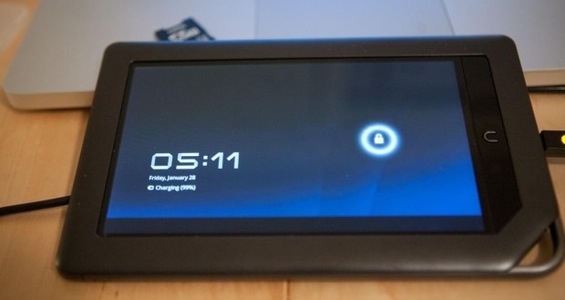
Android 3.0 Running On A Nook Colour

honeycomb_nook.jpg

The Android 3.0 (Honeycomb) SDK has only been released for a few days and enterprising hackers have already created a ROM for the Nook Colour. It’s not exactly fast, but it is a hack after all.

The crafty hackers combined the Nook’s kernel with the SDK to come up with a “zombie”. Hardware acceleration is a big part of getting Honeycomb’s UI to be nice and snappy and hacker dhoshman over at the XDA forums says that he will be working on it over the weekend.

I’d like to see 3.0 for my Elocity A7, and since I know for a fact they will only be releasing it in the upcoming A10, I sure hope someone smarter than me will put a ROM out for it.

If you haven’t seen all of the Honeycomb goodness yet, check out our sneak peek here.

tech.nocr.atAndroid 3.0 Running On A Nook Colour originally appeared on tech.nocr.at on 2011/01/29.

© tech.nocr.at 2011 |
Permalink |
Comments |
Read more in Hacking And Security |
Add to del.icio.us |
Stumble it |
Digg this

Explore more in: , , ,


The PS3 Has Been Pwned, Again

ps3_pwned_again.jpg

Wasn’t it just yesterday that we reported on the new firmware for the PS3 that was suppose to stop all the jalbreaking? Well it seems that we we can now safely answer the question of whether or not it would stop people from unlocking their units for good.

A few mere hours was all it took to pick apart firmware 3.56. Hacker Youness Alaoui (aka KaKaRoToKs) announced on Twitter that he had successfully unpacked the new firmware and published it’s signing keys, paving the way for people to create custom firmware based on 3.56 and allowing hacked PS3s to regain access to the Playstation Network.

And the cat and mouse game is-a-foot. No doubt that Sony will release another security fix in a few days and that will be hacked as well. This reminds me of the old satellite hacking days where the big direct to home satellite providers would change their keys almost daily. Not with the intent of stopping hackers since their keys had been cracked, but with the intent to annoy the average person to the point that they stopped doing it. Now that they keys are in the wild I think that Sony’s only chance to stop this will be with the release of the PS4.

tech.nocr.atThe PS3 Has Been Pwned, Again originally appeared on tech.nocr.at on 2011/01/29.

© tech.nocr.at 2011 |
Permalink |
Comments |
Read more in Hacking And Security |
Add to del.icio.us |
Stumble it |
Digg this

Explore more in: , , ,


Charatter Bear Regurgitates Your Tweets

charatter-bear.jpg

It can be a chore to keep up with your twitter feeds, countless hours of following people’s daily minutia can quickly chew up your day. This is where the Charatter bear comes in – it synchs with your Twitter account and reads back to you all of your incoming tweets and not on a small screen but out LOUD. How’s that for really annoying, especially if you follow 1000s of people.

The company behind the USB add-on says that sales are exploding. A simple app for your iPhone or PC translates all of your tweets into sound which is then sent to the Charatter bear. Although the novelty of the bear is cute, it can quickly turn annoying. Imagine a co-worker with this on his desk yelping out loud “LOL” or “WTF” every 20 seconds. If would easily drive you to destroying the poor USB bear.

If you lead a really lonely life and want a USB bear to keep you company (and drive you insane) you can pick up the Charatter bear for $28. You will also have to travel to an electronic retailer in Japan to pick one up.

tech.nocr.atCharatter Bear Regurgitates Your Tweets originally appeared on tech.nocr.at on 2011/01/28.

© tech.nocr.at 2011 |
Permalink |
Comments |
Read more in Gadgets |
Add to del.icio.us |
Stumble it |
Digg this

Explore more in: , , , , , , , , , , , , , , , , , , ,


Shinobi III On Your iPhone

shinobi127.jpg

I spent many an hour and many a quarter on Shinobi back in the day and now I can spend just as much time (but not as much money) playing it on my iPhone.

Sega has just released the great Genesis/Mega Drive classic to the App Store. The controls as great and the game play is responsive, not much more you can ask for really.

You can grab the iPhone version for $2.99 or you can also grab it for the Wii Virtual Console, The Sega Genesis Collection for the PSP & PS2, Sonic’s Ultimate Genesis Collection for the 360 & PS3 or on Steam.

tech.nocr.atShinobi III On Your iPhone originally appeared on tech.nocr.at on 2011/01/28.

© tech.nocr.at 2011 |
Permalink |
Comments |
Read more in Gaming |
Add to del.icio.us |
Stumble it |
Digg this

Explore more in: , , , , , , , , , , , , , , , , , , , , , , , , , ,


flipSYNC II Charging Fob

flipSYNC.jpg

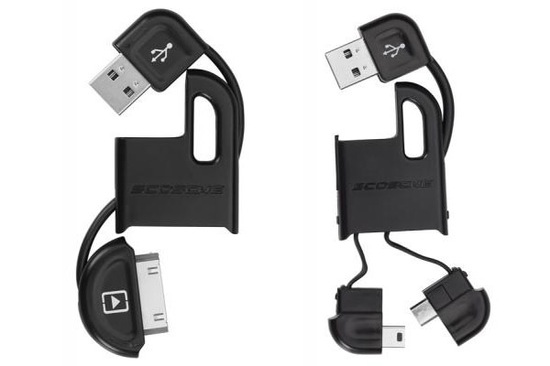
I bet if you reached into your computer bag right now you could easily pull out multiple USB cables. You know what I mean, that birds nest of cabling consisting of multiple iPod/iPhone cables and USB mini variants.

Scosche aims to change that for you with their flipSYNC II fob. Much like the key fob of a car, the flipSYNC is a USB cable that folds up nicely into a keychain fob.

2084.14638.600x400.IPUSBM2BK_keys.jpg

The currently offer two models; one with an iPod/iPhone 30-pin connector and one with dual miniUSB/microUSB. They are sleek, small, and durable and will run you $20 a piece. I already have a nice Lacie USB key on my key chain and will soon add one of these cool units.

[Link to flipSYNC II]

tech.nocr.atflipSYNC II Charging Fob originally appeared on tech.nocr.at on 2011/01/27.

© tech.nocr.at 2011 |
Permalink |
Comments |
Read more in Gadgets |
Add to del.icio.us |
Stumble it |
Digg this

Explore more in: , , , , , , , , , , , , , , , , , , , , , , , , , ,


Sony 1 – Geohot 0

Geohot_pwned.jpg

Remember the decision from a few weeks ago where a judge didn’t think they had jurisdiction to decide on the fate of jailbreaker George Hotz, aka Geohot? Well, Sony has finally seen their day in court and has managed to win a restraining order against Geohot.

We all know that once you put something on the internet it lives forever; the restraining order against Hotz only prevents him circulating the jailbreak. Sony would have to go after every single person who has the keys up to have any chance of stopping the spread of their keys. They can’t be that stupid, can they? Of course not.

Sony also released firmware version 3.56 today. Will the new firmware bring us new goodies? Not a chance. The purpose of the upgrade is to put a stop to all of the jailbreaking that has been running wild. We have confirmed that the update does indeed prevent jailbreaking, the question that remains is will it do so for good. After all, we do remember the cat and mouse game that went on for years with the PSP modding community.

tech.nocr.atSony 1 – Geohot 0 originally appeared on tech.nocr.at on 2011/01/27.

© tech.nocr.at 2011 |
Permalink |
One Comment |
Read more in Hacking And Security |
Add to del.icio.us |
Stumble it |
Digg this

Explore more in: , , , , , , , , , , , , , , , , , , , , , , , , , ,


A Look At Android 3.0 – Honeycomb

Google gave everyone a sneak peak of the next version of Android (Honeycomb) at CES earlier this year. Today they released the SDK for the upcoming tablet geared OS. Here’s a look at what we all can expect from Honeycomb.

UI

main.jpg

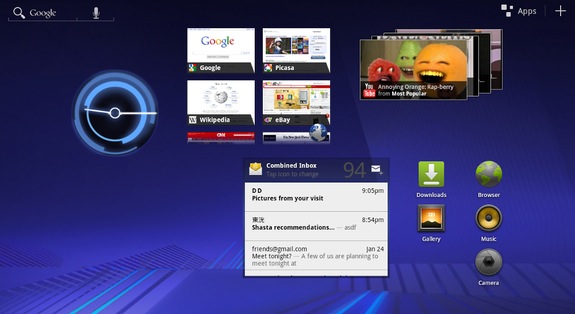
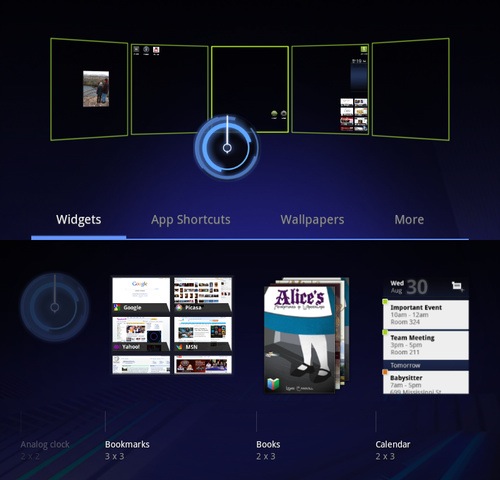
The biggest change is the UI. Older versions of Android weren’t geared towards tablets, Honeycomb changes all of that. You will now have more space on your home screen to accommodate more widgets and icons. As you can see from the image above, you will be able to fit all sorts of things on your home screen(s)

Home Screen(s)

android_3.jpg

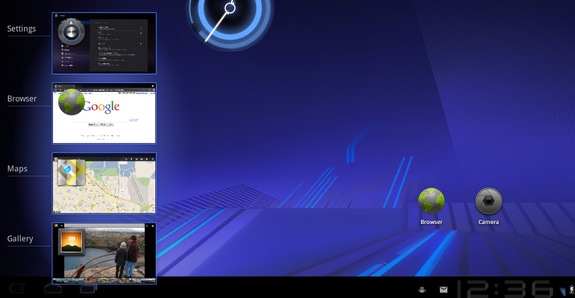
The layout of the screens look much like older versions. There is a new 3D look to all of it that might cause problems with older hardware, the new Tegra 2′s should be able to handle it without much effort.

Notification Bar

android_3.0.jpg

The notification bar has been moved to the bottom ala Windows and they have added some new buttons that work like the capacitive hardware buttons on most Android devices. They have also added a recent apps button that will show you the current state of apps running the background.

Keyboard

android_4.jpg

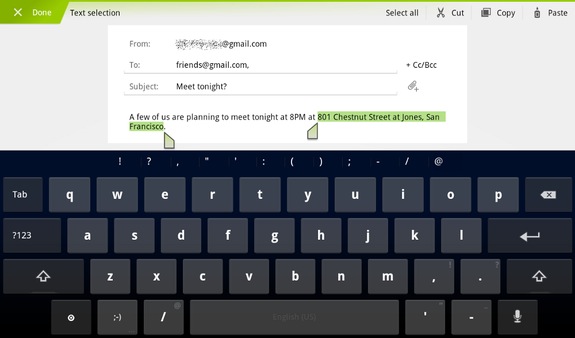
The new keyboard is a great improvement over the older iteration with larger reshaped keys. They also include keys like “Tab” which should make the transition for desktop users easier. Copy and Paste has also seen some change. Much like iOS, a long press will select a word and you can drag the selector to choose more text.

Over all it looks like a great improvement, especially if you are running 2.2 on a tablet currently (like I am). A welcome upgrade if I ever saw one.

tech.nocr.atA Look At Android 3.0 – Honeycomb originally appeared on tech.nocr.at on 2011/01/26.

© tech.nocr.at 2011 |
Permalink |
Comments |
Read more in Tech News |
Add to del.icio.us |
Stumble it |
Digg this

Explore more in: , , , , , , , , , , , , , , , , , , , , , , , , , , , , , , , , ,